

Technical LLM interview question!
You have 80,000 agent trajectories from production. You need to find top 100 worth reviewing to improve your agent.
No LLM allowed to evaluate trajectories. How will you do this?
Let’s look at some approaches.
The simplest solution one could start with is random sampling. Pick 100 random trajectories and review.
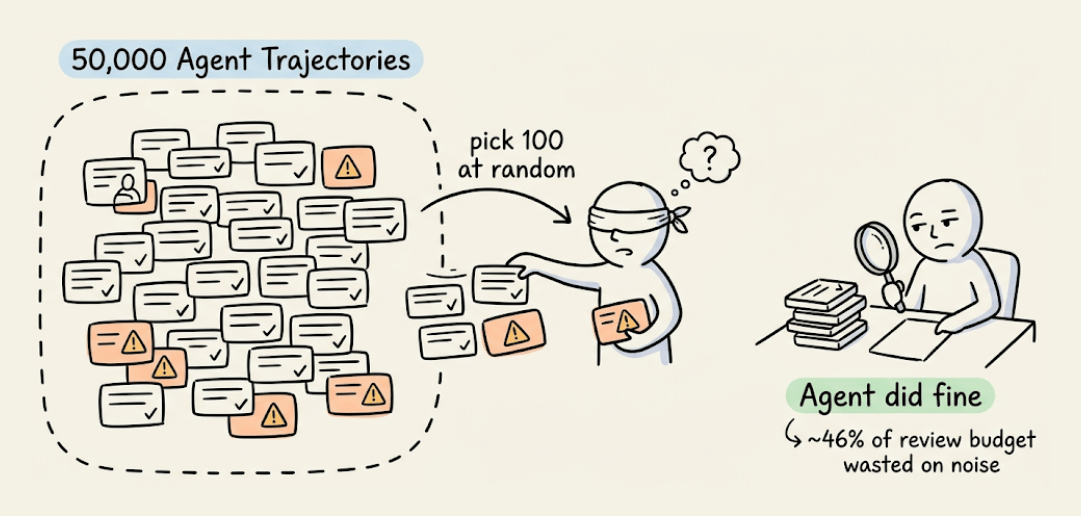
But most production agents handle routine requests just fine, so you end up wasting a big chunk of your annotation budget.
Another approach can filter for longer conversations since 10+ user messages means more complexity.
But longer conversations skew heavily toward outright failures. You’ll surface obvious breakdowns but miss subtle issues hiding in conversations where the agent technically succeeded.
A recent paper from DigitalOcean takes a new approach.
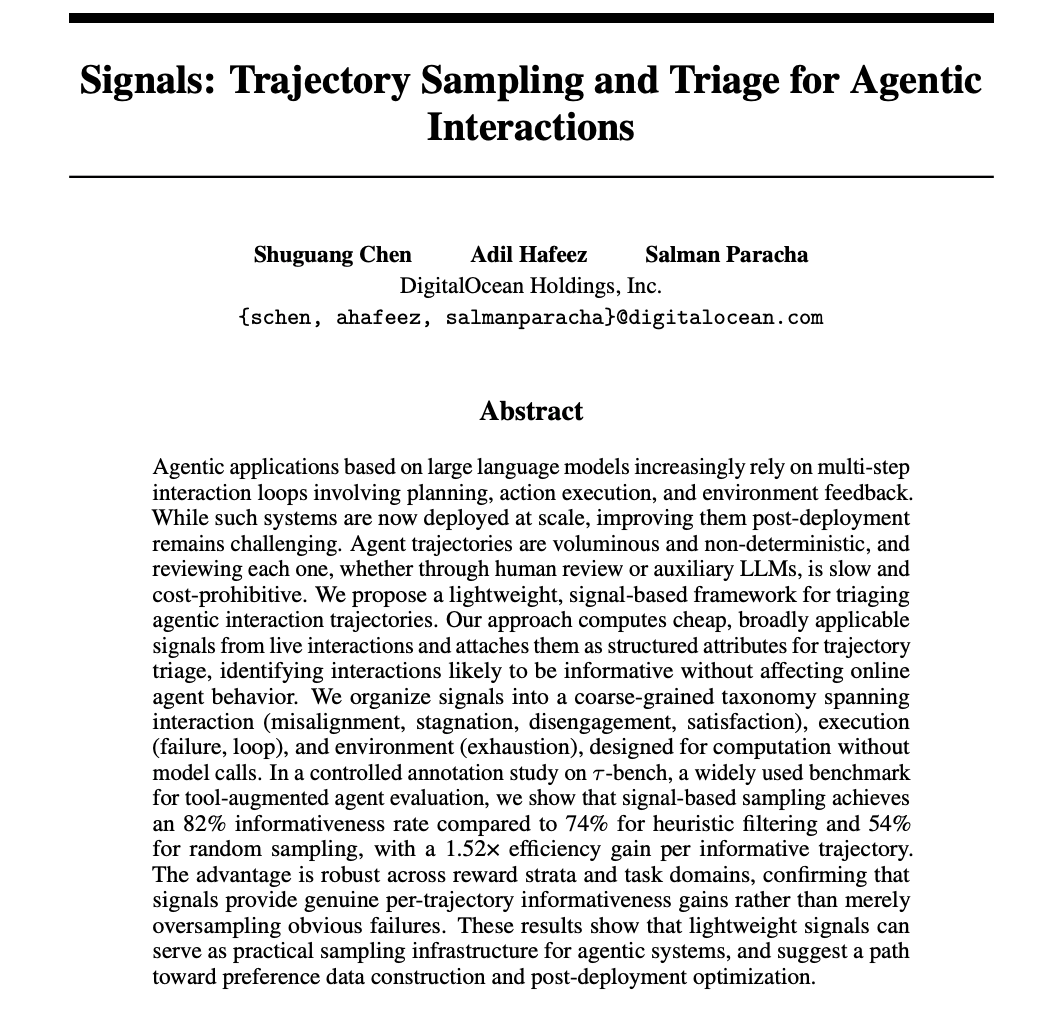
It computes lightweight behavioral signals directly from the trajectory data using deterministic rules.
The signals fall into three groups:
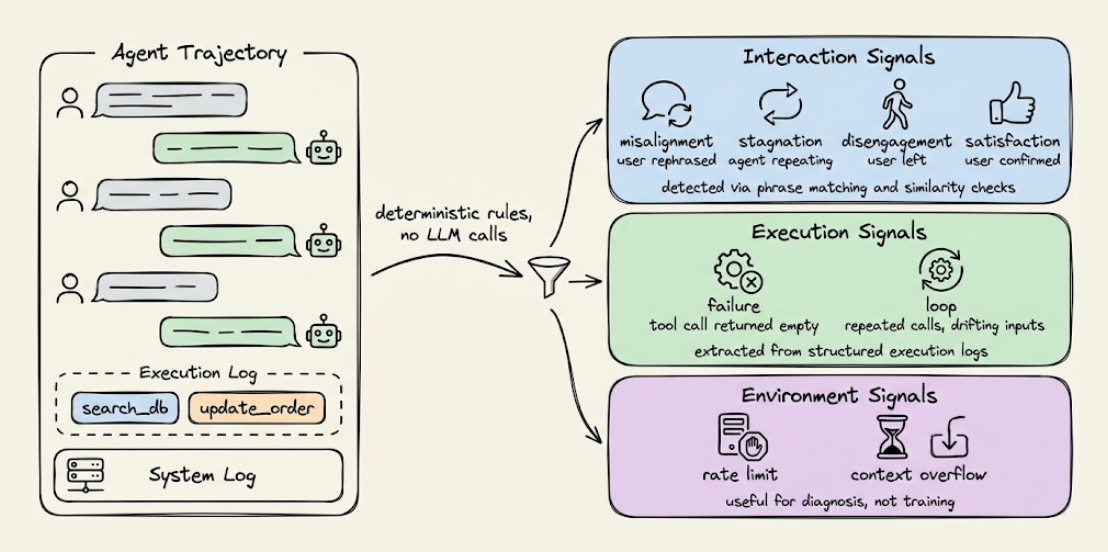
1) Interaction signals:
If a user rephrases the request or corrects the agent, that’s misalignment.
Agent repeating itself is stagnation.
User abandoning the agent is disengagement.
User confirming something worked is satisfaction.
All are detected through normalized phrase matching and similarity checks.
2) Execution signals:
A tool call that doesn’t advance the task is a failure signal.
Repeated calls with identical or drifting inputs indicate a loop.
These are straightforward to extract from execution logs.
3) Environment signals, like rate limits, context overflow, and API errors.
Useful to diagnose but not for training since they reflect system constraints, not agent decisions.
Each trajectory gets scored based on which signals fire, and you sample the highest-signal ones for review.
On τ-bench, they compared all three approaches on 100 trajectories:
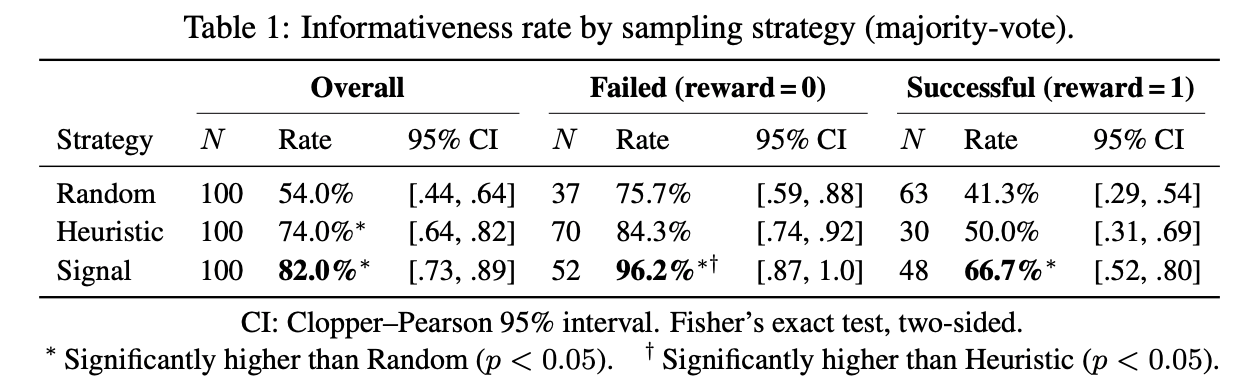
Random sampling hit a 54% informativeness rate.
The length-based heuristic reached 74%.
Signal-based sampling reached 82%.
This means roughly 4 out of every 5 trajectories are genuinely useful to improve the agent.
In fact, among conversations where the agent completed the task correctly, signal sampling still identified useful patterns in 66.7% of cases vs. 41.3% for random.
These are the subtle issues like policy violations, inefficient tool use, and unnecessary steps that don’t break the task but still matter for optimization.
The whole framework runs without any LLM overhead and can sit always-on in a production pipeline.
If you want to see this in practice, this signal-based approach is already integrated into Plano, an open-source AI-native proxy that handles routing, orchestration, guardrails, and observability in one place.
Here’s the Plano GitHub repo →
👉 Over to you: What is your approach to solve this?
10 Must-use Slash Commands in Claude Code
Setting up shell aliases is such a natural part of working in a terminal that most developers do it almost reflexively. If you run a command often enough, you alias it.
With Claude Code prompts, though, devs typically skip this step entirely and keep retyping the same 10-15 line instructions from memory, like their code review checklist, test gen constraints, pre-commit scan...and all this session after session.
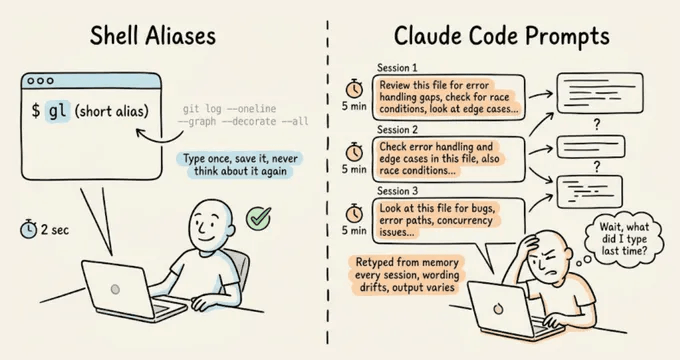
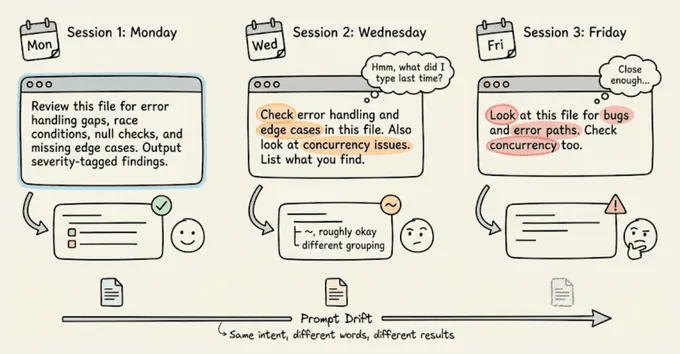
The real cost isn’t just the repetition you do as a dev, but the prompt drift.
Every time you retype a prompt from memory, the wording shifts slightly. For instance, you might forget a constraint or phrase the expected output format differently.
With shell commands, this doesn’t matter because they’re deterministic, but with an LLM, slightly different phrasing may produce noticeably different output.
Claude Code’s custom commands fix both problems.
You can save a markdown file in .claude/commands/, and it becomes a slash command you can invoke with identical instructions every time.
The prompts are version-controlled through Git, so your whole team runs the same commands, and when someone improves a prompt, everyone gets the update on their next pull.
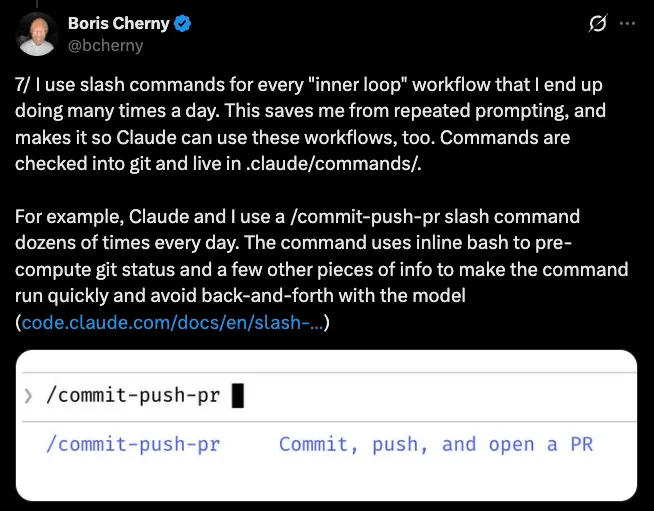
This is the same pattern Boris Cherny described in his thread on Claude Code workflows, where his every repeated workflow becomes a command, checked into Git, and shared with the team:
Let’s walk through how to set them up, then the 10 commands that have been most useful in my workflow. I’ll demo each one on a real ML inference service (FastAPI, scikit-learn, Alembic) so you can see the actual output, with full prompt templates you can drop into your own project.
How custom commands work
A custom command is a Markdown file inside a .claude/commands/ directory. The filename becomes the command name.
# Project-scoped (shared via Git, shows as "(project)" in autocomplete):
your-repo/.claude/commands/preflight.md  →  /preflight

# User-scoped (personal, works in all projects):
~/.claude/commands/orient.md  →  /orient

# Subdirectories create prefixed commands:
.claude/commands/db/migrate.md  →  /db:migrate
The file content is the prompt that gets sent to Claude when you run the command. You can use $ARGUMENTS as a placeholder for anything typed after the command name.
For instance, running “/dissect src/auth/session.ts” substitutes $ARGUMENTS with “src/auth/session.ts“.
You can also inject dynamic context using shell commands with the !command syntax:
## Current state
- Branch: !`git branch --show-current`

- Staged changes: !`git diff --cached --stat`

- Last 3 commits: !`git log --oneline -3`
Claude runs those shell commands before processing the prompt, so the context is always fresh.
Lastly, an optional YAML frontmatter at the top of the file lets you pre-approve tools (so Claude doesn’t ask for permission on every git call), set a model override, or add a description:
---
description: Pre-commit check for debug artifacts and code smells
allowed-tools: Bash(git *), Bash(grep *), Read, Glob
---
That’s the entire system, which includes a markdown file, an optional YAML header, and $ARGUMENTS for dynamic input.
Below are the 10 commands we’ve found most useful in practice:
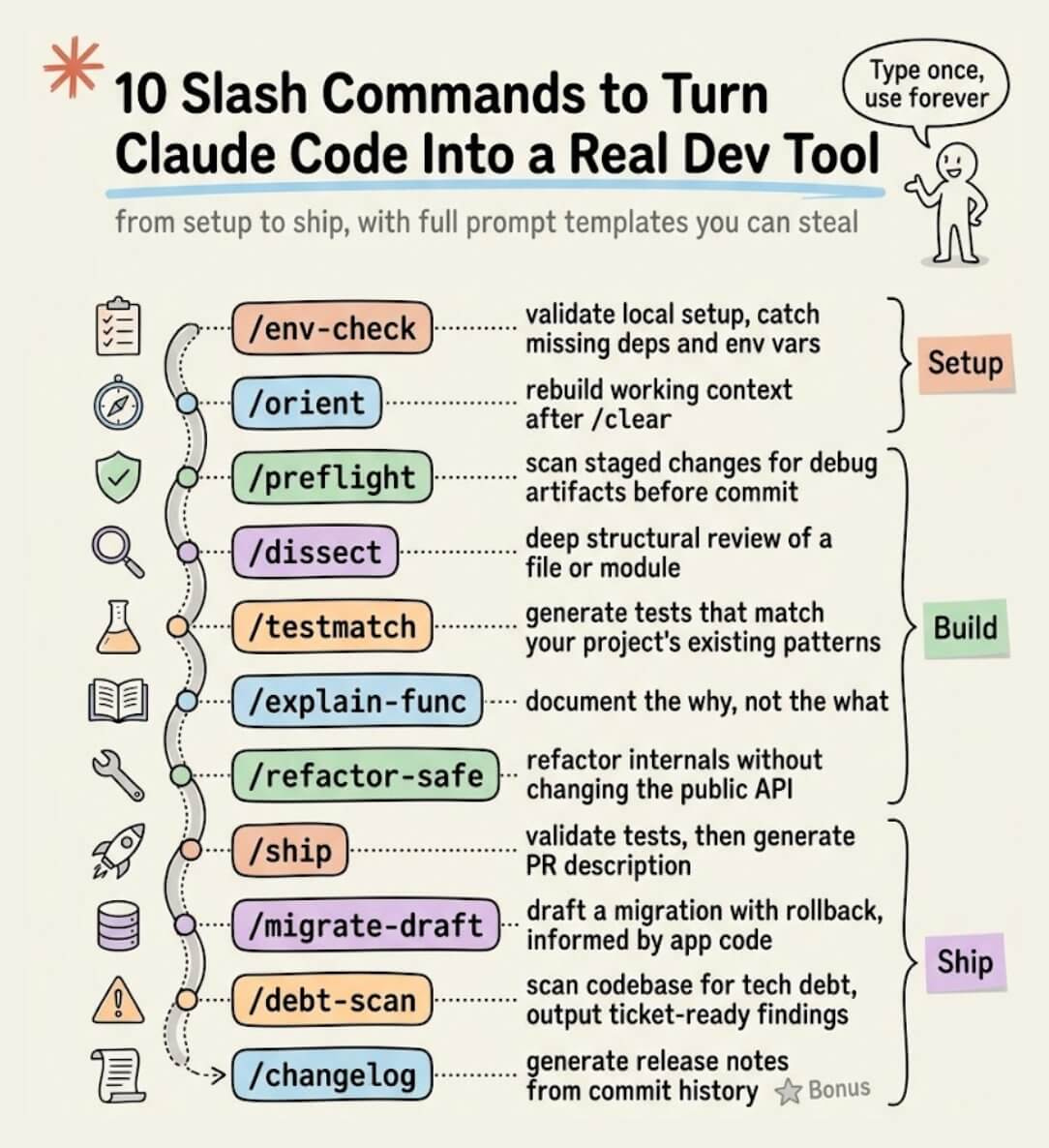
The newsletter ahead is a bit too long to share over email due to size constraints.
We have shared the full setup guide, with usage videos and prompts here →
Thanks for reading!
P.S. For those wanting to develop “Industry ML” expertise:

At the end of the day, all businesses care about impact. That’s it!
Can you reduce costs?
Drive revenue?
Can you scale ML models?
Predict trends before they happen?
We have discussed several other topics (with implementations) that align with such topics.
Here are some of them:
Learn everything about MCPs in this crash course with 9 parts →
Learn how to build Agentic systems in a crash course with 14 parts.
Learn how to build real-world RAG apps and evaluate and scale them in this crash course.
Learn sophisticated graph architectures and how to train them on graph data.
So many real-world NLP systems rely on pairwise context scoring. Learn scalable approaches here.
Learn how to run large models on small devices using Quantization techniques.
Learn how to generate prediction intervals or sets with strong statistical guarantees for increasing trust using Conformal Predictions.
Learn how to identify causal relationships and answer business questions using causal inference in this crash course.
Learn how to scale and implement ML model training in this practical guide.
Learn techniques to reliably test new models in production.
Learn how to build privacy-first ML systems using Federated Learning.
Learn 6 techniques with implementation to compress ML models.
All these resources will help you cultivate key skills that businesses and companies care about the most.