

Training LLM Agents using RL without writing any custom reward functions
Training LLM agents with RL typically requires writing custom reward functions, which means you need labeled data, expert feedback, or hours spent hand-crafting reward logic for every new task.
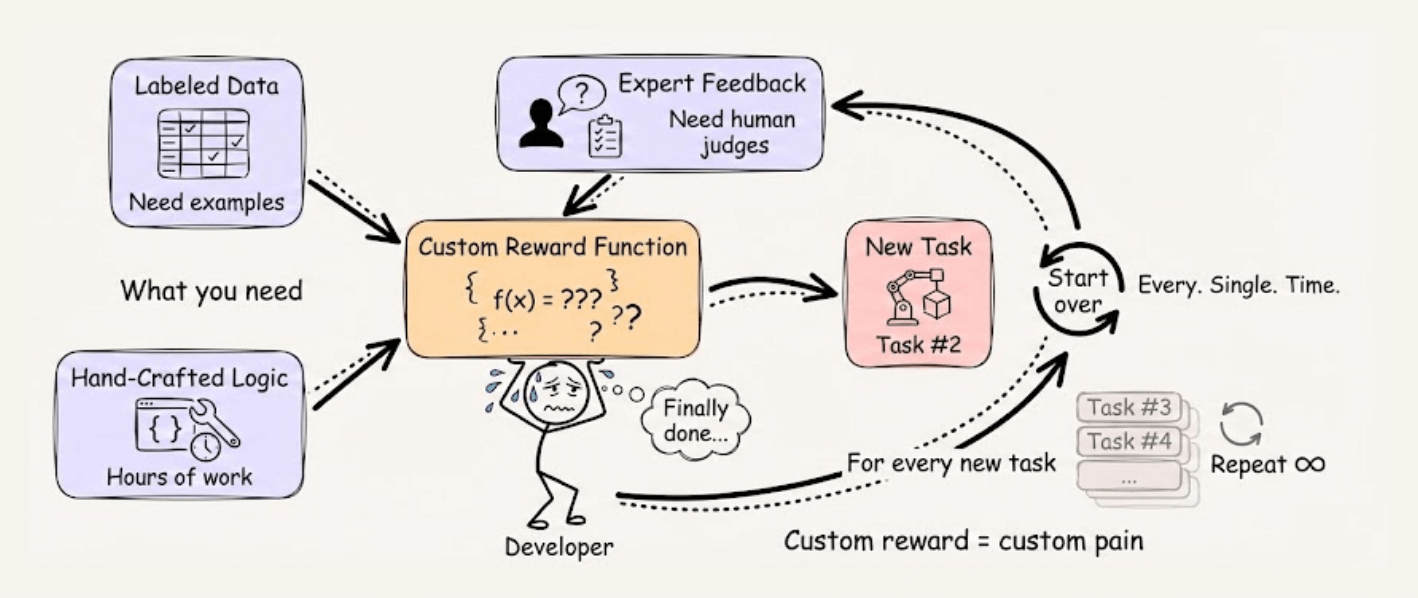
RULER from OpenPipe (open-source) takes a different approach. Instead of scoring each trajectory in isolation, it asks an LLM judge to rank multiple trajectories against each other.
This works because relative comparison is fundamentally easier than absolute scoring, and since GRPO normalizes scores within each group anyway, only the relative rankings matter.
The implementation is straightforward:
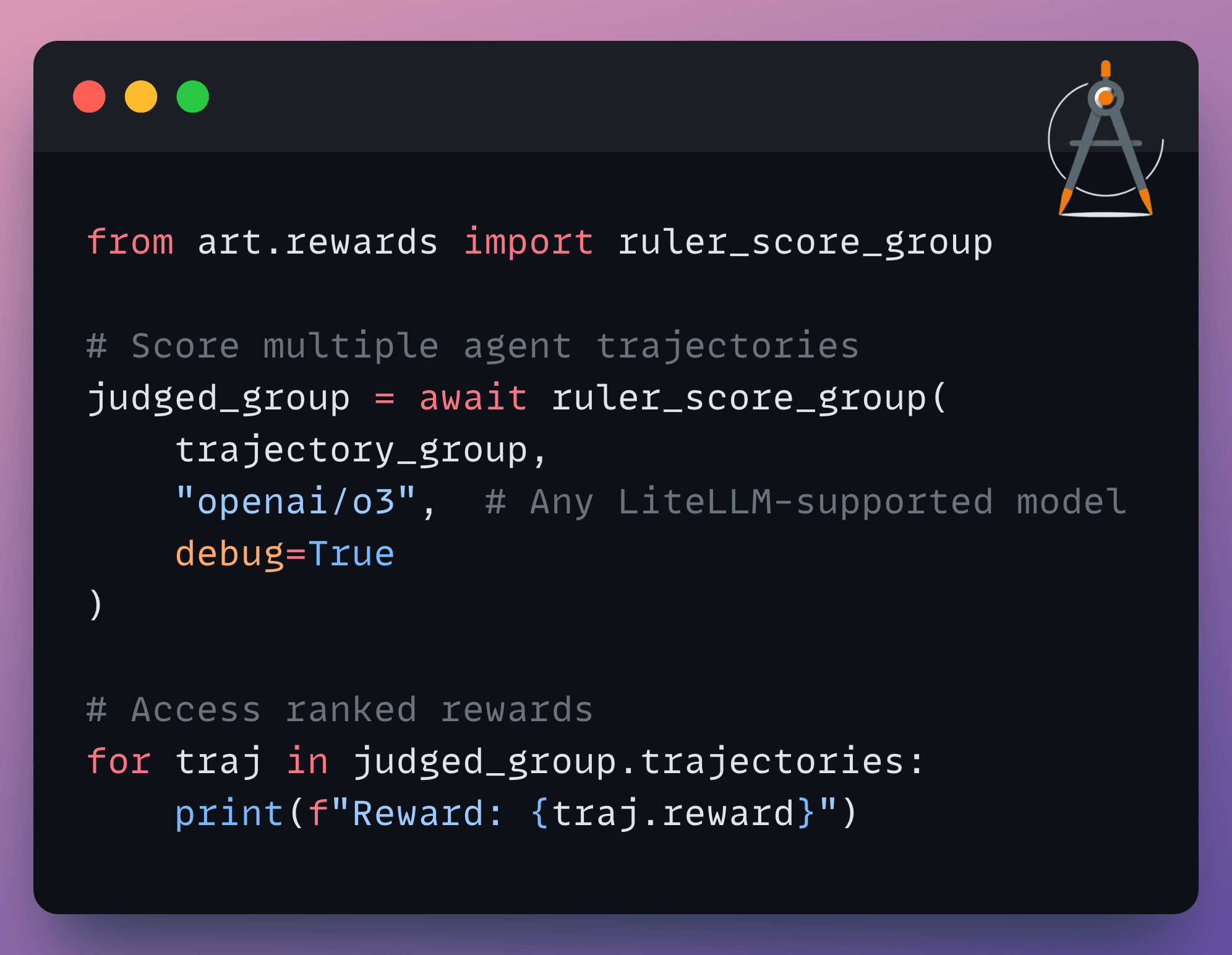
You can use any LiteLLM-supported model as the judge, add custom rubrics for specific evaluation criteria, and it automatically caches responses to avoid redundant API calls.
It’s a practical way to get started with agent training without the usual reward engineering overhead.
You can find the OpenPipe ART GitHub repo here →
16 techniques to optimize neural network training
Here are 16 ways to optimize neural network training:
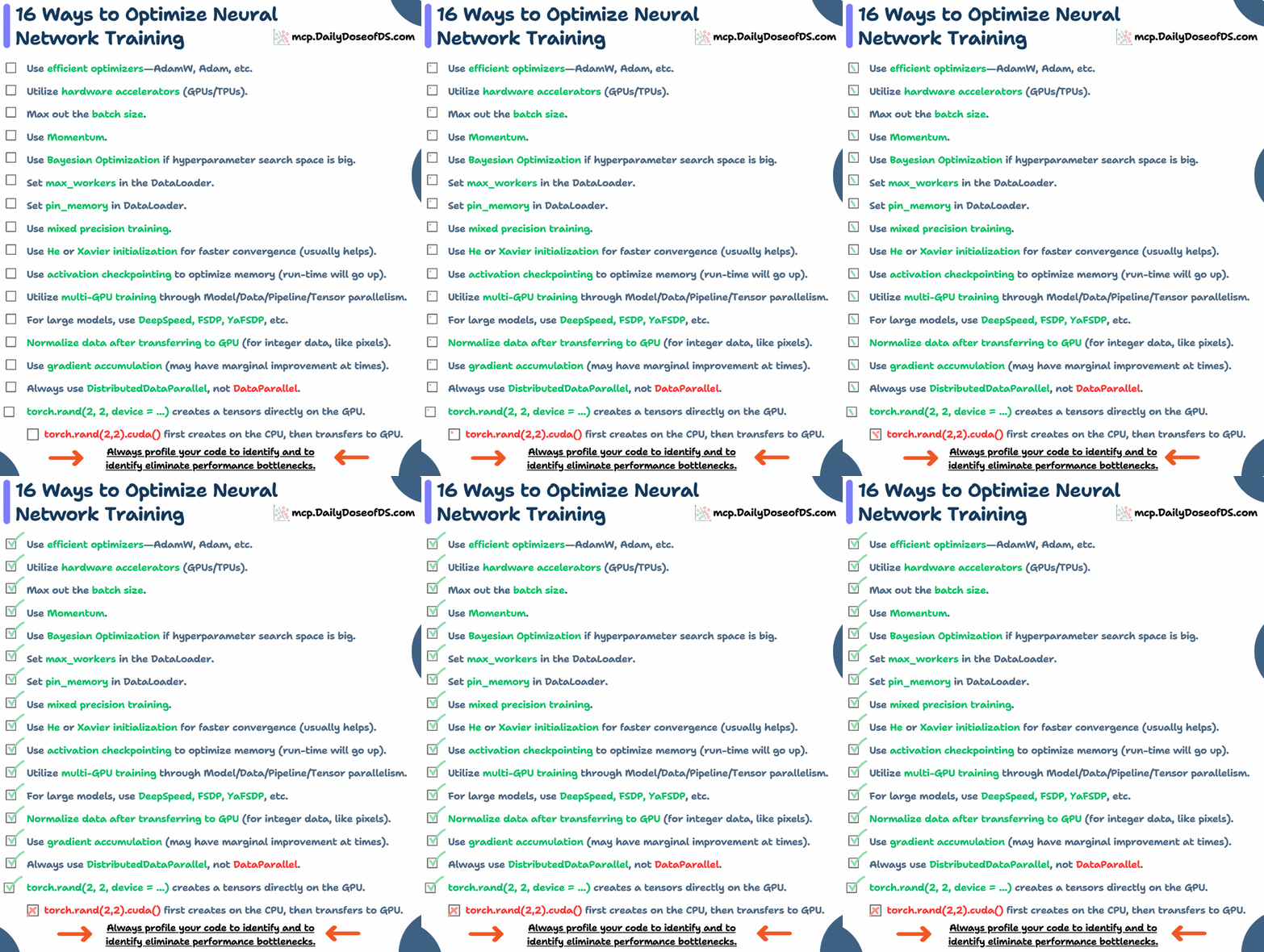
Some of them are pretty basic and obvious, like:
Use efficient optimizers: AdamW, Adam, etc.
Utilize hardware accelerators (GPUs/TPUs).
Max out the batch size.
Use momentum
Here are other methods with more context:
On a side note, we implemented all these techniques here →
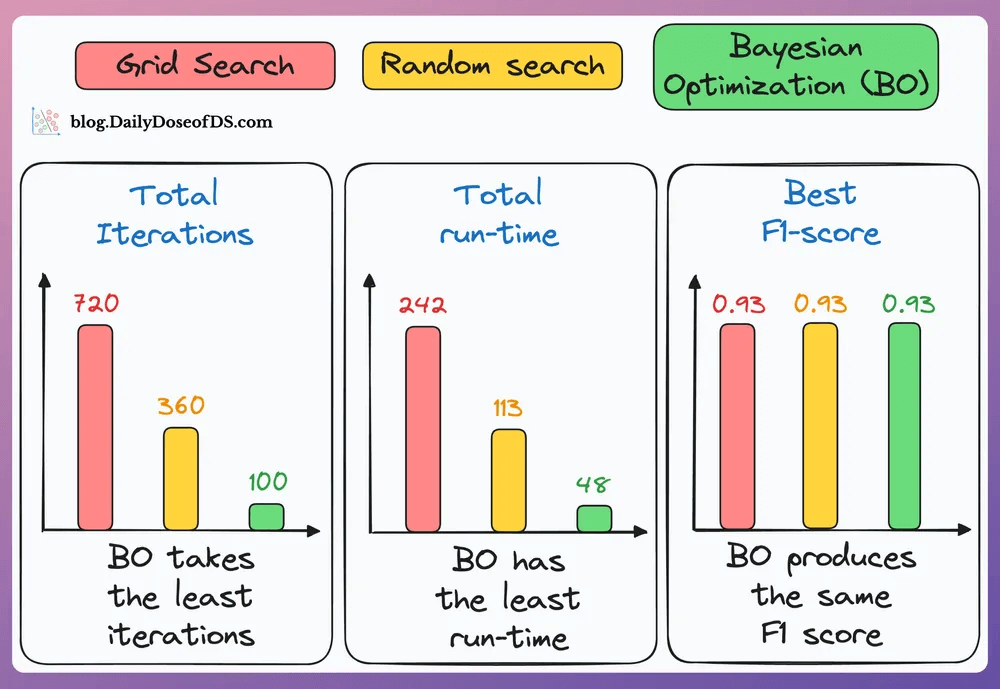
#5) Use Bayesian Optimization if the hyperparameter search space is big:
Take informed steps using the results of previous hyperparameter configs.
This lets it discard non-optimal configs, and the model converges faster.
As shown in the results below, Bayesian optimization (green bar) takes the least number of iterations, consumes the lowest time, and still finds the configuration with the best F1 score:

#6) Use mixed precision training:
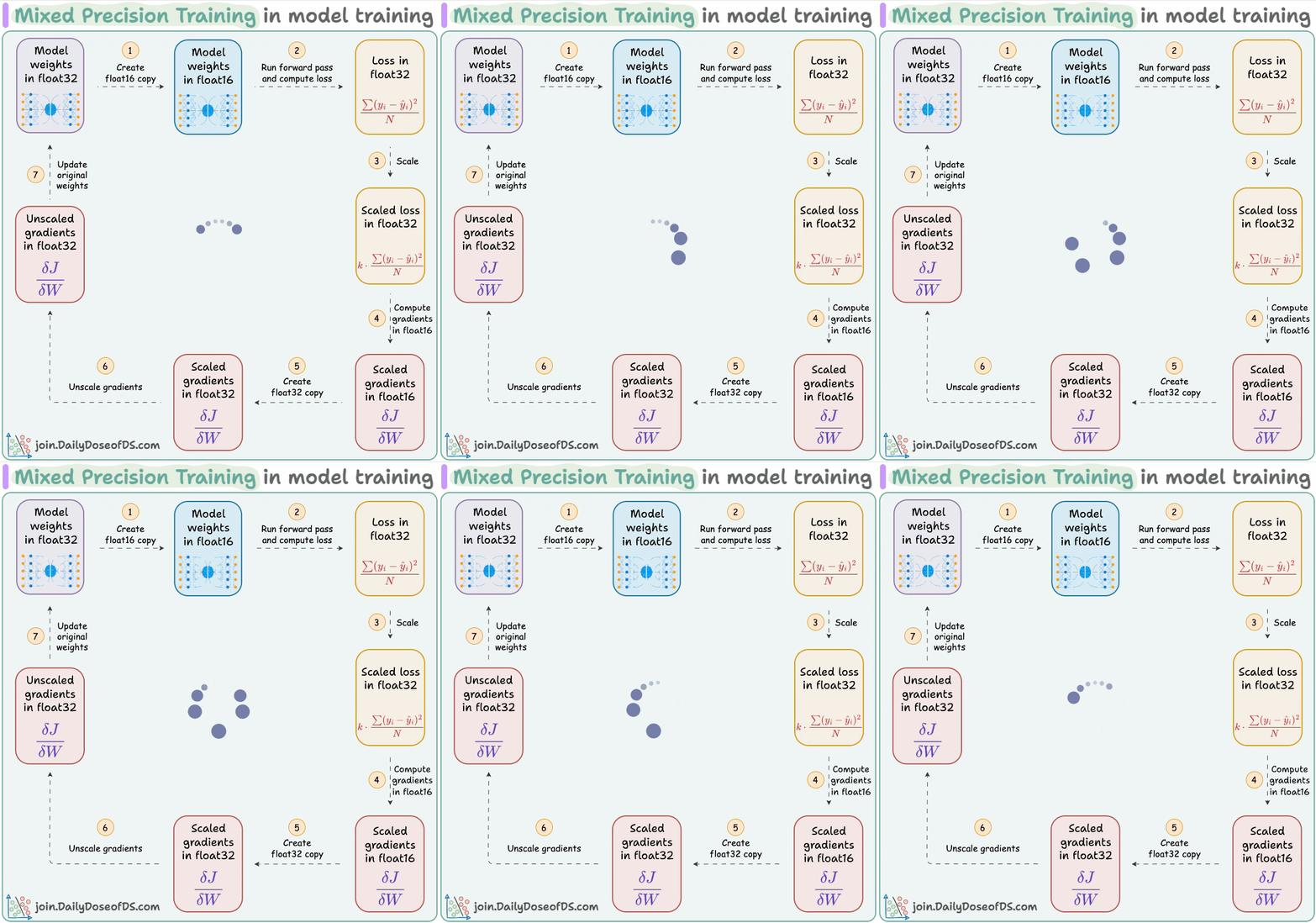
Use lower precision
float16(wherever feasible, like in convolutions and matrix multiplications) along withfloat32.List of some models trained using mixed precision (indicating popularity):

#7) Use He or Xavier initialization for faster convergence (usually helps).
#8) Utilize multi-GPU training through Model/Data/Pipeline/Tensor parallelism.
#9) For large models, use techniques like DeepSpeed, FSDP, YaFSDP, etc.
#10) Always use DistributedDataParallel, not DataParallel in your data loaders, even if you are not using distributed training.
#11) Use activation checkpointing to optimize memory (run-time will go up).
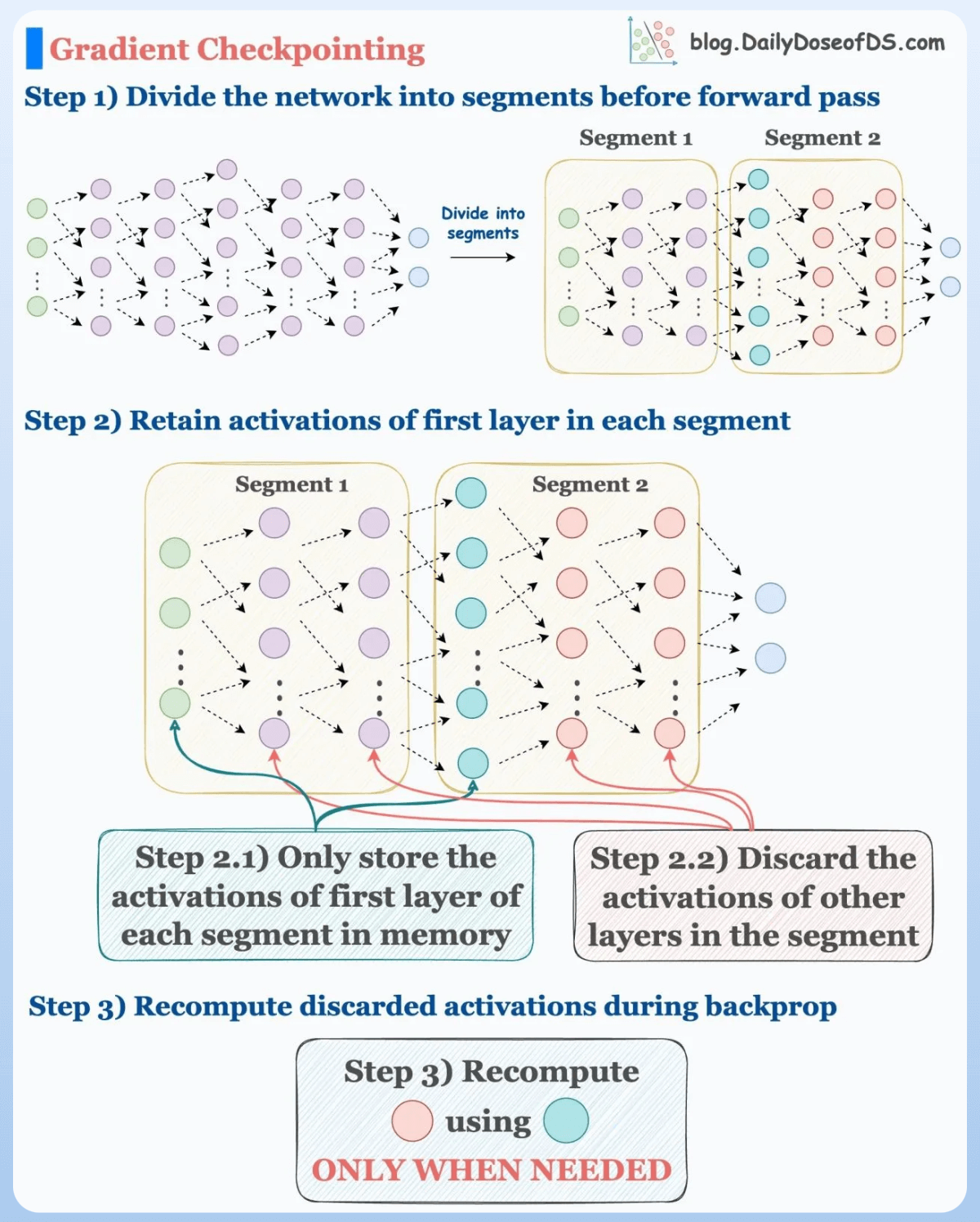
We don’t need to store all the intermediate activations in memory. Instead, storing a few of them and recomputing the rest when needed can significantly reduce the memory requirement.
This can reduce memory usage by a factor of
sqrt(M), whereMis the memory consumed without activation checkpointing.But due to recomputations, it increases run-time.
#12) Normalize data after transferring to GPU (for integer data, like pixels):

Consider image data, which has pixels (8-bit integer values).
Normalizing it before transferring to the GPU would mean we need to transfer 32-bit floats.
But normalizing after transfer means 8-bit integers are transferred, consuming less memory.
#13) Use gradient accumulation (may have marginal improvement at times).

Under memory constraints, it is always recommended to train the neural network with a small batch size.
Despite that, there’s a technique called gradient accumulation, which lets us (logically) increase batch size without explicitly increasing the batch size.
#14) torch.rand(2, 2, device = ...) creates a tensor directly on the GPU. But torch.rand(2,2).cuda() first creates on the CPU, then transfers to the GPU, which is slow. The speedup is evident from the image below:

#15-16) Set max_workers and pin_memory in DataLoader.
The typical neural network training procedure is as follows:
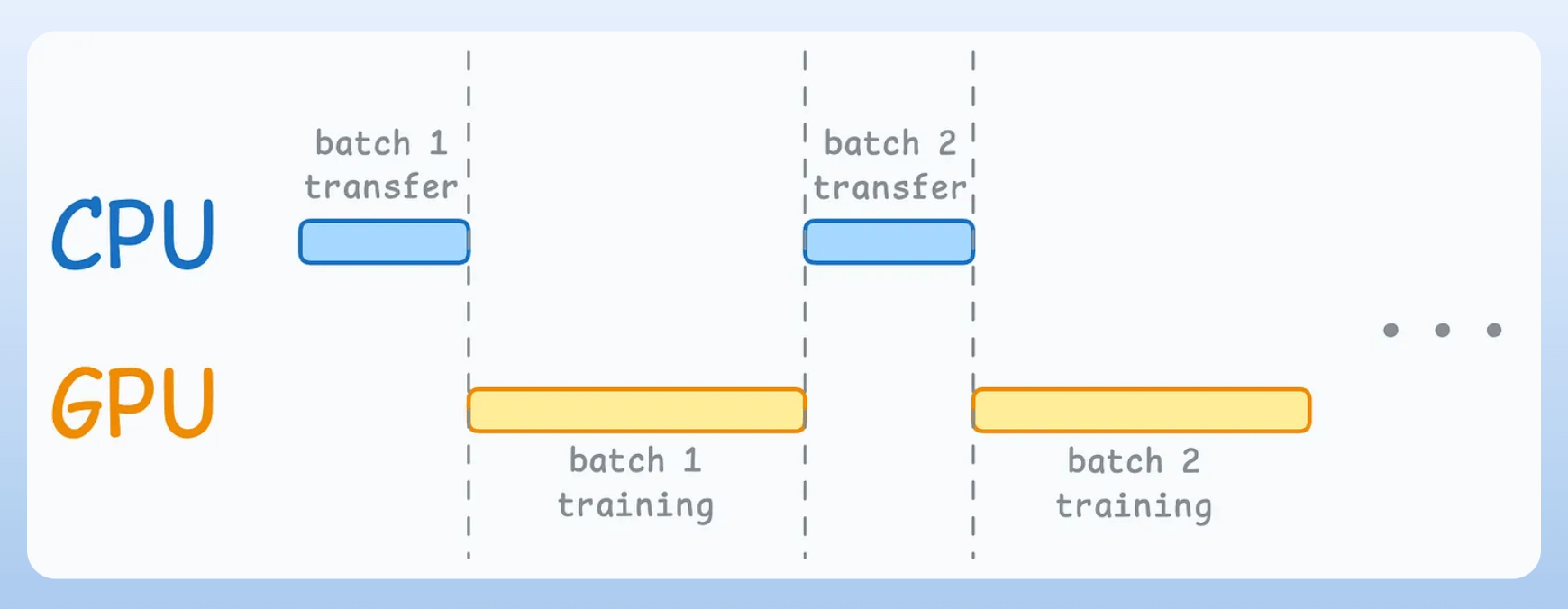
As shown above, when the GPU is working, the CPU is idle, and when the CPU is working, the GPU is idle.
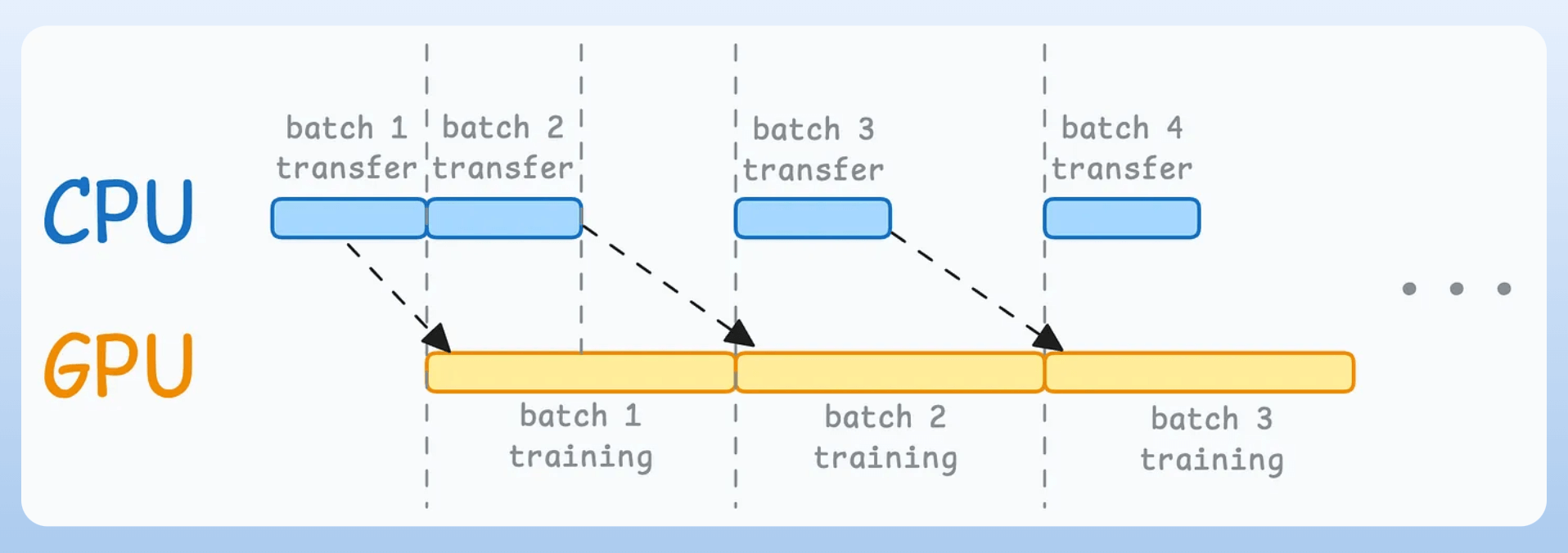
But here’s what we can do to optimize this:

When the model is being trained on the 1st mini-batch, the CPU can transfer the 2nd mini-batch to the GPU.
This ensures that the GPU does not have to wait for the next mini-batch of data as soon as it completes processing an existing mini-batch.
While the CPU may remain idle, this process ensures that the GPU (which is the actual accelerator for our model training) always has data to work with.
Of course, the above is not an all-encompassing list.
👉 Over to you: Can you add more techniques?
Thanks for reading!
P.S. For those wanting to develop “Industry ML” expertise:

At the end of the day, all businesses care about impact. That’s it!
Can you reduce costs?
Drive revenue?
Can you scale ML models?
Predict trends before they happen?
We have discussed several other topics (with implementations) that align with such topics.
Here are some of them:
Learn everything about MCPs in this crash course with 9 parts →
Learn how to build Agentic systems in a crash course with 14 parts.
Learn how to build real-world RAG apps and evaluate and scale them in this crash course.
Learn sophisticated graph architectures and how to train them on graph data.
So many real-world NLP systems rely on pairwise context scoring. Learn scalable approaches here.
Learn how to run large models on small devices using Quantization techniques.
Learn how to generate prediction intervals or sets with strong statistical guarantees for increasing trust using Conformal Predictions.
Learn how to identify causal relationships and answer business questions using causal inference in this crash course.
Learn how to scale and implement ML model training in this practical guide.
Learn techniques to reliably test new models in production.
Learn how to build privacy-first ML systems using Federated Learning.
Learn 6 techniques with implementation to compress ML models.
All these resources will help you cultivate key skills that businesses and companies care about the most.