

In today’s newsletter:
Your agents are doing web search wrong.
6 LLM deployment formats in production.
Prevent data leakage in ML pipelines.
Your agents are doing web search wrong

The agent isn't searching badly. It gets handed a table of contents and is left to go read the web itself.
A search call returns links and thirty-word snippets, so the agent fetches each page, strips the markup, and cleans the text before any reasoning starts, and that work repeats on every hop of the loop.
The same question runs above 28,000 tokens through a three-hop search loop and under 7,000 through an owned index that already holds the processed page.
Seltz is that index. It crawls and processes pages ahead of the query, so one call returns a finished document across its people, news, and wiki scopes.
Thanks to Seltz for partnering today!
6 LLM deployment formats in production
Google and Anthropic agree on one thing about LLM inference:
The faster a model runs, the fewer machines can run it.
This sounds counterintuitive, but a model file gets faster by locking in hardware-specific choices into the file.
And those choices only fit the hardware they were made for.
That is why they build the same model more than once, one version per chip or runtime it has to run on.
The visual below covers the six formats used to run LLMs in production:
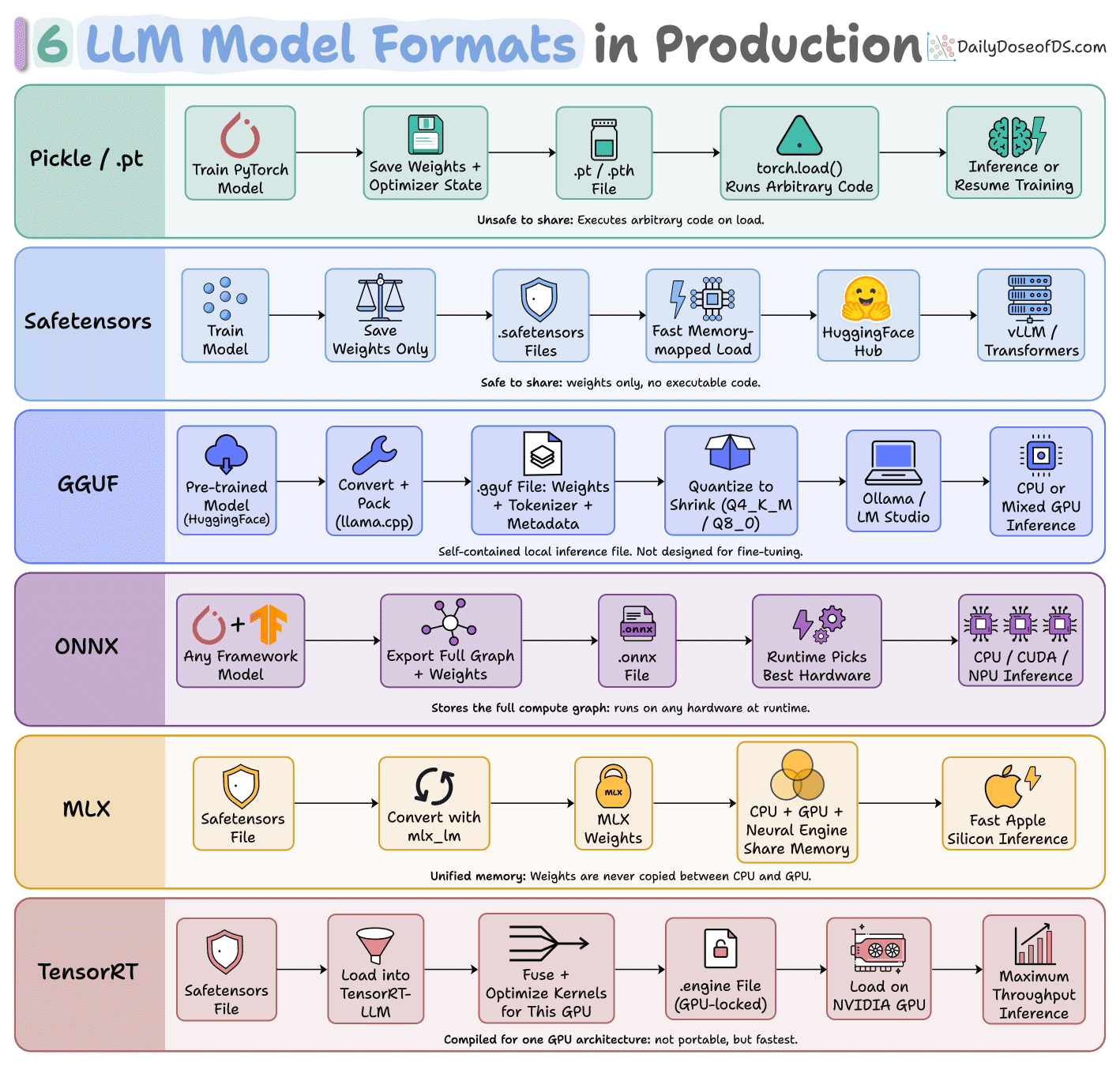
1-2) Pickle and safetensors hold raw weights. Both run anywhere Python runs, so neither is faster than the framework around it.
A .pt file is a list of instructions that torch.load executes and loading a checkpoint can also run a payload (possibly malicious).
Safetensors holds plain numbers instead, laid out the way memory needs them, so there is nothing to rebuild when the file opens.
Both still need Python, the model code, and a tokenizer alongside.
3) GGUF is llama.cpp’s format, built so a model can run on a machine with no ML framework installed.

To achieve this, weights, tokenizer, and chat template ship in one file, and llama.cpp or Ollama runs it directly.
4) ONNX is an interchange format, built so a model trained in one framework can run somewhere that framework was never installed.

It decides the operations and the order they run in, but leaves the hardware open, so the runtime picks CPU, CUDA, or an NPU when the file loads.
5) MLX is Apple’s framework for its own silicon, where the CPU and GPU share a single pool of memory.

It decides where the weights live, so they are never copied between the two, and that advantage does not help on any other machine.
6) TensorRT is NVIDIA’s compiler, which turns a model into machine code for one specific GPU.

Everything is settled at build time, down to instructions tested on the exact card it compiles for, which is why the file will not load on a different GPU architecture.
The safe default is to stop as high on the chart as the latency budget allows, because every row down trades speed with the types of hardware it can run on.
To dive deeper into the full LLMOps lifecycle, we have covered every bit of it in the LLMOps course, starting from fundamentals to production:
Read Part 2 on understanding the core building blocks of LLMs →
Read Part 11 on evaluation of multi-turn systems, tool use evaluations, tracing, and red teaming →
Prevent data leakage in ML pipelines
Data leakage happens when your model accidentally gets access to information during training that it won’t have during inference.
And the scary part is that it can be incredibly subtle.
Let us walk you through the most common ways it sneaks in.
To specifically explore data leakage in greater depth with code, we covered it in Part 6 of the MLOps course here →
Why is data leakage dangerous?
A leaked feature can make a model seem extremely accurate during training/validation, because it’s indirectly using the answer!
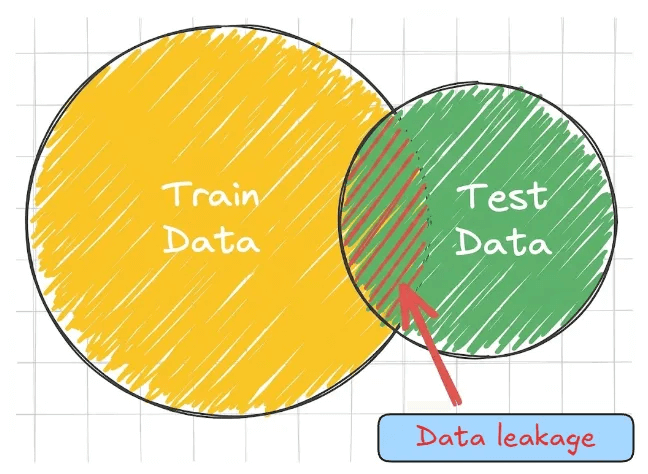
But when deployed, that info isn’t available, so the model fails unexpectedly.
Leakage can be subtle and is often discovered only after deployment, when the model behaves too well on historical data but poorly on new data.
Common causes of data leakage
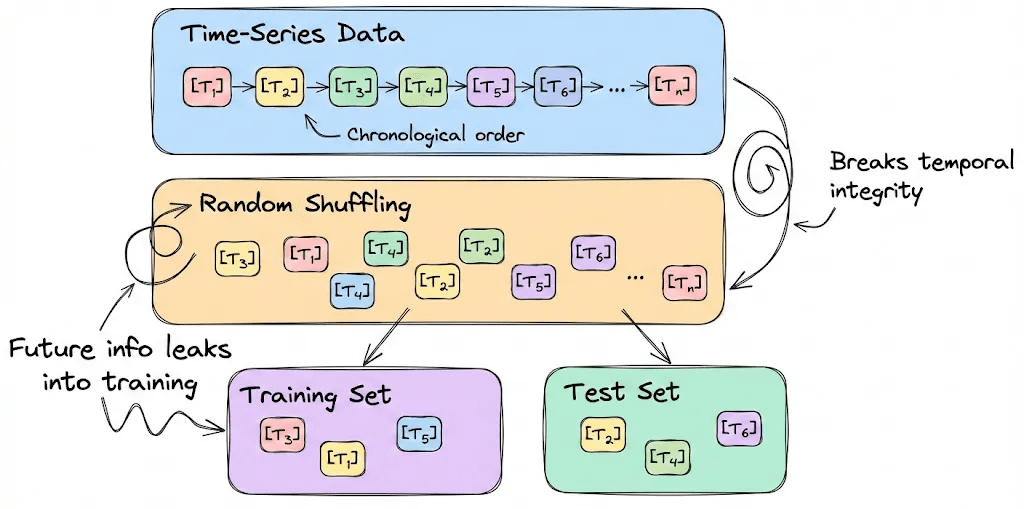
Train/test contamination
This is the most straightforward but pernicious case. Training data somehow bleeds into the test set. For example, random shuffling might break temporal integrity in time-series data, accidentally leaking future information into the model’s eyes.
Leaking through preprocessing
Do not scale or transform using the combined statistics of your dataset. This subtle form of leakage creeps in when the test data informs transformations like scaling.
For example, scaling features to 0-1 using the min and max of the entire dataset (including test) leaks knowledge of the test distribution into the train.
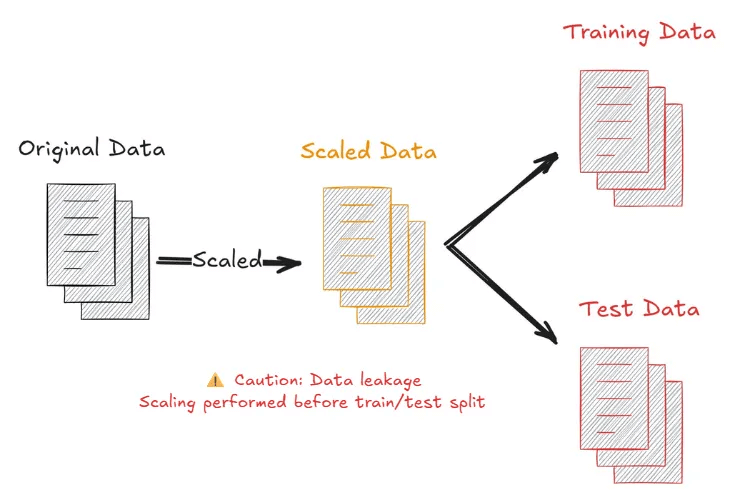
To prevent this type of leakage, always fit preprocessing only on the training set, then apply it to the validation/test sets.
Using target-derived features
This is a common mistake in feature engineering. For instance, say you’re predicting whether a user will churn next month, and you accidentally include a feature like “number of logins in next month,” which obviously references the outcome.
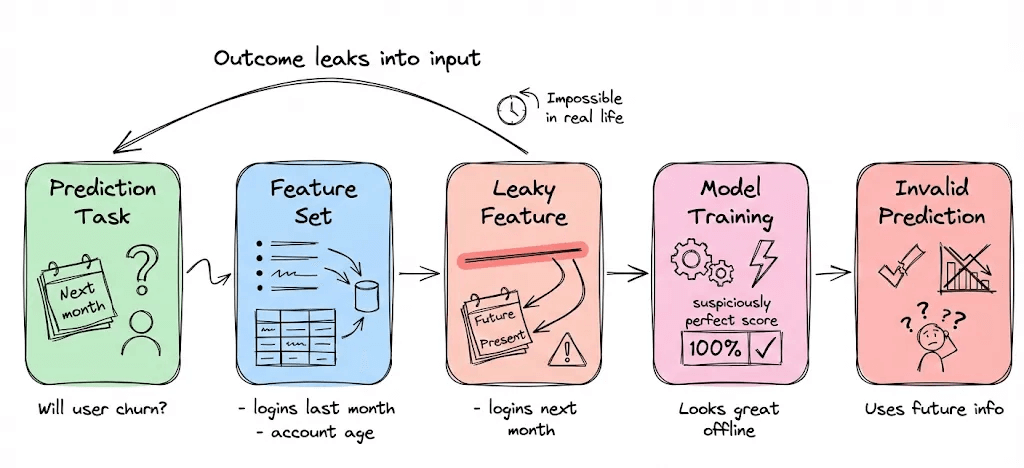
Sometimes this happens less obviously: e.g., you include a summary that was computed including the target period.
How to prevent this? Think carefully. Any feature that wouldn’t be available at prediction time (or that uses information from the future relative to prediction) is a leakage risk.
How to prevent leakage
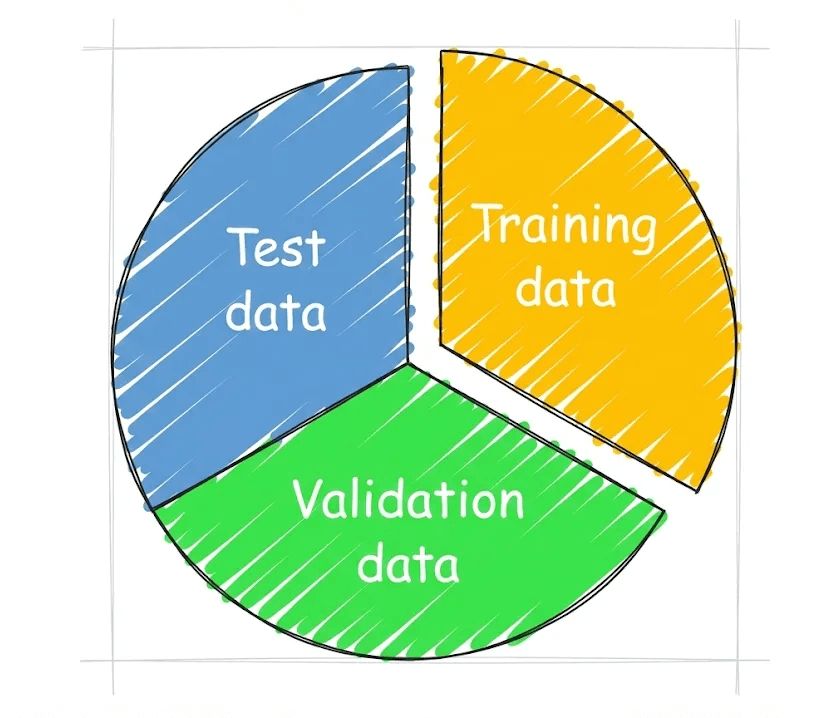
Holdout validation
Always assess your models on a truly independent dataset. Steep drops in performance from training to evaluation signal potential leakage.
Feature importance analysis
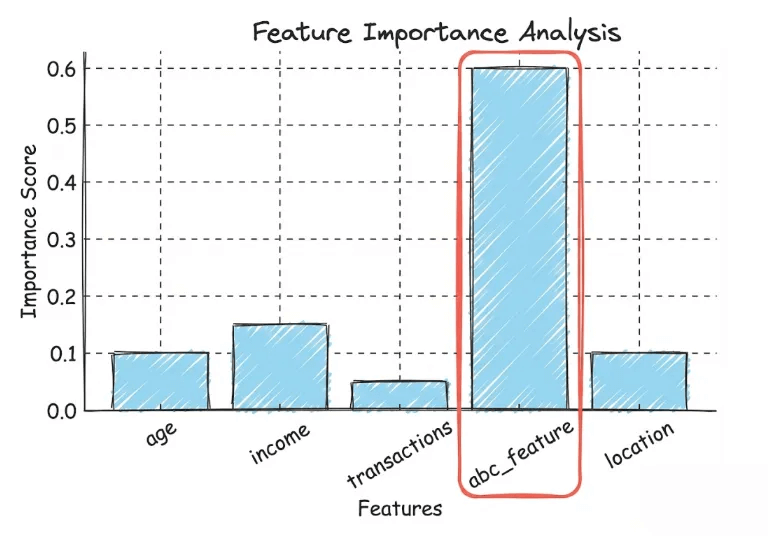
Calculating feature importance reveals suspicious features masquerading as informative only due to leakage. If a particular feature is overwhelmingly important, inspect it; could it be leaking info?
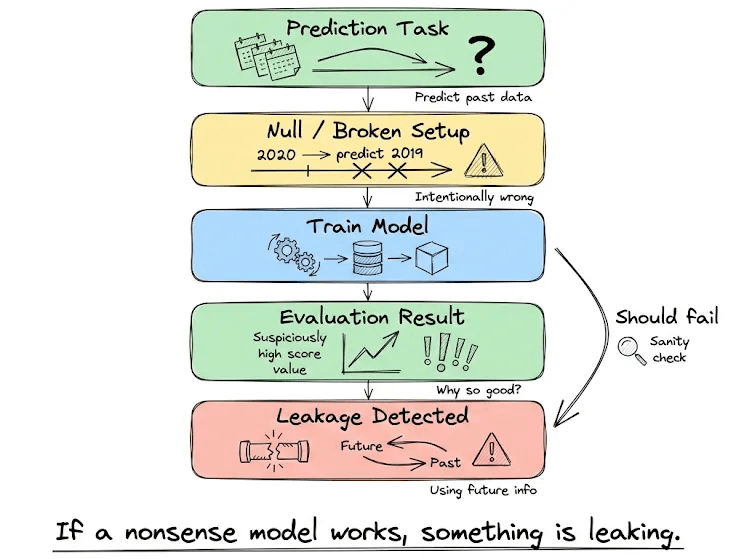
Null model testing
In deliberately nonsensical setups (e.g., predicting 2019 with a 2020 model), leakage causes even ill-formed models to perform inexplicably well.
A leak-safe approach
Perform train/validation/test splits before peeking or processing.
Use stats from only the training data for things like scaling and encoding.
In time-dependent data, keep the chronological order for validation.
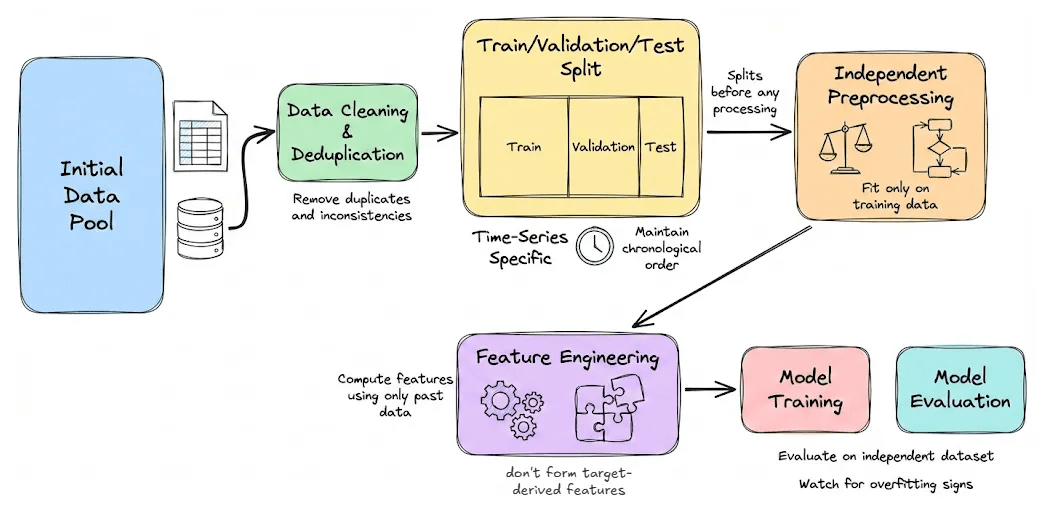
Understanding leaks and vigilantly safeguarding against them ensures your ML pipeline runs smoothly and reliably in the real world.
If you want to learn more about these real-world ML practices and start your journey with MLOps, we have already covered MLOps from an engineering perspective in our 18-part crash course.
It covers foundations, ML system lifecycle, reproducibility, versioning, data and pipeline engineering, model compression, deployment, Docker and Kubernetes, cloud fundamentals, virtualization, a deep dive into AWS EKS, monitoring, and CI/CD in production.
Start with MLOps Part 1 here →
To specifically explore data leakage in greater depth with code, we covered it in Part 6 of the MLOps course here →
Good day!