

In today’s newsletter:
How to build your own AI company (100% local).
A cheaper model does not imply a cheaper turn.
The anatomy of a Claude prompt.
How to build your own AI company (100% local):
Multi-agent orchestration is not new. Plenty of frameworks already let agents hand off tasks, run in parallel, and talk to each other.
So the key question is not whether agents can collaborate but rather what structure you use to make them collaborate.
The common approach is to wire a graph of nodes and edges and reason about the plumbing yourself. It works, but you are learning a new abstraction just to describe who does what.
There is a coordination structure we have trusted for a hundred years already: an organization.
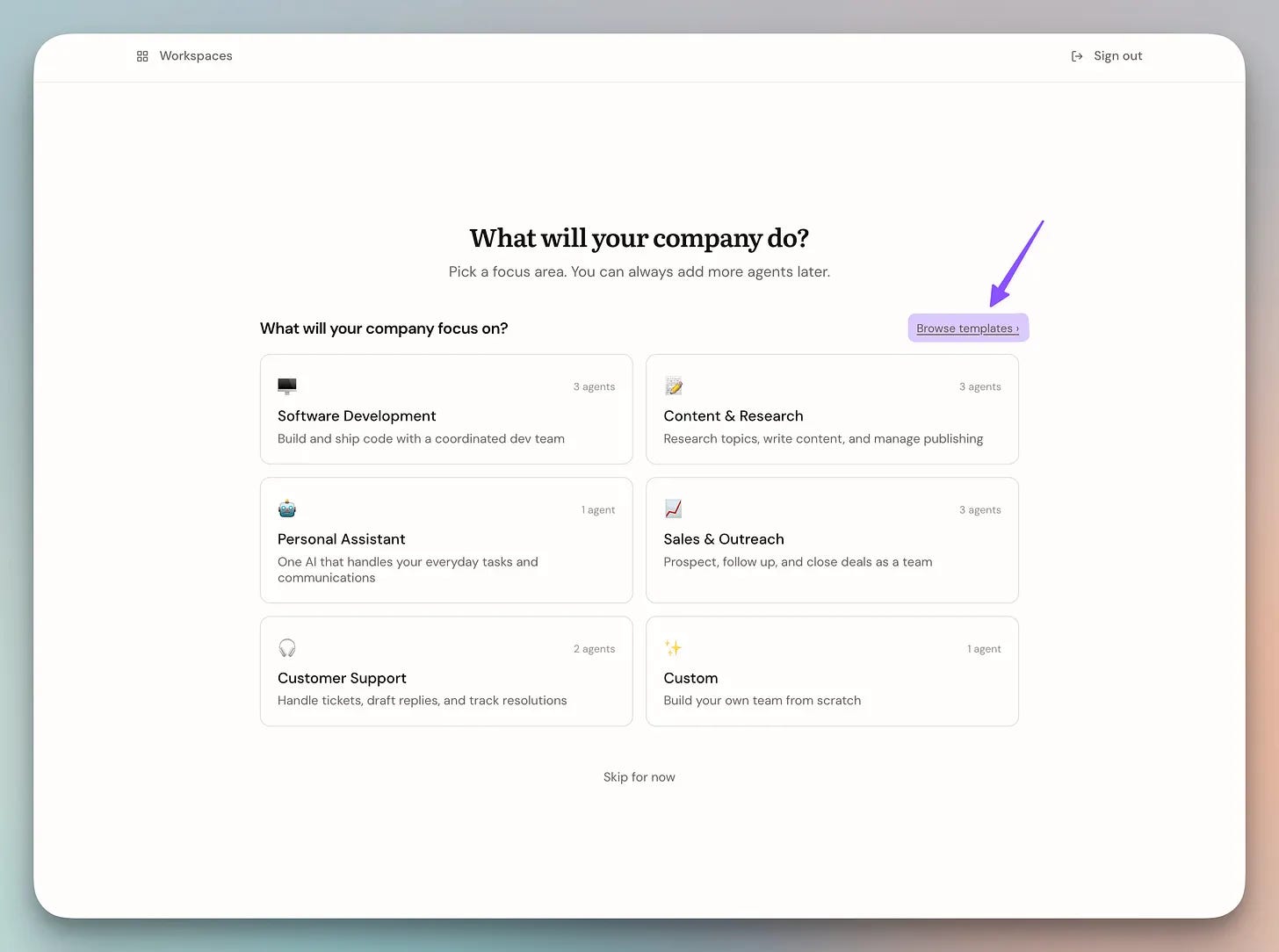
Every company runs the same way. People have roles, roles have reporting lines, and work moves up and down that chart without anyone relaying each message by hand.
Map that onto agents and the whole thing gets intuitive. You lay out an org chart, each agent fills one role, you talk to the person at the top, and the org sorts out the work between them.
You already know how a company works, so you already know how to run one here. There is no new abstraction to learn.
Alook (GitHub Repo) is an open-source, self-hosted platform that turns your coding agents into a real org chart.
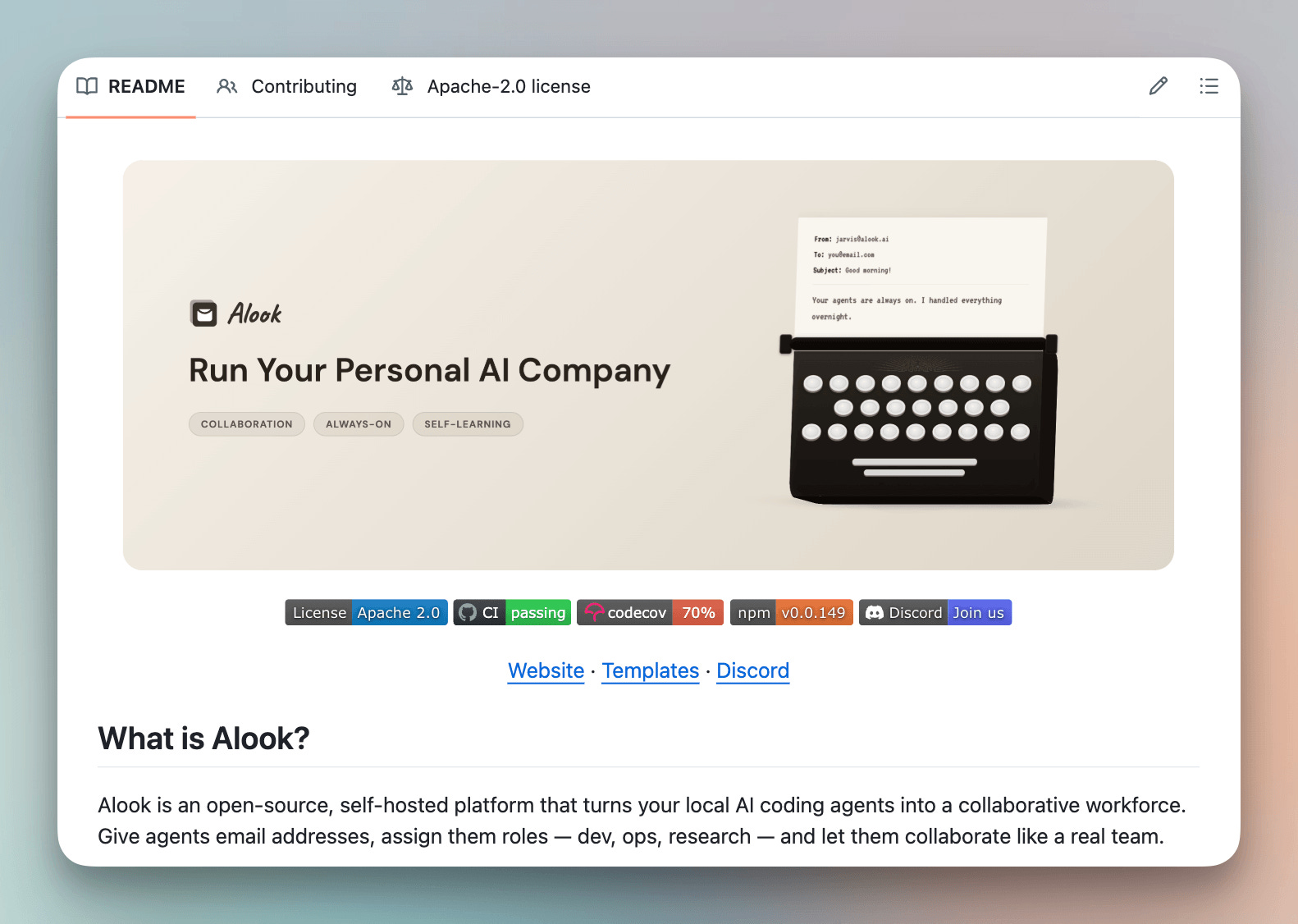
Each agent is a live Claude Code or OpenCode session with a defined role, a reporting line, and its own email inbox.
The agents coordinate over email, the same way a team would. And it all runs locally through a runtime on your own machine, so nothing leaves your setup.
You bring your own agent too. Claude Code and Codex both work, and if you would rather stay fully open source and local, OpenCode works the same way.
To show how this feels in practice, we set up three agents as a small sales team.
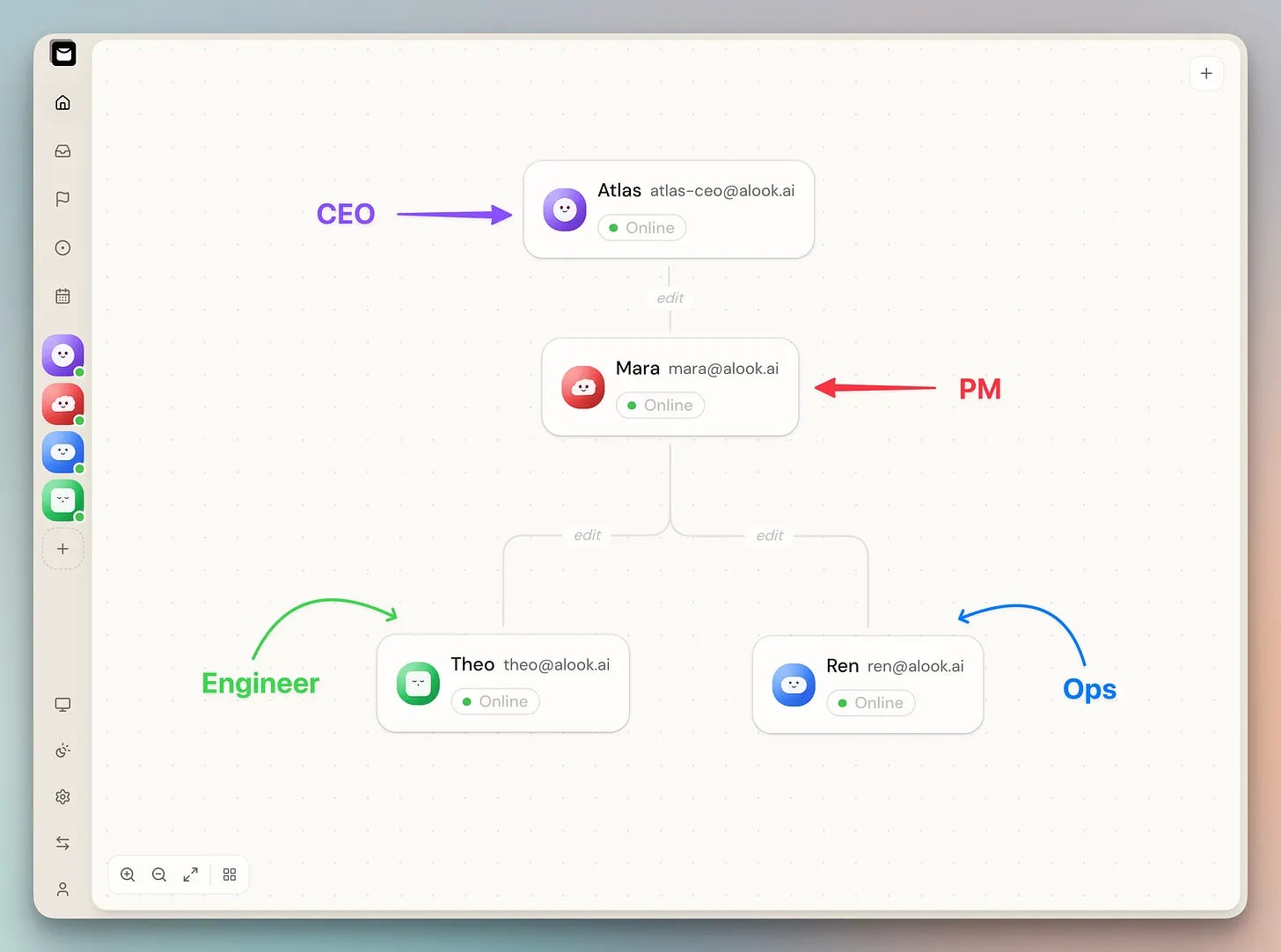
Atlas (CEO) is the point of contact for the human. It delegates tasks to Mara.
Mara (PM) turns Atlas’s briefs into specs and routes them to Theo or Ren. She’s the sole router on the chart.
Theo (engineer) builds and maintains the scrapers for competitive intelligence.
Ren (Ops and Customer-facing) notifies the human when a tracked change is detected.
We never relay a message between them.
The whole thing is open source and self-hosted, so it runs on your machine with your own agents.
A cheaper model does not imply a cheaper turn
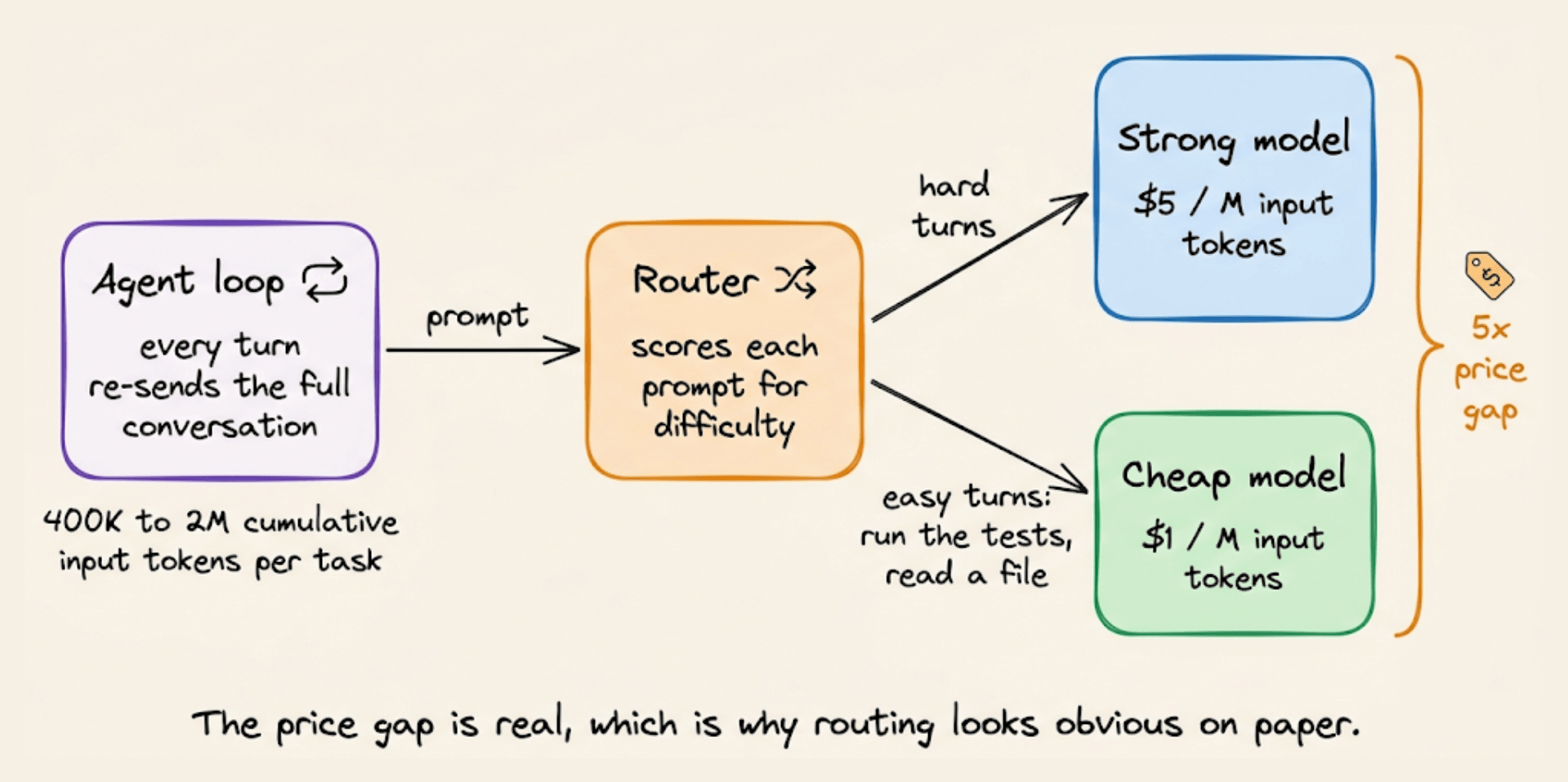
Model routing is one of the few cost levers in an agent stack that works without touching your prompts, your tools, or your model quality targets.
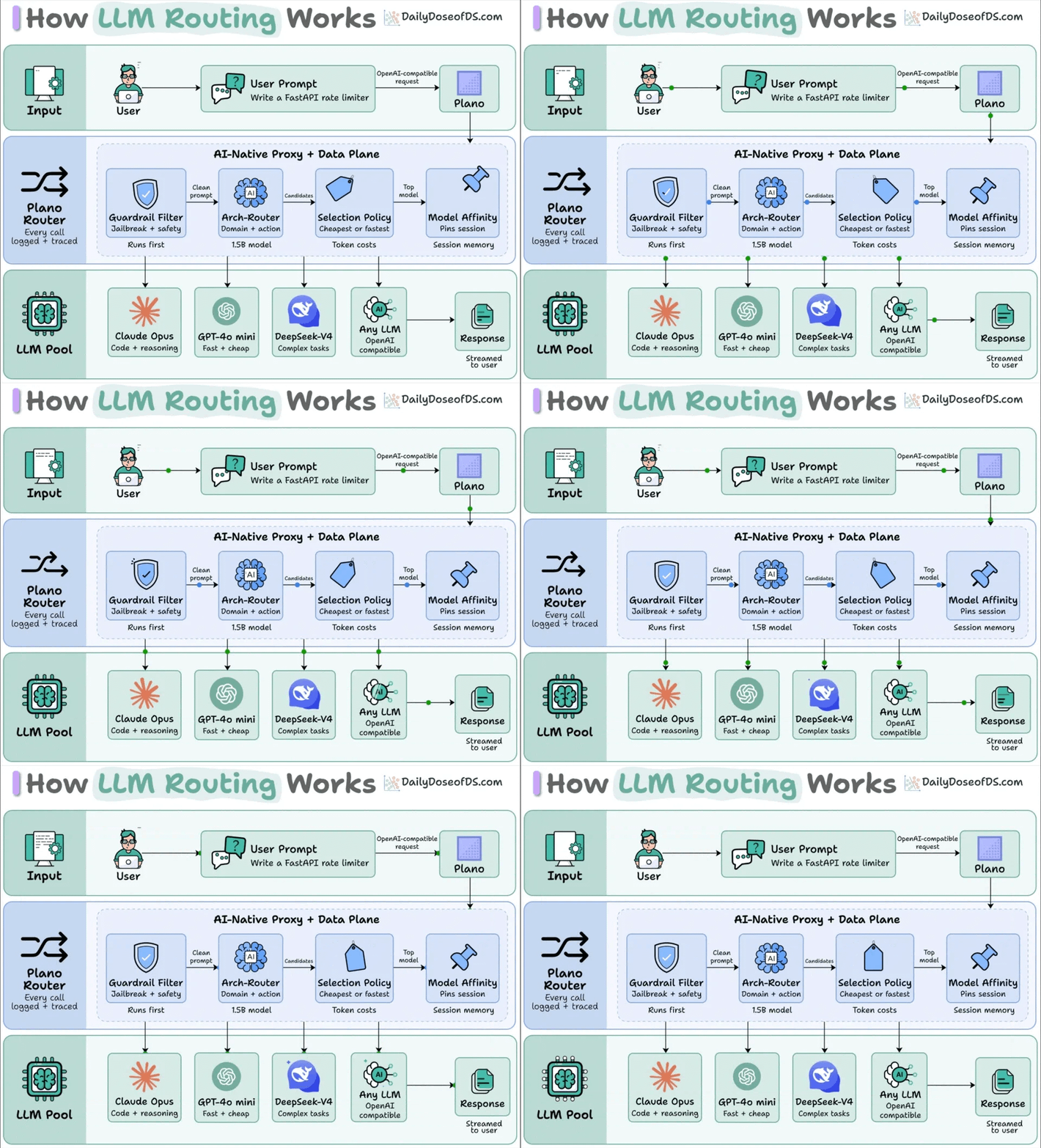
The reason devs find it handy is that API pricing is spread widely.
Anthropic currently charges $5 per million input tokens for Opus 5 and $1 per million for Haiku 4.5.
And for the kind of agent workloads we run today, it’s an important thing to consider.
A single coding task can push 400K to 2M cumulative input tokens through the API, because every turn re-sends the full conversation so far.
Most of those turns are not hard. For instance, deciding to run the test suite, reading a file, or checking whether a command succeeded do not necessarily need frontier reasoning.
Technically, a router can sit in front of the model call, score the incoming prompt for difficulty, and then send the easy ones to a cheaper model.
On a workload where 70% of turns are trivial, this can provide huge cost savings:
But the problem is that the cost reduction only holds for single, independent prompts.
It does not work when you are inside a long session. Let’s understand more.
How prompt caching works
When you send a prompt to an LLM, the model has to process every token of that prompt before it can generate anything.
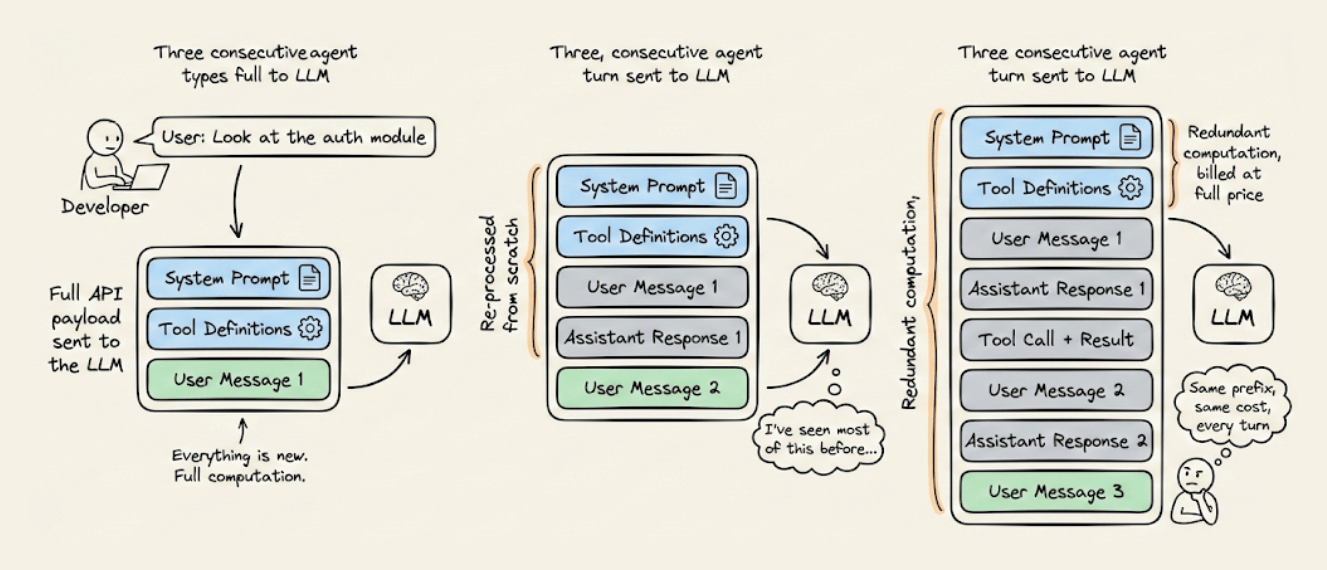
This is the prefill phase, and the intermediate results it produces (the key and value vectors for each token) form the KV cache.
Providers let you keep that cache alive between requests with prompt caching.
When your next request starts with the exact same tokens as the last one, the provider reuses the stored state instead of recomputing it, and bills those tokens at 10% of the base input rate.
The only problem is that the cache belongs to one model. Opus 5 and Haiku 4.5 have different weights and separate cache stores. A prefix that is warm on one of them does not directly transfer onto the other.
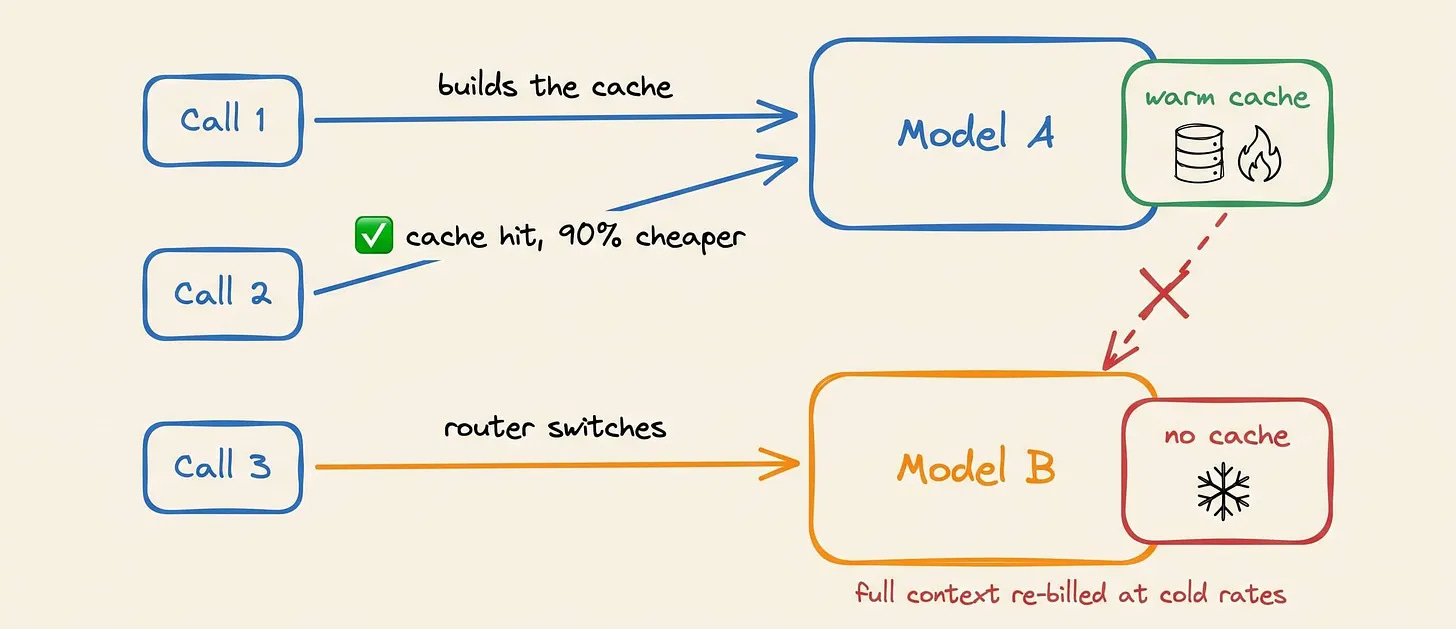
So a router that switches models mid-session is discarding the warm prefix and forcing a full cold prefill of the entire conversation on the new model.
This means you don’t pay the cheap model’s rate on the new instruction but rather the whole transcript.
An example
Say an agent has had 14 turns with the user and it’s carrying 60,000 tokens of history, including the system prompt, the tool schemas, a few files it has read, and the back and forth so far.
The new instruction (about 200 tokens) tells it to run a test, which is easy.
Option A, stay on Opus 5:
The 60,000 tokens of history are already warm, so they bill at the cache rate of $0.50 per million instead of $5.00. The 200 new tokens bill at the full rate.
60,000 cached tokens at $0.50/M comes to $0.030
200 new tokens at $5.00/M comes to $0.001
Total input cost for the turn: $0.031
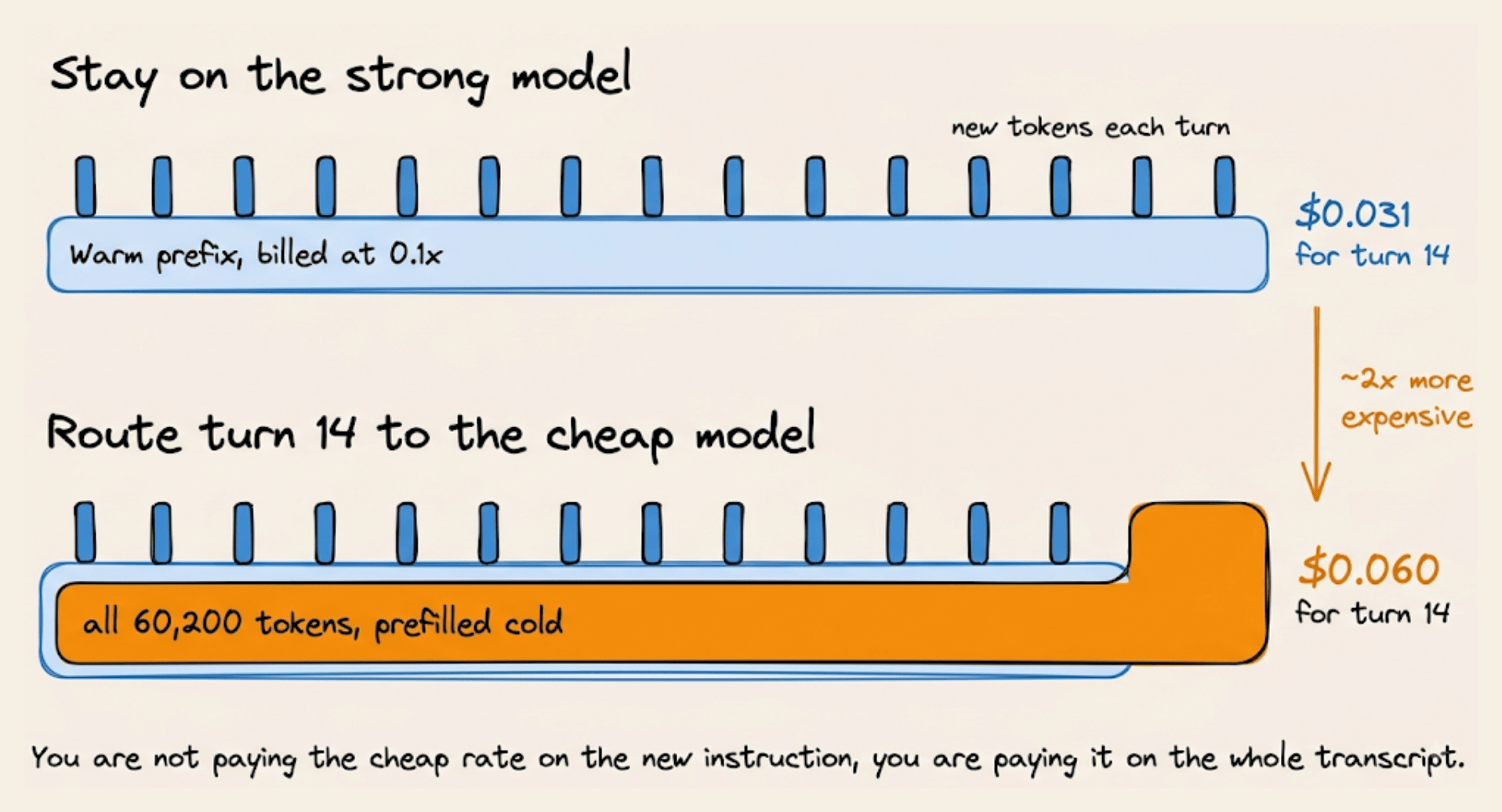
Option B, route to Haiku 4.5:
Haiku has never seen this conversation, so all 60,200 tokens are new to it and bill at its full input rate.
60,200 tokens at $1.00/M comes to $0.060
The model with 5x cheaper tokens produced a bill roughly 2x larger.
The router did its job, the cheap model also handled the prompt fine, and the whole turn still cost double.
The general rule
Call the history already in the conversation H, and the new tokens in this turn N. Call the strong model’s input price Ps and the cheap model’s Pc.
Staying on the strong model costs
0.1 × Ps × Hfor the warm history plusPs × Nfor the new tokens.Switching costs
Pc × (H + N), because nothing is warm. Setting those equal gives the condition where switching is cheaper:
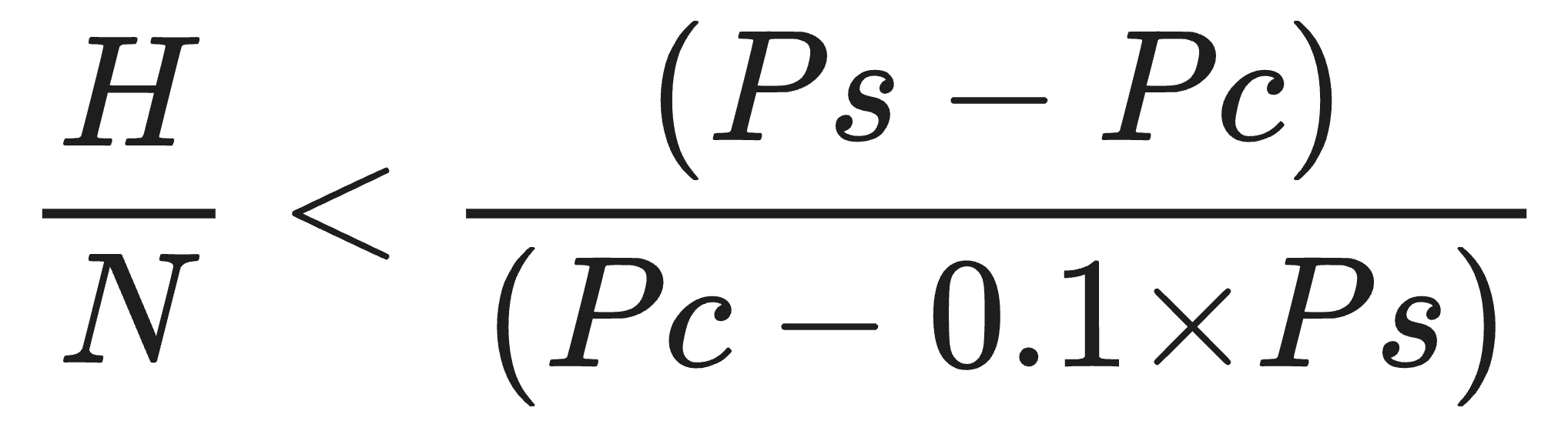
The numerator on the right denotes savings per new token by using the cheap model.
The denominator denotes the loss per history token by re-prefilling it from cold rather than reading it warm.
Together, they tell you how many tokens of history you can afford to re-prefill for each new token you save on.
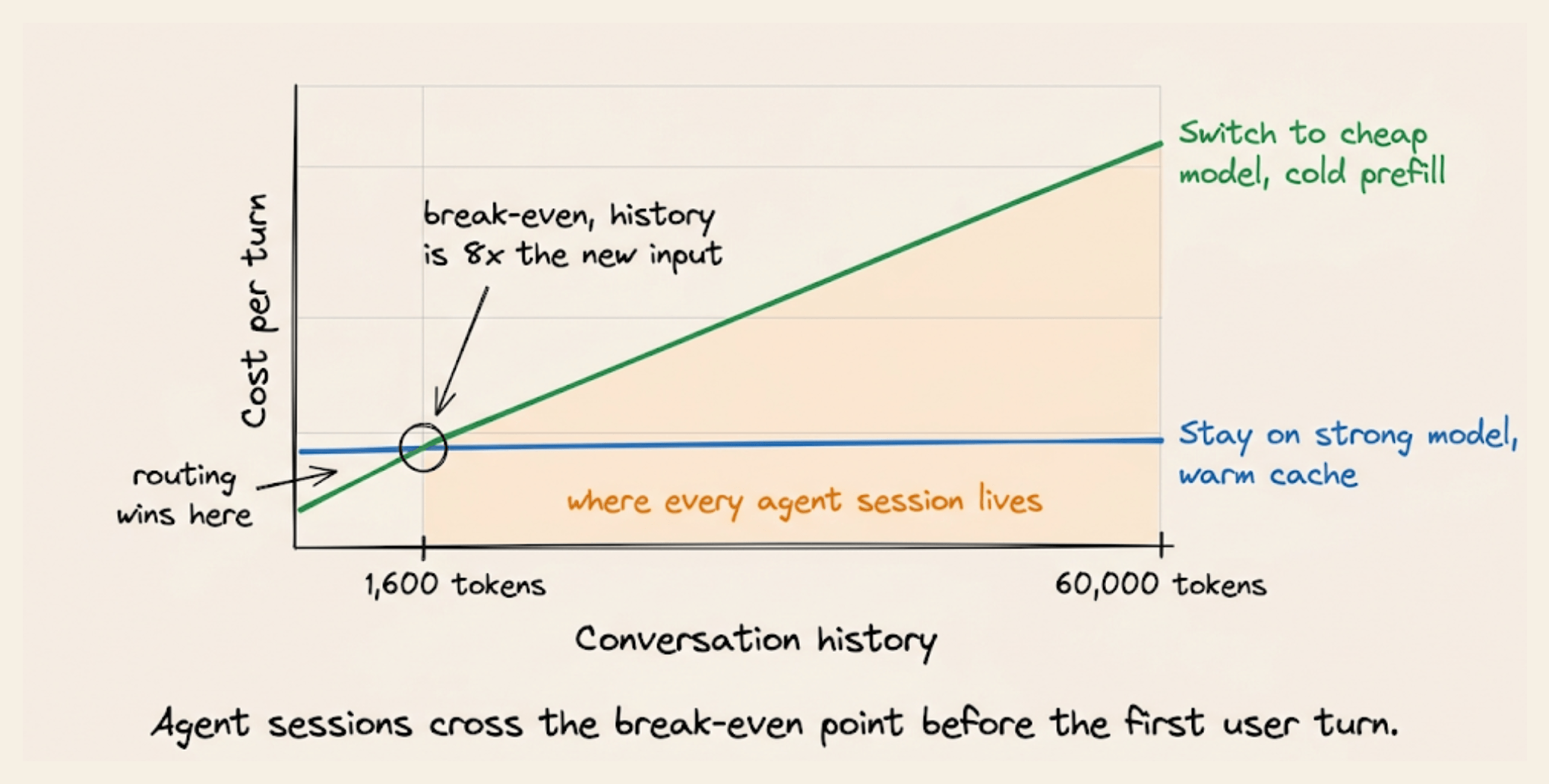
For Opus 5 and Haiku 4.5, that works out to be 8.
That means switching pays only while the history is under 8x the size of the new input. With a 200-token instruction, the conversation has to be shorter than 1,600 tokens.
An agent session with a system prompt and tool schemas is past that even before the first user turn.
Where routing is still important
In the example, switching cost an extra $0.029, but it saves $20 per million on output, so the cheap model needs to produce more than about 1,450 output tokens before the turn breaks even. That splits agent traffic along a clean line:
Tool calls, short instructions, and control-flow turns emit a few hundred tokens and lose money on a switch.
Turns that write a full file, draft a long document, or produce a large diff can benefit from a switch.
Short sessions follow a different rule.
With little accumulated history to re-prefill, the penalty nearly vanishes, and per-prompt routing actually works.
These are also the workloads routers were first measured on, and long agent sessions just took over their conclusion without understanding the conditions.
Where to place the switch
The cheapest moment to switch models is right after a compaction or a context reset. The prefix has already changed at that point, so the cache is invalid whichever model you use next, and the switch is free.
That suggests a different decision procedure.
Rather than scoring each prompt for difficulty and switching whenever one looks easy, find the points where the session’s cache already breaks and make every model change land on one of them.
A router scores the next prompt on its own, while the bill is computed over a prefix that grows for the entire session, and the savings disappear into the gap between those two units of measurement.
Further reading:
👉 Over to you: has your router ever made a session more expensive than the model it was routing away from?
The anatomy of a Claude prompt
The difference between a mediocre Claude output and a great one almost always comes down to how you structure your prompt. This involves a clear, repeatable structure that gives Claude exactly what it needs to do the job well.
Here’s how a well-built Claude prompt breaks down into 8 building blocks, each doing one job:
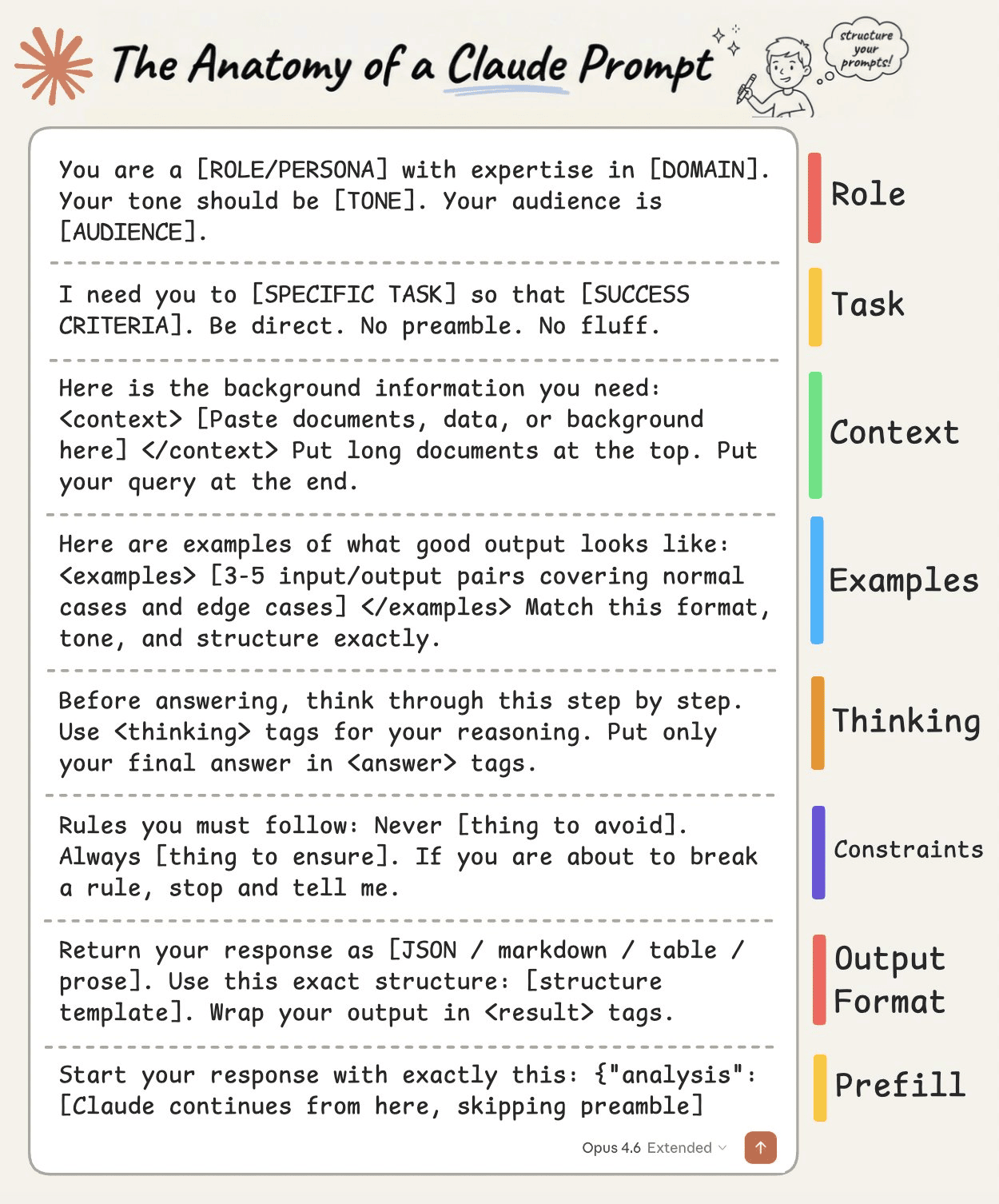
1) Role
Tell Claude who it is before telling it what to do.
“You are a [ROLE] with expertise in [DOMAIN]. Your tone should be [TONE]. Your audience is [AUDIENCE].”
Setting a role in the system prompt changes how Claude reasons, what it prioritizes, and how it communicates. A “senior backend engineer” writes differently than a “technical copywriter,” and Claude picks up on that distinction immediately.
2) Task
State what you want and what success looks like, in the same breath.
“I need you to [SPECIFIC TASK] so that [SUCCESS CRITERIA].”
The “so that” part is what people skip, and it’s the part that matters. It gives Claude a way to evaluate its own output. Without it, Claude is guessing what “good” means.
Be direct, skip the preamble, and cut the fluff.
3) Context
This is where you feed Claude everything it needs to do the job well.
Wrap it in XML tags like <context> and </context>, then paste your documents, data, or background inside.
One thing that dramatically improves quality: put long documents at the top of your prompt and your actual query at the end. Anthropic’s own testing shows this can improve response quality by up to 30%, especially with complex, multi-document inputs.
4) Examples
Nothing steers output quality like showing Claude what “good” looks like.
Provide 3-5 input/output pairs. Cover normal cases AND edge cases. Wrap them in <examples> tags so Claude doesn’t confuse them with instructions.
Claude pays extremely close attention to examples. If your example has a quirk you didn’t intend, Claude will replicate it. So make sure every example models the behavior you actually want.
5) Thinking
For anything requiring reasoning, analysis, or multi-step logic, ask Claude to think before answering.
“Before answering, think through this step by step. Use <thinking> tags for your reasoning. Put only your final answer in <answer> tags.”
This separates the messy reasoning from the clean output. You get to see how Claude arrived at its answer without that reasoning cluttering the final result.
6) Constraints
Every good prompt has guardrails.
“Never [thing to avoid]. Always [thing to ensure]. If you are about to break a rule, stop and tell me.”
That last line is underrated. It turns Claude into a collaborator instead of a blind executor. Instead of silently violating a constraint, Claude flags the conflict and lets you decide.
7) Output Format
Don’t leave the format to chance.
“Return your response as [JSON / markdown / table / prose]. Use this exact structure: [structure template].”
If you want JSON, show the exact schema. If you want markdown, show the heading structure. If you want a table, define the columns. The more specific you are about shape, the less time you spend reformatting afterward.
8) Prefill
This one is API-specific, but incredibly powerful.
You can pre-fill the start of Claude’s response to skip preamble and lock in the format. Claude will continue from exactly where you left off. No “Sure, I’d be happy to help!” opening, no throat-clearing, just clean output from the first token.
Here’s the thing people get wrong about prompting: they think it’s about finding the right words. It’s actually about giving Claude the right structure.
If you want to go deeper, we wrote a detailed article covering the anatomy of the .claude/ folder, a complete guide to CLAUDE(.)md, hooks, skills, agents, and permissions, and how to set them all up properly.
Good day!
Amazing insights, Alook + Graft + Semantica FTW!