

An open-source alternative to Claude (29k+ stars)!
Onyx is a self-hostable AI chat platform that works with any LLM, like Claude, GPT, Gemini, Llama, or any open-weight model you want.
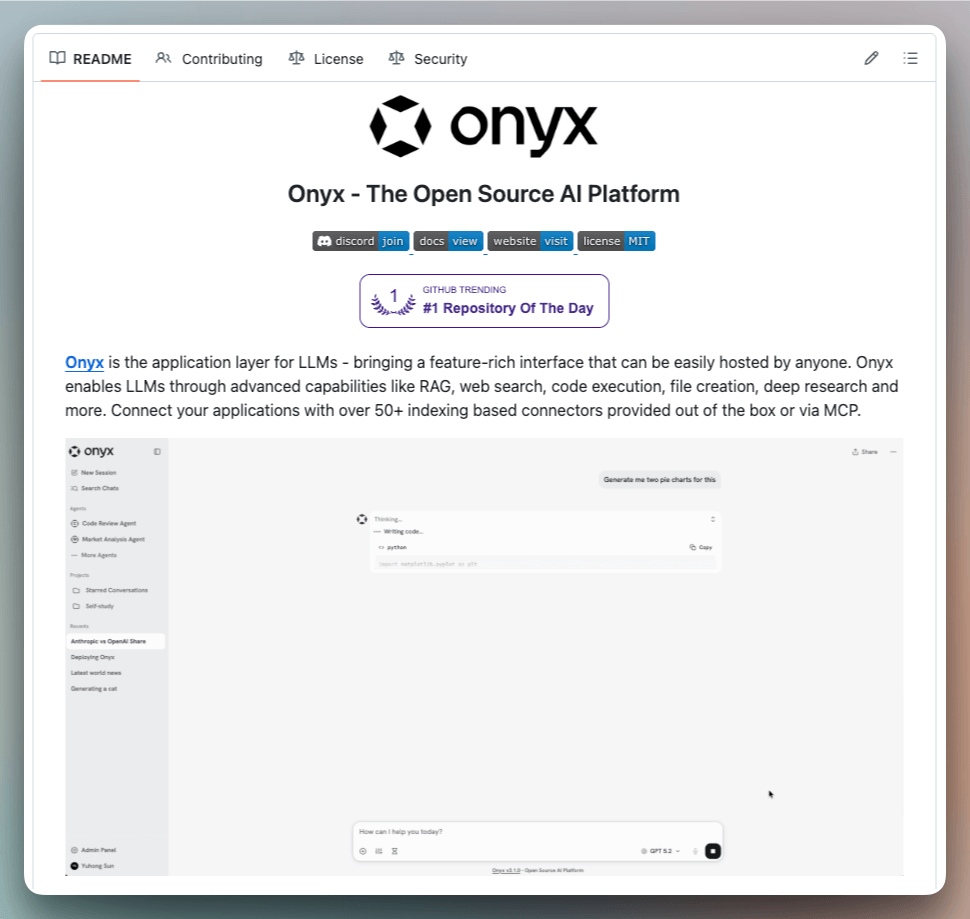
Here’s what it ships with:
Agents that chain multiple tools in sequence
RAG with full indexing across 40+ connectors (Slack, Drive, Confluence, Jira, GitHub, email, call transcripts)
Deep research ranked #1 on DeepResearchBench, above every proprietary alternative
MCP support for connecting to external systems
Code interpreter for data analysis and file generation
Self-host on your own infrastructure via Docker in a few mins
Unlike Claude’s MCP-based connectors that query your tools at runtime, Onyx actually indexes all your data. That means faster, more reliable search across everything your team has ever written.
The entire code is open-source under the MIT license, so you can see the full implementation on GitHub and try it yourself.
Find the GitHub repo here → (don’t forget to star it ⭐️)
Agent memory is only as good as its schema
When you give an agent a knowledge graph for memory, the default behavior is that the LLM handling extraction decides the structure on its own.
It picks the entity types, the relationship labels, and the attributes.
The results are generic.
Everything becomes a Topic or Object and every connection is labeled RELATES_TO, resulting in a graph that can’t be queried meaningfully.
Zep’s Graphiti (open-source with 26k+ GitHub stars) fixes this with a prescribed ontology.
You can define entity types and edge types as Pydantic models, and the extraction model classifies against these definitions instead of guessing.
Let’s look at why this matters, how the extraction pipeline works, with code!
Why flat retrieval breaks on multi-hop reasoning
Vector-based memory stores facts as text chunks and retrieves them by semantic similarity. That works until a query requires connecting facts that don’t appear in the same chunk.
Consider three facts stored about a project.
Alice manages Project Atlas
Project Atlas runs on PostgreSQL
The PostgreSQL cluster went down Tuesday
A query like “was Alice’s project affected by Tuesday’s outage” needs all three.
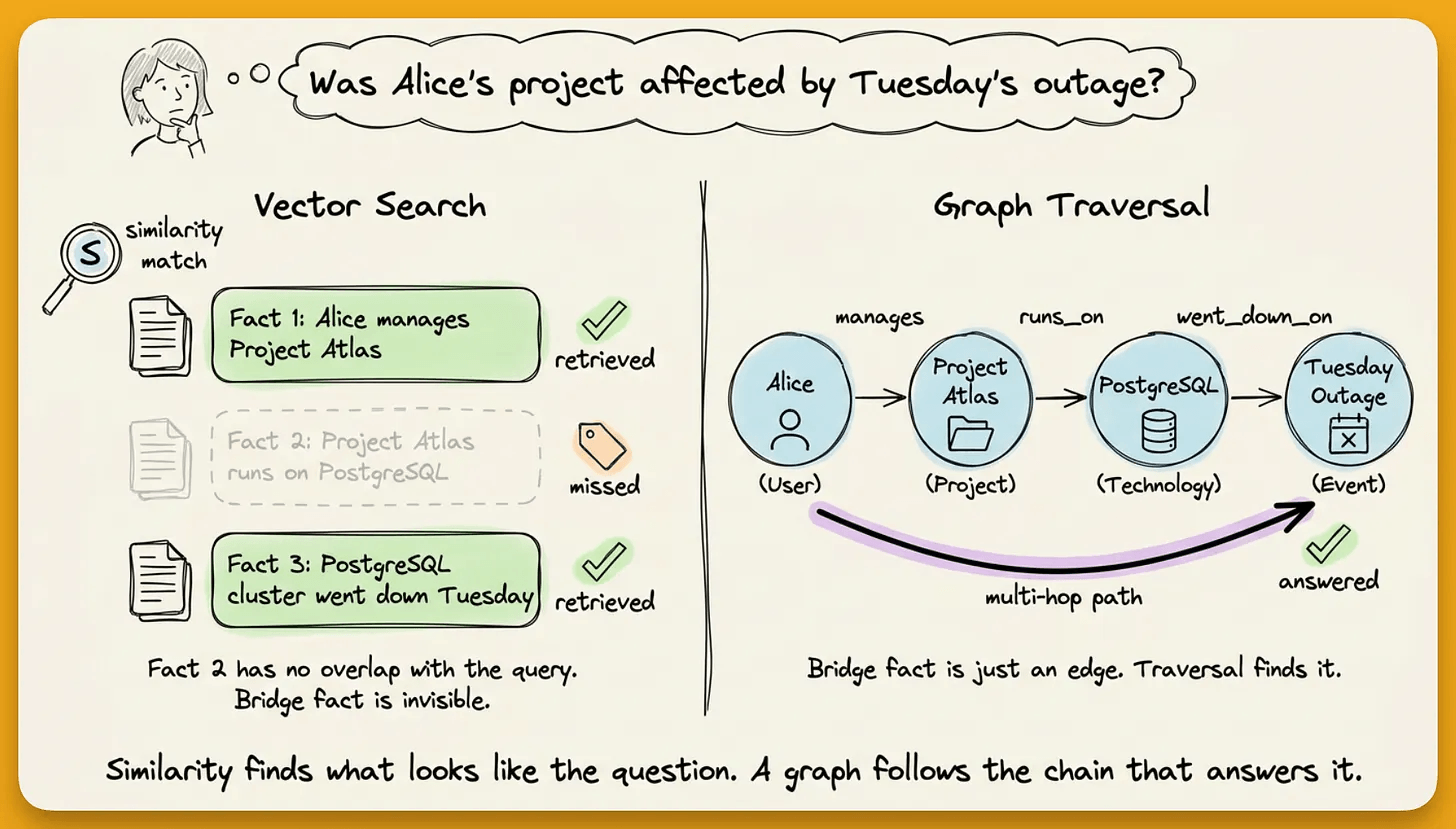
Vector search will retrieve just facts 1 and 3 because both mention relevant terms. Fact 2 is the bridge connecting Alice to PostgreSQL through Project Atlas, but it mentions neither Alice nor Tuesday. Similarity search misses it.
A knowledge graph stores entities as nodes and relationships as edges. Instead of matching text, it traverses connections.
That chain (Alice → manages → Project Atlas → runs on → PostgreSQL) is what makes multi-hop reasoning work, and it is invisible to flat vector retrieval.
Where extraction fits in the pipeline
Every graph-based memory system follows the same pipeline. LLM accepts the raw data and extracts entities and relationships.
These get stored as nodes and edges, and at query time, the system searches the graph and injects relevant facts into the agent’s prompt.
The extraction step determines everything downstream. It decides what the graph contains, how it’s structured, and what can be queried.
When extraction is unstructured, the LLM picks entity types and relationship labels on its own.
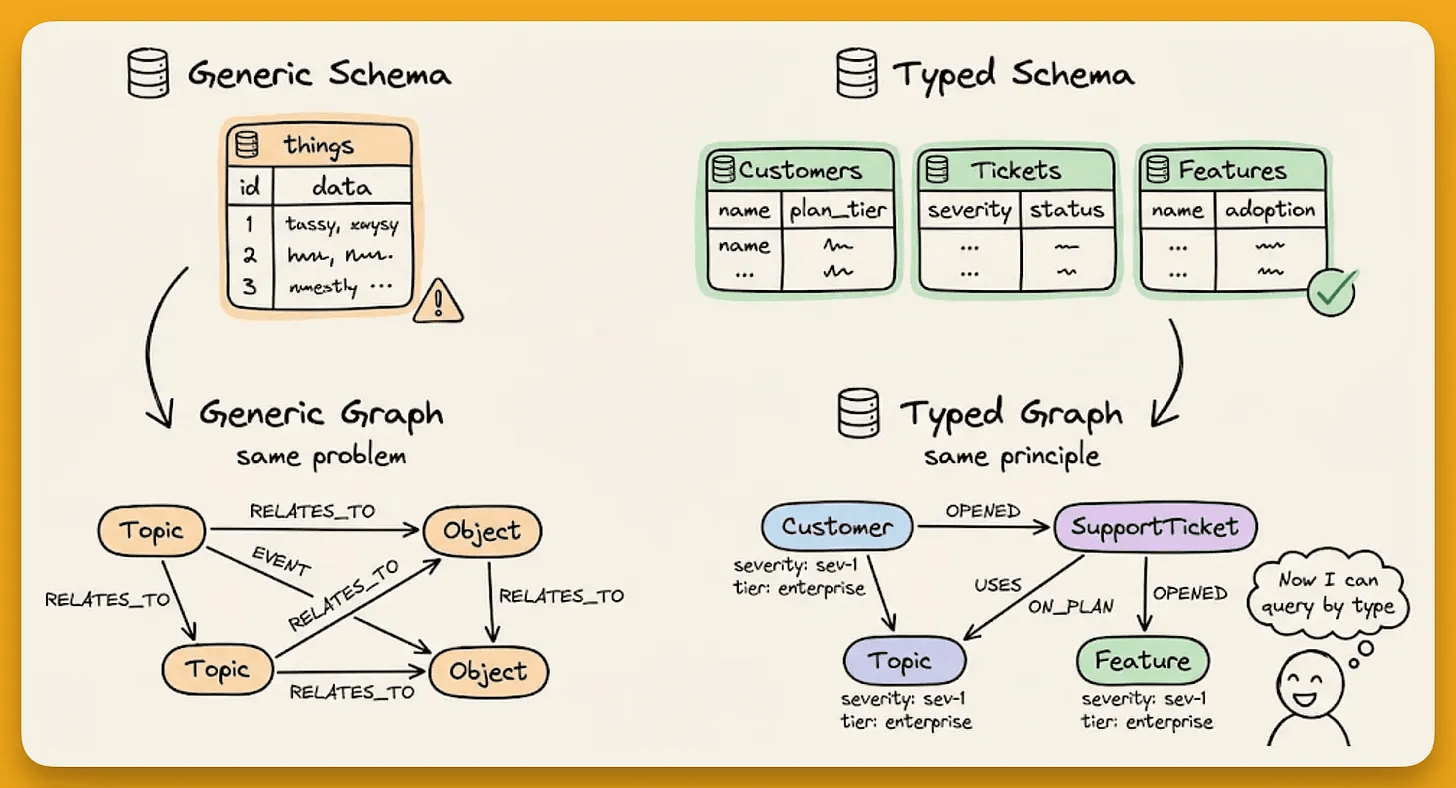
A developer conversation about building a web app called Nexus with Python, TypeScript, React, and Docker produces nodes labeled Topic and Object with RELATES_TO edges across the board.
Two things break without proper structure:
Retrieval collapses to semantic similarity because it can’t filter by type when everything shares the same label.
Domain constraints disappear because there are no structured attributes like
statusorcategoryto distinguish “active vs. completed” or “frontend framework vs. database.”
Defining the schema with Pydantic
The fix is the same pattern used everywhere in the AI stack.
FastAPI endpoints get Pydantic response models.
Function calling tools get Pydantic schemas.
Agent memory works the same way in Zep.
Define custom entity types using EntityModel (a subclass of Pydantic’s BaseModel) with EntityText fields and descriptions that guide the extraction model.
from zep_cloud.external_clients.ontology import EntityModel, EntityText
from pydantic import Field

class Project(EntityModel):
    """
    Represents a specific software project, application,
    or codebase that the user is building or contributing to.
    """

    project_status: EntityText = Field(
        description="Current status: active, completed, paused, or archived.",
    )
    project_type: EntityText = Field(
        description="Type of project: web app, mobile app, API, CLI tool, etc.",
    )
The docstrings and field descriptions are important here because good descriptions with concrete examples give the extractor enough signal to classify accurately.
The Pydantic descriptions above aren’t just classification instructions. They teach the extractor vocabulary it doesn’t know.
A Technology entity follows the same pattern.
class Technology(EntityModel):
    """
    Represents a programming language, framework, library,
    database, or tool that the user works with.
    """

    tech_category: EntityText = Field(
        description="Category: programming language, framework, database, etc.",
    )
Edge types use EdgeModel and carry their own attributes.
from zep_cloud.external_clients.ontology import EdgeModel

class WorksOn(EdgeModel):
    """The user is currently working on, building, or contributing to a project."""
    role: EntityText = Field(
        description="User's role: lead developer, contributor, maintainer, etc.",
    )

class UsesTechnology(EdgeModel):
    """The user actively uses or works with a specific technology."""
    proficiency: EntityText = Field(
        description="Proficiency level: beginner, intermediate, advanced, or expert.",
    )
Finally, wire these into the graph with source/target constraints using EntityEdgeSourceTarget, which defines which entity types can connect through which edge types:
from zep_cloud import EntityEdgeSourceTarget

client.graph.set_ontology(
    entities={"Project": Project, "Technology": Technology},
    edges={
        "WORKS_ON": (
            WorksOn,
            [EntityEdgeSourceTarget(source="User", target="Project")],
        ),
        "USES_TECHNOLOGY": (
            UsesTechnology,
            [EntityEdgeSourceTarget(source="User", target="Technology")],
        ),
    },
)
The code enforces that
WORKS_ONcan only connect aUserto aProjectUSES_TECHNOLOGYcan only connect aUserto aTechnology.Any relationship that doesn't match these constraints won't produce a typed edge.
Under the hood
When a conversation is ingested with a schema, Zep’s extraction pipeline runs through five steps:
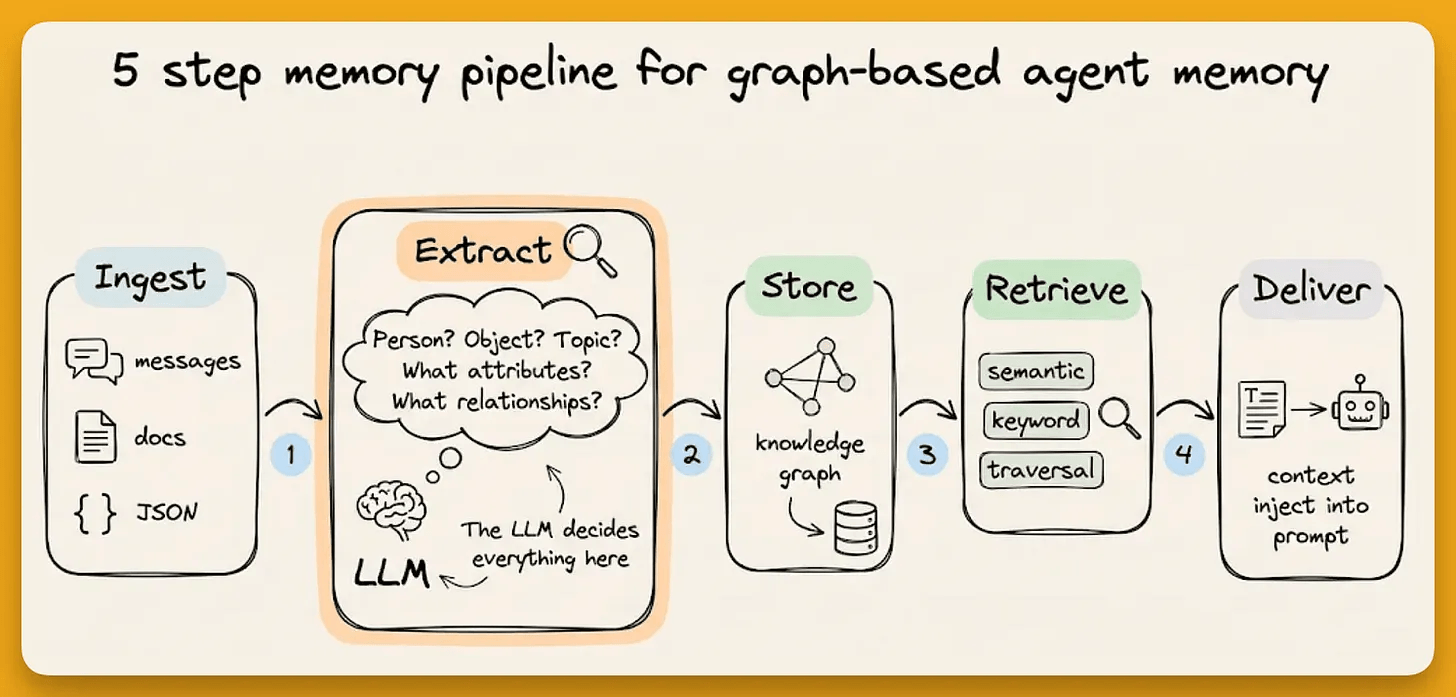
Entity extraction identifies named entities in the text and classifies them against the defined types
Entity resolution merges duplicates (”Nexus” and “the Nexus project” become one node)
Fact extraction identifies relationships and outputs them as typed edges using the source/target constraints
Fact resolution detects contradictions and invalidates outdated facts, preserving history through Graphiti’s bi-temporal model, which tracks both event time and ingestion time
Temporal extraction parses time references and maps them to validity windows on each edge
The Pydantic schema defined above guides steps 1 and 3.
Entity types tell the extractor what to look for. Edge types with their constraints tell it what relationships to classify. Resolution and temporal processing happen automatically.
Every edge also carries explicit validity intervals (t_valid, t_invalid). When information changes (”Alex moved from Project Atlas to Project Nexus”), the old fact is invalidated, not deleted.
This way, you can query what’s true now as well as reconstruct what the state would have been at any point in time.
The output in practice
We ingest a conversation where a developer named Alex discusses their work (an active web app called Nexus, their tech stack, proficiency levels):
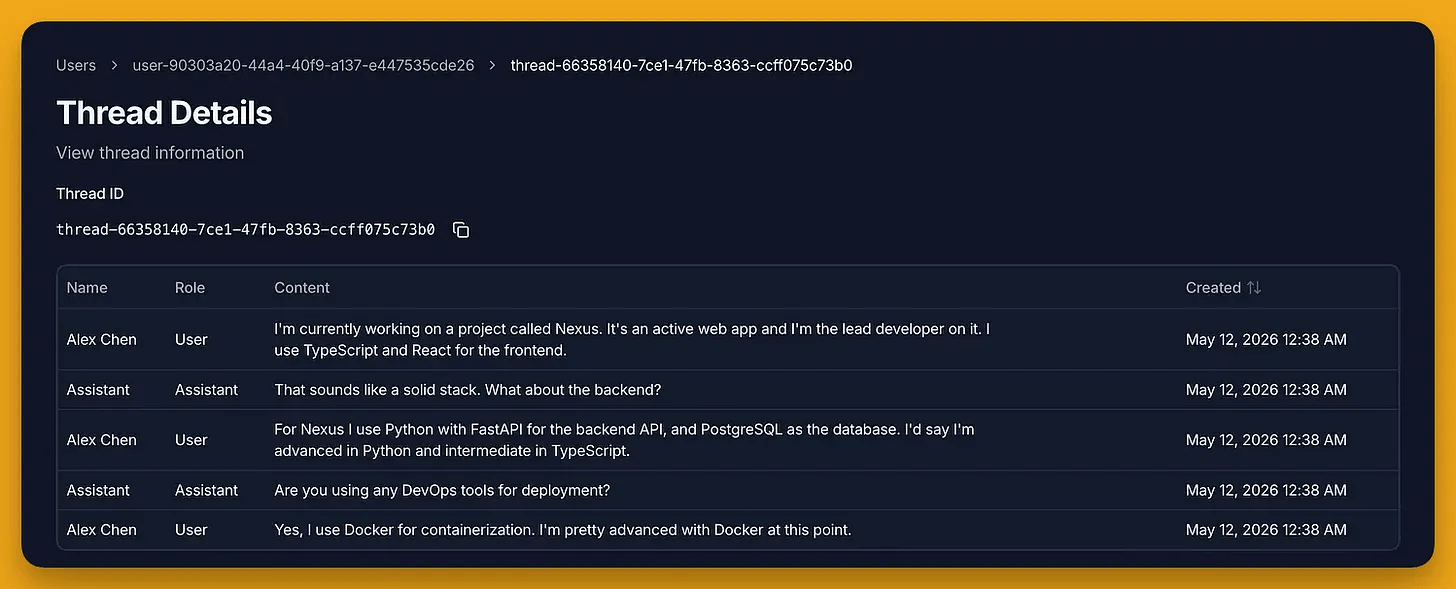
Querying for Project nodes returns Nexus with populated project_status and project_type attributes.

The node isn’t a generic “Topic” or “Object.” It’s a Project with structured fields as defined in the schema.
The edges are typed too.
WORKS_ONcarriesrole: lead developer

USES_TECHNOLOGYcarriesproficiency: advancedfor Python and Docker,proficiency: intermediatefor TypeScript.
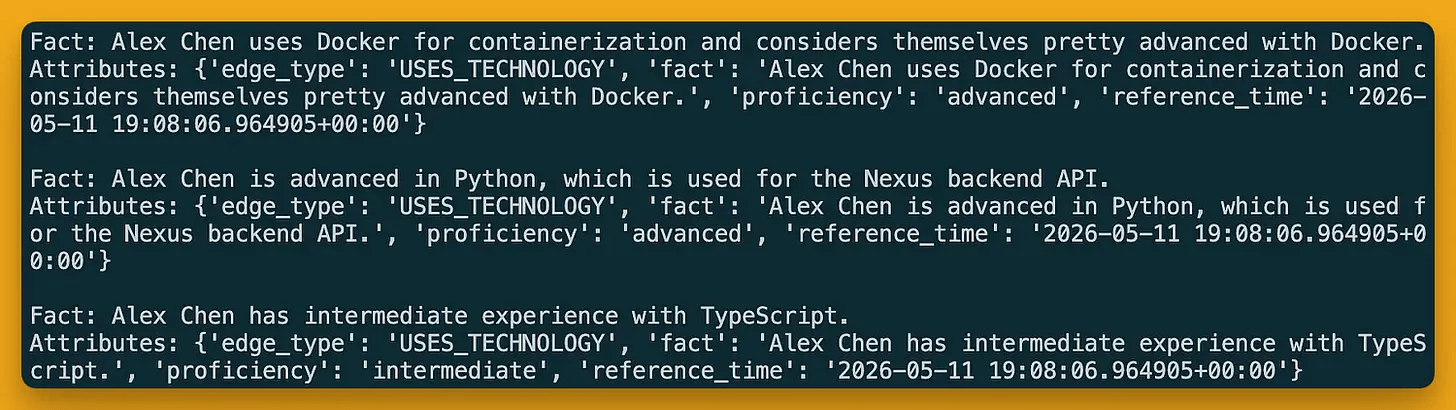
This can now filter projects by status, technologies by category, and query “which active projects use PostgreSQL” with a precise answer.
Context templates
The final piece is context templates, which assemble typed facts into a prompt-ready block.
You can define which edge types and entity types to include, and Zep formats them with temporal annotations into a single string injected into the agent’s prompt.
client.context.create_context_template(
    template_id="dev-context",
    template="""# PROJECTS
%{edges types=[WORKS_ON] limit=5}

# TECH STACK
%{edges types=[USES_TECHNOLOGY] limit=10}

# PROJECT DETAILS
%{entities types=[Project] limit=5}

# TECHNOLOGIES
%{entities types=[Technology] limit=10}""",
)
It looks like this:
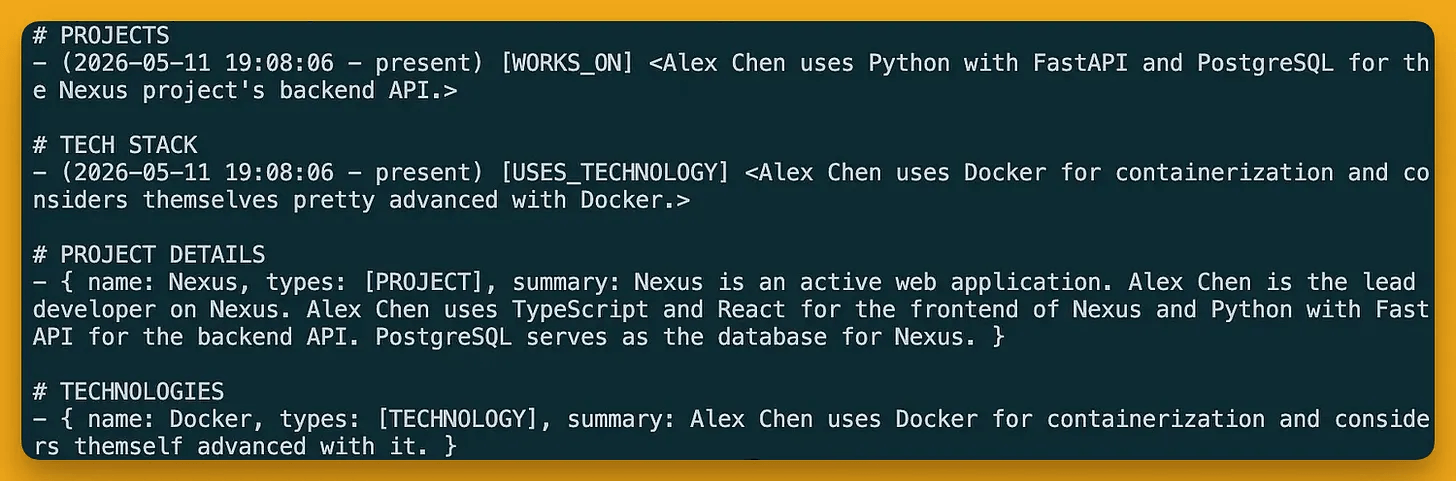
Every entry in the resulting context block is typed, temporally annotated, and carries the attributes defined. Save the template once, reference it by ID in agent calls.
The 10/10/10 constraint and schema as a reasoning boundary
Zep enforces a hard limit of 10 custom entity types, 10 custom edge types, and 10 fields per type.
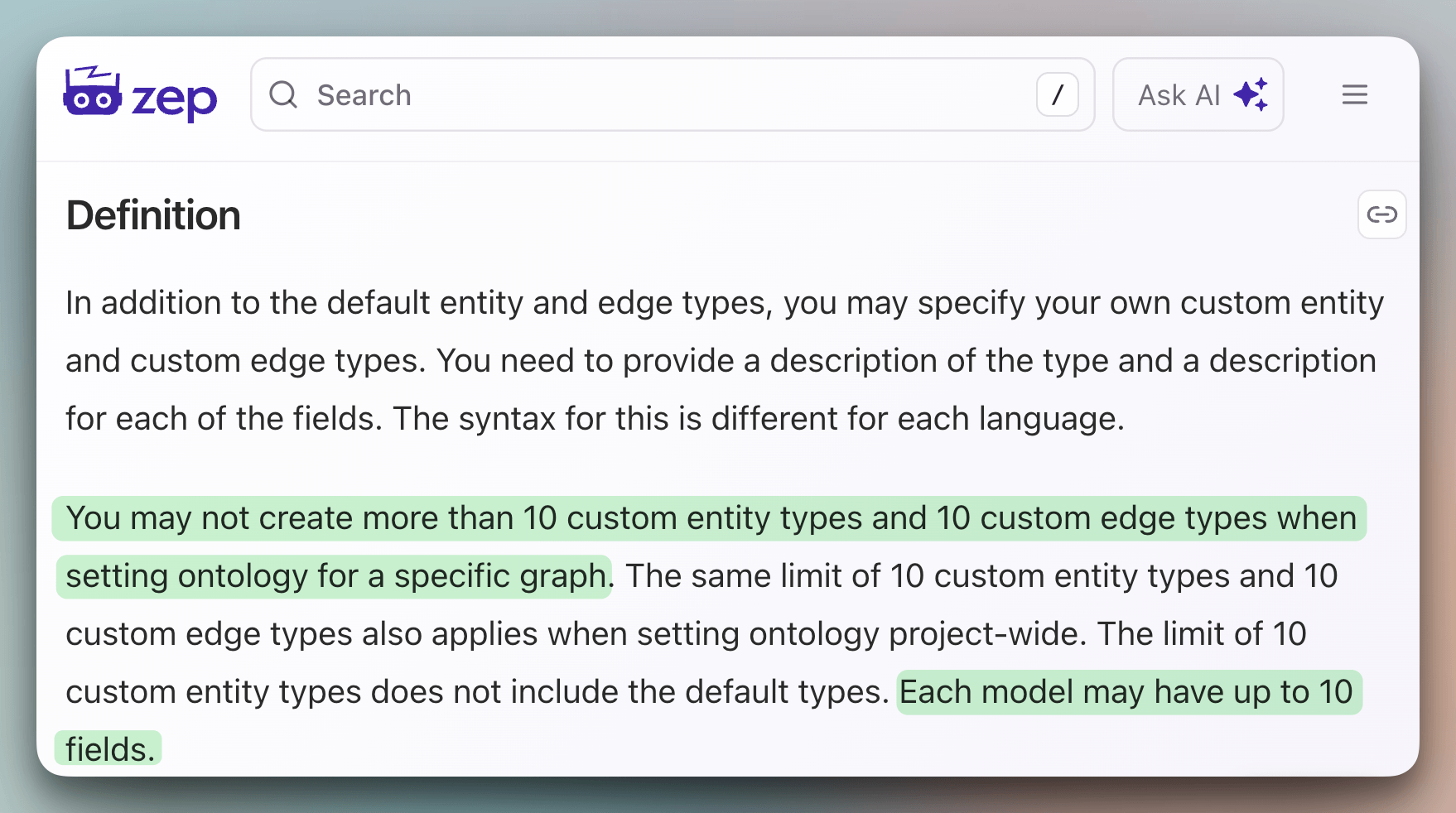
That’s intentional to force a dev to think about what matters in a domain rather than modeling everything.
The source/target constraints also act as guardrails on what an agent is allowed to remember. If a schema doesn’t include an edge type connecting Project to Competitor, the extraction model won’t create that relationship, even if a conversation mentions both.
The schema defines the space of valid memories.
This is the same principle behind typed function calling, where we constrain the LLM’s output space so that it can’t produce invalid arguments. Memory schemas apply that same constraint to what the agent stores.
Start with 3-4 entity types and 3-4 edge types that capture 80% of your domain logic, and add complexity incrementally.
Agent memory without schema discipline is a graph that behaves like a vector store.
In a way, you pay the cost of graph construction without getting the benefit of structured retrieval.
The schema is how you get that benefit back, and the fact that it’s Pydantic means there’s nothing new to learn.
You can find Zep’s GitHub repo here → (don’t forget to star 🌟)
👉 Over to you: have you defined a custom ontology for your agent’s memory, or are you letting the LLM decide the structure on its own?
Thanks for reading!