

vLLM still hasn’t solved this:
We served an embedder, reranker, entity extractor, and generator concurrently on just one GPU through a single inference server.
The server processed 2,700 requests with 32 requests in flight and zero failures.
vLLM supports several inference tasks, but each server instance still runs one model and one task. This pipeline would require separate instances, task-specific endpoints, and another layer to route requests between them.
SIE handled the entire pipeline through one server. It loaded models when requested, kept active models resident, and evicted them when GPU memory was needed.
The same system can serve embedding, reranking, extraction, OCR, and generation workloads.
GitHub repo: github.com/superlinked/sie
(don’t forget to star it ⭐)
We recently used the same architecture with five specialized models on one GPU and explained how dynamic loading, shared GPU memory, and compute-aware batching make it work.
Read the full walkthrough here →
Build a Jev-powered Agentic RAG
Agentic RAG systems have two problems that prompt tuning alone cannot solve.
The first is knowing when retrieved evidence is insufficient. The second is acting on that decision.
Decision models, like Jev, address the first problem.
Instead of generating text, they return structured judgments, such as relevance scores or probabilities that a passage contains the answer. The application uses these judgments to generate a response or escalate the question to a human.
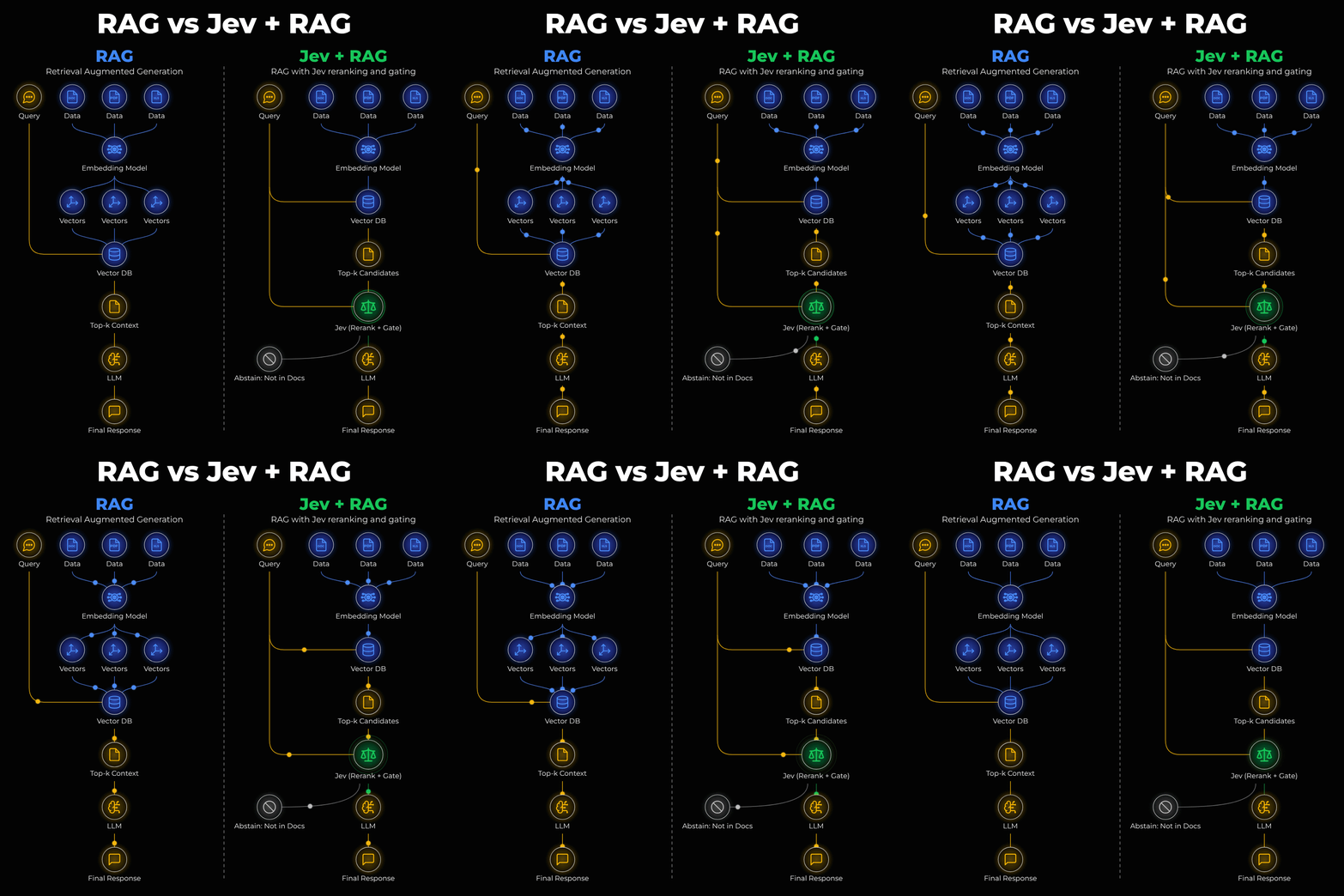
Multimodal RAG adds another challenge here. Evidence may lie within images as well as text, so the system must retrieve and evaluate both.
Building this system also means connecting multiple services and coordinating what happens when the evidence is insufficient.
InsForge (open-source) provides the entire backend for that work.
It brings Postgres with pgvector, authentication, storage, edge functions, real-time updates, email, and a model gateway into one place.
So today, we’ll use it to connect model decisions to application logic and human review.
We’ll build a support desk with a customer-facing chat and a dashboard for support representatives.
The system will retrieve relevant documents, check whether they contain enough evidence to answer, and either generate a response or send the question for human review.
We’ll use four components:
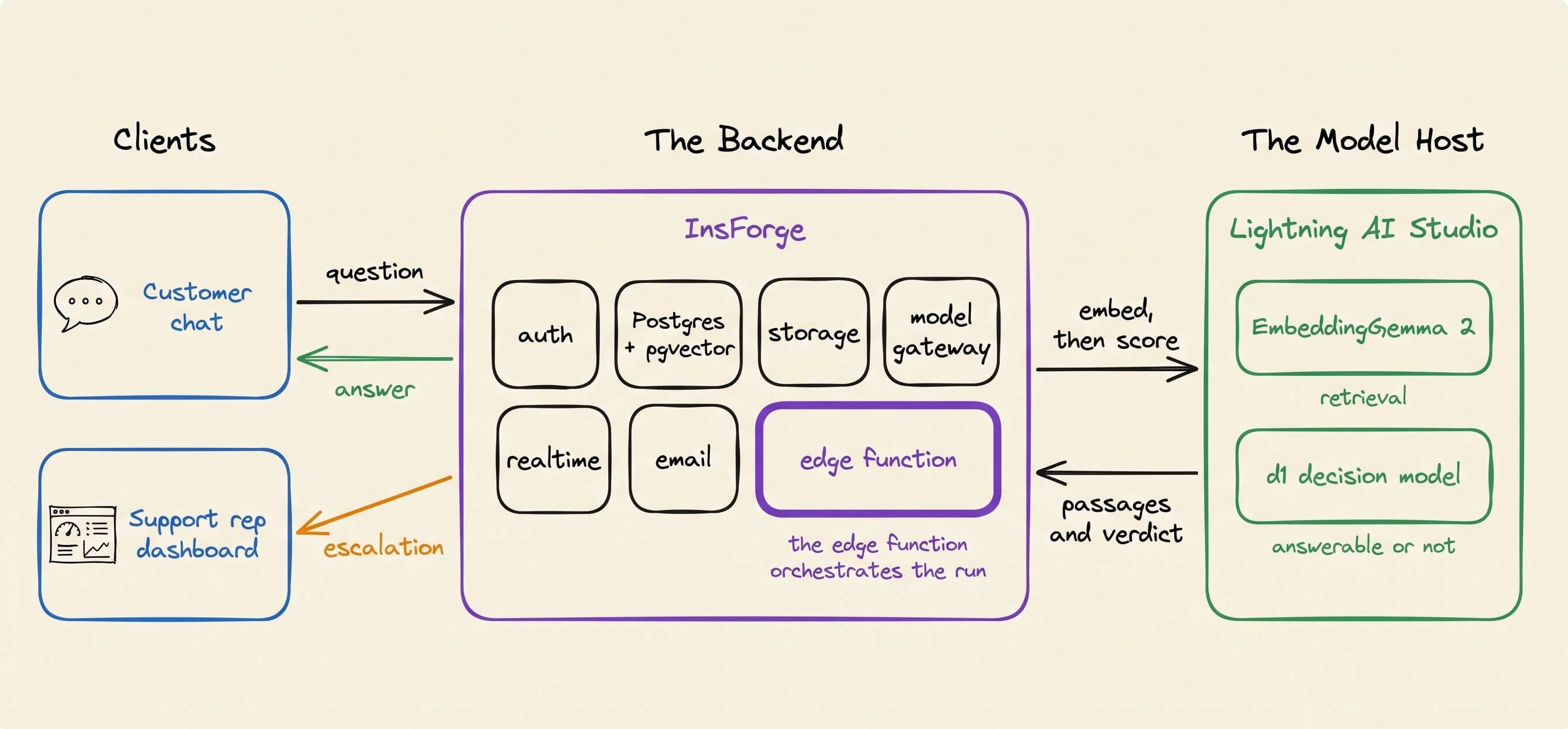
InsForge for the backend, database, auth, and human-review workflow
EmbeddingGemma 2 multimodal embeddings for retrieving text and images
Liquid AI’s d1 family of open-weight decision models to score passages and assess answerability
Lightning AI Studio to host the embedding & decision models.
The goal is an agentic RAG system that can assess evidence, decide what to do, and carry out that decision.
Step 1: Set up Claude Code with InsForge
InsForge (open-source) provides the database, auth, storage, compute, hosting, and model gateway. We’ll use Claude Code with InsForge’s skills and CLI to set up the backend.
Install the skills:
npx skills add insforge/insforge-skills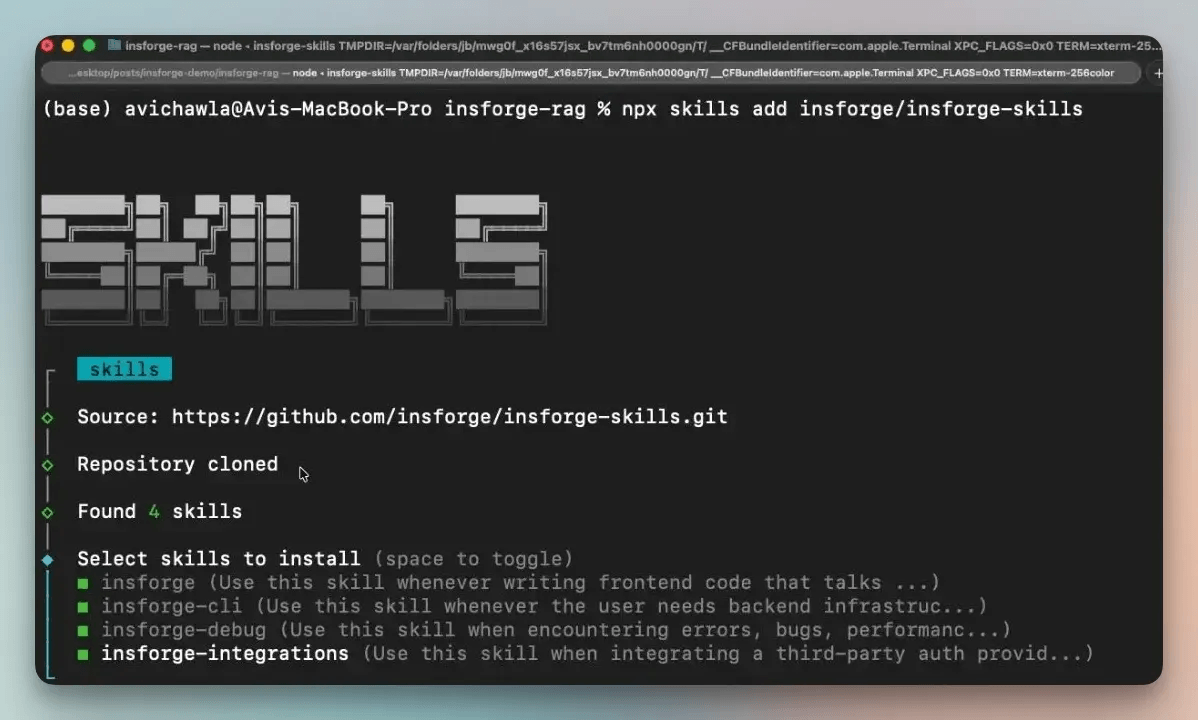
The package installs four skills.
insforgefor SDK patternsinsforge-clifor infrastructure commandsinsforge-debugfor diagnosing failuresinsforge-integrationsfor third-party authentication providers
Next, authenticate the CLI and link the project.
npx -y @insforge/cli login --user-api-key <your-api-key>
npx -y @insforge/cli link --project-id <project-id>
Linking also creates an AGENTS.md file with instructions for Claude Code to consult the InsForge skills instead of guessing API patterns. From here, Claude Code can configure the backend and build the app.
Step 2: Serve the models on Lightning AI
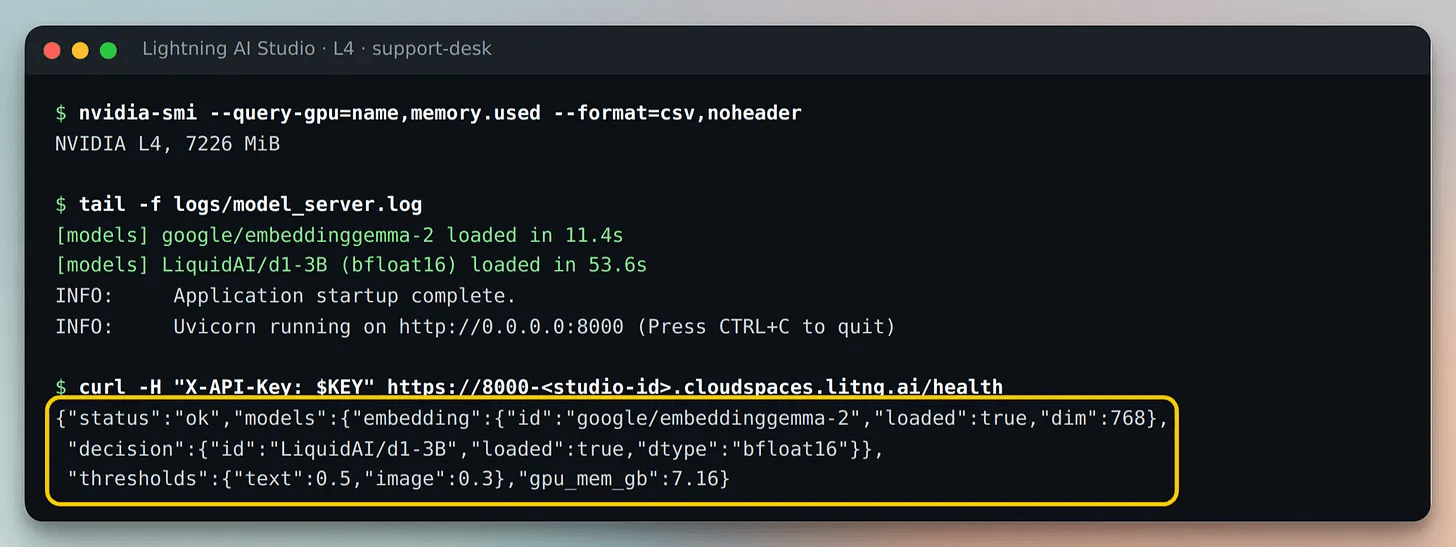
InsForge handles the backend, but the embedding and decision models need their own compute. So we serve them through a FastAPI server in Lightning AI Studio, and the backend calls it through a public URL and an API key.
The server exposes endpoints for embedding queries, reranking candidates, and indexing documents.
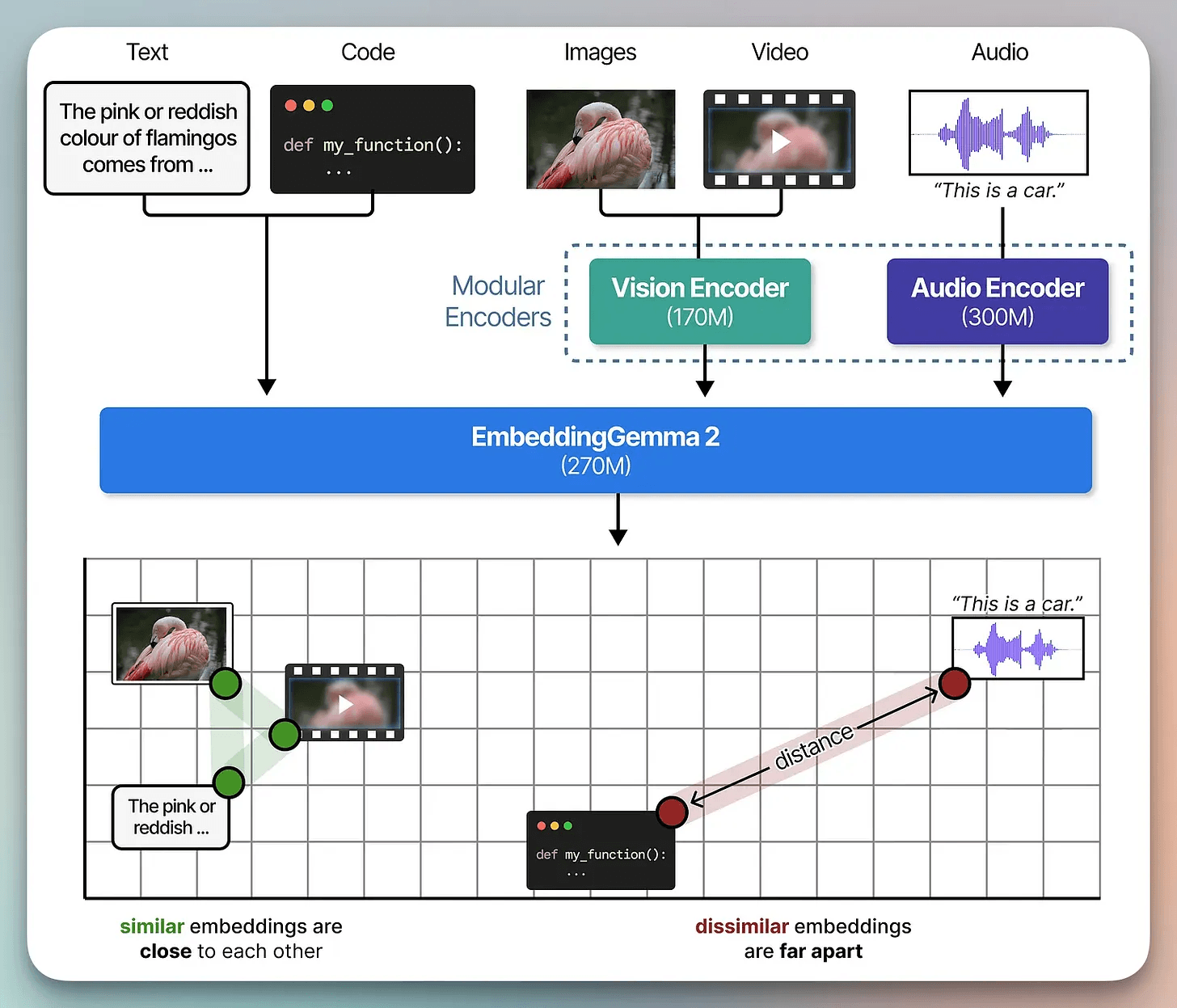
EmbeddingGemma 2 for multimodal search
EmbeddingGemma 2 maps text and images into the same 768-dimensional space, which enables cross-modal search. So, a text question can retrieve a PDF page whose answer sits in a diagram or screenshot.
Decision model for reranking and answerability
Decision models handle structured judgments rather than generating free-form text.
TypeSafe AI’s Jev is one example where it takes a state plus one or more typed questions and returns structured answers:
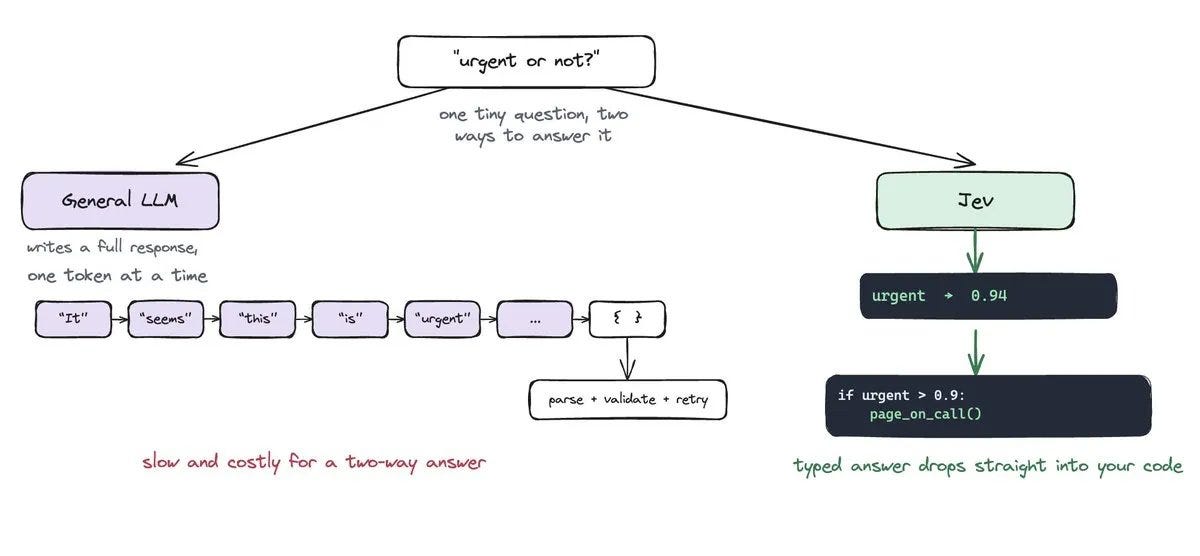
Choice selects one option from a defined set.
Score places the state on an ordered scale.
Noul returns the probability that a yes-or-no statement is true.
We use Liquid AI’s open-weight decision model d1-3B, which processes text and images. It first reranks retrieved pages by relevance, and then checks whether they contain enough evidence before anything reaches the generation model.
Both models fit on a single NVIDIA L4 and use about 7.2 GB of GPU memory.
Step 3: Build the backend
The support desk needs more than a vector database. It needs data isolation, private document storage, and a way to index both text and images.
First, ask Claude Code to configure the InsForge backend.
Set up the InsForge backend for a multi-company support desk: tables for
documents, chunks (768-dim vectors), conversations, tickets and a decision
log, all scoped to a company with RLS. Add private storage buckets and store
the model server URL and API key as secrets.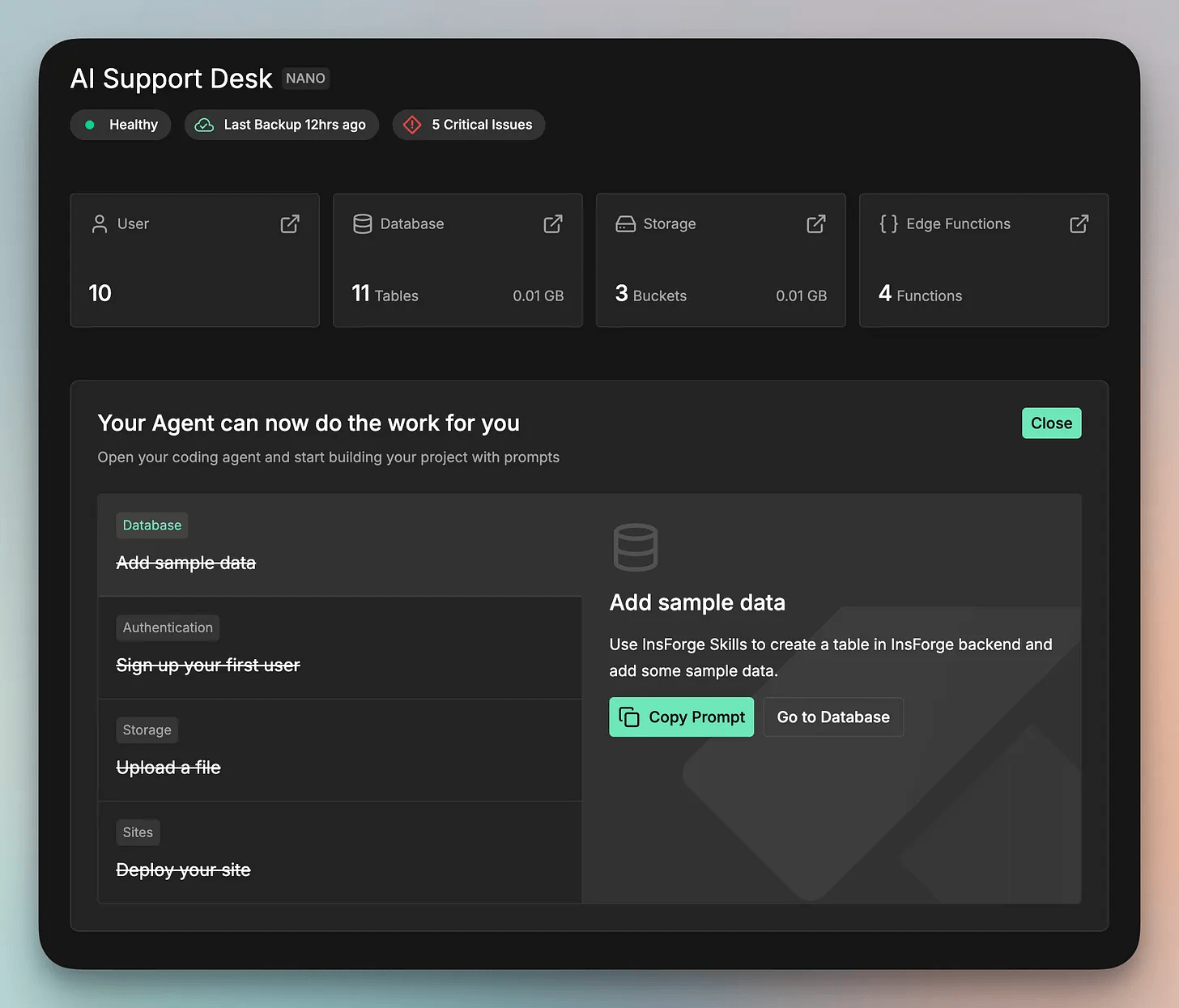
Index each document as text and images
Next, we’ll build the document-indexing pipeline.
When an admin uploads a PDF or DOCX, store it in InsForge storage and
index it on the model server: each page's text chunks and a rendered image
of the whole page, both tagged with the page number. Show progress live
in the dashboard.
The pipeline splits extracted text into chunks of about 220 words and renders each page as a PNG. It embeds both and stores them with the document and page numbers.
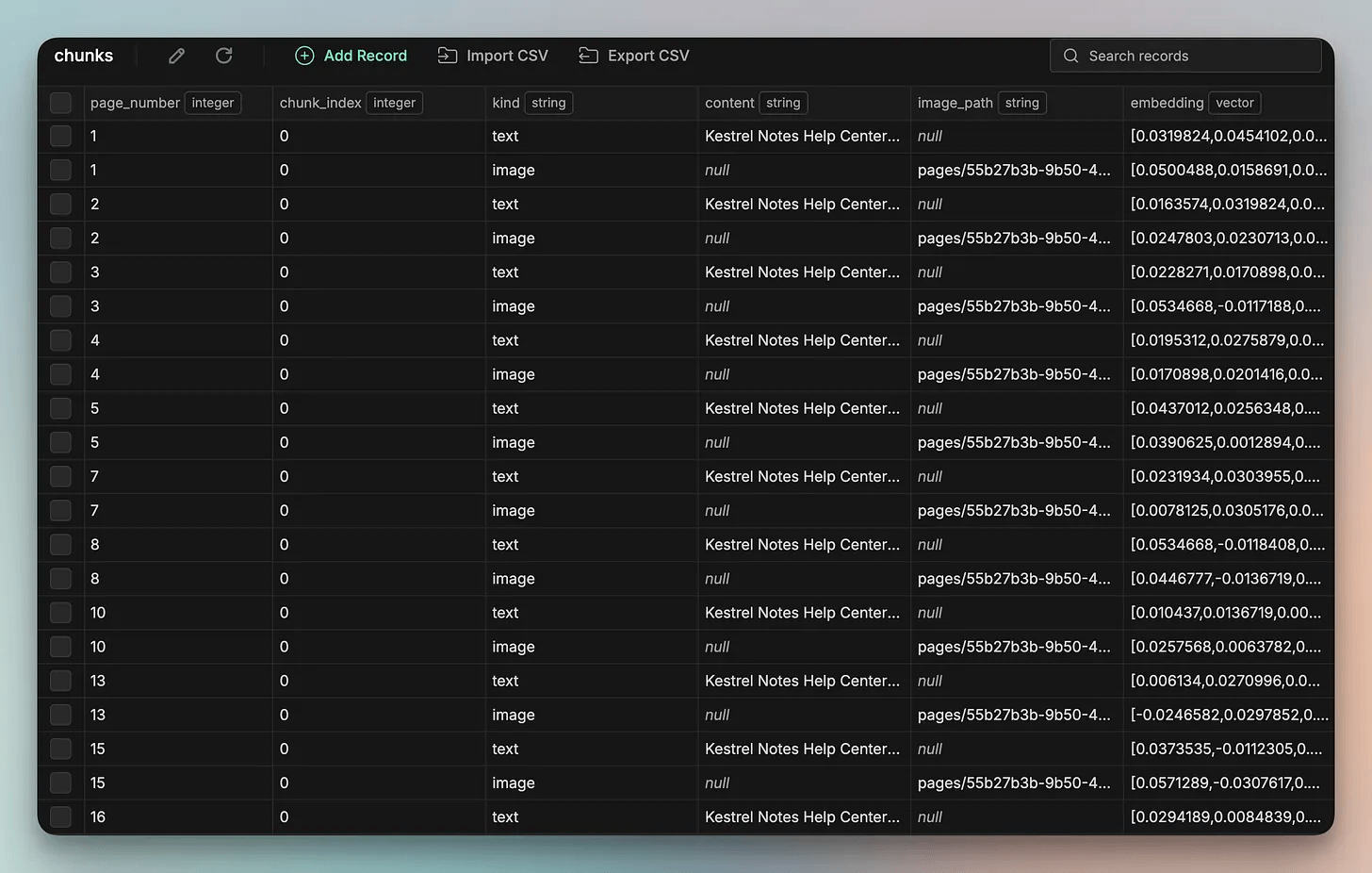
A text query can therefore retrieve either a passage or a full page containing a diagram. We index full pages instead of individual figures because diagrams are often vector drawings, and pulling them out can lose captions and context.
Track indexing progress
An InsForge edge function checks the uploader’s permissions, creates an indexing job, and hands it off to background processing. As each page finishes, the backend sends a real-time update to the dashboard.
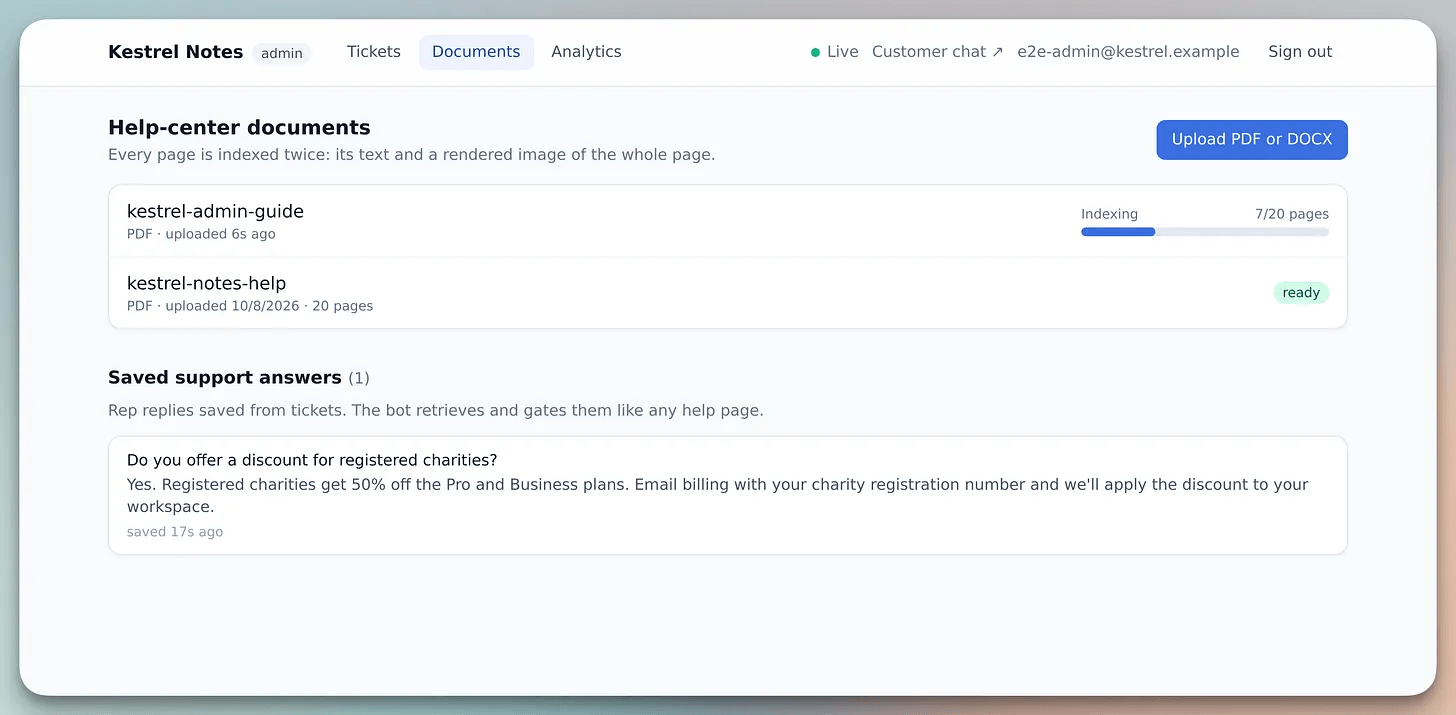
A 20-page help PDF indexes in about 27 seconds.
Step 4: Add a decision gate to RAG
Once documents are indexed, the next step is deciding whether the retrieved evidence is enough to answer.
The query pipeline brings retrieval and the decision model together in an InsForge edge function.
Create an edge function for customer questions. Embed the question and any
screenshot, search text chunks and page images separately, and send the
candidates to /rerank. If nothing clears the threshold, retry once with a
wider search, then open a ticket instead of calling the LLM. Log every
decision.
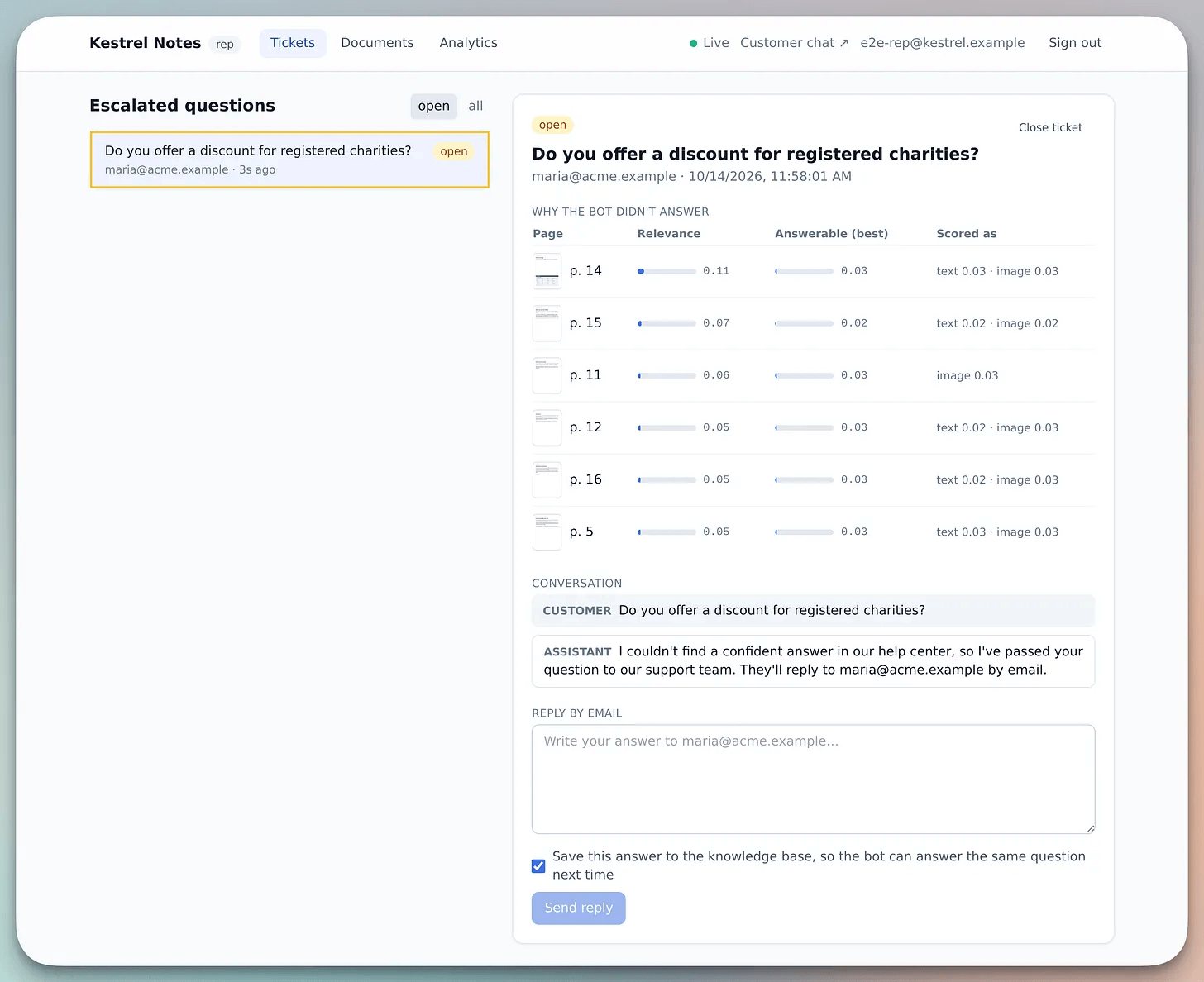
When a customer asks a question, the InsForge edge Function embeds it, along with any attached screenshot. It then runs two searches over the company’s documents, one across text chunks and one across page images.
Results from the same page are merged and sent to the model server’s /rerank endpoint.
Liquid AI’s d1-3B scores each candidate for relevance and answerability. The text and image thresholds are separate and stored in a database table, so you can tune them without code changes.
If no candidate passes, the pipeline retries with a wider search. If the evidence still falls short, it opens a support ticket instead of calling the generation model.
Step 5: Connect answers to human review
Next, we generate answers from the retrieved evidence:
When candidates pass the gate, send the surviving text and page images to a
vision model through the InsForge Model Gateway, and return an answer that
cites page numbers.
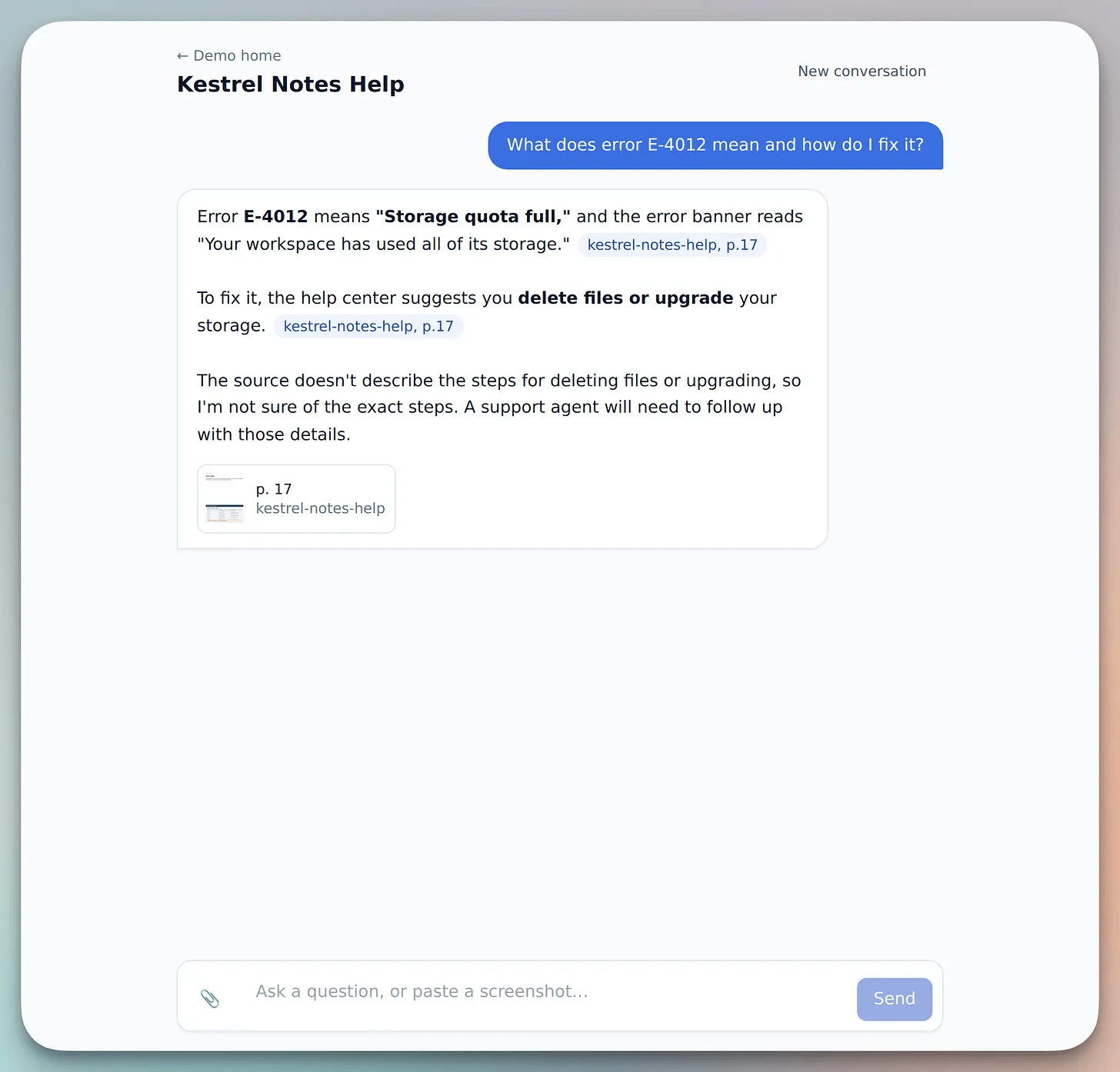
The gateway is configured to use anthropic/claude-haiku-5.5. The model answers only from the supplied evidence and cites the sources. The model ID is stored as a secret, making it easy to switch models by changing one value.
For example, the error code E-4012 in this screenshot appears on page 17. The answer returns to the customer with citations and page thumbnails.
When the system cannot answer
Questions that fail the gate become tickets.
A database trigger publishes each new ticket to the company’s real-time channel, so it appears on the dashboard.
Build a dashboard where reps see new tickets in real time, with the question
and the rejected candidates. When a rep replies, email the customer, and let
the rep save the reply as knowledge. Deploy the frontend to InsForge.
The representative sees the customer’s question alongside the rejected pages and their scores. They can then write a reply and send it to the customer by email, which is useful when the customer has already left the chat.
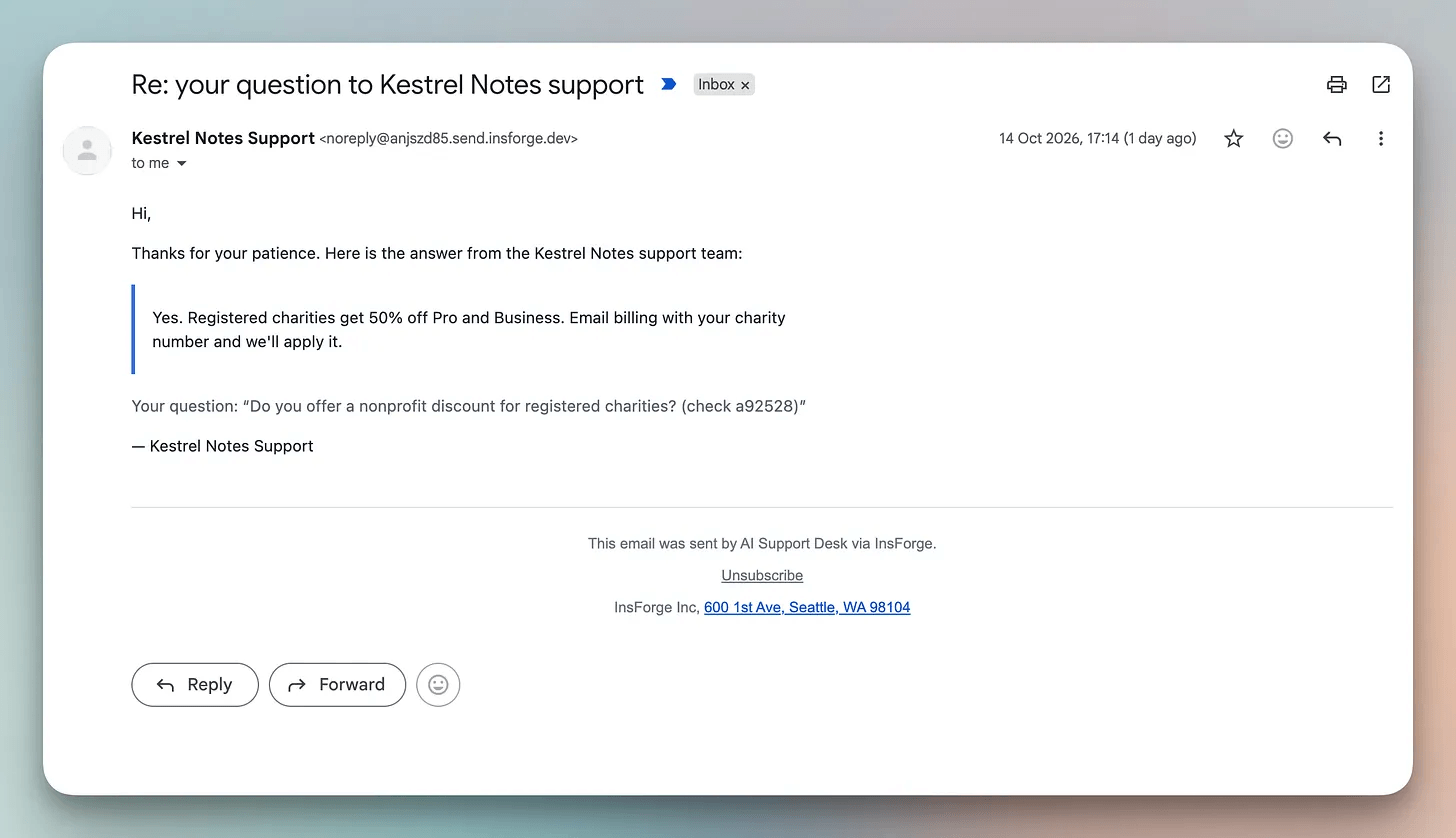
Save to knowledge base embeds the question and the rep’s reply as a new chunk. The next time a similar question comes in, retrieval can find that answer.
Finally, deploy the frontend through the InsForge CLI.
npx -y @insforge/cli deployments deploy webThat completes the full build.
The system answers when the evidence is sufficient, escalates when it isn’t, and human replies improve retrieval for next time.
Final evaluation
We ran three RAG pipelines on the same candidate set, using 75 labelled questions across four cases:
Answerable from text
Answerable only from screenshots
Questions that include a screenshot
Should be escalated
The following table summarizes the results:
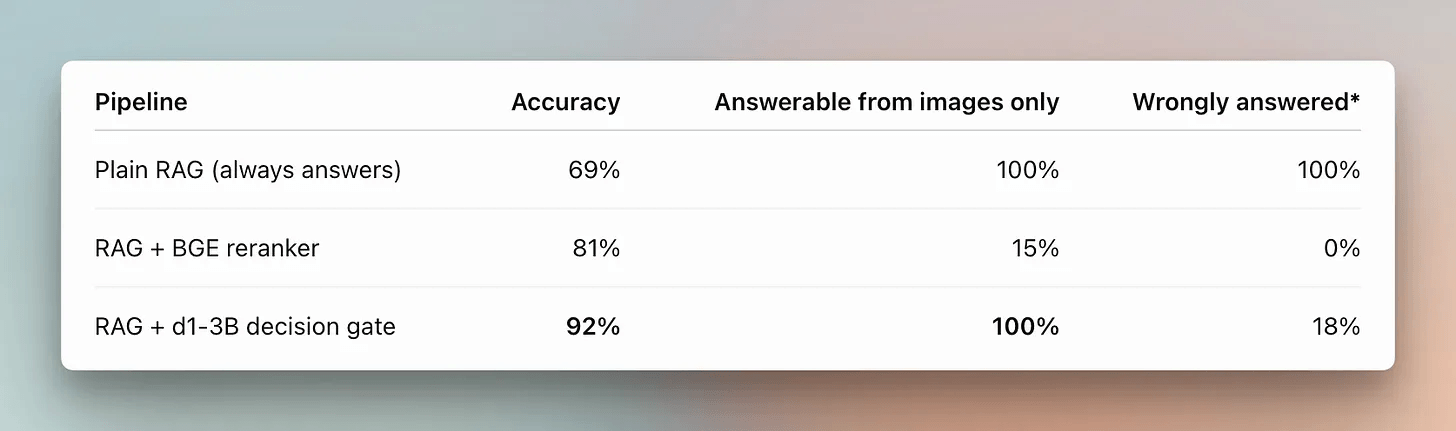
The decision gate had the highest accuracy, and it was the only pipeline that held full performance on image-only questions.
The BGE reranker avoided wrong answers but struggled with image-based questions, escalating most of them.
The takeaway is that a decision model can do more than rank passages. It can also judge whether the evidence supports an answer, even when that evidence is visual.
Retrieval, answerability checks, and response generation are only part of the app.
The core challenge is handling questions the docs can’t answer, routing them to a human, notifying the support team, and keeping the workflow connected.
We built the app in a single Claude Code session using prompts, with InsForge’s skills and CLI handling the backend setup.
Starting from an empty project, it became a support desk that answers from the docs when there’s enough evidence and hands unanswered questions to a person.
You can find InsForge on GitHub here →
Here are the InsForge skills →
👉 Over to you: what does your RAG system do when the docs don’t have the answer?
Good day!