

In today’s newsletter:
vLLM closed this feature request as “not planned”
[Hands-on] Build a real-time hotel booking voice agent.
Where does all the VRAM go during LLM inference?
vLLM closed this feature request as “not planned”:
Devs have requested running several small models on one GPU through a single inference server since 2023.
Workloads require serving two to five small models on the same GPU because none of them generates enough traffic to justify a dedicated GPU.
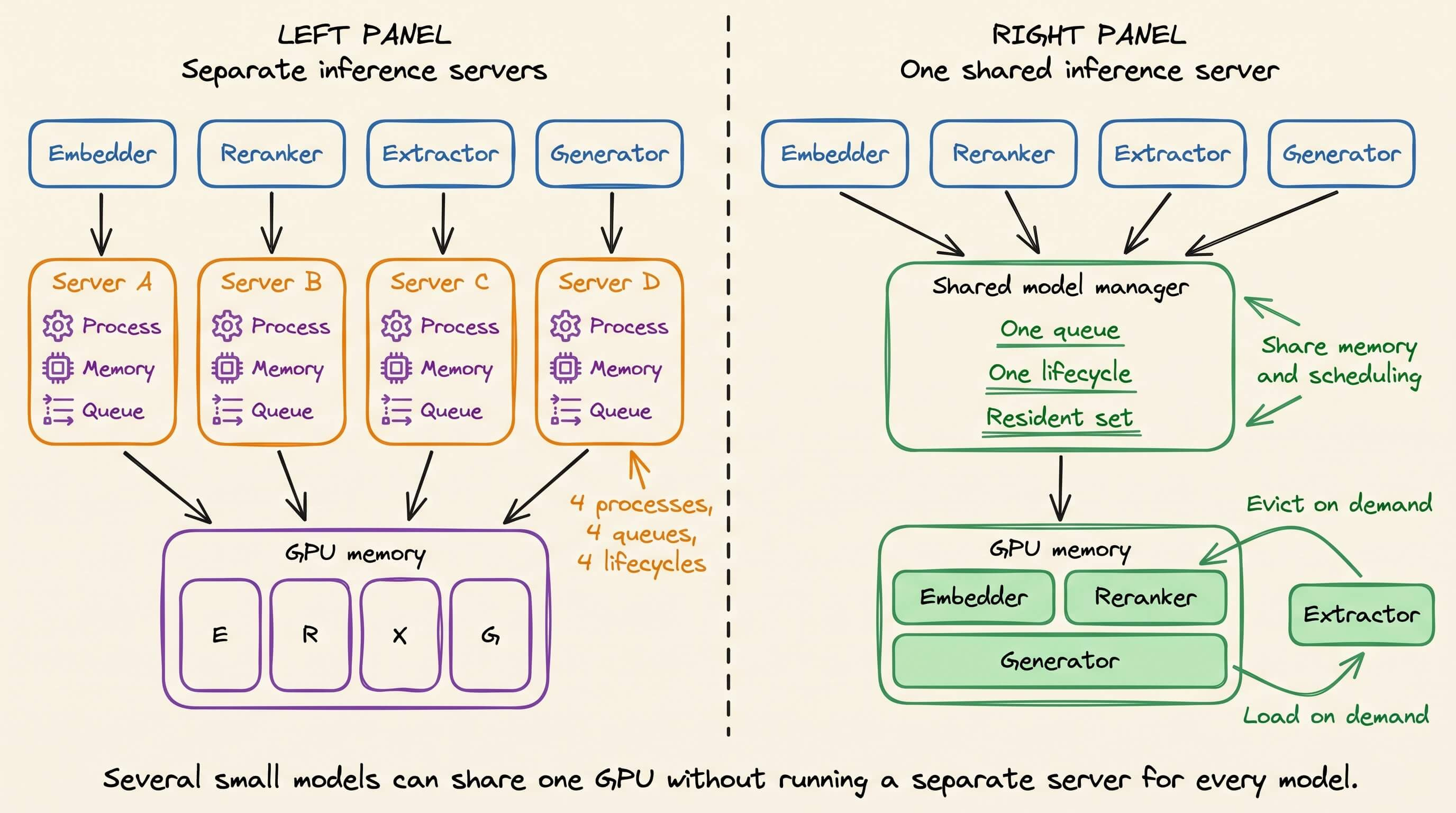
The documented workaround is to run a separate vLLM instance for every model and add another layer to route requests between them.
That gives each model its own process, memory allocation, request queue, and lifecycle.
We tested the alternative with an embedder, reranker, entity extractor, and generator running as one agent pipeline on a single GPU.
SIE kept all four behind one inference server. It loaded models on demand, kept active models resident, and evicted the least-recently-used model when GPU memory was needed.
Running the four models directly took 18.58 seconds in the concurrent test, including model loading. With the models already served behind SIE, the same four workloads completed in 1.47 seconds.
GitHub Repo: github.com/superlinked/sie
(don’t forget to star it ⭐)
Build a real-time hotel booking voice agent
Voice agents often look convincing until they need to capture a name, date, or booking reference from a noisy call. One wrong token reaches the LLM, and the rest of the pipeline produces a polished response to the wrong request.
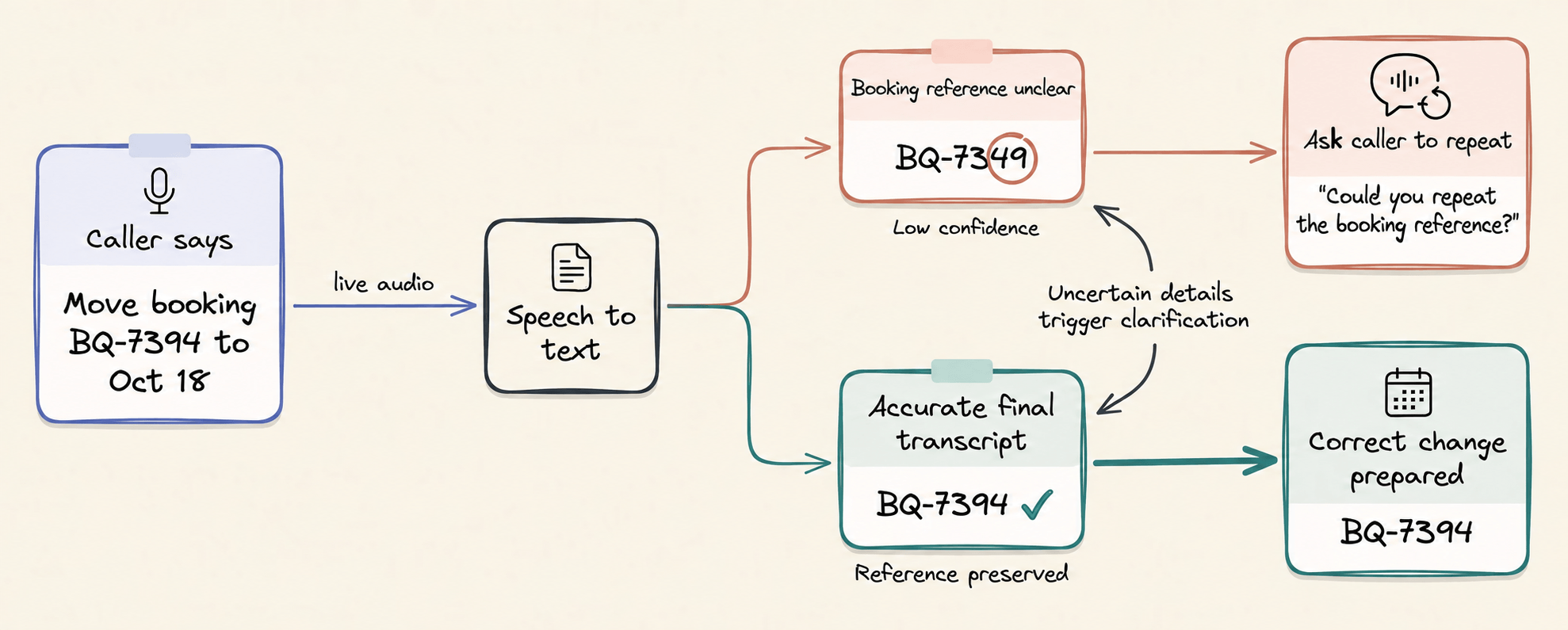
So we built a hotel booking agent that exposes the speech layer while the conversation is running. It shows partial transcripts, final turns, and the delay between a final transcript and the agent speaking.
Let’s walk through the pipeline and build it with Speechmatics Linden, LiveKit, OpenRouter, Fish Audio, and Streamlit.
The workflow
The browser publishes microphone audio to a LiveKit room. Speechmatics Linden converts that stream into partial and final transcripts, OpenRouter sends the final turn to the selected LLM, and Fish Audio streams the response back into the room.
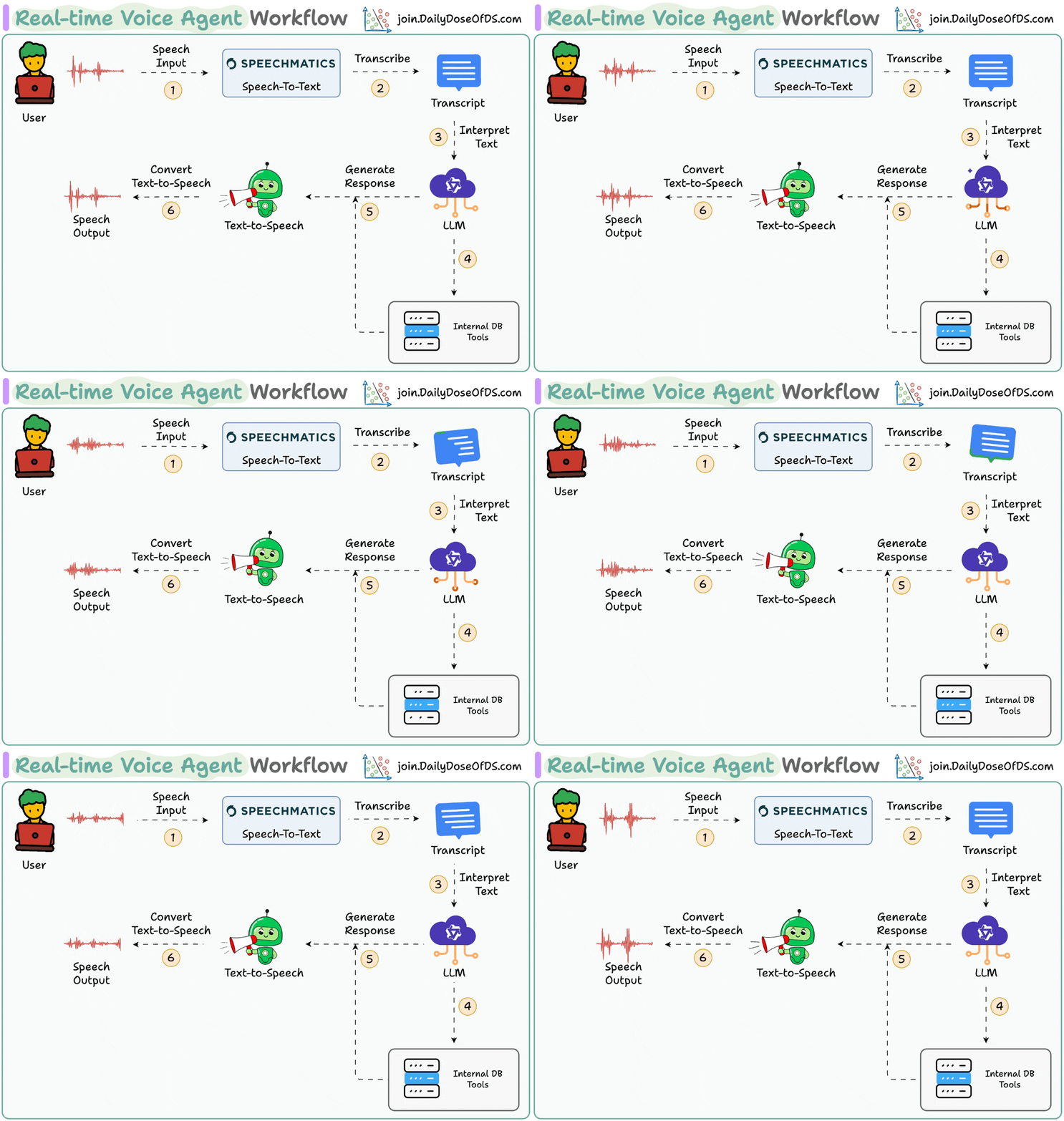
This separation matters because speech-to-text, reasoning, and speech generation remain replaceable components. LiveKit handles the real-time room, media tracks, turn detection, and provider routing.
Add the API keys
This implementation needs one LiveKit project and one OpenRouter key:
# .env file

LIVEKIT_URL=wss://your-project.livekit.cloud
LIVEKIT_API_KEY=...
LIVEKIT_API_SECRET=...
OPENROUTER_API_KEY=...
OPENROUTER_MODEL=openai/gpt-4.1-mini
You can get these credentials from LiveKit Cloud.
Create or select a project, open Project Settings → Keys, and copy the project WebSocket URL, API key, and API secret into LIVEKIT_URL, LIVEKIT_API_KEY, and LIVEKIT_API_SECRET.
There is no separate Speechmatics or Fish Audio key in this setup. Both models run through LiveKit Inference, which handles authentication, routing, usage reporting, and billing through the LiveKit project.
Configure the speech-to-response pipeline
LiveKit’s AgentSession connects the three model providers. Partials stay enabled so the interface can display evolving text before Speechmatics commits the final turn.
session = AgentSession(
    stt=inference.STT(
        model=”speechmatics/linden-1”,
        language=”en”,
        extra_kwargs={”enable_partials”: True},
    ),

    llm=openai.LLM(
        model=os.getenv(”OPENROUTER_MODEL”),
        api_key=os.getenv(”OPENROUTER_API_KEY”),
        base_url=”https://openrouter.ai/api/v1”,
    ),
    tts=inference.TTS(model=”fishaudio/s2.1-pro”),
)
The agent prompt limits each spoken reply to three sentences and asks only for missing reservation fields. It also preserves corrections, which lets a caller change October 16 to October 18 without restarting the request.
INSTRUCTIONS = “”“

Ask only for missing booking details.
Repeat names, dates, and references exactly.
When the caller corrects a detail, keep the corrected value.
Never claim the real booking system was changed.
Keep each spoken response under three sentences.
“”“
Make latency visible
The app records when speech starts, when the final transcript arrives, and when the agent begins speaking. These events are published to the browser on a LiveKit data topic and rendered beside the transcript.
@session.on(”agent_state_changed”)

def on_agent_state_changed(event):

    latency_ms = round(
        (time.perf_counter() - clock.final_transcript_at) * 1000
    )
    publish(”agent_state”, final_to_speech_ms=latency_ms)
Speech → finalincludes the caller’s speaking time, so it isn’t a provider benchmark.Final → voicecovers LLM generation and the start of text-to-speech, which is the delay the caller notices after completing a turn.
That’s it!
The video below shows the full demo in action, where we have also wrapped this up in a nice Streamlit interface:
Why Speechmatics?
Linden was built for voice agents rather than offline transcription. Speechmatics targets strong accents, non-native speech, noisy audio, and alphanumeric strings across 55+ languages, all cases where a hotel reference or guest name can fail.
Its ForceEndOfUtterance flow can return a final transcript in roughly 250 ms after the client signals that a turn has ended. LiveKit handles that turn boundary in this demo, while the Streamlit interface makes the complete application delay measurable instead of presenting the STT number as end-to-end latency.
The finished agent can hear a booking change, retain a mid-sentence correction, and answer through the same browser session.
Speechmatics voice-agent details →
LiveKit Inference integration →
👉 Over to you: Which real-world voice workflow should we test next?
Thanks to Speechmatics for working with us on this issue.
Where does all the VRAM go during LLM inference?
Loading the model is only one part of the memory consumed.
Once inference begins, GPU memory is divided across several components. Some remain relatively stable, while others grow with context length, batch size, and concurrency.
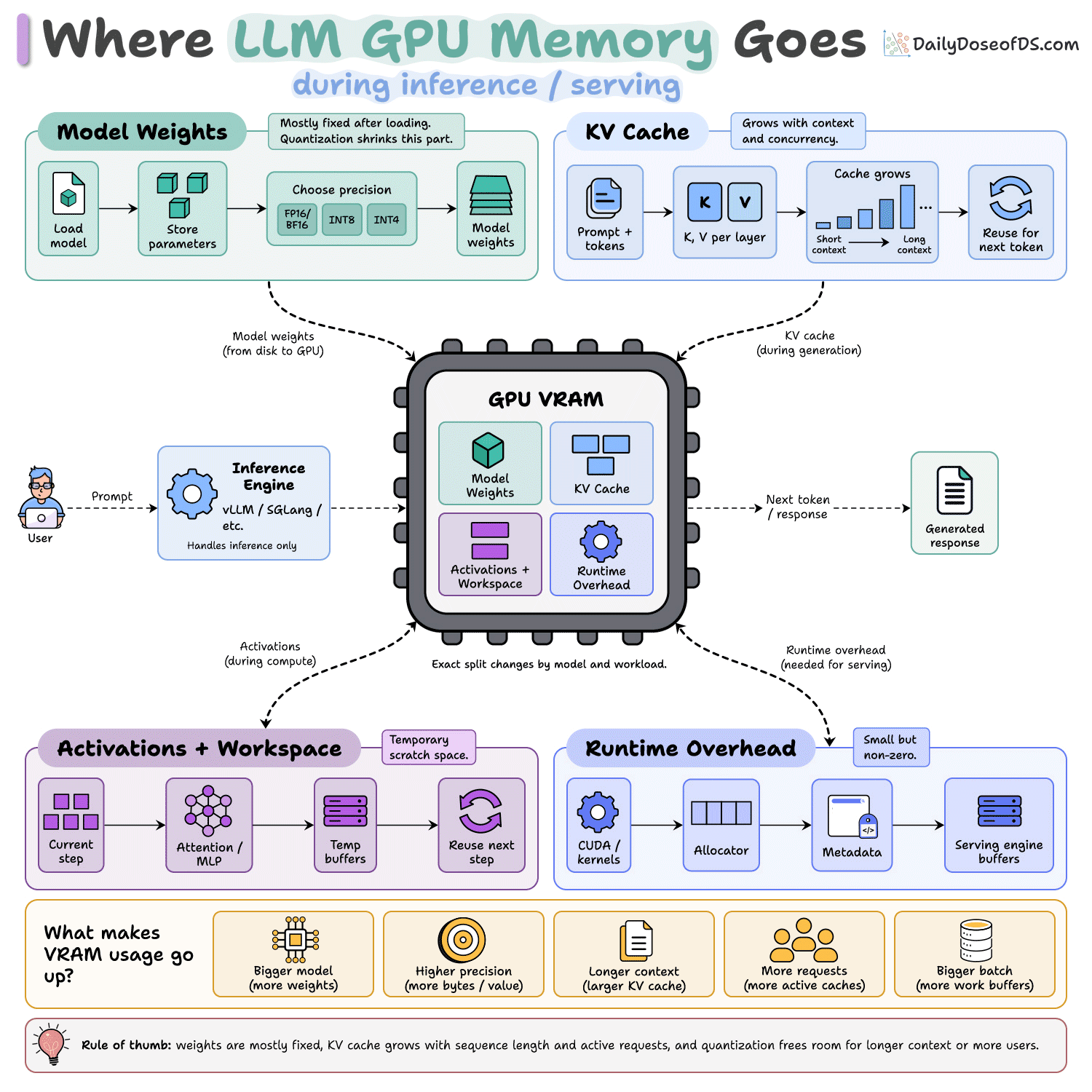
Model weights are the mostly fixed part. Once the model is loaded, their memory footprint stays roughly constant.
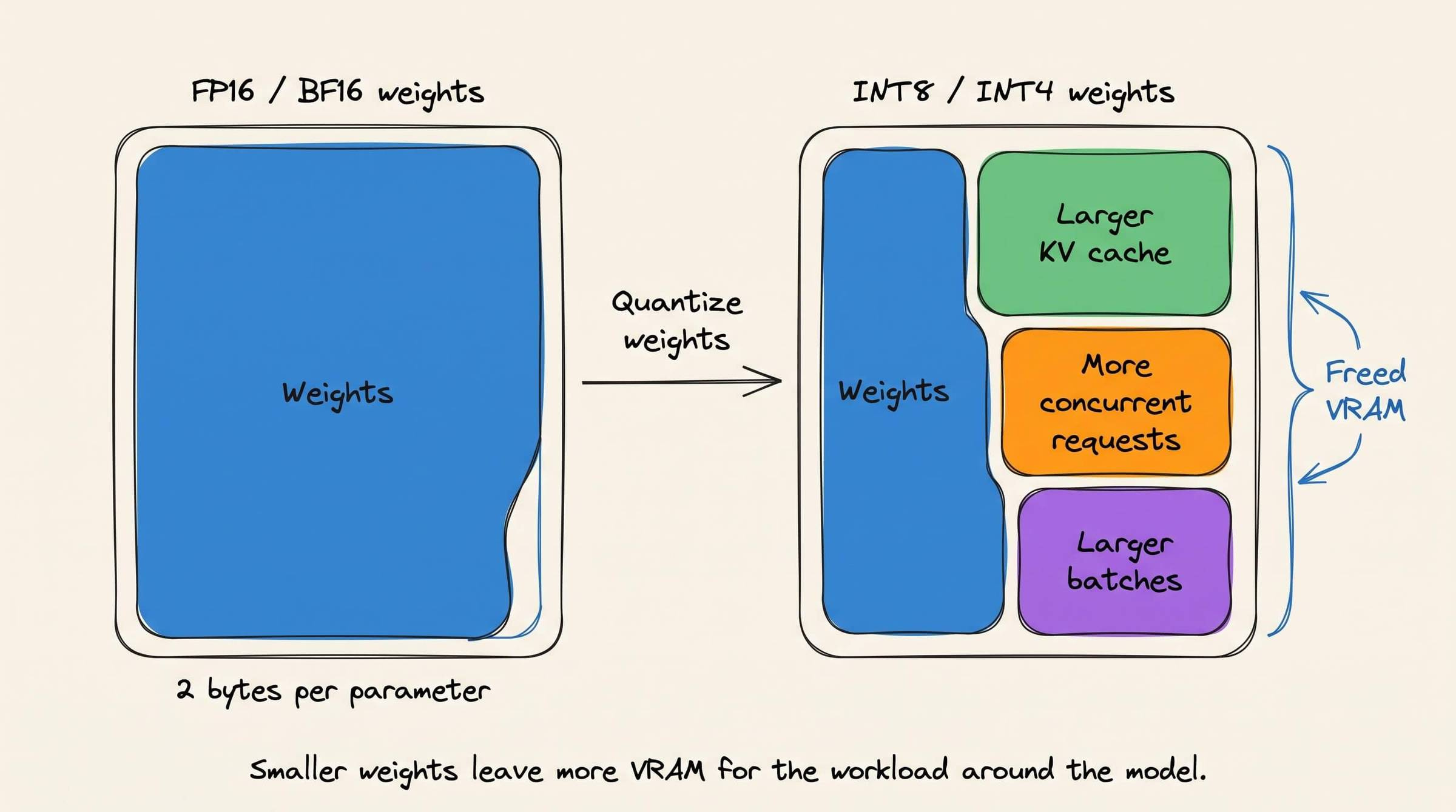
The main lever is precision. FP16 and BF16 weights use two bytes per parameter, while INT8 and INT4 representations require fewer bytes, although implementations may add scales, metadata, and other quantization overhead.
The KV cache behaves differently. It grows as the model processes more tokens.
For each previous token, attention layers retain key and value tensors so later decoding steps can reuse them. Longer sequences create larger caches, and every concurrent request needs cache space for its own active sequence.
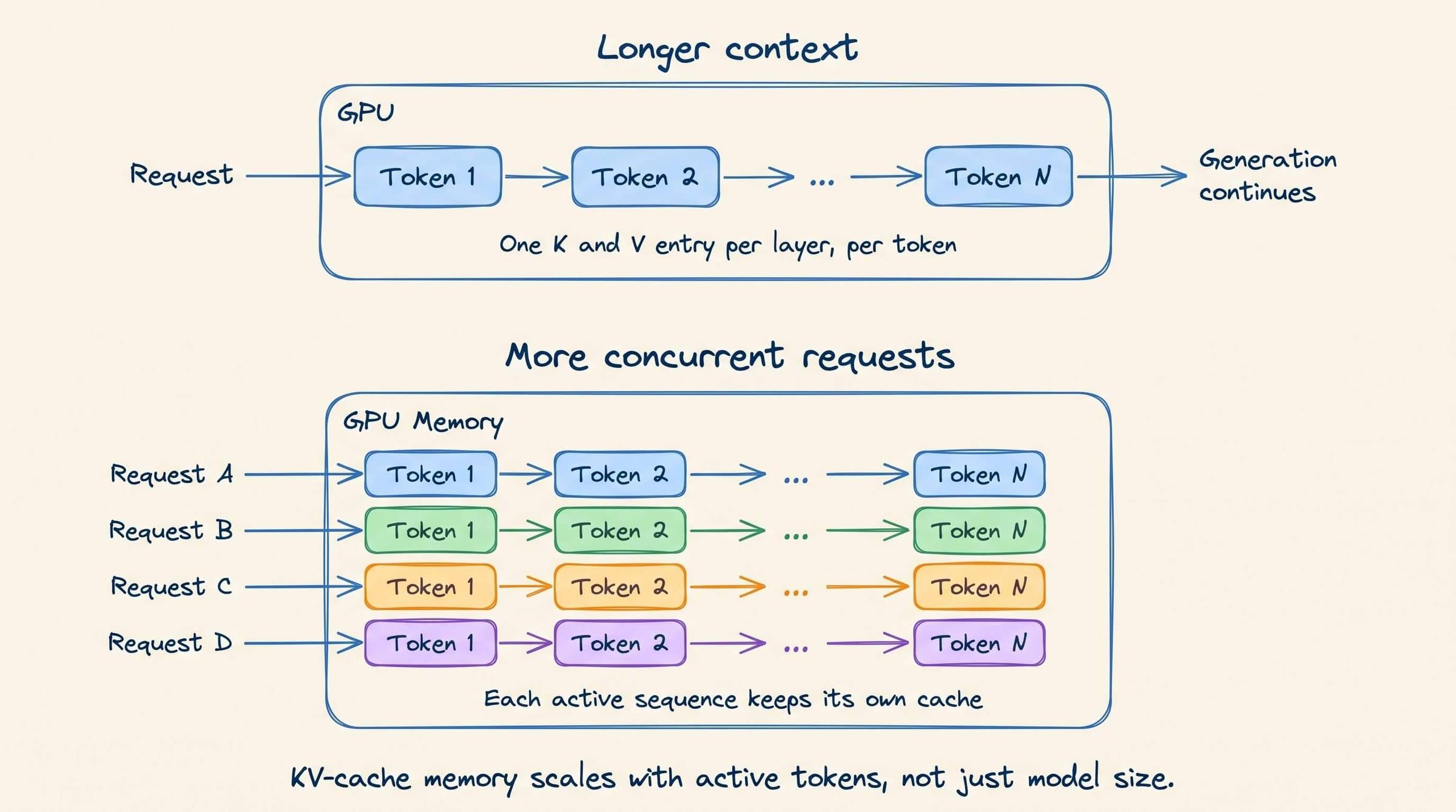
Activations and workspace memory hold intermediate values used by attention operations, MLP layers, and GPU kernels.
Serving engines reuse much of this memory between inference steps, but the required capacity still changes with sequence length, batch size, and the kernels selected by the runtime.
Runtime overhead covers everything around the model itself, including CUDA contexts, memory allocators, metadata, communication buffers, and serving-engine data structures.
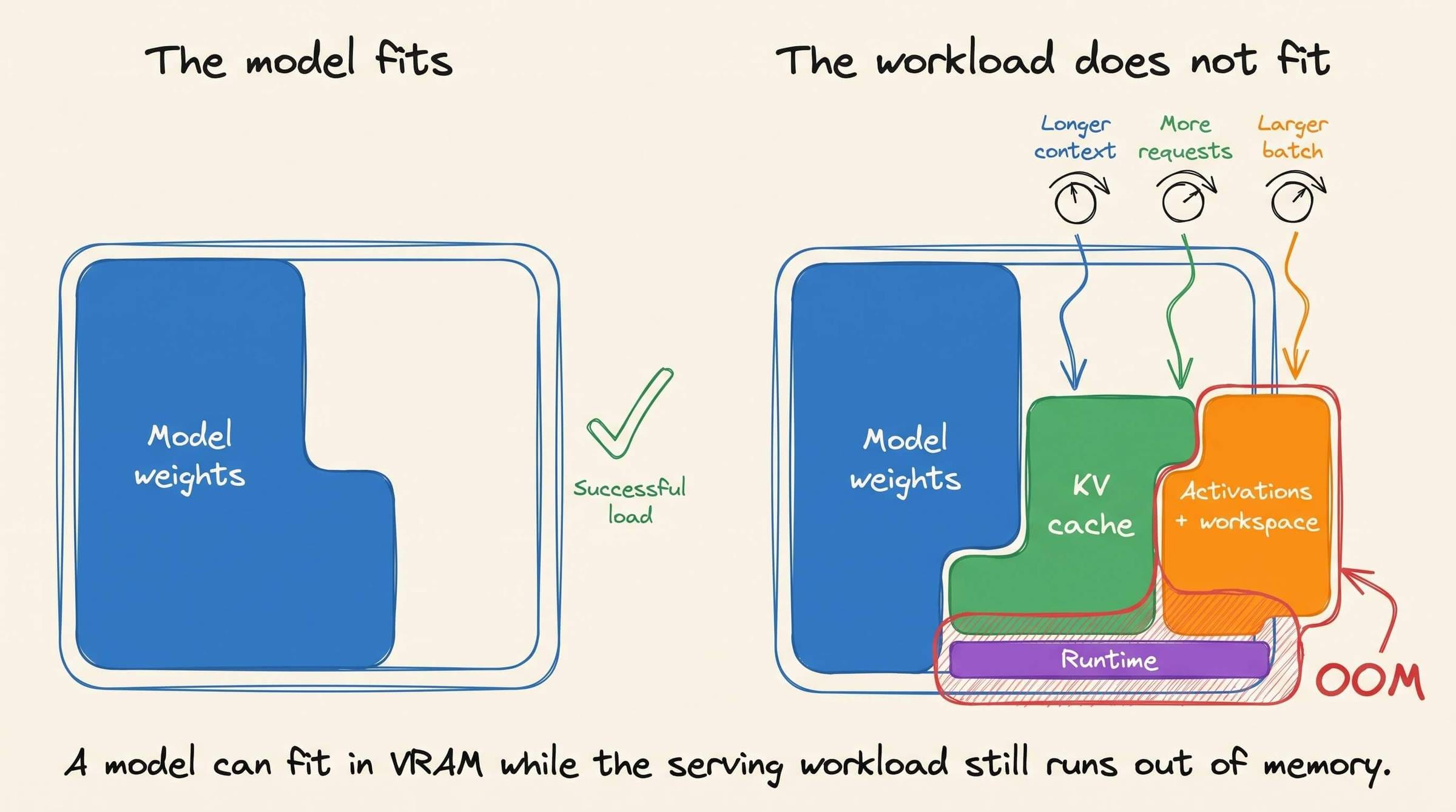
This portion is usually smaller than the weights or KV cache, but it is never zero.
This is why “the model fits on the GPU” and “the workload fits on the GPU” are different statements.
A model may load comfortably and still run out of memory when the context window grows, more users generate concurrently, or the server increases its batch size.
Quantization therefore helps with more than fitting a larger model.
Shrinking the weights leaves VRAM for larger KV caches, more concurrent requests, or larger batches. It does not shrink those components directly. It simply gives them more room.
The same idea applies to GPU performance.
Arithmetic throughput matters, but inference also depends on which data occupies memory, how often the GPU moves it, and whether kernels can reuse it before reading from high-bandwidth memory again.
A GPU with idle compute units may still be waiting for weights, KV-cache entries, or activations to arrive.
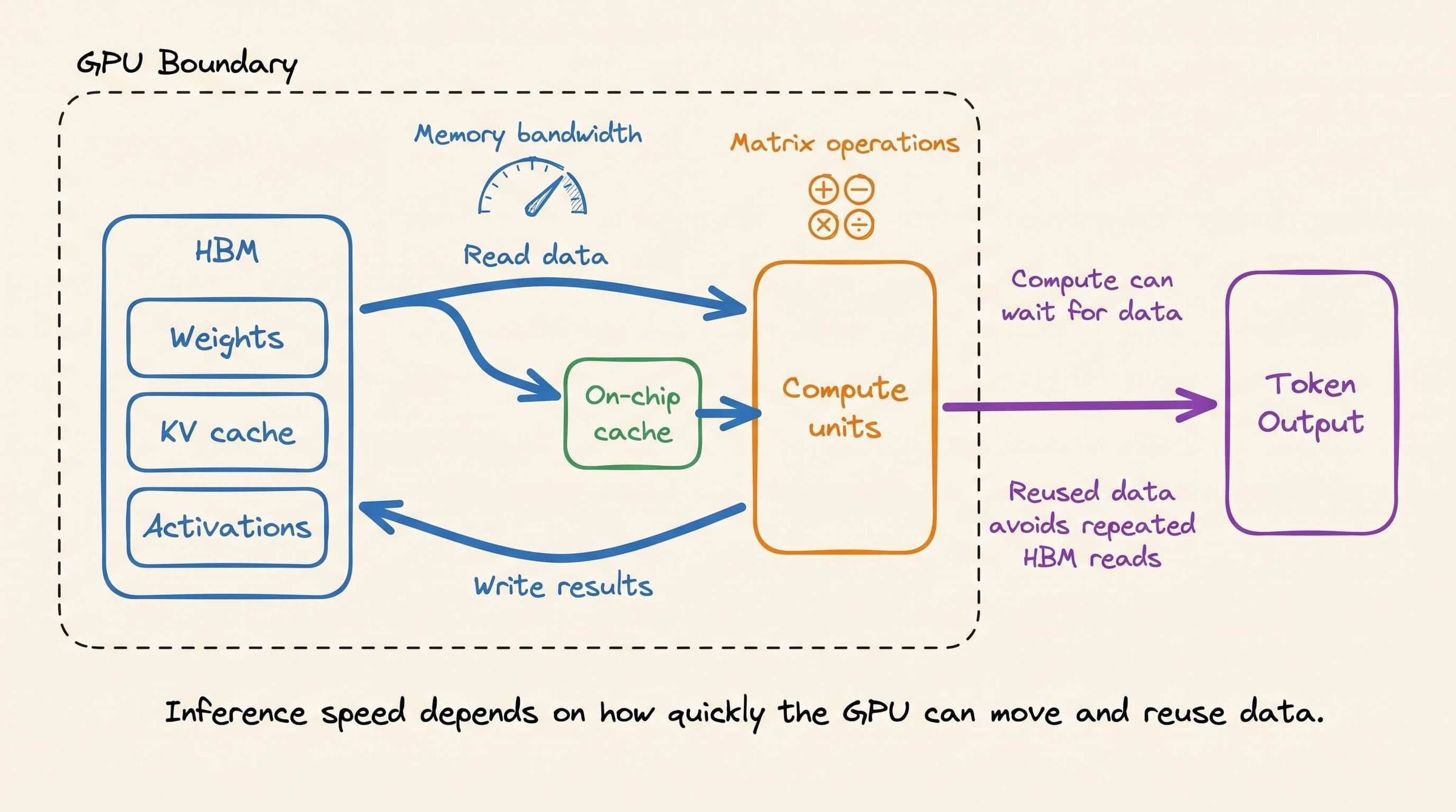
We wrote a full breakdown of how GPUs work and why memory movement is central to LLM inference performance.
Good day!
The vLLM thread you mentioned is the real story hiding in this newsletter. Voice agents for something like hotel booking rarely need one big model doing everything, they need a small model for intent classification, a bigger one for the actual reasoning, and maybe a third for entity extraction. Serving all three efficiently on shared GPU memory is exactly the gap that's been sitting unresolved since 2023, and it's why so many teams end up running separate inference servers per model, which kills unit economics fast.