

From idea to running app, without touching a cloud dashboard
The standard path from “I have a thing to run” to “it’s running and accessible” involves provisioning a VPS, configuring SSH keys, opening firewall ports, setting up a reverse proxy, and wiring HTTPS manually.
For a side project or internal tool, that overhead often exceeds the work itself.
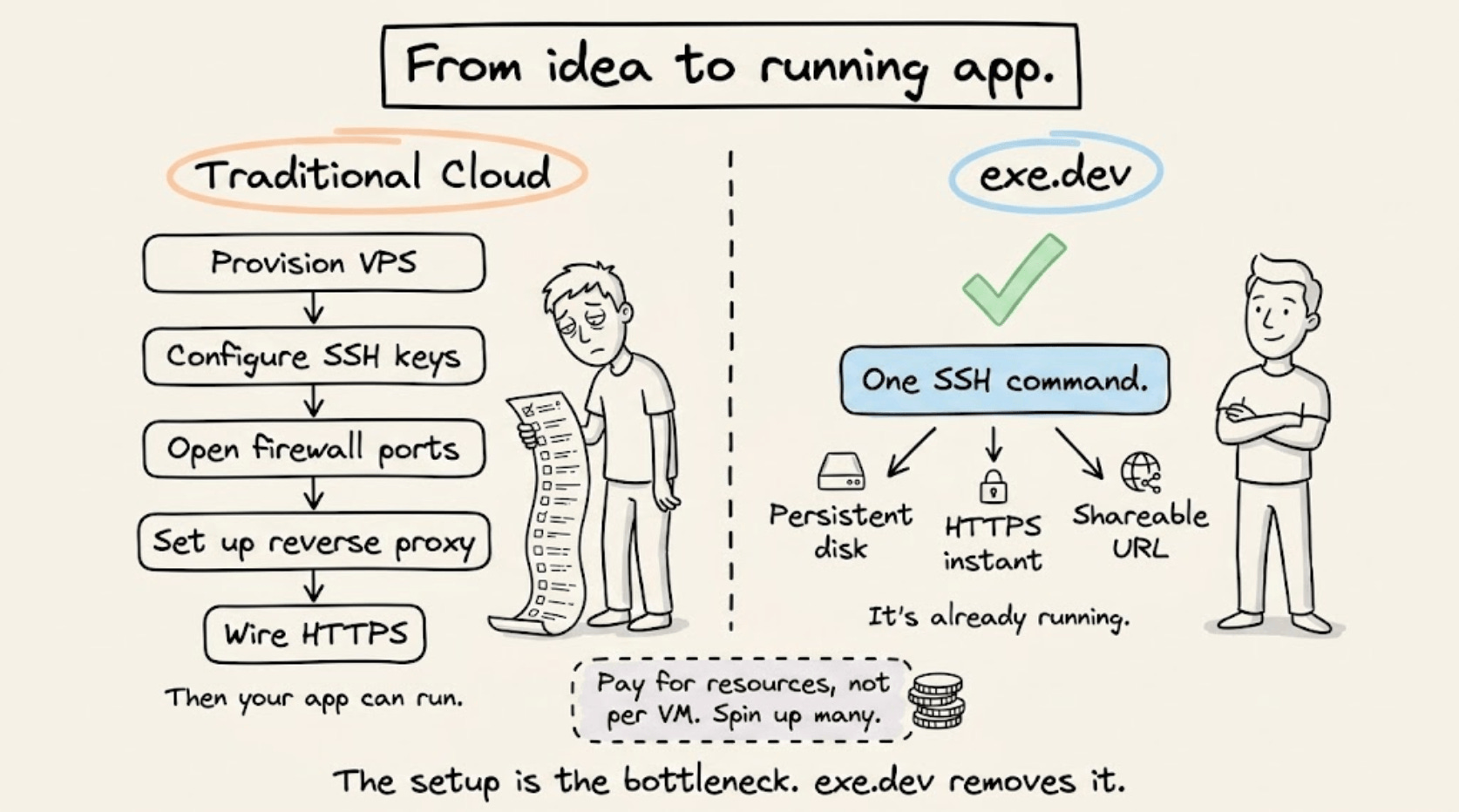
exe.dev bundles compute, networking, and persistence into a single step.
One command gives you a persistent virtual machine, already exposed to the internet over HTTPS, with no firewall configuration or reverse proxy required.
The pricing model matches how developers actually work: shared CPU and RAM across machines, billed for underlying resources rather than per VM. Spin up several for different projects without paying for idle capacity.
It sits practically between a VPS and serverless, built for developers who want infrastructure control without the setup tax.
Get started with exe.dev here →
Thanks to the team for partnering today!
Claude Code’s /goal command
Claude Code completes a turn, then stops and waits for your next prompt.
For a 200-file migration or a full test suite fix, that means you’re typing “keep going” every few minutes for an hour. The bottleneck in long-running agentic coding sessions isn’t the model, it’s the human pressing enter.
/goal removes that bottleneck.
You define a completion condition once, and Claude keeps working turn after turn until a separate evaluator model (Haiku by default) confirms the condition is met by reading the conversation transcript.
The evaluator doesn’t run commands or read files on its own. Instead, it only judges what Claude has already surfaced.
Let’s look at how the evaluator loop works, what makes a good condition, and where it breaks down.
How the evaluator loop works
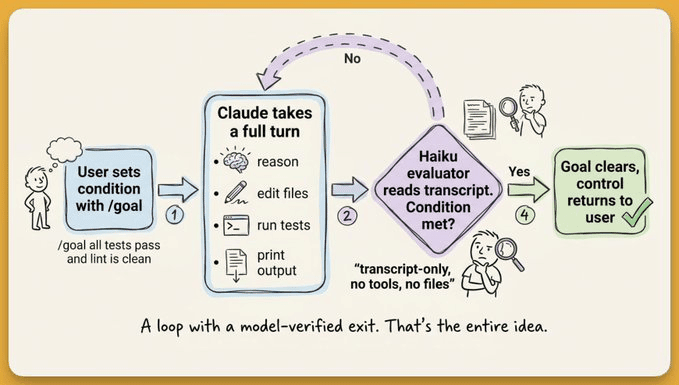
/goal runs one evaluation cycle per turn.
Claude finishes a turn (reads files, runs commands, edits code), and the evaluator model receives the full conversation transcript plus your condition.
The evaluator doesn’t call tools, run commands, or read files independently. It can only judge what Claude has already surfaced in the conversation.
This constraint shapes how you write conditions.
The condition describes the desired end state, not the current state.
For instance:
/goal all tests in test/auth pass and the lint step is cleanmeans “keep working until every test passes and lint is clean.” Claude will edit code, run the test suite, read failures, fix them, and re-run, turn after turn, until the evaluator sees passing output in the transcript. The condition works because the test output is visible in the conversation.But a condition like
/goal the app is production-readyfails because “production-ready” doesn’t produce verifiable output. There’s no command whose result proves that claim, so the evaluator has nothing concrete to check against.
The evaluator returns a short reason with every judgment. That reason appears in the status view and in the transcript, so you can track what Claude is working toward at any point.
Run /goal with no argument to see the turns elapsed, tokens spent, and the last evaluator reason.
Writing effective conditions
Conditions can be up to 4,000 characters. The official docs recommend four components, including a measurable end state, a stated check (how Claude should prove it), constraints on what shouldn’t change, and optionally a turn or time cap.
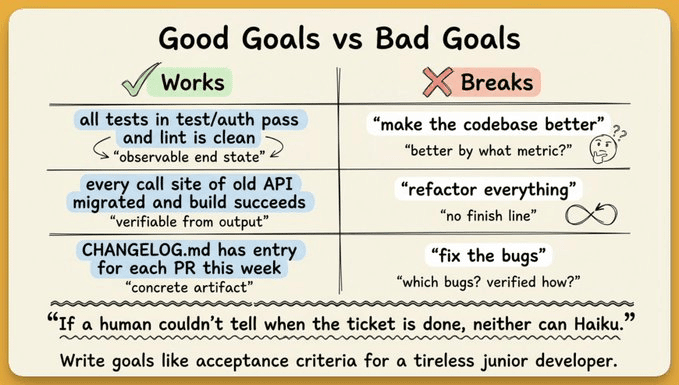
Conditions that work well:
/goal all tests in test/auth pass and the lint step is clean/goal CHANGELOG.md has an entry for every PR merged this week/goal every call site of the old API has been migrated and the build succeeds, stop after 20 turns
Each one describes an observable end state that Claude can demonstrate through its own output. The evaluator has concrete criteria to check against.
Vague conditions lead to two failure modes and both waste compute:
Claude loops burning tokens without making progress
or the evaluator hallucinates success because there’s nothing concrete to verify.
Interactive, -p, and remote control modes
/goal works across three Claude Code execution modes.
Interactive mode is the default. You type
/goal <condition>in your terminal session. Setting a goal starts a turn immediately with the condition as the directive, so you don’t need a separate prompt.Non-interactive mode with the
-pflag runs the loop to completion in a single invocation:claude -p "/goal CHANGELOG.md has an entry for every PR merged this week"Remote Control mode lets multiple developers share goal-tracking agents in collaborative environments.
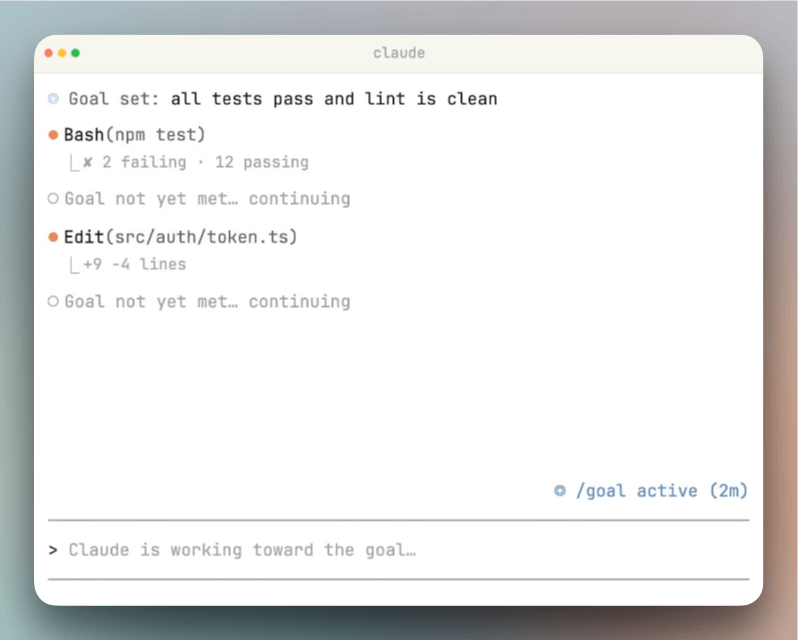
In all three modes, a ◎ /goal active indicator shows live elapsed time, turn count, and token usage as an overlay panel.
/goal vs. /loop vs. Stop Hooks vs. Auto Mode
Claude Code now has four autonomous workflow mechanisms. Each solves a different problem.
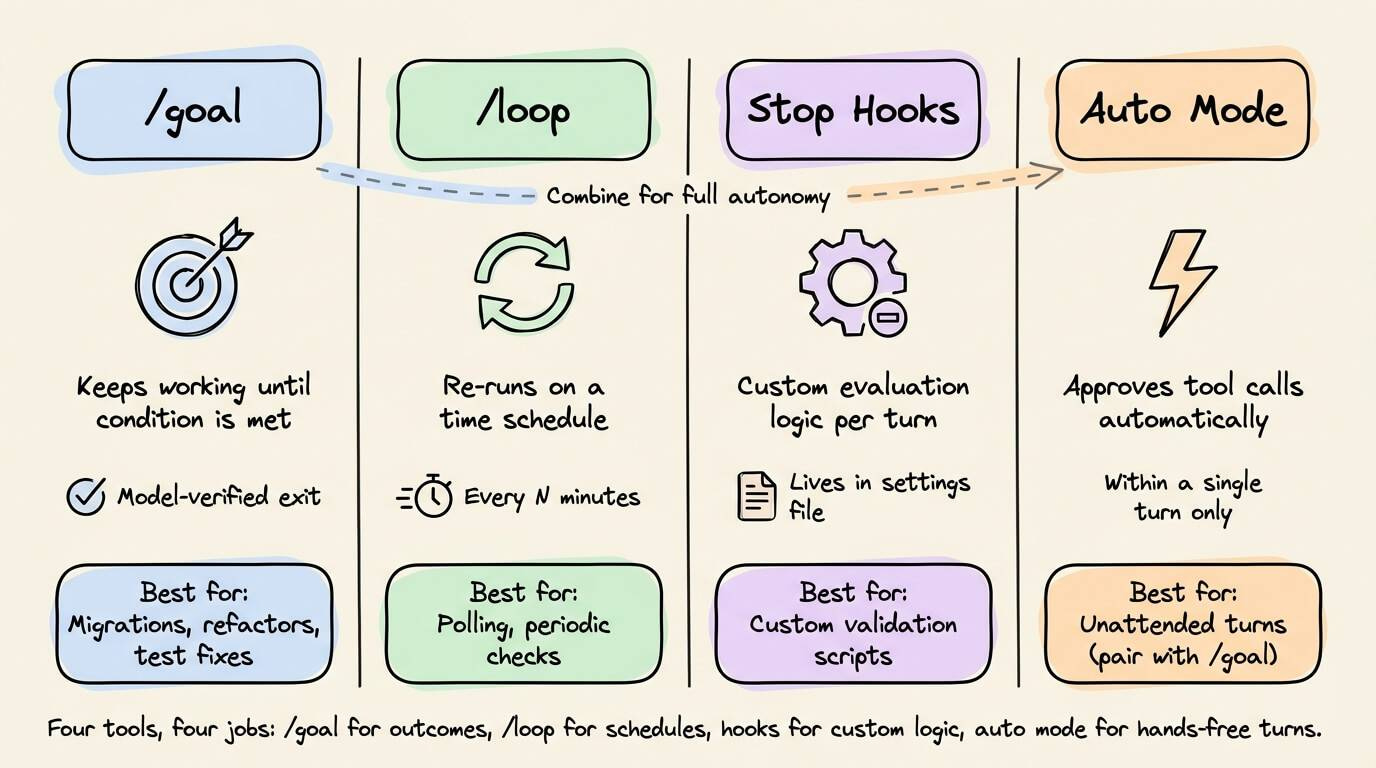
/goalkeeps a session alive across turns until a model-verified condition is met. Best for tasks with a defined end state: migrations, refactors, test suite fixes./loopre-runs a prompt on a time schedule (every 5 minutes, every hour). Best for polling or periodic tasks: checking a deploy, summarizing new GitHub comments. It’s not the right tool for “finish this refactor.”Stop hooks live in your settings file, apply to every session in their scope, and can run custom scripts for deterministic checks or prompts for model-evaluated ones. More flexible than
/goal, but requires configuration.Auto mode removes per-tool confirmation prompts within a turn but doesn’t start new turns on its own. The practical combination is auto mode +
/goal: each turn runs unattended, and the loop runs until done.
Where /goal doesn’t work
There’s no built-in token budget. Claude keeps going until the condition is met or you interrupt with Ctrl+C (or /goal clear). Including a turn cap in your condition (stop after 20 turns) is the simplest mitigation.
The evaluator only sees the transcript. If Claude doesn’t print a test result or file diff, the evaluator can’t verify it. Conditions must be phrased around observable output.
Compound objectives overwhelm it. “Redesign auth, add OAuth, write tests, update docs” is too much for one goal. Break complex work into sequential goals, each with its own verifiable end state.
/goal runs only in workspaces where you’ve accepted the trust dialog. It’s unavailable when disableAllHooks is set at any settings level or when allowManagedHooksOnly is set in managed settings.
Setting up the project
Three things make /goal runs more reliable.
CLAUDE.md at your project root. Claude reads this automatically during every turn. Define architecture decisions, coding conventions, and acceptance criteria here so Claude has consistent context across a 30-turn run.
Hooks for auto-validation. Set up PostToolUse hooks to auto-run lint or type-checking after every file edit. Claude catches issues mid-run instead of discovering them at the end.
Auto mode enabled. Without it, a long
/goalrun stalls waiting for you to approve every file write. Auto mode +/goalis the combination that makes unattended runs practical.
If you’re not sure how to phrase your goal, let Claude write it for you. Paste something like this into Claude Code before running /goal:
Write me a /goal prompt. Ask me what I’m trying to do first, then keep asking follow-up questions until you can describe ‘done’ in specific, measurable terms.
The feature doesn’t solve every problem. But for any task where you can write a clear finish line, it removes the biggest friction in AI-assisted coding, which is you, sitting there, pressing enter over and over.
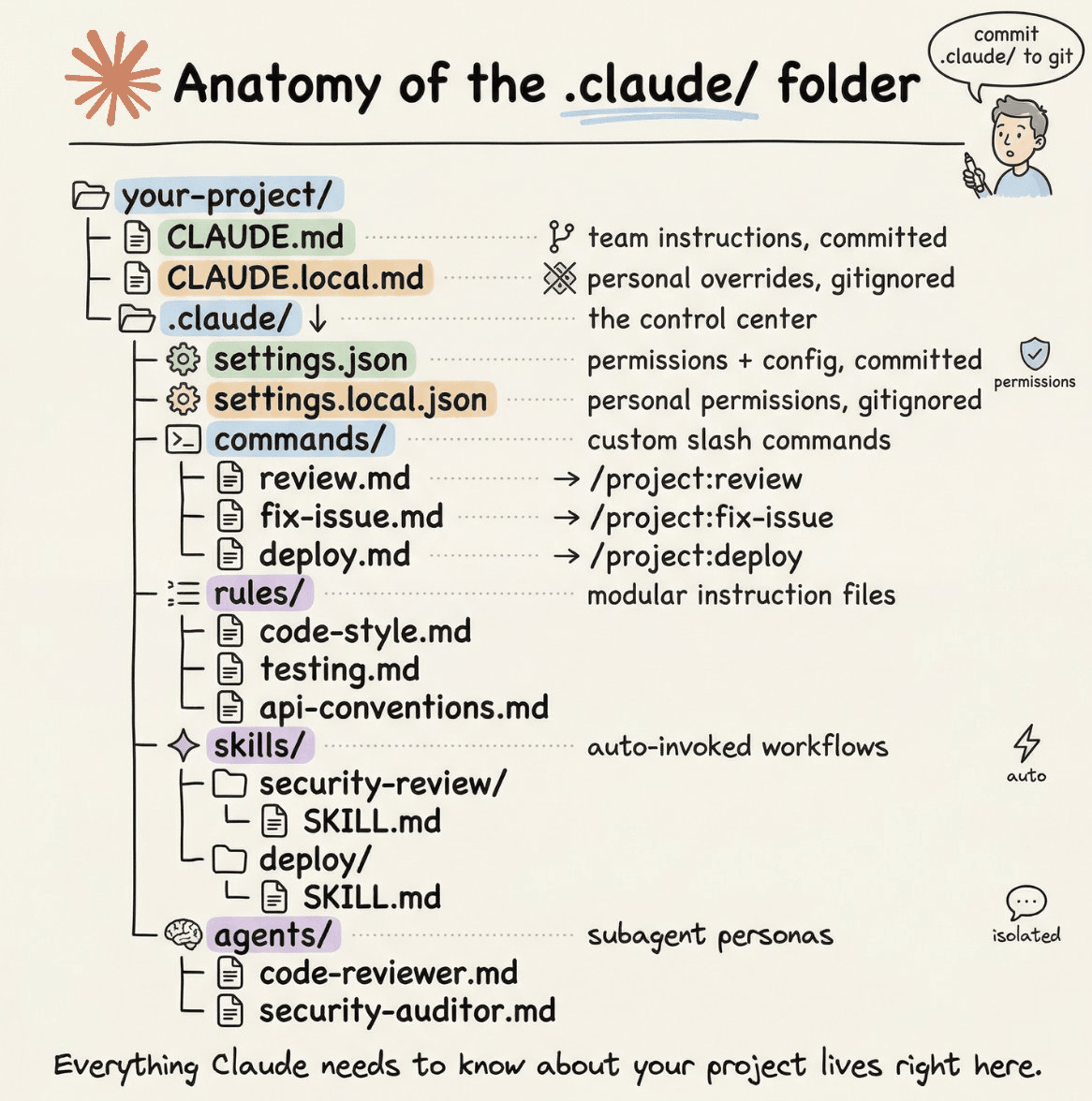
As further reading, if you want to dive into the anatomy of the .claude/ folder: we covered it here in full detail →
👉 Over to you: Have you tried /goal for a real codebase task yet? What condition did you set, and how did it go?
Thanks for reading!
P.S. For those wanting to develop “Industry ML” expertise:

At the end of the day, all businesses care about impact. That’s it!
Can you reduce costs?
Drive revenue?
Can you scale ML models?
Predict trends before they happen?
We have discussed several other topics (with implementations) that align with such topics.
Here are some of them:
Learn everything about MCPs in this crash course with 9 parts →
Learn how to build Agentic systems in a crash course with 14 parts.
Learn how to build real-world RAG apps and evaluate and scale them in this crash course.
Learn sophisticated graph architectures and how to train them on graph data.
So many real-world NLP systems rely on pairwise context scoring. Learn scalable approaches here.
Learn how to run large models on small devices using Quantization techniques.
Learn how to generate prediction intervals or sets with strong statistical guarantees for increasing trust using Conformal Predictions.
Learn how to identify causal relationships and answer business questions using causal inference in this crash course.
Learn how to scale and implement ML model training in this practical guide.
Learn techniques to reliably test new models in production.
Learn how to build privacy-first ML systems using Federated Learning.
Learn 6 techniques with implementation to compress ML models.
All these resources will help you cultivate key skills that businesses and companies care about the most.