

Kimi K2.6 raises the bar for open-source models.
Moonshot released Kimi K2.6 yesterday, and for the first time, an open-weight model holds its ground against Claude Opus 4.6 on the benchmarks that matter for agentic work.
It also costs a fraction of the price.
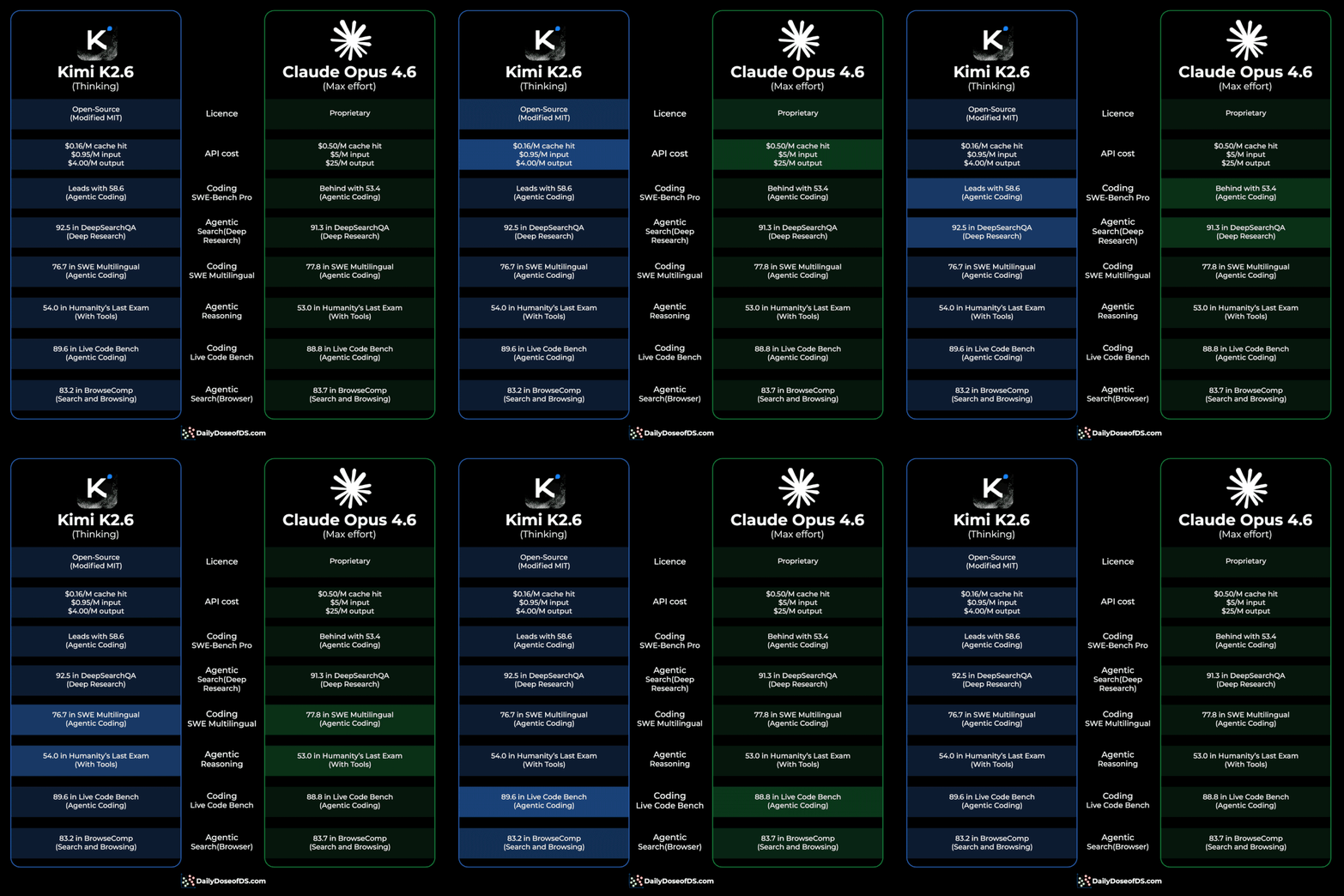
Here’s a graphical comparison:
Pricing:
Kimi K2.6 → $0.95/million input tokens and $4/million output tokens.
Claude Opus 4.6 → $5/million input tokens and $25/million output tokens.
With cache hits, the gap widens.
K2.6 drops to $0.16 per million on cached inputs.
Opus 4.6 drops to $0.50.
That’s roughly 5-6x cheaper across the board, before and after caching.
Benchmarks:
K2.6 leads Opus 4.6 on four of the six head-to-head comparisons Moonshot published:
SWE-bench Pro: 58.6 vs 53.4 (agentic coding)
HLE with tools: 54.0 vs 53.0 (agentic reasoning)
DeepSearchQA: 92.5 vs 91.3 (deep research)
LiveCodeBench: 89.6 vs 88.8
Opus 4.6 still wins on SWE-bench Multilingual and BrowseComp, but the gap is under a point in both.
The part that actually matters
Benchmarks are the easy story. The harder and more interesting story is long-horizon execution.
K2.6 ran a single autonomous task for over 12 hours, making 4,000+ tool calls, to port and optimize inference for a small LLM in Zig, a language most models barely touch.
It ended up running around 20% faster than LM Studio on the same hardware.
Separately, it refactored an 8-year-old financial matching engine across 13 hours, delivering a 133% peak throughput gain.
This is the capability gap that usually separates frontier closed models from open ones. K2.6 closes a meaningful chunk of it.
You get weights you can actually deploy, a Modified MIT license, 5-6x lower inference cost, and performance that no longer forces you to compromise on agentic workloads.
Read more in the official blog here →
We’ll publish a thorough evaluation and a model deep dive on Kimi soon.
Claude Opus 4.7 isn’t a drop-in replacement for 4.6
Opus 4.7 thinks differently, follows instructions more literally, spawns fewer subagents, and reasons more aggressively after every user turn.
The patterns that worked before now cost you tokens without proportional quality gains. The fix is not complicated, but it requires understanding what changed and adjusting your workflow accordingly.
Let’s walk through it today!
The delegation mindset
The single biggest shift with Opus 4.7 is how you frame your role. Treat Claude like a capable engineer you delegate to, not a pair programmer you guide line by line.
Every user turn in an interactive session triggers reasoning overhead. With 4.6, you could spread instructions across multiple turns without much penalty.
With 4.7, that pattern inflates token usage because the model reasons deeply after each message you send. You pay for reasoning on every turn, whether the turn deserves it or not.
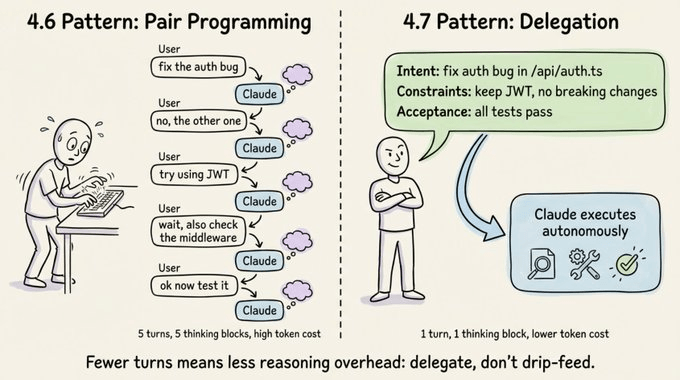
Three concrete changes will fix this.
Specify the task upfront in the first turn. Include intent, constraints, acceptance criteria, and relevant file paths. Ambiguous prompts spread across many turns reduce both token efficiency and output quality.
Batch your questions. Every user message adds reasoning overhead, so give the model enough context to keep moving without checking in.
Use auto mode for trusted tasks. For long-running work where you’ve already provided full context, auto mode (Shift+Tab) cuts cycle time by removing unnecessary check-ins.
The 5 effort levels
Opus 4.7 introduces xhigh, a new effort level between high and max. It’s now the default for Claude Code.
If you’re an existing user who never manually set your effort level, you’ve been auto-upgraded to xhigh.
Here’s how the five tiers break down.
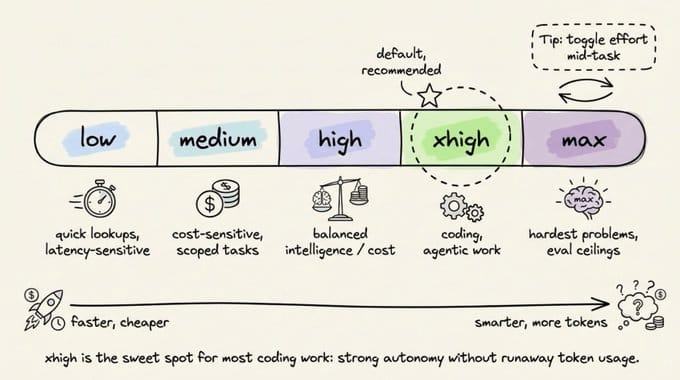
low is for latency-sensitive, tightly scoped work. The model won’t go above and beyond, but it still outperforms Opus 4.6 at the same effort level.
medium fits cost-sensitive tasks where you’re willing to trade intelligence for speed.
high balances intelligence and cost. It’s a good pick for concurrent sessions or budget-conscious work without a large quality drop.
xhigh is the default and the sweet spot for coding and agentic tasks. You get strong autonomy and intelligence without the runaway token usage that max can produce.
max squeezes out extra performance on genuinely hard problems, but with diminishing returns. It’s more prone to overthinking, so use it deliberately for eval ceiling testing or extremely intelligence-sensitive work.
One practical tip: you can toggle effort mid-task. Start at xhigh for the complex design phase, drop to high for straightforward implementation, and bump to max for a tricky debugging session. This gives you fine-grained control over token spend.
Opus 4.7 respects effort levels more strictly than 4.6, so if a task at low or medium feels underthought, raise the effort instead of prompting around it.
Adaptive thinking replaces fixed budgets
If you were using Extended Thinking with budget_tokens on Opus 4.6, that’s gone. Opus 4.7 uses adaptive thinking instead.
With fixed budgets, you allocated a set number of thinking tokens upfront, and the model used them whether it needed to or not.
With adaptive thinking, the model decides when and how much to think at each step.
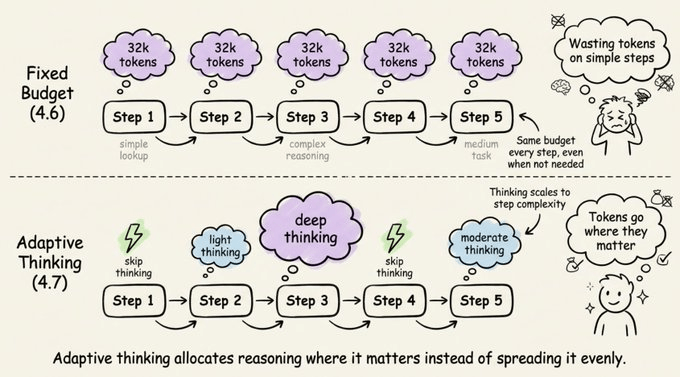
Simple queries get fast responses, complex reasoning steps get deep thought, and steps that don’t benefit from thinking skip it entirely.
Over a long agentic run, this adds up to faster responses and lower token usage compared to a blanket thinking budget.
The migration is straightforward:
# Before (Opus 4.6 with extended thinking)
client.messages.create(
    model="claude-opus-4-6",
    max_tokens=64000,
    thinking={"type": "enabled", "budget_tokens": 32000},
    messages=[{"role": "user", "content": "..."}],
)

# After (Opus 4.7 with adaptive thinking)
client.messages.create(
    model="claude-opus-4-7",
    max_tokens=64000,
    thinking={"type": "adaptive"},
    output_config={"effort": "xhigh"},
    messages=[{"role": "user", "content": "..."}],
)
You can still steer the thinking rate with prompts. To get more thinking, try something like “Think carefully and step-by-step before responding; this problem is harder than it looks.”
To get less thinking, use “Prioritize responding quickly rather than thinking deeply. When in doubt, respond directly.”
If you’re running at max or xhigh effort, set a large max output token budget (start at 64k), so the model has room to think and act across subagents and tool calls.
Behavior changes to note
Opus 4.7 has several default behavior changes that will catch you off guard if you’ve tuned your prompts or harnesses for 4.6. Let’s go through them.
Response length
Opus 4.7 calibrates response length to task complexity. Simple lookups get short answers, open-ended analysis gets long ones.
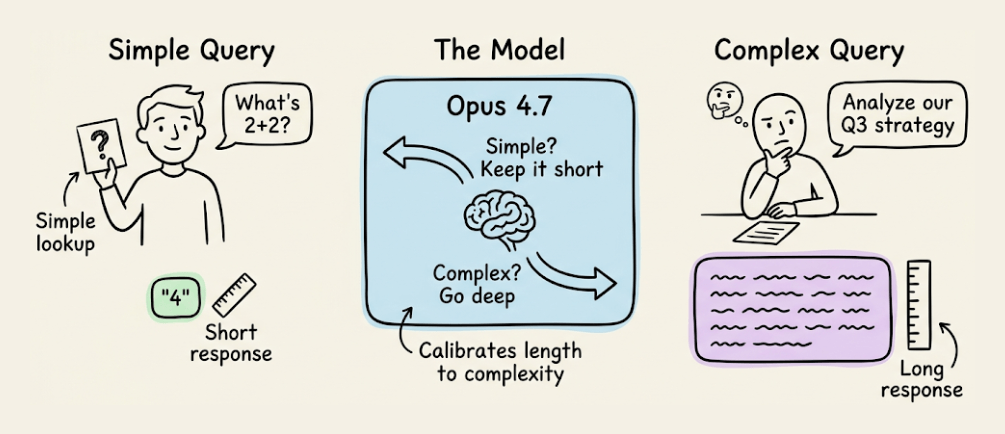
If your use case depends on a specific length or style, state it explicitly. Positive examples of the voice you want work better than negative “don’t do this” instructions.
Fewer tool calls
The model calls tools less often and reasons more. This produces better results in many cases.
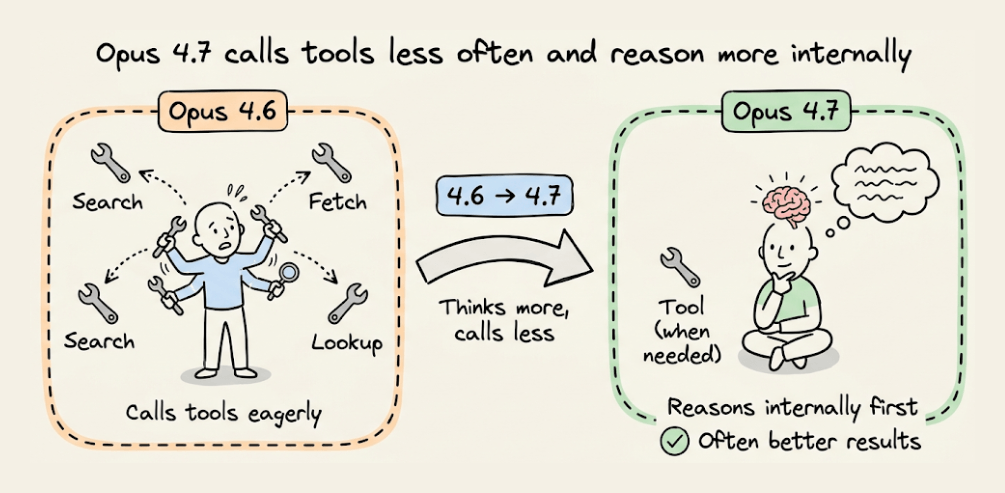
But if you need more aggressive tool use for search or file reading, provide explicit guidance about when and why tools should be used. Raising effort to high or xhigh also increases tool usage.
Fewer subagents
Opus 4.7 is more judicious about delegating to subagents. If your workflow benefits from parallel fan-out, spell it out clearly:
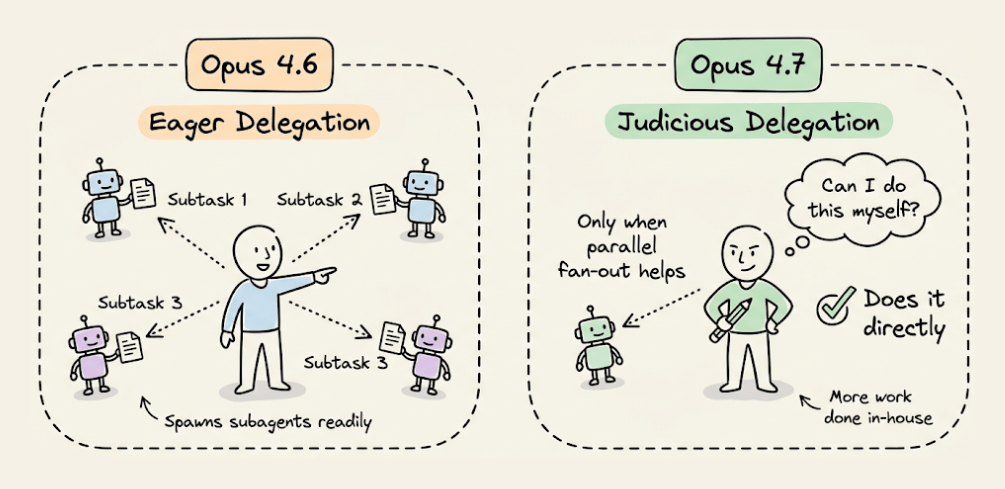
“Do not spawn a subagent for work you can complete directly in a single response. Spawn multiple subagents in the same turn when fanning out across items or reading multiple files.”
More literal instruction following
This is the change most likely to break existing setups. Opus 4.7 interprets prompts more literally, especially at lower effort levels.
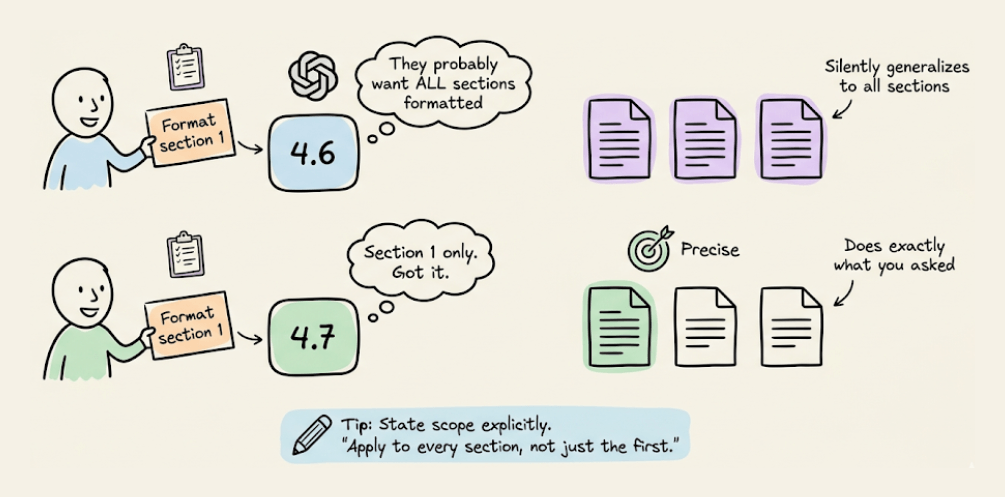
It won’t silently generalize an instruction from one item to another, and it won’t infer requests you didn’t make. The upside is precision and less trash.
The downside is that if you need an instruction applied broadly, you must state the scope explicitly. For example: “Apply this formatting to every section, not just the first one.”
Tone shift
Opus 4.7 is more direct and opinionated, with less validation-forward phrasing and fewer emoji than 4.6’s warmer style.
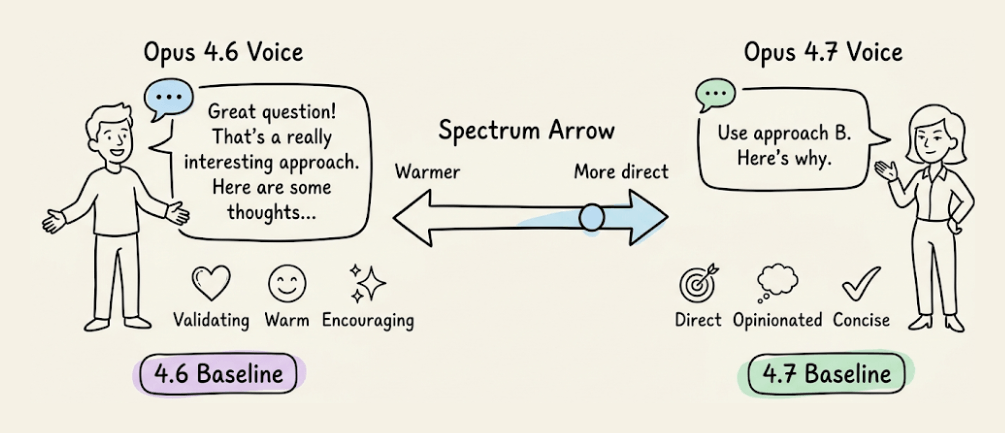
If your product relies on a specific voice, re-evaluate your style prompts against the new baseline.
Code review
Opus 4.7 is meaningfully better at finding bugs. It shows 11 percentage points better recall on Anthropic’s hardest bug-finding eval based on real PRs, with higher precision too.
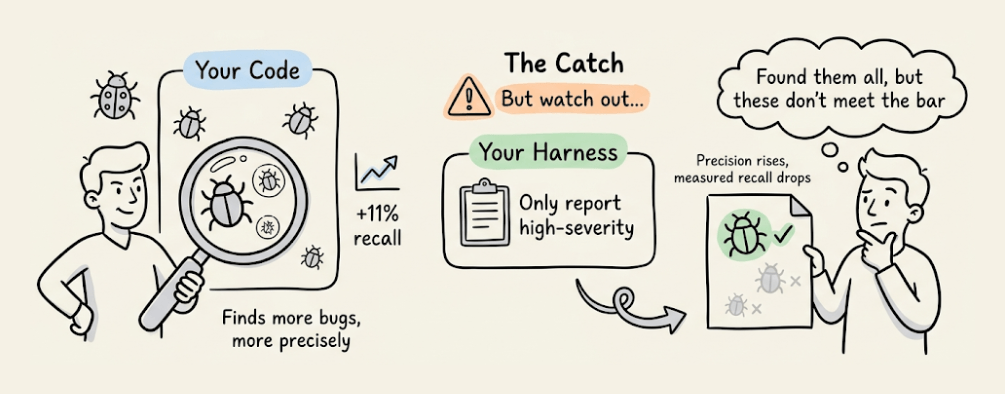
But here’s the catch. If your review harness says “only report high-severity issues” or “be conservative,” Opus 4.7 follows that instruction more faithfully than 4.6 did.
It may investigate code just as thoroughly, identify bugs, and then not report findings it judges below your stated bar. Precision rises, but measured recall drops.
The fix is to separate finding from filtering:
Report every issue you find, including ones you are uncertain about or consider low-severity. Do not filter for importance or confidence at this stage. Your goal here is coverage: it is better to surface a finding that later gets filtered out than to silently drop a real bug. For each finding, include your confidence level and an estimated severity so a downstream filter can rank them.
If you need single-pass filtering, be concrete about where the bar is rather than using qualitative terms. For example: “Report any bugs that could cause incorrect behavior, a test failure, or a misleading result; only omit pure style or naming preferences.”
Session management with 1M context
Claude Code now has a 1 million token context window. That’s enough to build a full-stack app from scratch in a single session.
But more context doesn’t always mean better results. Context rot is real.
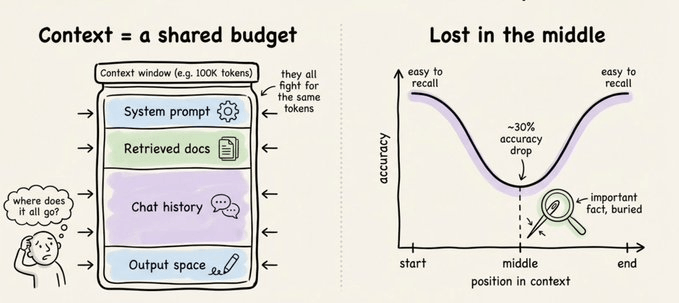
As the context grows, attention spreads across more tokens. Older, irrelevant content starts to distract from the current task, and the model gets less intelligent as its context window fills up.
You have five options at every turn.
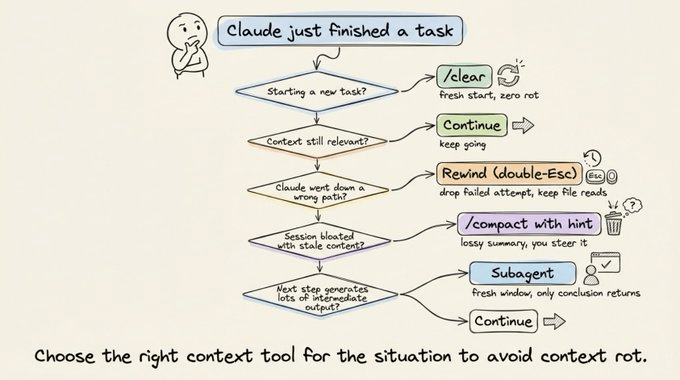
Continue means sending another message. Use this when everything in the window is still relevant.
Rewind (double-Esc) jumps you back to a previous message to re-prompt from there. Failed attempts get dropped from context, which is often better than typing “that didn’t work, try X instead,” because you keep the useful file reads while dropping the failed approach.
/compact with a hint summarizes the session and keeps going. It’s lossy but low effort, and you can steer it with instructions like /compact focus on the auth refactor, drop the test debugging.
/clear starts a fresh session. You write down what matters yourself, giving you zero rot and full control.
Subagents delegate work that generates lots of intermediate output. The subagent gets its own fresh context window, and only the final result comes back.
The mental test here: will you need the tool output again, or just the conclusion? If just the conclusion, use a subagent.
What causes bad auto-compaction
Auto-compaction fires when you’re nearing the context limit. The problem is that this is exactly when the model is at its least intelligent point due to context rot.
A common failure looks like this: autocompact fires after a long debugging session and summarizes the investigation. Your next message references something that was dropped from the summary.
With one million context, you have more time to compact proactively with a description of what matters. Don’t wait for auto-compaction to kick in.
Important prompting techniques
Several foundational prompting techniques remain effective with Opus 4.7, and you shouldn’t abandon them just because the model is smarter.
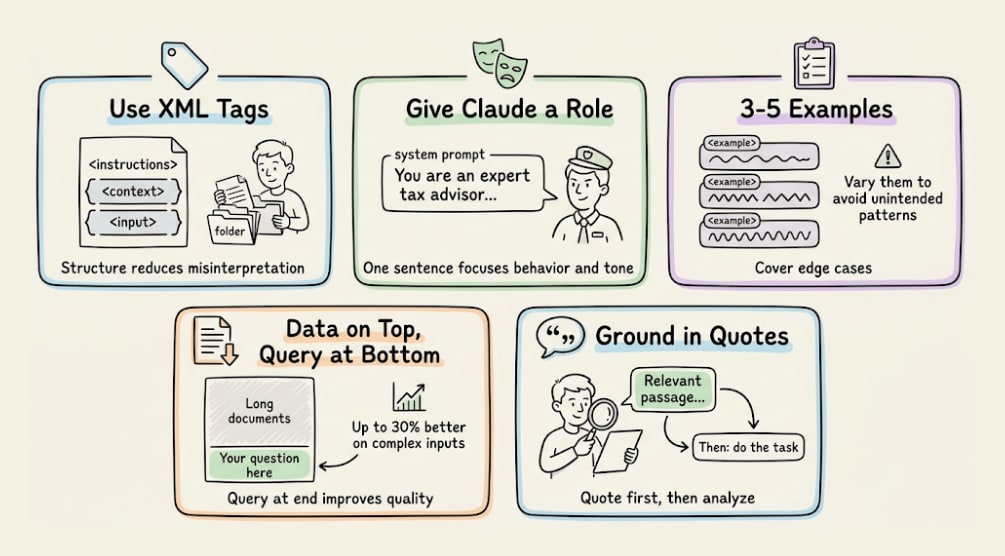
Use XML tags to structure complex prompts. Wrap instructions, context, examples, and inputs in their own tags (<instructions>, <context>, <input>) to reduce misinterpretation.
Give Claude a role in the system prompt. Even a single sentence focuses on behavior and tone.
Use 3-5 examples wrapped in <example> tags, covering edge cases and varying enough that the model doesn’t pick up unintended patterns.
Put longform data at the top of your prompt, above your query. Queries at the end can improve response quality by up to 30% on complex, multi-document inputs.
Ground responses in quotes. For long document tasks, ask Claude to quote relevant parts before carrying out the task.
Controlling tool use
Opus 4.7 calls tools less frequently by default. To increase tool use, raise effort or add explicit guidance: “Use [tool] when it would enhance your understanding of the problem.”
Parallel tool calling is a strength worth leaning into. The model will run multiple searches, read several files at once, and execute bash commands in parallel.
You can boost parallel execution to near 100% with explicit guidance in XML tags.
Overthinking mitigation
At higher effort levels, Opus 4.7 can think extensively, inflating thinking tokens. Add this prompt to keep it focused:
“When you’re deciding how to approach a problem, choose an approach and commit to it. Avoid revisiting decisions unless you encounter new information that directly contradicts your reasoning.”
Migration checklist
If you’re moving from Opus 4.6 to 4.7, here’s what to update.
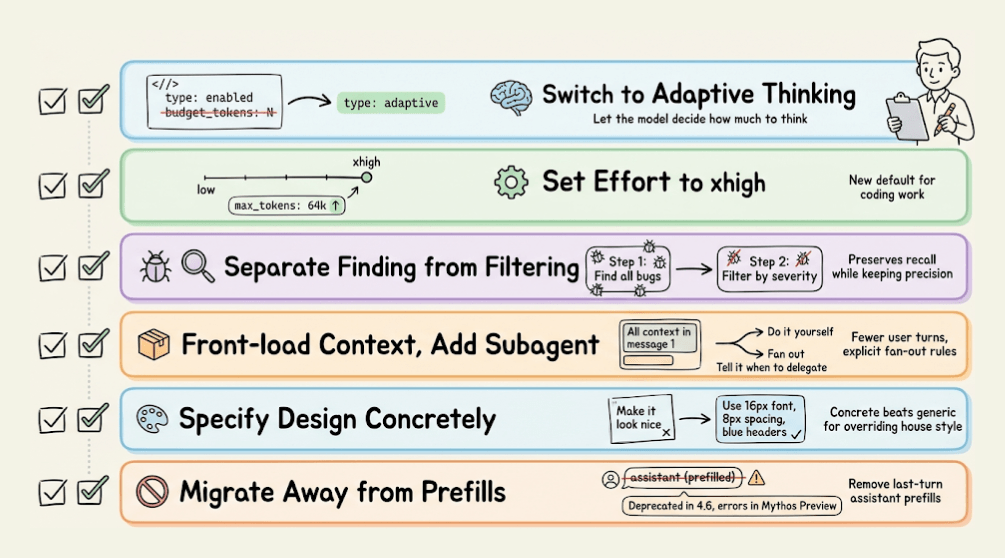
Switch to adaptive thinking by replacing thinking: {type: “enabled”, budget_tokens: N} with thinking: {type: “adaptive”}.
Set effort to xhigh, which is the new default for coding work, and set max output tokens to 64k at xhigh or max effort.
Update code review prompts to separate finding from filtering so you preserve recall.
Reduce user turns by front-loading context into the first message, and add explicit subagent guidance so the model knows when to fan out.
Specify design preferences concretely rather than relying on generic instructions to override the house style.
Migrate away from prefilled responses. Starting with Claude 4.6 models, prefilled responses on the last assistant turn are deprecated, and on Mythos Preview, they return a 400 error.
Computer use
Computer use works across resolutions up to a new maximum of 2576px or 3.75MP. Sending images at 1080p provides the best balance of performance and cost.
For cost-sensitive workloads, 720p or 1366x768 are strong lower-cost options.
Opus 4.7 rewards upfront specification and punishes incremental, multi-turn prompting. The model is more capable, more literal, and more autonomous than 4.6.
Give it a well-specified task, set effort to xhigh, and let it run. The developers who will get the most out of this model are the ones who stop guiding it step by step and start delegating like they would to a senior engineer.
Try this today: take your next coding task, write a single detailed prompt with intent, constraints, and acceptance criteria, and send it in one turn at xhigh. Compare the result and token usage to your old multi-turn pattern.
Thanks for reading!