

Small models are changing how AI systems are built.
Production AI systems are moving from a single large model doing everything to several smaller models, each doing one job.
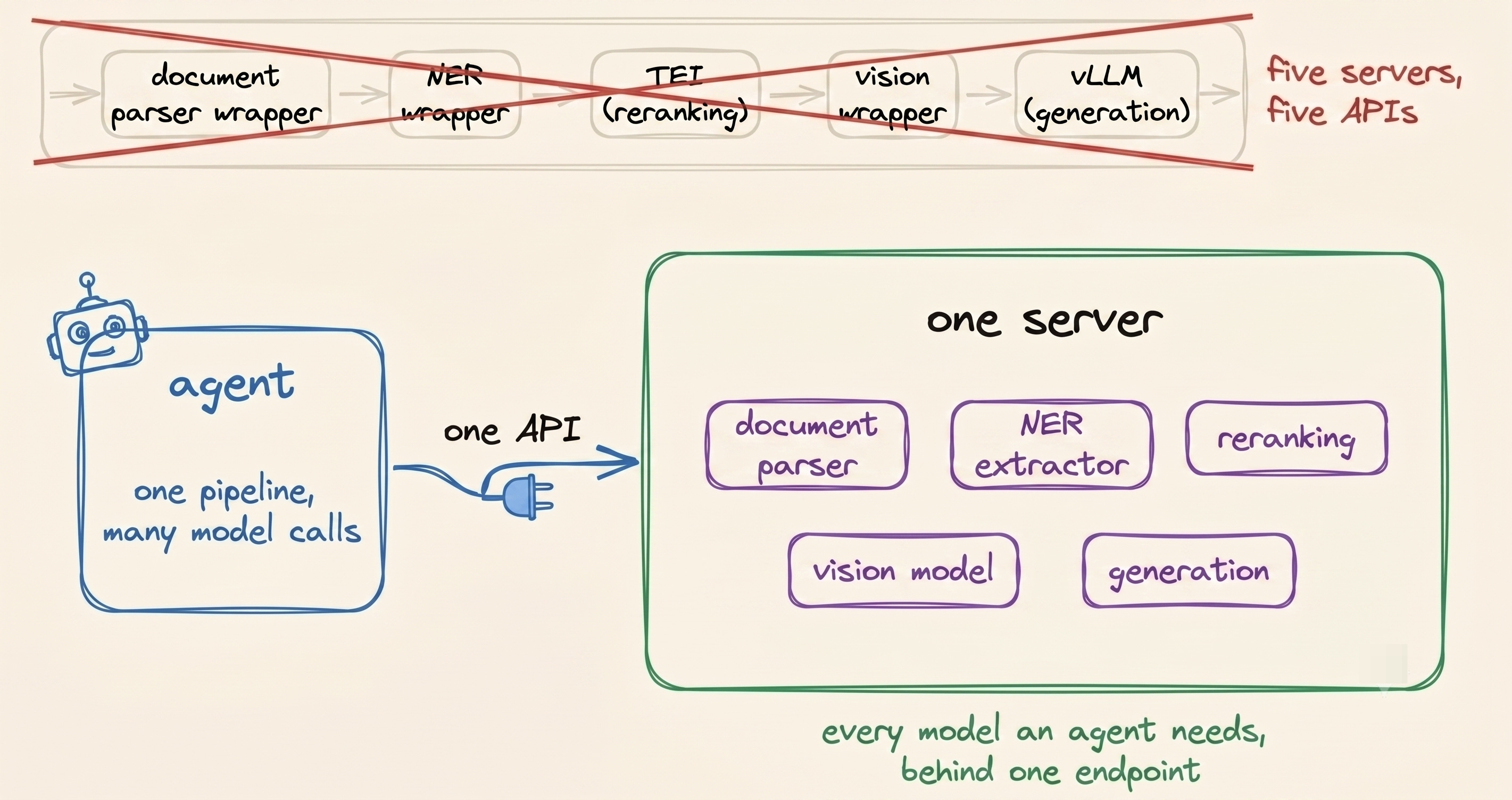
One parses the document, the next extracts fields, a third reranks search results, a vision model reads the image, and a final model handles generation.
At the model level, this usually brings the cost down quite a bit.
But the model is only part of the inference bill. You still need GPUs to run it, memory to keep it loaded, and a serving layer to batch and schedule the requests coming through it, which is why most teams don't experience the cost savings they expect.
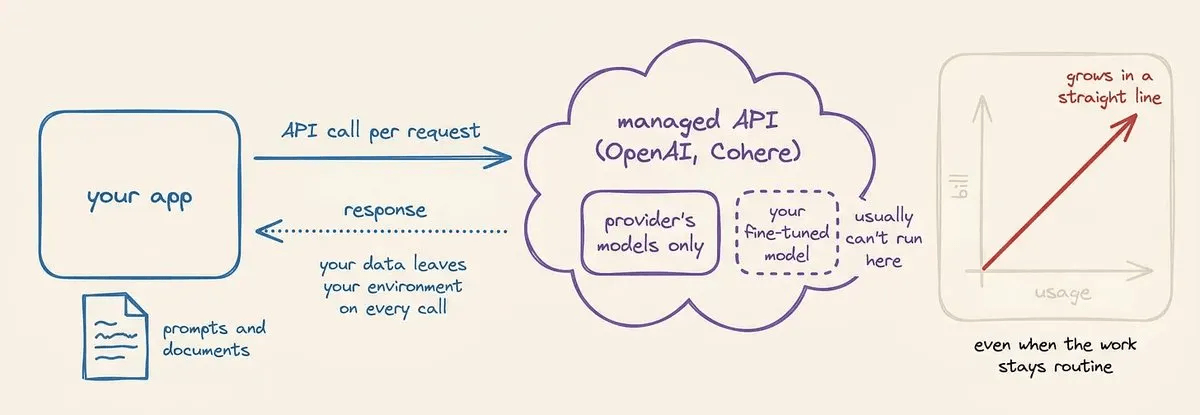
Today, we understand why that is the case, what serving small models well actually takes, and how the SIE open-source inference engine solves it end-to-end.
Problem with standard serving tools
Once an agentic pipeline starts using several model types, the multi-framework serving problem becomes a hardware problem too.
Even though pipelines rely on a mix of vLLM, TEI, and custom servers, each tool is great at what it does. The challenge is deciding where and how those models should actually run.
That leaves two practical ways to arrange them. Give each serving stack its own GPU, or put several of them on the same card.
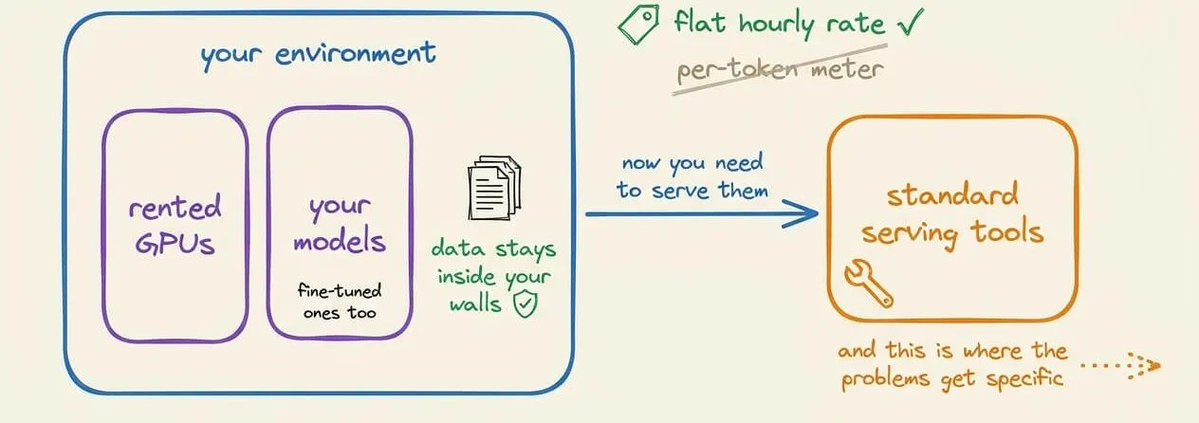
Unfortunately, with today’s standard AI serving tools, neither setup works cleanly.
1. Give every model its own GPU
The simplest setup is to give each serving stack its own GPU. There is no resource sharing to manage, and each service gets the hardware it needs.
vLLM handles the main LLM on one GPU, TEI gets another for embeddings and reranking, and your document processing, NER, and vision models each get their own dedicated GPUs.
While this setup works operationally, the issue comes down to GPU cost and utilization.
Take our earlier flood insurance claim pipeline, where work proceeds in the following sequence.
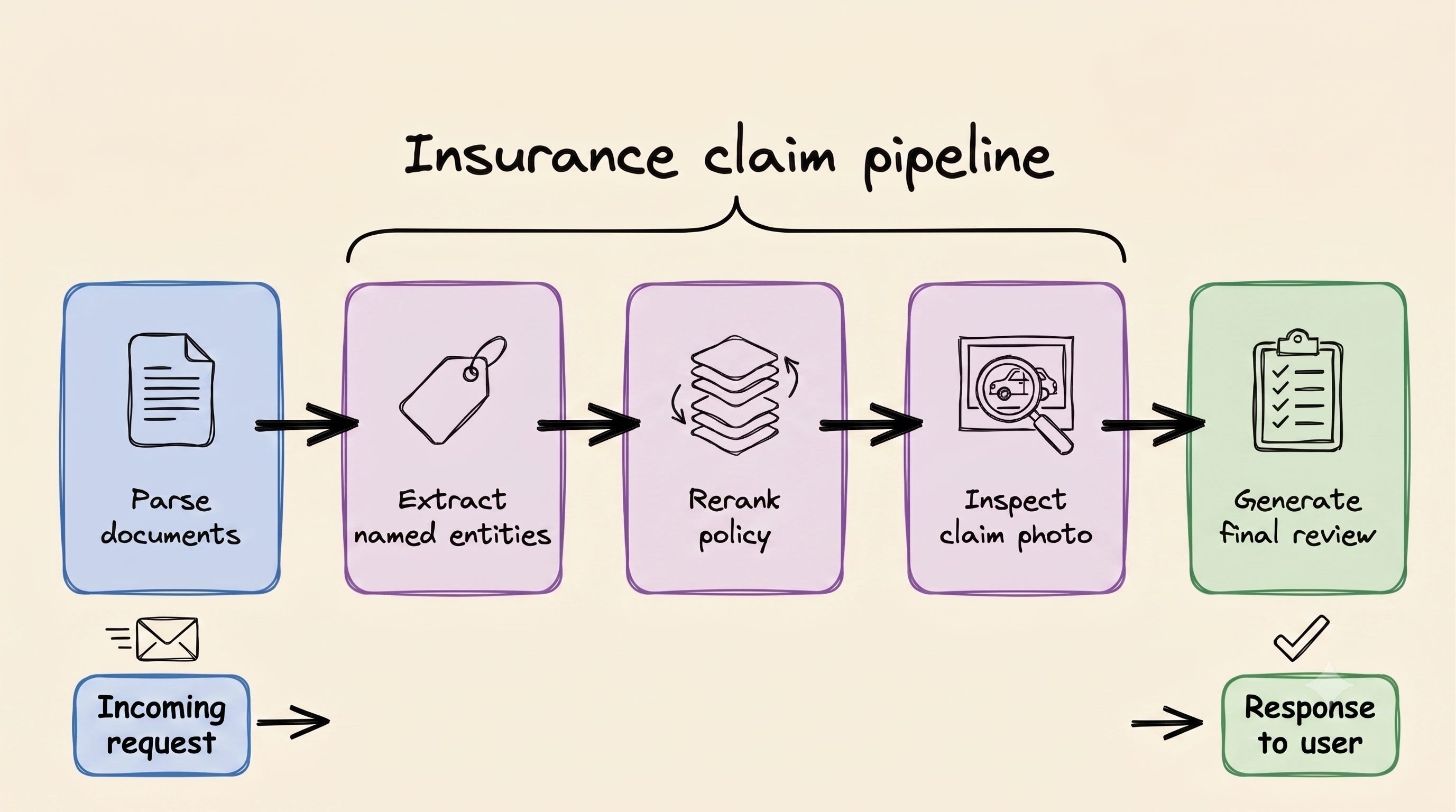
The catch is that a single claim moves through those stages sequentially, so each dedicated GPU spends much of that time waiting for its turn.
Across many claims, those workloads can overlap, but that still doesn’t mean every dedicated GPU stays well utilized all the time.
So if each stage has its own dedicated GPU, the GPU running the document parser sits idle while the reranker runs. Then the reranker waits while the LLM runs.
That idle GPU also doesn’t get freed up or handed to something else. The serving process is still running on it, so the hardware stays allocated to that one stage the entire time, whether it’s doing anything or not.
That’s a real budget concern because GPU infrastructure is paid for by the time you hold it, not by how many seconds the GPU is actually computing.
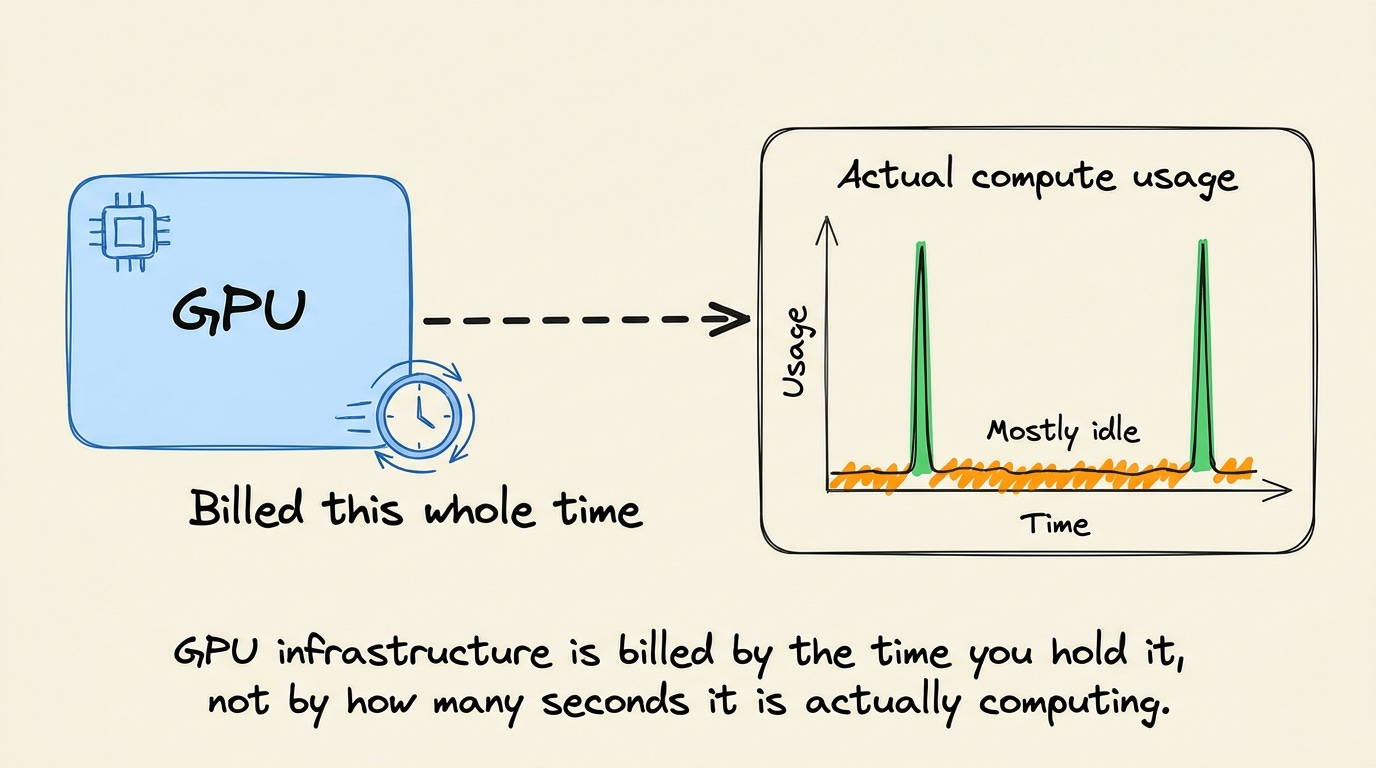
Furthermore, many of these specialized models are small enough that they do not need an entire dedicated GPU.
An extraction model, reranker, or small vision model will use only a fraction of an L4 GPU’s 24 GB of memory, while also spending much of its time waiting for work.
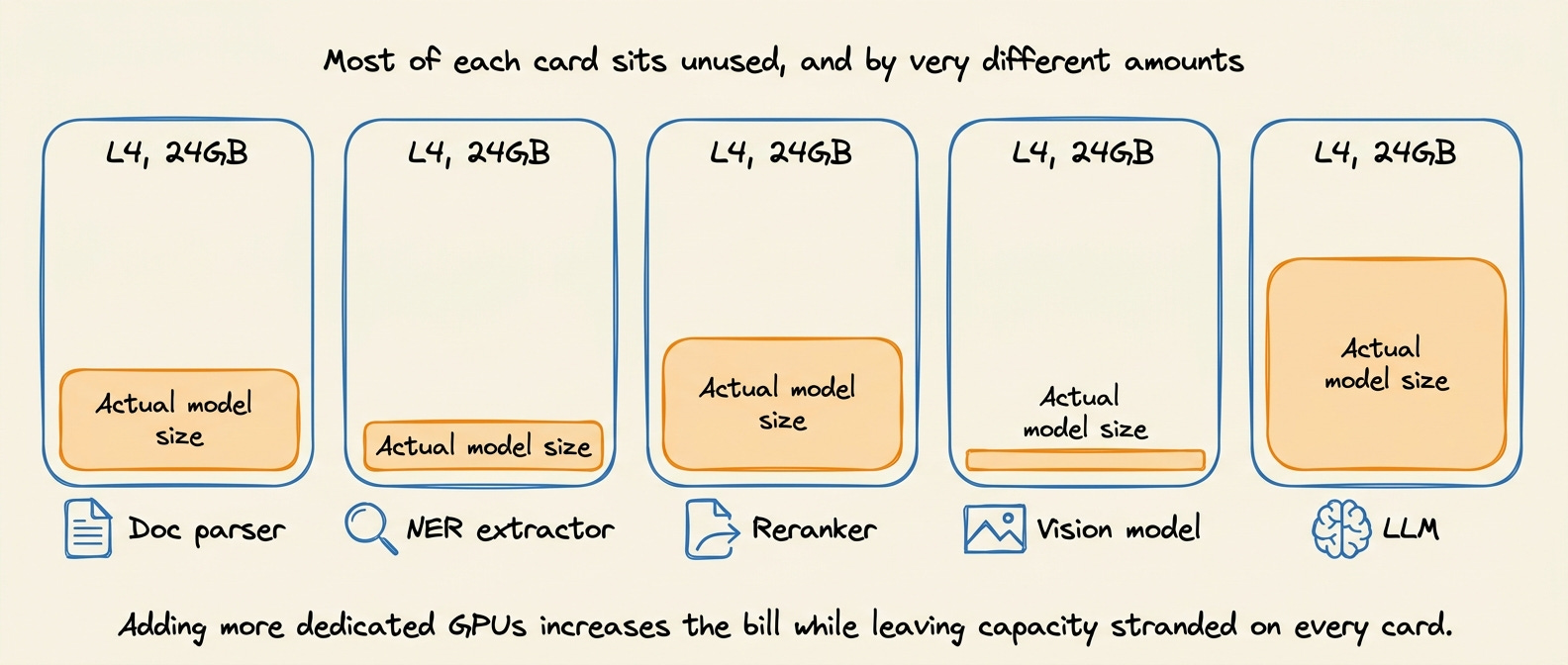
So adding more GPUs increases the bill while leaving capacity unused on each card.
Remember how your pipeline started with multiple specialized models? By the time you add extra steps, every new capability will demand its own serving process and another dedicated GPU before you know it.
You moved to smaller models to reduce the hardware needed per task. Now the hardware count grows with every new task you add.
2. Fit multiple models on one GPU
The other option looks much better from a cost perspective, where you put several of those models on the same GPU.
When the models fit within the GPU’s memory, there is no fundamental reason each needs its own GPU. A single L4, for example, has 24 GB of memory, which is enough to hold several small models at once.
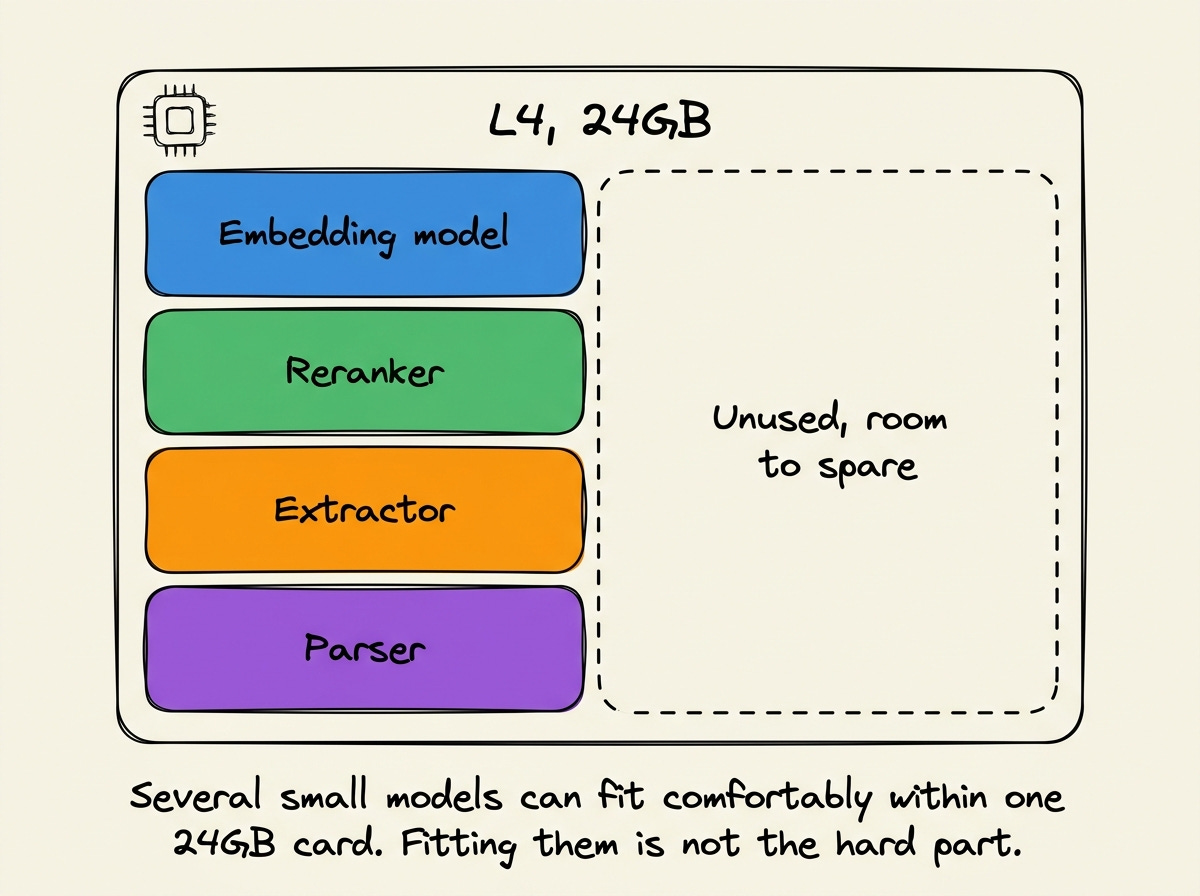
The difficult part is not fitting the models onto the card. It is getting separate serving processes to share that card efficiently.
A serving process is usually built around the model it was started with. It manages that model’s memory, requests, and batches without knowing what the other processes on the same GPU are doing.
Take vLLM as an example. Its --gpu-memory-utilization setting defaults to 0.92, which defines how much of the GPU memory that instance is allowed to use.
Run another serving process beside it, and that second process does not automatically know what vLLM is using or what memory could safely be made available to it.
Now try packing vLLM, TEI, and your custom parsing, extraction, and vision servers all onto the same GPU.
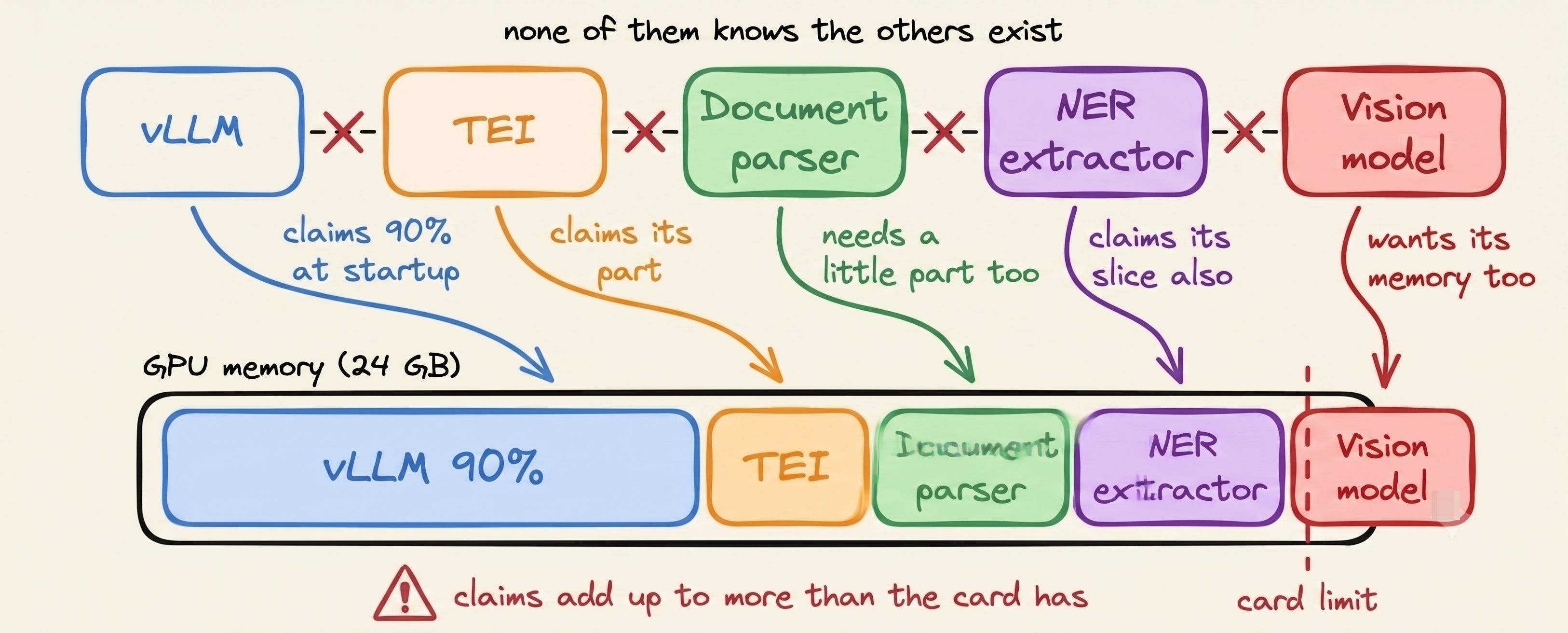
You are deciding manually how much memory each process should be given to use before you even know what the actual traffic will look like:
Give one process too little room or card memory. And a long document or sudden batch can push one model beyond its limit.
When that happens, it doesn't just fail on its own; it can take every other model sharing that GPU down with it.
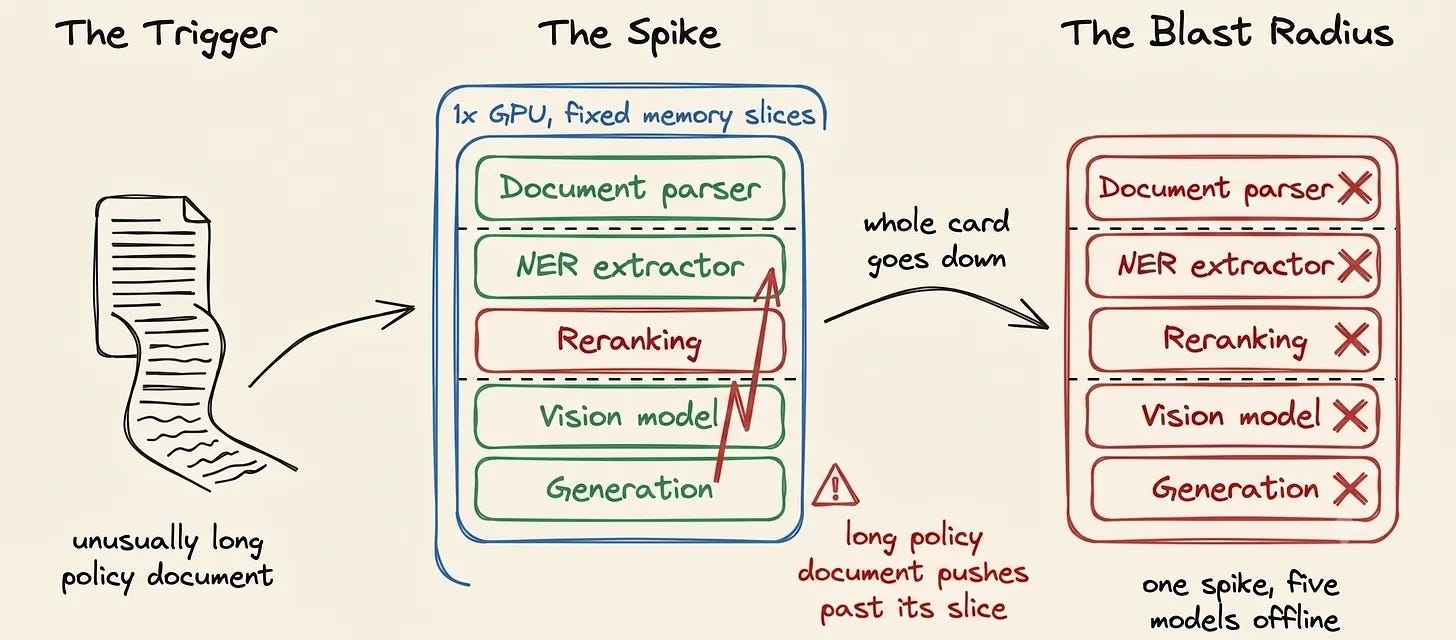
Give one process too much room or card memory. That memory sits unavailable to every other model, even while it's sitting idle itself.
What a serving stack for small models needs
First, step back from searching for another framework and understand the things we need the ideal server to do.
The first requirement is breadth. The server has to run embeddings, rerankers, OCR, vision, extraction, and generation behind one API.
GPU utilization is the second problem. And that turns out to require more than a good scheduler.
Because to pack requests of different lengths into one pass without wasting compute, the engine has to control the batching and the attention path for every architecture it serves.
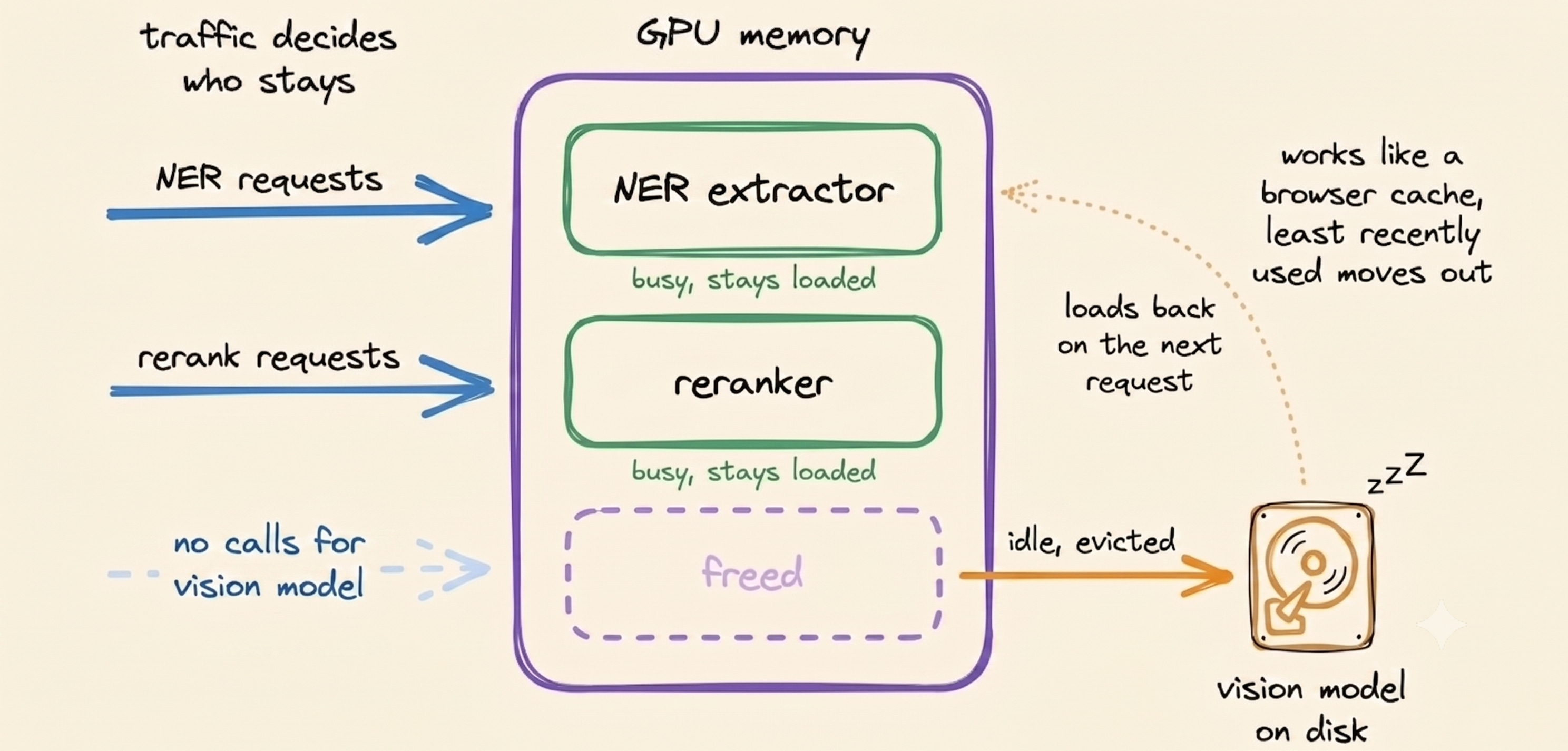
Model memory needs to follow traffic too. It should load and evict models as traffic moves, keeping the busy ones loaded and letting the idle ones move out.
So that a model is not holding memory the way a cold serverless worker or a padded vLLM instance does.
And the serving layer still has to behave like production infrastructure with routing, autoscaling, monitoring, and GPU pools.
This is important since a bare runtime like vLLM is only the engine. On its own, it cannot spread load across replicas, add or remove GPUs as traffic changes.
And adding a new replica would be a config change, not a redeployment.
Today, developers have to build all of this from scratch, spending months on custom engineering because different model families run completely differently under the hood.
A Qwen model handles positions and attention differently.
A ColBERT model returns a vector for every token.
A reranker returns a single score and no vector at all.
Building one engine that can hold all of those shapes and pack any of them into a full batch is critical work. And it is the reason this did not already exist as an open-source package.
Open-source solution: Superlinked Inference Engine
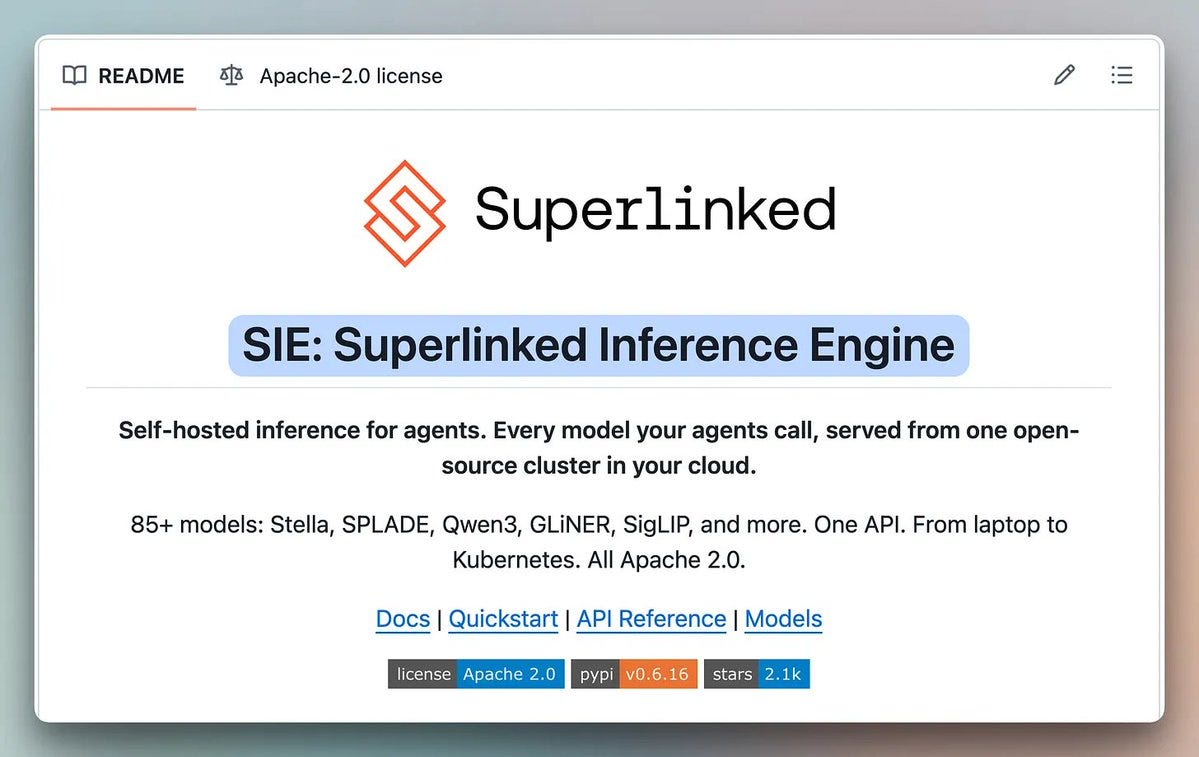
The solution to all of this is implemented in the open-source Superlinked Inference Engine (SIE).
SIE is an open-source inference engine that runs as a production cluster for multi-model pipelines on shared infrastructure.
It supports 100+ models through a unified API, so different model types can run through the same serving layer instead of each needing its own deployment.
One API is useful, but the bigger advantage is coordination. SIE can manage those models around the same GPU pool.
It runs as one cluster inside your own cloud, and it’s built for exactly the kind of multi-model pipeline we have been describing, i.e., several small models of different kinds running back to back on shared GPUs.
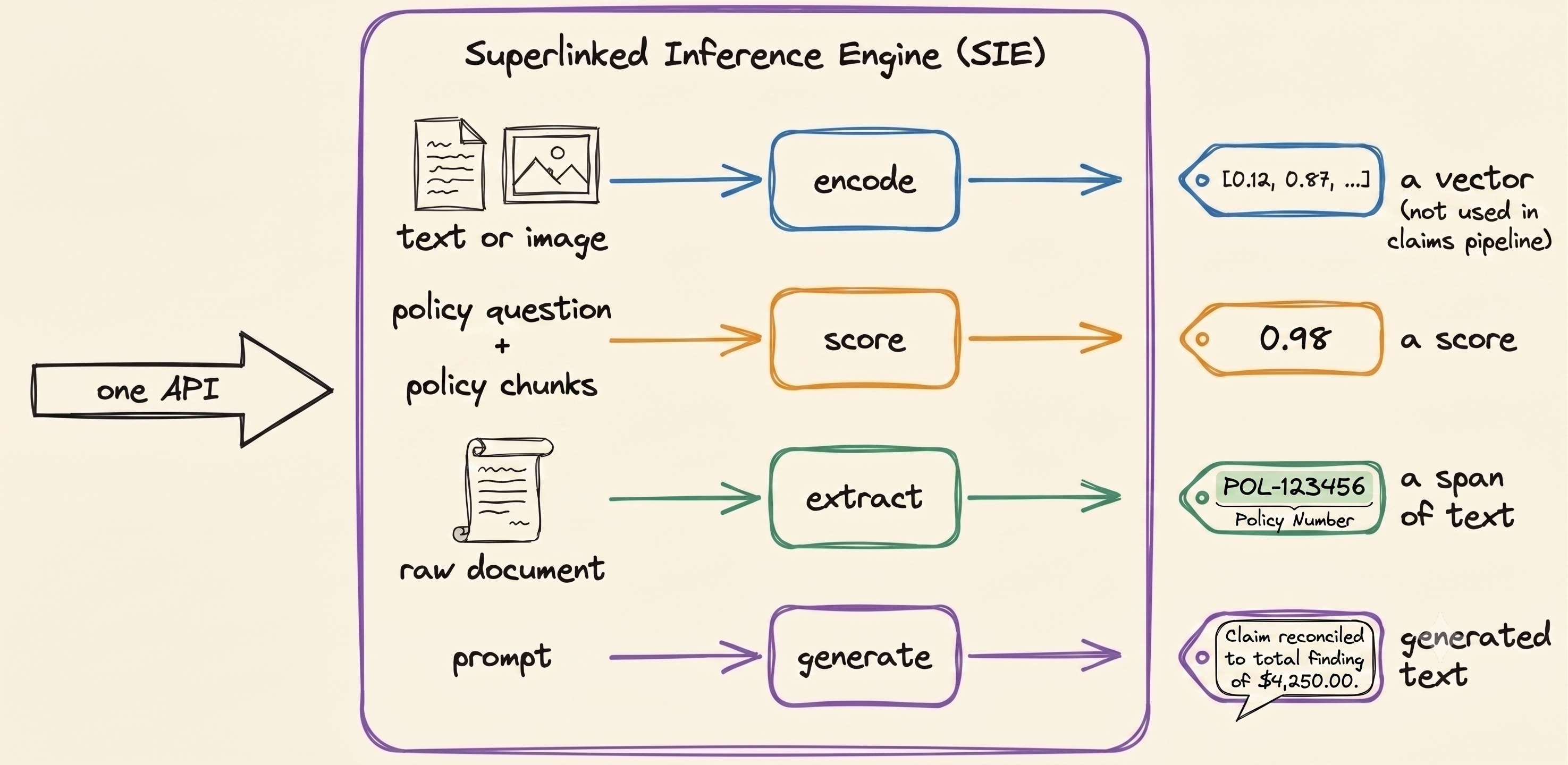
For the kinds of workloads we have been discussing for the flood insurance claim use case, SIE exposes multiple core primitives as:
extract does three different jobs in this pipeline:
turning the claim form and policy document into clean markdown (
docling)pulling labeled fields like name, policy number, and date out of text (
gliner)and finding labeled flood-damaged categories in the claim photo (
grounding-dino)
Three genuinely different tasks of parsing, entity extraction, and vision detection using the same
extractinterface.The models can be different underneath, but the serving interface doesn't have to be.
score reranks the policy’s chunks against a query using
bge-reranker, and returns the ranked list.generate takes everything gathered so far- parsed documents, extracted fields, policy language, and photo analysis- and produces the final review, using
Qwen3.5.
Under the old approach, TEI could handle the reranking stage, but that still leaves four other stages to serve separately.
Parsing, entity extraction, vision detection, and generation would each need their own serving setup.
A single SIE cluster runs all five stages without a separate serving stack for any of them. It gives us five stages, three primitives, and one shared serving layer.
The API is only the visible part. The interesting work happens underneath it, where SIE has to actually coordinate those models on shared GPUs.
1. Models load only when they are needed
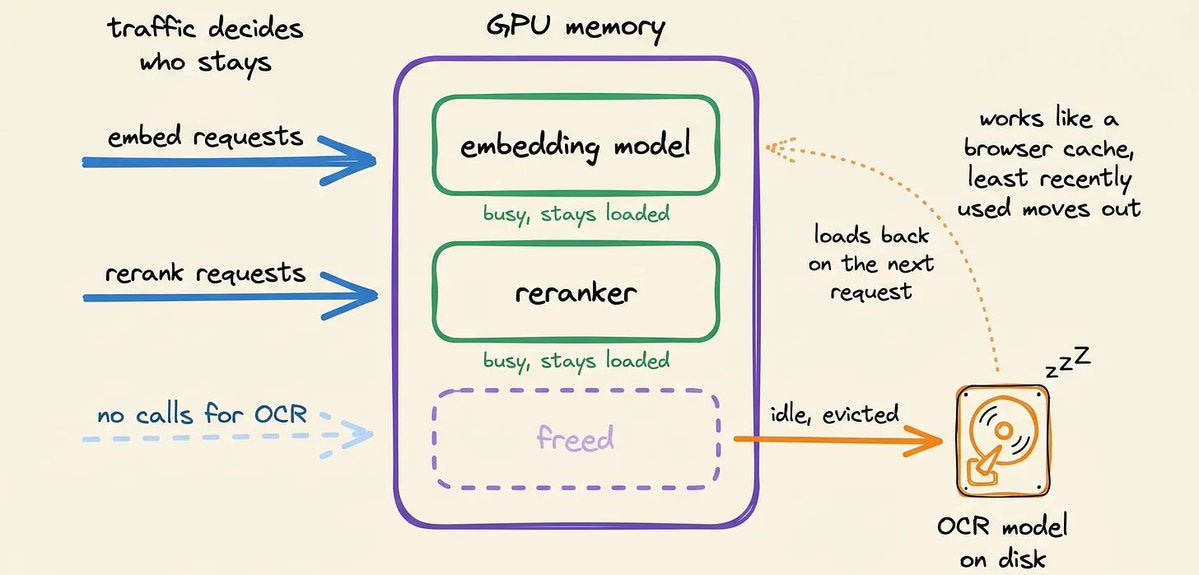
The first problem we had with standard serving tools was memory.
If several models share one GPU, we cannot keep every model loaded all the time and hope the memory works out. The serving layer needs to decide which models actually deserve space on the card.
SIE loads a model when a request actually needs it.
When GPU memory becomes constrained, SIE evicts the least recently used model and makes room for another one.
The GPU is no longer permanently attached to one model. It becomes a shared pool that different models can use as traffic moves through the pipeline.
2. One queue sees all the work
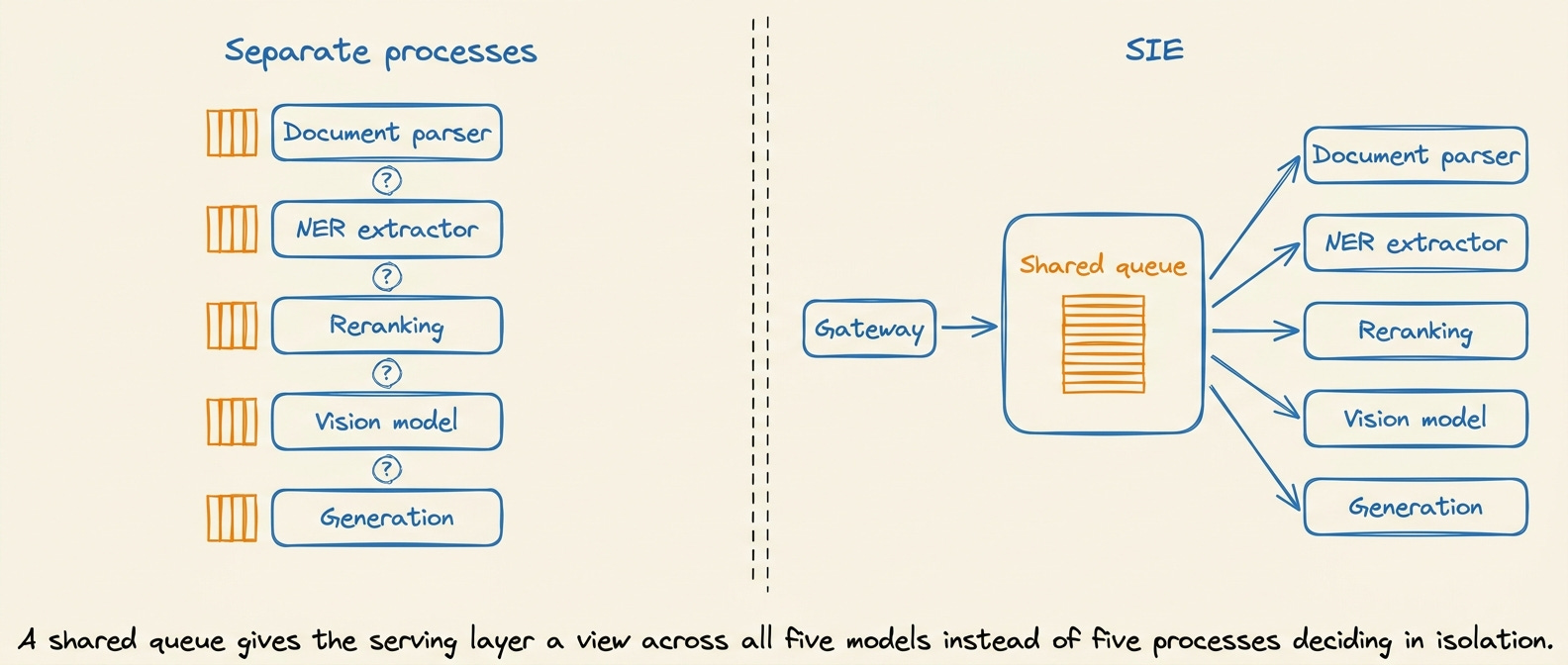
The second problem was coordination in a shared pool of resources.
With separate serving processes, each model sees only its own requests. The document server does not know what the reranker is waiting for, and the reranker has no idea what the extraction service is doing.
SIE puts the work behind a shared queue instead.
The gateway publishes requests into that common pool, and workers pull from it when they are ready to run.
That gives the serving layer a view of the workload across models instead of forcing every process to make scheduling decisions in isolation.
3. Batching follows compute cost
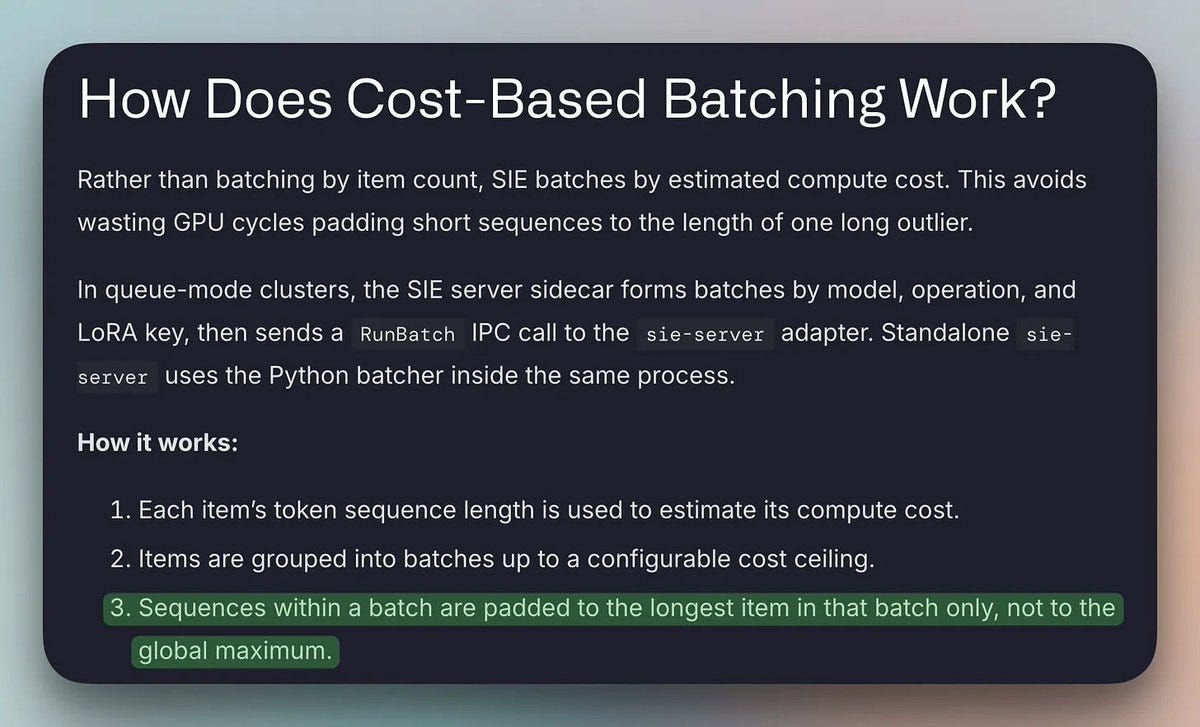
There is another source of waste once incoming requests start sharing the same GPU.
Requests are rarely the same size. If you batch a short input together with a much longer one, the shorter input is usually padded to the longer length.
The GPU then spends part of the computation processing padding rather than useful input.
SIE groups requests by estimated compute cost instead of simply grouping a fixed number of requests together.
Requests with similar compute costs can be batched together, so shorter inputs don't spend most of their GPU time being padded to match much longer ones.
4. The shared server scales with the workload
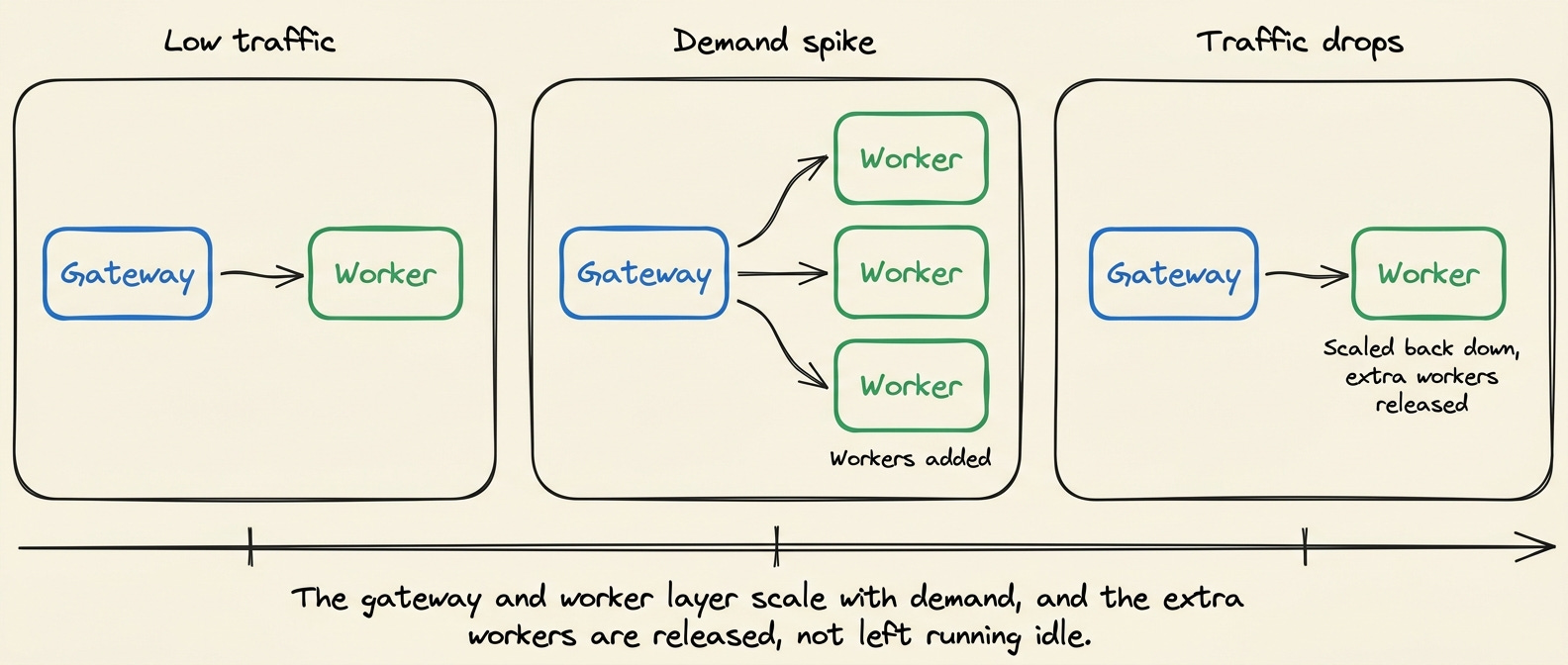
Sharing one GPU is useful locally, but production traffic does not stay constant.
SIE puts a gateway and worker layer around the model-serving runtime so the same setup can scale beyond.
It matters because the shared-GPU idea should not end when you move from a laptop to a production cluster. The same serving layer needs to handle both.
The system can add workers as demand increases and scale back down when demand falls.
SIE also provides deployment and operational pieces for production environments, including Kubernetes-oriented infrastructure, monitoring, and cloud deployment (AWS, GCP) support.
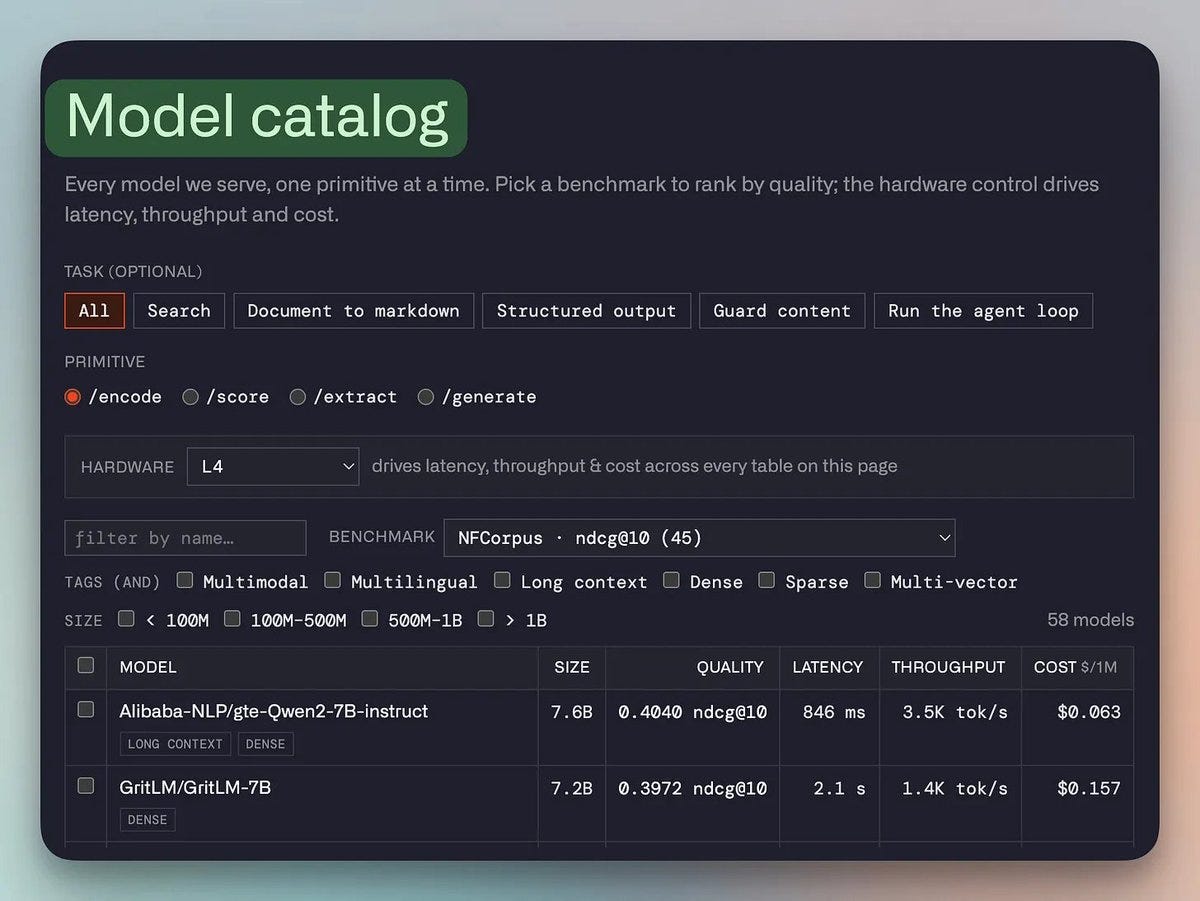
5. Models come with their serving configuration
There is one more problem that is very easy to underestimate.
Supporting a new model is not just downloading its weights. Different model architectures have different memory requirements, batching behavior, precision settings, and runtime characteristics.
A production serving layer therefore needs to know how each supported model should run instead of making you tune every model from scratch with vLLM or Triton, etc.
SIE’s model catalog packages supported models with their serving configuration, so adding or swapping a supported model does not mean rebuilding an entire serving stack around it.
The current catalog covers 112 models. So you reference a model by name, and the engine loads it with settings known to work.
Proving it against a real document
To see what serving looks like in practice, let’s execute our flood insurance claim review workflow in SIE (Superlinked Inference Engine).
The claim workflow spans plain text, formatted PDFs, and images, bringing multiple modalities together into a single pipeline.
The documents are deliberately messy, pulled straight from real public-domain sources to stress-test the pipeline:
a proof-of-loss user form
a repair estimate cost
an insurance policy document
and a photograph of the actual flood damage
Under the fragmented approach, this is the same five-tool sprawl covered earlier. SIE runs the same five jobs through one shared cluster instead.
None of these models does the same job. That means five serving setups where SIE runs the same five jobs through one shared cluster.
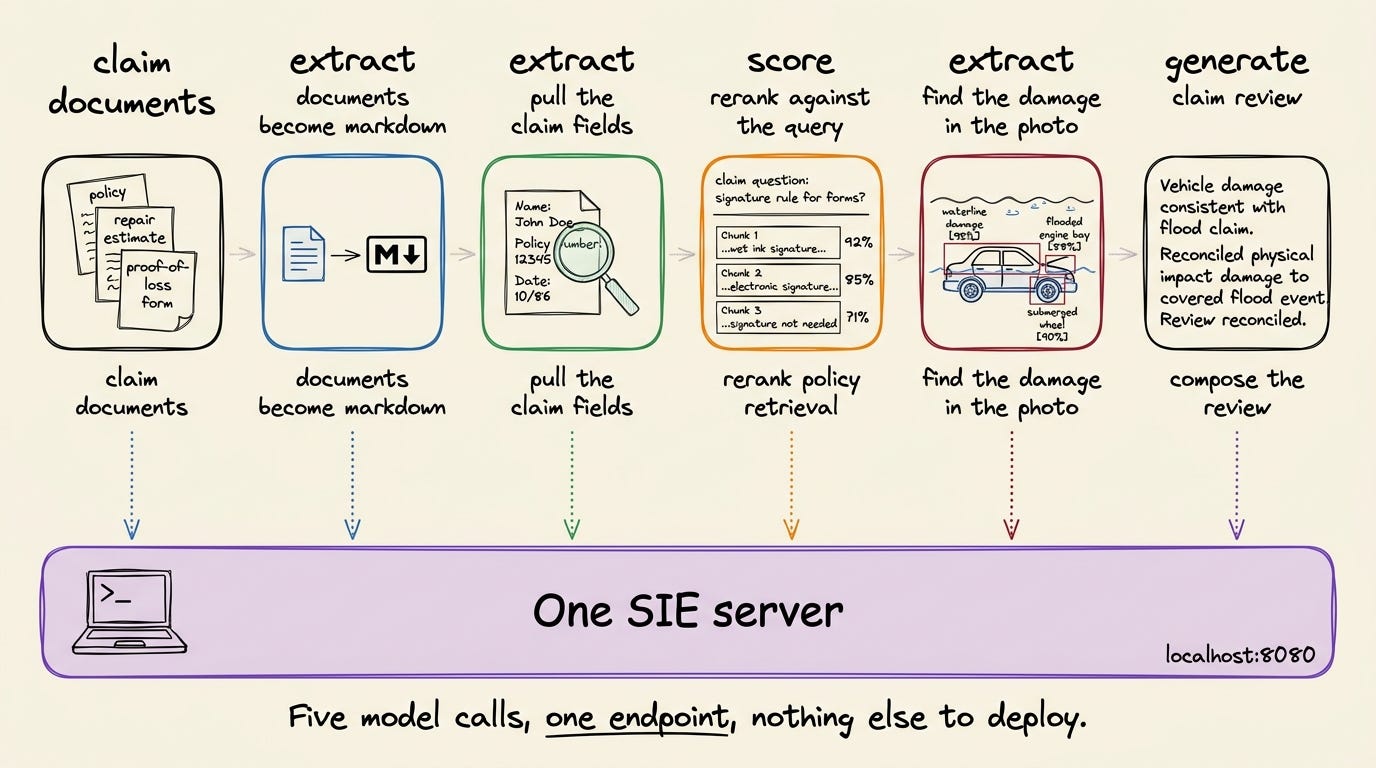
One cluster executing five different jobs
Here’s what the pipeline looks like, with each stage showing the task, model, and SIE endpoint it uses:
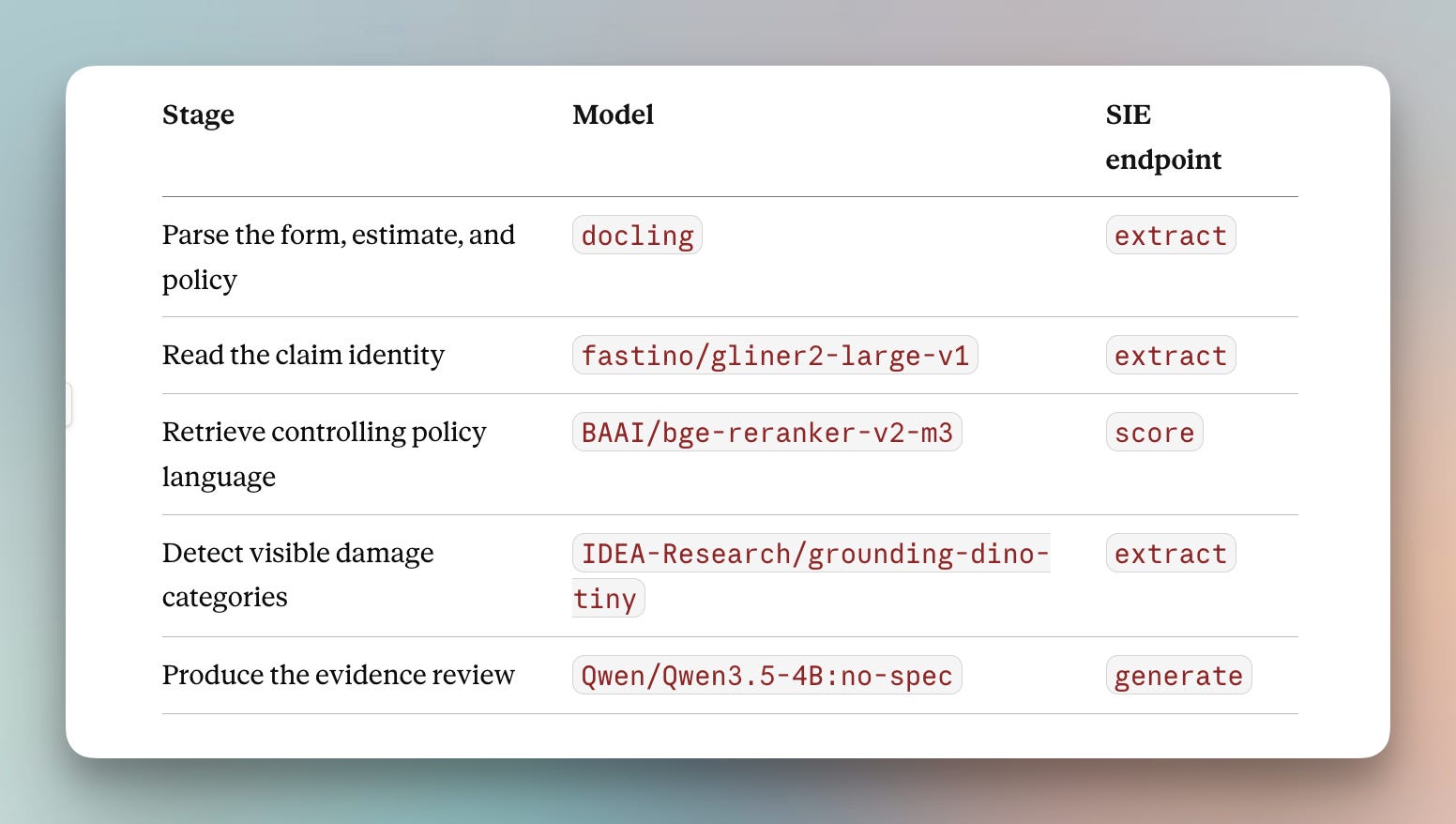
First, start by installing and starting the server. The serve command starts the server on port 8080.
pip install "sie-server[local]"
sie-server serve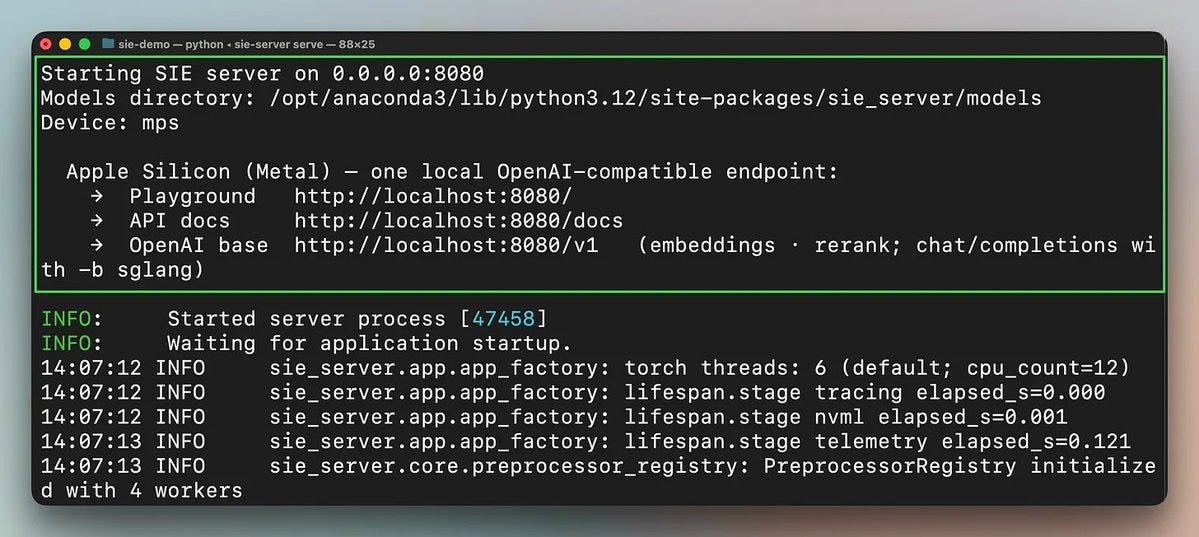
It is ready when the health check answers.
curl http://localhost:8080/readyz # okNow, instantiate the client and point it at the running server:
from sie_sdk import SIEClient

client = SIEClient("http://localhost:8080")
Every stage of the rest of the pipeline now goes through this one object and this one endpoint, no matter which model it hits.
Let’s walk through them one by one.
1. Parsing the policy documents
The proof-of-loss form, the repair estimate cost, and the insurance policy all go through docling for parsing, turning documents into clean markdown.
Docling is an open-source document parser that reads PDFs and structured documents and outputs clean markdown while keeping tables and layout intact.
result = client.extract(
    "docling",
    Item(id=path.stem, document=path),
    options={"profile": "default"},
)
markdown = result["data"]["markdown"]

print(markdown)
# "# Proof of Loss\n\nPolicyholder: ...\n\nDate of Loss: ..."
Parsing calls go through the extract endpoint. extract is SIE’s general-purpose call turns raw input, text, or image into structured or clean output.
So a document parser, an entity extractor, and a vision model can all sit behind the same endpoint even though they’re doing different work underneath.
2. Pulling the claim identity
Once the proof-of-loss form is in Markdown, an extraction model pulls the structured fields actually needed. i.e., name, loss date, property address, etc.
GLiNER is doing named entity extraction here, which means it can identify fields from labels you provide instead of needing a fixed schema baked into the model.
labels = [
    "insured name",
    "date and time loss",
    "flood insurance policy number",
    "insured property address",
]
result = client.extract(
    "fastino/gliner2-large-v1",
    Item(id="claim-identity", text=markdown[:5000]),
    labels=labels,
)

print(result["data"])
# [
#   {"label": "insured name", "text": "...", "score": 0.97, "start": 0, "end": 0},
#   {"label": "date and time loss", "text": "...", "score": 0.96, "start": 0, "end": 0},
#   ...
# ]
3. Finding the policy language
The policy document is long, so a naive approach would rerank every chunk against the query.
The cross-encoder reads the query and a candidate together and outputs a relevance score. This means every chunk it evaluates costs a full pass, not a cheap lookup.
So we will filter first before actual reranking:
It scores candidate chunks by keyword overlap, with terms like “proof of loss,” “signed,” and “60 days,” before sending only the strongest candidates to the reranker.
score_result = client.score(
    "BAAI/bge-reranker-v2-m3",
    Item(id="policy-requirements", text=POLICY_QUERY),
    [Item(id=str(i), text=text) for i, text in candidates],
)

print(score_result["scores"])
# [{'item_id': '0', 'rank': 0, 'score': 3.009},
#  {'item_id': '1', 'rank': 1, 'score': -1.061},
#  {'item_id': '2', 'rank': 2, 'score': -11.425}]
SIE has the score() method that uses a cross-encoder. The scores are cross-encoder logits, so the absolute numbers do not mean much on their own.
Instead, the order is important. The results come back already ranked, so the top passage is the best match:
best_id = score_result["scores"][0]["item_id"]

best = candidates[int(best_id)][1]
# 'Proof of loss must be signed and submitted within 60 days of the date of loss.'
4. Reading the damage photo
The damage photograph goes through zero-shot object detection, looking for specific damage categories with a confidence floor.
Zero-shot means the model was never trained on these exact labels of 'standing water’ and 'flooded room.’ So just text descriptions are handed to it at request time.
And it matches them against the image directly instead of needing a model fine-tuned to recognize this specific list of categories in advance.
labels = ["standing water", "flooded room", "water damaged wall", "damaged furniture"]
result = client.extract(
    "IDEA-Research/grounding-dino-tiny",
    Item(id="damage-photo", images=[photo_path]),
    labels=labels,
    options={"score_threshold": 0.05},
)

print(result["data"])
# [
#   {"label": "furniture", "score": 0.509, "bbox": [412, 890, 1180, 1640]},
#   {"label": "standing water", "score": 0.276, "bbox": [50, 1500, 2900, 2280]},
# ]
5. Writing the review
By this point, the pipeline has written out its own set of intermediate results as markdown for each parsed document, the structured claim identity, the ranked policy passages, and the photo analysis.
Those feed into one generation call, which produces the final review. The output is locked to a JSON schema, so the result has a fixed structure.
result = client.generate(
    "Qwen/Qwen3.5-4B:no-spec",
    generation_prompt,
    max_new_tokens=1500,
    temperature=0,
    top_p=1,
)

print(result["data"])
# {
#   "status": "manual_review",
#   "findings": [
#     {
#       "severity": "blocking",
#       "detail": "Proof of Loss lacks required signature and date."
#     }
#   ]
# }
For generation, SIE invokes generate() to compose the answer. This is free text with token usage, produced by a generative model, and it comes back through the same client as the entities, the scores, and the bounding boxes.
Run it yourself
Finally, we have a whole pipeline with five models, three shared primitives, extract, score, and generate, running through one client against one SIE cluster.
The important part is that these five stages do not require five separate serving stacks. How you place the models underneath that serving layer depends on the available GPU memory and the models you need to run.
For this example, you can also run two SIE servers:
one for Docling, GLiNER2, and reranking
a second for Grounding DINO and Qwen’s generation
Or, if you want to reuse a single GPU, you can load one model bundle, run its calls, release it, and then load the second bundle.
So the deployment can use multiple servers or reuse the same GPU. The serving layer stays the same.
Five models are pulled from Hugging Face on their first call and stay active for subsequent requests while their bundle is loaded.
Run the five calls end to end, inspect what each model returns, and see how the whole pipeline runs through SIE.
Want to try the pipeline without building it from scratch?
The repository includes notebooks that walk through the complete insurance-claim workflow, along with the full code and server setup.
(Don’t forget to ⭐ the repo.)
Using small, specialized models for the narrow tasks is the right approach, and it is not really controversial.
They are accurate enough on the task they are trained for, and they keep your data in your own environment.
But switching to small models does not make inference cheaper by itself. It moves the cost from a per-token bill to the GPUs you rent, and if you put each model on its own GPU, most of that hardware sits idle, and you are paying for it.
The saving only appears when the models share GPUs, and that requires a single engine that can run all of them. The moment you serve each model with a different tool, each one takes a GPU of its own again.
SIE (open-source) already implements that, letting you run the different models your agent needs on one shared cluster, with the routing and autoscaling for production you’d otherwise have to build yourself.
It also plugs into your existing stack, from vector databases (Chroma, Qdrant) to agent frameworks (LangChain, CrewAI). And it even has drop-in OpenAI compatibility, so existing embedding or chat can just point at a new URL.
Superlinked GitHub (100% Open Source) →
👉 Over to you: how many separate models does a single request in your stack call, and how many of them are holding a dedicated GPU right now?
Good day!