

AI security has nothing to do with AI
Adding an LLM call to a product puts security focus on prompt filtering, output guardrails, and input validation. That only covers the application layer.
To understand this, trace a single model call.
The prompt leaves the app, hits a provider endpoint, and if it carries a patient record or financial data, regulated data just left the boundary.
Depending on the provider’s retention policy, it can sit in external logs for days.
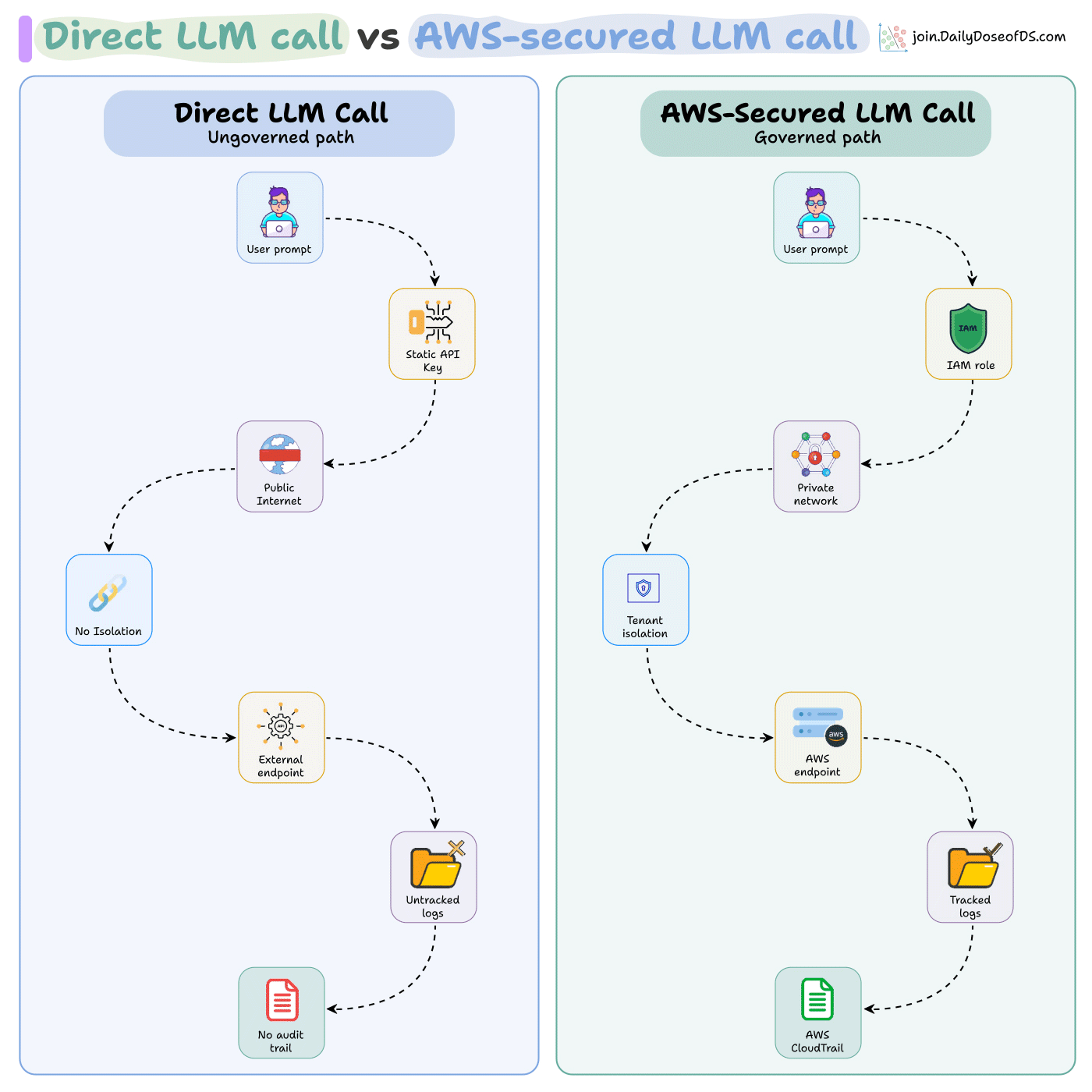
Prompt filtering governs what goes into the model. It does not control where data travels or who stores it.
AWS moves this into the infrastructure layer:
IAM policies scope which services call which endpoints.
VPC isolation keeps tenant traffic apart.
Encryption and CloudTrail logging cover every data flow, including model calls, by default.
So a new AI feature inherits all of it on day one.
IDEMIA handles identity data for 45+ US government agencies on AWS. And they cut transformation time by 4x with the security coming from the infrastructure, not the application code.
You can explore AWS’s resources for building AI-native SaaS here →
Thanks to AWS for partnering today!
Hermes Kanban: Mission control for your agents
We built a 4-agent software team where everything runs from Telegram and is managed on a Kanban board.
A project manager who plans the work
A backend developer
A frontend developer
And a tester.
The PM reads a goal, breaks it into linked tasks, and assigns each to the right agent.
The thing that makes them a team instead of four strangers is a shared kanban board. Every task is a row, and when an agent finishes, it writes a summary of what it built and what the next agent needs to know.
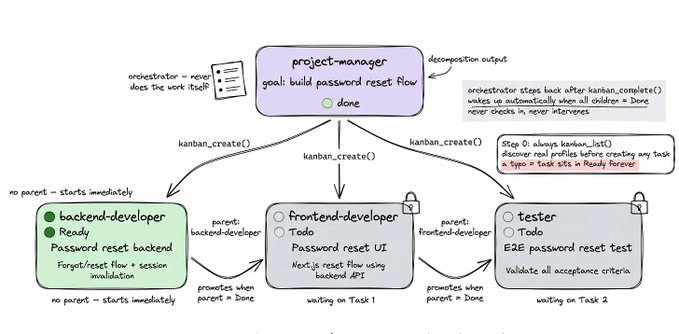
The next agent reads that summary before it starts. So the frontend developer never has to guess the API shape, and the tester knows exactly what to verify.
The hardest part we faced when setting this up was building an agent that could actually act like a backend engineer.
A backend engineer has to stand up a database, wire auth, manage storage, deploy functions, and keep all of it consistent while the rest of the team builds on top.
An agent doing this from scratch failed almost every time in our run.
It burned its context window, remembering which tables existed and which endpoint it created. Due to this, the work context exhausted quickly.
We solved this by adding InsForge as the backend context engineering layer. It is an open-source, agent-native backend, and we added it to our backend developer agent as a skill.
A skill is a step-by-step guide that teaches the agent how to do a specific kind of work.
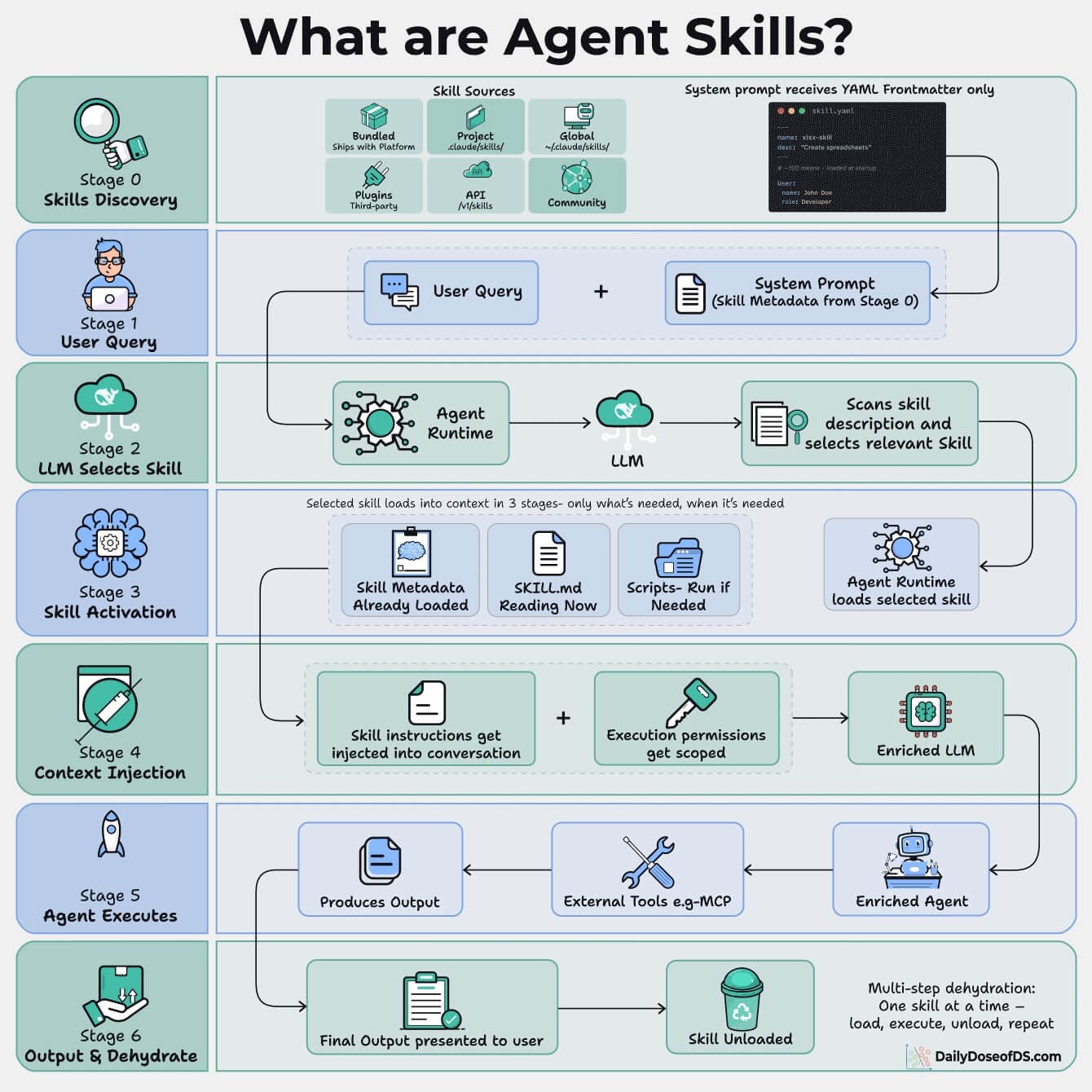
With InsForge installed, the agent stopped improvising infrastructure and followed a reliable path to create the project, define the database, set up auth, and deploy functions.
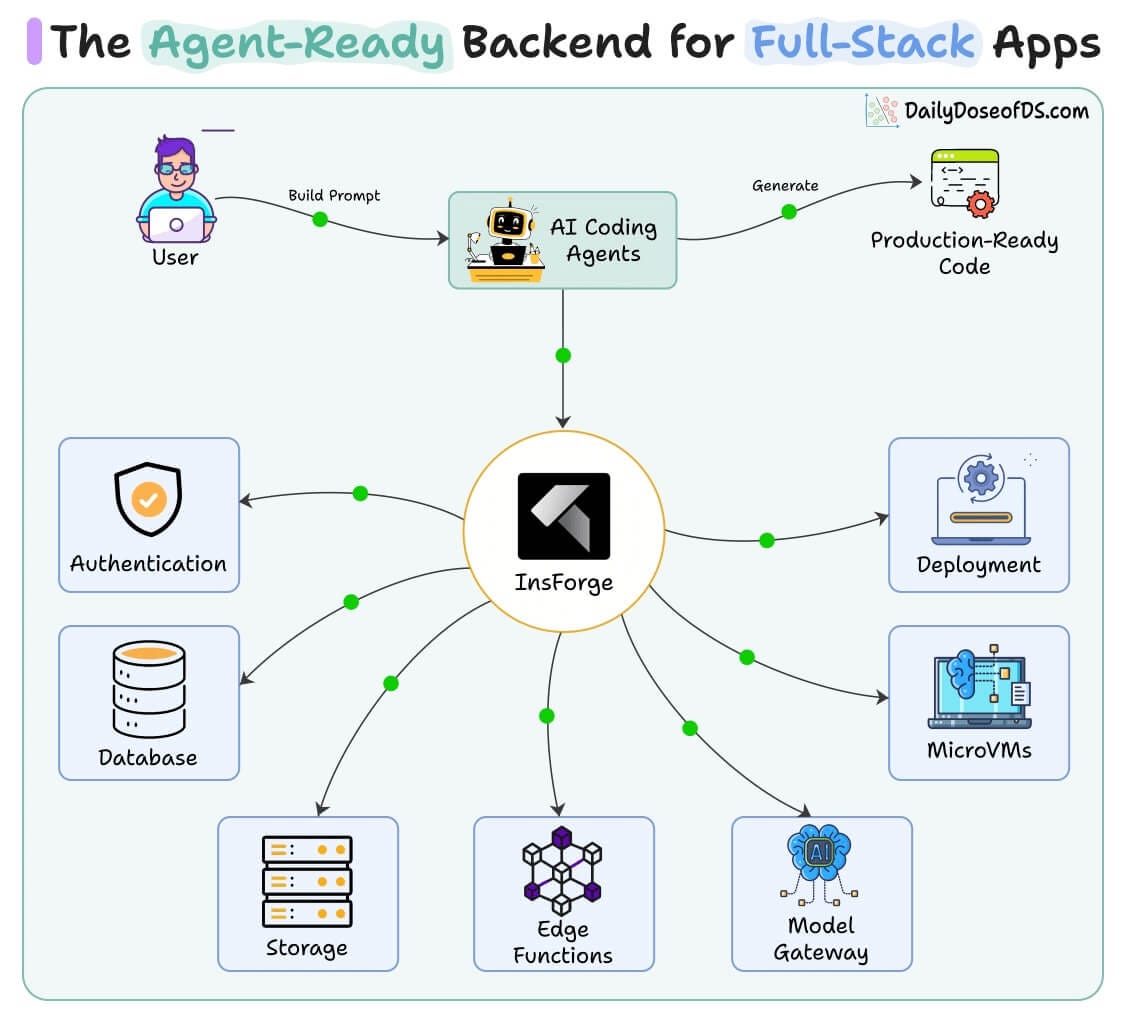
To test the whole team, we had them build a working Google Docs clone, AI features included.
The backend agent spun up the full service on its own, like database tables, user auth, document handling, and edge functions running real TypeScript, all in one dashboard.
The frontend agent read that summary and built the UI on top of it, and the tester closed the loop.
(don’t forget to star 🌟)
You can read our full article covering this demo with full setup here on X →
The top Claude Code CLI integrations
We created a collection of some of the top Claude Code CLI integrations you should add to your Agents:
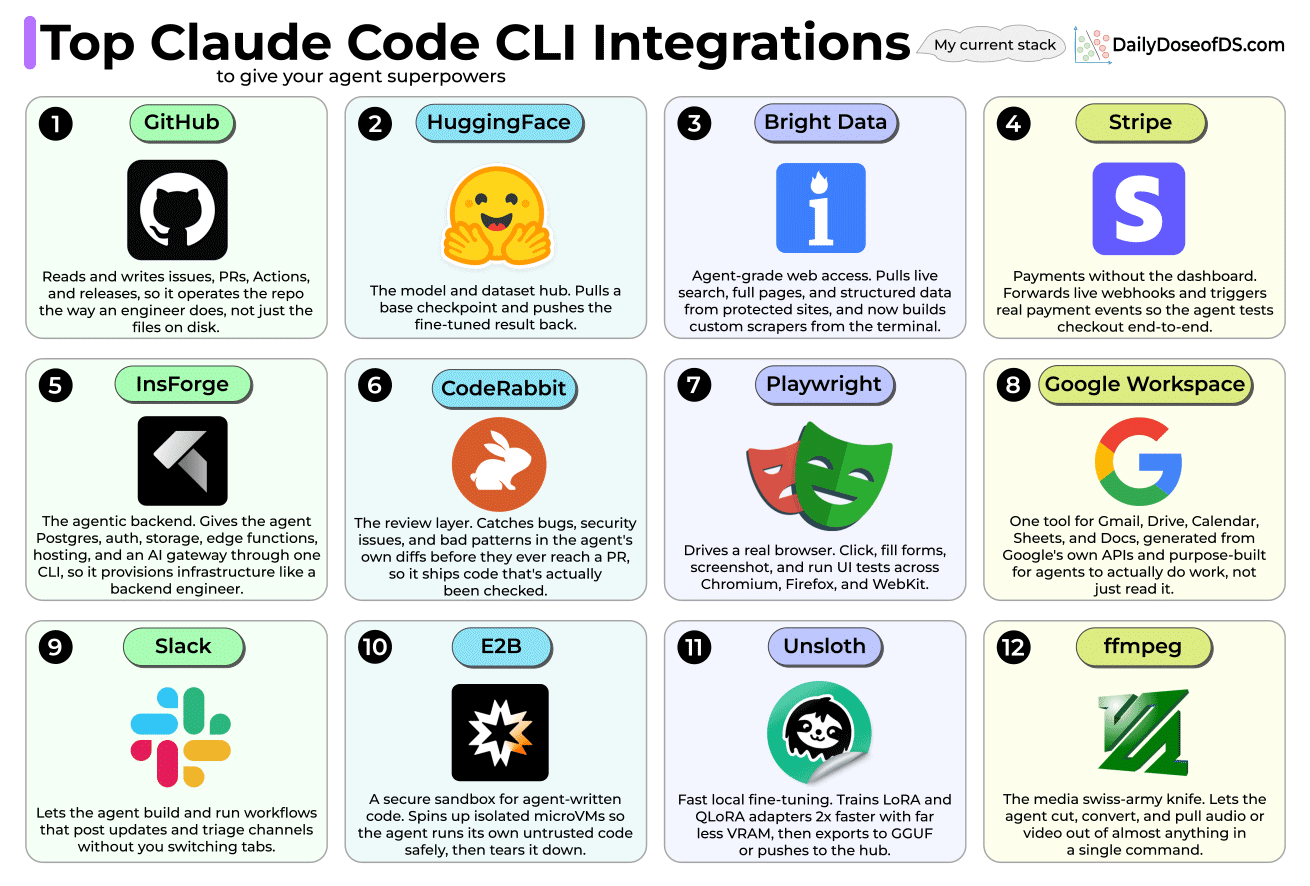
1. GitHub → Helps the agent read and write issues, PRs, Actions, and releases, so it works the codebase the way an engineer does, not by editing text on disk.
2. HuggingFace → It pulls a base model, runs the training, and pushes the fine-tuned version back, without you ever leaving the terminal. The whole loop happens in one place.
3. Bright Data → It pulls live search, full pages, and clean data from sites that normally block bots, and now it can even build custom scrapers from the terminal. You can collect data from any website by turning prompts into ready-to-run scrapers with built-in proxies and automatic unblocking.
GitHub Repo: https://github.com/brightdata/cli
(don’t forget to star 🌟)
4. Stripe → It forwards live webhooks and fires real payment events, so the agent runs through the whole checkout instead of faking it.
5. InsForge → A full backend in one CLI (also used in the Kanban demo above). It gives database, auth, storage, edge functions, hosting, and an AI gateway...all in one place instead of stitching five services together. The agent sets up the infrastructure the way a backend engineer would.
GitHub: https://github.com/InsForge/insforge
(don’t forget to star 🌟)
6. CodeRabbit → It reviews the agent’s own code before you ever see it. It catches bugs, security holes, and sloppy patterns while the change is still local, so nothing messy makes it into a PR.
7. Playwright → It allows the agent to click, fill forms, take screenshots, and run UI tests across Chrome, Firefox, and Safari, on the real page instead of guessing from the HTML.
8. Google Workspace → Connect Gmail, Drive, Calendar, Sheets, and Docs through one connector. It is built on Google’s own APIs and made for agents to actually do the work, not just read it, so it can draft the reply, update the sheet, and block off the calendar in one go.
9. Slack → It puts the agent right where your team already works. It builds and runs workflows that post updates and sort through channels.
10. E2B → A safe sandbox for code that the agent wrote itself. It spins up a small isolated VM, runs the code, grabs the output, then shuts the whole thing down.
GitHub: https://github.com/e2b-dev/E2B
(don’t forget to star 🌟)
11. Unsloth → It gives the agent fast local fine-tuning without the cloud bill. It trains LoRA and QLoRA adapters about 2x faster on a lot less VRAM, then exports to GGUF or pushes straight to the hub.
GitHub: https://github.com/unslothai/unsloth
(don’t forget to star 🌟)
12. ffmpeg → This lets the agent cut, convert, and pull audio or video out of just about anything in a single command.
👉 Over to you: What popular CLI integrations do you use?
That said, if you want to see how this whole stack fits together, we wrote a full deep dive on how Claude Code’s harness works, what actually goes in the .claude/ folder, and how hooks, skills, and subagents come together into a real workflow.
Good day!
P.S. For those wanting to develop “Industry ML” expertise:

At the end of the day, all businesses care about impact. That’s it!
Can you reduce costs?
Drive revenue?
Can you scale ML models?
Predict trends before they happen?
We have discussed several other topics (with implementations) that align with such topics.
Here are some of them:
Learn everything about MCPs in this crash course with 9 parts →
Learn how to build Agentic systems in a crash course with 14 parts.
Learn how to build real-world RAG apps and evaluate and scale them in this crash course.
Learn sophisticated graph architectures and how to train them on graph data.
So many real-world NLP systems rely on pairwise context scoring. Learn scalable approaches here.
Learn how to run large models on small devices using Quantization techniques.
Learn how to generate prediction intervals or sets with strong statistical guarantees for increasing trust using Conformal Predictions.
Learn how to identify causal relationships and answer business questions using causal inference in this crash course.
Learn how to scale and implement ML model training in this practical guide.
Learn techniques to reliably test new models in production.
Learn how to build privacy-first ML systems using Federated Learning.
Learn 6 techniques with implementation to compress ML models.
All these resources will help you cultivate key skills that businesses and companies care about the most.