

How to fine-tune LLMs in 2026
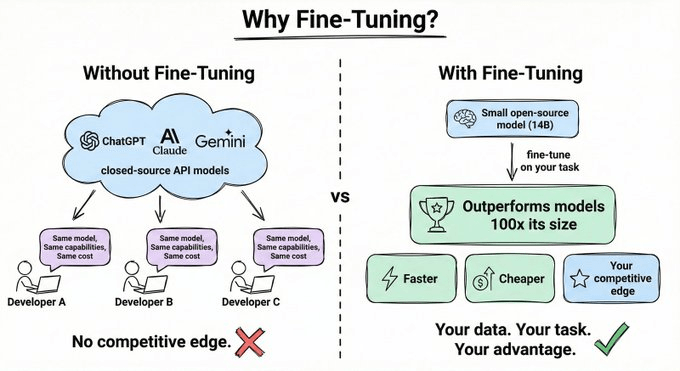
If you’re using GPT or Claude, you’re using the same model as everyone else, with the same capabilities, the same cost, and no competitive edge.
But if you take a small open-source model and fine-tune it on your specific task, it can outperform a model 100x its size, at a fraction of the cost and latency.
Devs typically associate fine-tuning with a painful setup, like curating datasets, labeling outputs, and hand-crafting reward functions.
In 2026, that’s no longer the case.
Modern fine-tuning using GRPO and RULER is redefining fine-tuning.
You can now train agents that genuinely improve through experience, without writing a single reward function or collecting a single labeled example.
Today, let’s walk through exactly how!
SFT vs. Reinforcement Fine-Tuning
In supervised fine-tuning (SFT), you collect input-output pairs and the model learns to imitate them.
The problem is that SFT teaches the model what to say, not how to succeed.
For agents that search, call APIs, and reason across multiple steps, imitation isn’t enough. You want improvement through trial and error.
Think of it this way:
SFT = studying a textbook (memorizing answers to known questions)
RL = on-the-job training (learning from trial, error, and feedback)
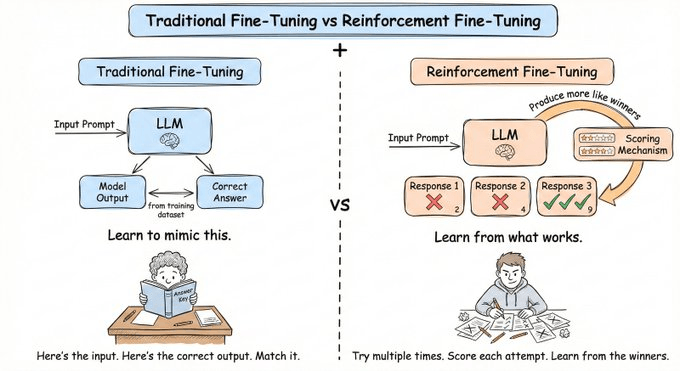
This is Reinforcement Fine-Tuning (RFT). You give the model a reward signal and let it discover the best strategies on its own.
How GRPO Works
GRPO (Group Relative Policy Optimization) is the most popular RFT algorithm today. It’s the same algorithm that powered DeepSeek-R1’s reasoning capabilities.
Essentially, instead of training a separate model to score responses, GRPO generates multiple completions and grades them relative to each other.
Here’s how it works for each prompt:
Sample a group: Generate N completions from the current model
Score each one: A reward function evaluates each attempt
Normalize within the group: Calculate relative advantage vs. the group average
Update the model: Reinforce above-average behaviors, suppress below-average ones
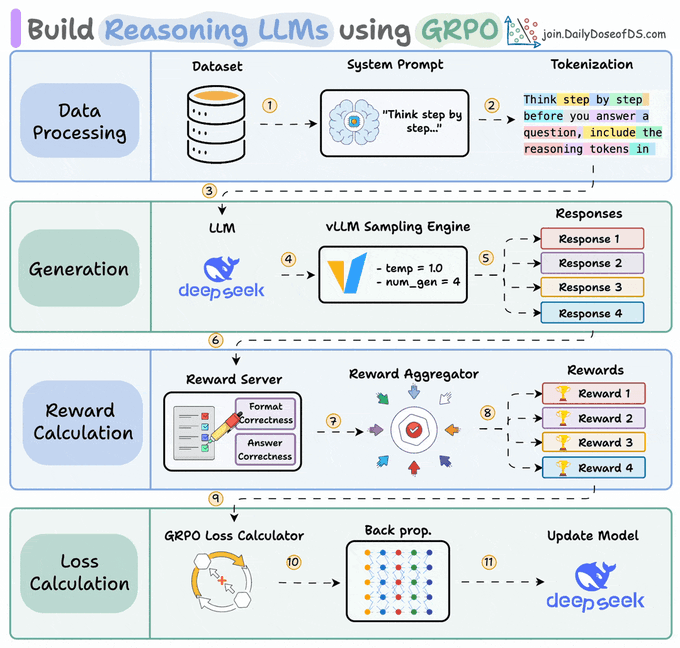
GRPO only needs relative rankings, not absolute scores. Whether completions score 0.3, 0.5, and 0.7 or 30, 50, and 70 doesn’t matter. Only the ordering drives learning.
ART: Agent Reinforcement Trainer
GRPO is powerful, but how do you actually apply it to a real-world agent?
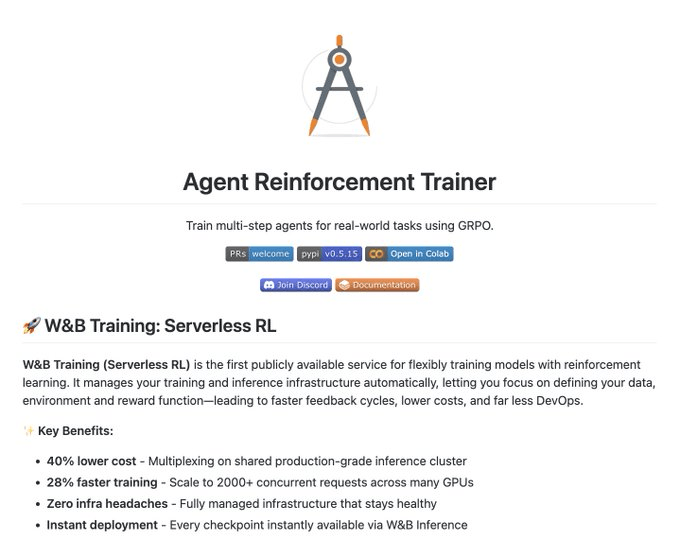
ART (Agent Reinforcement Trainer) is a 100% open-source framework that brings GRPO to any Python application.
Most RL frameworks are built for simple chatbot interactions, involving one input, one output, and the job is done.
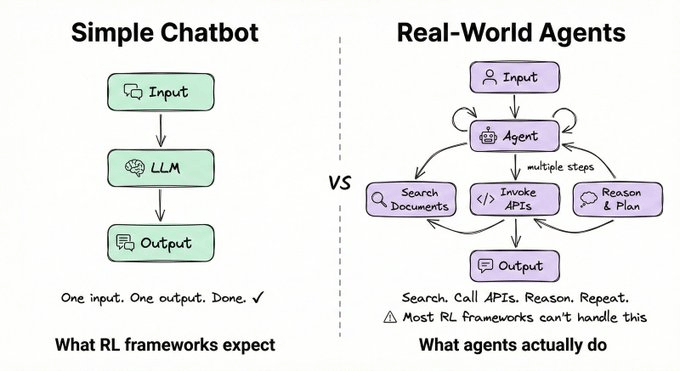
Real agents are fundamentally different. They search documents, invoke APIs, and reason across multiple steps before producing an answer.
ART is built for exactly this. It provides:
Native support for tool calls and multi-turn conversations
Integrations with LangGraph, CrewAI, and ADK
Efficient GPU utilization during training
Architecture
ART splits into two parts: a Client and a Backend.
The Client is where your agent code lives. It sends inference requests to the backend and records every action into a Trajectory, the complete history of one agent run.
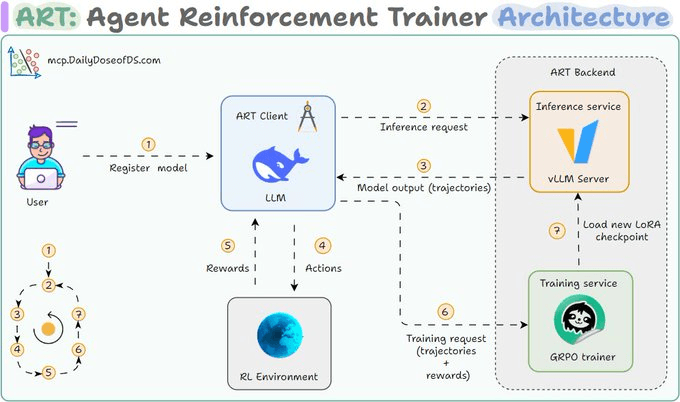
The Backend is where the heavy lifting happens. It runs vLLM for fast inference and Unsloth-powered GRPO for training. After each training step, a new LoRA checkpoint loads automatically into the inference server.
The full training loop
Client sends an inference request
Backend generates model outputs
Agent takes actions in the environment (tool calls, searches, etc.)
Environment returns a reward
Trainer updates the model via GRPO
A new LoRA checkpoint loads into the inference server
Repeat, with each cycle, the model gets a little better than before
RULER: RL without manual reward functions
Defining a good reward function has always been the hardest part of RL.
Training an email agent requires labeled correct answers. Training a code agent requires test suites. Each one is its own unique engineering project.
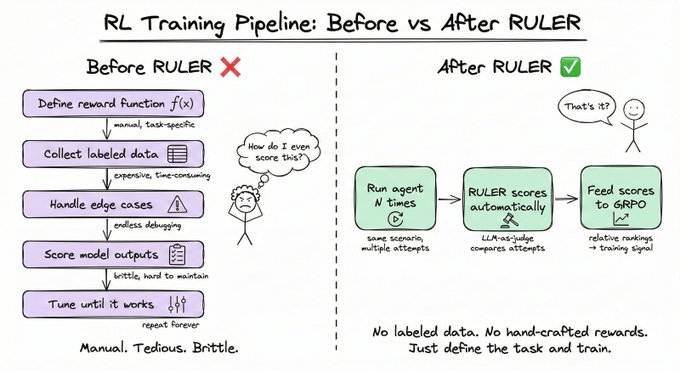
RULER (Relative Universal LLM-Elicited Rewards) eliminates this bottleneck entirely. It uses an LLM-as-judge to compare multiple agent trajectories and rank them, with no labeled data required.
It works because of two key insights:
Asking an LLM “rate this 0-10” produces inconsistent results
Asking “which of these 4 attempts best achieved the goal?” is far more reliable.
And since GRPO only needs relative scores, the absolute values don’t matter anyway.
The process is three steps:
Generate N trajectories for a scenario
Pass them to an LLM judge, which scores each from 0 to 1
Use those scores directly as rewards in GRPO
A practical example
We put together a fully working notebook that trains a 3B model to master how to use any MCP server through reinforcement learning using ART.
Simply provide an MCP server URL, and the notebook will:
Query the server’s tools
Generate a set of input tasks that use those tools
Train the model on those tasks using automatic RULER evaluation
You can find more examples to adapt and get started in the ART GitHub repo.
12 must-use features in Claude Code
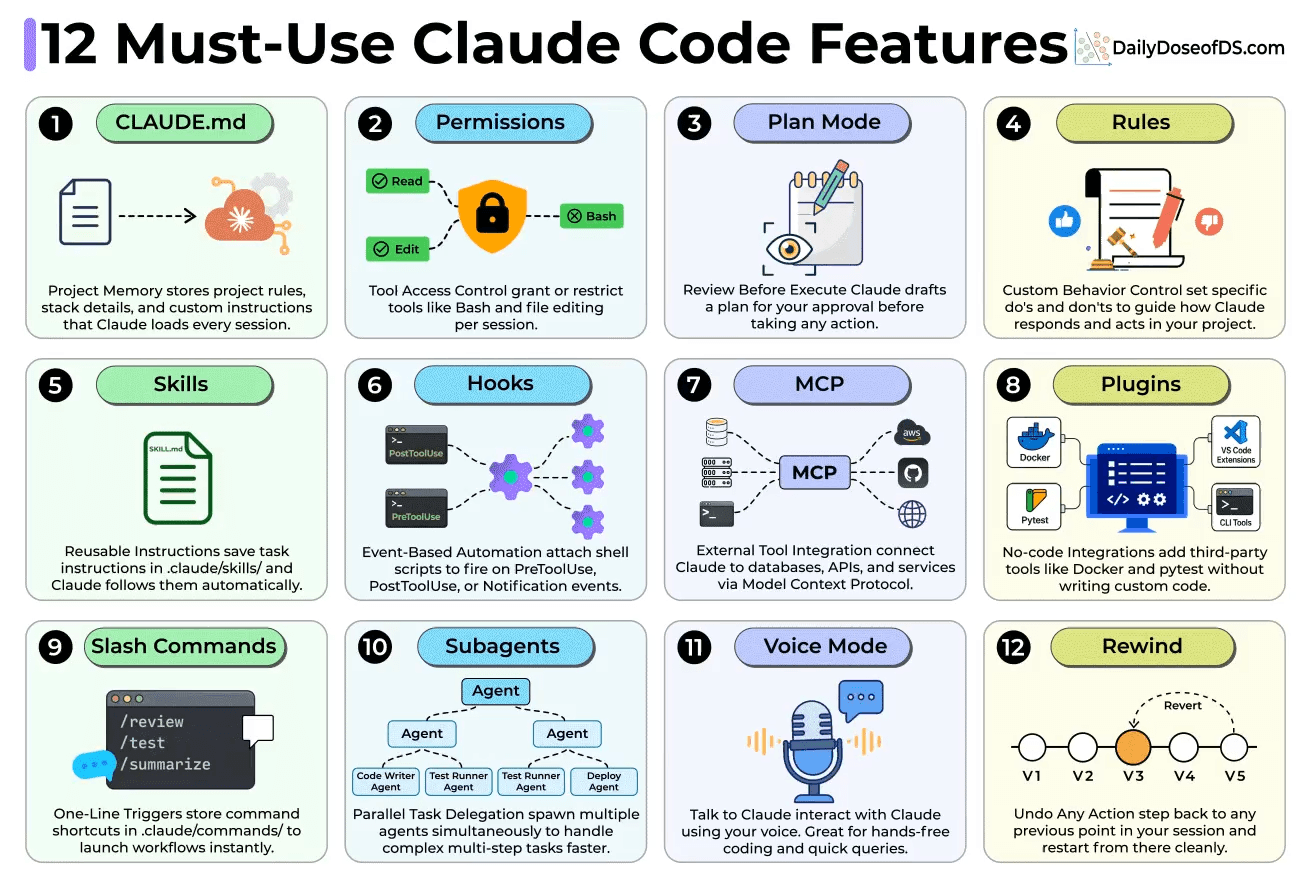
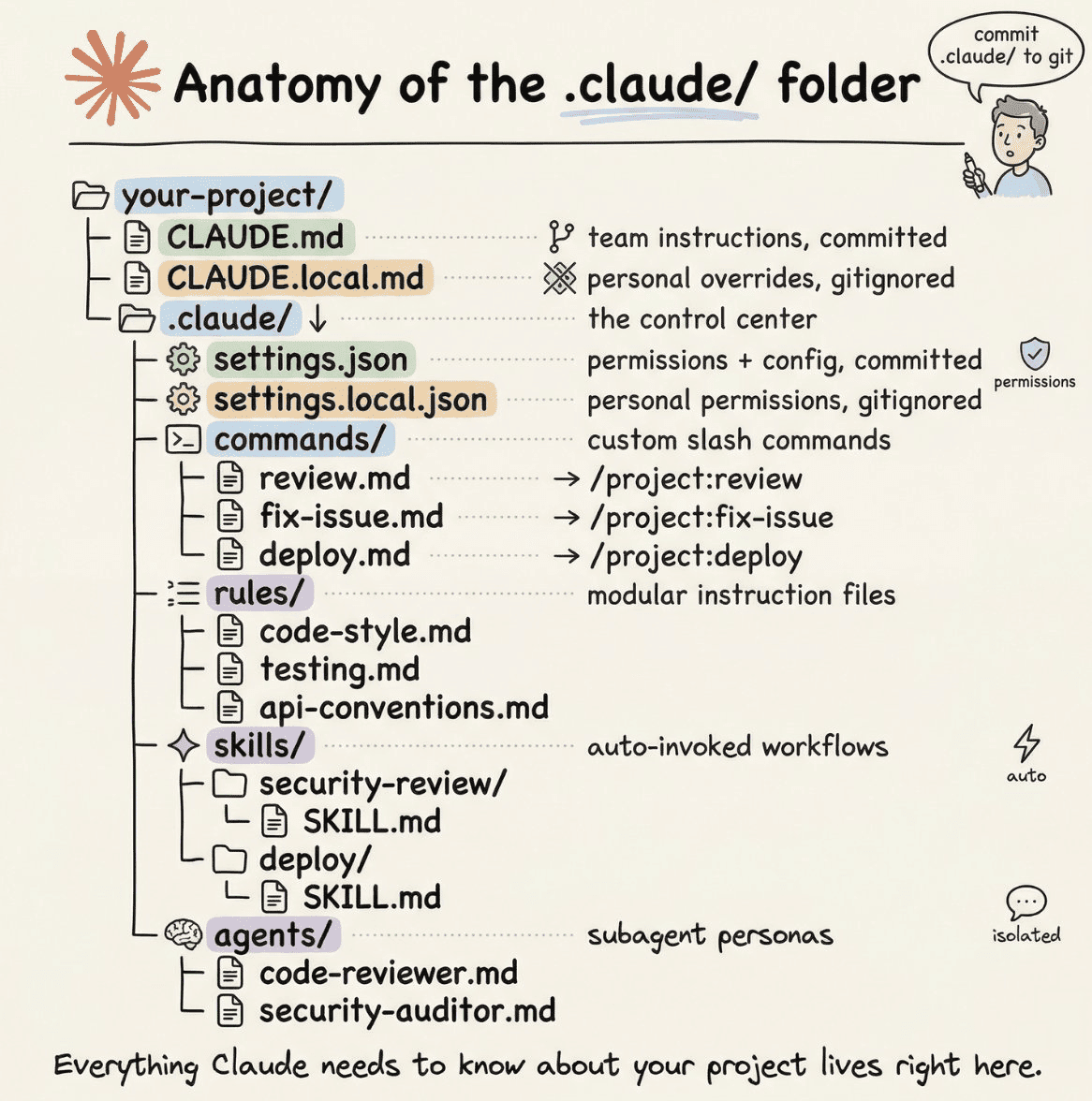
CLAUDE .md is your project’s memory. It stores your stack details, conventions, and rules so Claude loads them at every session start.
Permissions let you whitelist or block tools like Bash per session. If you’re working on anything production-facing, this is non-negotiable.
Plan Mode makes Claude draft a step-by-step plan before touching any code. You get to approve or reject before anything runs.
Rules let you set project-wide behavioral guardrails with specific dos and don’ts beyond what CLAUDE(.)md covers.
Skills are reusable instruction files you store in .claude/skills/. Write them once and Claude follows them automatically every time.
Hooks fire shell scripts on events like PreToolUse and PostToolUse, which makes them perfect for auto-linting or triggering tests.
MCP connects Claude to databases, APIs, and services. This is how you give it real-world access beyond your codebase.
Plugins let you add Docker, pytest, and VS Code extensions without writing any integration code.
Slash Commands store workflow shortcuts in .claude/commands/ so you can trigger complex flows with a single keystroke.
Subagents spawn parallel Claude instances that divide and conquer multi-step workflows simultaneously.
Voice Mode lets you talk to Claude hands-free, which is great for quick queries while your hands are on the keyboard.
Rewind lets you step back to any checkpoint in your session and restart cleanly from that point.
We covered the anatomy of the .claude folder in a recent issue.
👉 Over to you: Which features do you use the most in CC?
Thanks for reading!
P.S. For those wanting to develop “Industry ML” expertise:

At the end of the day, all businesses care about impact. That’s it!
Can you reduce costs?
Drive revenue?
Can you scale ML models?
Predict trends before they happen?
We have discussed several other topics (with implementations) that align with such topics.
Here are some of them:
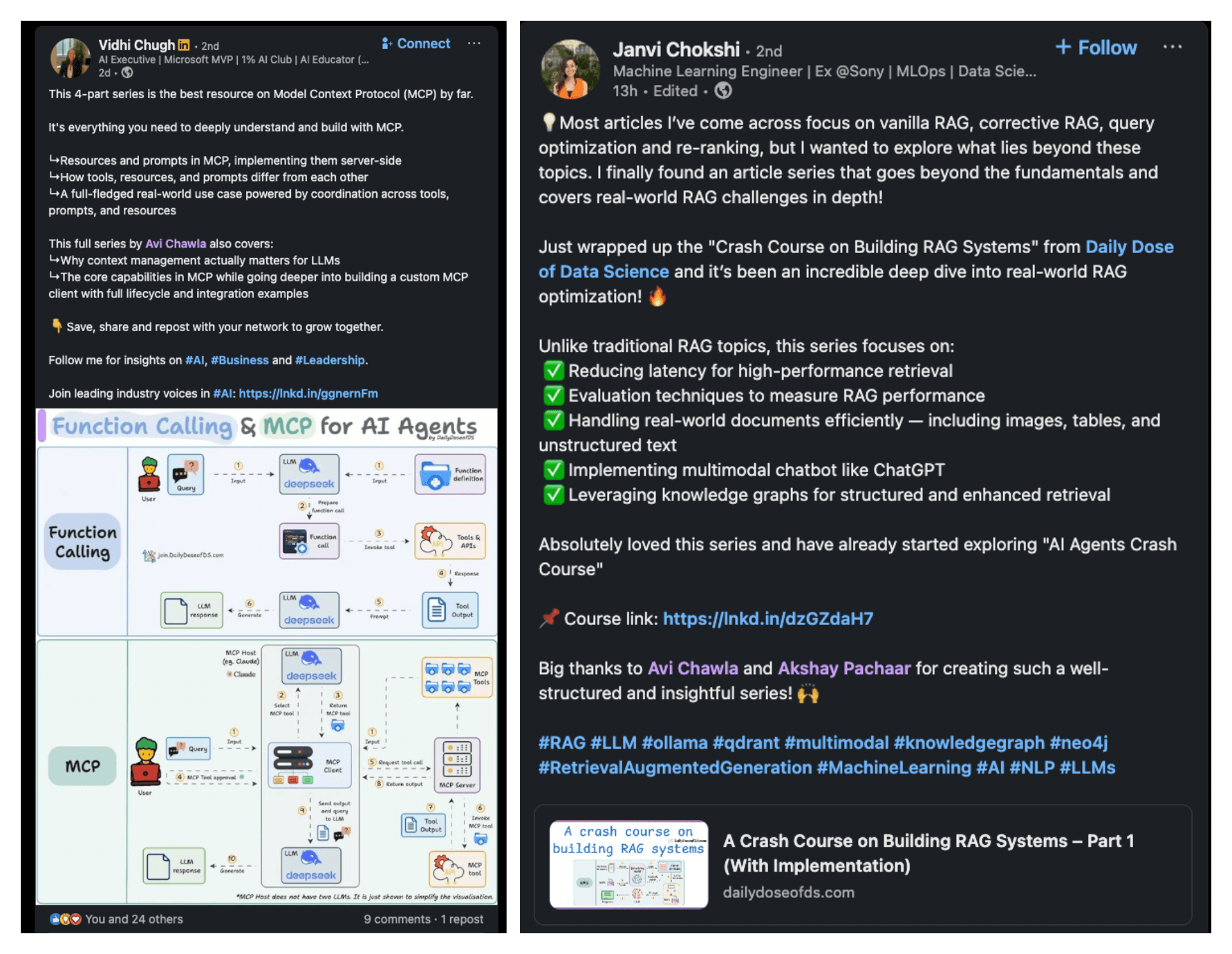
Learn everything about MCPs in this crash course with 9 parts →
Learn how to build Agentic systems in a crash course with 14 parts.
Learn how to build real-world RAG apps and evaluate and scale them in this crash course.
Learn sophisticated graph architectures and how to train them on graph data.
So many real-world NLP systems rely on pairwise context scoring. Learn scalable approaches here.
Learn how to run large models on small devices using Quantization techniques.
Learn how to generate prediction intervals or sets with strong statistical guarantees for increasing trust using Conformal Predictions.
Learn how to identify causal relationships and answer business questions using causal inference in this crash course.
Learn how to scale and implement ML model training in this practical guide.
Learn techniques to reliably test new models in production.
Learn how to build privacy-first ML systems using Federated Learning.
Learn 6 techniques with implementation to compress ML models.
All these resources will help you cultivate key skills that businesses and companies care about the most.