

In today’s newsletter:
How to query billion+ rows on postgres without overhead.
Cross-model KV cache transfer in LLM families.
How to query billion+ rows on postgres without the overhead
Robert Cepa’s team at Cloudflare spent two years patching Postgres before they found a database that cut their query times by up to 35x.
Plain Postgres held up fine until the dataset hit billions of rows, and querying across longer time windows became the bottleneck.
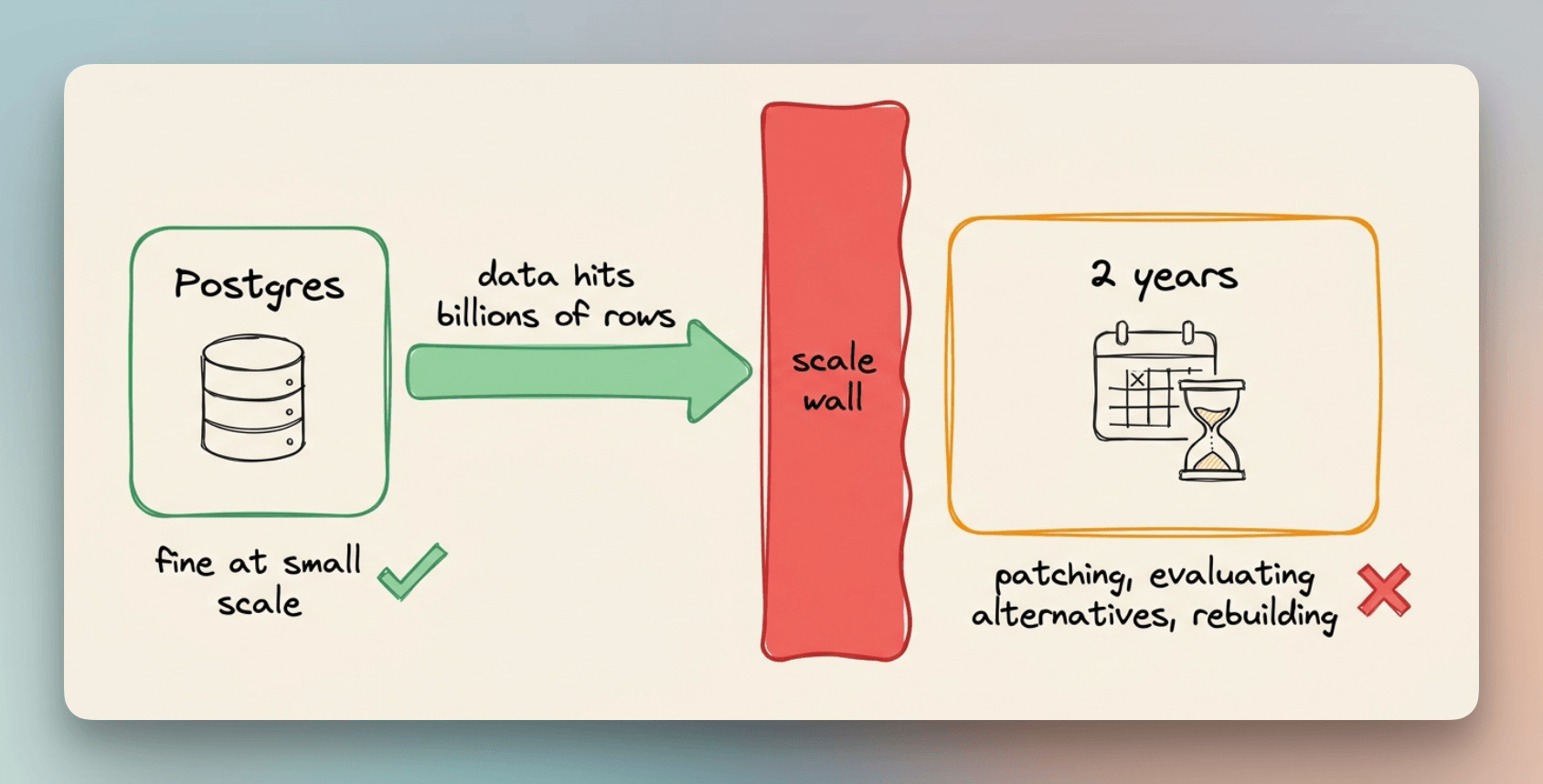
They manually built precomputed aggregates with cron jobs, then evaluated ClickHouse, which required a full ingestion pipeline just to handle their write pattern cleanly.
The full Cloudflare case study is available here if you want to learn more →
Most teams face the same bottlenecks and end up spending months on partition management, aggregation pipelines, and retention infrastructure before the actual product gets any attention.
Tiger Cloud is built for exactly that layer. It is a managed TimescaleDB service, the same technology Cloudflare moved to, built on the Postgres you already know, with automatic time-based partitioning, continuous aggregates, and compression built in from the start.
To show how this feels in practice, I built a real-time earthquake intelligence dashboard on a 3D globe using Claude Code and Tiger Cloud in a single session.
But before that, let’s understand the problem.
The problem with time-series data
Most applications that deal with timestamped data start the same way.
You create a table, add a timestamp column, and plain Postgres handles it fine.
When the table grows into hundreds of millions of rows and queries start filtering across long time windows, Postgres slows down.
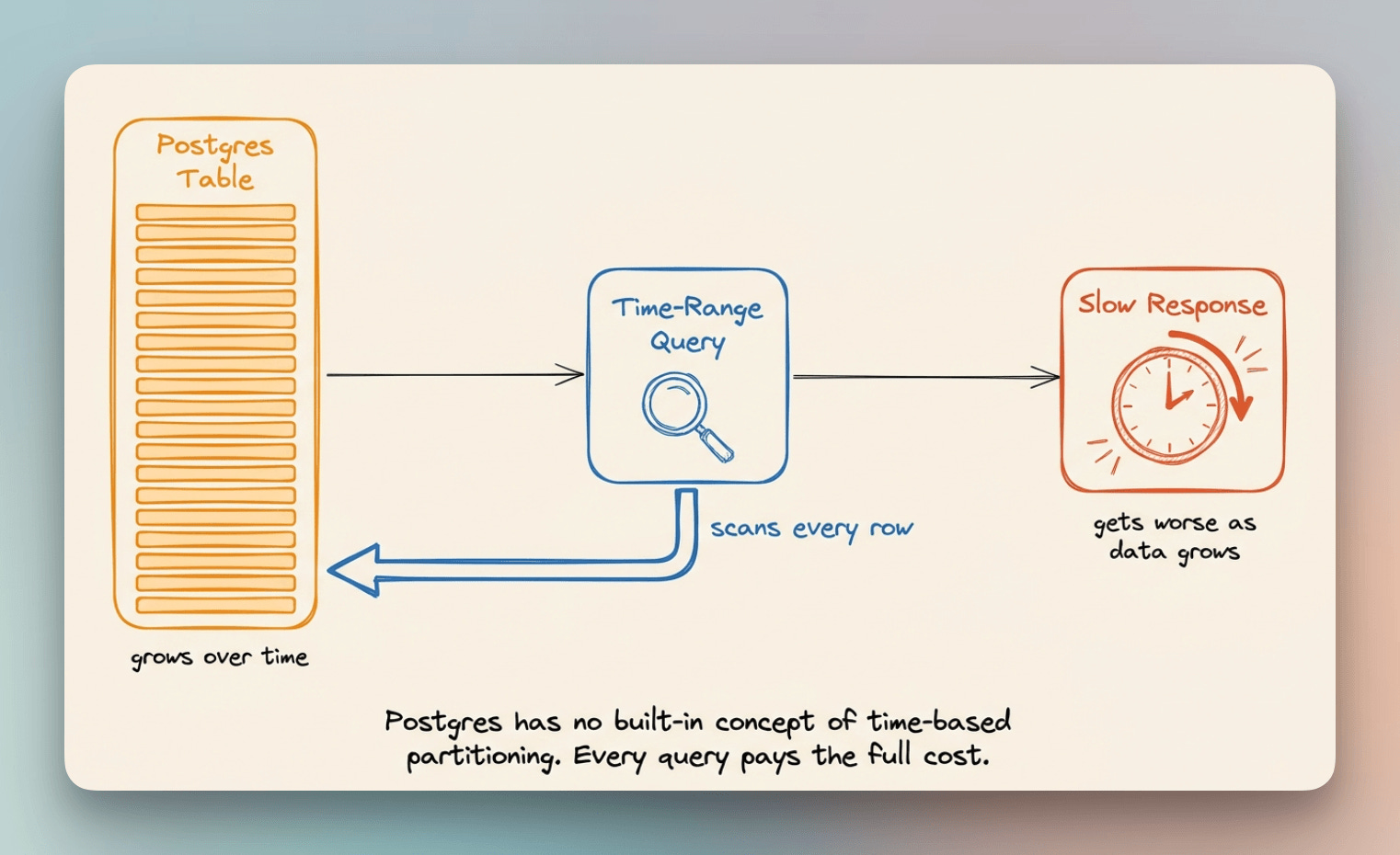
Postgres does have time-based partitioning, but nothing creates or retires those partitions for you, so splitting a growing table by day or month is a system you have to build and maintain yourself. The more data accumulates, the worse queries over longer time windows get.
Adding indexes on the timestamp column helps initially, but as the table keeps growing, those indexes become expensive to maintain, and the query planner starts making poor choices.
The cost of building it yourself
Most teams end up manually splitting data into child tables by day or month.
That means building tooling to create new partitions on schedule, handle edge cases at boundaries, and drop old ones when retention policies kick in.
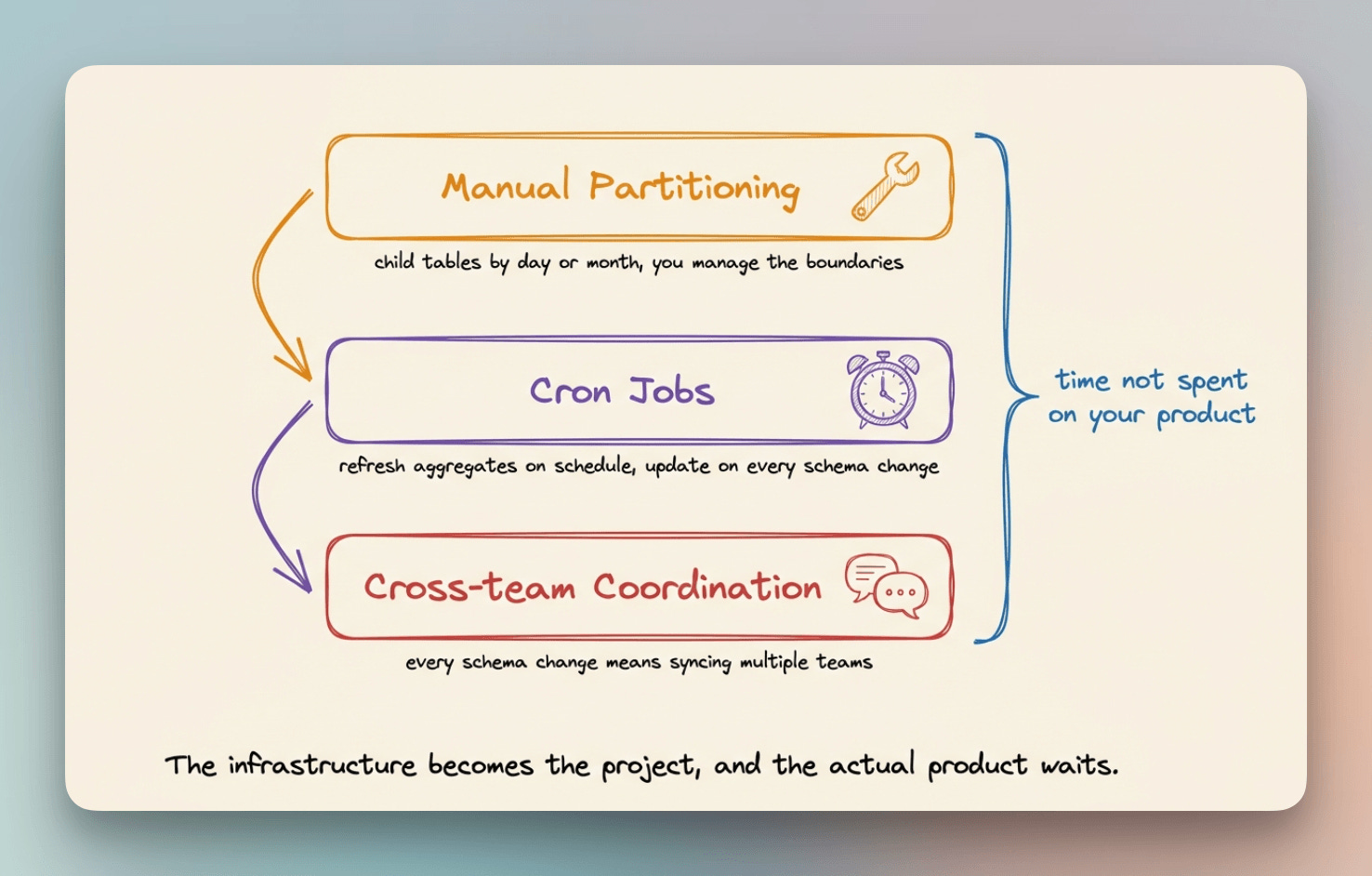
Dashboards need event counts per hour, weekly averages, and trends across months. Computing those on raw data gets expensive fast, so teams build precomputed aggregate tables and refresh them with cron jobs.
Every schema change after that means updating the cron logic and coordinating across teams.
Cloudflare spent two years in exactly that cycle before the data outgrew it, and they had to rebuild the layer underneath.
How Tiger Cloud handles it
Tiger Cloud takes a different approach entirely.
TimescaleDB partitions data by timestamp automatically through hypertables.
Converting any Postgres table to a hypertable takes a single function call, and time-based partitioning runs from that point forward.
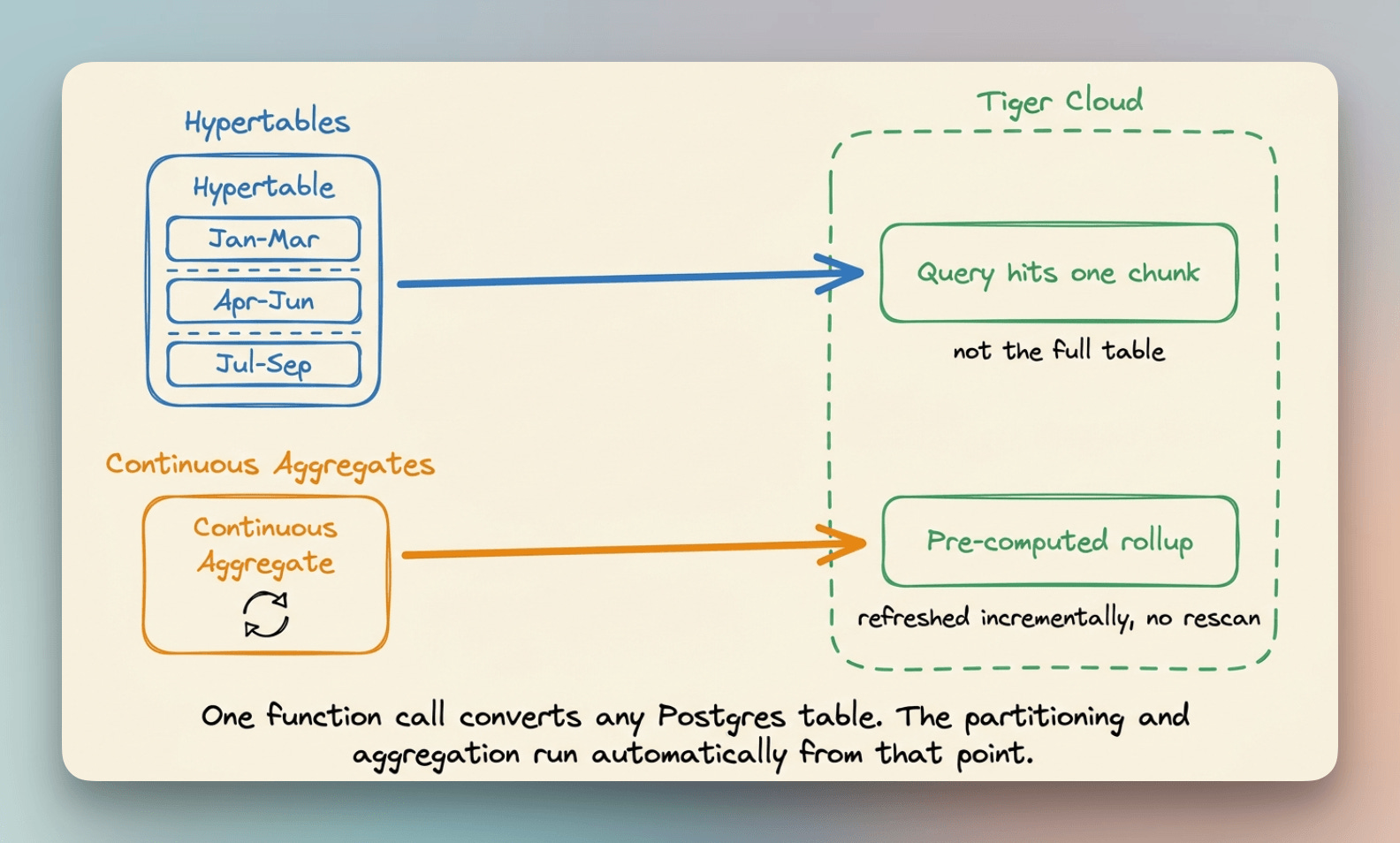
Queries hit only the chunks relevant to the time window being filtered, regardless of how large the full dataset gets.
Continuous aggregates replace the cron job layer. You define a rollup query once, and TimescaleDB refreshes it incrementally in the background, including the most recent data not yet rolled up, with no separate pipeline to maintain.
Tiger Cloud provisions all of this as a managed service. You connect through the standard Postgres wire protocol, and the infrastructure is ready from day one.
Setup
Tiger CLI is the bridge between Claude Code and Tiger Cloud. It runs as an MCP server that gives Claude Code direct access to your database infrastructure.
Start by signing up at tigerdata.com and creating an account.
Then install Tiger CLI with one command.
curl -fsSL https://cli.tigerdata.com | shOnce installed, authenticate with your Tiger Cloud account. This opens a browser window, and the CLI stores your session locally after you log in.
tiger auth login
Now, connect Tiger CLI to Claude Code as an MCP server.
tiger mcp install claude-code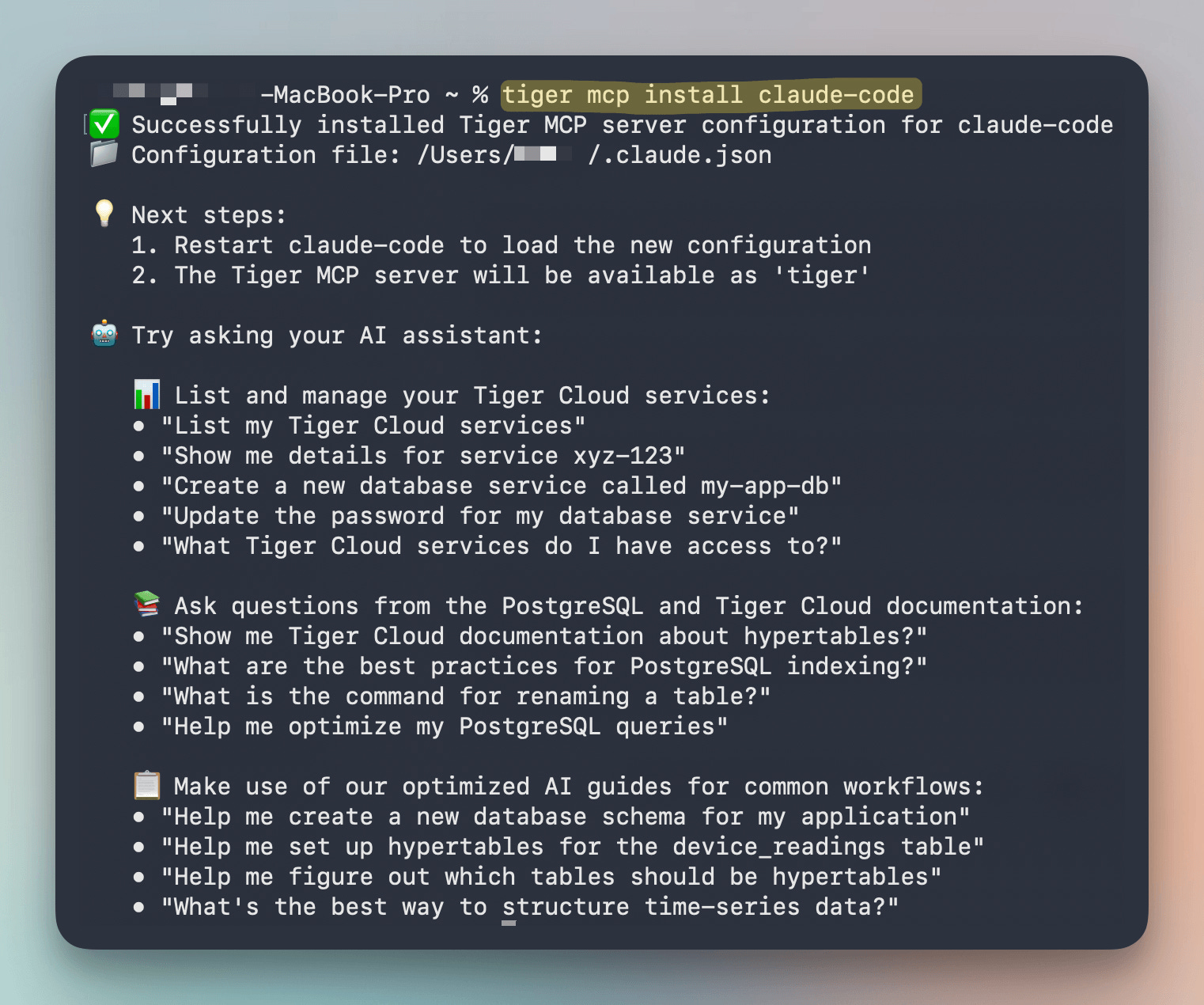
Restart Claude Code after that.
Tiger Cloud shows up as a connected tool in the session, and Claude Code can now provision databases, create hypertables, and run SQL directly against your Tiger Cloud instance without leaving the conversation.
Building the dashboard
I gave Claude Code a single prompt describing the full build and let it run.
Build a real-time earthquake intelligence dashboard on a 3D globe.
TimescaleDB backend on Tiger Cloud via Tiger MCP, hypertable for
earthquake events with event_time as the time dimension, continuous
aggregates for hourly counts and average magnitude per region, seeded
from the USGS catalog for all magnitude 4.0+ events from 1900 to
today. Next.js and Three.js frontend, dark theme, ripple animations
sized by magnitude and colored by depth, time slider from 1900 to today,
magnitude filter, side panel with event count and top quakes, popup on click.
The video below shows the final build in action.
Claude Code connected to Tiger Cloud through the Tiger CLI MCP server, provisioned the database, pulled the full USGS catalog, and assembled the complete frontend in the same session.
The globe plots every earthquake as a ripple animation sized by magnitude and colored by depth. The Ring of Fire, the seismic belt circling the Pacific, lights up naturally from the data.
Every slider position fires a live query.
Dragging it across 120 years of history, the hypertable partitioning means each query hits only the relevant time chunk, and the side panel pulls from continuous aggregates, so both update fast regardless of how far back you go.
The takeaway
Cloudflare spent two years getting to the infrastructure that Tiger Cloud provisions on day one.
The partition management, aggregate refresh, and retention tooling are all there from the start. The database layer should not be a project in itself.
Tiger CLI is open source under Apache 2.0 and works with Claude Code, Cursor, Codex, Gemini CLI, and VS Code.
→ Sign up for Tiger Cloud. New accounts get $1,000 in free credits, no credit card required.
→ Install Tiger CLI:
curl -fsSL https://cli.tigerdata.com | sh→ Connect to Claude Code:
tiger mcp install claude-code→ Give Claude Code a prompt and let it build.
Tiger Cloud uses the Postgres you already know, built for real-time analytics and time-series workloads, with autoscaling reads and writes and deep observability built in.
Get started with Tiger Cloud here →
Also, the full Cloudflare case study is here if you want to learn more →
Thanks to Tiger Data for working with us today!
Cross-model KV cache transfer in LLM Families
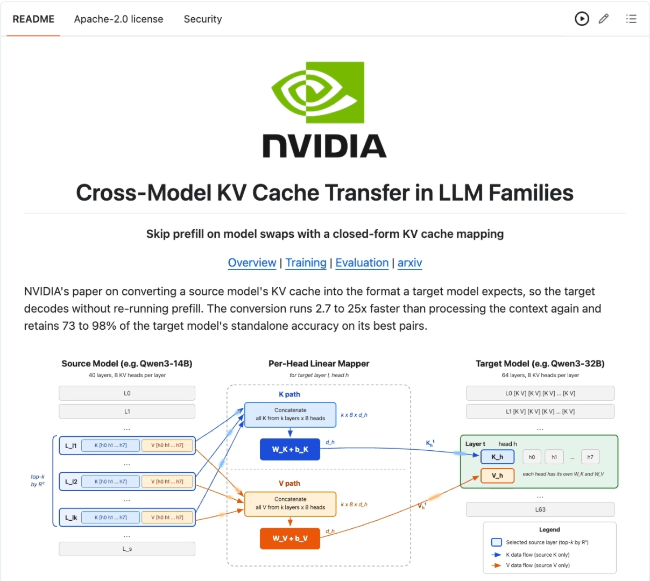
NVIDIA released a paper in which they shared a method to make the KV cache transferable between models.
The target model skips prefill entirely, and the conversion runs 2.7 to 25x faster than processing the context again.
Let’s understand why this is so important today.
During LLM token generation, every turn sends the entire conversation back to the model. The model reads all of it again before writing a single new token, and all of it is billed as input.
Prompt caching allows Anthropic and other providers to hold the KV cache for a stable prefix and bill a hit at roughly 10% of the base input rate, because the compute was already done once.
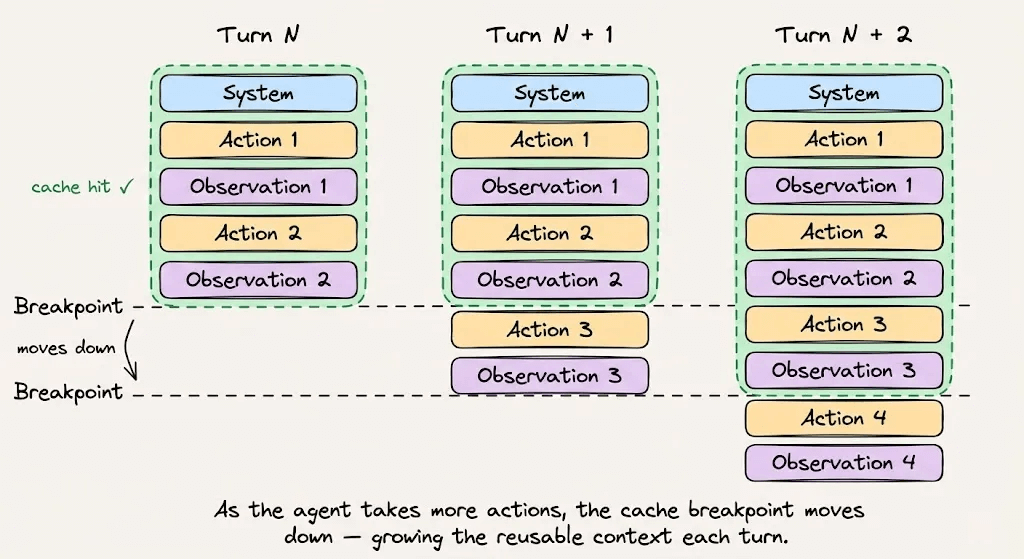
The 90% reduction is one of the largest levers in LLM serving, which is why so much production work goes into keeping prefixes byte-stable.
But the cache only works on the model that produced it. Keys and values are produced from that model’s weights, so no other model can read them.
In practice, the constraint shows up in LLM routing. If the traffic is shifted to a different model for cost/capability reasons, the accumulated KV cache becomes invalid.
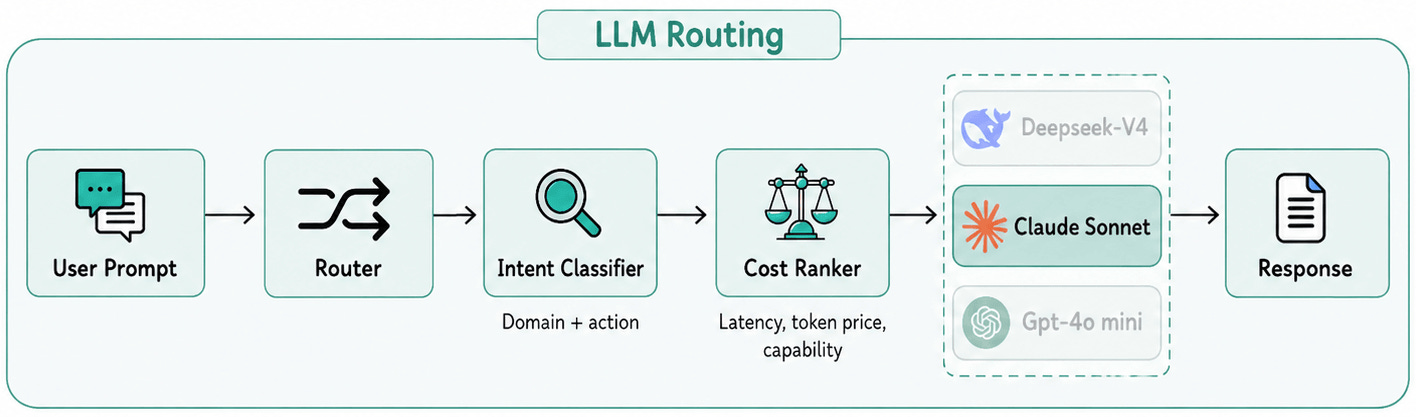
As a result, the accumulated context has to be processed from scratch, and it’s billed at full rate.
NVIDIA’s recent paper treats this as a representation problem.
Prefill’s only output is the KV cache, so to move KV between models, we need to convert one model’s cache into the format the other expects.
They first checked whether the conversion has any structure worth exploiting.
They found that moving from Qwen3 14B to 32B, a plain linear regression from a single source layer reconstructed 56% of the variance in the target model’s keys.
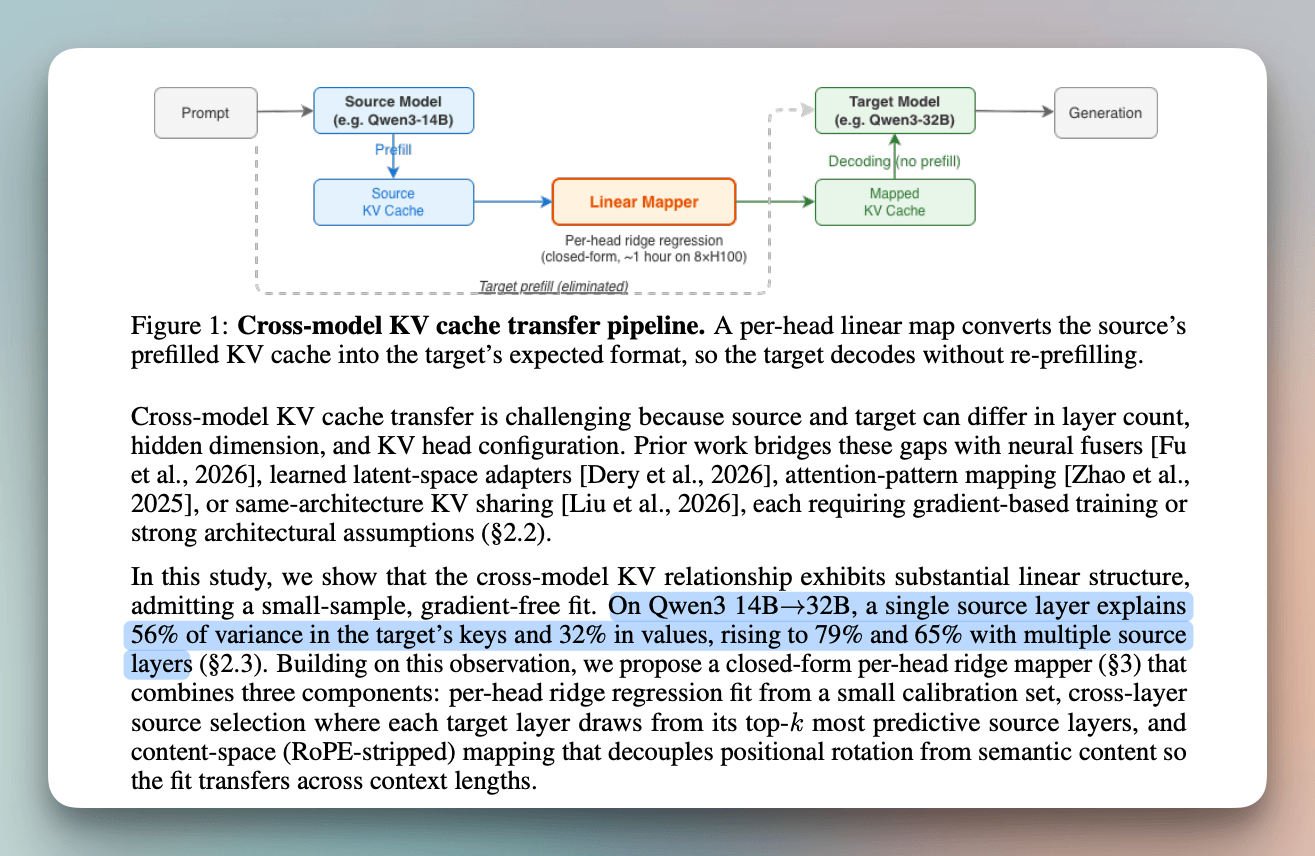
The two models obviously may have different layer counts, so there is no natural one-to-one pairing between them.
For each target layer, they rank every source layer by how well it predicts that layer, then feed the top eight in together, which takes the reconstruction to 79%.
The mapper itself has three parts:
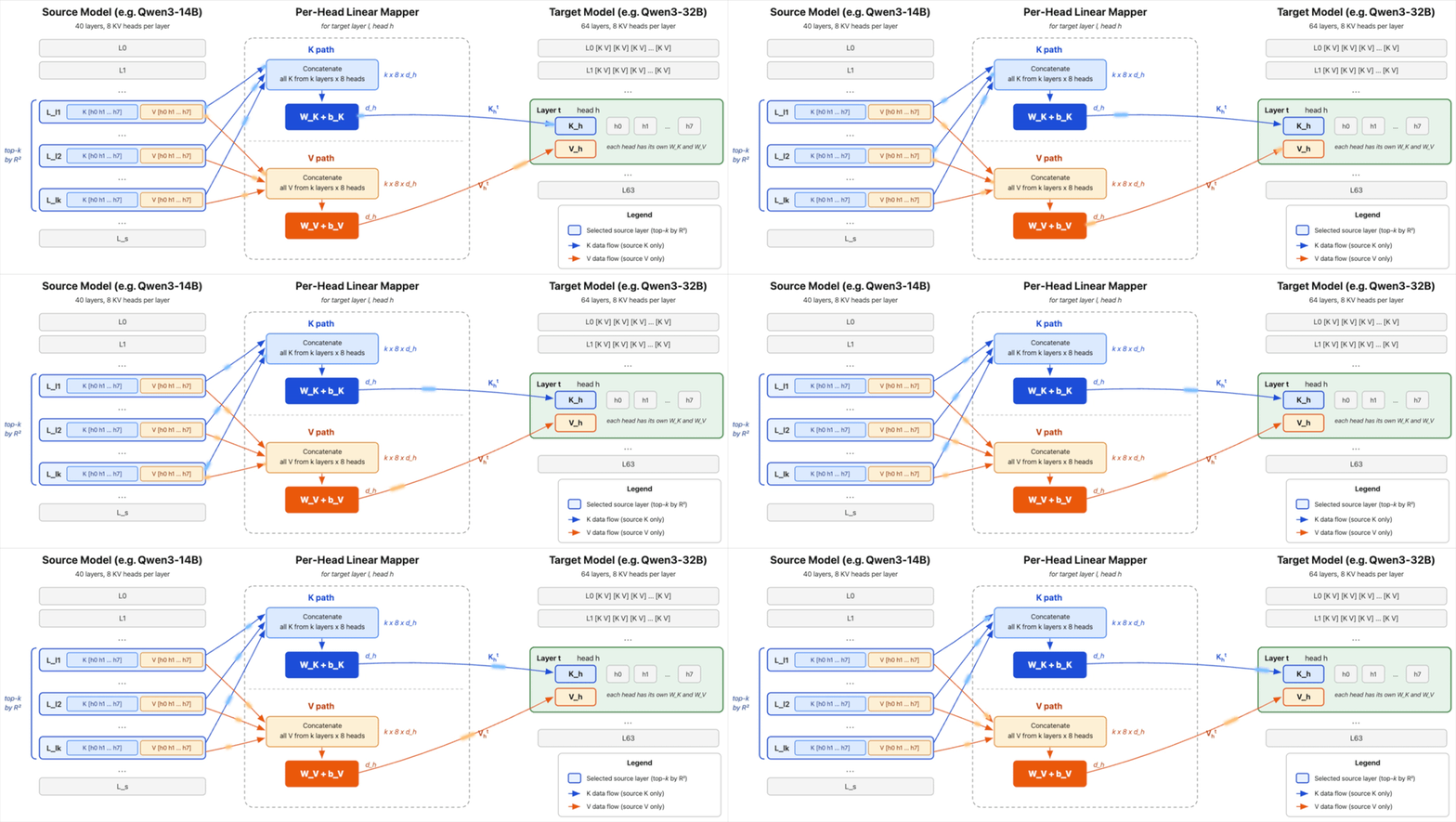
> Each target layer and head gets its own independent linear map, solved in one closed-form step rather than by gradient descent.
> The cross-layer selection described above is the second part, and their ablation shows it carries the most weight of the three.
> Keys also carry a position-dependent rotation from RoPE. They strip that rotation, fit the map in position-free space, then reapply the target model’s rotation at inference.
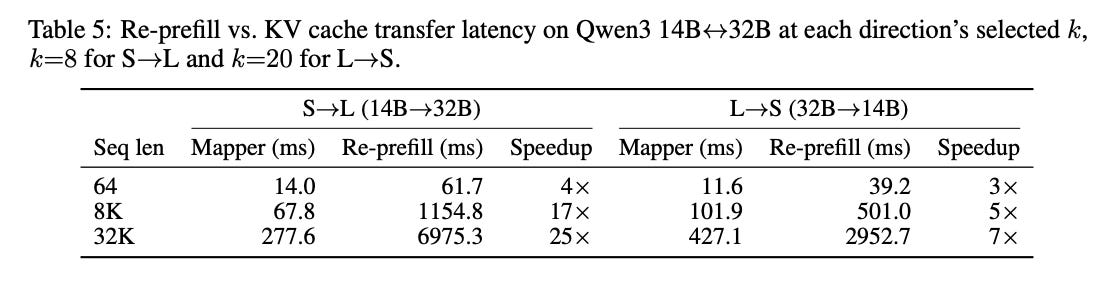
Across six pairs from Qwen3, Llama 3.1, and Ministral 3, four retain 73 to 98% of the receiving model’s standalone accuracy, and the conversion runs 3-25x faster than processing the context again.
Prior work on cross-model KV reuse exists, but it either trains a neural adapter per pair or requires both models to be architecturally identical.
This is probably the first version that is closed-form and training-free, so a lot of it is still open research.
Every pair tested belongs to one family, so it works on Qwen to Qwen and Llama to Llama.
Cross-family transfer is listed as future work.
All six pairs mentioned above also happen to share the KV head count and per-head dimension across scales. Mismatched head configurations are currently untested.
The researchers scoped this to dense full-attention only, so sliding-window and attention-recurrent hybrids still need work.
Here’s the paper: https://arxiv.org/abs/2608.03893
Plenty of work is yet to be done. Still, the constraint being solved is genuine.
Every model swap currently invalidates the full KV that was already paid for, and this is the first result showing that work might be recoverable without training anything extra.
To dive deeper into KV cache management specifically for running LLMs in production, we wrote a full 50 min deep dive that covers:
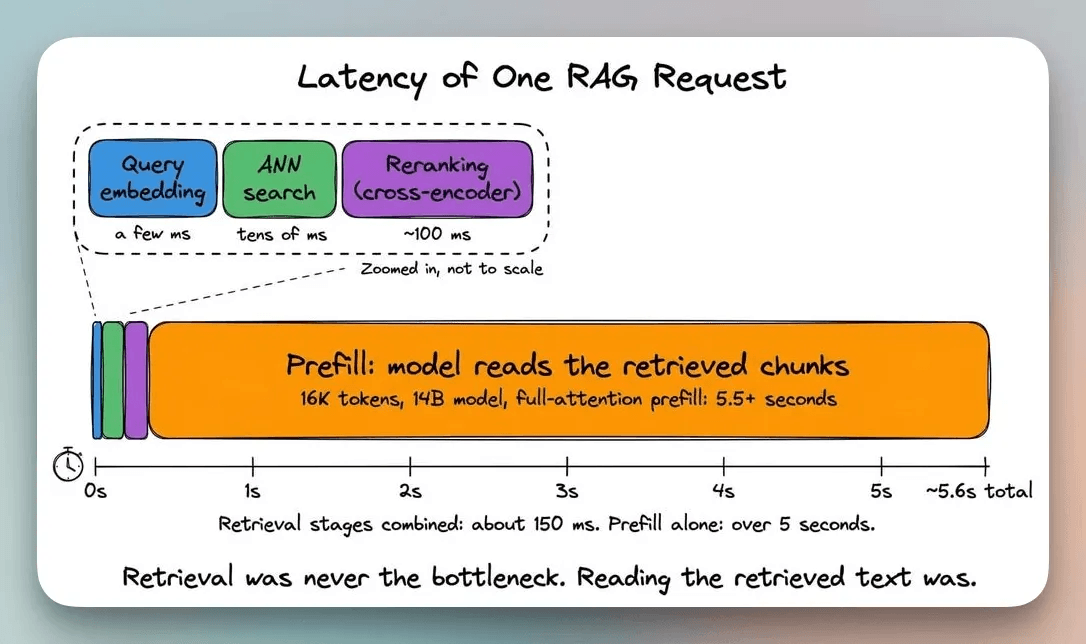
Why prefill dominates RAG latency, not retrieval
How the KV cache works and what it costs in memory
Why prefix caching approaches zero hit rate for RAG workloads
Three independent failures when you try to reuse cached chunks
Six published approaches to fix them
Hands-on implementation that covers every problem and fixes
Best practices for production to assess what applies to your system
Read the full deep dive here →
Good day!