

Reinforcement Learning from Verifiable Rewards (RLVR) is useful when an answer can be checked automatically, but writing an ideal response is expensive.
For a math problem, the training record only needs the question and its final answer. The model samples several solutions. A reward function checks each result. GRPO then increases the probability of responses that score higher within the group.
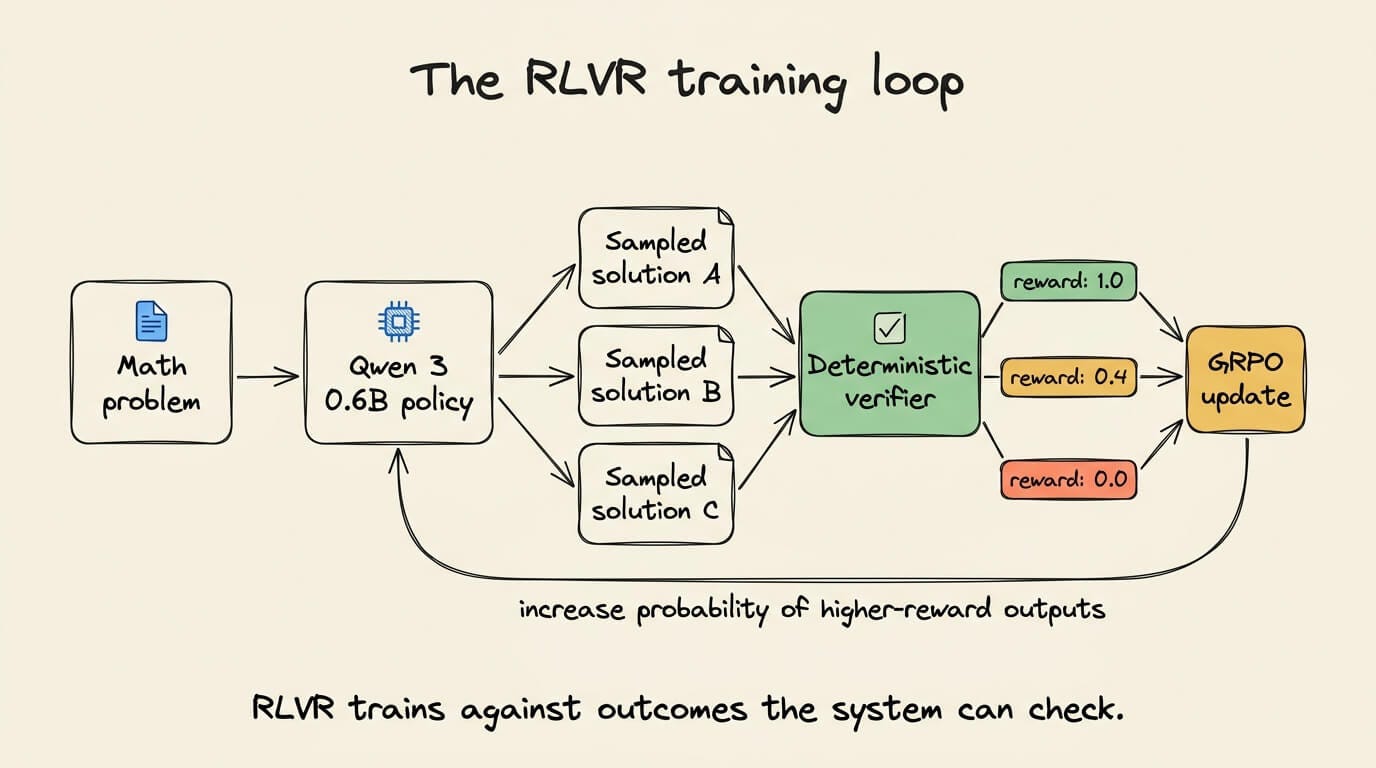
This gives us a practical way to customize reasoning behavior without curating a reasoning trace for every example. It also introduces a hard engineering constraint. The model will optimize exactly what the verifier rewards, including any shortcuts hidden in that verifier.
We will test this on Qwen3 0.6B using serverless RLVR in Amazon SageMaker AI. The target is higher exact-match accuracy on a fixed set of unseen arithmetic problems.
One evaluation set stays fixed throughout the experiment. We will test the reward function, run one customization job, repeat the evaluation, and deploy the resulting model to a SageMaker AI real-time endpoint.
Training against an executable reward
Supervised fine-tuning (SFT) learns from target completions. Each training record contains an input and the response that the model should imitate. This works well when high-quality completions already exist.
RLVR needs a different asset. It needs a verifier that can score generated responses. The training set can contain a problem and its reference answer without prescribing the full reasoning trace.
For a math problem, the verifier can extract the final number. For generated code, it can run unit tests. For structured extraction, it can validate a schema and compare required fields.
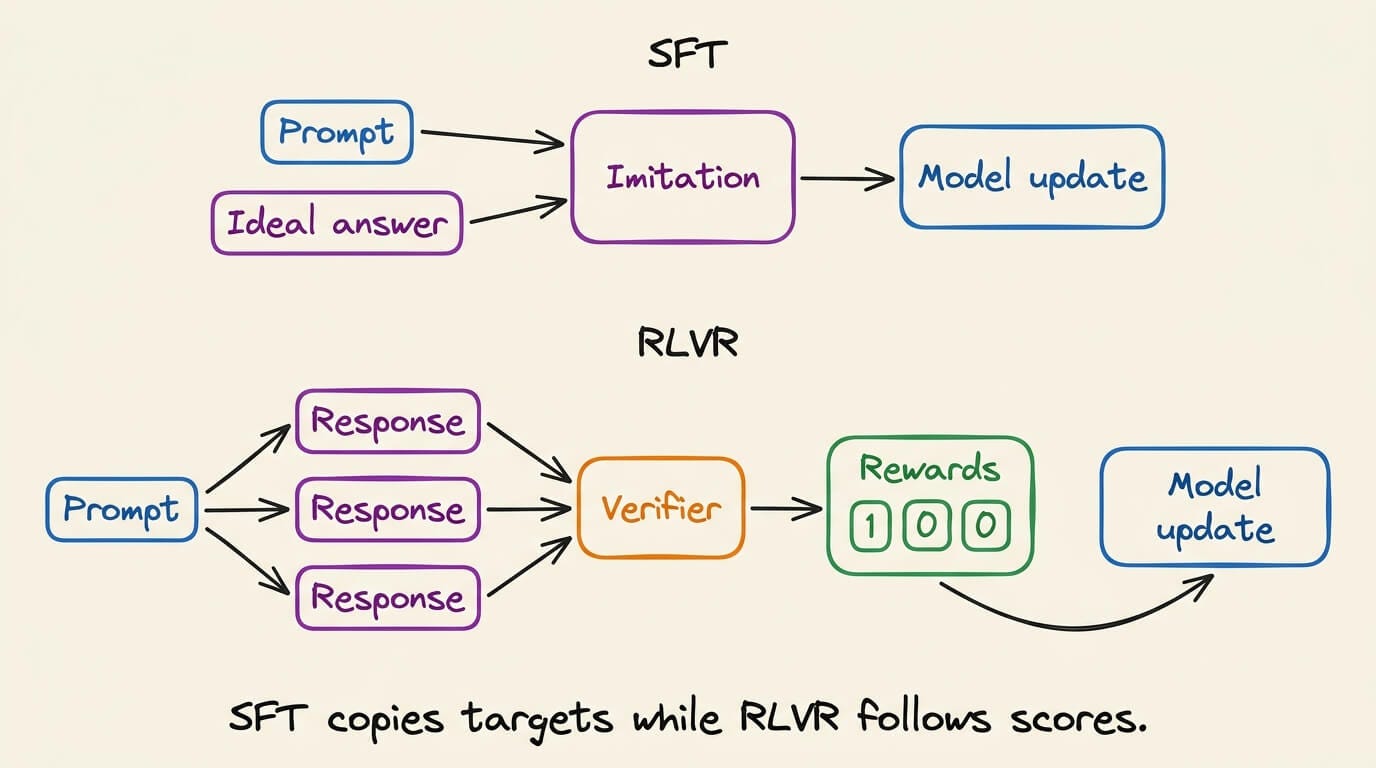
Reasoning traces are expensive to curate. When correctness has a programmatic definition, a verifier can replace them.
RLVR does not remove supervision. It moves supervision into the reward function. That reward function becomes part of the task specification.
A verifier only measures what its code expresses. It cannot distinguish genuine reasoning from a shortcut unless the test exposes that shortcut.
Choosing the optimization signal
Proximal Policy Optimization (PPO) is a general policy-gradient method. RLHF systems often combine it with a learned reward model and a separate value model. That stack is flexible, but it adds training and operational complexity.
Group Relative Policy Optimization (GRPO) removes the separate value model. It samples a group of responses for one prompt. Their relative rewards provide the baseline used during the policy update. The DeepSeekMath paper introduced GRPO for mathematical reasoning.
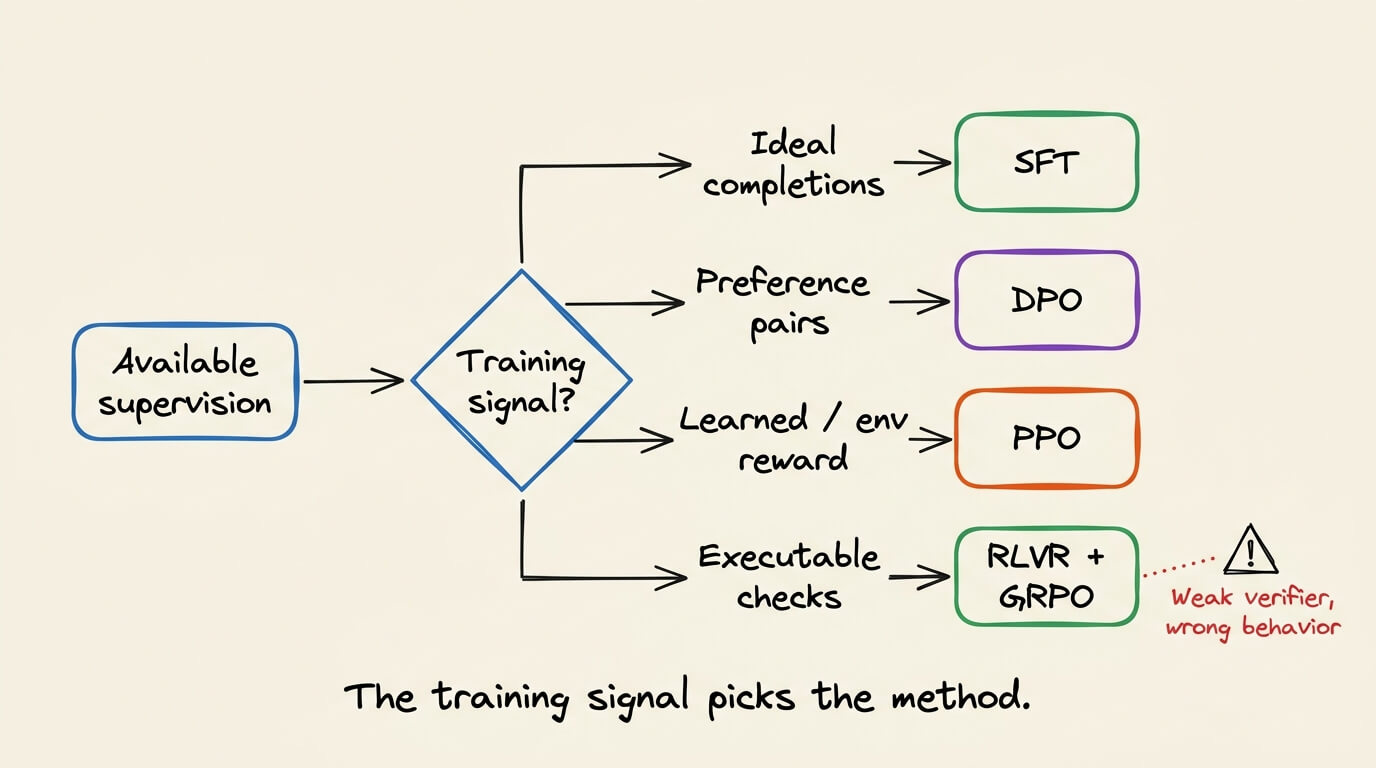
Direct Preference Optimization (DPO) avoids online reinforcement learning. It learns directly from preferred and rejected response pairs. DPO is useful when pairwise preference data already captures the desired behavior.
RLVR is not universally better than these methods. It fits tasks with reliable checks. A weak verifier can produce a model that scores well while failing the real task.
RLVR replaces ideal traces with executable feedback, which puts more responsibility on reward design.
Experiment design and evaluation contract
The experiment uses the custom-reward RLVR path from the Amazon SageMaker AI serverless model customization workshop. AWS configures this lab around Qwen3 0.6B and 180 GSM8K samples.
The setup is fairly direct. Just deploy the provided Studio environment, clone the repository, and run five Jupyter notebooks in sequence.
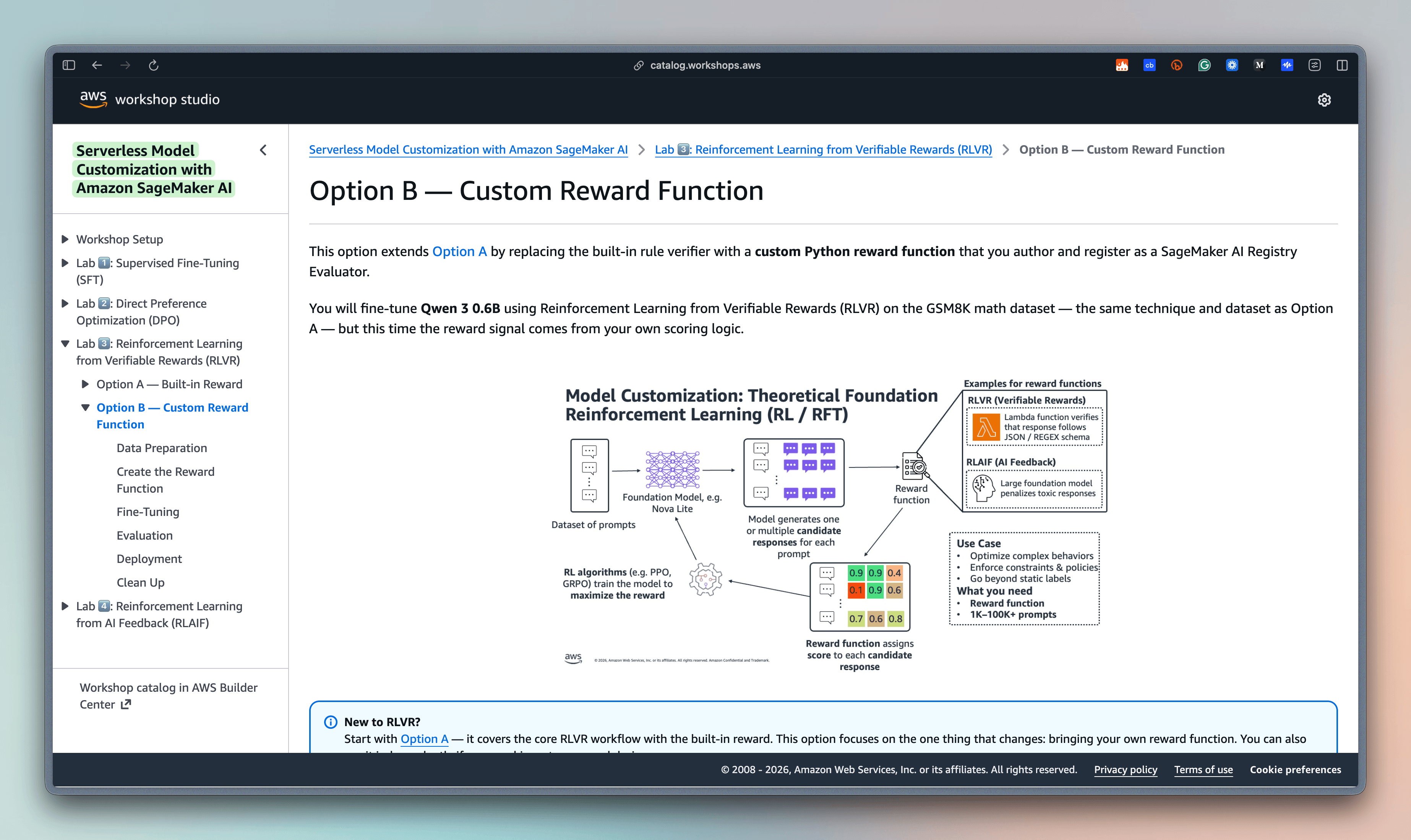
We will preserve the workshop’s Qwen3 model and training path while treating the evaluation protocol as our own experiment. Qwen3 is an open-weight model, so this workflow is not limited to Amazon-developed models.
You can find the model on HF here →
Opening SageMaker Studio
You do not create a separate SageMaker account. You need an AWS account with permission to create SageMaker, IAM, VPC, S3, Lambda, and MLflow resources.
Sign in to the AWS Management Console and open the workshop’s own-account setup page. Launch its Deploy SageMaker Studio domain CloudFormation template.
The template creates the networking environment, SageMaker execution role, Studio domain, user profile, and managed MLflow tracking server. It defaults to us-west-2. If you choose another region, update the Availability Zone parameters before creating the stack.
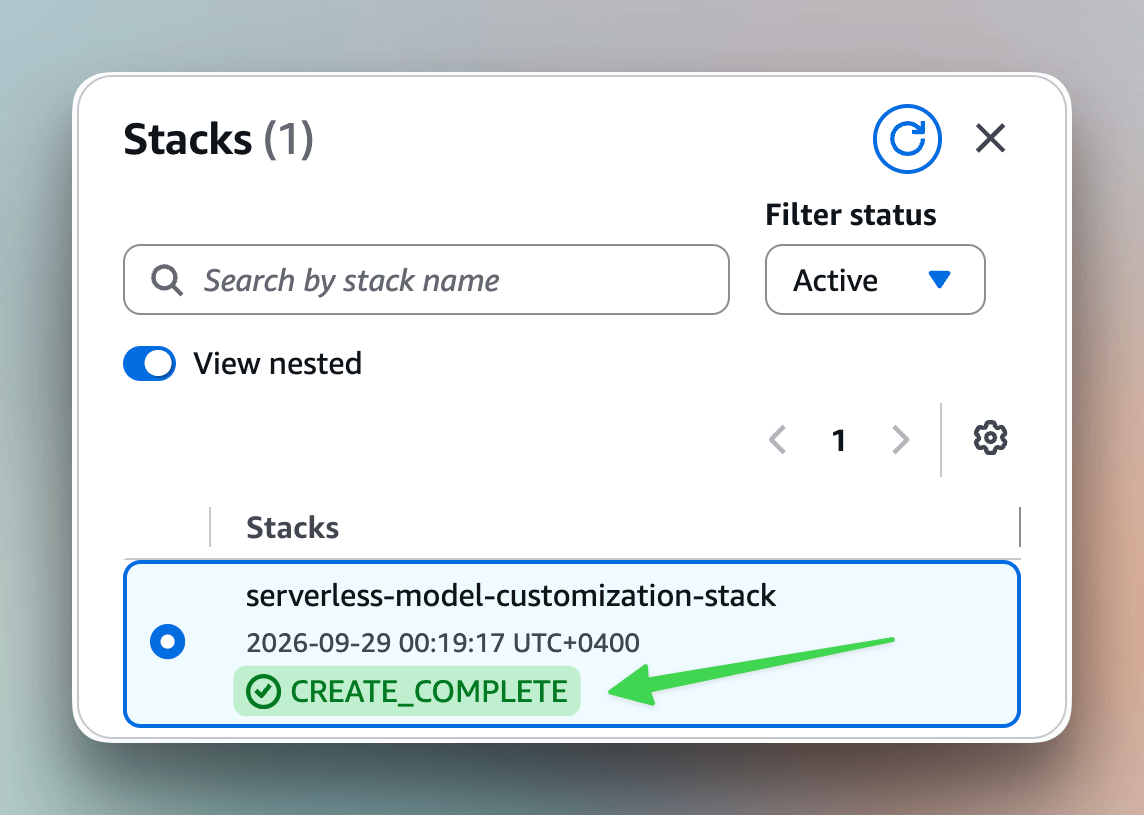
Wait until the CloudFormation stack reaches CREATE_COMPLETE. Then open the workspace through the AWS console:
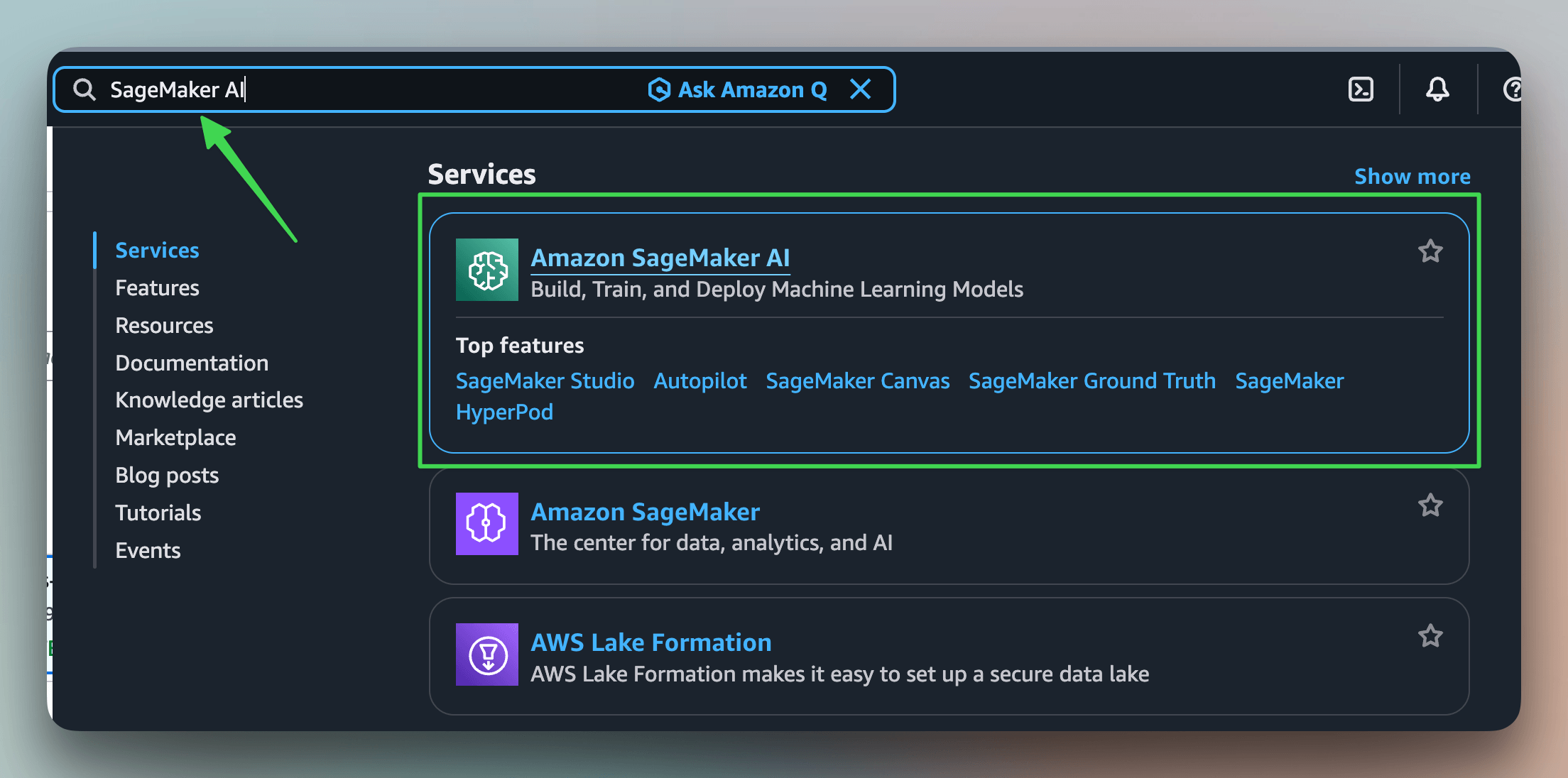
Search for SageMaker AI.
Select Domains from the left navigation.
Open the Studio domain created by CloudFormation.
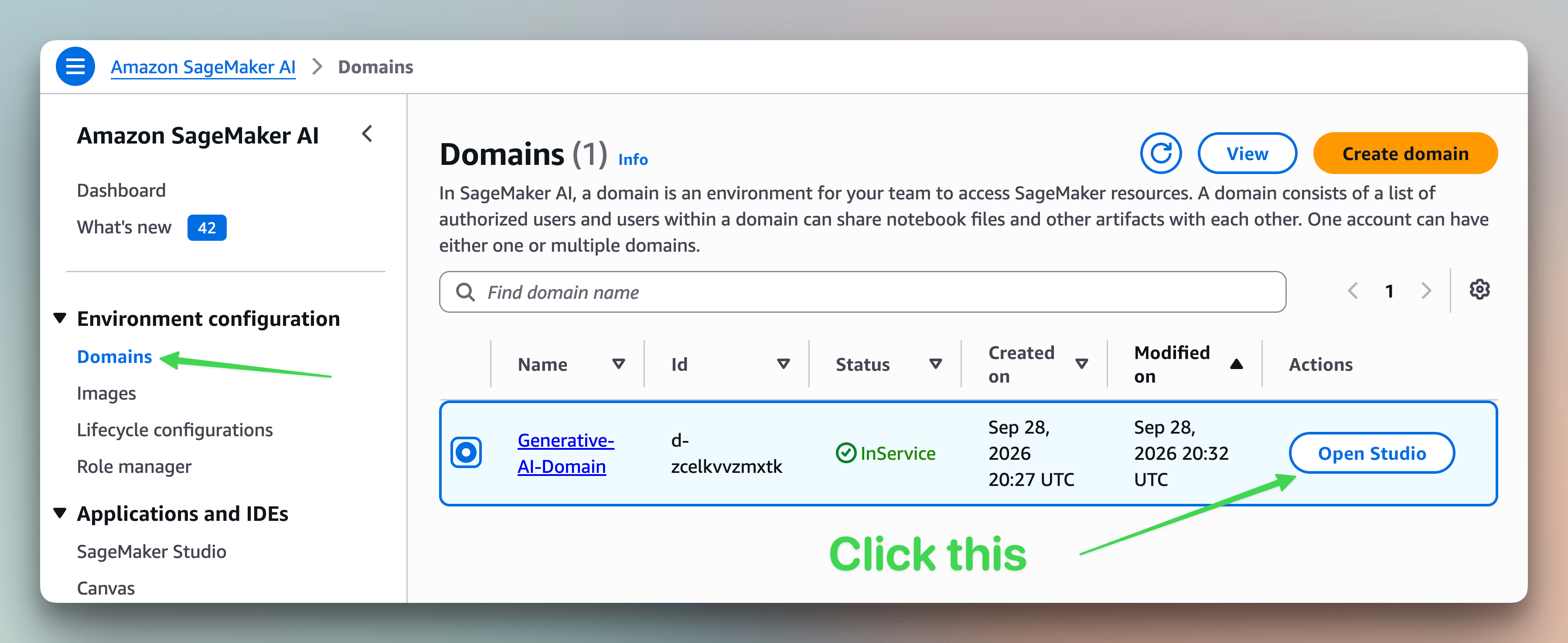
Open User profiles.
Open the menu beside your user profile and select Studio.
Inside Studio, select the JupyterLab icon.
Select Open to launch the JupyterLab space.
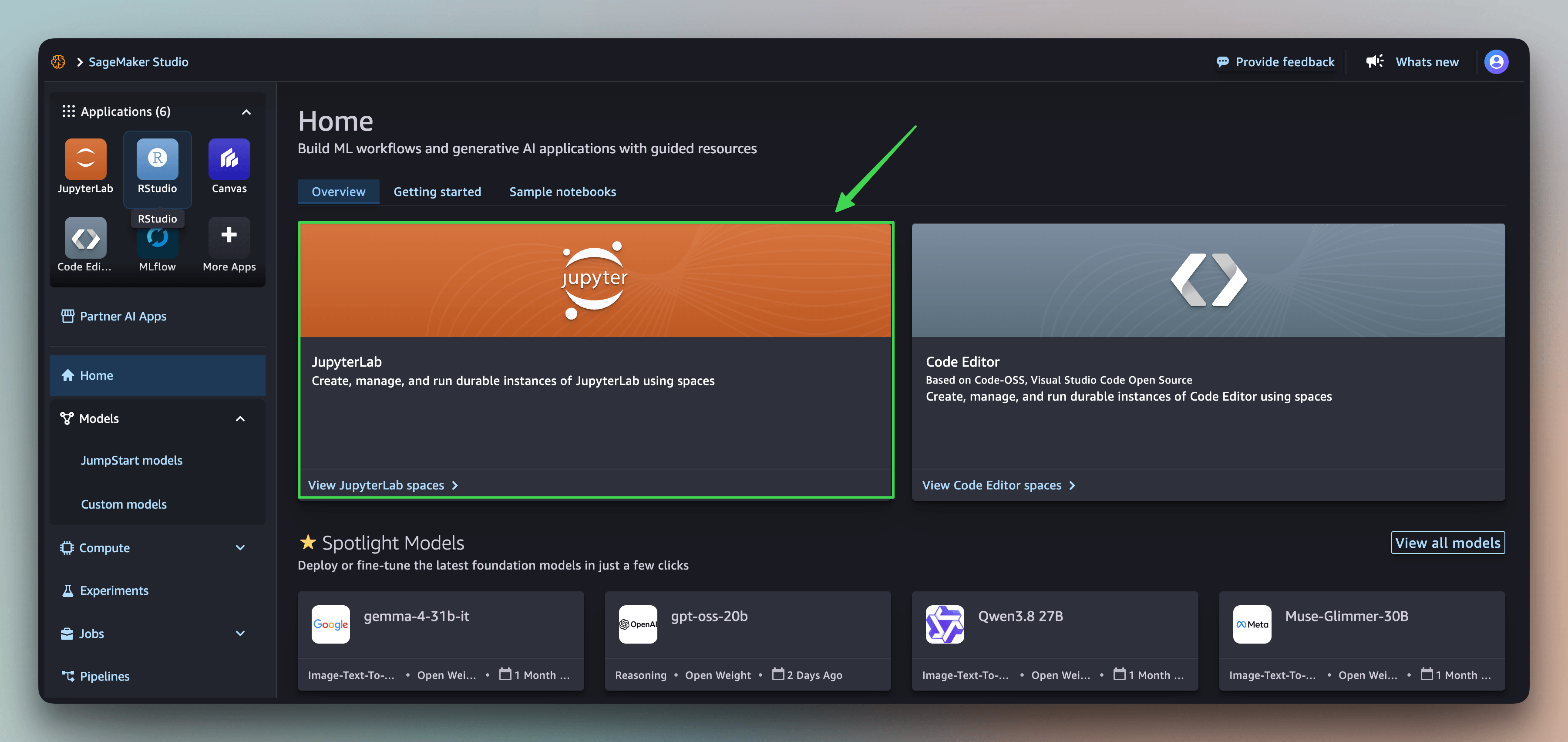
Once JupyterLab loads, open a terminal from its launcher. Clone the workshop repository and grab the SageMaker AI Agent Skills while setting up the workspace.
git clone https://github.com/aws-samples/generative-ai-on-amazon-sagemaker.git
git clone --depth 1 https://github.com/awslabs/agent-plugins.git

cd generative-ai-on-amazon-sagemaker/workshops/serverless-model-customization-with-sagemaker-ai
The SageMaker AI Agent Skills (GitHub repo) provide reusable guidance for planning customization jobs, preparing data, training, evaluation, and deployment.
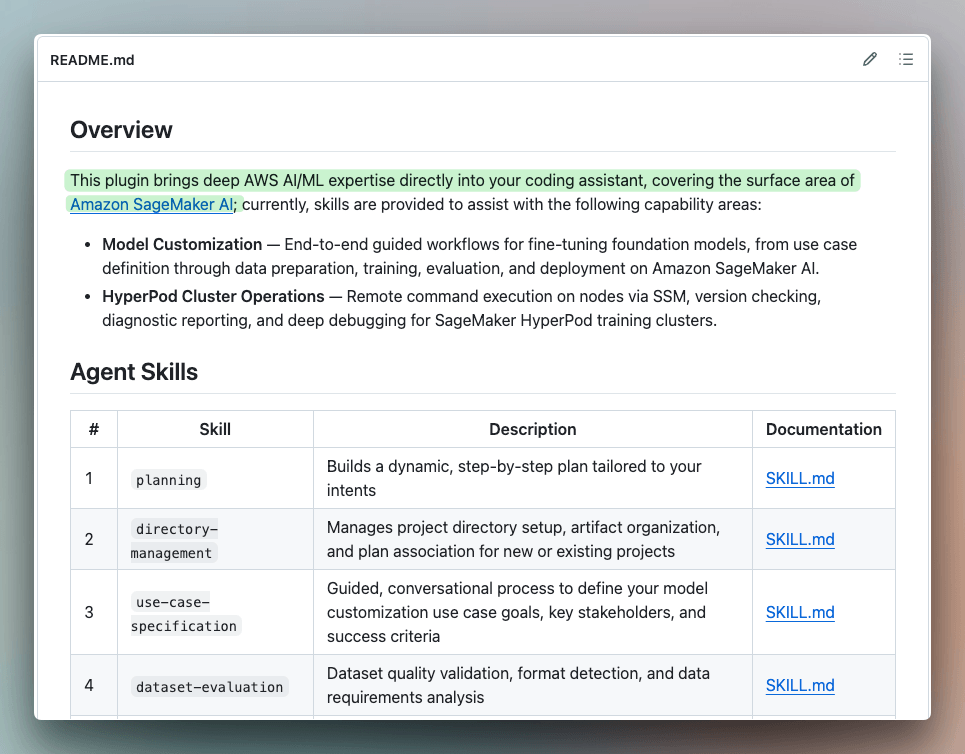
They work with the coding agent you already use, including Claude Code, Codex, and Kiro.
The skills can help generate or revise the notebooks, but the held-out split, reward implementation, and success metric still need to be reviewed by the engineer running the experiment.
Open the five notebooks under lab-3b-custom-reward-function-rlvr in order:
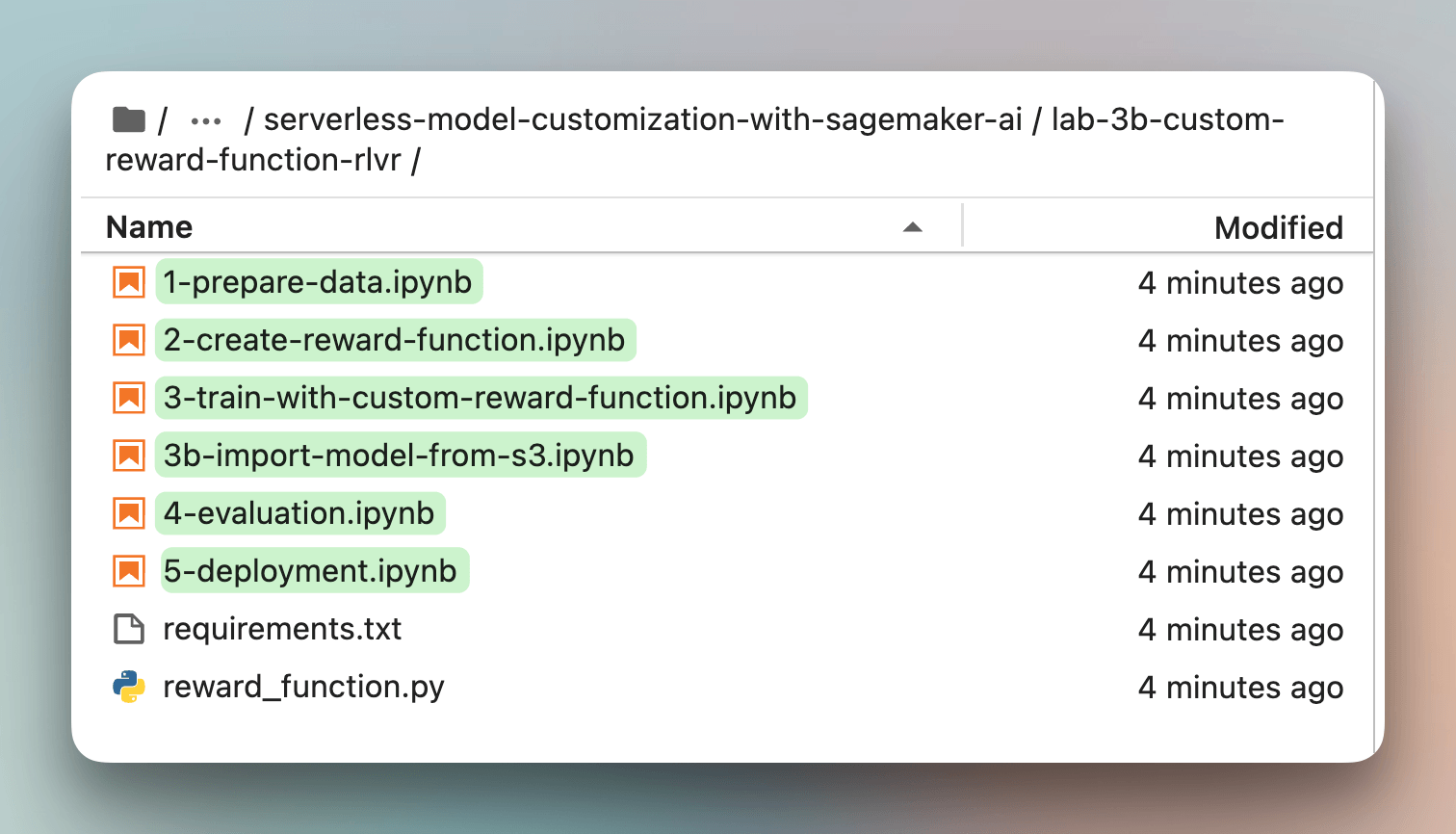
Select Python 3 (ipykernel) when JupyterLab asks for a kernel. Each notebook consumes resources created by the preceding notebook, so run them in sequence.
The workshop environment already contains the SageMaker SDK. For a fresh environment, pin the versions used for this walkthrough.
pip install "sagemaker==3.23.0" "datasets==5.0.1" "scikit-learn==1.9.1"The notebooks reuse one session, role, bucket, and project prefix. Define them once before creating any resources.
import boto3
import sagemaker

sess = sagemaker.Session()
region = sess.boto_region_name
role = sagemaker.get_execution_role()
bucket_name = sess.default_bucket()

project_prefix = "gsm8k-custom-reward-rlvr"
reward_function_name = "gsm8k-rlvr-rf"
output_path = f"s3://{bucket_name}/{project_prefix}/output"
sm_client = boto3.client("sagemaker", region_name=region)
These variables connect every later cell. Keep the prefix unchanged across all five notebooks.
Notebook 1: preparing the training records
The workshop streams 180 GSM8K examples. It preserves each question, extracts the reference number, and assigns a stable identifier.
import re
from datasets import Dataset, load_dataset

stream = load_dataset("openai/gsm8k", "main", split="train", streaming=True)
raw = Dataset.from_generator(lambda: stream.take(180), features=stream.features)

def prepare(sample, index):
    answer = re.search(r"####\s*(.+)", sample["answer"]).group(1)
    answer = answer.strip().replace(",", "")
    return {
        "id": f"gsm8k-train-{index:06d}",
        "data_source": "openai/gsm8k",
        "prompt": [{
            "role": "user",
            "content": sample["question"]
            + ' Let\'s think step by step and output the final answer after "####".',
        }],
        "ability": "math",
        "reward_model": {"ground_truth": answer, "style": "custom"},
        "reference_answer": answer,
        "extra_info": {"question": sample["question"], "answer": sample["answer"]},
    }

records = [prepare(sample, index) for index, sample in enumerate(raw)]
The top-level reference_answer reaches the custom evaluator during training. The stable id lets the evaluator return one score for each rollout.
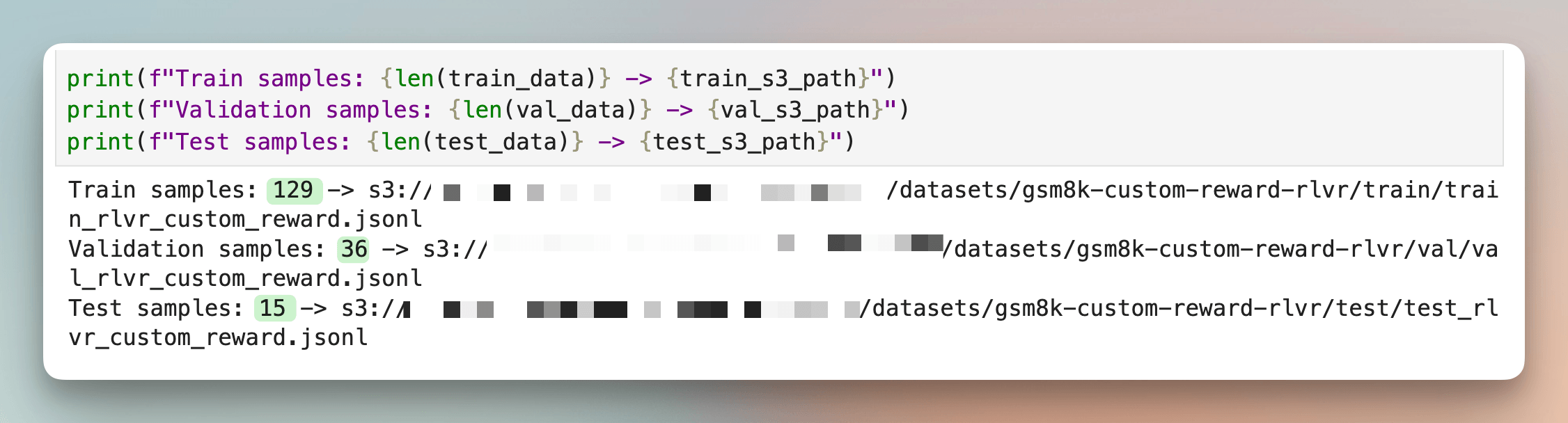
For the short workshop job, split the 180 records once with seed 42.
This produces 129 training records, 36 validation records, and 15 held-out records. We use that split to follow the managed workflow, but not for the larger result reported in this article.
import json
from pathlib import Path
from sklearn.model_selection import train_test_split

train_records, val_records = train_test_split(records, test_size=0.2, random_state=42)
train_records, test_records = train_test_split(
    train_records, test_size=0.1, random_state=42
)

def write_jsonl(path, rows):
    with Path(path).open("w", encoding="utf-8") as handle:
        for row in rows:
            handle.write(json.dumps(row) + "\n")

for name, rows in {
    "train": train_records,
    "val": val_records,
    "test": test_records,
}.items():
    write_jsonl(f"{name}.jsonl", rows)
Upload all three files, then register them as RLVR datasets.
from sagemaker.ai_registry.dataset import CustomizationTechnique, DataSet

def register_split(name):
    s3_uri = sess.upload_data(
        f"{name}.jsonl",
        bucket=bucket_name,
        key_prefix=f"{project_prefix}/datasets/{name}",
    )
    return DataSet.create(
        name=f"{project_prefix}-{name}",
        source=s3_uri,
        customization_technique=CustomizationTechnique.RLVR,
        wait=True,
    )

dataset_train = register_split("train")
dataset_val = register_split("val")
dataset_test = register_split("test")
wait=True blocks until each registry asset becomes ready. Do not launch training while a dataset is still being created.
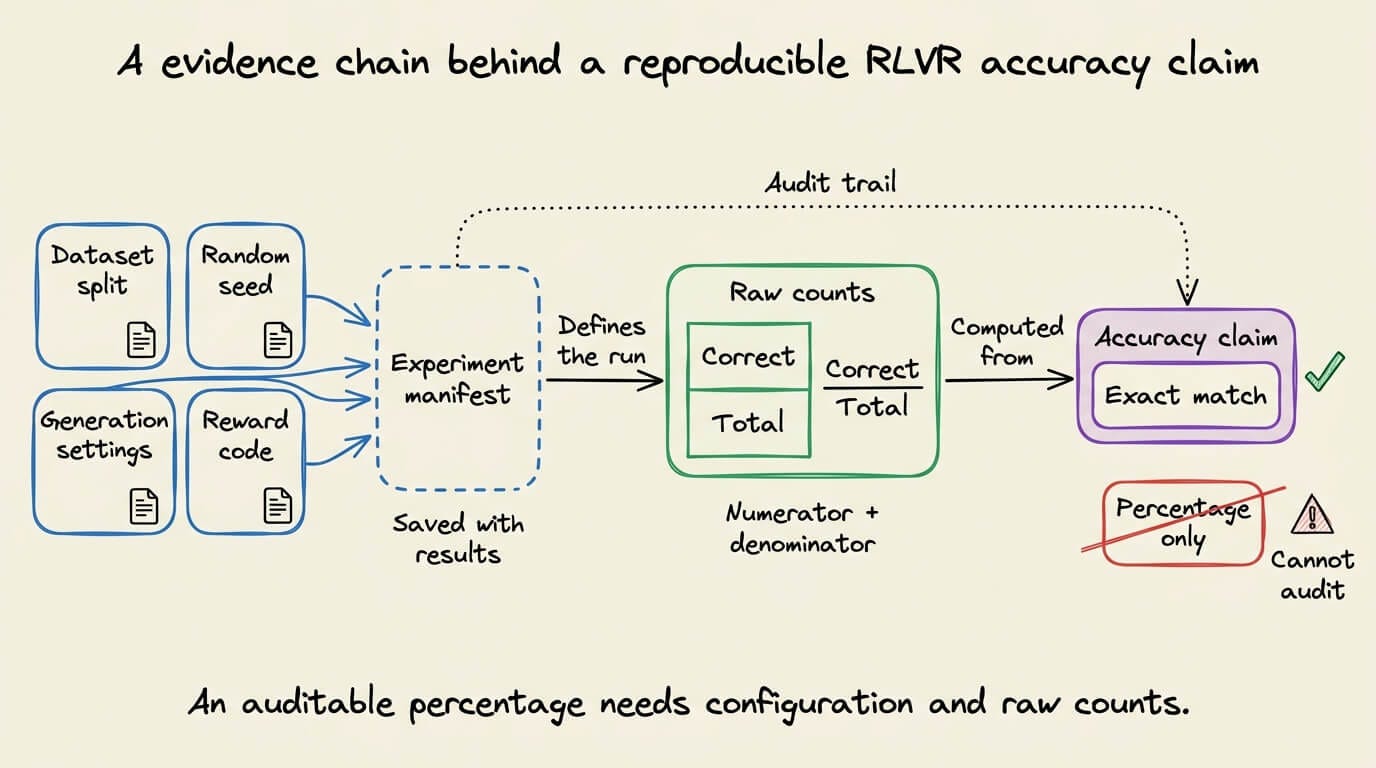
The run should record these fields before training:
Model identifier and revision
Training sample count
Evaluation sample count
Random seed
Generation temperature and token limit
Exact-match parsing rule
SageMaker job configuration
The primary metric is exact-match accuracy. The secondary metric is final-answer parseability. We will also record response length because reward shaping may change how much text the model emits.
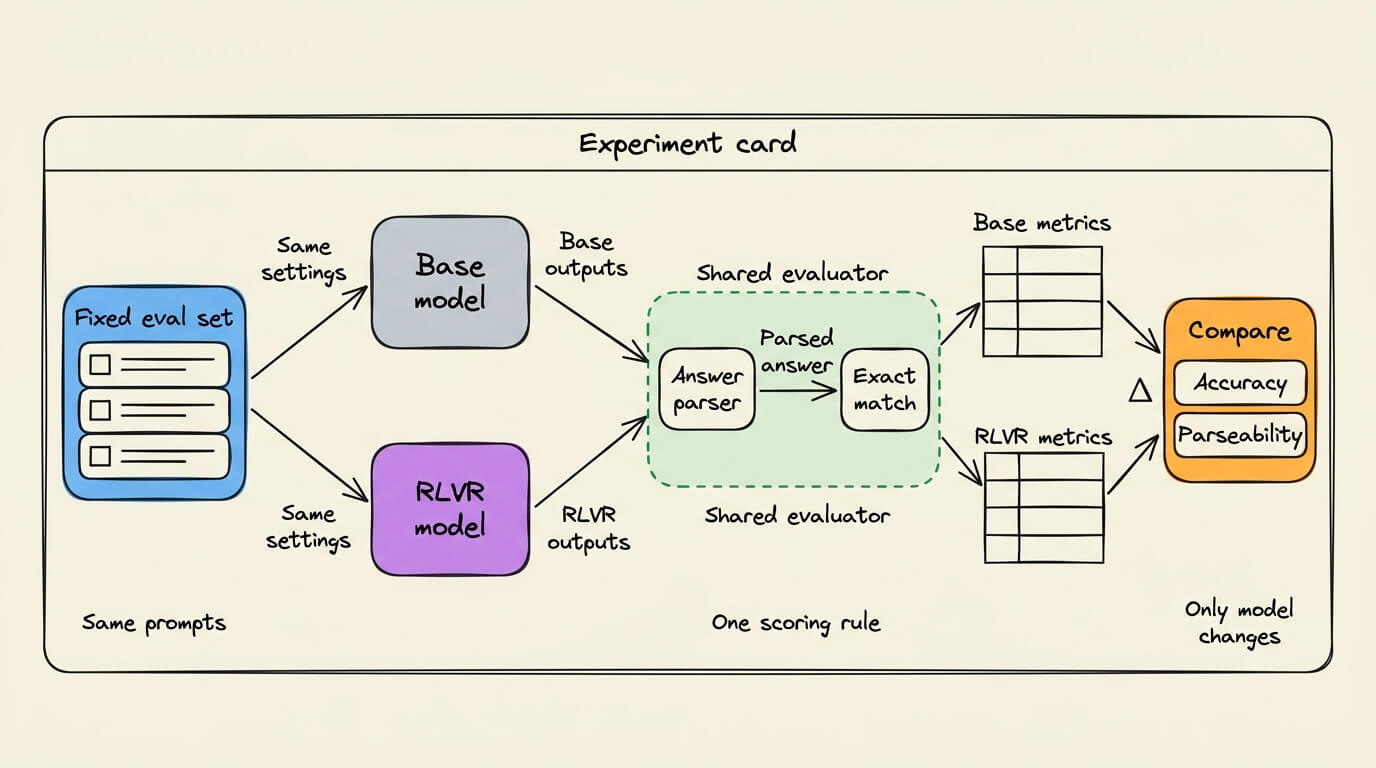
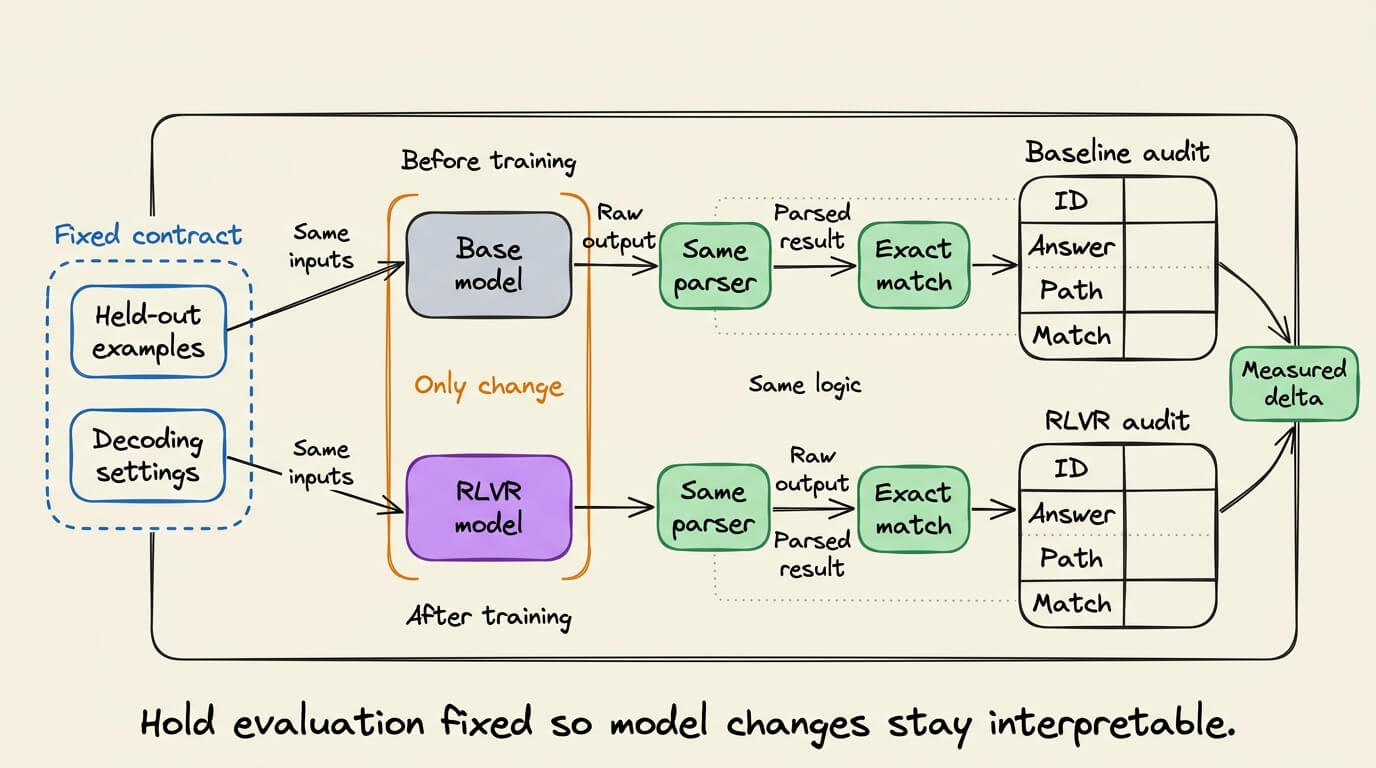
The base and customized models must use identical evaluation prompts. They must also use identical decoding settings. Otherwise, the comparison mixes training gains with inference changes.
The workshop evaluates the customized model with the MATH benchmark. That adds a useful out-of-distribution check after training on GSM8K. For our main claim, however, we should use one fixed held-out set and report its exact size.
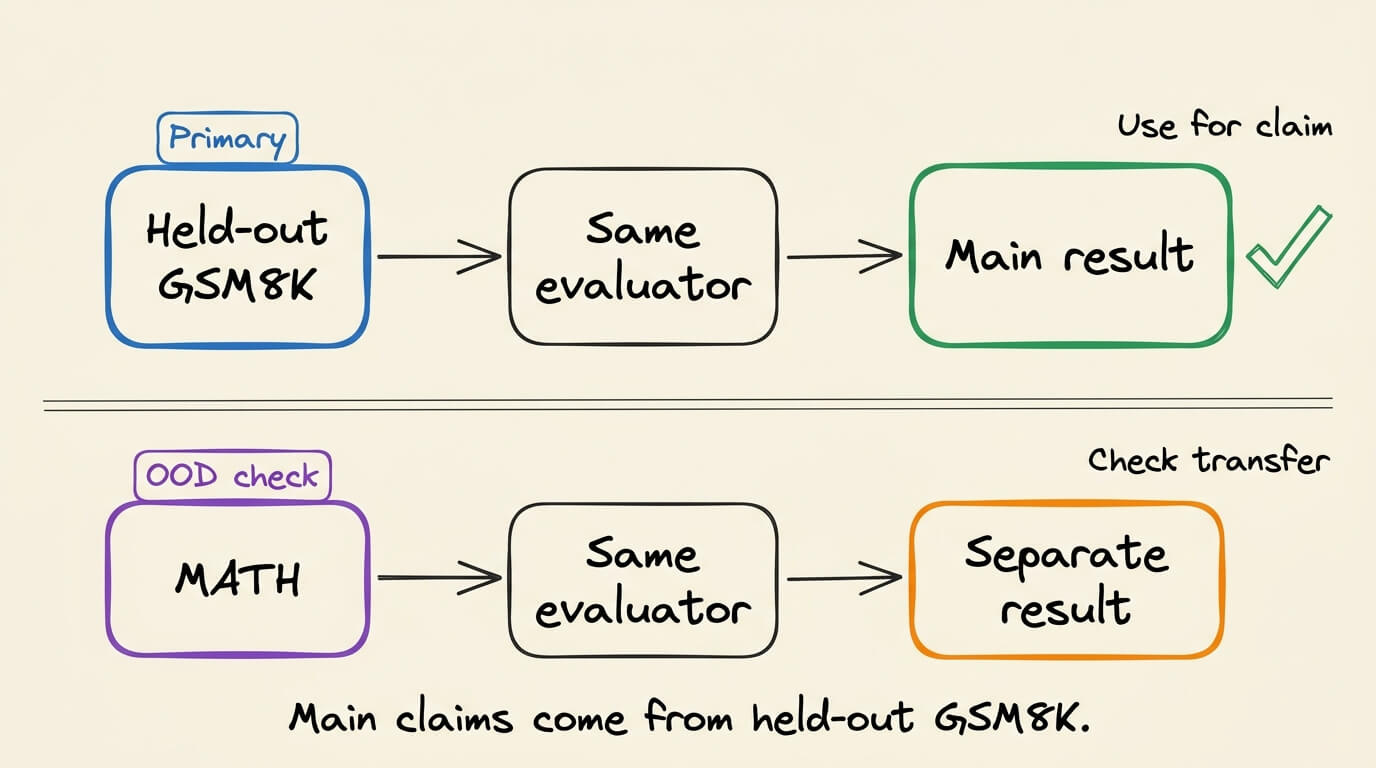
Fix the evaluation contract before training. The job succeeds only when the same evaluator measures a real gain.
Notebook 2: reward function design and failure modes
SageMaker AI accepts a Python reward function through an Evaluator resource. The handler receives a list containing one generated conversation and its reference fields. It returns one aggregate reward per record plus named metrics for observability.
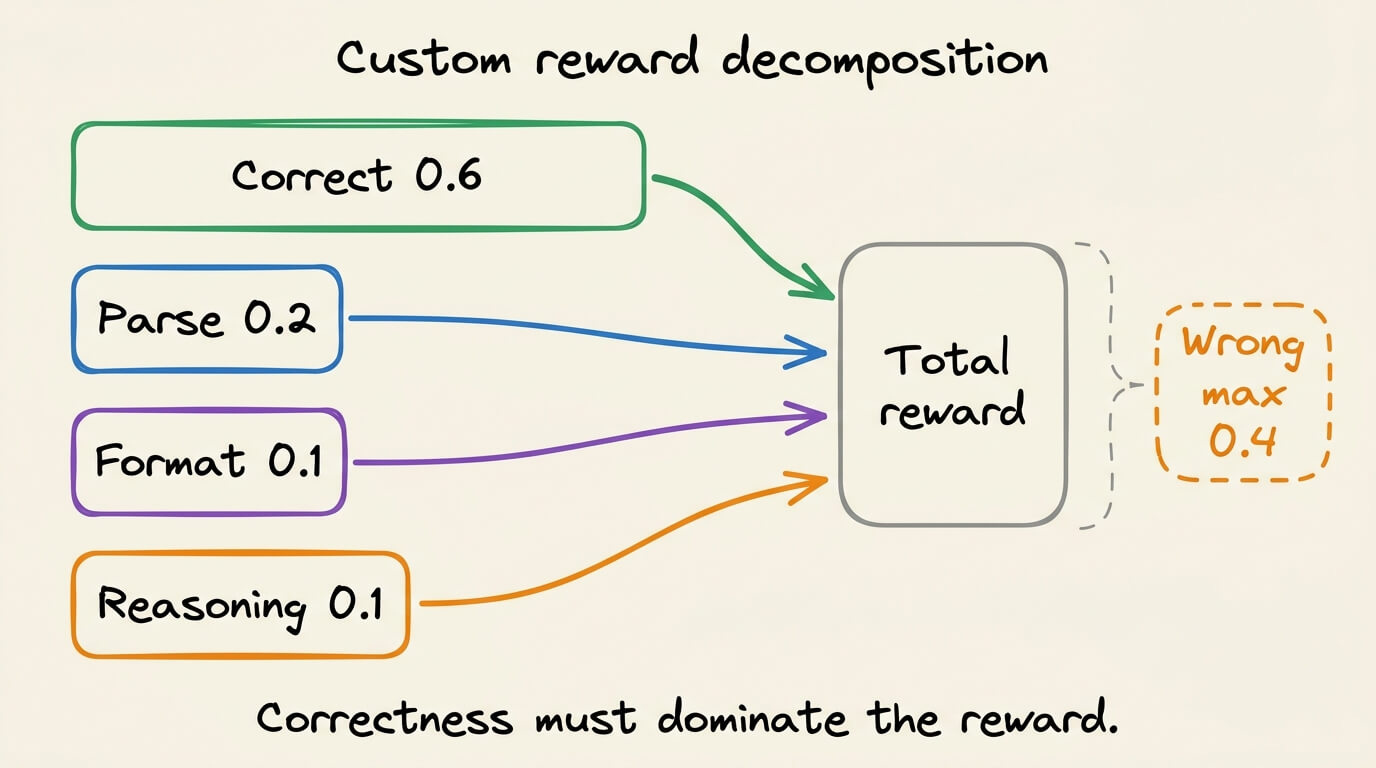
Our custom reward combines four signals:
Numeric correctness contributes 0.6
Answer parseability contributes 0.2
Required final-answer format contributes 0.1
Presence of non-trivial reasoning contributes 0.1
The offline implementation is demonstrated below:
def score_record(record, index=0):
    response = _extract_model_response(record)
    predicted, path = extract_final_answer(response)
    expected = _to_decimal(_extract_reference_answer(record))

    correctness = float(predicted is not None and predicted == expected)
    parseable = float(predicted is not None)
    formatted = float(path == "marked")
    reasoning = float(len(response.split("####", 1)[0].split()) >= 8)

    reward = round(
        0.6 * correctness
        + 0.2 * parseable
        + 0.1 * formatted
        + 0.1 * reasoning,
        4,
    )
    return {
        "id": str(record.get("id") or index),
        "aggregate_reward_score": reward,
        "metrics_list": [
            {"name": "numeric_correctness", "value": correctness, "type": "Reward"},
            {"name": "answer_parseable", "value": parseable, "type": "Reward"},
            {"name": "final_answer_format", "value": formatted, "type": "Metric"},
            {"name": "reasoning_present", "value": reasoning, "type": "Metric"},
        ],
    }
This is the central reward-design decision, i.e., four observable signals must collapse into one optimization target.
Correctness receives most of the reward. The remaining components provide a learning signal when early samples are mostly wrong.
This shaping has a clear risk. A model can earn 0.4 without producing the correct number. It only needs a parseable answer, the requested marker, and enough text before that marker.
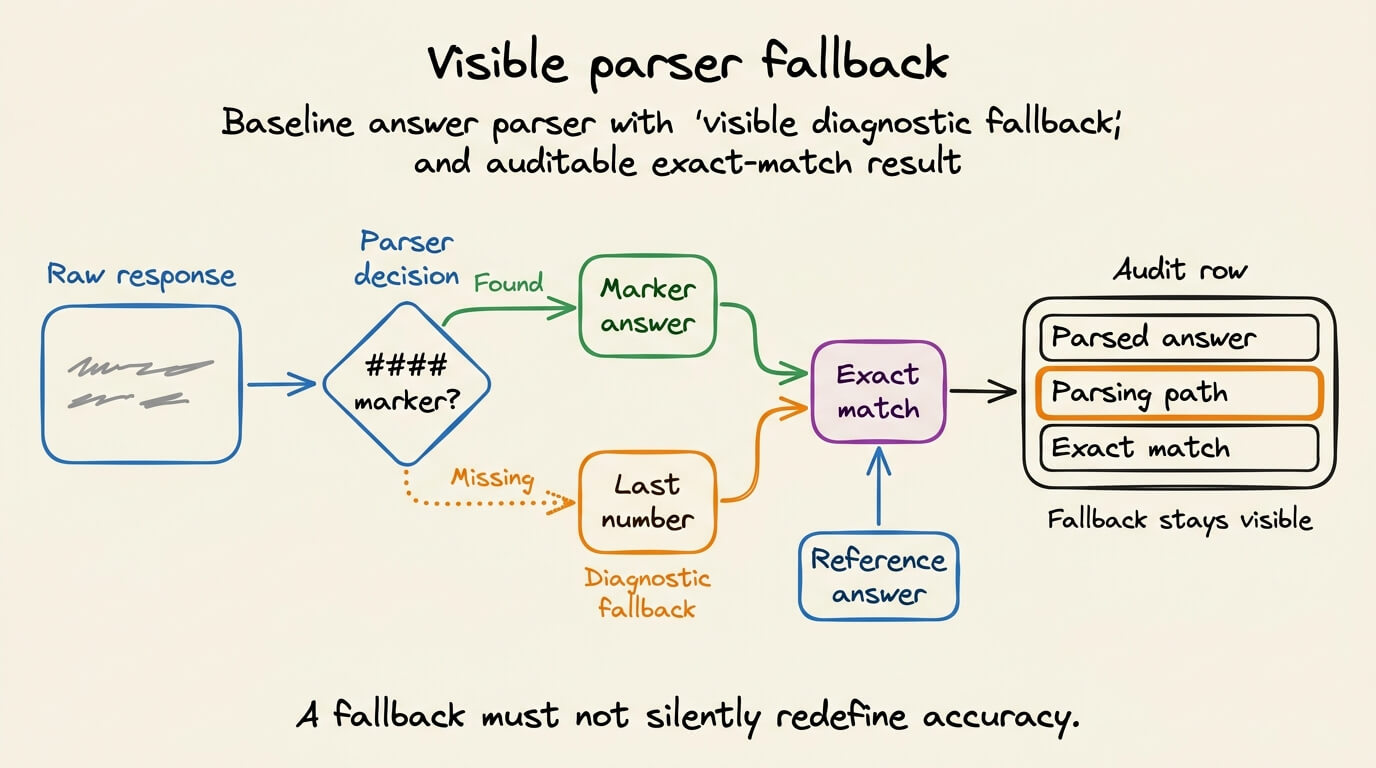
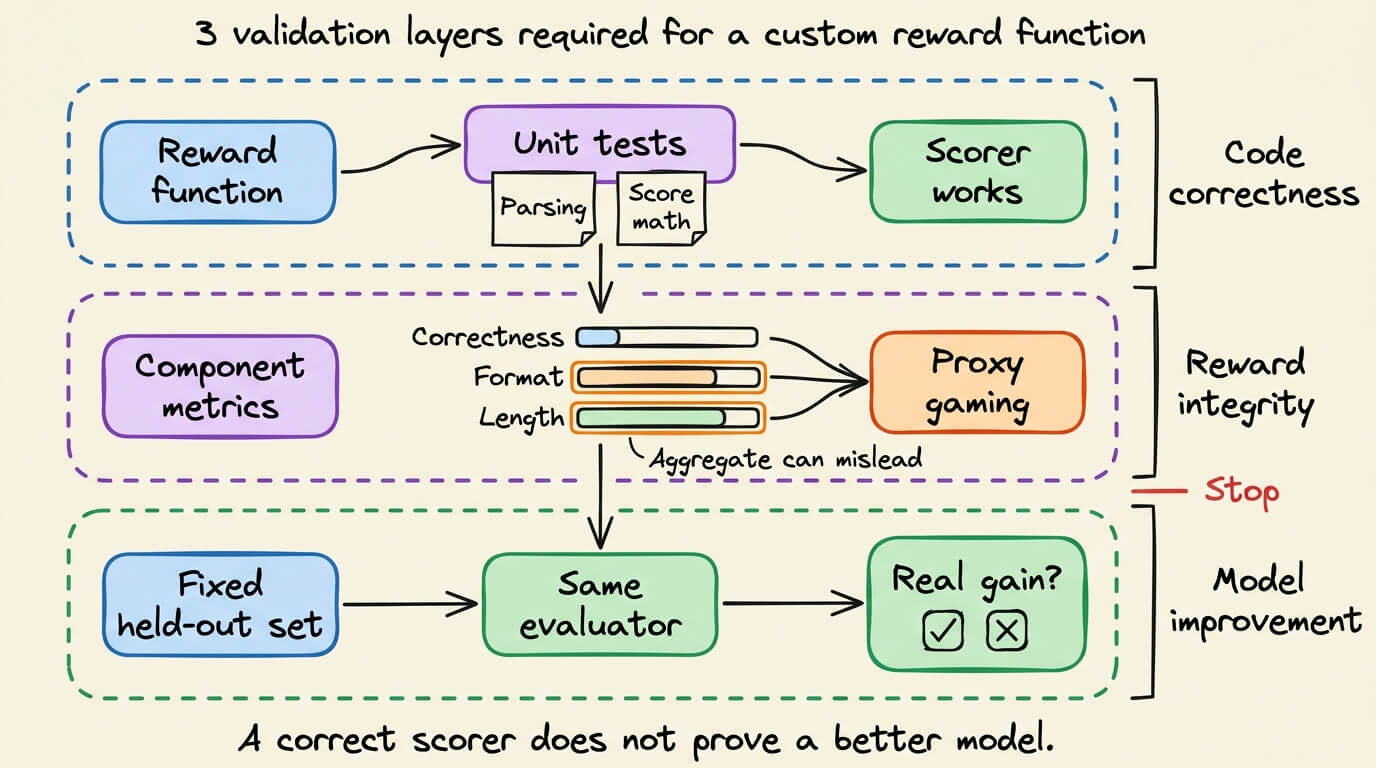
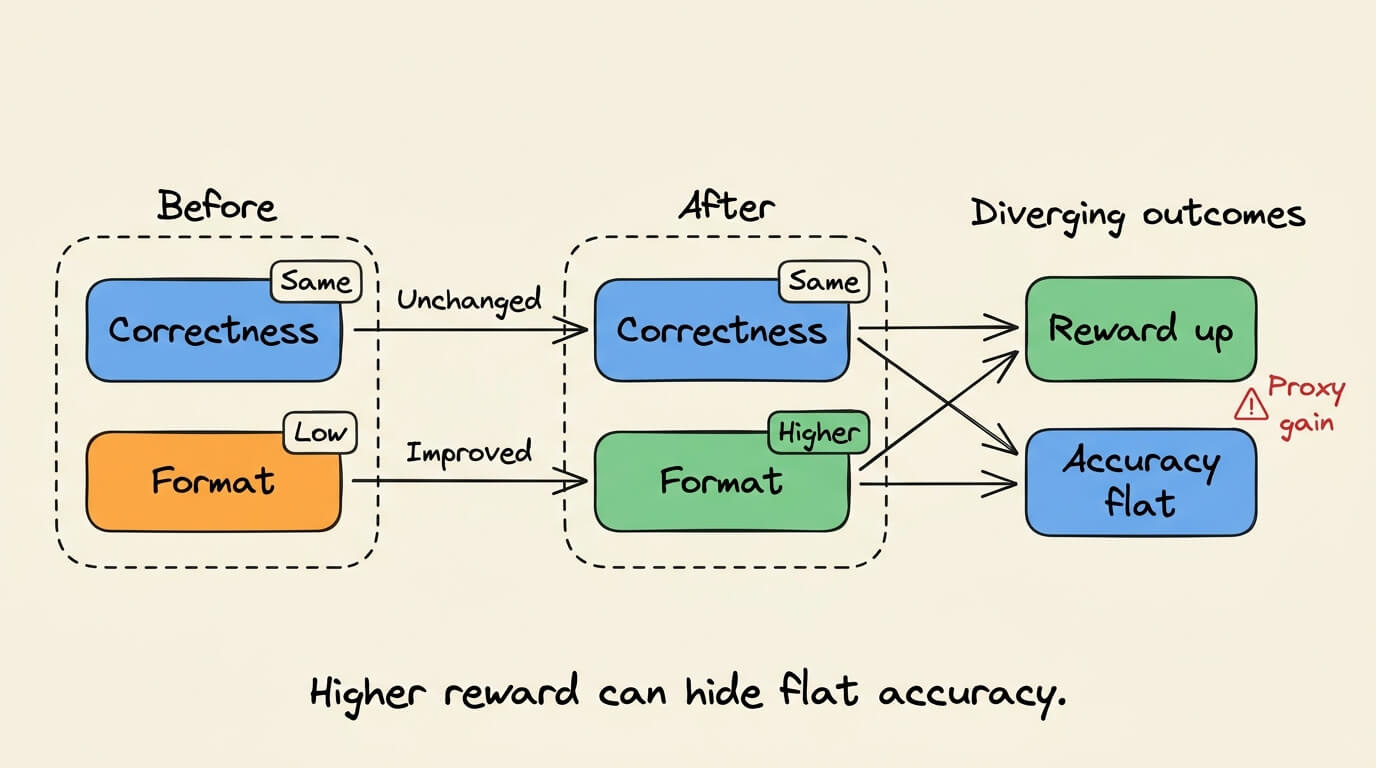
That risk suggests two checks. First, graph correctness and formatting separately. Second, inspect whether response length rises faster than accuracy.
The local test suite covers correct answers, wrong answers, comma-separated numbers, decimal equivalence, missing markers, malformed batches, and absent references. These tests validate the scorer. They do not validate the learned model.
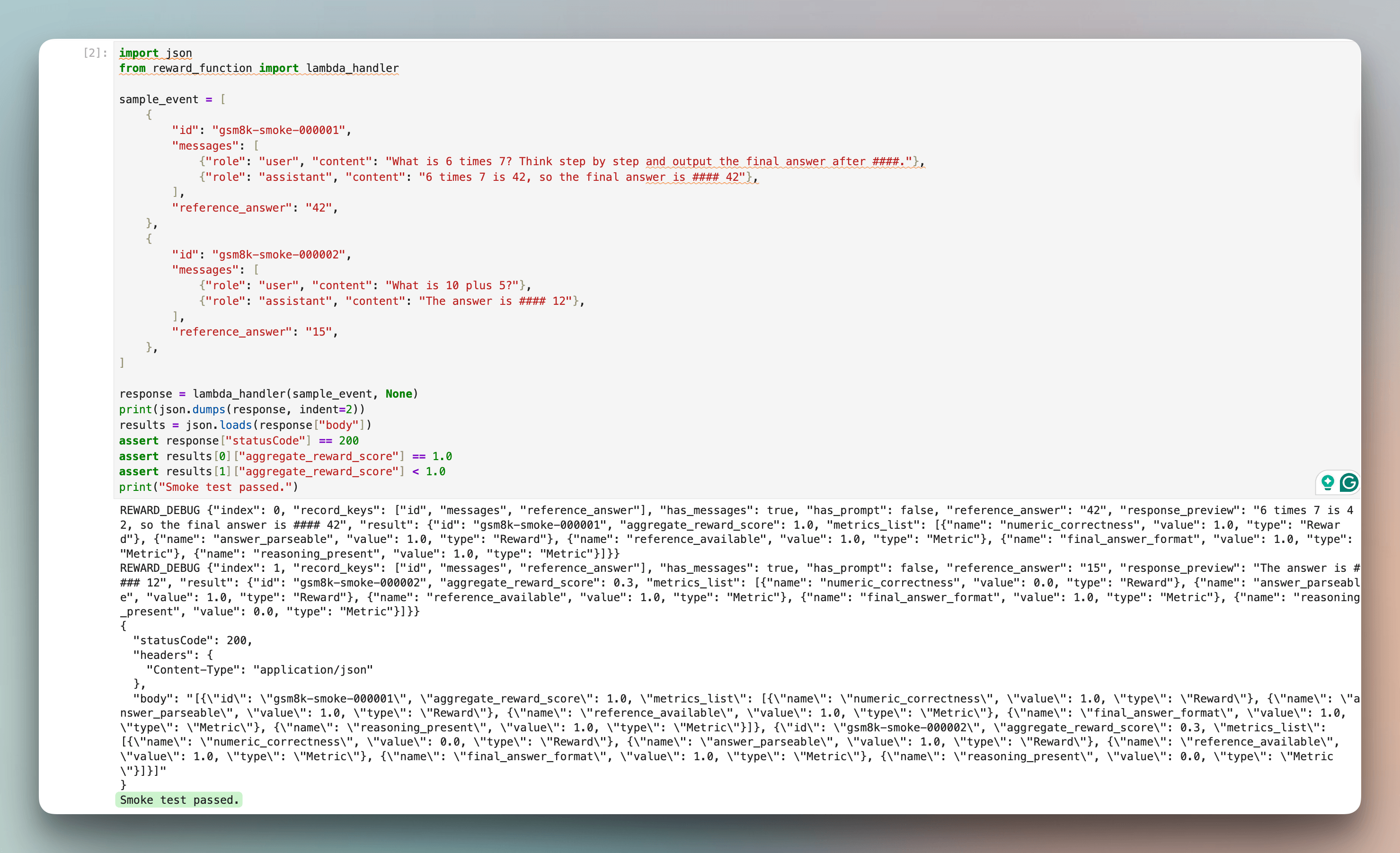
Reward shaping should guide exploration without replacing the actual objective. When proxy rewards dominate, training can improve the dashboard while leaving exact-match accuracy unchanged.
In summary, the reward function is executable product logic. It deserves tests, version control, and metric-level monitoring.
Notebook 3: RLVR training pipeline in SageMaker AI
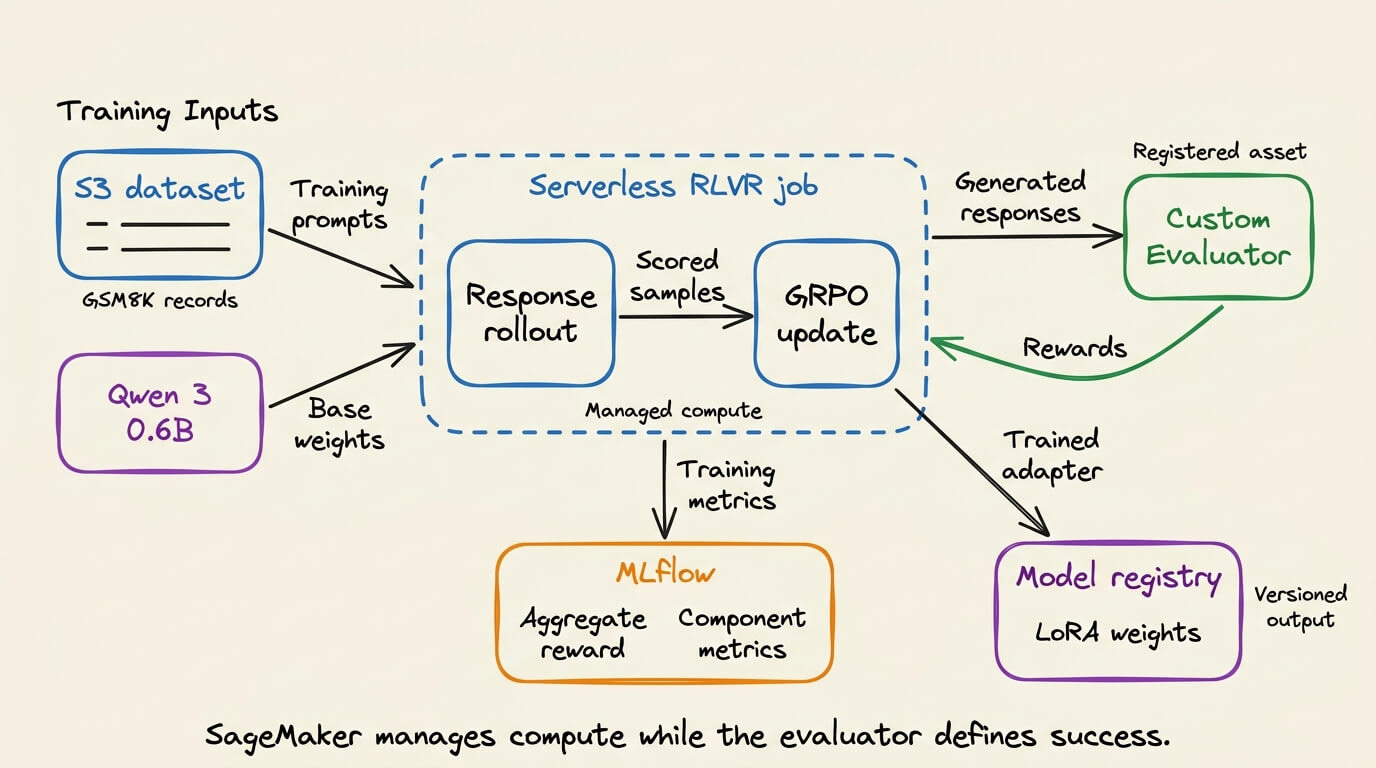
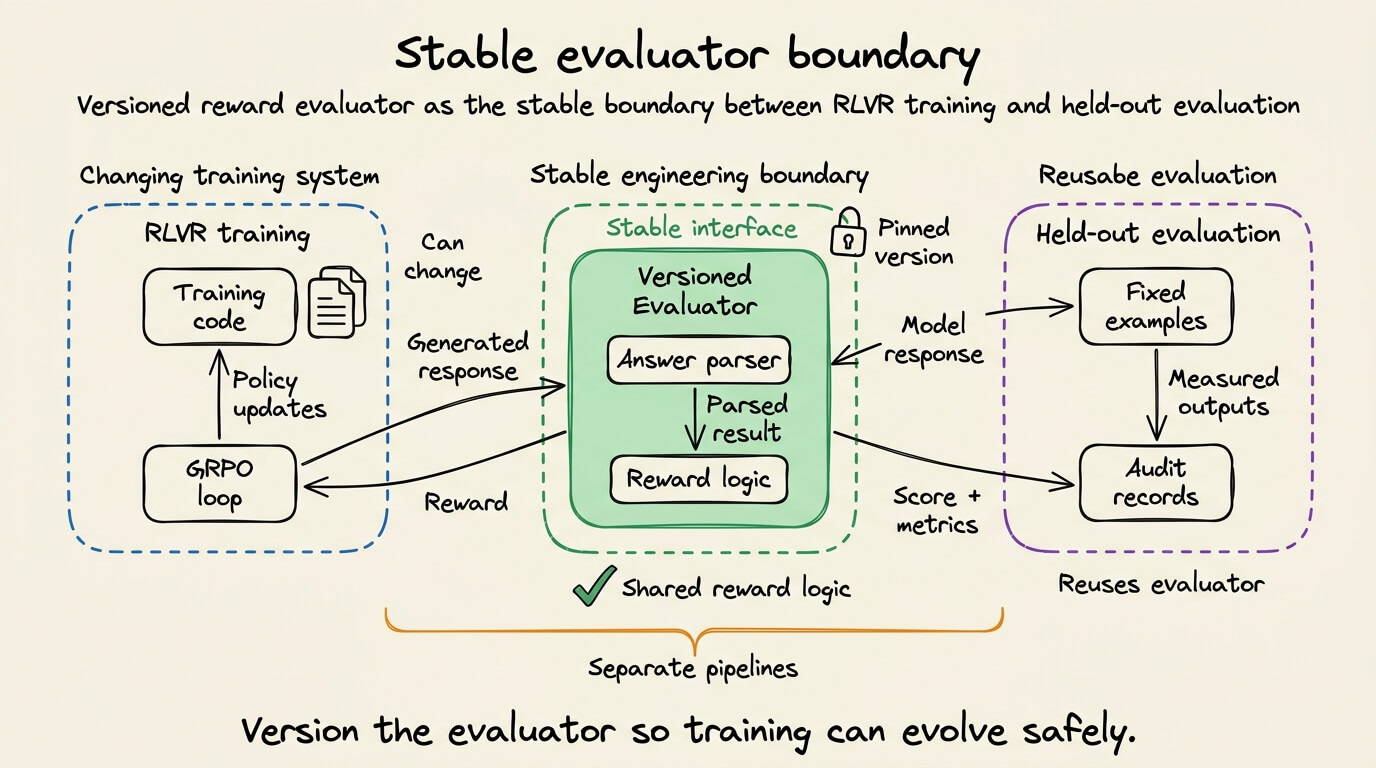
The custom reward lab registers the Python scorer as a SageMaker AI Registry Reward Function Evaluator. The RLVR trainer then references that evaluator during customization.
The flow contains four resources:
The GSM8K-derived records live in Amazon S3.
The custom scorer becomes a versioned Evaluator.
The RLVR job trains LoRA adapters for Qwen3 0.6B.
MLflow records aggregate and component metrics.
Register the tested Python file as a versioned reward evaluator.
from sagemaker.ai_registry.air_constants import REWARD_FUNCTION
from sagemaker.ai_registry.evaluator import Evaluator

reward_evaluator = Evaluator.create(
    name=reward_function_name,
    type=REWARD_FUNCTION,
    source="reward_function.py",
    role=role,
    sagemaker_session=sess,
    wait=True,
)
print(reward_evaluator.arn)
The evaluator ARN is the link between our Python scorer and the serverless training job. Keep the evaluator name short because SageMaker creates an underlying Lambda resource from it.
Next, retrieve the registered datasets and configure RLVRTrainer.
from sagemaker.ai_registry.dataset import DataSet
from botocore.exceptions import ClientError
from sagemaker.core.resources import ModelPackageGroup
from sagemaker.train.rlvr_trainer import RLVRTrainer

base_model_id = "huggingface-reasoning-qwen3-06b"
training_dataset = DataSet.get(name=f"{project_prefix}-train")
validation_dataset = DataSet.get(name=f"{project_prefix}-val")
group_name = f"{base_model_id}-custom-rw-rlvr"
try:
    model_package_group = ModelPackageGroup.get(group_name)
except ClientError:
    model_package_group = ModelPackageGroup.create(
        model_package_group_name=group_name,
        model_package_group_description="Qwen 3 0.6B custom-reward RLVR runs",
    )

trainer = RLVRTrainer(
    model=base_model_id,
    model_package_group=model_package_group,
    custom_reward_function=reward_evaluator,
    training_dataset=training_dataset,
    validation_dataset=validation_dataset,
    s3_output_path=output_path,
    mlflow_experiment_name=project_prefix,
    base_job_name=project_prefix,
    sagemaker_session=sess,
    accept_eula=True,
    role=role,
)

trainer.hyperparameters.max_epochs = 1
trainer.hyperparameters.learning_rate = 5e-6
trainer.hyperparameters.global_batch_size = 128
trainer.hyperparameters.max_prompt_length = 1024

training_job = trainer.train(wait=False)
print(training_job.training_job_name)
custom_reward_function is the only structural change from the built-in reward path. SageMaker chooses and releases the training compute. The notebook does not specify an instance type.
The serverless path removes instance selection from the training configuration. The SageMaker model customization documentation describes UI, Python SDK, and agent-guided interfaces for this workflow.
The workshop estimates 15 to 20 minutes for its fine-tuning section. That estimate is not our runtime. Record the actual wall-clock duration from the job metadata.
Serverless RLVR removes cluster management. Experiment design and reward validation remain the engineer’s responsibility.
Notebook 4: post-training evaluation
The post-training evaluation must reuse the baseline pipeline. Only the model endpoint changes.
The workshop also runs the separate MATH benchmark. Retrieve the newest model package, then submit the managed evaluation.
from sagemaker.train.evaluate import BenchMarkEvaluator, get_benchmarks

group_name = "huggingface-reasoning-qwen3-06b-custom-rw-rlvr"
packages = sm_client.list_model_packages(
    ModelPackageGroupName=group_name,
    SortBy="CreationTime",
    SortOrder="Descending",
    MaxResults=1,
)
model_arn = packages["ModelPackageSummaryList"][0]["ModelPackageArn"]

Benchmark = get_benchmarks()
evaluator = BenchMarkEvaluator(
    benchmark=Benchmark.MATH,
    model=model_arn,
    model_package_group=group_name,
    base_eval_name="custom-reward-rlvr",
    s3_output_path=output_path,
    evaluate_base_model=False,
    role=role,
    sagemaker_session=sess,
)

execution = evaluator.evaluate()
execution.wait()
print(execution.show_results())
execution.show_results() is the result produced by this notebook.
Record the customized model’s MATH score and the evaluation-job status from that output.
This notebook does not evaluate the base model because evaluate_base_model=False, so one Lab 3b execution cannot support a before-and-after accuracy claim by itself.
AWS includes a paired comparison in the standard RLVR lab. Its checked-in base-model artifact reports 0.406 MATH exact match. The corresponding fine-tuned artifact reports 0.507.
The exact values may vary across runs. The dataset split, seed, generation settings, and reward implementation should therefore ship beside the result.
Notebook 5: real-time endpoint validation
The final step deploys the customized model to a SageMaker real-time endpoint. This keeps the article on one deployment path and matches the custom-reward workshop.
Deployment should happen only after the evaluation artifact is saved. The endpoint test should reuse one held-out prompt that did not appear in training.
The workshop deploys the merged model weights to one ml.g5.xlarge endpoint. It uses the DJL LMI container with the vLLM backend.
from sagemaker.core import s3
from sagemaker.core.resources import ModelPackage

package = ModelPackage.get(model_arn)
model_root = package.inference_specification.containers[0]
merged_model_s3_uri = s3.s3_path_join(
    model_root.model_data_source.s3_data_source.s3_uri,
    "checkpoints",
    "hf_merged",
) + "/"

CONTAINER_VERSION = "0.36.0-lmi18.0.0-cu128"
image_uri = (
    f"763104351884.dkr.ecr.{region}.amazonaws.com/"
    f"djl-inference:{CONTAINER_VERSION}"
)
Create the endpoint before attaching the model through an inference component.
from sagemaker.core.resources import Endpoint, EndpointConfig
from sagemaker.core.shapes import ProductionVariant

endpoint_name = f"{project_prefix}-endpoint"
endpoint_config_name = f"{project_prefix}-config"

EndpointConfig.create(
    endpoint_config_name=endpoint_config_name,
    execution_role_arn=role,
    production_variants=[ProductionVariant(
        variant_name="AllTraffic",
        instance_type="ml.g5.xlarge",
        initial_instance_count=1,
        model_data_download_timeout_in_seconds=700,
        routing_config={"routing_strategy": "LEAST_OUTSTANDING_REQUESTS"},
    )],
)
endpoint = Endpoint.create(
    endpoint_name=endpoint_name,
    endpoint_config_name=endpoint_config_name,
)
endpoint.wait_for_status("InService")
Create the model with the same LMI settings used by the workshop. Then attach one GPU through an inference component.
from sagemaker.core.resources import InferenceComponent, Model
from sagemaker.core.shapes import (
    ContainerDefinition,
    InferenceComponentComputeResourceRequirements,
    InferenceComponentRuntimeConfig,
    InferenceComponentSpecification,
    ModelDataSource,
    S3ModelDataSource,
)

model_name = f"{project_prefix}-model"
ic_name = f"{project_prefix}-component"

model = Model.create(
    model_name=model_name,
    primary_container=ContainerDefinition(
        image=image_uri,
        model_data_source=ModelDataSource(
            s3_data_source=S3ModelDataSource(
                s3_uri=merged_model_s3_uri,
                s3_data_type="S3Prefix",
                compression_type="None",
            )
        ),
        environment={
            "SERVING_FAIL_FAST": "true",
            "OPTION_ASYNC_MODE": "true",
            "OPTION_ROLLING_BATCH": "disable",
            "OPTION_MAX_MODEL_LEN": "16384",
            "OPTION_TENSOR_PARALLEL_DEGREE": "max",
            "OPTION_ENTRYPOINT": "djl_python.lmi_vllm.vllm_async_service",
            "OPTION_TRUST_REMOTE_CODE": "true",
        },
    ),
    execution_role_arn=role,
)

component = InferenceComponent.create(
    inference_component_name=ic_name,
    endpoint_name=endpoint_name,
    variant_name="AllTraffic",
    specification=InferenceComponentSpecification(
        model_name=model_name,
        compute_resource_requirements=InferenceComponentComputeResourceRequirements(
            min_memory_required_in_mb=1024,
            number_of_accelerator_devices_required=1,
        ),
    ),
    runtime_config=InferenceComponentRuntimeConfig(copy_count=1),
    region=region,
)
component.wait_for_status("InService")
Now run one held-out problem through the endpoint. The workshop repository provides execute_inference and print_stream helpers for the streaming request.
prompt = "What is 25 * 4 + 10? Show your reasoning step by step."
stream = execute_inference(prompt, endpoint_name, ic_name, stream=True)
print_stream(stream)
For the side-by-side validation in SageMaker Studio JupyterLab, the serving configuration exposes both the base weights and the RLVR adapter. The notebook can therefore switch models without changing the prompt or decoding configuration.
base_endpoint_name = f"{project_prefix}-base-endpoint"
base_ic_name = f"{project_prefix}-base-component"

rlvr_endpoint_name = endpoint_name
rlvr_ic_name = ic_name

def stream_answer(prompt, endpoint_name, inference_component_name):
    stream = execute_inference(
        prompt,
        endpoint_name,
        inference_component_name,
        stream=True,
    )
    print_stream(stream)
    return stream
Invoke the untouched base model and then the adapter-backed model. Keep every other input fixed.
prompt = (
    "Natalia sold clips to 48 of her friends in April, then half as many "
    "in May. How many clips did she sell altogether? Show the calculation "
    "and end with #### followed by the numeric answer."
)

base_response = stream_answer(
    prompt,
    base_endpoint_name,
    base_ic_name,
)

rlvr_response = stream_answer(
    prompt,
    rlvr_endpoint_name,
    rlvr_ic_name,
)
The recording below sends the same prompt through both model routes with identical decoding settings. It shows the responses arriving token by token and keeps the time to first token and total generation time visible for each model:
We verified both model routes with streamed responses.
On a five-prompt serving smoke test
the base route had a median time to first token of 0.571 seconds and a median total response time of 1.667 seconds.
The RLVR route measured 0.529 seconds and 1.867 seconds respectively.
These numbers validate the streaming path. Five requests are not enough to characterize throughput under load.
Delete the endpoint after collecting the result unless it serves another workload. Real-time endpoints continue consuming provisioned capacity while active.
Delete inference resources in reverse creation order.
from sagemaker.core.resources import Endpoint, EndpointConfig, InferenceComponent, Model

InferenceComponent.get(inference_component_name=ic_name).delete()
Model.get(model_name=model_name).delete()
Endpoint.get(endpoint_name=endpoint_name).delete()
EndpointConfig.get(endpoint_config_name=endpoint_config_name).delete()
Engineering lessons from verifier-driven training
RLVR is useful when the target behavior has a cheap verifier. The reward can evaluate many sampled responses without requiring an ideal completion for each one.
That verifier is now part of the training specification. A loose parser, incomplete test suite, or exploitable scoring rule can reward the wrong behavior. The reward components therefore need tests, versioning, and separate monitoring.
The simplest designs keep one evaluator at the center. Training calls it for rewards. Held-out evaluation reuses the same parsing rules. The final endpoint test applies the same acceptance criteria once more.
Every accuracy claim should trace back to a fixed split, raw responses, and executable checks.
To run the complete workflow yourself, AWS provides a serverless model customization workshop for Amazon SageMaker AI.
It includes hands-on labs for SFT, DPO, RLVR, and RLAIF. The custom-reward RLVR lab walks through data preparation, evaluator registration, training, evaluation, deployment, and cleanup.
Good day, and thanks to AWS for partnering today!
The point that the reward function becomes part of the task specification is the one I'd stress to anyone starting RLVR: the model will find whatever path your verifier rewards, shortcuts included. I'd log the verifier's raw score alongside a small held-out human-audited sample each eval round, so reward hacking shows up as divergence between the two rather than as a climbing training curve.
I'd dump a few top-reward completions per step and read them. The verifier only pulls the final number, so a right answer sitting on broken arithmetic still scores 1, and an exact-match eval won't flag that either.