

Turn trace reviews into production eval metrics
A common problem observed across most LLM eval setups today is that it takes too much time and effort to go from manual trace annotations to automated metrics.
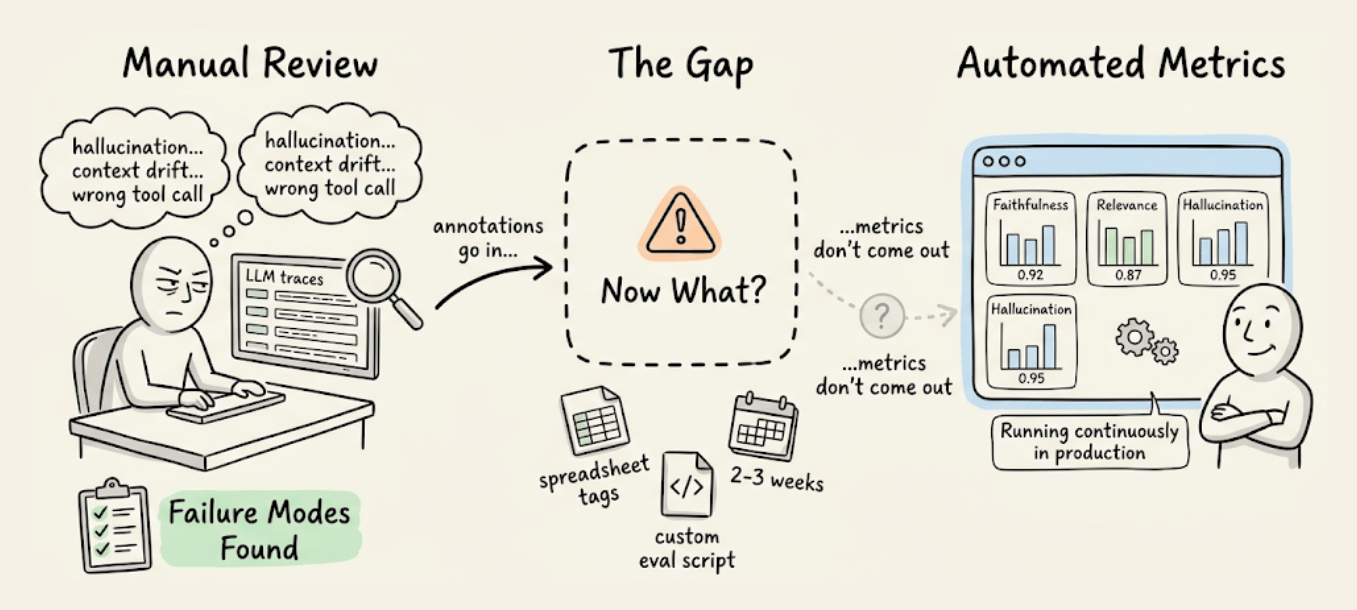
Let’s say you found some failure modes by reviewing production traces. But codifying those into the right eval metrics that correlate with human reviewers is its own engineering project.
The observability built into Confident AI now handles that translation automatically.
Essentially, you can annotate traces on the platform, and it recommends the right eval metrics based on those annotations. Each metric comes with a human-alignment score, so you can validate coverage before wiring it into your pipeline.
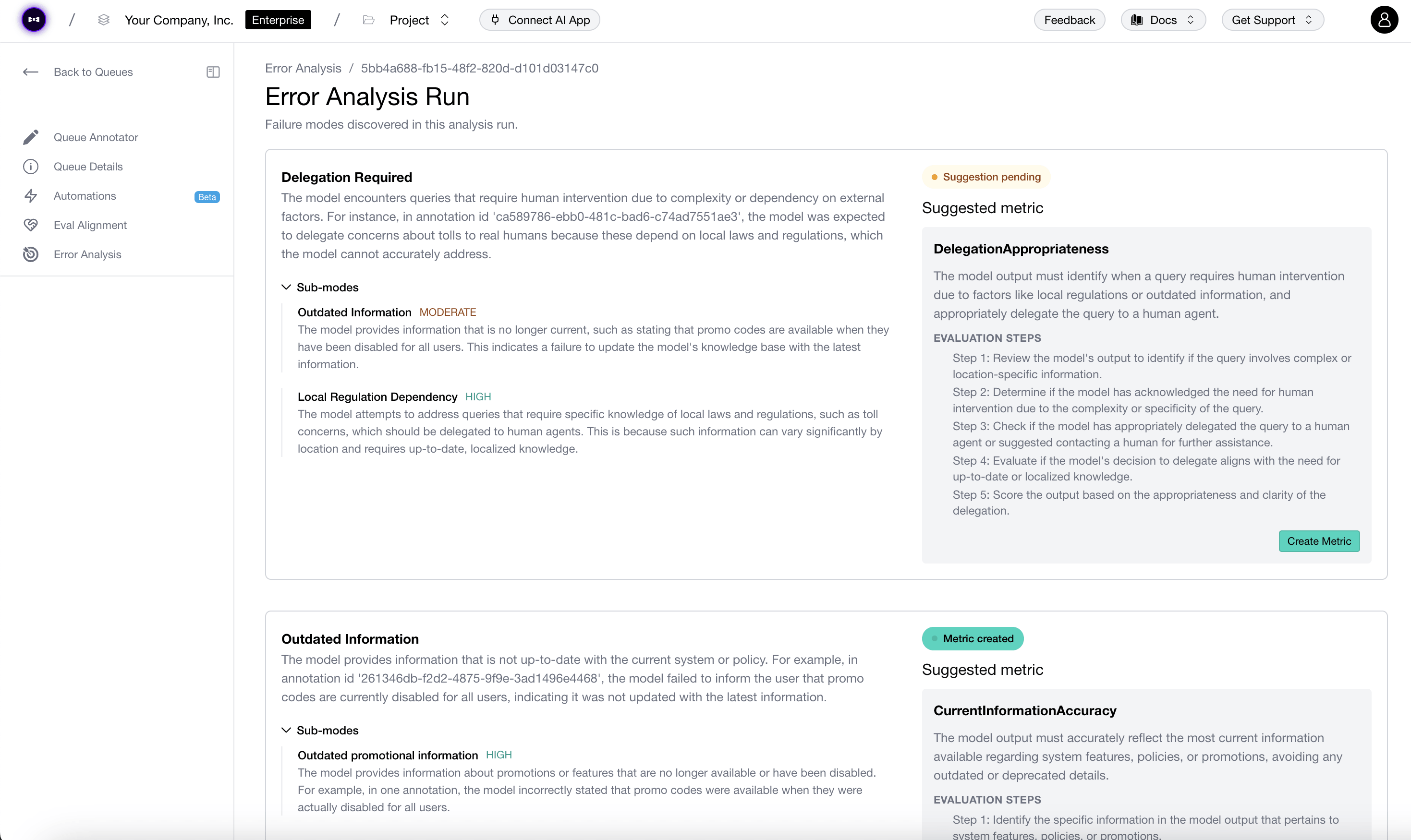
The eval engine underneath is DeepEval (14k+ GitHub stars), already widely adopted across production LLM projects.
You can try this yourself here on the Confident AI platform →
And here’s the DeepEval GitHub repo →
How to vibe code: A developer’s playbook
Almost every developer now uses AI to write code. Very few use it well.
A randomized controlled trial found that experienced developers were 19% slower with AI coding tools. But those same developers believed they were 20% faster. That’s a nearly 40-point gap between how productive they felt and how productive they actually were.
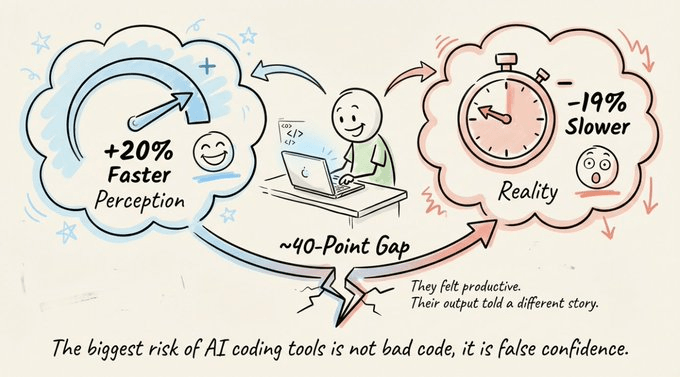
The tools aren’t the issue. The practices around them are.
And closing that gap doesn’t take anything radical. It’s a handful of simple practices and a shift in mindset that anyone can follow.
This article covers those principles and then puts them into practice. These fundamentals apply to any AI coding tool you’ll use. For the hands-on part, we’ll use Mistral Vibe, an open-source CLI coding agent with everything you need to vibe code like a pro engineer.
Pure vibe coding vs. AI-assisted development
Before getting into practice, it’s worth understanding what you’re actually doing when you write code with AI. The industry has converged on a spectrum, and where you sit on it determines your results.
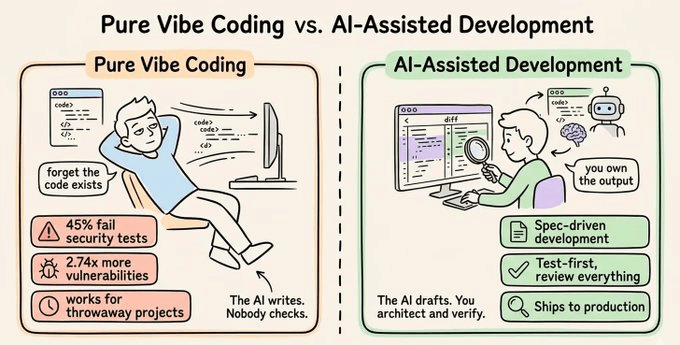
Pure vibe coding means accepting AI output without reviewing it. This is the original framing from early 2025: “forget that the code even exists.” It works for throwaway prototypes and weekend experiments.
It does not work for production.
The data makes this clear:
45% of AI-generated code introduces security vulnerabilities
AI co-authored code had 2.74x higher security vulnerability rates across an analysis of 470 pull requests
The gap between “it runs” and “it’s production-ready” is enormous.
AI-assisted development sits at the other end. You use AI to accelerate implementation, but you maintain full understanding and ownership of the code. You write specs, review diffs, run tests, and can explain every line to someone else.
The AI is the typist. You are the engineer.
In traditional development, roughly 70% of your cognitive energy goes into translating ideas into syntax. In AI-assisted development, that flips. 70% goes into thinking clearly about what to build and verifying what the AI produced.
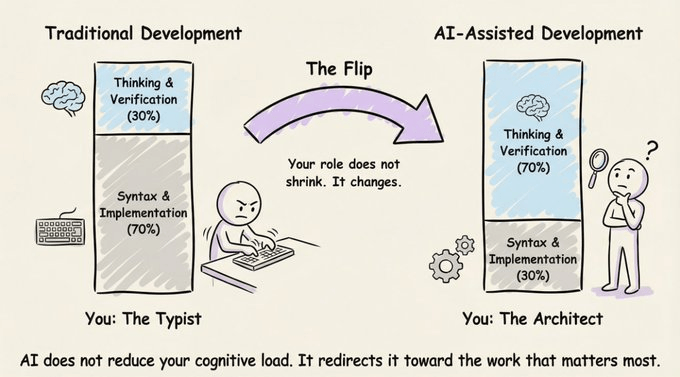
Your role doesn’t shrink. It changes. You stop being the typist and start being the architect.
Important practices
Five practices show up consistently among developers getting real, compounding value from AI-assisted development.
None of them are about writing better prompts.
1) Spec before you prompt
The single biggest mistake is prompting too early.
“Build me a task manager” produces garbage. A 15-line spec defining stack, schema, views, and auth produces a working prototype in one session.
One practitioner reported going from idea to 32 passing tests in a single session by their fifth feature, with zero debugging cycles. The difference wasn’t the model. It was the input.
A good spec has three pillars:
Intent: What you’re building and why
Constraints: Tech stack, architectural patterns, what NOT to do
Acceptance criteria: Testable conditions that define “done”
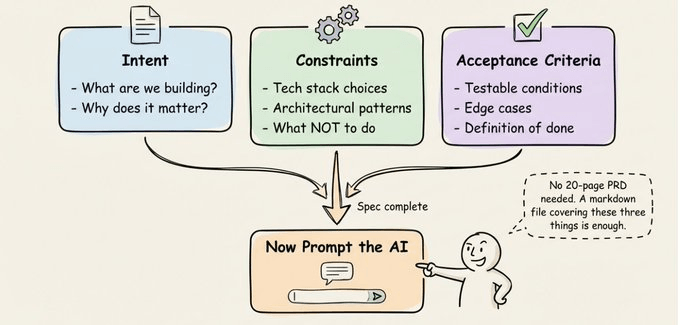
You don’t need a 20-page PRD. A markdown file covering these three things is enough.
For larger features, try having the AI interview you before it writes any code. Have it probe your requirements, question edge cases, and surface tradeoffs. Once the interview is done, have it write a spec document, then start a fresh session to execute against that spec. Clean context focused entirely on implementation.
One thing that’s easy to overlook: make your architectural decisions explicitly. AI will make them for you if you don’t, and it usually picks defaults that work for demos but fail in production.
2) Context engineering > prompt engineering
This is the most underappreciated skill in AI-assisted development.
Context engineering is the practice of designing what information is available to the AI at any given moment. It matters far more than how cleverly you phrase your request.
The context window is a shared resource. Performance degrades as it fills. Three practical rules:
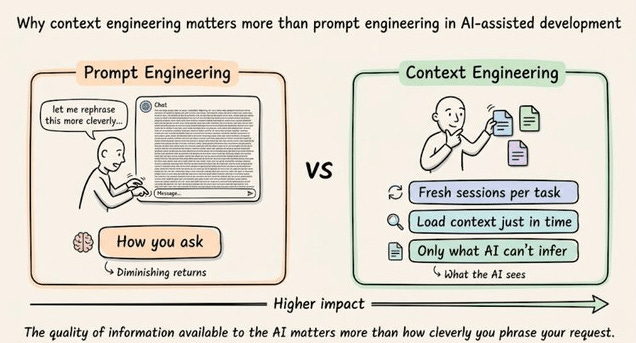
Start fresh sessions for new tasks. Don’t let stale context from a previous feature pollute your new implementation. Carry forward only the spec and key decisions, not the full conversation history.
Use “just in time” context retrieval. Rather than pre-loading your entire codebase, maintain lightweight references (file paths, module names) and use tools like grep to dynamically load data as needed.
Keep context files focused on things the AI can’t infer. Project conventions, naming patterns, architectural constraints, security requirements. The AI can read your code. It can’t read your team’s unwritten rules.
3) The Plan → Execute → Verify loop
Vibe coding is a conversation, not a one-shot. The developers who move fastest break the work into small, verifiable steps.
Plan: Define the goal and constraints for this specific step. Not the whole project, just the next piece. Better yet, ask the AI to think through the plan first before writing any code. This forces the model to reason about the problem, surface edge cases, and propose an approach you can review before implementation.
Execute: Let the AI generate code, tests, or docs.
Verify: Review the diffs. Run the tests. Give specific, actionable feedback. “That’s wrong” is a bad prompt. “The auth middleware should read from the Authorization header, not X-Token, and return 401 on expired tokens” is a good one.
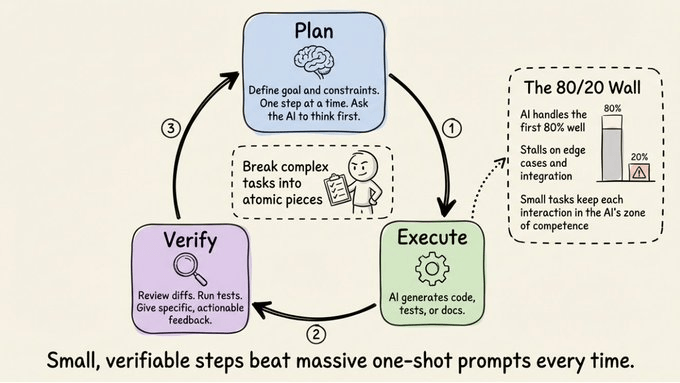
The key discipline is breaking complex tasks into atomic pieces. AI works great for the first 80% of a project but stalls on edge cases and integration. Small, focused tasks keep each interaction within the AI’s zone of competence.
4) Testing is the foundation
Automated testing is the single most important practice for production-quality AI-assisted development.
Without tests:
Your AI agent might claim something works without having actually tested it
Any new change could silently break an unrelated feature
AI-generated code optimizes for plausibility, code that “looks right” but may contain subtle logic errors
Test-first development works particularly well with agents. Write (or have the AI write) the tests first. Review them. Confirm they fail. Then let the agent implement code to make them pass.
You’ve validated intent through the tests before you ever review the implementation.
5) Security and review are non-negotiable
Security is where AI-assisted development’s risks are the sharpest.
40% of code completion suggestions were found insecure in security-sensitive scenarios
One platform’s missing row-level security exposed 170+ production apps
Three strategies that significantly reduce these risks:
Security-first context. Include security instructions in your project context file: “always use parameterized queries, never hardcode secrets, validate all inputs.” Research shows this significantly reduces vulnerable code generation.
Self-reflection loops. After the agent generates code, prompt it to review its own output for security vulnerabilities before you do. This catches a surprising number of issues.
Supply chain vigilance. AI models suggest packages that don’t exist on public registries (a vector for “slopsquatting” attacks), or pull in unreviewed transitive dependencies. Always verify dependencies.
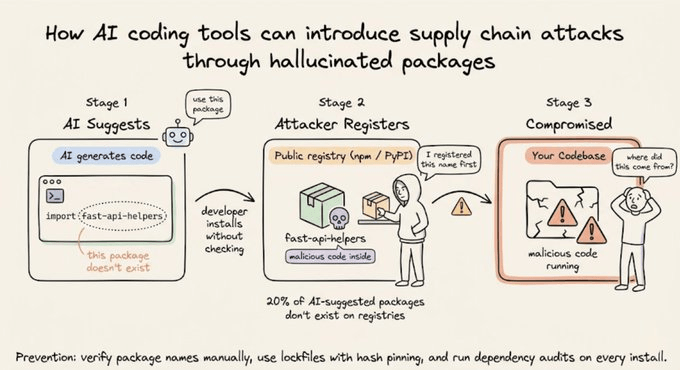
The golden rule for production: don’t commit code you can’t explain to someone else. Your name is on the commit.
Anti-patterns
Three failure modes show up consistently:
The endless error loop. The AI introduces a bug, you describe the bug, and the AI “fixes” it by introducing a different bug. Stop the loop. Read the code yourself. Understand the root cause. Provide a precise description of the problem and the expected behavior.
The comprehension gap. Shipping code you don’t understand. It works today. You can’t debug it tomorrow. If you don’t understand it, don’t merge it.
Session drift. Long sessions accumulate stale context. When the AI starts losing coherence, start fresh. Carry forward the spec and decisions, not the conversation history.
Putting it into practice with Mistral Vibe
Everything above is tooling-agnostic. To walk through these workflows hands-on, we’ll use Mistral Vibe, an open-source CLI coding agent from Mistral AI.
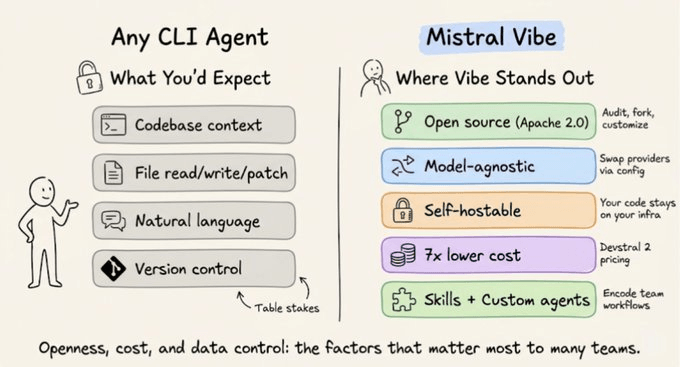
Open source under Apache 2.0. The code is on GitHub. You can audit exactly what the agent does, fork it, and customize the security model.
Self-hostable. Run locally on your own hardware and your code never leaves your infrastructure. For teams where data sovereignty is a hard requirement, this matters.
Model-agnostic. Swap providers via config.toml. Point it at OpenRouter, a local vLLM server, or any OpenAI-compatible API.
Built-in cost controls. The --max-price and --max-turns flags hard-cap session costs. Devstral 2 also runs at roughly 7x lower per-token cost compared to frontier models, which compounds fast at scale.
Setup
Get started with a single command:

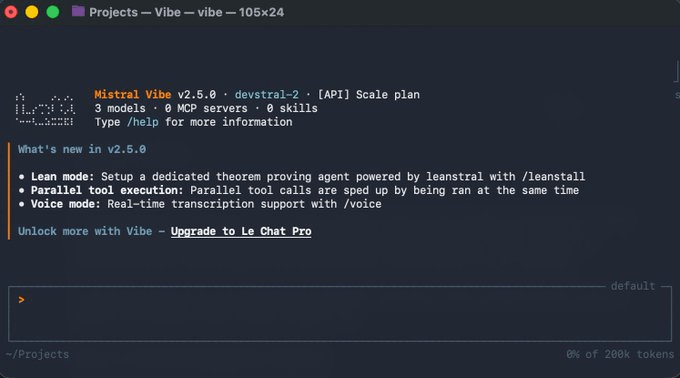
Then navigate to your project and run vibe:

Vibe automatically scans your project’s file structure and Git status. You’re now in an interactive chat with an agent that already has context about your codebase.
Agent modes: matching trust to the task
Vibe offers different modes that map directly to the practices we covered.
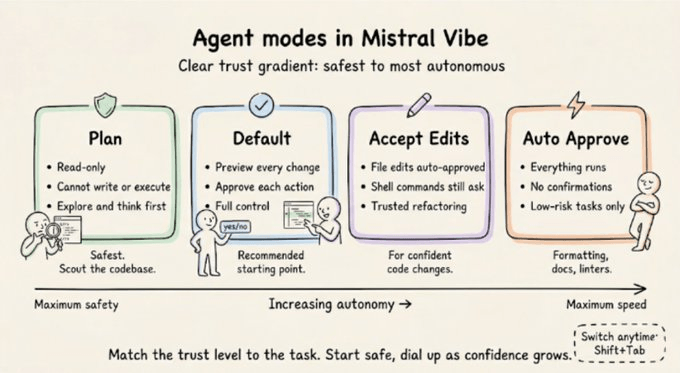
Default mode requires approval for every tool execution. Every file write, every shell command gets a preview and a confirmation prompt. Start here.
Plan mode is read-only. It can read files and search code but cannot write or execute anything. Use it to explore a codebase, create a structured plan, and surface edge cases before implementation begins.
Accept-edits mode automatically approves file edits but still asks for shell commands. Useful for trusted refactoring workflows.
Auto-approve mode skips all confirmations. Use for well-defined, low-risk tasks like formatting, documentation, or running linters.
Switch between them mid-session with Shift+Tab.
Plan mode deserves emphasis. Spec-driven approaches have shown 50-80% reduction in implementation time precisely because the upfront thinking eliminates entire categories of errors downstream.
[Demo] Understanding to shipping a PR
What follows is a continuous workflow on a single codebase: we understand the project, plan a new feature, implement it, verify with a subagent, and ship a PR. The same Plan → Execute → Verify loop, end to end in practice.
The demo codebase is a lightweight Express.js + SQLite task management API with JWT authentication, task CRUD, user profiles, and existing tests.
Understanding the codebase
Let’s see how Vibe understands your codebase:
Vibe explores the project structure, reads the files, understands the relationships between them, and responds with a clear breakdown. It also traces the authentication flow through @src/middleware/auth.js as prompted.
This is the step that developers skip the most, and it’s the most expensive one to skip. Every minute spent understanding the codebase saves you from fighting the AI’s output later.
This is context engineering in practice: you’re loading exactly the information you need, not dumping the entire project into a prompt. The @ file reference system makes this precise. Instead of “look at my auth code,” you say “explain @src/middleware/auth.js,” and Vibe reads exactly that file.
Planning and implementing a feature
This is where the full Plan → Execute → Verify loop becomes concrete.
Before writing the prompt, we switched to plan mode to let Vibe plan the feature thoroughly before writing a single line of code.
We ask Vibe to create a plan for adding a “delete account” feature. Vibe produces a structured plan: which files need to change, what the endpoint should look like, what edge cases to handle, and the database operations involved.
Check this out:
Once the plan looks right, we tell it to implement. Vibe patches existing files using targeted search-and-replace, showing a full preview of each diff and waiting for confirmation before writing to disk. The feature takes shape across the route file, the controller, the database migration, and the tests, each step approved individually.
Verifying with a subagent
The feature is implemented. Now we verify.
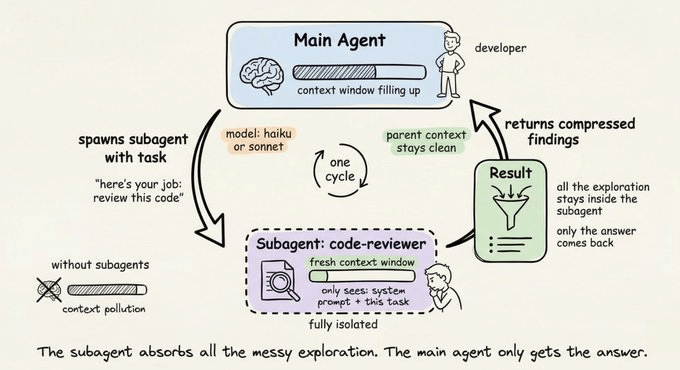
A subagent is a specialized agent instance that runs in its own isolated context window. The main agent delegates a focused task, the subagent executes independently, and only the compressed result flows back to the parent.
Why does this matter?
Context stays clean. Each subagent gets a fresh context window and reads only what it needs. The main agent’s context doesn’t get polluted with all the files the subagent explored or the dead ends it hit. Clean context means better output quality on everything that comes after.
Token efficiency. The subagent’s full exploration gets compressed into a summary before returning. You pay for the subagent’s work, but your main agent’s context window stays lean.
Here’s how we use it in Mistral Vibe:
In our example, we delegate a verification task to a subagent to review the files we just modified for bugs, inconsistencies, or missing error handling.
The subagent reads the changed files, cross-references them against the existing codebase, flags issues, implements the fix, runs the tests to confirm, and stages the changes for commit, all without us needing to intervene. The main agent then commits with a detailed message describing what the feature does and how it was verified.
Shipping with a custom skill
The code is committed. Time to push and create a PR.
Skills are reusable components that extend what Vibe can do. They’re defined as markdown files with a YAML header specifying a name, description, allowed tools, and workflow instructions.
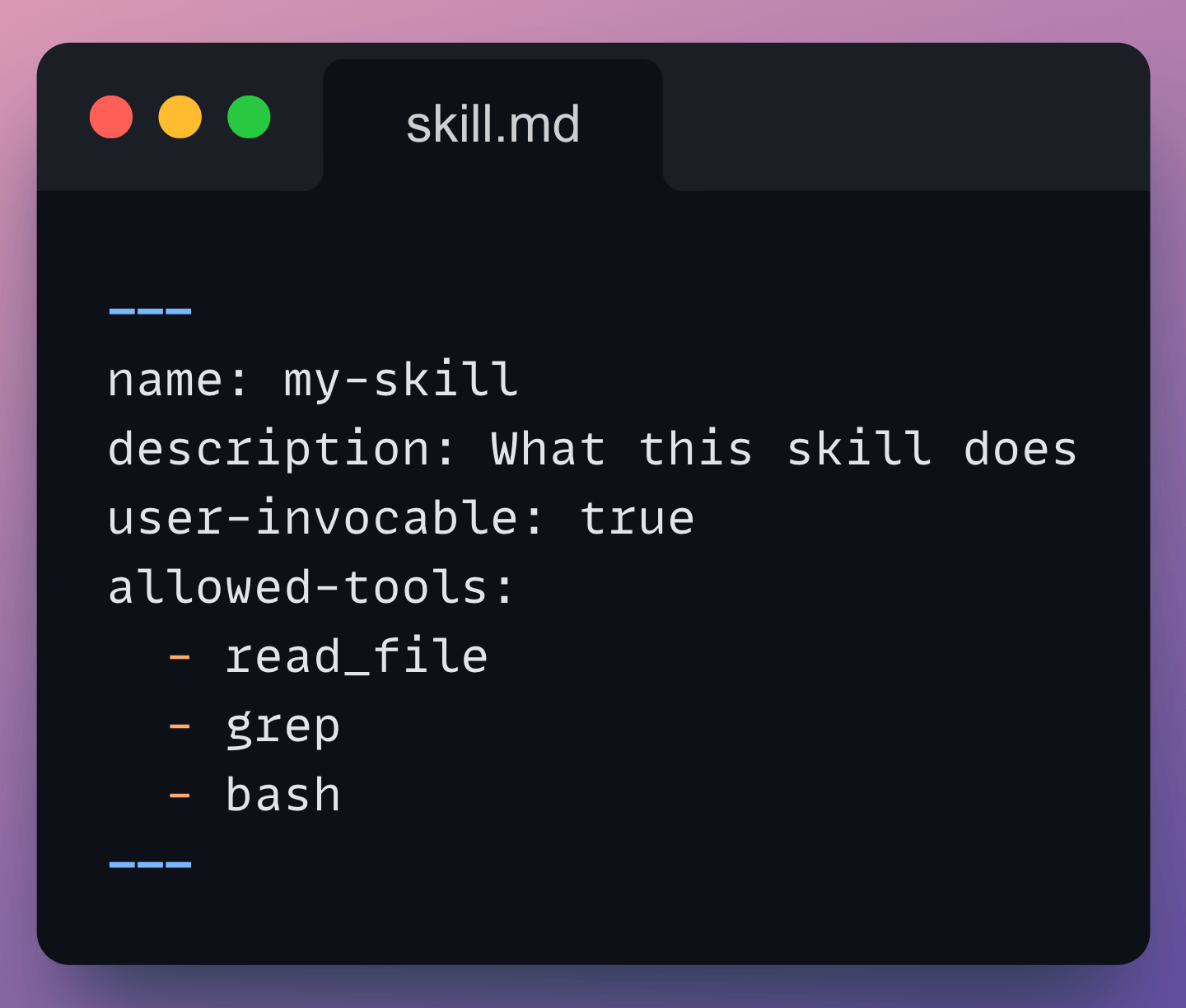
When you mark a skill as user-invocable: true, it becomes a slash command you can trigger during any session.
Skills live in three places:
Globally (
~/.vibe/skills/) for personal skills across all projectsPer-project (
.vibe/skills/) for team skills that travel with the repoCustom paths in
config.toml
Anything you find yourself doing more than twice becomes a skill that runs with a single command: code review checklists, migration generators, release notes writers, security audits.
Since we always need to push code and create pull requests, that’s a perfect candidate. We’ve created a ship-pr skill that analyzes the current branch, generates a PR description, pushes to origin, and creates the PR on GitHub via the gh CLI.
You can see the SKILL.md file side-by-side with the terminal. We invoke the skill and Vibe executes the full workflow, handing over the final PR link.
Branch analyzed, description written, code pushed, PR created. From a single slash command.
Other features
Session continuation. Pick up where you left off with
vibe --continue, or resume a specific session by ID.Configuration. Everything lives in
config.toml. Custom system prompts in~/.vibe/prompts/encode your team’s coding standards.Programmatic mode. Run non-interactively with
vibe --prompt “...” --max-turns 5 --max-price 1.0 --output json. Useful for CI/CD pipelines and automated code review.Local/offline mode. Self-host Devstral on your own GPU using vLLM or Ollama. An RTX 4090 handles the 24B model at 4-bit precision. Your code never leaves your infrastructure.
The speed AI gives you is a superpower. Overconfidence is a trap.
The developers who benefit the most bring engineering discipline to the process: the spec, the plan, the review, and the verify step. The tools amplify your judgment. They don’t replace it.
Start with the spec. Break the work into steps. Verify everything. Treat AI output with the same scrutiny you’d give a junior developer’s pull request.
That’s how you vibe code in 2026.
Thanks for reading!