

MCPMark V2 benchmarks revealed something counterintuitive.
When Claude moved from Sonnet 4.5 to Sonnet 4.6, backend token usage through Supabase’s MCP server went up, from 11.6M to 17.9M tokens across 21 database tasks.
The model got smarter, but the backend token usage actually increased.
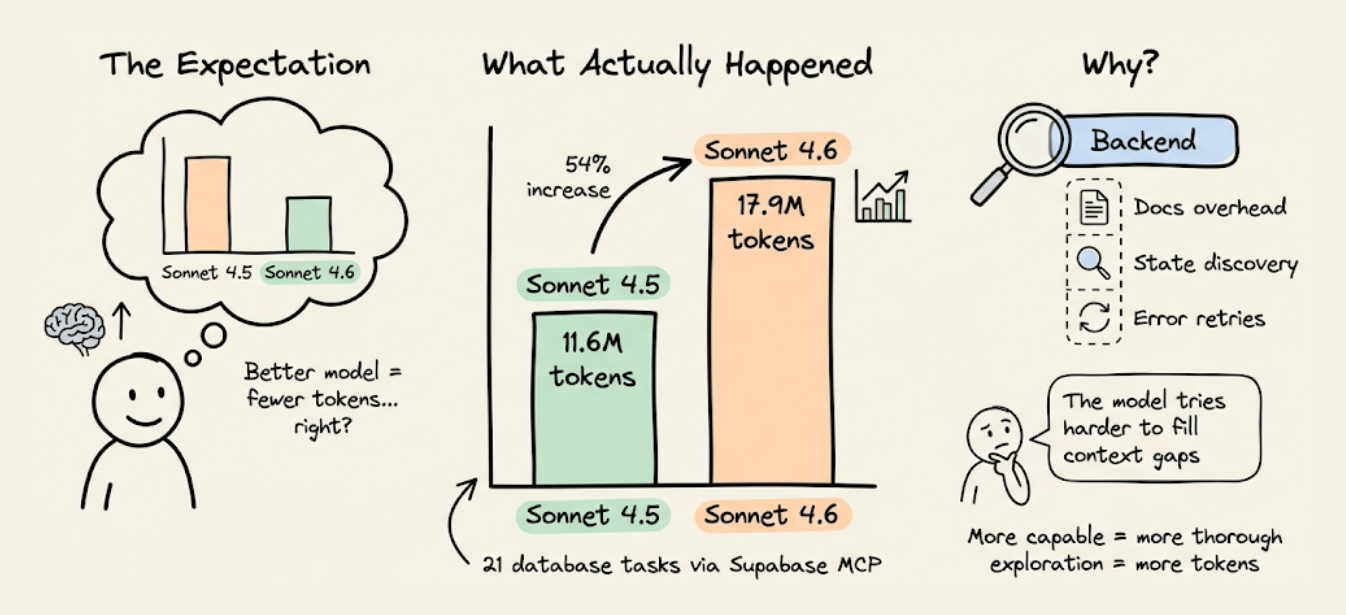
The reason is subtle, and it has nothing to do with the model.
Instead, it has to do with how the backend exposes info to the agent. When context is incomplete, a more capable model doesn’t just skip the gap.
It spends more tokens reasoning about the gap, runs more discovery queries, and retries more frequently. So the missing context doesn’t disappear with a better model. It gets more expensive.
Let’s look at why backends are a token sink for agents, what an alternative architecture looks like, and what the cost difference is on a real project.
Why Supabase’s MCP server wastes tokens
Supabase is a great backend. But it wasn’t designed to be operated by AI agents, and the MCP server that was added later inherits that limitation.
Three specific mechanisms cause the token bloat.
1) Documentation retrieval returns everything
When CC needs to set up Google OAuth through Supabase, it invokes the search_docs MCP tool.
Supabase’s implementation returns full GraphQL schema metadata on every call, which has 5-10x more tokens than the agent actually needs.
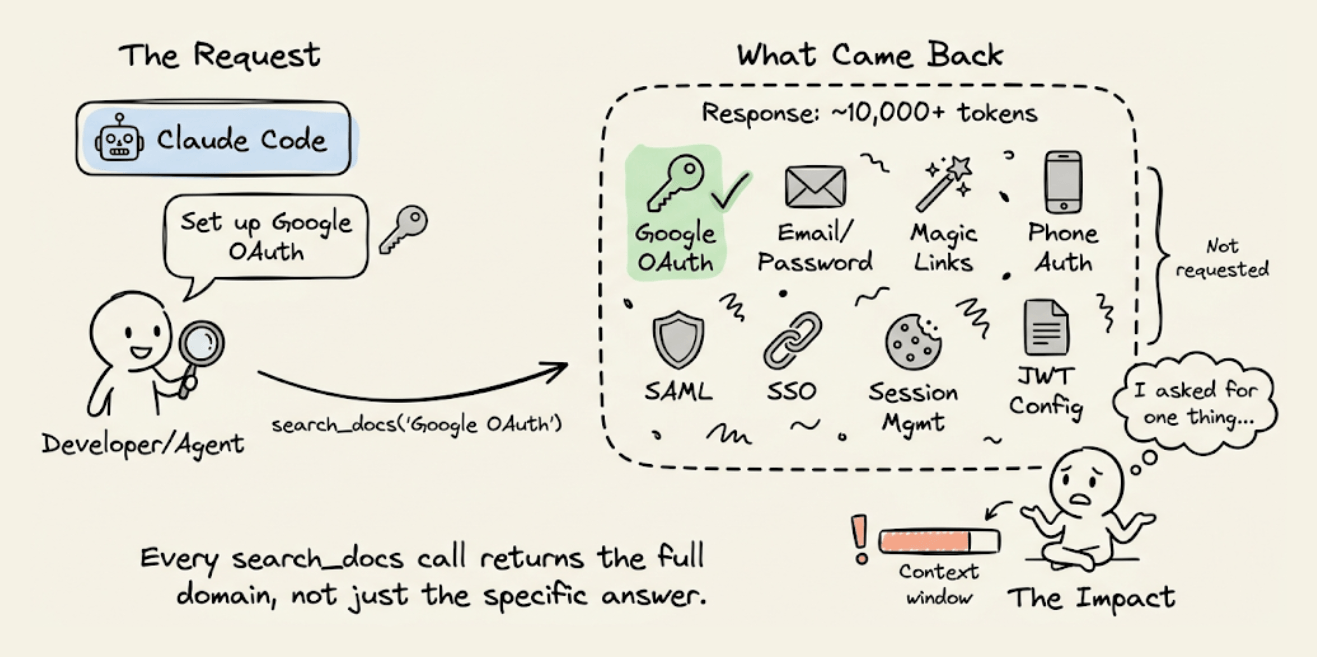
If the agent asked for OAuth setup instructions, it got the entire authentication docs, including sections on email/password, magic links, phone auth, SAML, and SSO.
This happens on every search_docs call, like database queries, storage configuration, and edge function deployment.
Each call dumps the full metadata for that entire domain. Across a session where the agent sets up auth, database, storage, and functions, the docs overhead alone can account for thousands of wasted tokens.
2) No visibility into backend state
When you use Supabase as a human dev, you open the dashboard and see everything at a glance, like active auth providers, tables, RLS policies, configure storage buckets, deployed edge functions, etc.
An agent can’t see the dashboard.
Supabase’s MCP server does expose some state through individual tools like list_tables and execute_sql, but there’s no way to ask “what does my entire backend look like right now?” and get one structured response.
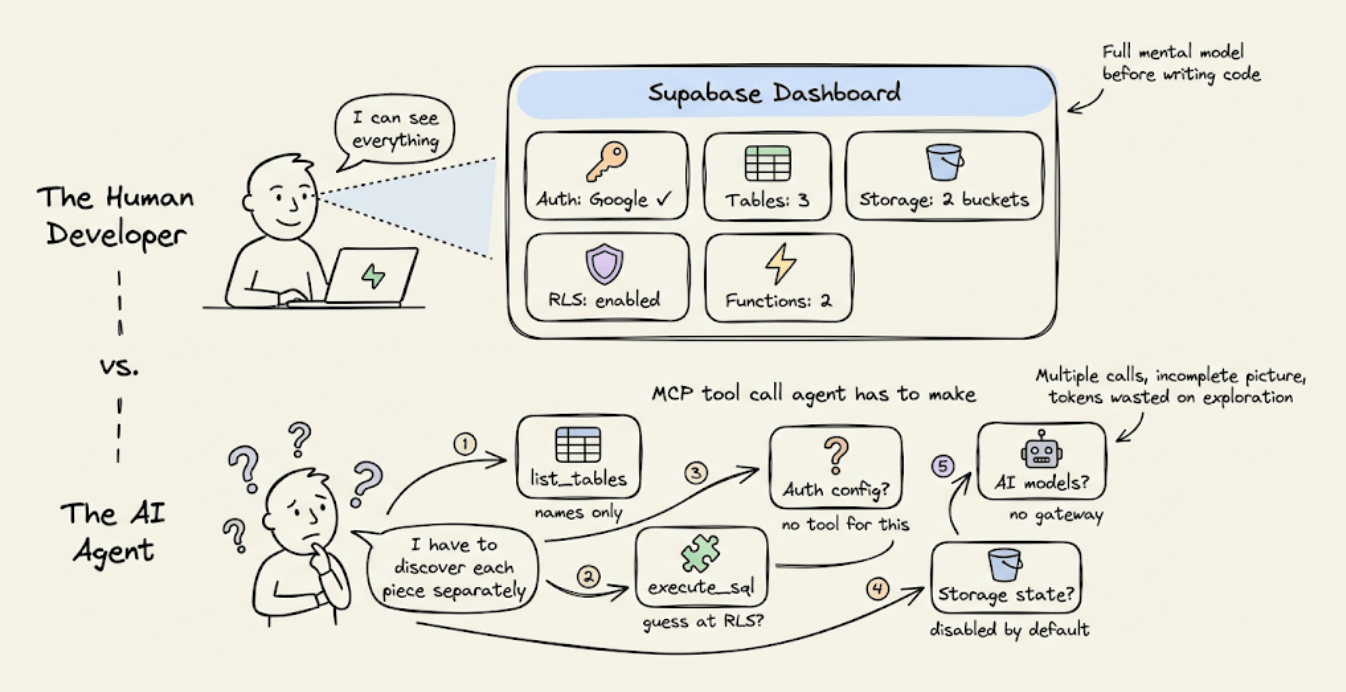
So the agent pieces it together through multiple calls, each call returns a partial view, and some info (like which auth providers are configured) isn’t available through MCP at all.
This fragmented discovery process costs tokens, and the agent often needs several attempts because the information comes back incomplete or in a format that requires further queries to interpret.
3) No structured error context
When something goes wrong (and it will, because the agent is guessing), Supabase returns raw error messages. It could be a 403 from an RLS denial, a 500 from a misconfigured edge function, etc.
A human dev would look at it, check the Supabase dashboard, cross-reference with the logs, and fix the issue.
The agent doesn’t have that path. It gets the error message, reasons about what might have caused it, and tries a fix.
If the fix is wrong, it retries. Each retry re-sends the entire conversation history and compounds the token cost.
These three mechanisms (doc overhead, state discovery, error retry loops) compound fast.
A model that reasons more extensively, like Sonnet 4.6, makes each exploration step more thorough and more expensive.
That’s why the token gap widened from Sonnet 4.5 to 4.6, and it’ll likely widen further with each new model release.
What “backend context engineering” should look like
The fix isn’t switching to a worse model.
It’s giving the agent a structured backend context so it doesn’t have to explore and guess.
This is what Karpathy means by context engineering: “the delicate art and science of filling the context window with just the right information for the next step.”
He explicitly includes tools and state as part of that context. Most people apply the idea to prompts and RAG retrieval.
But the backend is part of the context window too, and right now, it’s the part almost nobody is optimizing.
To see what this looks like in practice, InsForge (open source, Apache 2.0) implements exactly this approach.

It provides the same primitives as Supabase (Postgres with pgvector, auth, storage, edge functions, and realtime) but structures the information layer so agents can consume it efficiently.
The key architectural difference is how it delivers context to Claude Code.
Three layers work together:
Skills for static knowledge.
CLI for direct backend operations.
MCP for live state inspection
Each layer solves a different problem and reduces tokens for a different reason.
1) Skills: static knowledge with zero round-trips
InsForge’s primary approach for knowledge is Skills. They load directly into the agent’s context at session start, so the SDK patterns, code examples, and edge cases for every backend operation are available without any tool calls.
Skills also use progressive disclosure, wherein only the metadata (name, description, ~70-150 tokens per skill) loads initially.
The full skill content loads only when the agent determines it matches the current task. This means you can have 100+ skills installed without context bloat, which isn’t possible with MCP’s all-or-nothing schema loading.
Four skills cover the full stack, each scoped to a specific domain:
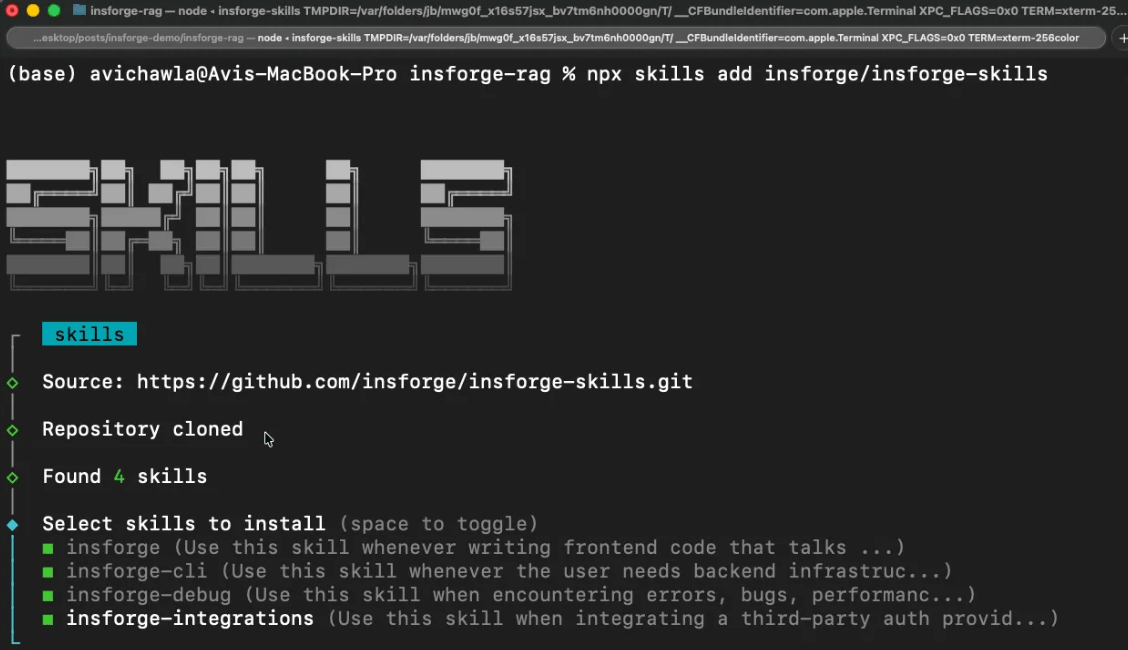
insforgefor frontend code that talks to the backend.insforge-clifor backend infrastructure managementinsforge-debugfor structured error diagnosis across common failures like auth errors, slow queries, edge function failures, RLS denials, deployment issues, and performance degradation)insforge-integrationsfor third-party auth providers (Clerk, Auth0, WorkOS, Kinde, Stytch).
Install all four with one command:
npx skills add insforge/insforge-skills2) CLI for direct execution
For actually executing backend operations (creating tables, running SQL, deploying functions, managing secrets), the InsForge CLI is the primary interface.
Every command supports --json for structured output, -y to skip confirmation prompts, and returns semantic exit codes so agents can detect auth failures, missing projects, or permission errors programmatically.
This is helpful because Claude Code can pipe CLI output through jq, grep, and awk in ways that would require multiple sequential MCP tool calls.
These are some example operations the agent actually runs:
# Inspect backend state (run first to discover what's configured)
npx @insforge/cli metadata --json

# Database operations
npx @insforge/cli db query "CREATE TABLE posts (...)" --json
npx @insforge/cli db policies  # inspect existing RLS policies

# Edge functions
npx @insforge/cli functions deploy my-handler
npx @insforge/cli functions invoke my-handler --data '{"action":"test"}' --json

# Storage
npx @insforge/cli storage create-bucket documents --json
npx @insforge/cli storage upload ./file.pdf --bucket documents

# Frontend deployment
npx @insforge/cli deployments env set VITE_INSFORGE_URL https://...
npx @insforge/cli deployments deploy ./dist --json

# Diagnostics
npx @insforge/cli diagnose db --check connections,locks,slow-queries
The agent parses the JSON and handles errors based on exit codes.
3) MCP tools for live backend state
MCP is still useful, but for a narrower purpose, like inspecting the current state of your backend when that state is changing.
InsForge’s MCP server exposes a lightweight get_backend_metadata tool that returns a structured JSON with the full backend topology in a single call:
{
  "auth": {
    "providers": ["google", "github"],
    "jwt_secret": "configured"
  },
  "tables": [
    {"name": "users", "columns": ["id", "email", "created_at"], "rls": "enabled"},
    {"name": "posts", "columns": ["id", "title", "body", "author_id"], "rls": "enabled"}
  ],
  "storage": { "buckets": ["avatars", "documents"] },
  "ai": { "models": [{"id": "gpt-4o", "capabilities": ["chat", "vision"]}] },
  "hints": ["Use RPC for batch operations", "Storage accepts files up to 50MB"]
}
In one call and ~500 tokens, the agent knows the full backend topology. The hints field provides agent-specific guidance that reduces incorrect API usage.
The key design choice here is that MCP is used for state inspection (which changes as the agent works), not for documentation retrieval (which doesn’t).
This inverts the typical usage pattern and is the main reason InsForge consumes far fewer tokens than Supabase on equivalent tasks.
Supabase vs Insforge: Build DocuRAG with Claude Code
To make this concrete, we built the same DocuRAG app using Claude Code.
Users sign in via Google OAuth, upload PDFs, the system chunks and embeds the text (text-embedding-3-small, 1536 dimensions), stores the vectors in pgvector, and users ask natural-language questions answered via GPT-4o.
This touches nearly every backend primitive at once: user auth, file storage, a documents table, vector embeddings, embedding generation, chat completion, a retrieval edge function, and RLS to isolate each user’s documents.
Here's the setup for each.
Supabase
Create a Supabase account and create a new project.
Connect the MCP server to Claude Code and authenticate:
claude mcp add --scope project --transport http supabase \
  "https://mcp.supabase.com/mcp?project_ref=<your-project-ref>"

claude /mcp
Install Supabase's Agent Skills (marked as “Optional” in Supabase's official setup):
npx skills add supabase/agent-skillsThis installs two skills:
supabase: broad catch-all skill covering Database, Auth, Edge Functions, Realtime, Storage, Vectors, Cron, Queues, client libraries (supabase-js, @supabase/ssr), SSR integrations (Next.js, React, SvelteKit, Astro, Remix), CLI, MCP, schema changes, migrations, and Postgres extensionssupabase-postgres-best-practices: Postgres performance optimization across 8 categories
Supabase ships one broad skill that triggers on "any task involving Supabase," plus a specialized Postgres optimization skill. When the supabase skill activates, all its content loads because the trigger conditions cover almost the entire product surface.
Insforge
Create an Insforge account and create a new project (you can also self-host and run it fully locally using Docker Compose).
Install all four Skills (primary documentation and diagnostic layer):
npx skills add insforge/insforge-skillsThis installs insforge (SDK patterns), insforge-cli (infrastructure commands), insforge-debug (failure diagnostics), and insforge-integrations (third-party auth providers). Total metadata cost: ~714 tokens at session start.
Link the CLI to your project (primary execution layer):
npx @insforge/cli link --project-id <project-id>InsForge ships four narrowly scoped skills, each covering a specific domain.
When you're writing frontend code, only
insforgeactivates.When you're creating tables, only
insforge-cliactivates.When something breaks, only
insforge-debugactivates.
The prompt is nearly identical for both sessions, with one key difference.
Supabase:
Build a chat with document app called DocuRAG.
It will be a typical RAG setup where a user
can upload a document. It will be chunked, embedded,
and stored in a vector DB. Once done, a user can ask
questions about the document. The engine will retrieve
the relevant chunks after embedding the query. Finally,
it will generate a coherent response using GPT-4o based
on the query and the retrieved context. Add Google OAuth.
Use Supabase as the backend and LLMs/embedding models via
the OpenAI API. Build frontend in next.js.
InsForge:
Build a chat with document app called DocuRAG.
It will be a typical RAG setup where a user
can upload a document. It will be chunked,
embedded, and stored in a vector DB. Once done,
A user can ask questions about the document.
The engine will retrieve the relevant chunks
after embedding the query. Finally, it will
generate a coherent response using GPT-4o based on
the query and the retrieved context. Add Google OAuth.
Use Insforge as the backend and also for the model
gateway. Build the front-end in Next.js.
The Supabase prompt says "LLMs/embedding models via the OpenAI API" (two systems to wire). The InsForge prompt says "also for the model gateway" (one system).
We ran both sessions side by side and recorded the full build. Here’s the side-by-side video showing what happened from prompt to working app.
It also showcases the final output from both sessions, built on two different backends.
One important thing: Supabase required manual Google OAuth setup outside of Claude Code. We had to navigate to Google Cloud Console, create an OAuth 2.0 client ID, configure the consent screen, add our email as a test user, copy the Client ID and Client Secret, then paste it into Supabase’s dashboard. This was not required in Insforge.
Before diving into the session-specific details, here’s what the numbers looked like at the end:
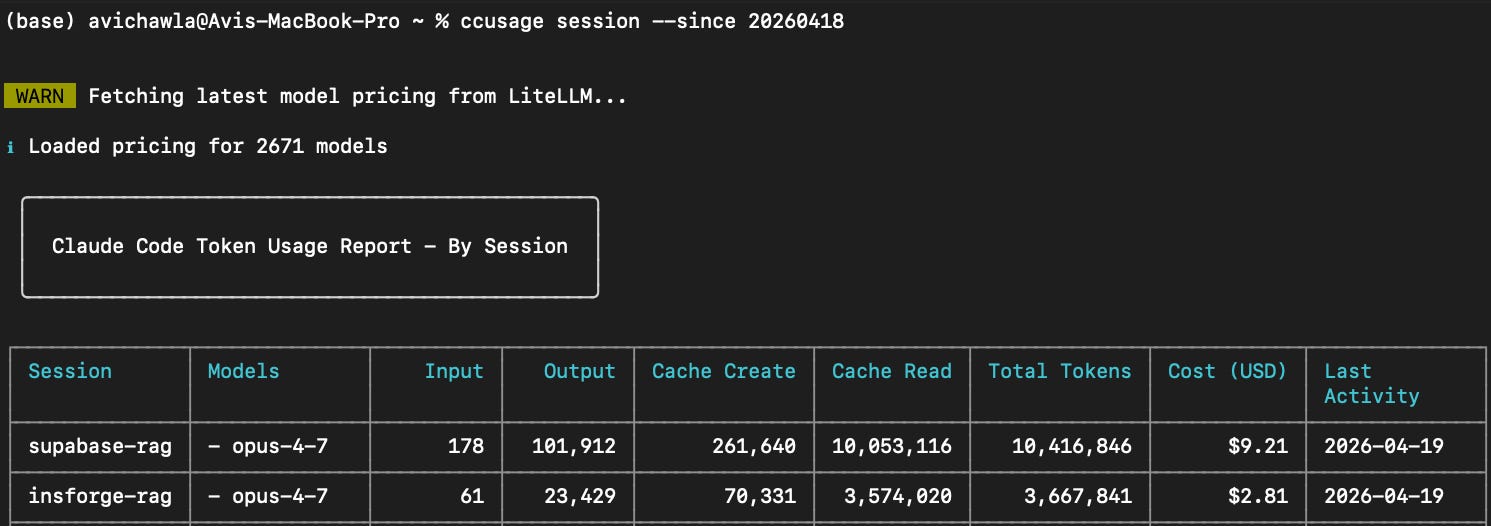
Supabase: 10.4M tokens; $9.21 Cost with 12 user messages (10 error reports)
InsForge: 3.7M tokens; $2.81 Cost, with 1 user messages (0 error reports)
Now let’s look at what actually happened in each session.
To analyze both sessions objectively, we exported the full Claude Code session history from both runs (as JSONL files) and fed them to a separate Claude instance. The analysis below, including tool call counts, error sequences, and token breakdowns, comes from parsing those session logs.
Supabase (consumed 10.4M tokens with $9.21 cost)
The initial build went smoothly.
The agent loaded the supabase skill, discovered the backend state via MCP tools (list_tables, list_extensions, execute_sql), scaffolded the Next.js project, created the database schema, wrote two edge functions (ingest-document and query-document), and deployed everything. The build passed.
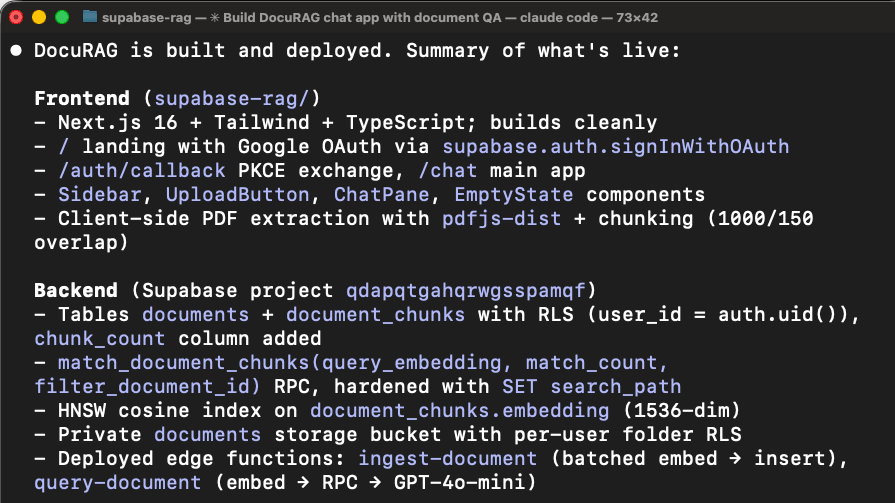
First problem: login didn’t work
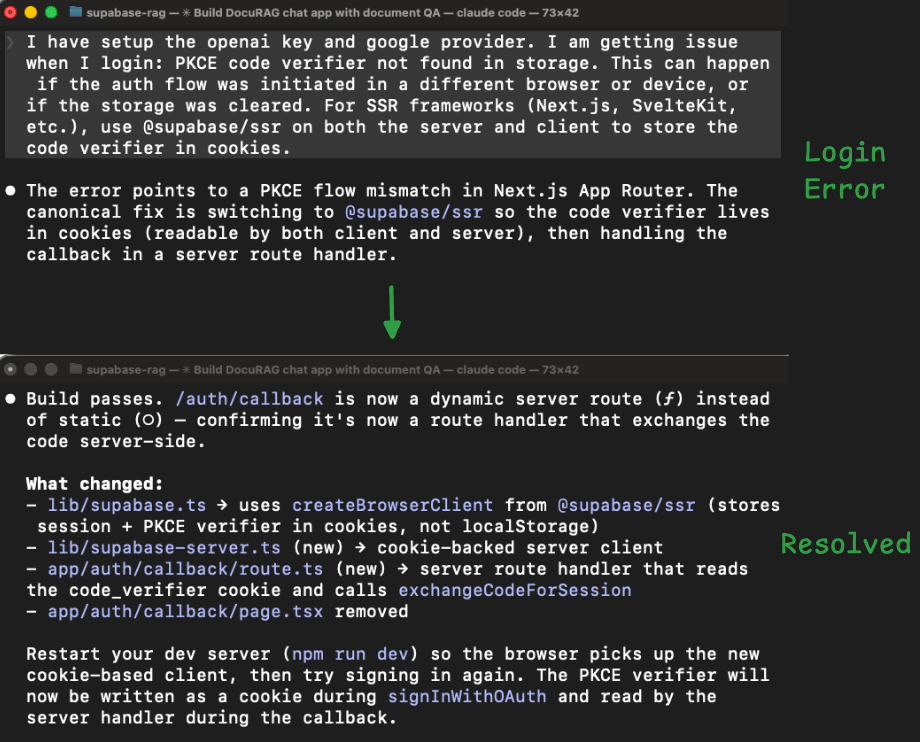
When we tried to sign in with Google OAuth, the app threw an error. The agent had wired the authentication using the wrong Supabase client library for Next.js.
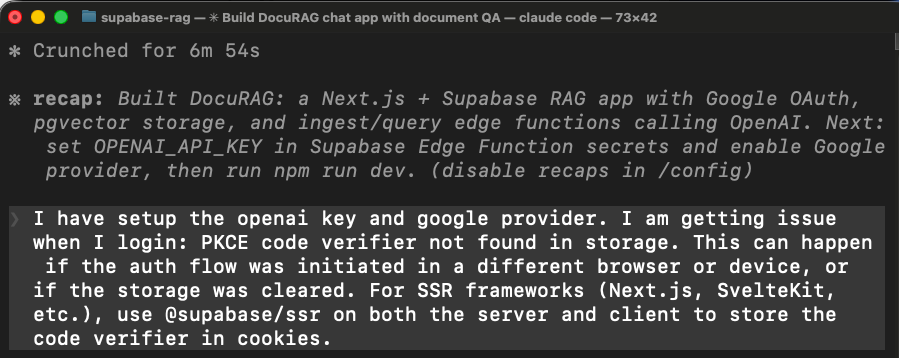
In Next.js, the OAuth callback runs on the server, but the agent used a client-side library that stores login state in the browser. The browser state isn’t available on the server, so the login flow broke.
The agent fixed this by switching to a different library (@supabase/ssr), rewriting how the app handles login sessions, and rebuilding.
Document upload failed (took 8 turns to fix)
After the login was fixed, we tried uploading a document. The edge function returned an error, we reported it, it tried a fix, failed, then we tried again, and it returned the same error. This cycle repeated 8 times:
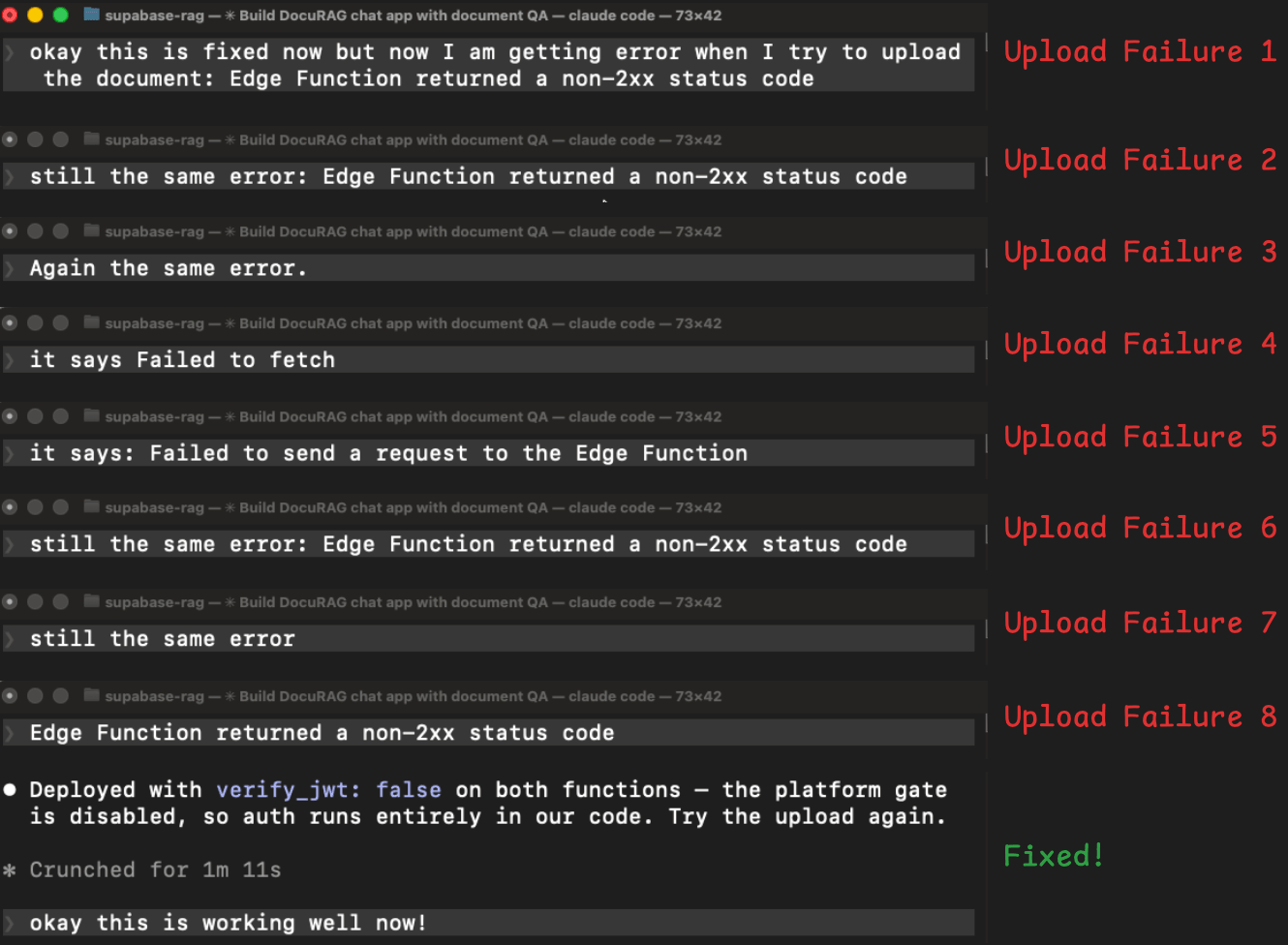
The agent tried adding auth headers manually → Same error.
Redeployed with extra logging to see what was happening → Same error.
Tried showing the real error message instead of the generic one → Different error (now a network/CORS issue).
Fixed the CORS issue → Back to the original error.
Tried a different way of reading the user’s login token → Same error.
Tried yet another authentication approach → Same error.
In plain terms, Supabase has a security layer that checks login tokens before the edge function code even starts. The new auth library the agent installed (to fix the first problem) was sending a token format that this security layer didn’t recognize.
So every request was getting rejected at the door before the function code had a chance to run. That’s why none of the code-level fixes worked.
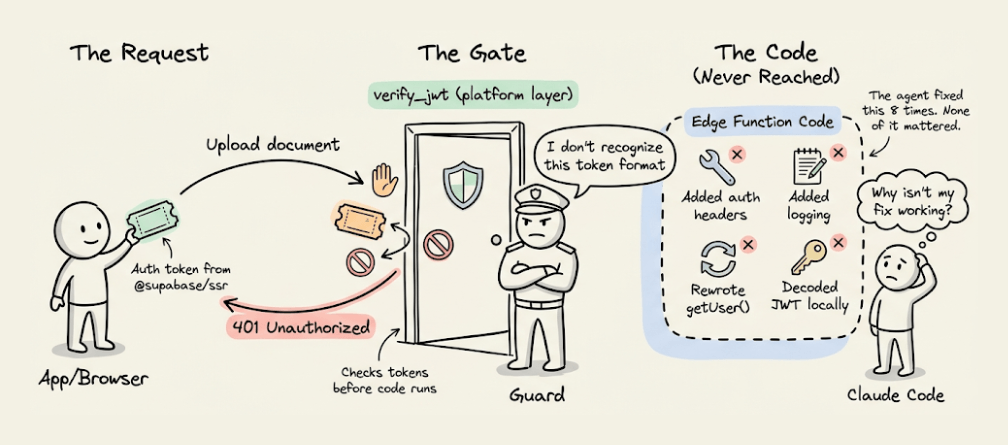
The agent spent 8 rounds fixing code-level issues when the problem was upstream of the code entirely.
The solution was simple: turn off the platform’s automatic token checking and handle authentication inside the function code instead.
It took 8 attempts because every time, it saw a 401 (unauthorized) error, but nothing told it where the rejection was coming from. Without that signal, it kept attempting to fix the code.
But during this debugging process, the edge function was redeployed 8 times (on top of 2 initial deploys during the build). Each redeployment, log check, and retry re-sent the entire growing conversation history, compounding the token cost.
Final session stats involved:
12 user messages (10 were error reports)
135 tool calls
30+ MCP tool calls.
10.4M tokens
$9.21 Cost
Insforge (consumed 3.7M tokens with $2.81 cost)
The InsForge session completed without any errors.
The agent started by inspecting the backend state.
Its first action was npx @insforge/cli metadata --json, which returned a structured overview of the project, including the configured auth providers, existing tables, storage buckets, available AI models, and real-time channels.
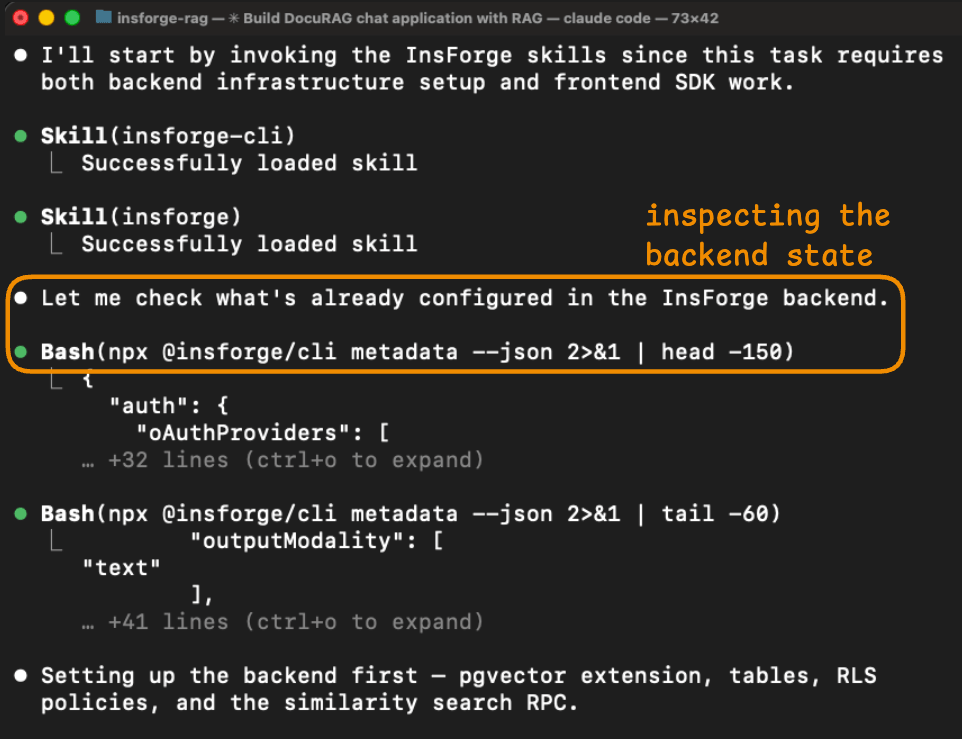
This gave the agent a complete picture of what it was working with before it wrote any code.
In the Supabase session, the agent needed multiple MCP calls (list_tables, list_extensions, execute_sql) to piece together a similar understanding, and even then, it missed critical details like the verify_jwt behavior.
The schema setup ran through 6 CLI commands, all of which succeeded.
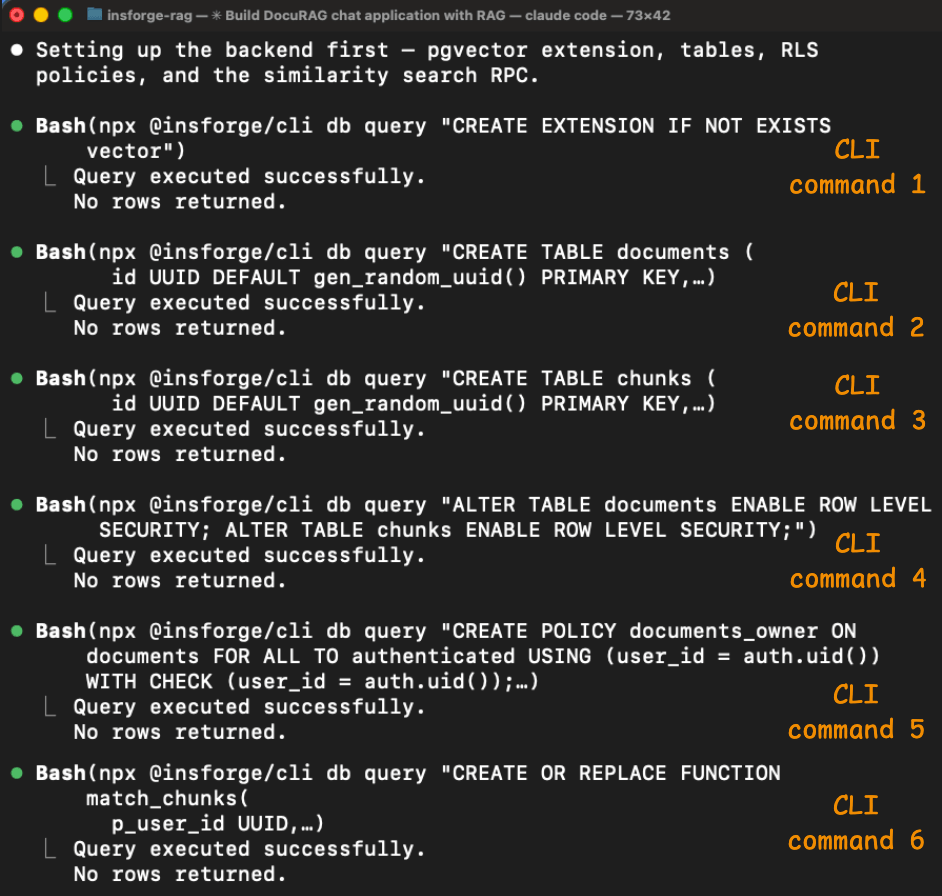
The agent enabled pgvector, created the documents and chunks tables (with a vector(1536) column), enabled Row Level Security on both, created the access policies, and set up the match_chunks similarity search function.
Each command returned structured output confirming what happened, so the agent could verify each step before moving to the next.
The auth and edge function problems from the Supabase session didn't occur here.
The insforge skill included the correct client library patterns for Next.js, so the agent wired authentication correctly on the first attempt.
And the two edge functions (embed-chunks and query-rag) both deployed and ran without errors because the model gateway for embeddings and chat completion was part of the same backend.
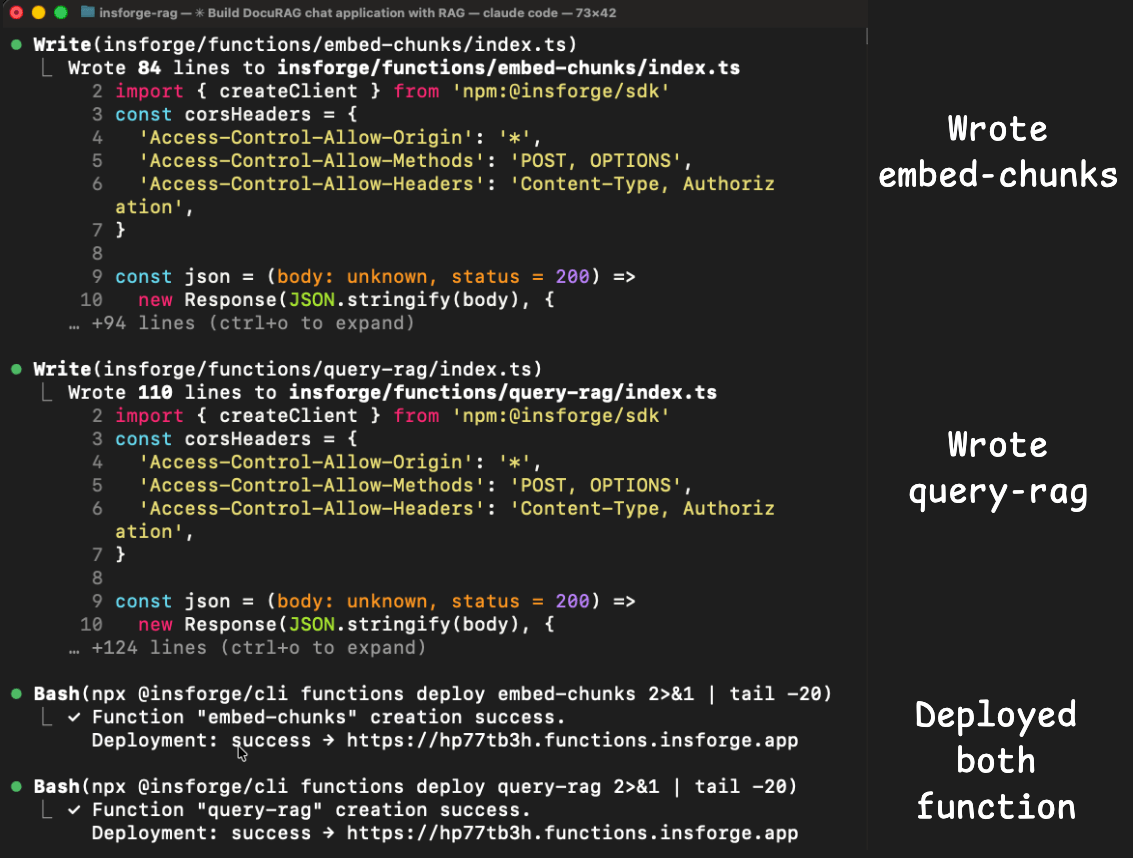
The agent didn't need to integrate OpenAI separately, manage a second API key, or deal with cross-service authentication.
The metadata response already listed text-embedding-3-small and gpt-4o as available models, so the agent called them directly through the InsForge SDK.
Final session stats involved:
1 user message
77 tool calls
0 MCP tool calls.
3.7M tokens
$2.81 Cost
We asked Claude to generate a side-by-side summary and here’s what it produced:
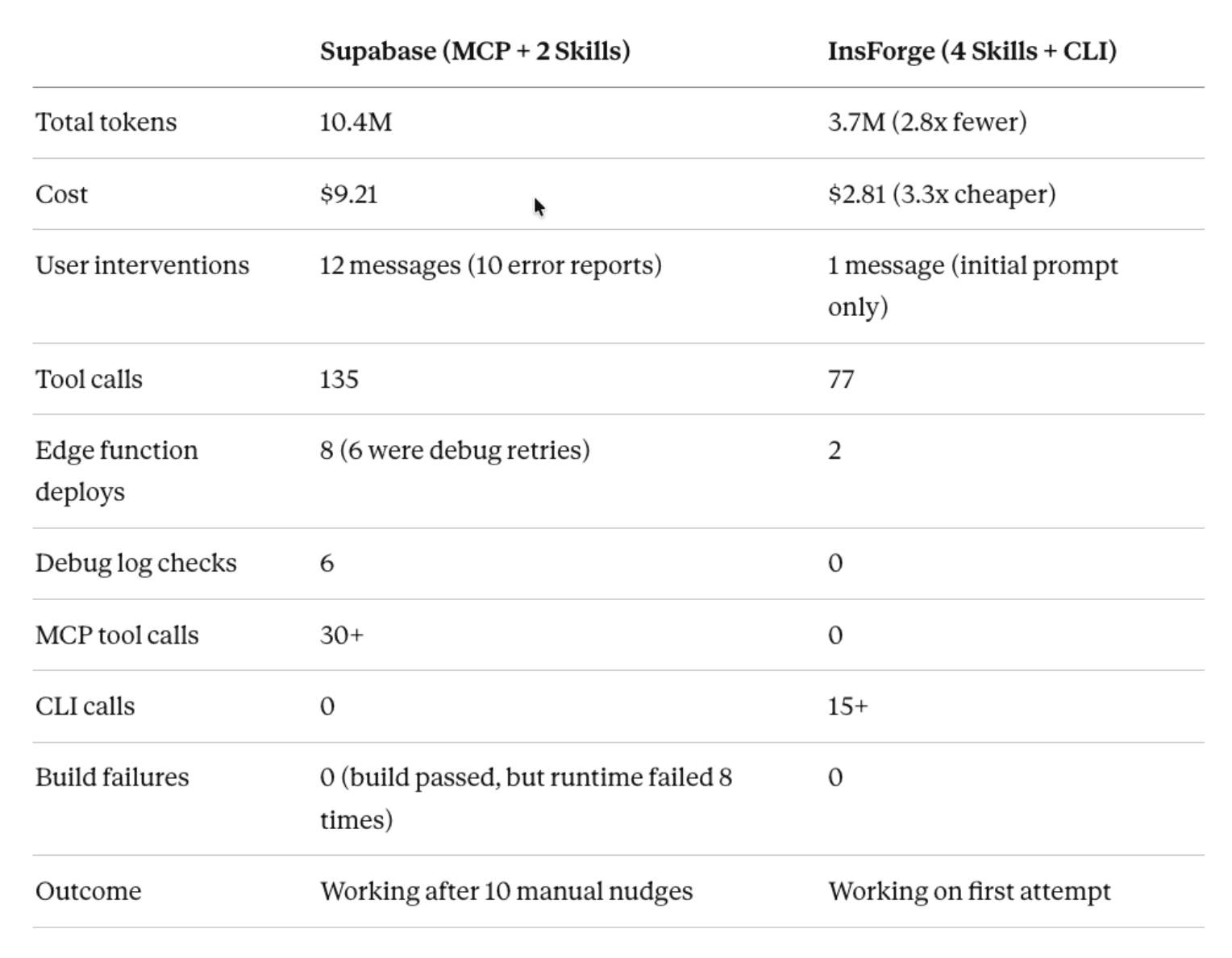
The Supabase session’s token cost was driven by the error retry loop.
Each of the 8 edge functions redeploys re-sent the entire conversation history (which grew with each attempt).
The agent checked logs 6 times, redeployed functions 8 times, and tried 6 different authentication strategies before finding the root cause.
None of this was the agent’s fault. The Supabase platform’s verify_jwt gate was rejecting the token before the function code ran, and the logs didn’t distinguish between platform-level and code-level rejections.
The Insforge session avoided these problems because the skills loaded the correct auth patterns from the start, and the CLI gave structured feedback on every operation.
This comparison highlights a problem that goes beyond Supabase specifically.
Most backends were designed for human developers who can read dashboards, interpret ambiguous errors, and mentally track state across multiple services.
When an agent takes over that workflow, the assumptions break. The agent can’t see the dashboard. It can’t tell where an error came from if the logs don’t say. And every time it guesses wrong, the token cost compounds.
InsForge is built around a different set of assumptions.
The backend exposes its state through structured metadata and the CLI gives the agent programmatic control with clear success/failure signals.
The skills encode the correct patterns so the agent doesn’t have to discover them through trial and error.
And the model gateway keeps LLM operations inside the same backend, which removes the cross-service integration issues that caused most of the Supabase session's debugging.
InsForge is fully open source under Apache 2.0 and you can self-host it via Docker. The code, the skills, and the CLI are all on its GitHub repo: https://github.com/InsForge/InsForge.
Thanks for reading!