

Why per-user memory graphs break normal graph DBs
Agent memory stored as a knowledge graph produces one graph per user, per team, and per project. A single enterprise customer can run millions of them.
Most of those graphs are cold at any given moment, and a single query reads exactly one of them.
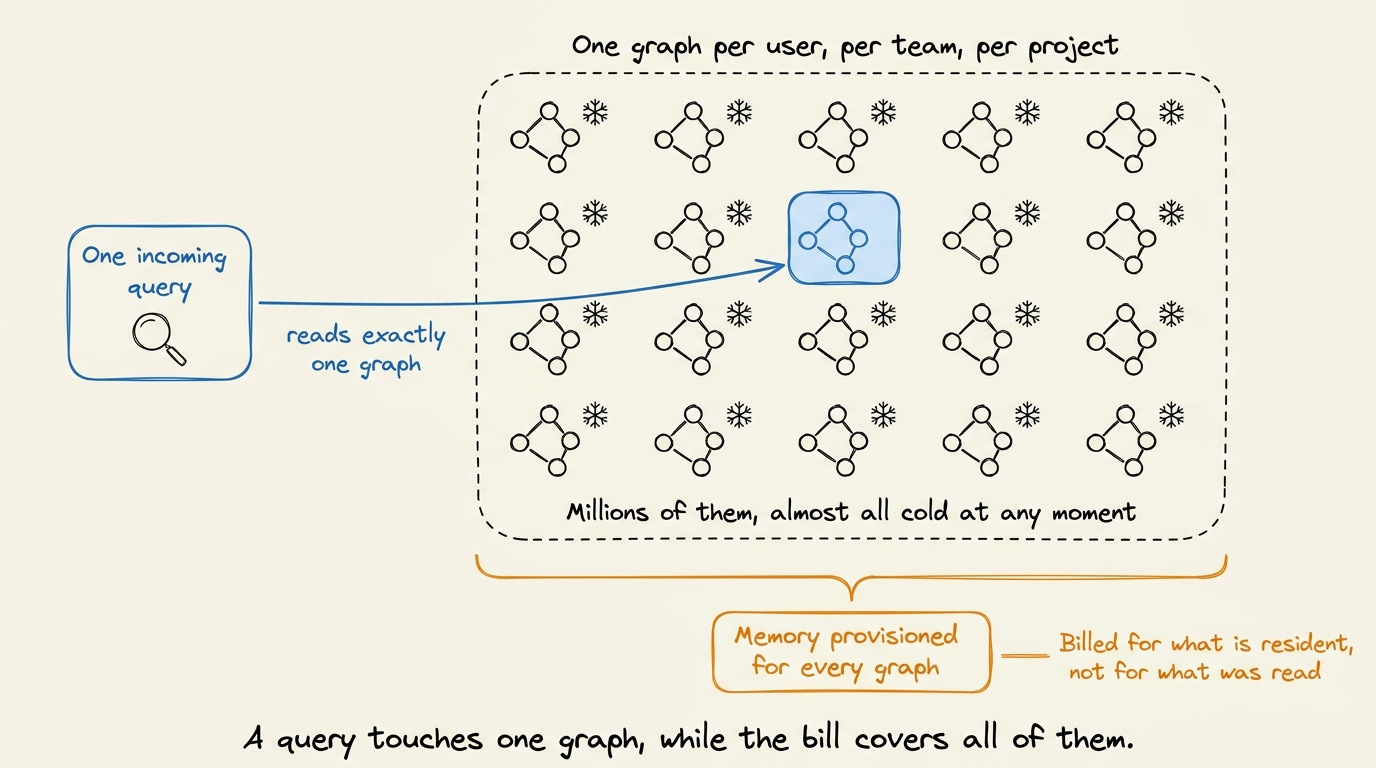
Neo4j and similar systems are built for the opposite workload. One large graph stays resident in memory, and every request passes through a Cypher parser and a query optimizer before it reaches the data.
On millions of small idle graphs, the cost follows provisioned memory rather than the reads actually served. Isolation also becomes a filter on one shared graph rather than a separate graph per tenant.
Adding hardware stopped helping Zep, so the team built Konig around this access pattern.
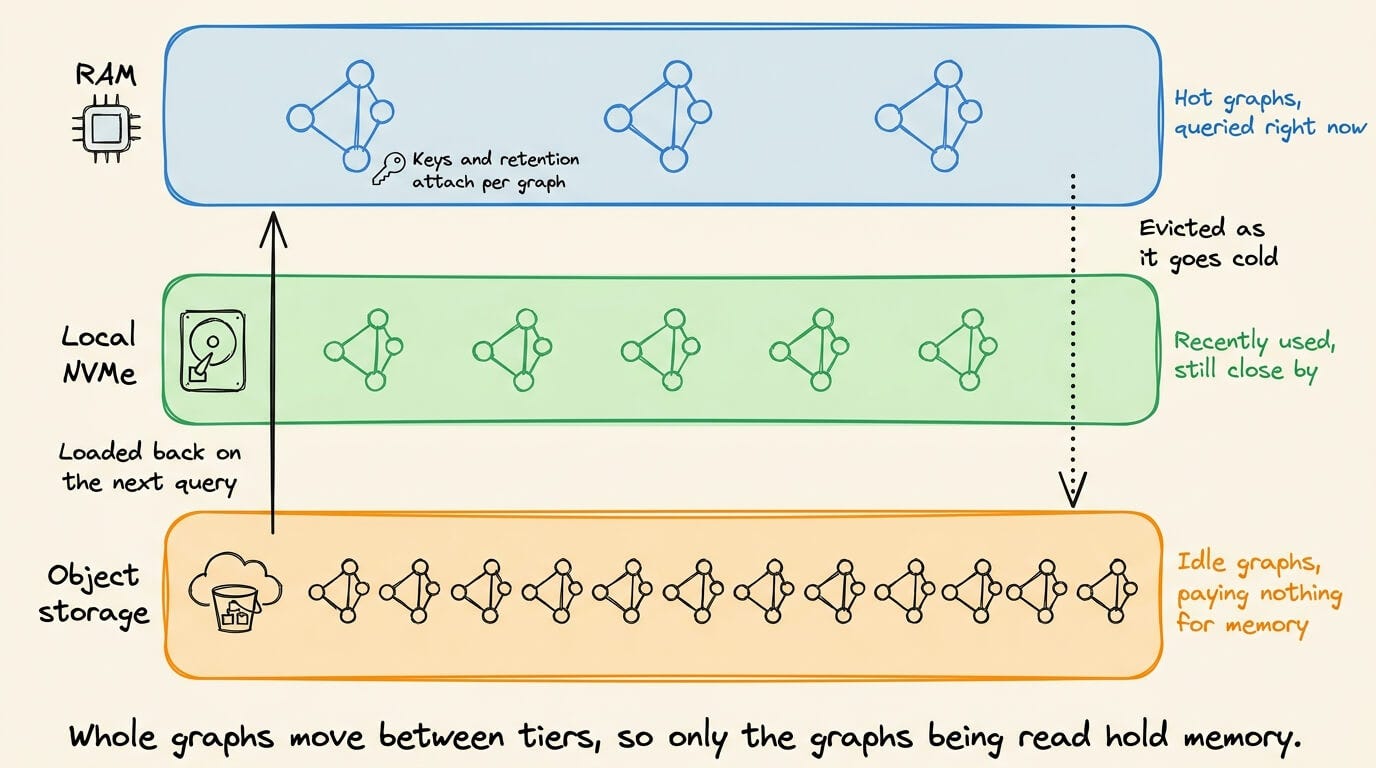
Konig keeps hot graphs in RAM, recently used graphs on local NVMe, and idle graphs in object storage, loading them back when a query arrives. Encryption keys and retention rules attach to each graph.
Because each query reads a single graph, PageRank runs inline in milliseconds rather than as a batch job. Retrieval holds a p95 under 100ms from a thousand graphs up to tens of millions, and end-to-end latency stays under 200ms.
Konig also keeps two in-memory layouts of every graph and converts between them on demand.
KV vs Prefix vs Prompt vs Semantic Caching
Four things in an LLM stack store four different objects, and all of them get called caching.
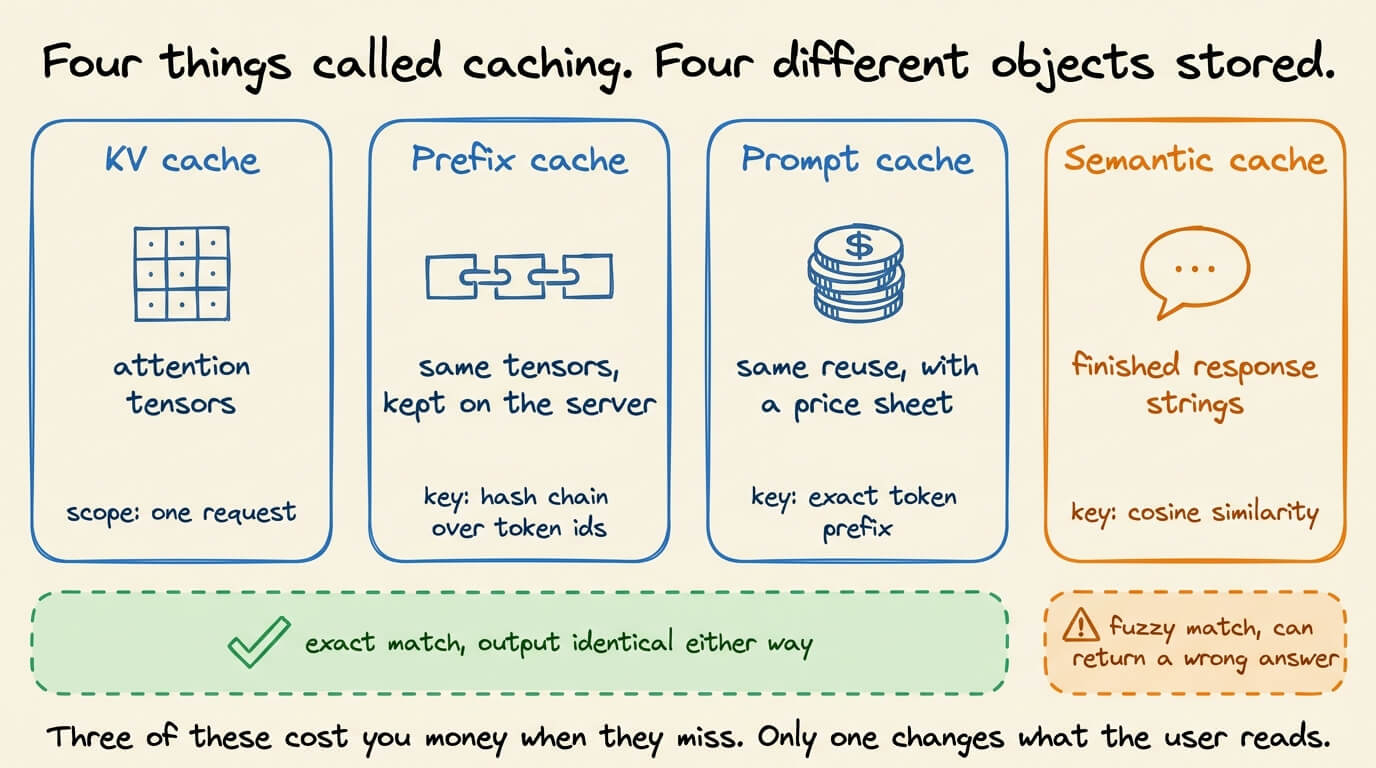
The KV cache stores attention tensors for one request.
Prefix caching stores those same tensors on the server, keyed by a hash chain over token IDs.
Prompt caching is the provider’s billed version of that same lookup, at 0.1x the base input rate on a read against a 1.25x premium on the write.
A semantic cache stores finished response strings, keyed by cosine similarity over an embedding.
The first three are exact-match and correctness-neutral, so a miss costs you money and latency. The fourth is fuzzy-match, and it will hand you a wrong answer with a 200.
So today let’s go through all four, what each one stores, and what quietly breaks it.
1) The KV cache
During prefill, the model computes a key and value vector for every prompt token at every layer and stores them.
Decoding then attends over those stored vectors and appends one new pair per generated token, instead of recomputing the whole sequence each step.
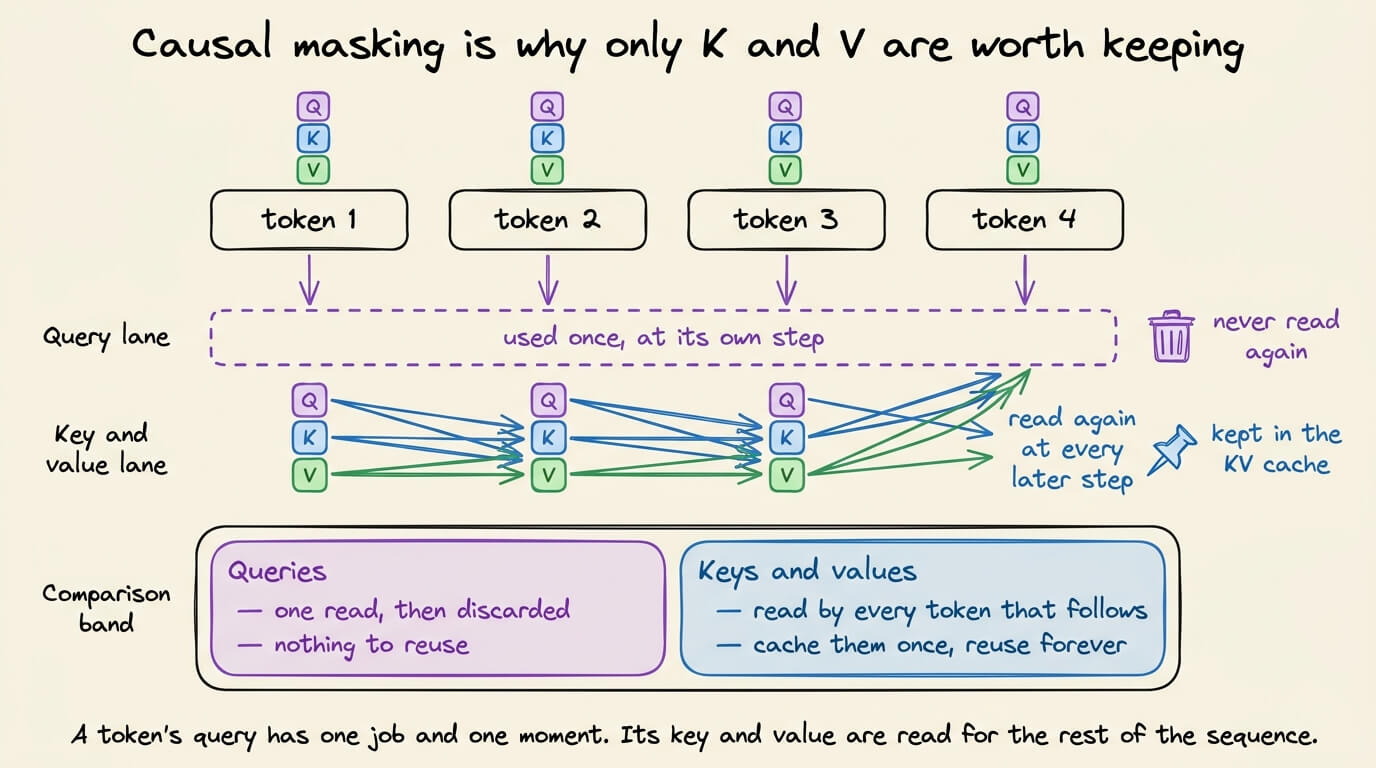
Queries don’t get cached, and the reason is causal masking. A token’s query vector is used once, at the step that token is processed, and never read again. Its key and value are read by every token that comes after it, so those are the two most important vectors to save.
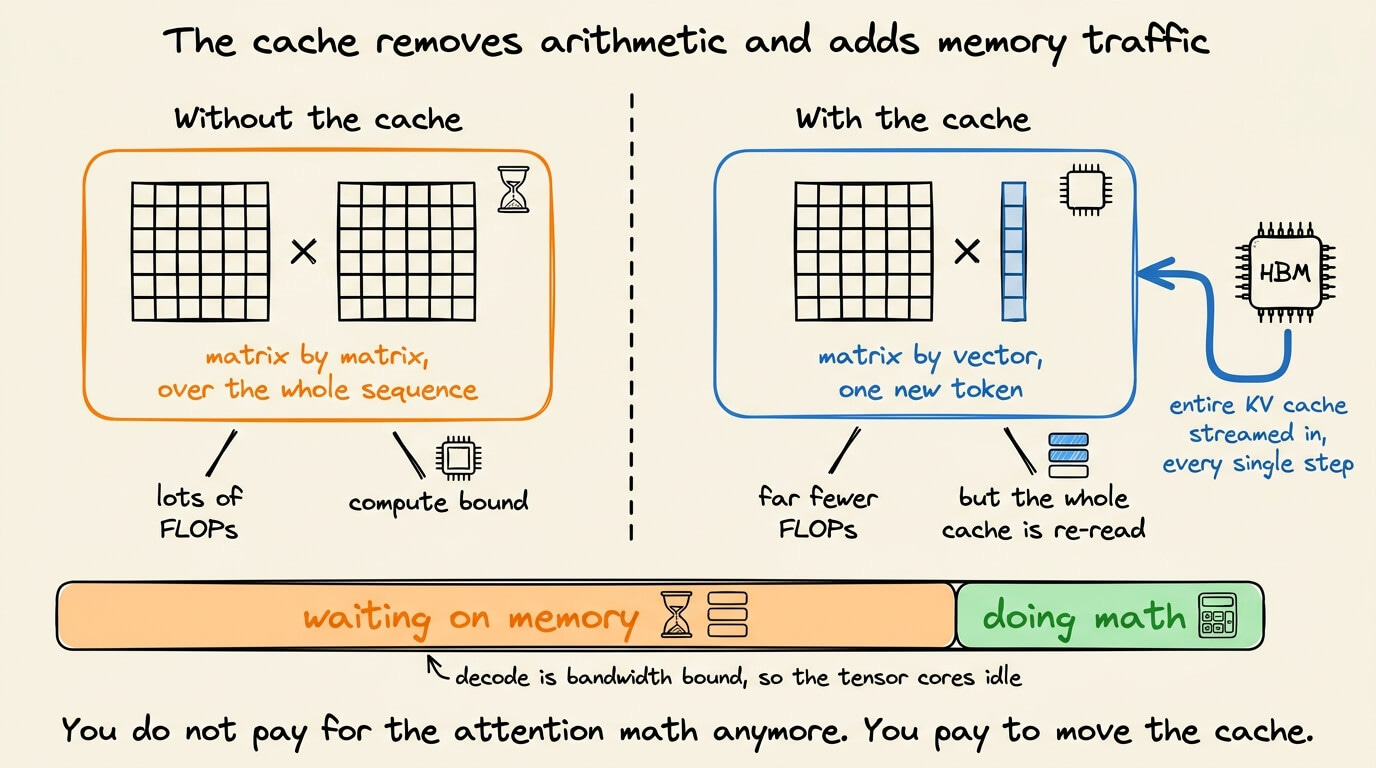
Without storing them, each decode step is a matrix-matrix multiply over the full sequence. With it, the step becomes a matrix-vector multiply over one new token, which is far fewer FLOPs.
The video below depicts LLM inference with and without KV caching:
While this reduces the computation on each token, you have to load the entire cache from HBM on every single step, so decode stops being compute-bound and becomes memory bandwidth-bound.
Attention kernels finish faster than the cache can be streamed in, and the GPU spends most of a decode step waiting on memory.
The cache is also the thing that decides how many requests fit on the box. Its size is fixed by the model shape and grows linearly with token count, since every layer holds a key and value tensor for every KV head.
For a 70B model at BF16, a single 128K context holds around 40 GB of cache, comparable to the entire model at 4-bit weights.
These are some ways to reduce this. For instance, Grouped-query attention shares one key and value head across a group of query heads, which shrinks the cache and raises the FLOPs done per byte loaded.
Multi-head latent attention in the DeepSeek line compresses the whole thing into a latent vector. FP8 cache quantization roughly doubles capacity and trades a little numerical accuracy for it.
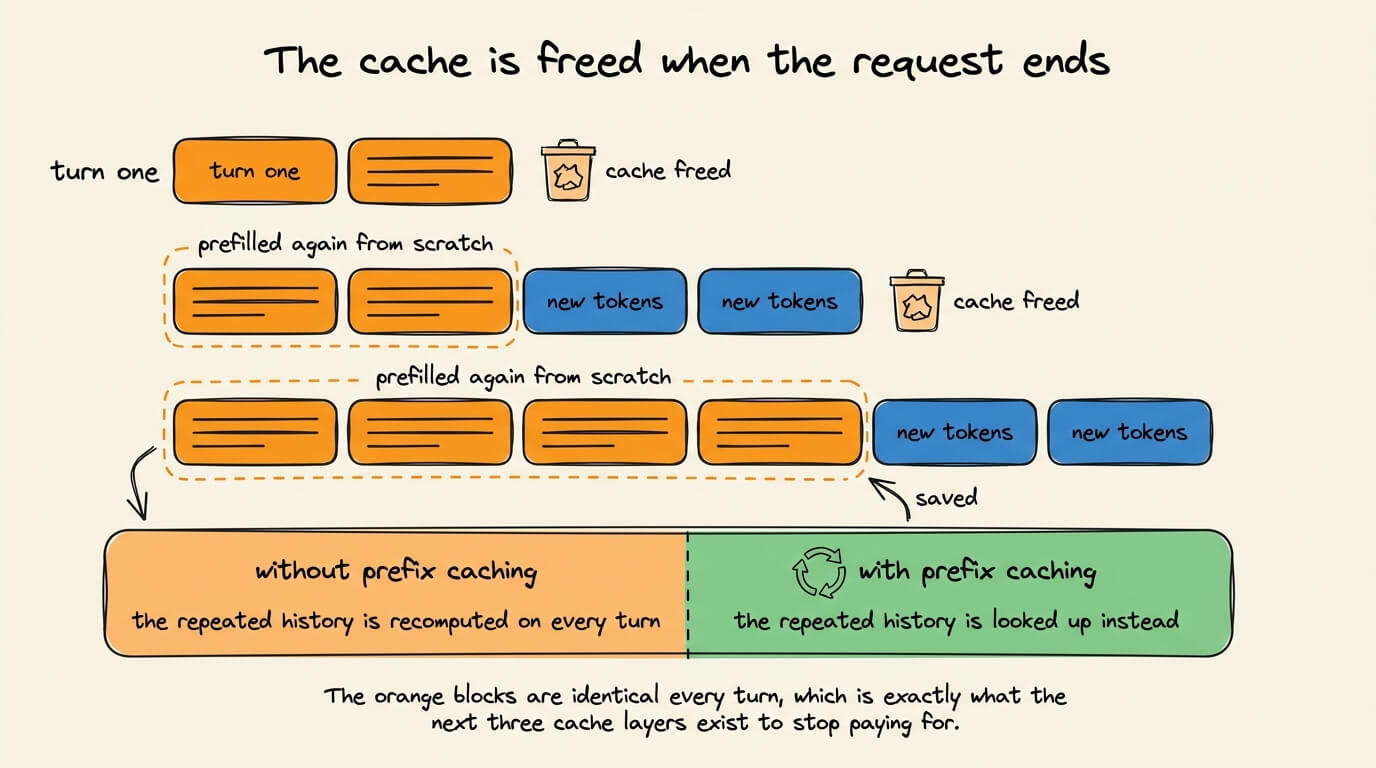
The engine frees those blocks when the request finishes. A 20-turn chat therefore prefills turns 1 through 19 again on turn 20, at full cost.
We built all of this from scratch (with implementation) in Part 12 of the RAG systems course, including the prefill and decode split and the cache memory formula, with the tensors printed out at each step. Read it here →
2) Prefix caching
Prefix caching is the engine that does not need to free the blocks above.
vLLM stores the cache as fixed-size blocks of 16 tokens and identifies each block by a hash over the parent block’s hash plus the token IDs inside it.
Chaining the parent hash into the child turns a block lookup into a prefix lookup, since a block only matches if everything before it matched too.
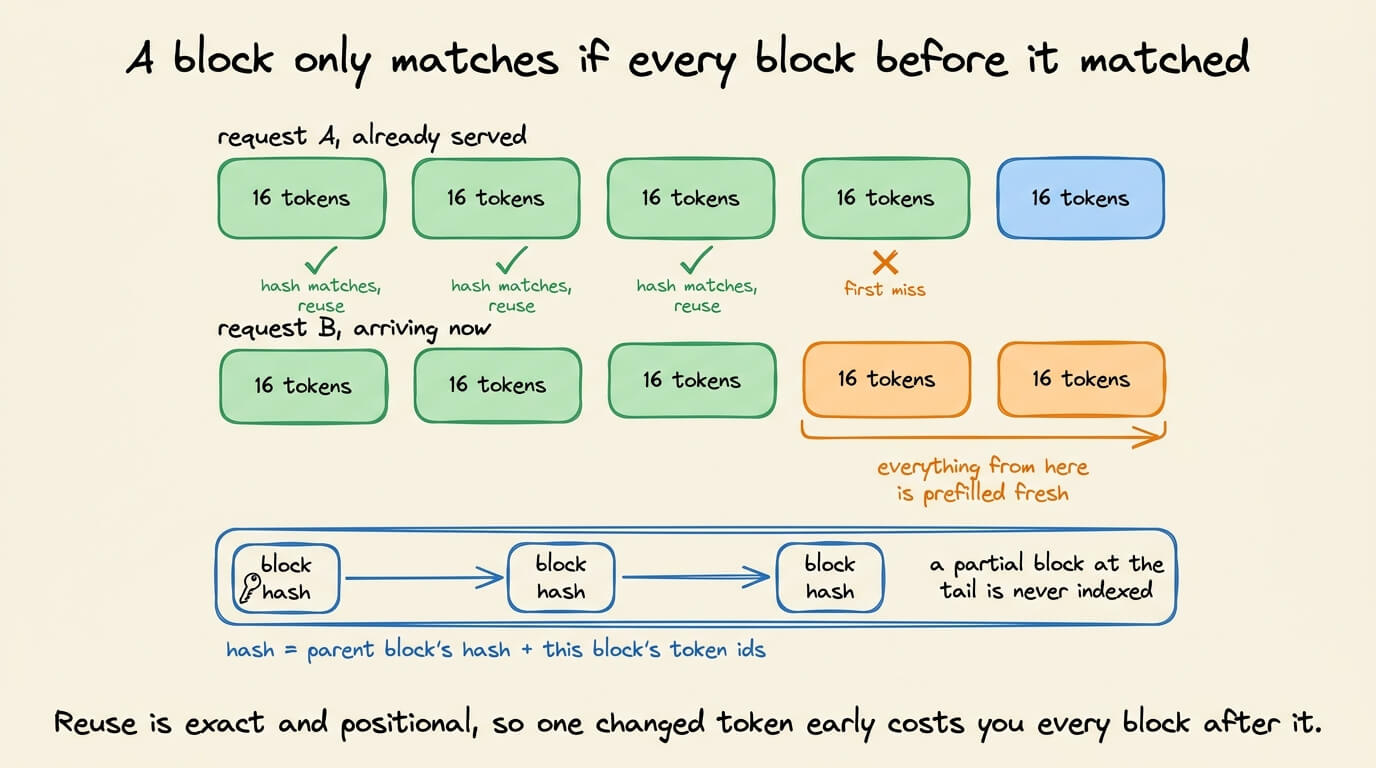
The scheduler walks the incoming blocks in order and stops at the first miss. A hit increments that block’s reference count, which also pins it against eviction while a request is using it.
Everything from the miss onward gets fresh allocation and a fresh prefill.
Only complete blocks get indexed, so a trailing partial block is recomputed every time. That makes block size a real tuning decision. Larger blocks mean fewer table lookups and better memory locality, smaller blocks mean finer-grained sharing and less waste at the tail.
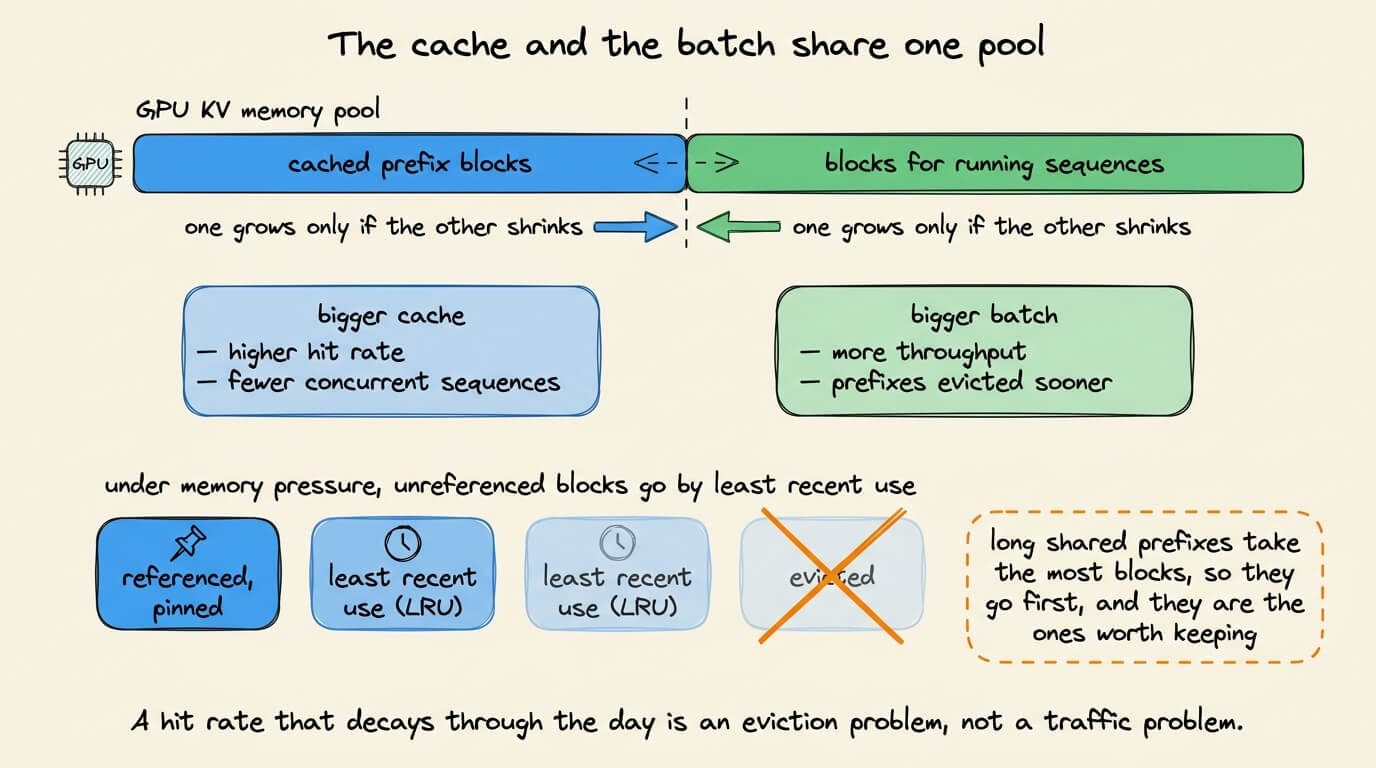
Eviction reduces hit rates, as expected.
The cache and the running batch draw from the same GPU memory pool, so a larger cache means fewer concurrent sequences, and under pressure vLLM drops unreferenced blocks by least recent use.
Mixed traffic makes this worse, because long shared prefixes occupy the most blocks and are the ones whose loss actually hurts.
Before you turn this on, you should know two things
It saves prefill only, so decode time is unchanged and crediting a whole speedup to the cache will overstate it.
And the hashing itself costs something, so on traffic with genuinely unique prompts, benchmarks have measured a throughput regression rather than a gain.
There’s a third problem, which is workload dependent, and it impacts RAG the most. A RAG prompt includes a system instruction, then retrieved chunks, then the query, and the chunks change per request and change order between requests. Two requests that retrieve the same documents in a different order share nothing at all under the chain hash.
The same Part 12 of the RAG course covers the solutions to it. It also explains the problem with the obvious repair of prefilling each chunk on its own and stitching the caches together, and the problems with it. Read it here →
3) Prompt caching
On a hosted model, you don’t get any block table or the eviction policy. Instead, you get a price sheet over the provider’s own prefix reuse, plus two knob.
The cached object is still KV tensors, not your prompt text, and it still requires an exact prefix match on the fully rendered context.
Anthropic charges 1.25x the base input rate to write an entry and 0.1x to read it, with a higher write multiplier if you want it for a longer time. OpenAI applies the same two multipliers on its current models.
The premium cost is recovered in subsequent requests since anything reused inside the TTL will avoid any recomputation.
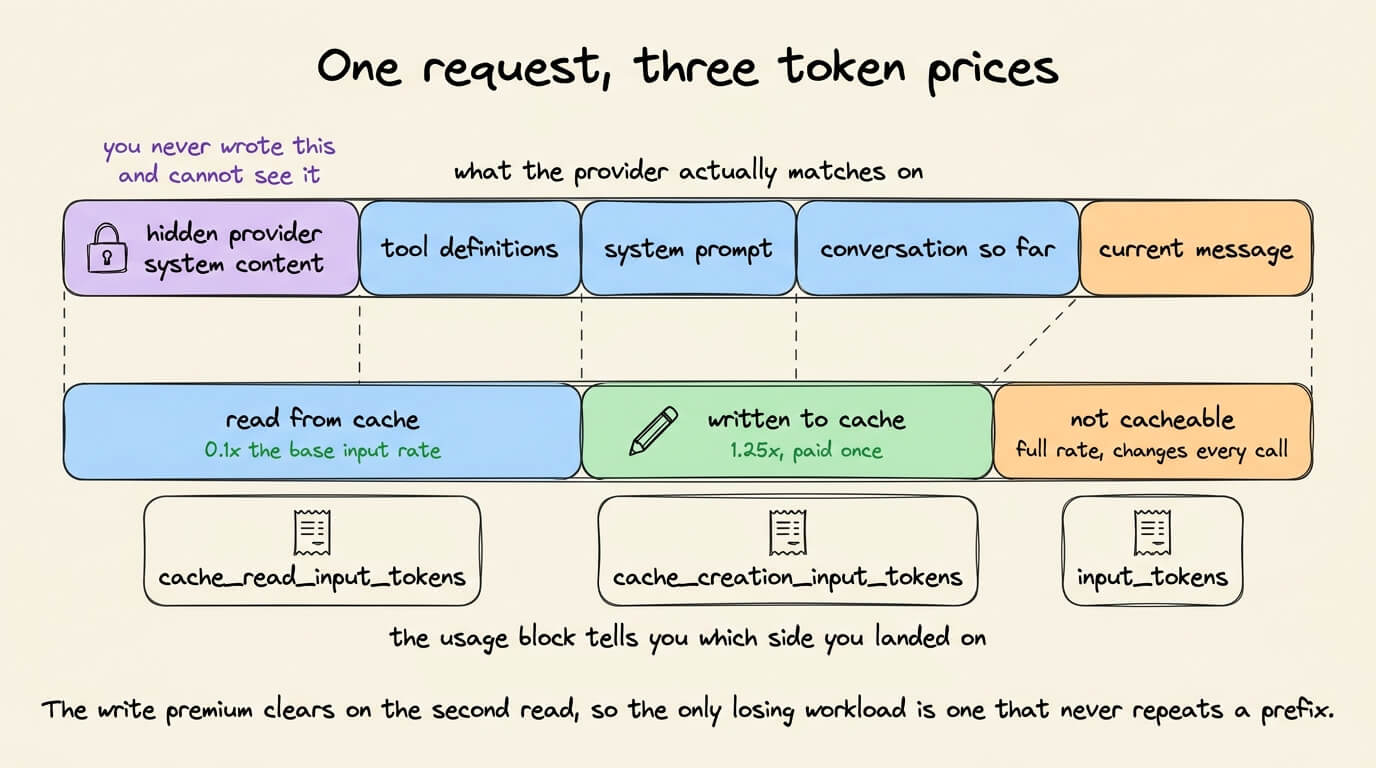
A read can only find an entry that some earlier request wrote, and writes happen only at a breakpoint you placed.
Each call checks your breakpoint, and on a miss it walks backward through a limited number of blocks looking for an older write. Anthropic caps that at 20 blocks, so adding more than 20 blocks of conversation between two calls pushes the last write out of range and the hits stop.
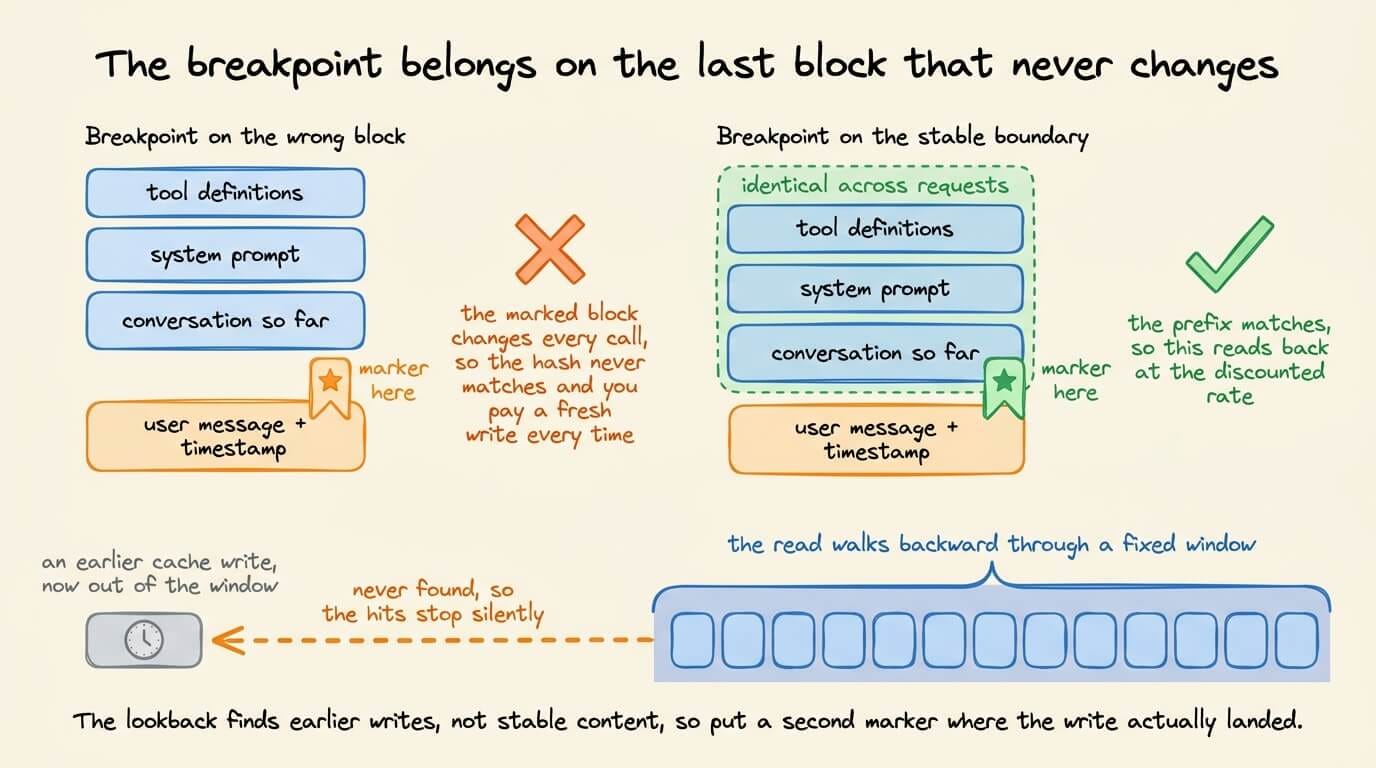
All of this is about reusing whatever the provider happened to keep around.
The other thing you can do is to prefill your corpus once, deliberately, before any query arrives, and pay to store the resulting cache instead of paying to recompute it.
Part 13 of the RAG course extensively works through that, including the storage arithmetic and how many queries a preloaded cache has to serve before the offline prefill pays for itself. Read it here →
4) Semantic caching
The three techniques above save prefill work and still run the model.
A semantic cache embeds the incoming prompt, runs a nearest-neighbor search over stored prompts, and returns a stored response outright when the similarity exceeds a threshold.
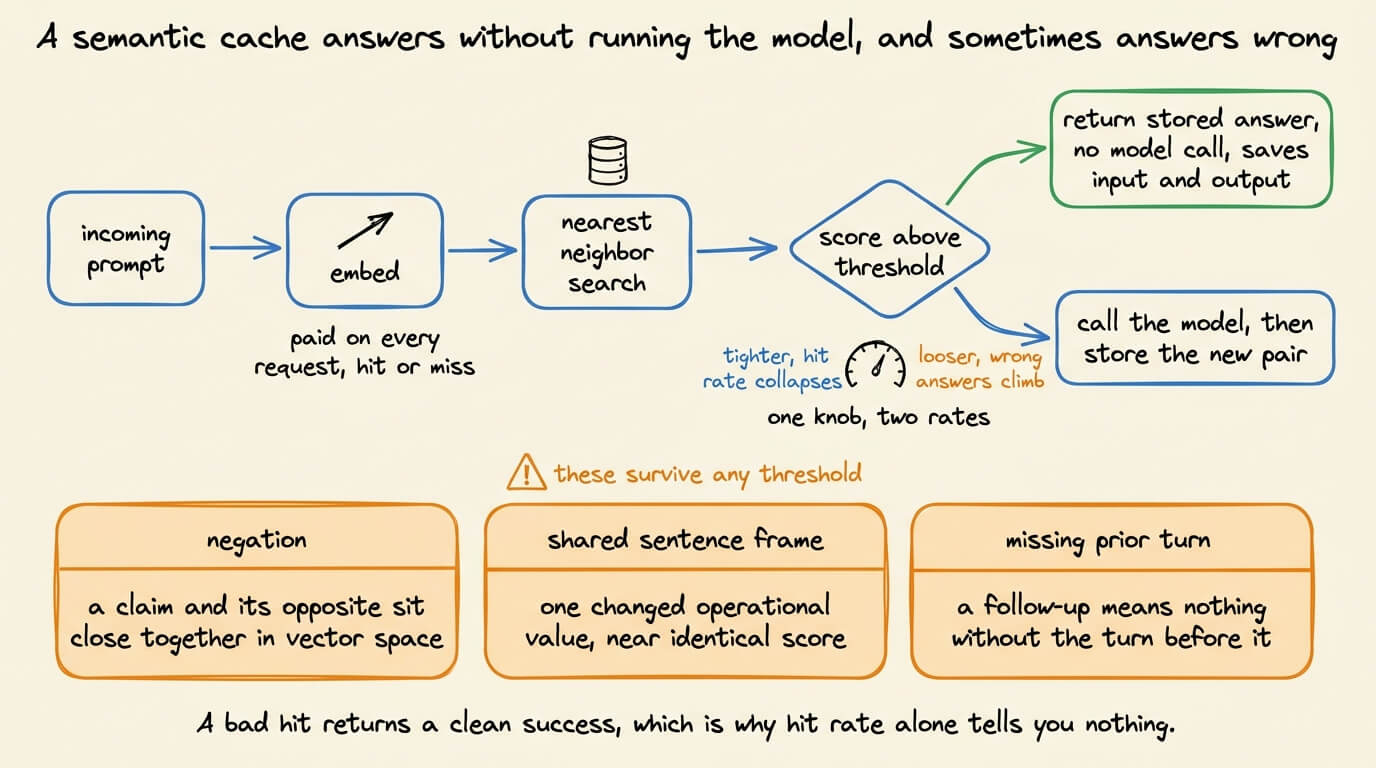
That’s why it saves output tokens as well as input. It’s also why every request must bear an embedding round trip, including every miss.
On the similarity threshold:
If you increase it, the hit rate collapses while you keep paying for embeddings on every call.
If you decrease it, the hit rate climbs alongside the rate of confidently wrong answers.
Published defaults range from 0.75 to 0.97 depending on who you ask, which tells you it’s a property of your traffic rather than a value to copy.
This is not a fully reliable technique per se since some failures can bypass any threshold value, because they come from what embeddings represent.
For instance:
Negated sentences sit close together in vector space.
Two prompts sharing a sentence frame but differing in one operational value score are near-identical, because the frame contributes most of the vector.
Putting the four side by side
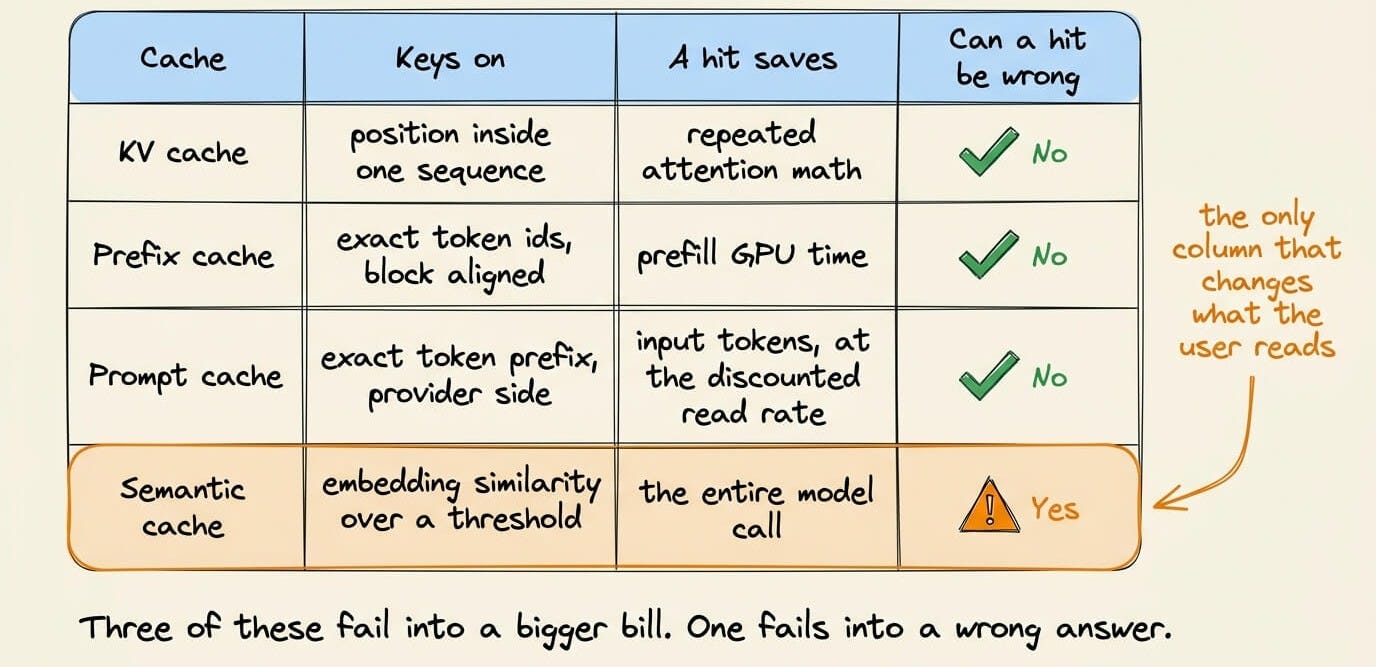
Three of the four techniques discussed above are correctness-neutral, so their misses show up in cost and latency and nowhere else.
The semantic cache works in a different way, so hit rate is not the right metric to report here.
Takeaways for production
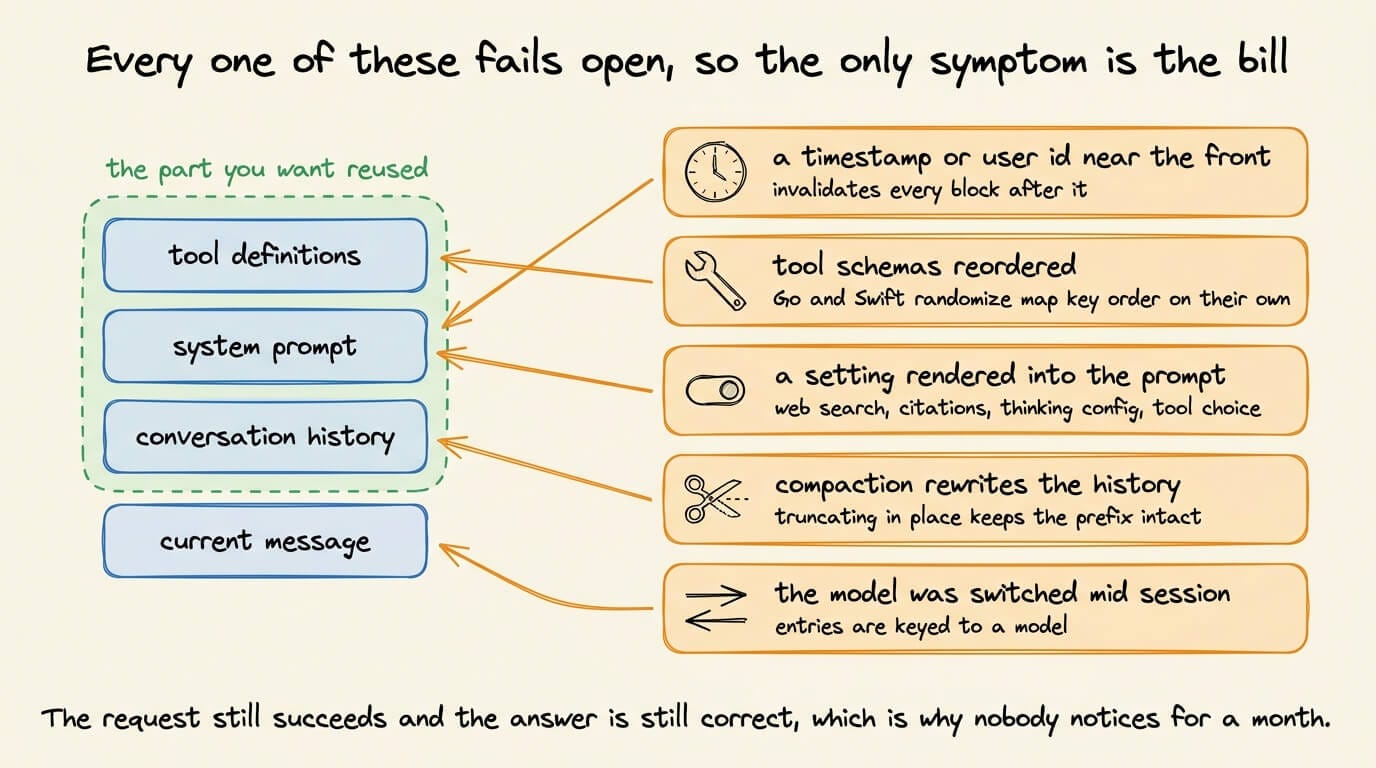
All of these have failure points:
If you have any variable in the front of the prompt, like A timestamp, request id or user name in the system prompt, this invalidates every block after it. Always put stable content first, variable content last, and a marker on the boundary.
Tool schemas are usually placed ahead of the system prompt, so a reorder can invalidate the whole cache.
Check the settings that get rendered into the prompt. On Anthropic, toggling web search, citations, thinking config or
tool_choicerewrites the prompt text and invalidates downstream blocks. A/B testing two reasoning efforts splits your cache in two.Summarizing history rewrites the prefix, so the next call pays full price on cold tokens. Truncating tool outputs in place keeps the prefix byte-identical and the cache alive.
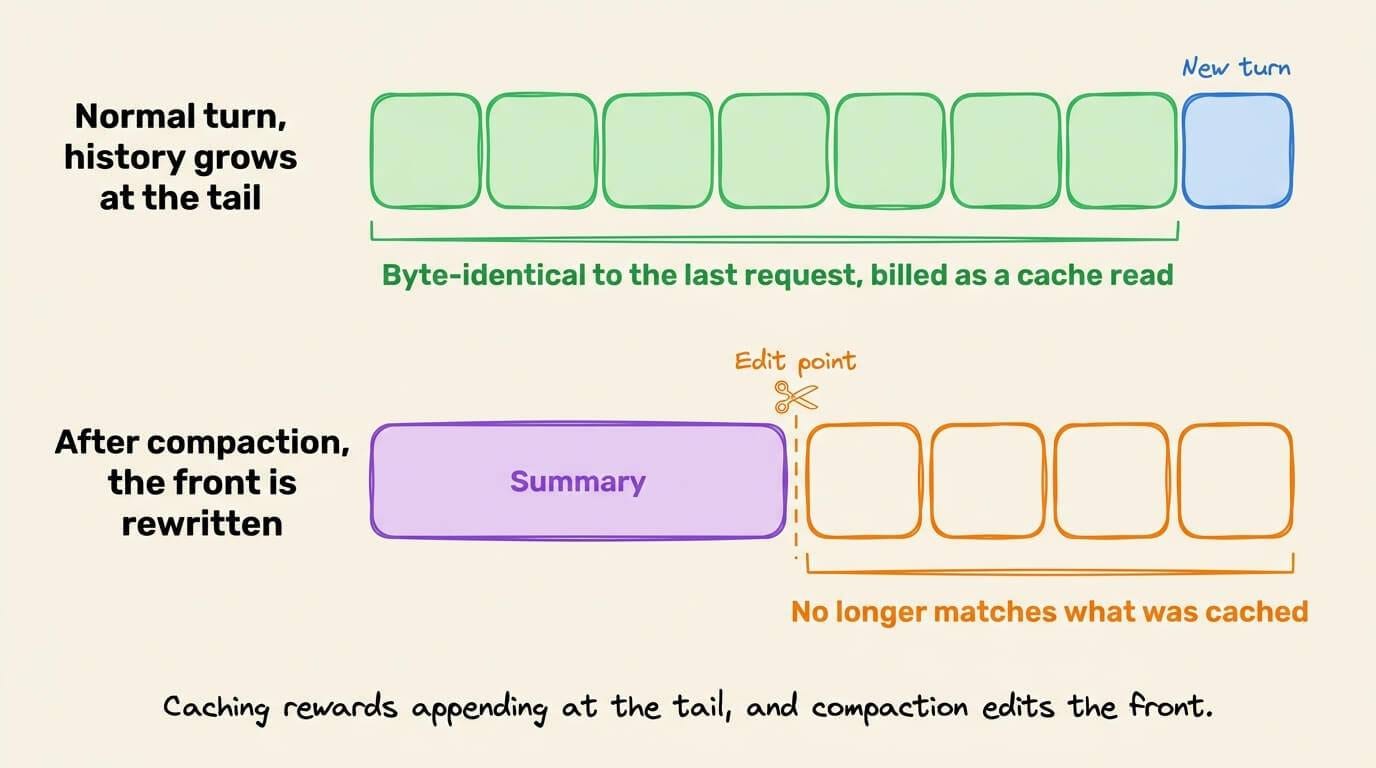
Cache entries are keyed to a model, so routing to a cheaper one still prefills the whole accumulated history at cold rates.
As further reading:
RAG course Part 12 covers the prefill and decode split and why prefix caching underperforms on RAG, with implementations →
RAG course Part 13 covers preloading a corpus into a cache before any query arrives →
RAG course Parts 14 and 15 cover cache compression that has to run before a query exists, plus the training-based approaches and what production involves →
👉 Over to you: which of these four layers has cost you the most debugging time?
Good day!