

Free Observability Engineering Masterclass with Liz Fong-Jones & Honeycomb
When an agent run fails, you usually can’t reproduce it. The model can sample differently, the tool can return something else, and more. All you are left with is whatever you recorded while it was running.
Dashboards don’t help much here, because you built them around the failures you already knew about. Once you’re running LLM calls, retries, and tool chains inside a single request, the number of ways it can go wrong is far larger than the number of charts you can maintain.
What works instead is recording enough context on each request that you can slice it afterwards on a field you never planned for, like which model version handled it, or which customer, or which tools it called.
Honeycomb is running a six-session live masterclass on exactly this, taught by Liz Fong-Jones, who co-wrote the O’Reilly book Observability Engineering. It’s free, and three sessions are still ahead:
Sep 16 → Decide what counts as too slow, and what you do when you hit it
Sep 30 → Cut the bill without losing the data you need at 3am
Oct 14 → Do the same for mobile apps, data pipelines, and ML systems
Each session covers one chapter and turns it into something you can use that same week in production. The first two sessions covered instrumenting with OpenTelemetry and catching a bad deploy before users find it. You can still register to get the recordings and start now without being behind.
Live sessions include Q&A with Liz. Recordings and hands-on labs will also be made available after each one.
Register here for free now so that you don’t miss out →
Thanks to Honeycomb for partnering today!
LLM routing can cost more than not routing
A single coding agent session can analyze a codebase, write new functions, fix bugs from test output, explain methods, and search documentation.
Those tasks are not equally difficult. But when the agent uses one hardcoded model, they all bill at the same rate.
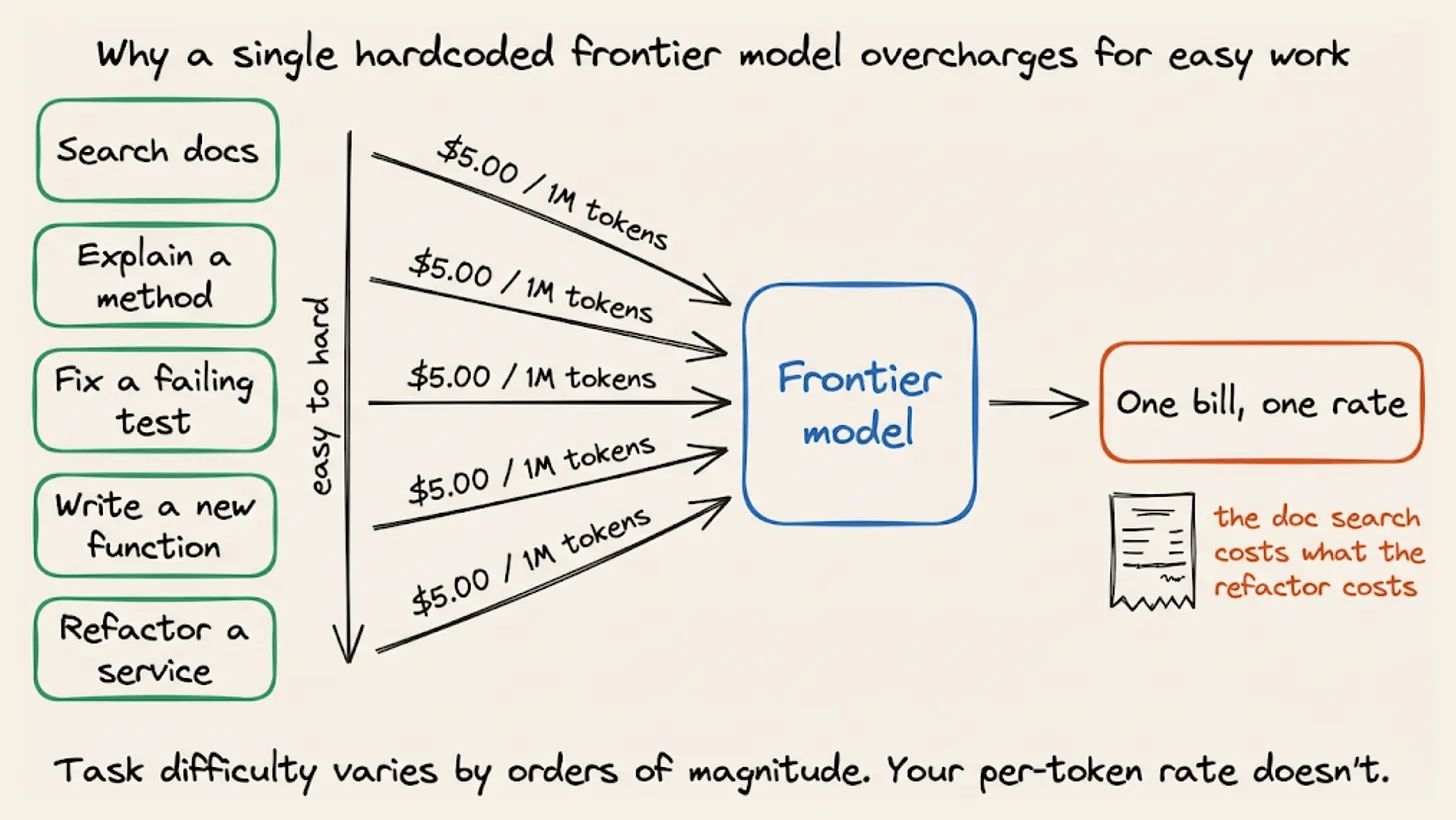
A docstring lookup and a distributed systems refactor should not cost the same.
Routing is the obvious answer where you send easy work to a cheaper model and reserve the expensive one for requests that need it.
That works for isolated requests. Inside an agent loop, though, a naive router can cost more than using one model throughout the session.
Routing works in theory but not as much in practice
The basic rule is that you send each request to the cheapest model that can handle it well.
Classification, extraction, formatting, and short summaries often produce comparable results on models that cost 10 times less. The frontier model stays available for harder work.
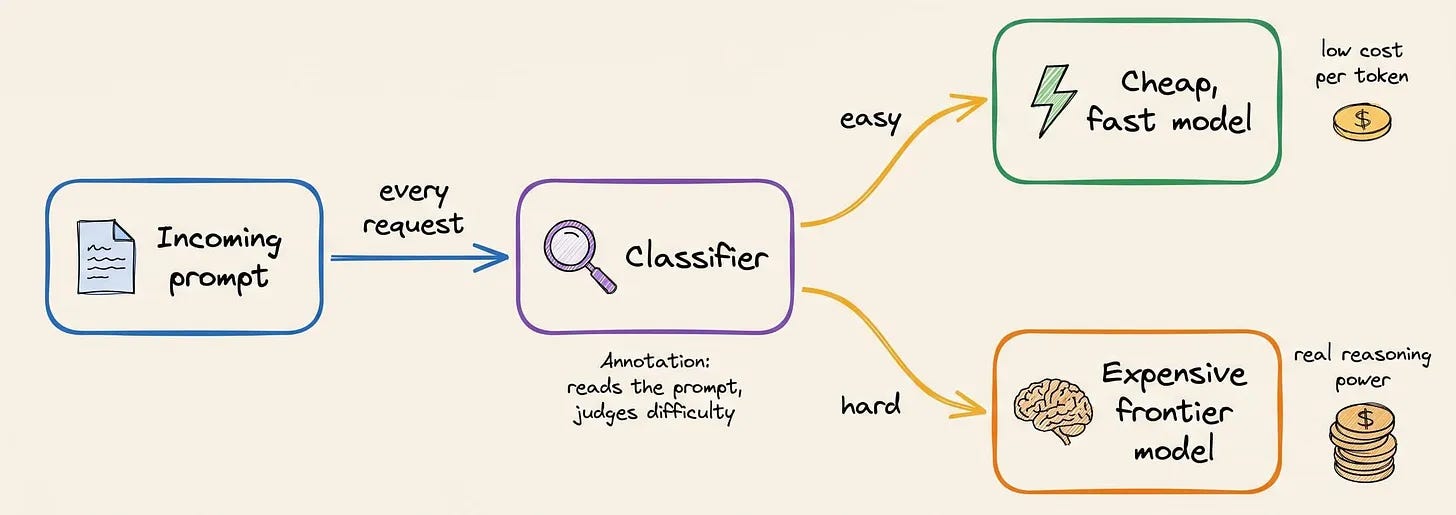
If 70% of requests go to a model priced at $0.10 per million tokens and the remaining 30% go to one priced at $3, the blended rate is $0.97 per million instead of $3.
A 2026 arXiv survey on dynamic routing found that a well-designed router can even outperform the best individual model by sending tasks to models with different strengths.
So while routing works, teams still hardcode one model because they do not want to build and maintain the routing layer around it.
Four problems with DIY routing
These are four typical problems when building a production router:
You pay for two inference calls. There’s a small LLM in front of every request that acts as a classifier, so you first pay for classification and then for the actual response. The savings survive only when the classifier costs far less than the gap between model tiers and routes accurately enough to avoid expensive mistakes.
General models are mediocre routers. A request such as “fix this” or “make it faster” contains almost no useful signal by itself. The intent lives in the conversation history. General-purpose models were not trained to compare that history against a fixed set of route definitions, and coding requests are particularly easy to misread.
The routing logic is never really finished. It may work well when you first ship it, but it was written around the models, task definitions, and provider prices available at that point. Those assumptions keep changing while the routing code stays the same. Eventually, easy requests start reaching expensive models, or difficult ones get sent to models that cannot handle them.
Model switching invalidates cache reuse. This failure is specific to multi-turn workloads. Providers cache the attention state for repeated prompt prefixes. If the same token sequence reaches the same model, the provider can reuse that state and bill those input tokens at a lower rate. But if you switch models mid-session, the new model must process the conversation again at full price.
Routing at the infrastructure level
These problems have the same cause. When routing lives in your application, you own the classifier, decision logic, maintenance, and cache behavior.
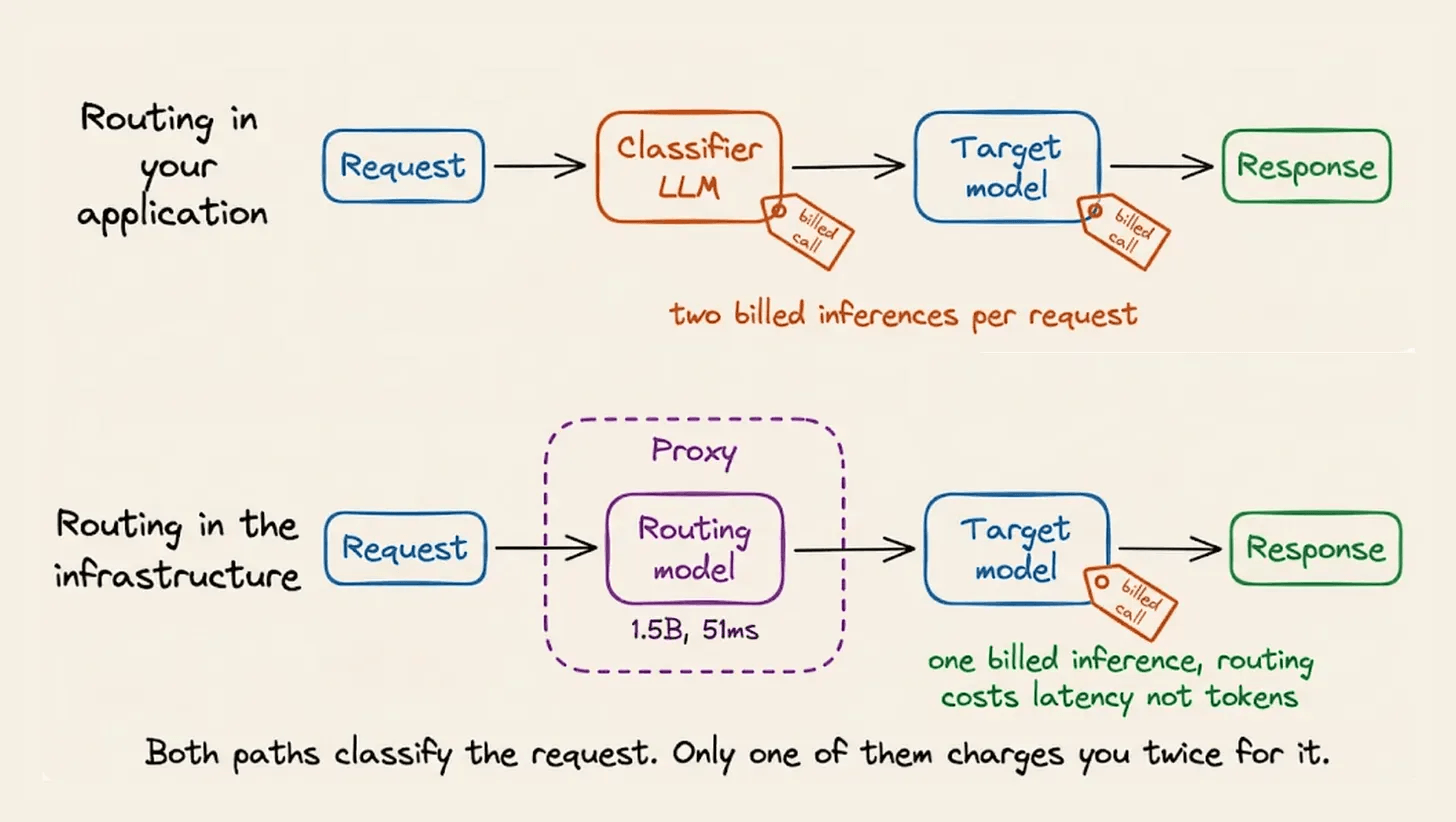
DigitalOcean’s Inference Router moves that work into the infrastructure. You describe the tasks and choose which models may handle each one. The platform makes the routing decision for every request.
The router uses Plano, an open-source AI proxy. Each decision has two phases.
Phase 1: Resolving intent
A small language model reads the conversation, compares it with your task descriptions, and returns a routing decision.
That sounds like the double-inference problem from earlier. The difference is the classifier.
Katanemo’s first routing model, Arch-Router, had 1.5 billion parameters and was fine-tuned for one job, i.e., read a conversation, compare it with route descriptions, and emit JSON.
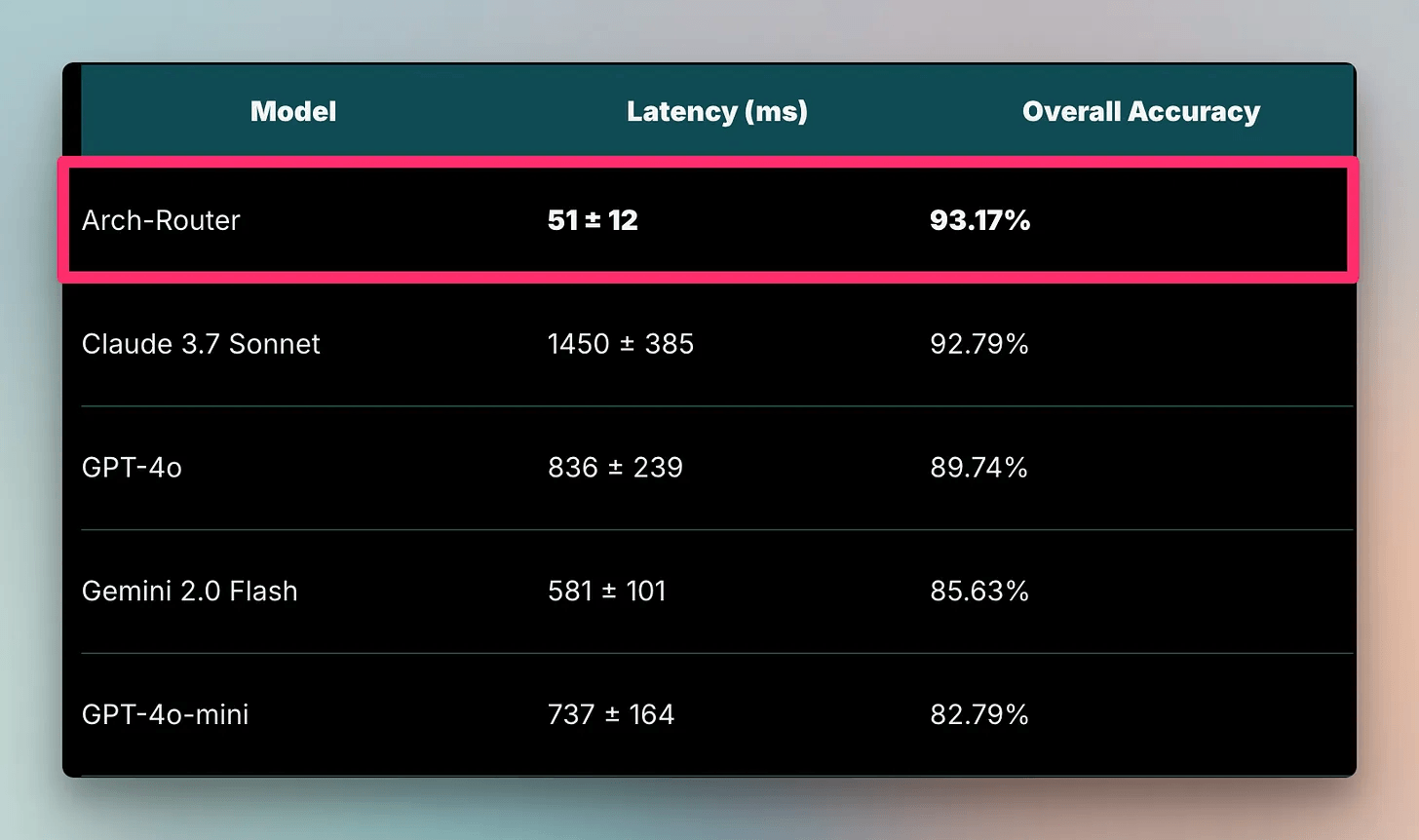
On that task, the 1.5B model beat Claude 3.7 Sonnet on accuracy and ran 28 times faster.
This is the difference between prompting a general model to classify and training a small model for classification. The router does not need prose generation, tool use, or broad multi-step reasoning. Its job is narrow enough for a much smaller model.
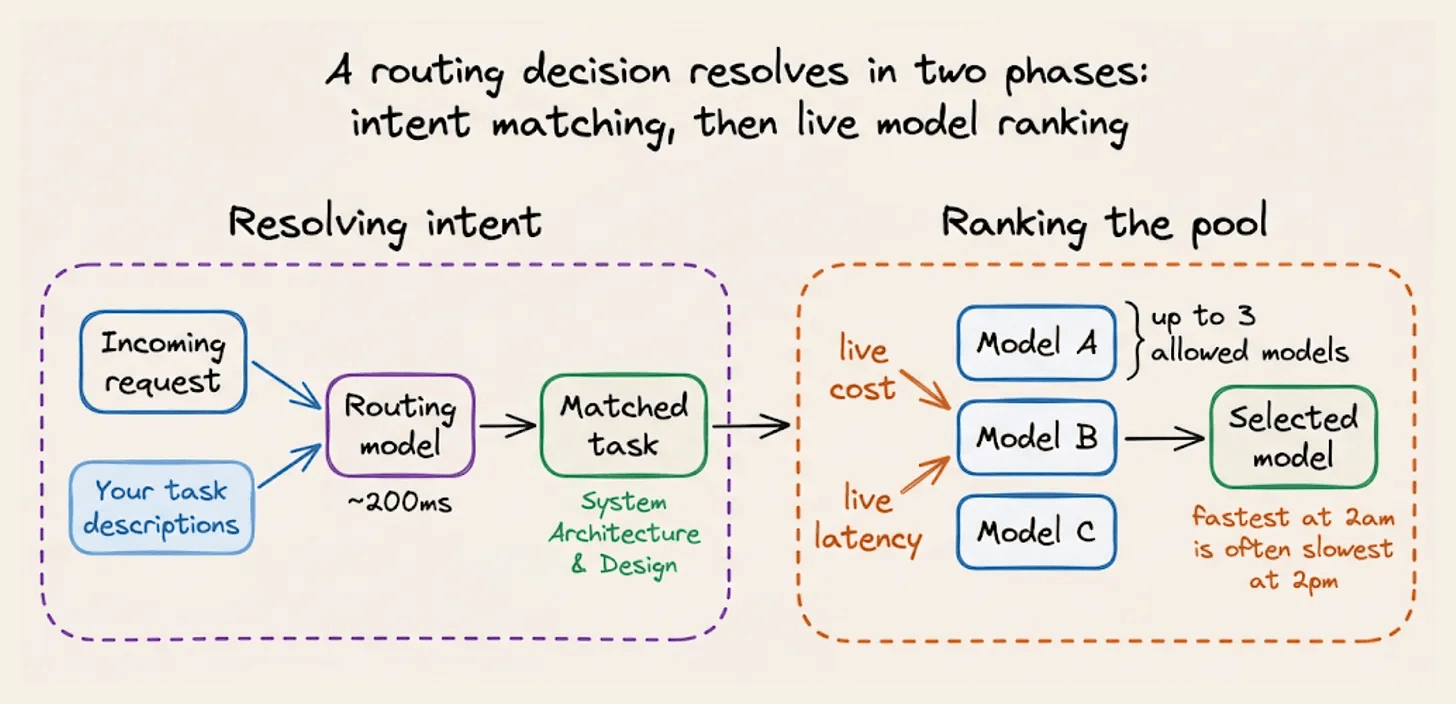
The classifier runs inside the proxy, so it does not appear as a second API call on your bill. The tradeoff is roughly 200 milliseconds of added latency.
The production model today is Plano-Orchestrator. It was trained on harder conversational cases, including ambiguous follow-ups, topic changes during a conversation, and messages that should not be routed.
It scores slightly above GPT-5.1 and Claude Sonnet 4.5 on overall routing accuracy. Its largest margin is on coding requests.
A model trained on that pattern can resolve the intent better than a general model prompted to classify it.
Phase 2: Ranking the pool
Once the router knows the task, it narrows the choice to a pool of up to three models. It then has to pick one.
You could define a fixed order and always choose the first available model. The problem is that provider latency can vary by 2 to 3 times over the course of a day.
The fastest model at 2 a.m. may be the slowest at 2 p.m.
With this, prices change, latency drifts and rate limits affect availability.
The ranking engine reads cost data from DigitalOcean’s pricing API and latency data from Prometheus. It then sorts the candidate models according to the policy you chose:
Cost Efficiency sorts by token price.
Speed Optimization sorts by time to first token.
Manual Ranking keeps the order you specified.
Optimal uses DigitalOcean’s benchmarked ordering.
A background process refreshes the metrics and stores them in memory, so the router does little work at request time.
Each router also has a fallback list. If the selected model is down, rate-limited, or unavailable, the router tries the next candidate under the same policy before moving to the configured fallbacks.
Model affinity
An agent resends its system prompt, tool definitions, files, and previous steps on every turn.
Prefix caching makes this repeated input much cheaper, but the cache belongs to the model that processed it.
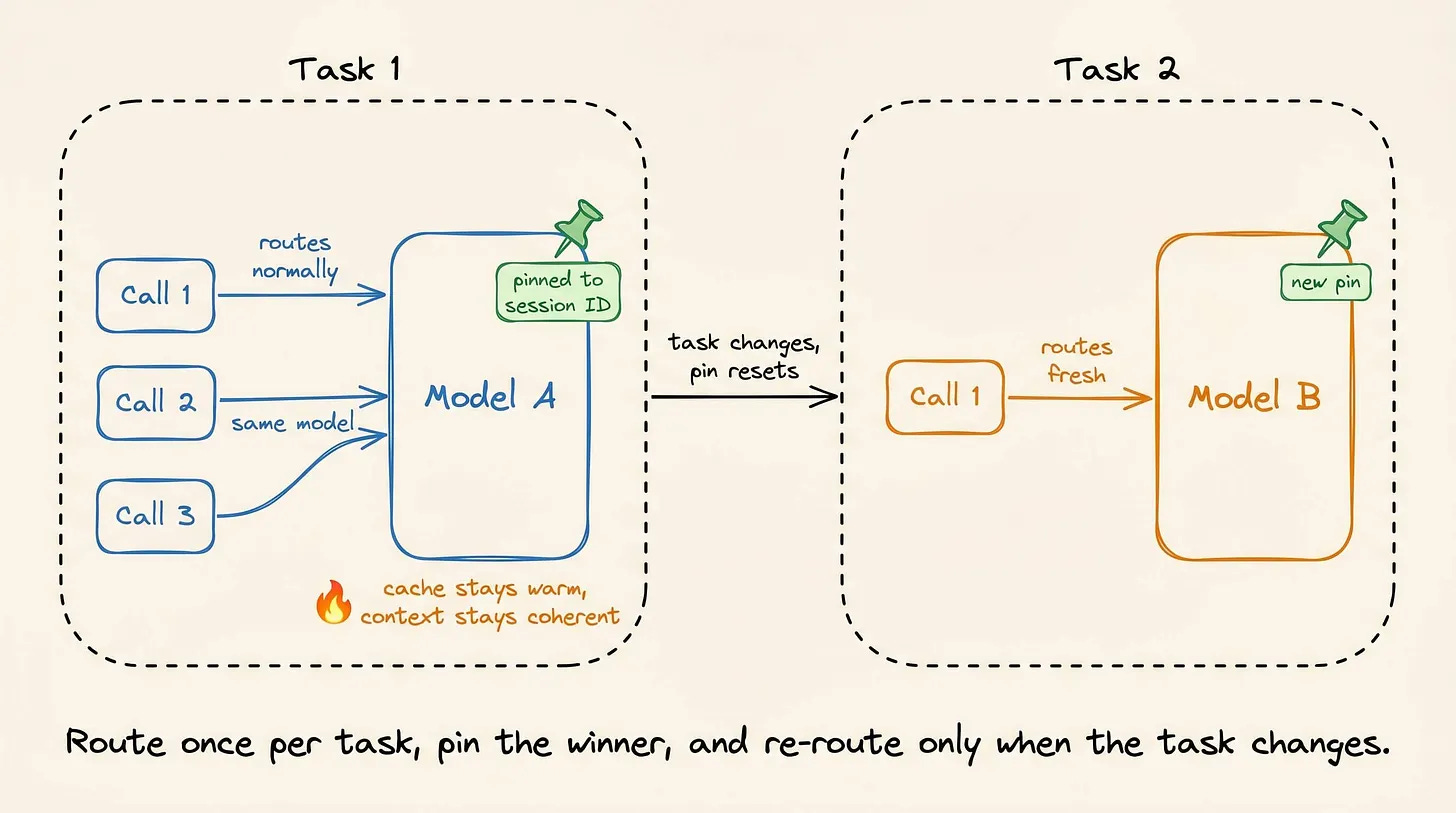
If turn 3 goes to Model A and turn 4 goes to Model B, Model B must process the entire conversation again at the full input rate. This is why the router should choose a model once and keep the rest of the session on it.
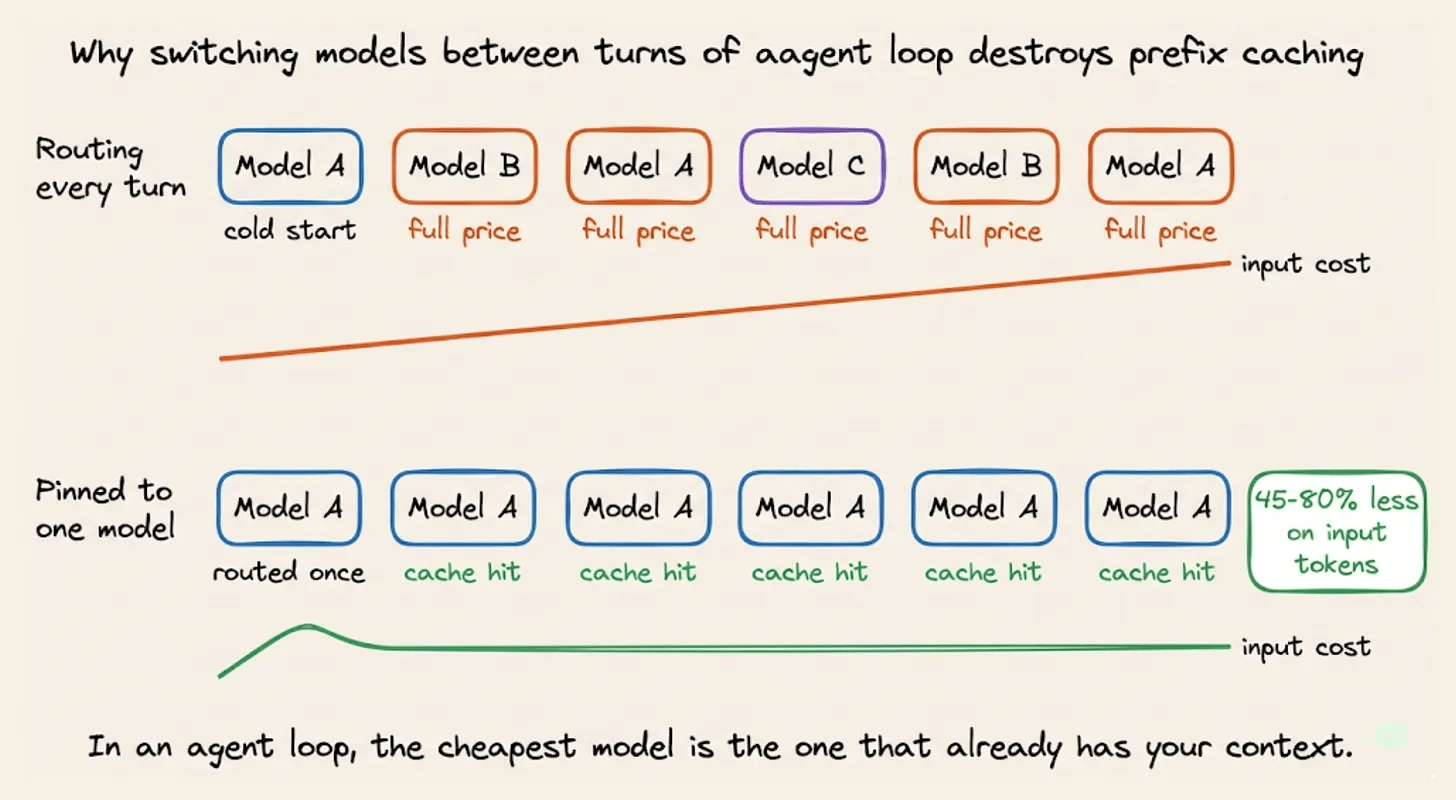
Three problems follow:
In a 15-turn loop where 90% of the input is a repeated prefix, model affinity can reduce input cost by 45% to 80%. Switching models removes those cache hits.
Models differ in output style and tool-call formatting. A mid-session switch can break the agent’s parser.
The next model may interpret the existing reasoning and instructions differently.
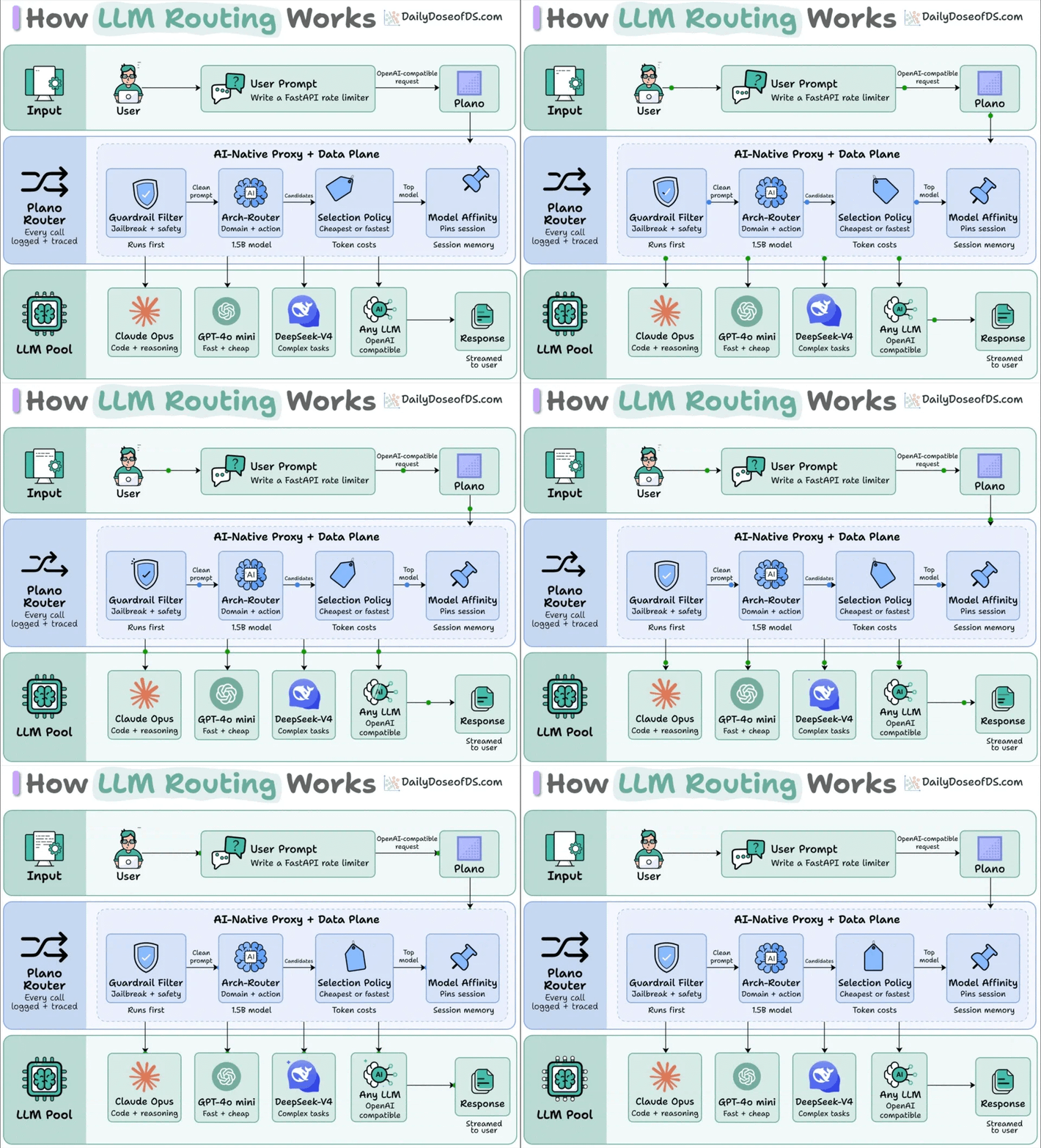
Session pinning solves this. Essentially, the router chooses a model for the first request, then sends every later request with the same session ID to that model.
DigitalOcean exposes this through the X-Model-Affinity header:
curl --location 'https://inference.do-ai.run/v1/chat/completions' \
  -H "Authorization: Bearer $MODEL_ACCESS_KEY" \
  -H "X-Model-Affinity: session-001" \
  -d '{
    "model": "router:test-router",
    "messages": [
      {"role": "user", "content": "Write a Python function for binary search"}
    ]
  }'
A second call with the same affinity ID skips routing, uses the same model, and returns "pinned": true.
You pay for one routing decision, then keep the cache savings for the rest of the session.
Without session pinning, routing an agent loop can cost more than keeping the entire session on one model.
Building an Inference Router
Setting up a router takes about five minutes.
DigitalOcean provides preset routers for Software Engineering, General, Writing, and Knowledge Base & Document Intelligence workloads.
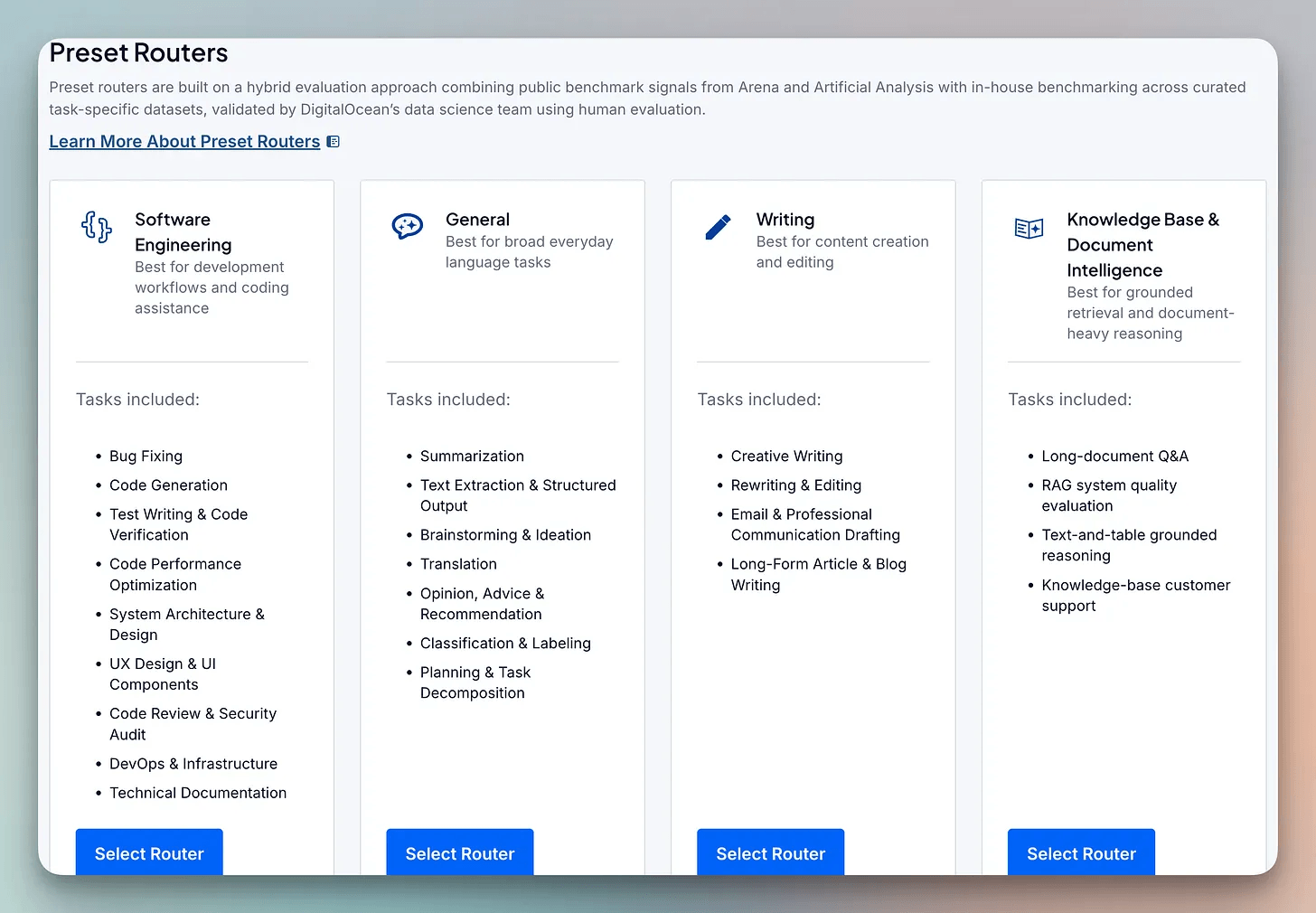
Start with a name and a description.
The name is how you reference the router later.
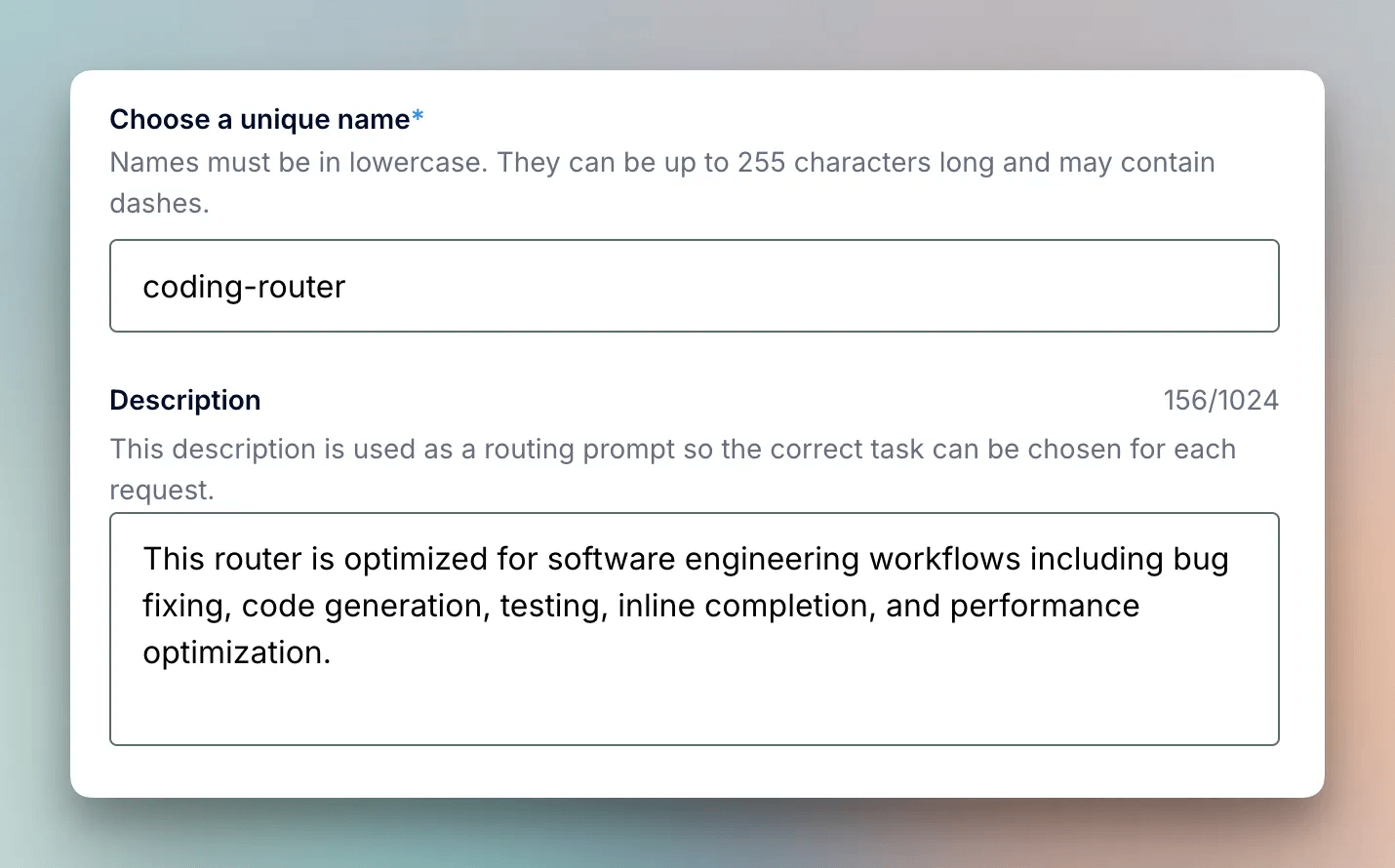
The description becomes part of the routing prompt. The model reads it when deciding where a request belongs, so vague wording leads to vague matches.
Next, add your tasks.
A router contains tasks and a fallback list. Each task pairs a description with the pool of models allowed to handle it.
You can use DigitalOcean’s preset tasks or write your own.
The Coding & Development preset includes Bug Fixing, Code Generation, Performance Optimization, and System Architecture & Design. Other presets cover work such as summarization, extraction, translation, classification, long-document Q&A, and RAG evaluation.
Alternatively, you can also define a custom task.
For a custom task, you provide the name, routing description, model pool, and prioritization policy. The available policies are Cost Efficiency, Speed Optimization, and Manual Ranking.
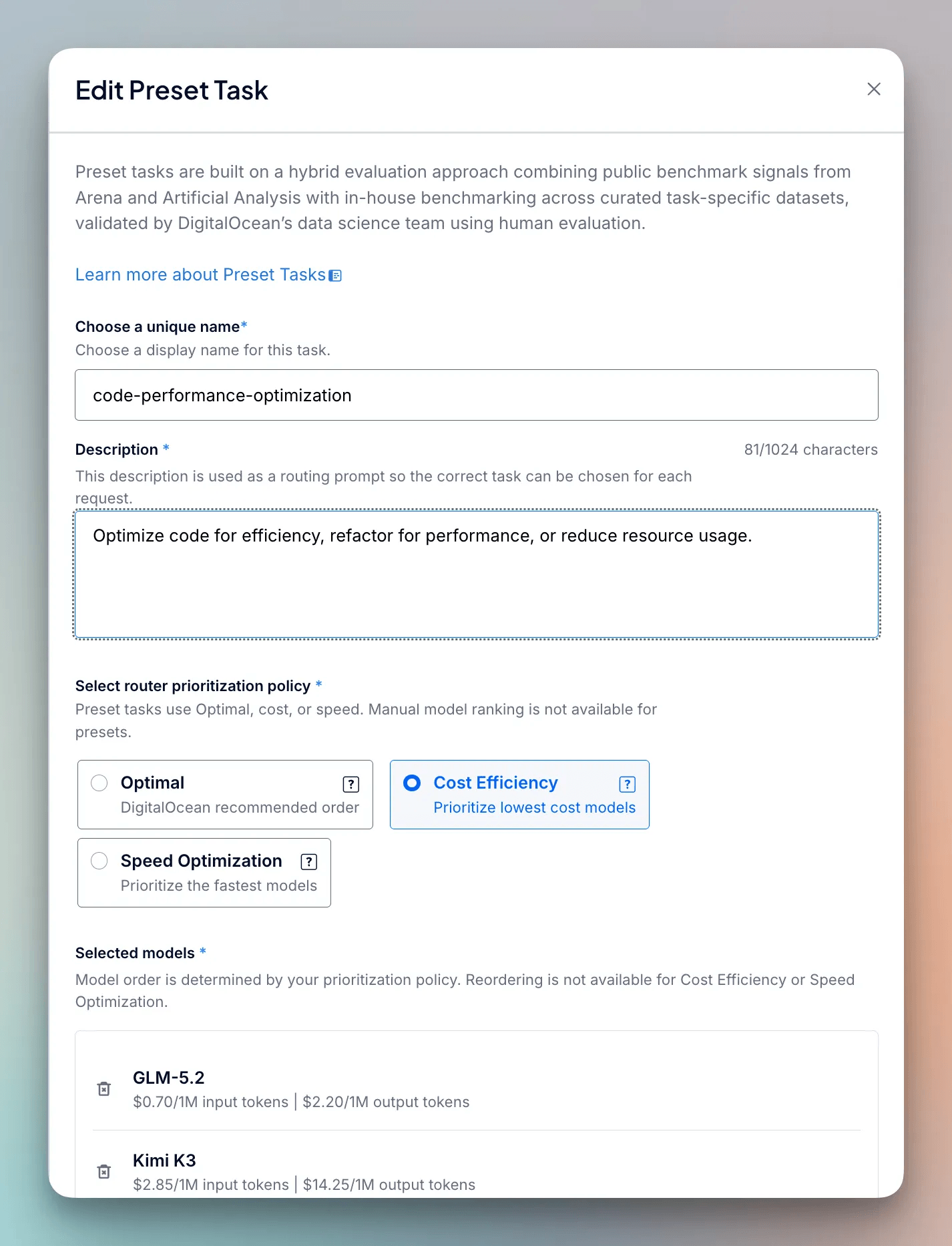
The routing model matches requests against these descriptions, so specificity matters. Concrete task names and nouns work better than broad descriptions.
Next, pick your models.
The model picker displays the current price per token. DeepSeek V4 Flash costs $0.08 per million input tokens, while Claude Opus 5 costs $5.
Finally, add fallback models and create the router.
Fallbacks handle requests that do not match a task. The router tries them in the order you set.
Test the router
The Playground runs your router and a single model side by side. You can compare them with your own prompts instead of relying only on benchmarks.
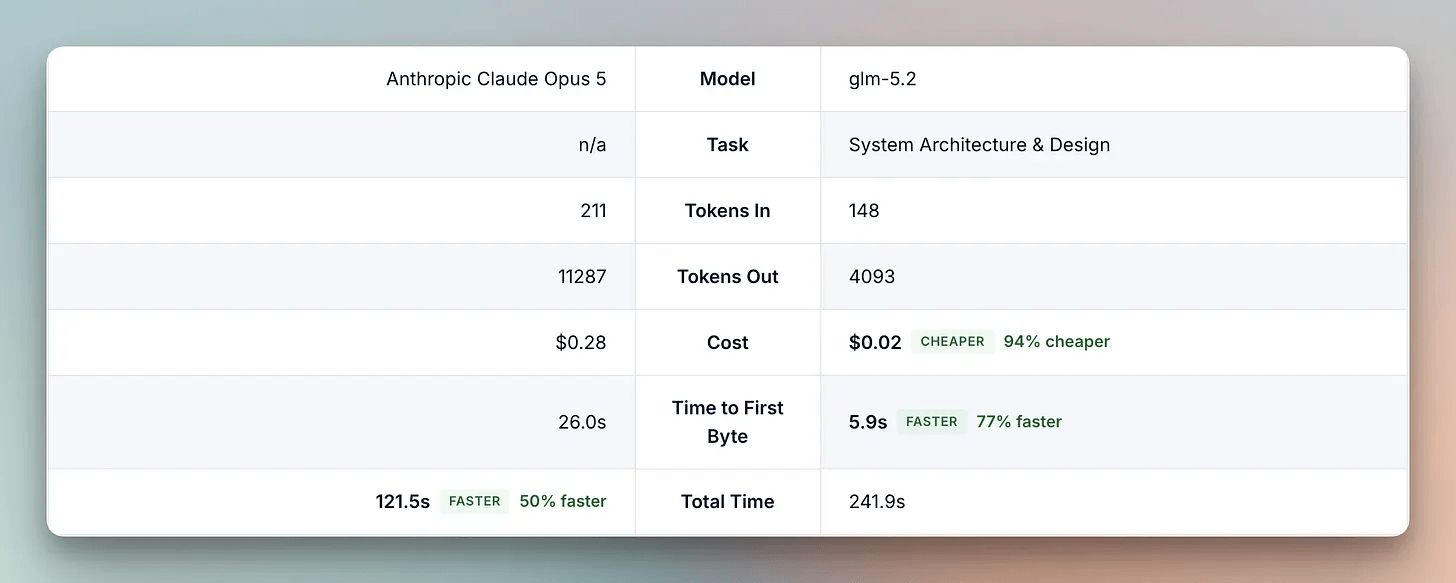
We tested both with a difficult request: design a transactional outbox pattern for PostgreSQL and Kafka, including the schema, polling publisher logic, and idempotency handling.
Claude Opus 5 ran directly on the left. My custom coding-router ran on the right.
The router matched the request to System Architecture & Design and sent it to GLM-5.2. Both responses were correct and complete.
The routed response was 94% cheaper and 77% faster to first byte.
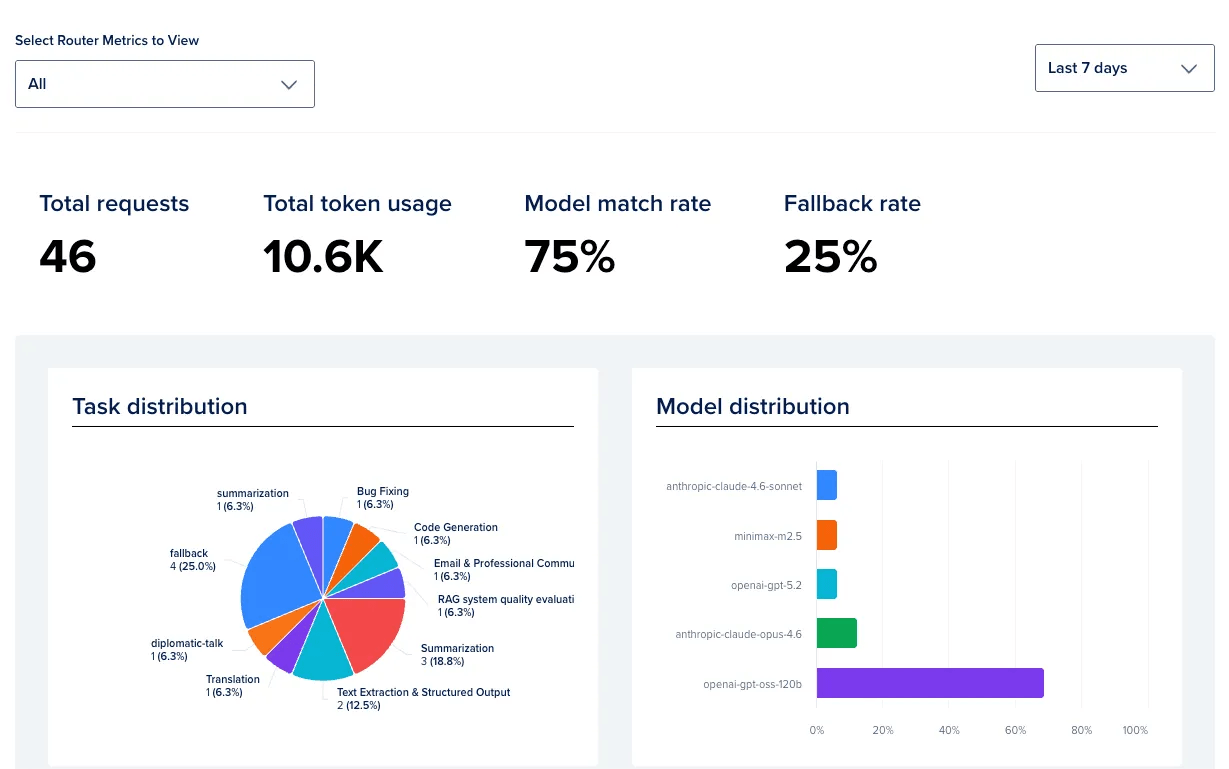
Once real traffic starts flowing, two other tools become useful.
The Analyze tab reports model match rate and fallback rate. If the fallback rate is high, your task descriptions probably need to be more specific.
Router Evaluation tests the configuration against an uploaded dataset. It uses an LLM judge to score completeness and correctness, giving you a way to catch bad routing changes before they reach production.
Next steps
Token prices keep falling, but agents are consuming tokens even faster. Gartner estimates that agentic workflows use 5 to 30 times more tokens per task than a standard chat interaction.
Spending caps control that cost by limiting how much people can use the tools. Routing attacks the waste instead. Easy requests go to cheaper models, while difficult work still reaches the models capable of handling it.
DigitalOcean has taken on the parts that usually make teams abandon an in-house router:
A small model trained specifically for intent resolution
Rankings that update with current prices and latency
Session pinning that keeps an agent on one model long enough to reuse its cache
The question is no longer whether routing works but rather how much of your traffic is still going to a model that costs more than the request requires.
Try DigitalOcean Inference Router here →
Good day, and thanks to DigitalOcean for partnering today!
The cache-invalidation point is the most underappreciated of the four: for long agent sessions, the switched-to model reprocesses the whole conversation prefix at full input price, so the tax grows exactly where routing promises the most. It compounds with the classifier problem too - a misroute that fails and retries upstream turns one request into three paid calls, which is why savings survive only when the router is both near-free and near-perfect at once. And the decay point is the one teams underestimate organizationally: route definitions written against last year's model prices silently become cost multipliers rather than savings.