

The more you use OpenClaw, the worse its memory gets. It remembers everything you tell it but understands none of it. The problem isn’t storage. It’s structure.
After weeks of using OpenClaw across multiple projects, you have hundreds of memory entries.
When you ask a question, the agent retrieves similar text but can’t reason about relationships. It can’t connect facts across conversations.
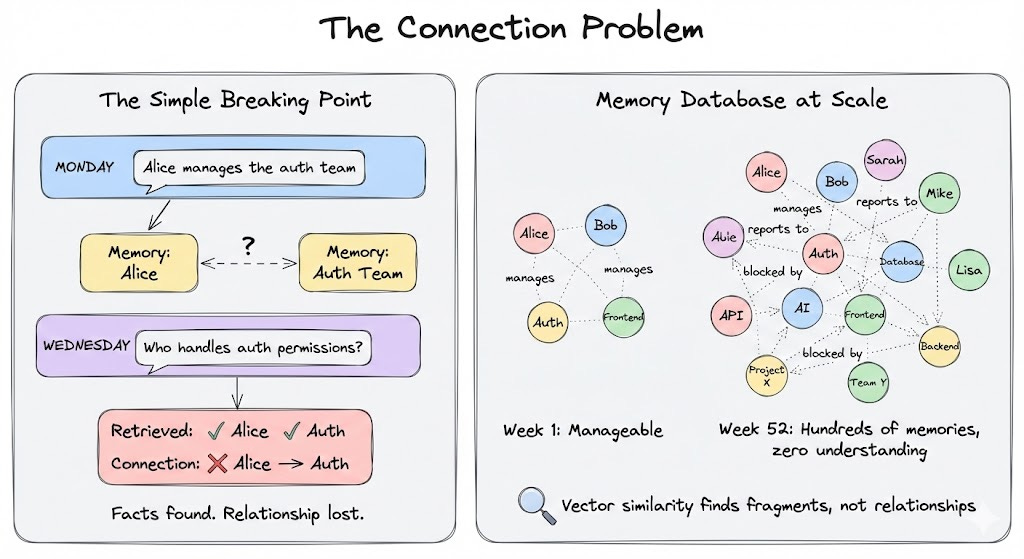
A simple example:
Monday, you mention Alice manages the auth team.
Wednesday, you ask “who handles auth permissions?”
The agent knows Alice exists, knows auth exists, but can’t connect them. It retrieves both memories but doesn’t understand Alice manages auth.
Now multiply that by dozens of people, projects and dependencies.
The problem compounds.
Later in this article, I’ll show you an open-source plugin to improve this. But first, let’s understand how OpenClaw’s memory actually works.
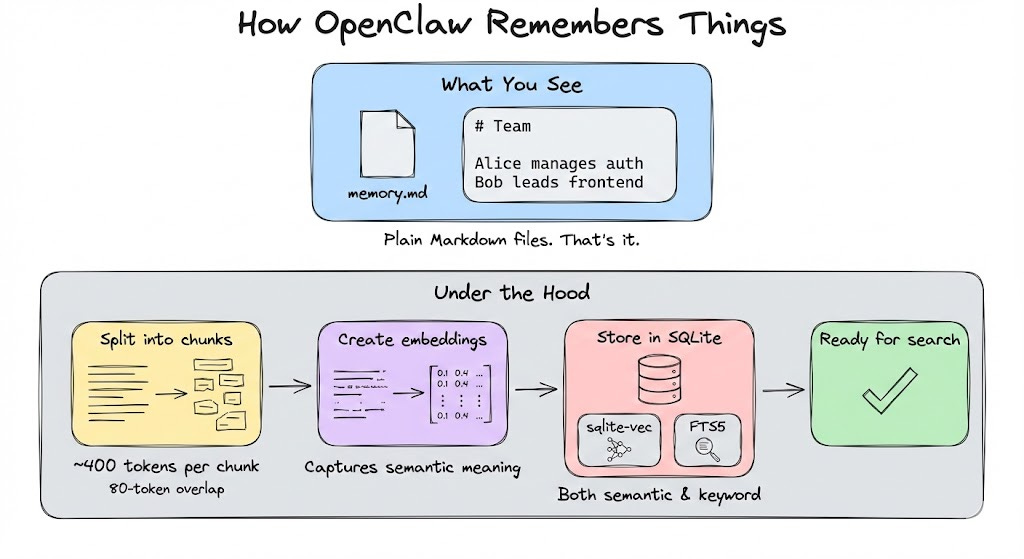
OpenClaw’s memory is simple: everything lives in plain Markdown files that the agent reads and writes to. When it learns something worth remembering, it updates these files.
Under the hood, the system does some clever things:
Semantic search over ~400 token chunks with 80-token overlap
Vector embeddings stored in SQLite via the sqlite-vec extension
Full-text search using SQLite’s FTS5
The system retrieves semantically similar text, which works well for simple queries. But it can’t reason about how facts relate to each other.
The Real Pain Points
The inability to reason about relationships shows up everywhere. Not as one big failure, but as a dozen small frustrations that compound over time:
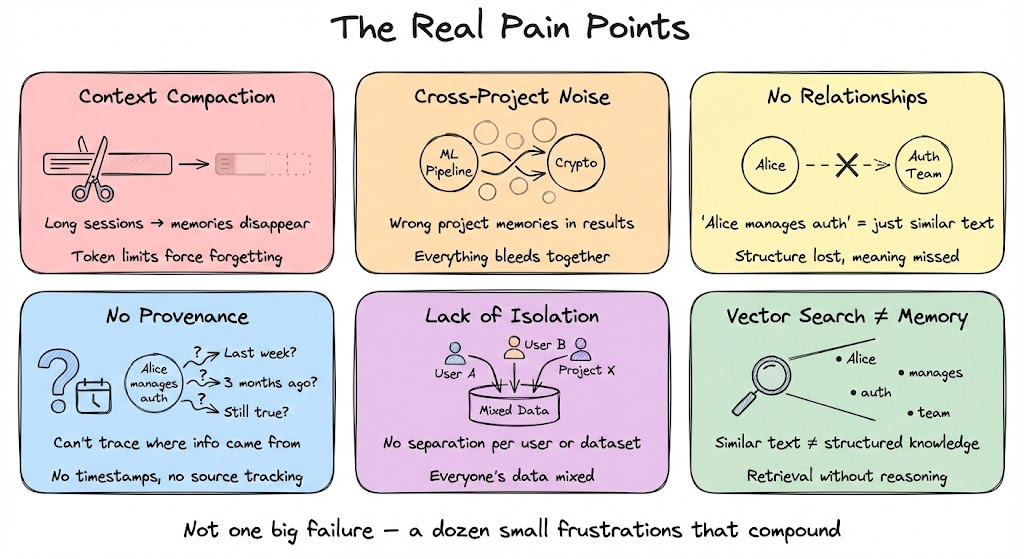
Context compaction: During long sessions, memory gets “forgotten” when context is compressed to fit token limits. This means important details disappear.
Cross-project noise: When working across multiple projects, searches return irrelevant results from other contexts. Your ML pipeline memories bleed into crypto project queries.
No relationships: The system doesn’t know that “Alice manages auth” is a structural relationship. It treats it like any other semantically similar text.
No provenance: You can’t trace where information came from without manually reading Markdown files. When the agent says “Alice manages auth,” you don’t know if that’s from last week or three months ago.
Lack of isolation: Memory isn’t separated per user or dataset so everything bleeds together.
Vector search gives you similar text but memory needs structure.
The Fix: Knowledge Graphs
That structure comes from knowledge graphs. A knowledge graph doesn’t store text chunks. It stores entities and relationships.
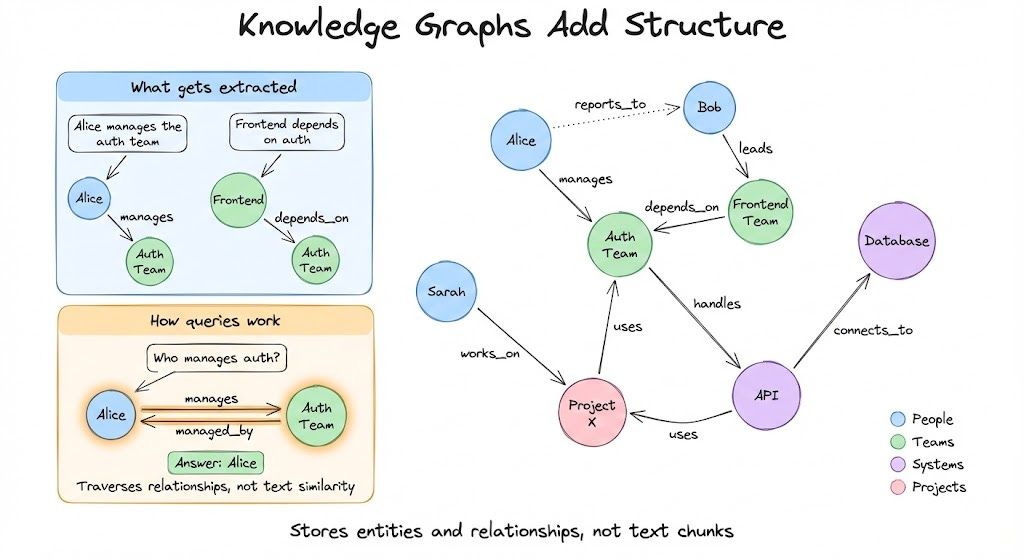
When you tell OpenClaw “Alice manages the auth team,” a knowledge graph extracts:
Entity: Alice (Person)
Entity: Auth Team (Team)
Relationship: Alice → manages → Auth Team
When you ask “Who manages auth?”, the system doesn’t search for similar text. It traverses the graph:
Find Auth Team → Follow “managed_by” relationship → Return Alice.
This is fundamentally different from semantic search. The graph understands structure, not just similarity.
An Open-Source Solution
Now, let’s see how to add this persistent memory to OpenClaw.
Cognee is an open-source memory engine that builds knowledge graphs from conversational data. The OpenClaw plugin augments your existing memory without replacing it.
The plugin operates in these phases:
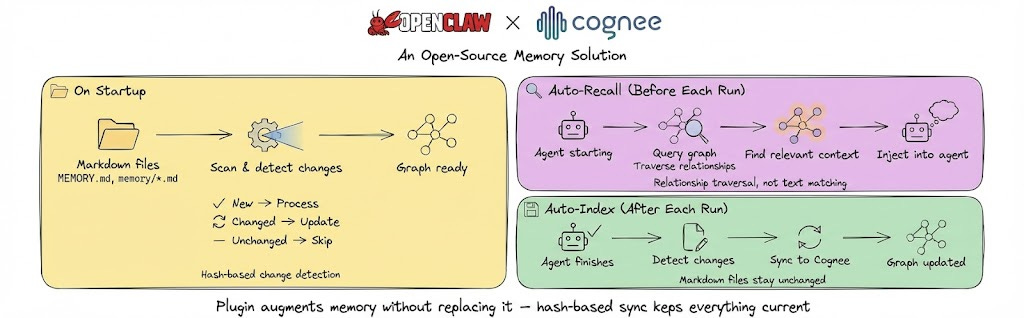
On Startup - Scans your ~/.openclaw/workspace/MEMORY.md and memory/*.md files, processing new ones into the graph while updating changed files and skipping unchanged ones.
Auto-Recall - Before each agent run, searches the knowledge graph for relevant memories and injects them as context by traversing relationships rather than matching similar text.
Auto-Index - After each agent run, syncs any memory changes back to Cognee so the graph stays current with your latest conversations.
Your Markdown files stay exactly as they are. Hash-based change detection means only modified files trigger updates.
Setting It Up
Let’s set this up. It takes just 3 steps:
Run Cognee locally in Docker as your graph engine
Install the integration plugin
Configure OpenClaw to use it
1) Run Cognee locally:
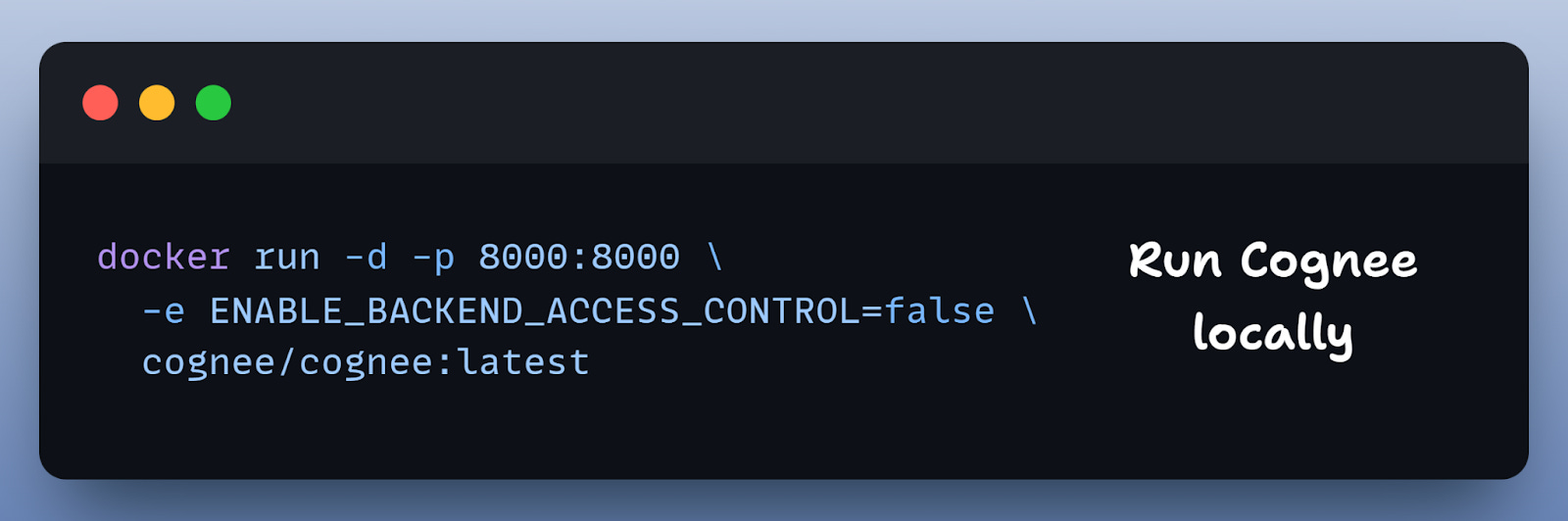
This starts Cognee locally on port 8000, perfect for local development.
Note: You can also use the minimal Docker Compose file provided by Cognee in their docs. I have shared the link at the end.
2) Install the plugin:
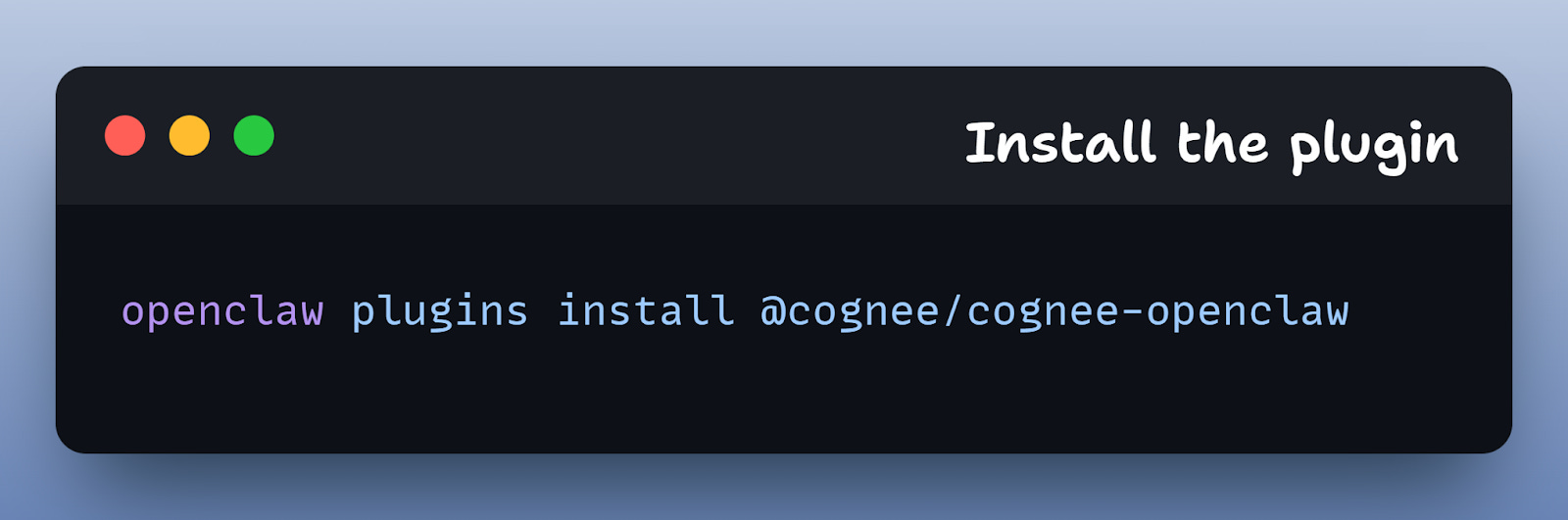
This adds the Cognee integration to OpenClaw.
3) Enable the plugin
Configure in ~/.openclaw/config.yaml:
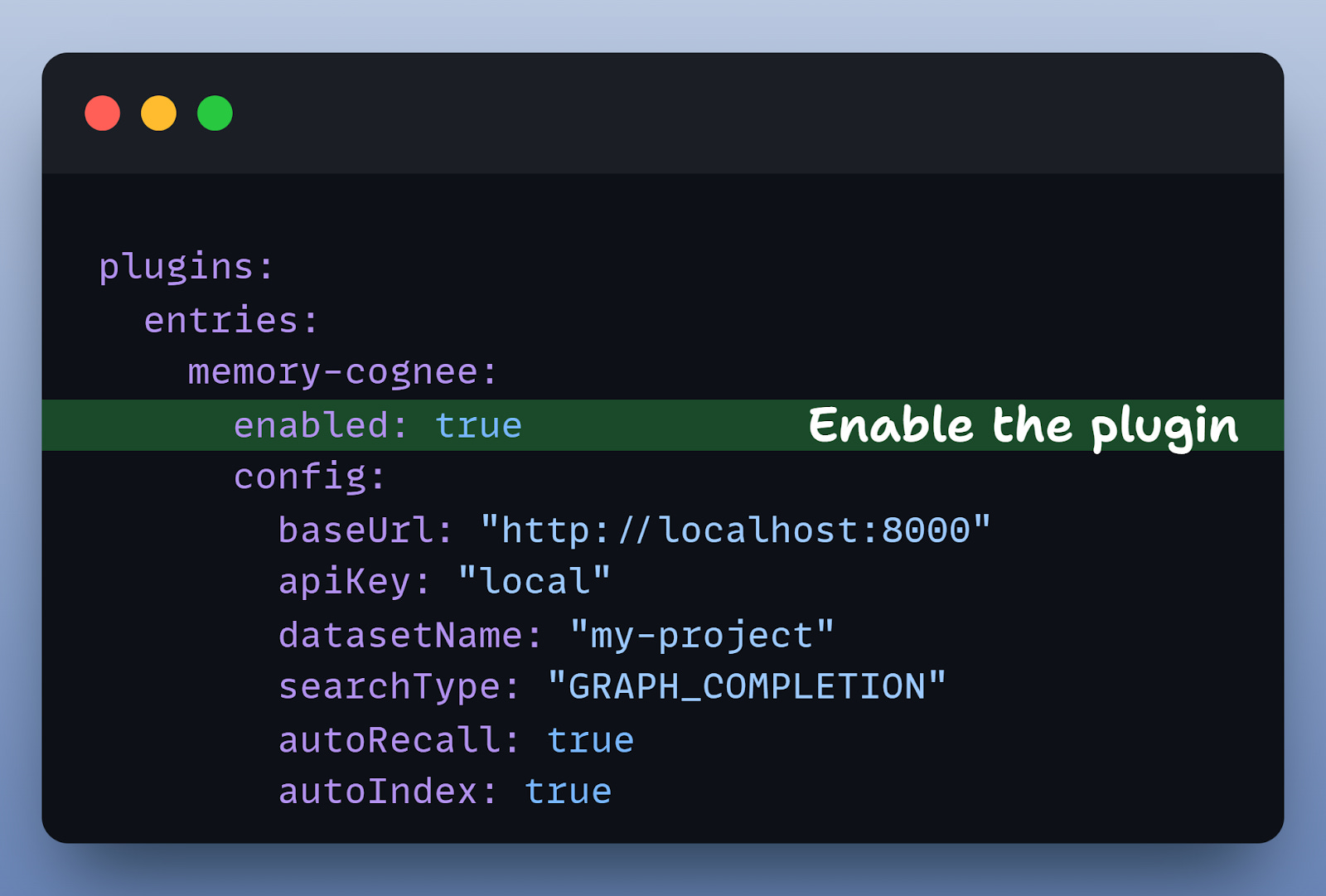
That’s it. Your OpenClaw memory files are now backed by Cognee’s knowledge graph.
What This Changes
Let’s revisit the Alice scenario with graph-backed memory:
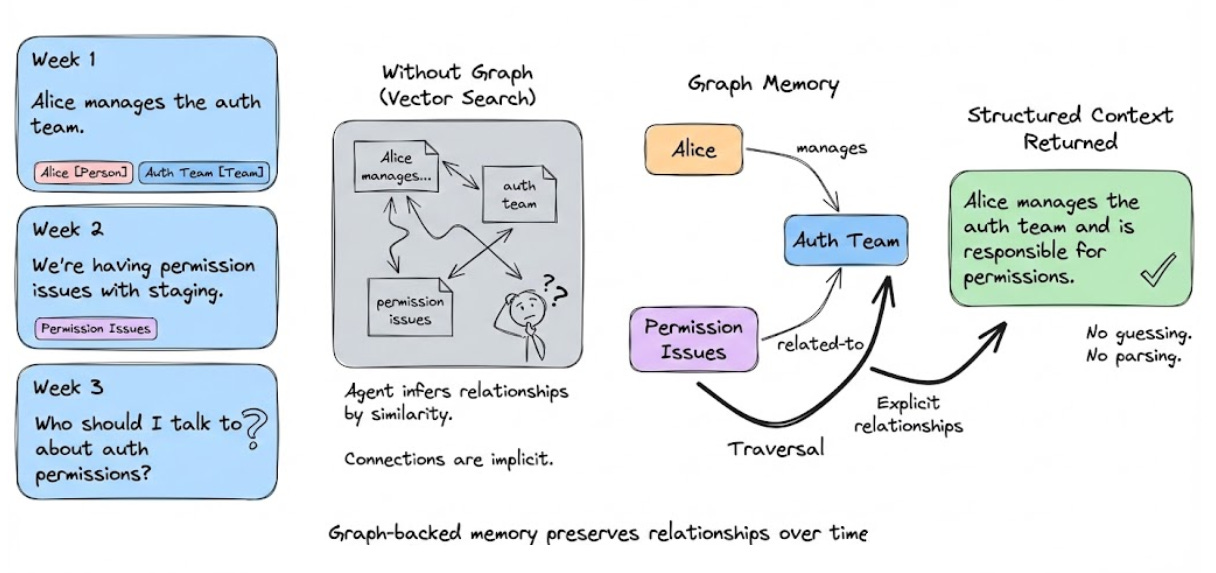
Week 1: You say “Alice manages the auth team.”
Cognee extracts: Alice [Person] --manages→ Auth Team [Team]
Week 2: “We’re having permission issues with staging.”
Cognee extracts: Permission Issues --related-to→ Auth Team
Week 3: You ask “Who should I talk to about auth permissions?”
Without the graph, OpenClaw searches for similar text and the agent parses through chunks to infer the connection.
With the graph, Cognee traverses: Auth Permissions --related-to→ Auth Team --managed-by→ Alice
The agent gets structured context: “Alice manages the auth team and is responsible for permissions.” The graph explicitly encodes the relationship.
The Bottom Line
OpenClaw’s Markdown-based memory is simple and transparent. But for complex, long-running projects where relationships matter, that simplicity has limits.
Vector search retrieves similar text. But it doesn’t understand that Alice manages auth, or that your crypto project is separate from your ML project, or that last month’s facts might be outdated.
Cognee adds a knowledge graph layer that captures these relationships.
The Markdown files stay exactly as they are.
The graph runs in the background, extracting structure and enabling smarter retrieval.
The plugin is open-source, installs with one command and syncs automatically.
If you’re running OpenClaw agents that need to remember more than similar keywords, it’s worth trying.
Thanks for reading!
Great diagnosis, especially the line that the problem is structure, not storage. One angle worth adding before reaching for a knowledge graph: a lot of the pain people blame on vector search is actually write-side and can be fixed much more cheaply. (I make ScallopBot, a self-hosted assistant, so take this as a builder's view.)
Three things that moved the needle for us, all without a graph layer:
First, hybrid retrieval. Embeddings alone miss names and exact phrases, so we run BM25 and vector search together with a rerank step, and we score-gate the result: if nothing clears the bar, the assistant says it does not know instead of confabulating. That alone kills a whole class of false memories.
Second, write-side discipline. Facts get extracted in the background after each message, deduped against what is already stored, and an old fact only gets overwritten when a classifier is confident the new one supersedes it and it does not contradict something else. Staleness is mostly an update problem, not a retrieval problem.
Third, time. Dates are embedded in the memory text and date-shaped questions are detected up front, so "when did X happen" does not go through similarity search at all.
A graph adds real value for relationship traversal, agreed. But if you skip the three basics first, the graph just inherits dirty data. More on how we structured ours here:
https://scallopbot.com/memory/