

Preloading knowledge into a model instead of retrieving it
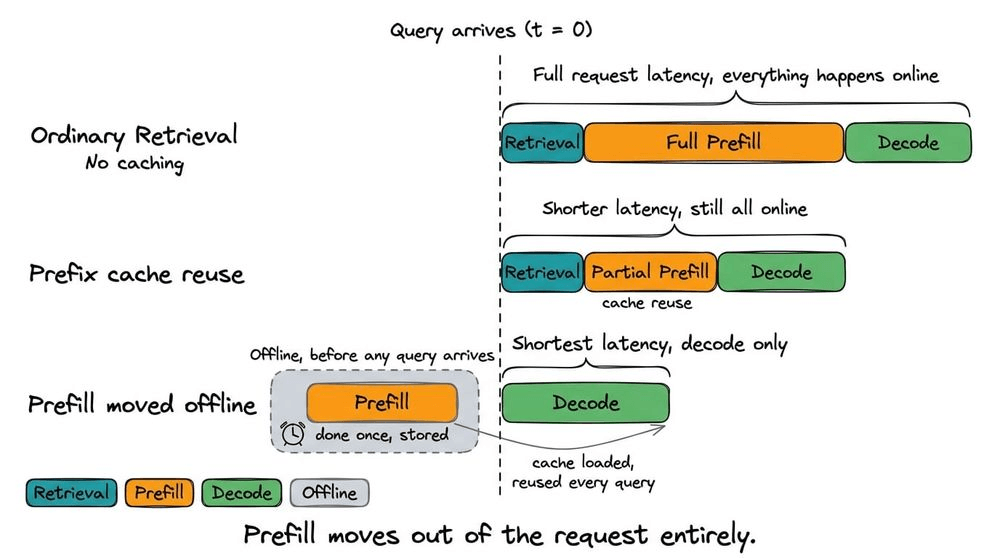
We have released three new parts in the RAG Systems course, all covering one idea: what if the model reads the knowledge base before any query arrives, and every request skips retrieval, chunking, and embedding entirely?
Part A on naive preloading, effective length, and provider economics here →
Part B on compressed preloading and query-agnostic requirement here →
Part C on modular preloading, trained preloading, and production deployment here →
The three parts cover:
Naive preloading and why the advertised context window is not the real context limit
Cost economics and the break-even math for both self-hosted and provider-hosted caching
Why most published KV cache compression methods fail for preloading
Modular preloading where each passage is cached independently
Trained preloading where the corpus is distilled into a compact cache through a training run
How to treat the cache as production infrastructure with storage tiers
When preloading is the wrong choice entirely
Hands-on experiments across all three parts.
Why care?
Every time a RAG system answers a question, it re-reads the same documents the model has likely already seen on earlier requests.
For instance, processing 16,000 input tokens with a 14B model on an NVIDIA L20 takes over 5.5 seconds before a single output token appears.

And prefill scales quadratically with input length, so doubling the context roughly quadruples the attention cost.
For production systems serving thousands of requests per hour against the same knowledge base, prefill is the dominant line item on the inference bill.
Preloading eliminates that line item.
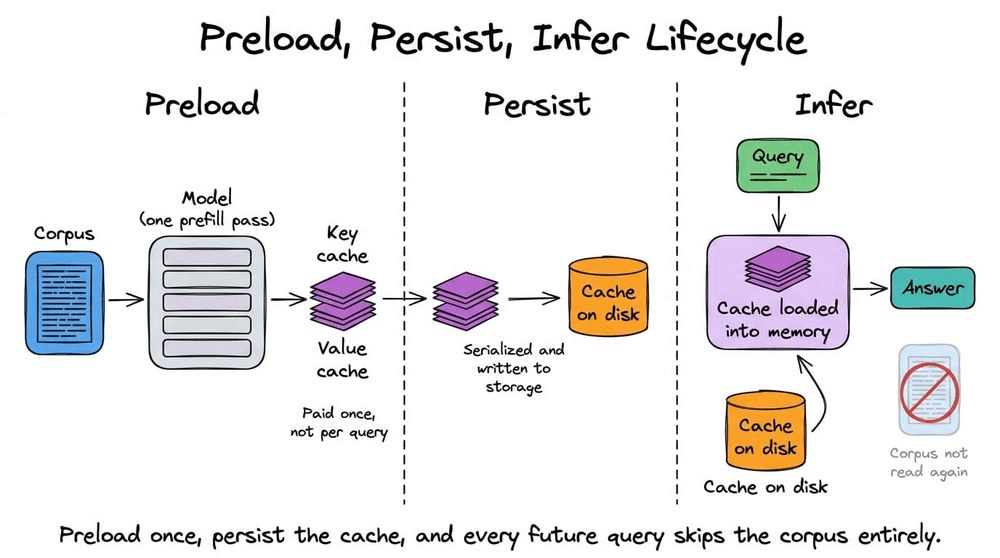
The model reads the corpus once, the resulting KV cache is stored, and every subsequent query skips straight to decoding.
Provider-side caching (Gemini, Claude) offers up to 90 percent reduction on input token costs.
And in self-hosted setups, the savings come from the GPU compute not done.
But preloading is not as simple as caching everything and forgetting about it.
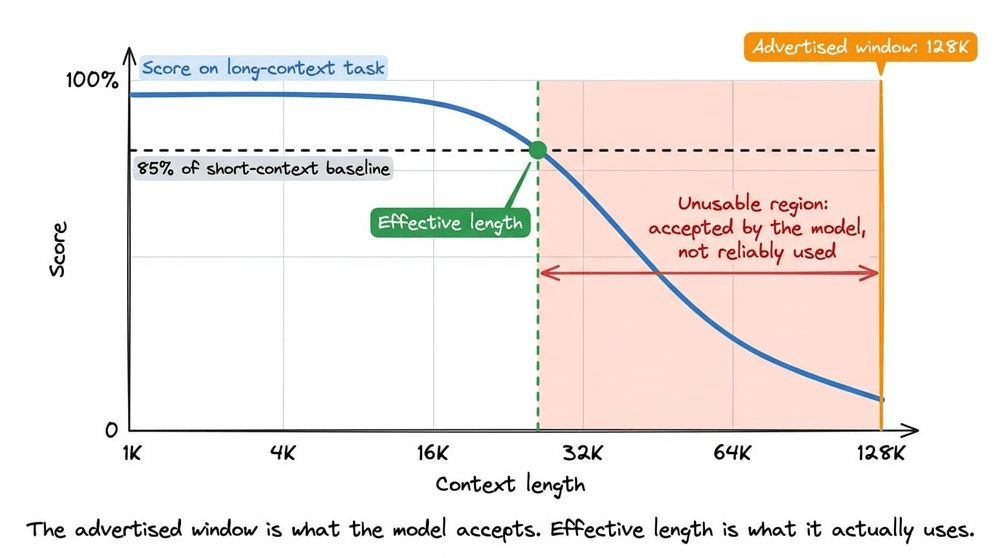
The advertised context window is not the usable context window. Models that accept 128K tokens can start degrading at 32K on tasks requiring inference rather than keyword matching.
And most published KV cache compression methods cannot be used for preloading at all, because they need the query at compression time, which defeats the entire point.
And modular caching, where each passage is stored independently, runs into the same cross-attention failures we covered in the KV cache reuse deep dive.
These are engineering constraints that determine whether preloading works for a given system, and they are the kind of thing that only surfaces after you have already built it.
These three parts cover the full spectrum so you can make that decision upfront.
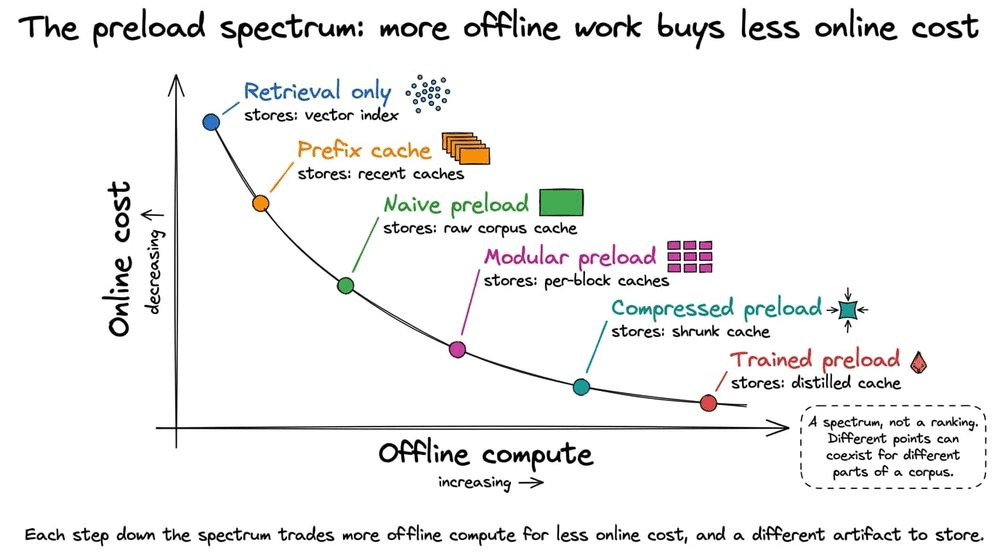
Part A: Naive preloading, effective length, and provider economics →
Part B: Compressed preloading and the query-agnostic requirement →
Part C: Modular preloading, trained preloading, and production deployment →
👉 Over to you: Is your RAG system re-reading the same documents on every request?
How to cut agent tokens by 2.7x (using an open harness)
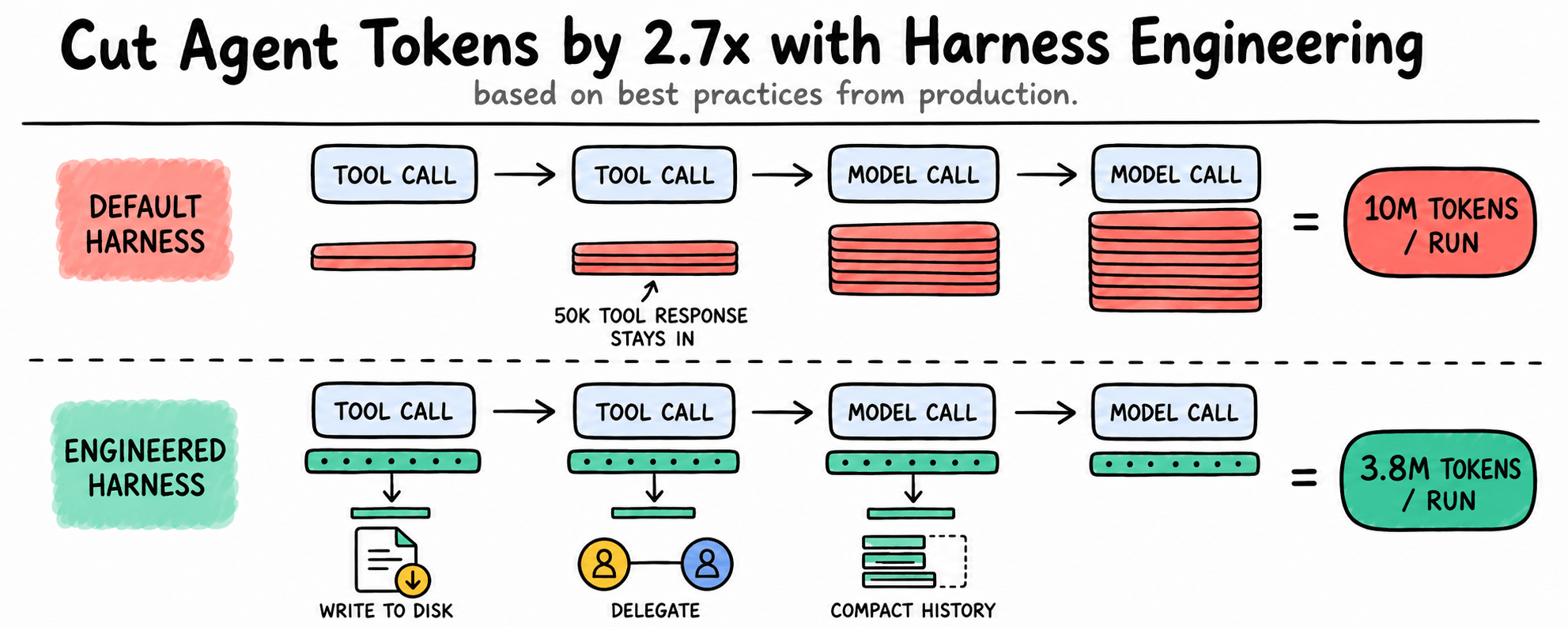
An agent run comes back correct, and costs more than the task looked like it should. The model did what you asked, so there is no obvious place to look for the difference.
The difference lies in the code wrapped around the model. That layer decides how much context the model sees, how often it gets called, which tools it can reach, and what carries from one step to the next. The usual name for it is the harness.
An agent that costs more than it should is rarely a model problem but rather a runtime problem.
LangChain showed how much room there is in that layer. They moved deepagents-cli from 52.8% to 66.5% on Terminal Bench 2.0 with the model pinned to gpt-5.2-codex, taking it from outside the top 30 to rank 5.
The model stayed the same, and the harness did the rest.
Capability improves that way, and so does cost, because the same decisions that control what the model reads also control how many times it reads it.
Today we’ll look at what a production harness owns, why two harnesses produce workloads this far apart, and how those decisions come together.
The objective of a harness beyond the execution loop
Anthropic’s documentation calls the SDK behind Claude Code an agent harness, and OpenAI’s Codex team uses the same term. Beyond the loop, a harness handles tool execution, context, memory, state persistence, errors, and permission.
Claude Code, Codex, and OpenCode assume a developer, a machine, and a terminal, which works when the person running the agent built it. Putting that agent in front of real users changes the problem.
A server restarts while a task is running
A sensitive action needs approval an hour later from a different device
Several users run the same agent at once
Conversations pick up where they left off without seeing another user’s state
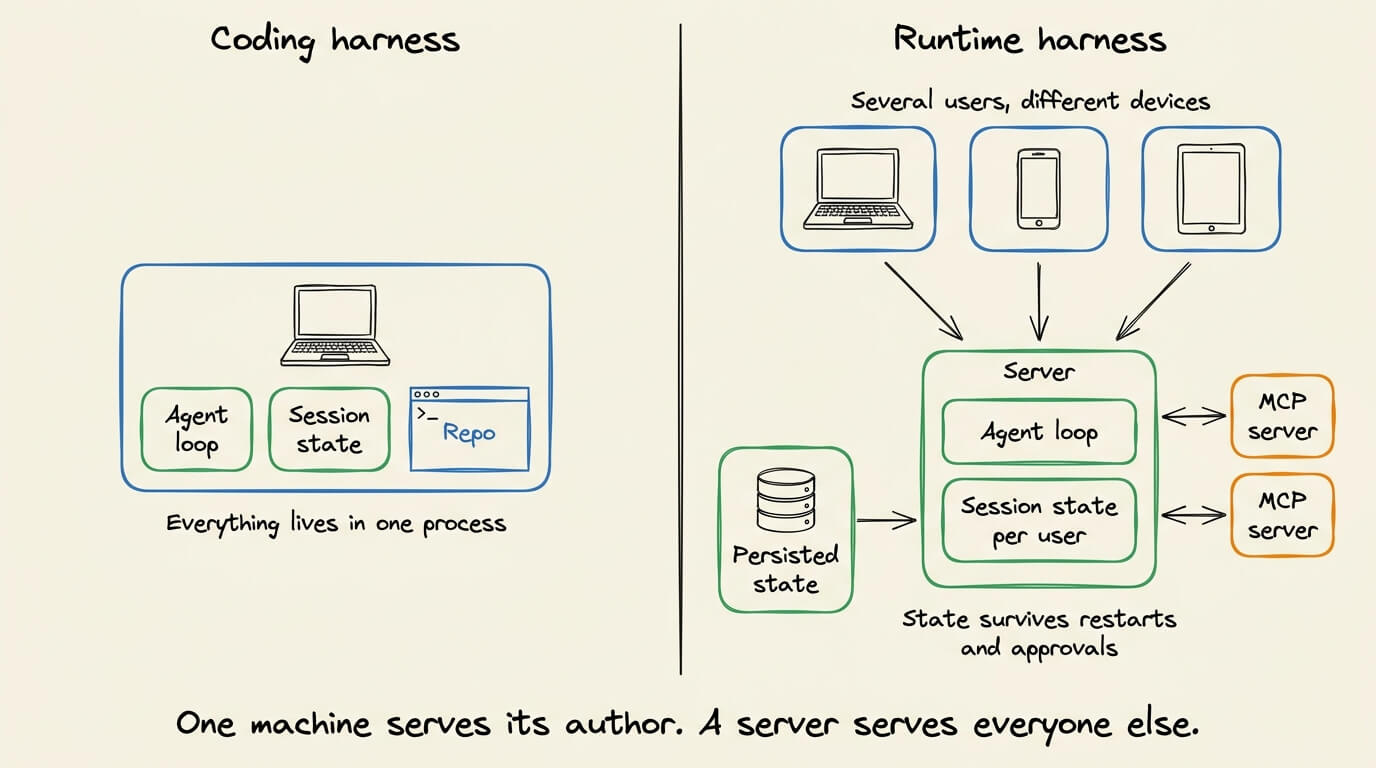
Production runtimes move concerns to the server, managing sessions, execution state, and concurrent users independently of the process running the agent.
The harness starts affecting cost here, deciding what survives between runs and what gets sent to the model again. The model does the work. The harness decides how that work runs.
Why the same task can cost three times more
A tool returns a 50,000-token JSON payload at step four. Nothing removes it from the conversation, so by step nineteen the model has read those fifteen more times.
That is 800,000 input tokens for one tool response, all billed at input rates.
Tool definitions do the same. Each carries a name, description, and input-output schema, so MCP servers fill a large part of every prompt before the actual work.
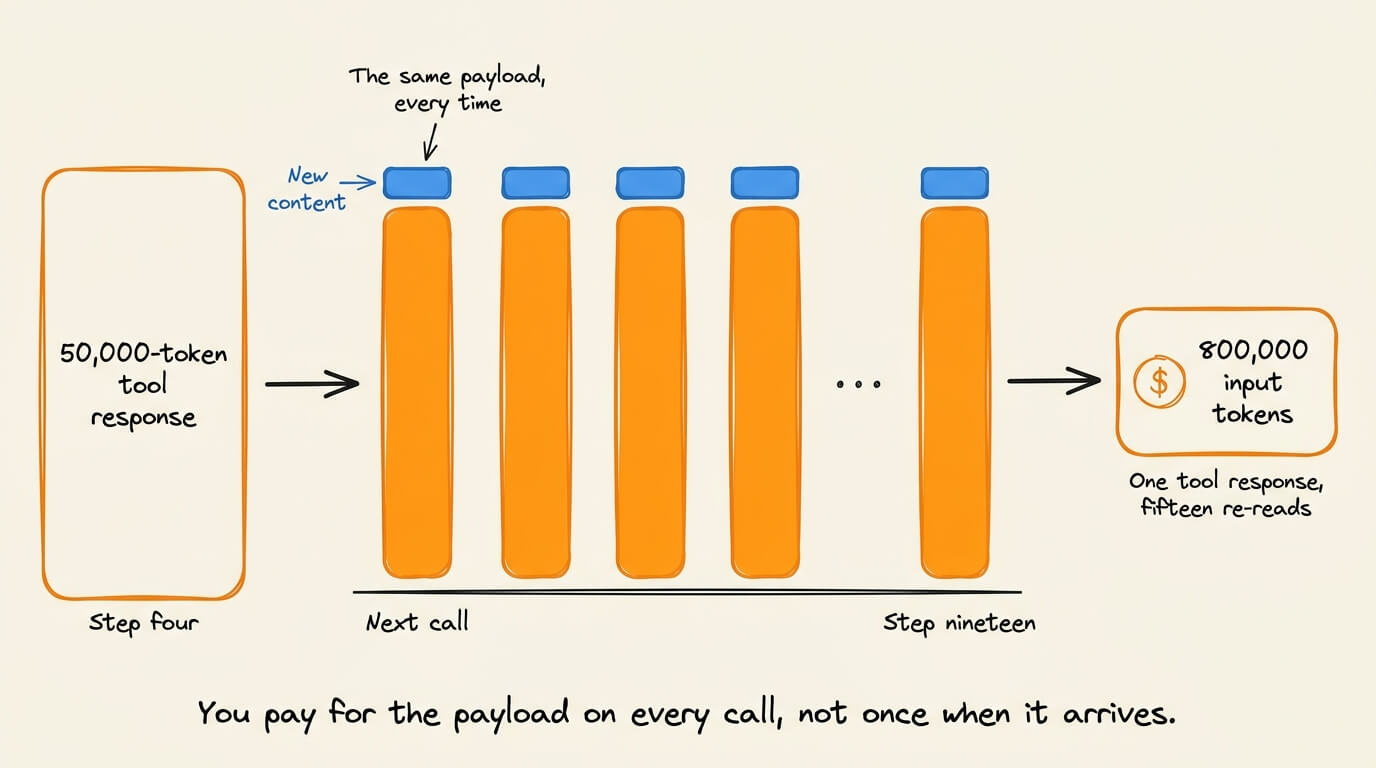
A larger context window does not help. You pay on every model call, not once when you assemble the context.
Context is one lever. The other is how often the harness calls the model. Every tool round trip creates another call, planning, verification, and reflection on top.
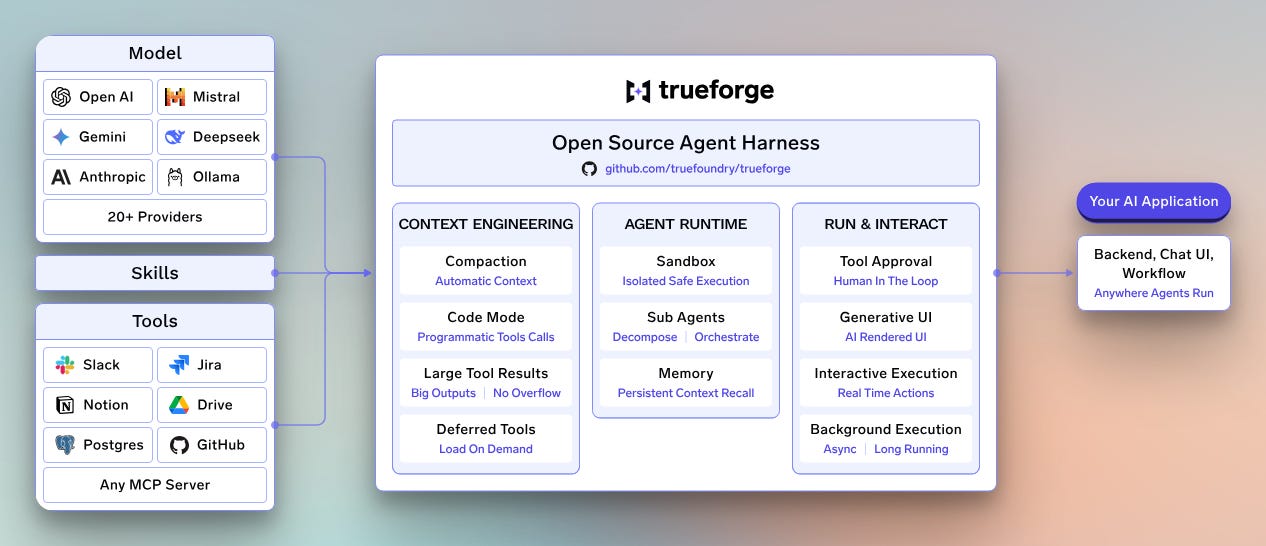
TrueFoundry’s open harness, TrueForge, works both levers. It splits context into what the model needs at the start and what accumulates while it executes.
What TrueForge loads before the run starts
TrueForge keeps skills and tool definitions lightweight at startup, then loads details when the agent needs them.
Skills are git-backed SKILL.md packs. The agent starts with the name & description and reads the body from the sandbox only when the skill is relevant.
Tool definitions default to deferred. With preload set to false, the agent starts with the MCP server’s name and description instead of every schema, then discovers what it needs through four calls:
list_toolsreturns the tool names available on a given MCP server.get_tool_inforeturns one tool’s description with its input-output schema.get_tool_output_schemareturns the output shape alone, read before writing a Code Mode script so the agent isn’t guessing keys from raw JSON.call_toolinvokes a tool on a server by name once the agent knows its need.
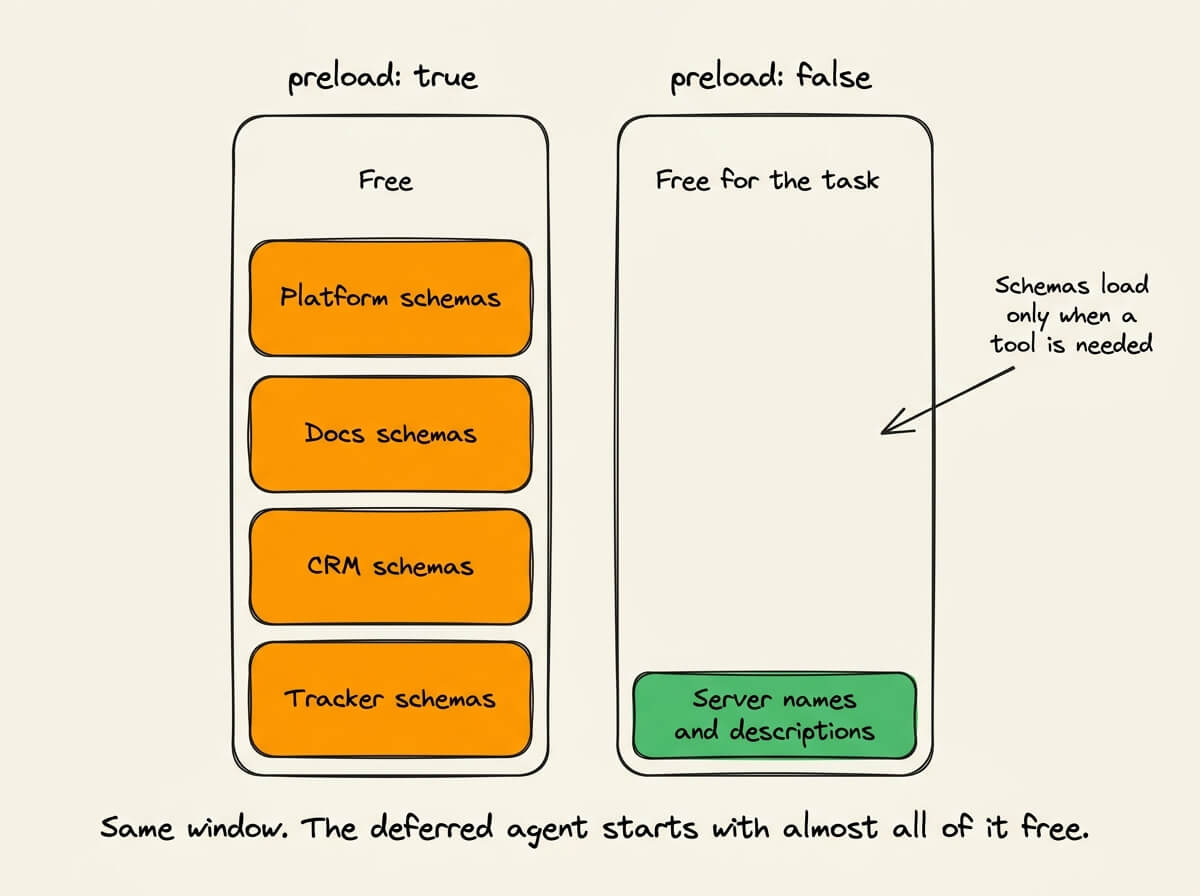
If an internal platform server exposes 100 tools and the agent uses two, the other 98 never enter the prompt.
The bottom line is load what the run needs, not everything the system supports.
What happens during the run
Take a support question that needs information from several systems.
Which accounts have the most open tickets right now, and what are they about?
That means querying an issue tracker, matching tickets to accounts in a CRM, and reading documents. The tool calls are manageable, but the data return is not.
Large tool responses go to disk
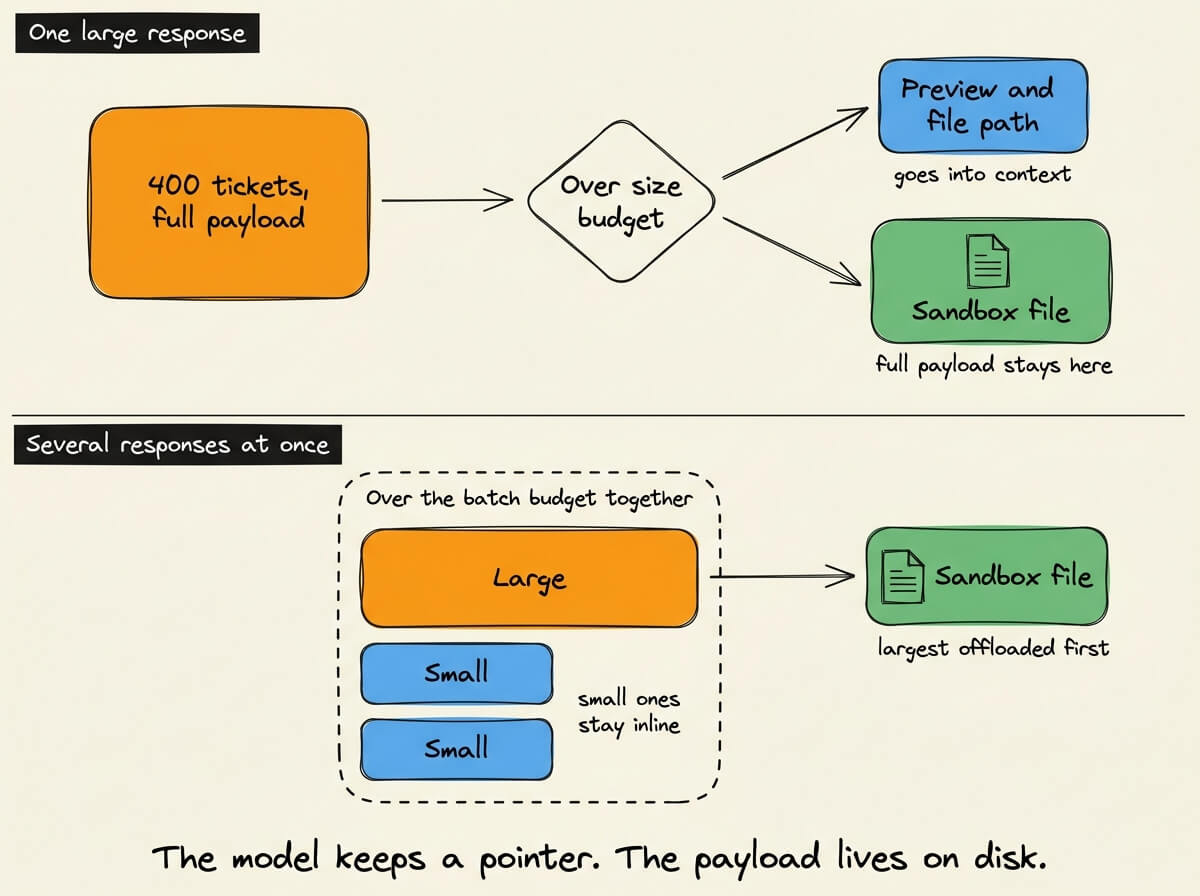
Suppose the tracker returns 400 open tickets, each with a title, description, comments, labels, assignee, and timestamps. The agent needs the account ID and subject line, and the rest rides into every following model call.
TrueForge writes large responses to a sandbox file, keeping a short preview and the path in context. The agent reads/parses that file when it needs the full result.
Parallel calls create another case. If several responses return together and cross the context budget, TrueForge offloads the largest first until the batch fits.
Subagents keep intermediate data out of the root context
Now suppose twelve accounts come back, each needing its own lookups.
The root agent can work through them one by one, carrying every lookup and raw record in its own context. Or it creates a subagent per account.
Each subagent works in its own context and returns a short summary, so the root sees twelve summaries instead of twelve accounts’ worth of raw records.
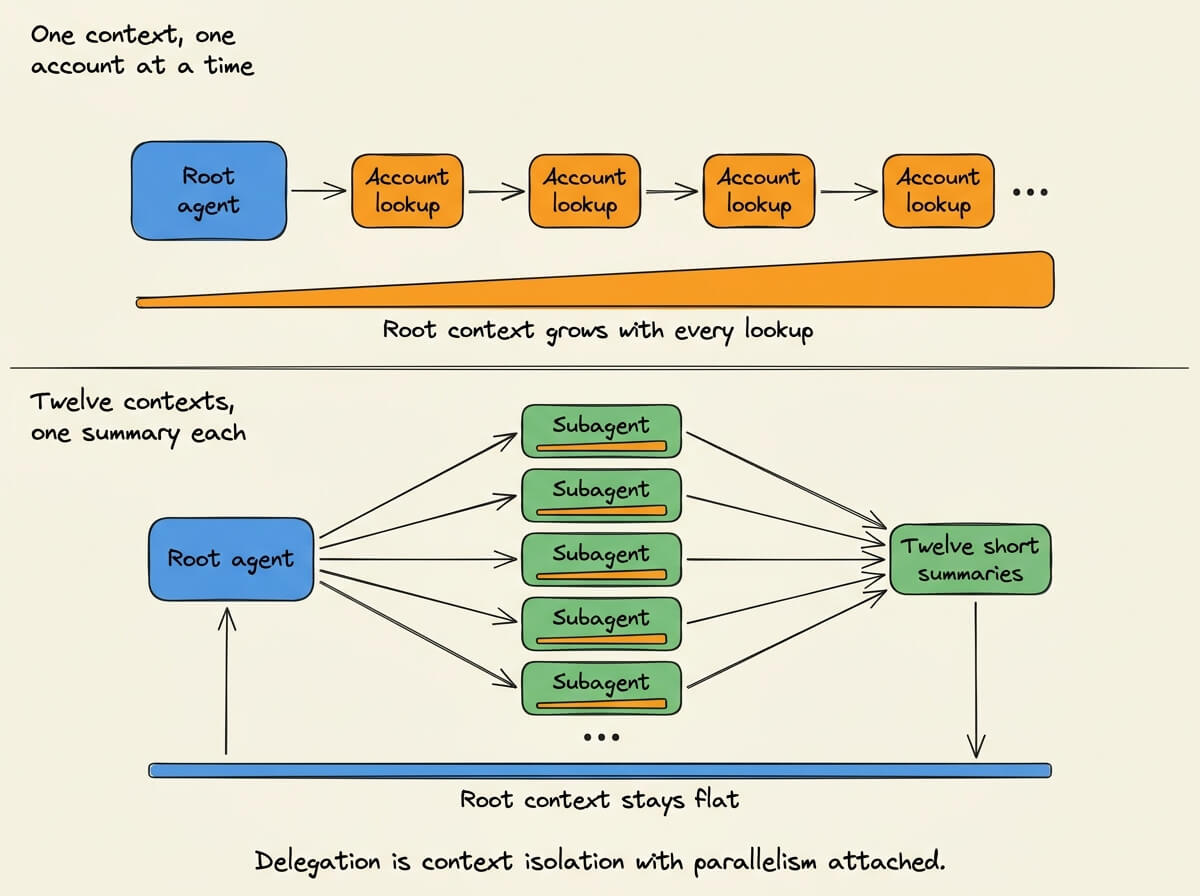
That is context isolation on top of parallel execution.
Code Mode collapses tool chains into one script
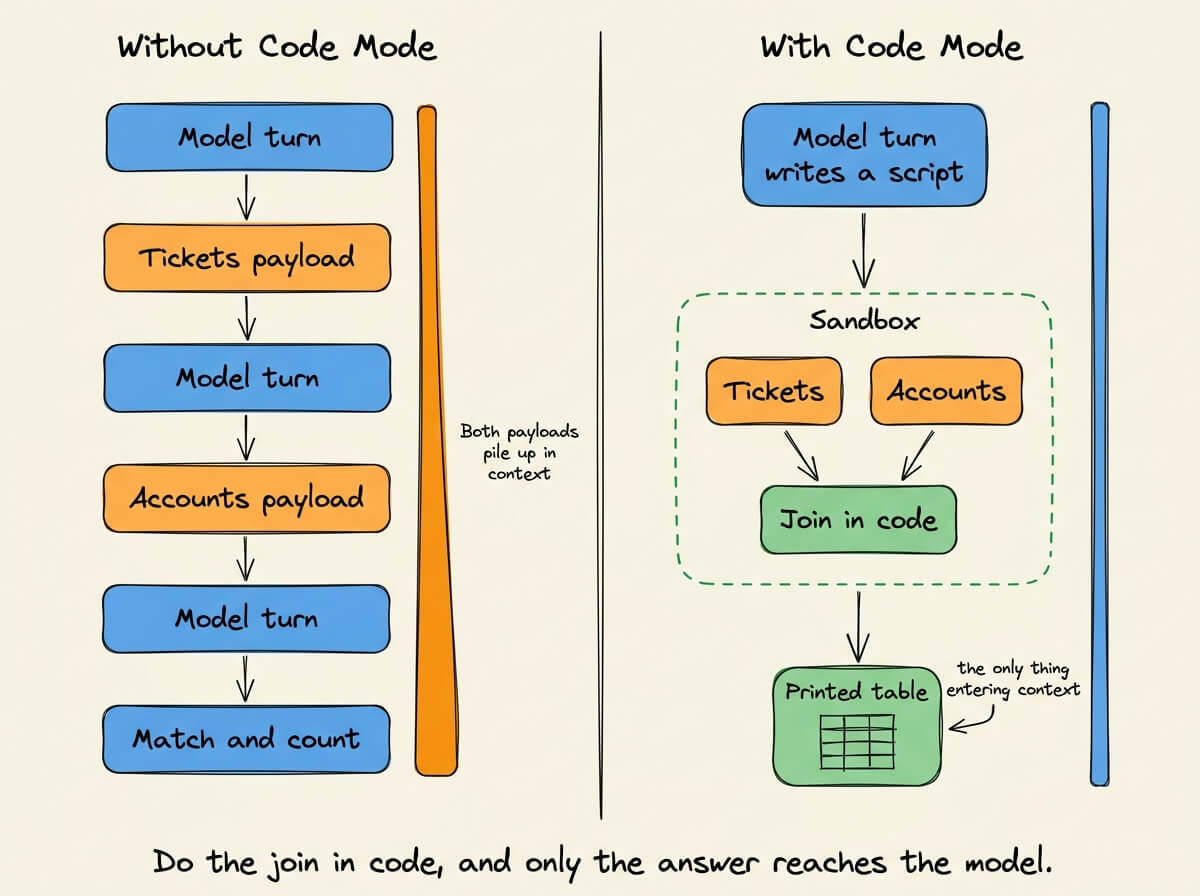
Counting tickets per account is a data join.
Without Code Mode, the agent pulls both sets, brings them into context, matches the IDs, and counts across several model runs.
With Code Mode, it writes a Python script that calls both tools, joins them in code, and prints the table. The IDs stay inside the script instead of passing through a model run, and only the output enters context.
Compaction summarizes history past 50,000 tokens
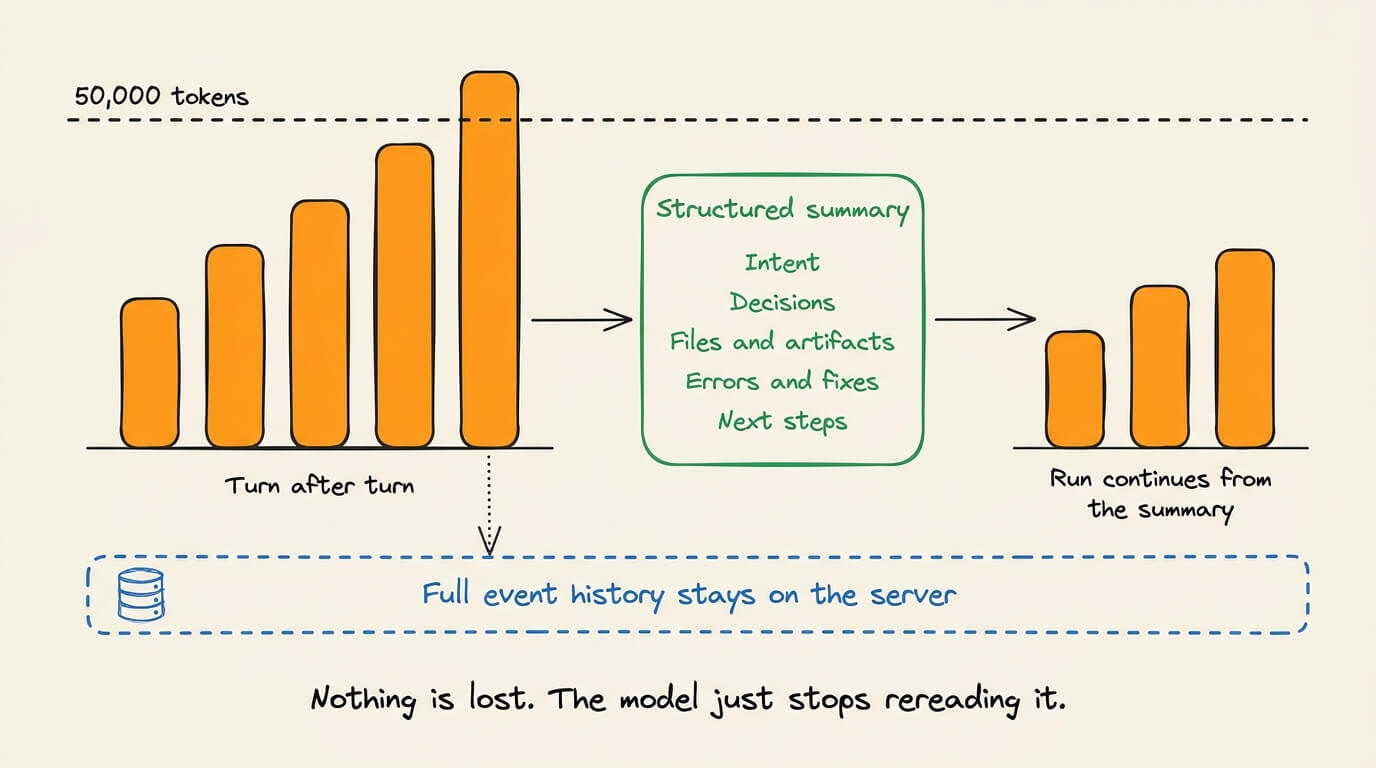
The first three control what enters context during the run. Compaction handles the case where the conversation itself becomes the payload.
Past the default 50,000-token threshold, TrueForge writes a structured summary of the intent, decisions, files and artifacts, errors and fixes, and next steps, and that replaces the older messages. The full event history stays on the server.
The four strategies in a single run
A single run can use all four, and they reduce model workload in different ways:
Offloading and compaction cut the context carried forward
Subagents move intermediate work into separate contexts
Code Mode removes multi-tool data processing from the model loop
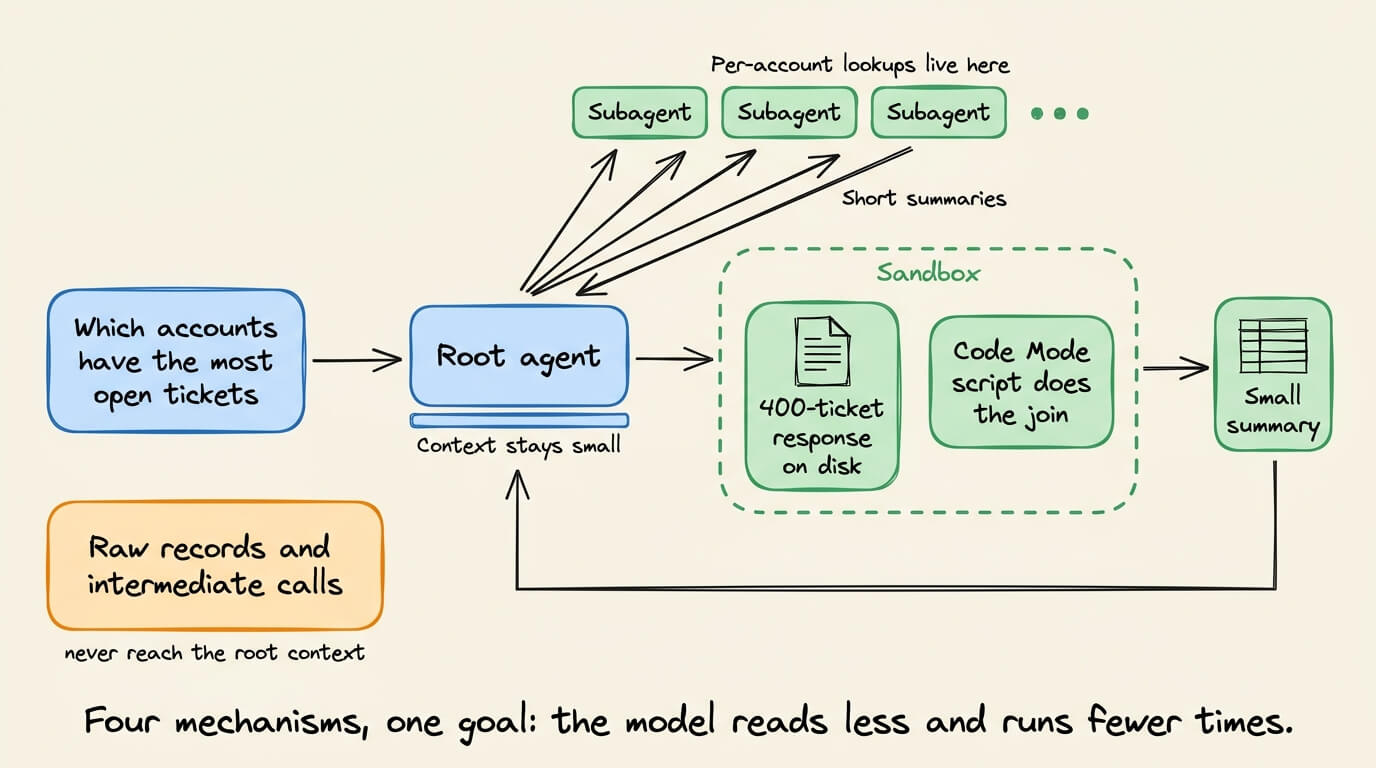
The runtime controls both things we started with: what the model reads and how many times it works through it.
Why the sandbox never holds your credentials
Reducing context helps only if the runtime can safely let the agent touch real systems.
Running generated code in a sandbox is the usual isolation. But a sandbox holding the model’s API keys and MCP credentials gives that code the same secrets as the harness.
TrueForge separates them. The harness and its credentials stay on the server, and the sandbox handles code, files, and shell.
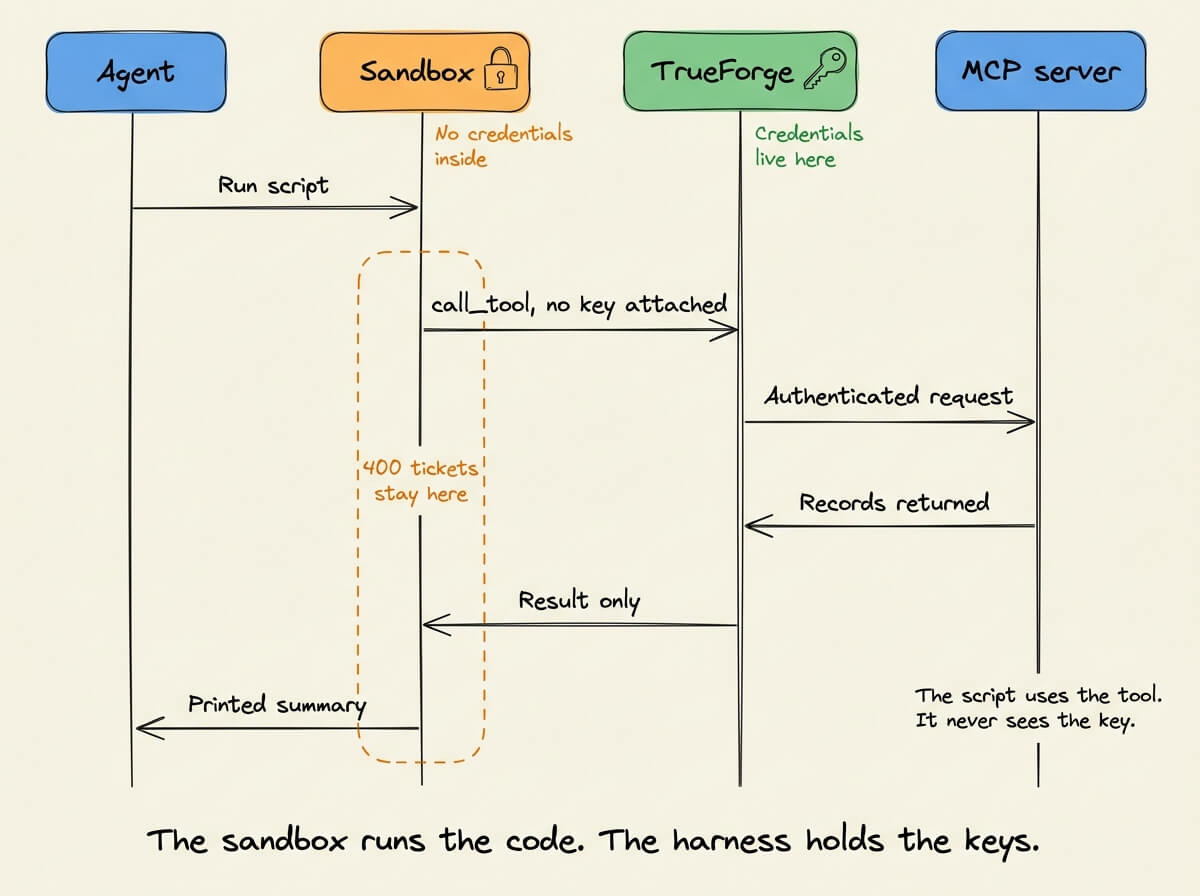
When a Code Mode script calls call_tool, the request routes back through the harness, which applies the stored credentials, calls the MCP server, and returns the result to the sandbox.
import asyncio
from collections import Counter
from mcp_client import call_tool

async def main():
    tickets = await call_tool(
        “tracker”,
        “search_issues”,
        body={”status”: “open”, “limit”: 500},
    )
    accounts = await call_tool(
        “crm”,
        “query_records”,
        body={”object”: “Account”, “fields”: [”id”, “name”]},
    )

    names = {a[”id”]: a[”name”] for a in accounts[”records”]}
    counts = Counter(t[”account_id”] for t in tickets[”issues”])

    for account_id, count in counts.most_common(10):
        print(f”{names.get(account_id, account_id):<28} {count:>4}”)

asyncio.run(main())
The 400 tickets and the account records stay in the sandbox, and the script never receives the credential that authenticates it.
Approvals apply here too. A script invoking a gated tool pauses for approval, so Code Mode is not a backdoor around the permission model.
What it takes to build this yourself
None of these strategies is complicated in isolation. The production behavior is what takes longer:
Offloading has to decide which of several parallel responses to remove first.
Code Mode has to let generated code call MCP tools without ever receiving their credentials.
Deferred loading has to expose a tool’s output shape without loading the entire schema.
The same pattern continues underneath the agent. Production runtime needs sessions that survive restarts, streams clients that can rejoin, approvals that stay pending, credentials you can refresh without exposing them to generated code, and accounting per model message to show where the workload came from.
Describing a single optimization is easy. Making them work together, safely and predictably, is the runtime engineering.
Adopting an open harness
So you adopt a runtime instead of building one. The next question is how much control you have over it.
With a closed harness, the layer deciding what context reaches the model, which tools it calls, and how often it runs is code you cannot inspect or change. When a run behaves strangely, you see the result and not the machinery producing it.
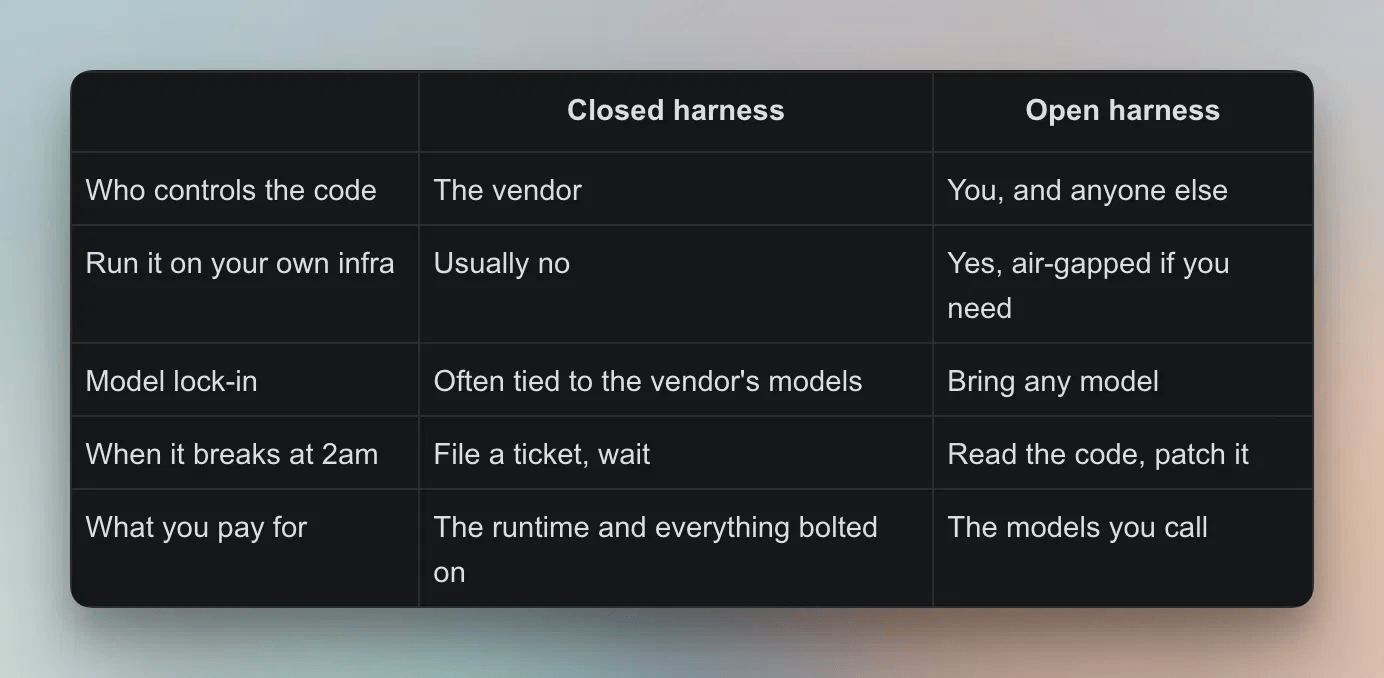
TrueForge is MIT licensed and self-hostable. You can read how it manages context, loads tools, and controls execution, and change that behavior when the defaults do not fit. Self-hosting also keeps the data in your environment.
The benchmark that follows puts the difference into numbers.
Benchmarks
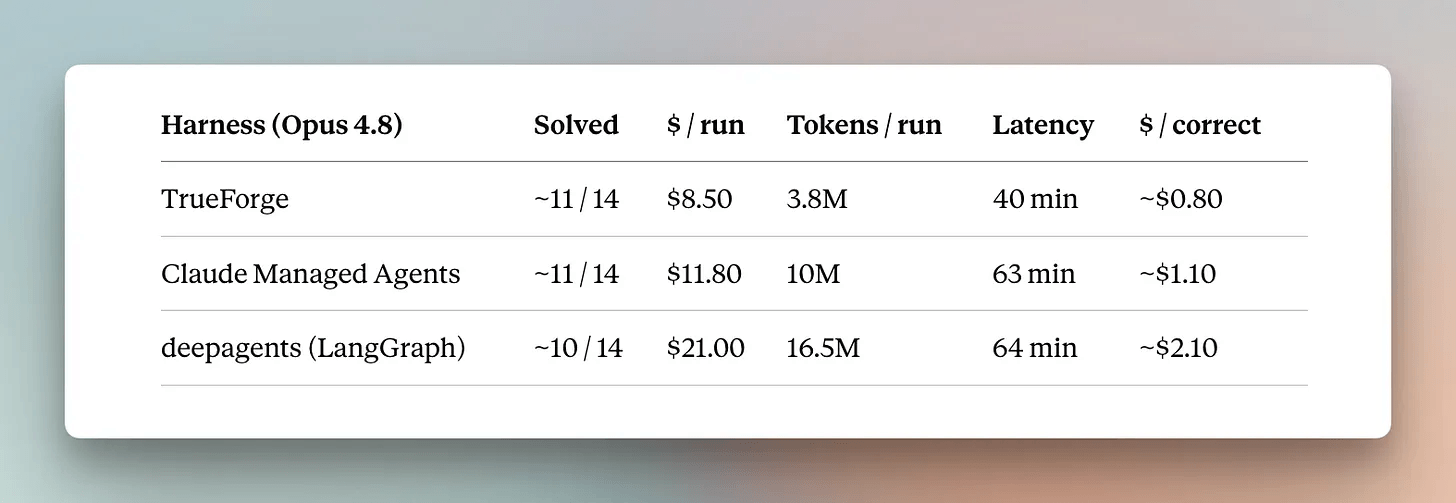
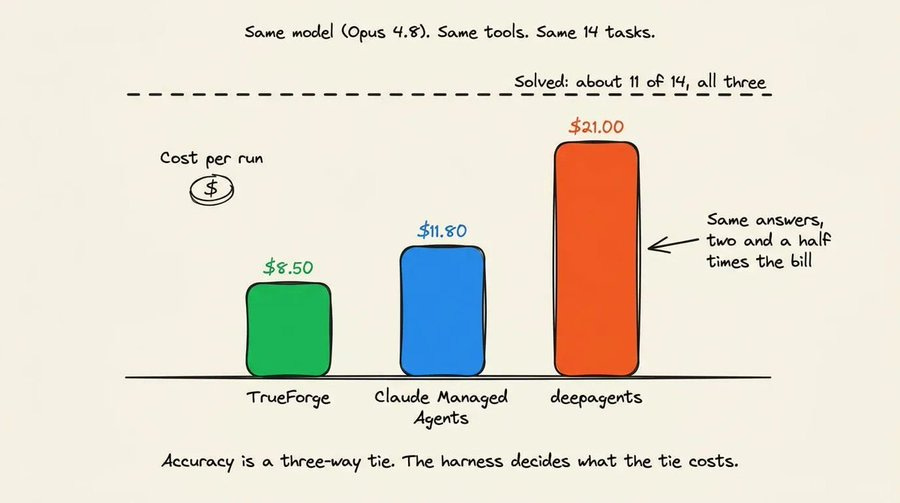
TrueForge is tested against Claude Managed Agents and deepagents on 14 tasks from DevRev’s Enterprise-Bench, pulling from a Jira-style tracker, a Salesforce-style CRM, and a Drive-style document store, all exposed through MCP servers.
Each runtime got the same model, tools, and a fresh session per task. An LLM judge scores answers against the criteria without knowing which harness produced it, and a task counts as solved only if it meets every one.
Starting with task success, where it is a three-way tie. Across 14 tasks, a one-task difference does not show that one harness solves tasks better.
The difference worth reading is how much work each harness did to get there.
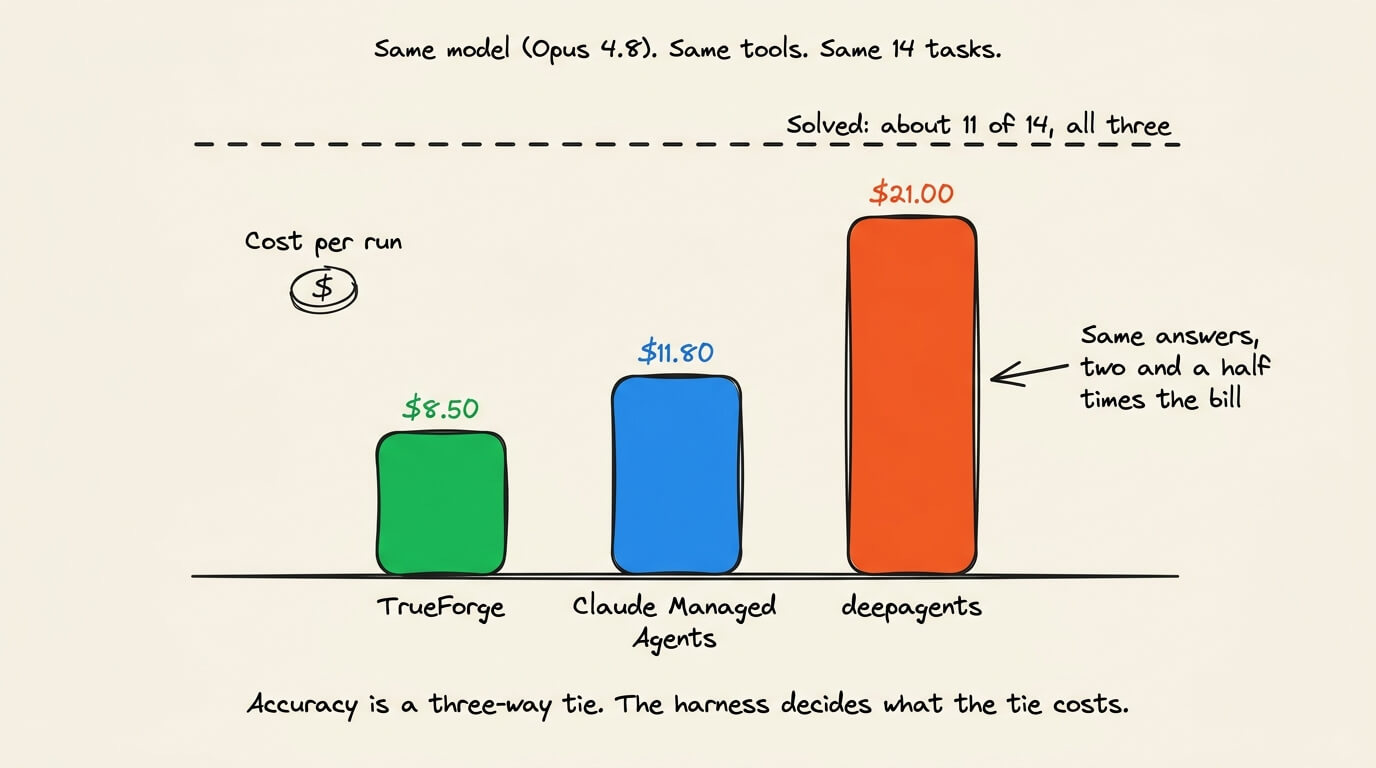
TrueForge reached the same answers on about 40% of Claude Managed Agents’ tokens and under a quarter of deepagents’.
It also finished faster, at 40 minutes per run against 63 and 64.
The gap comes down to how much each harness carries. TrueForge drives from a compact instruction, plans fewer tool calls, and trims history. The deepagents library carries planning, a virtual filesystem, and a subagent on every turn.
Changing the model is the other lever. TrueForge with GLM-5.2 solved roughly the same number of tasks at 75% lower cost than Claude Agents on Opus 4.8.
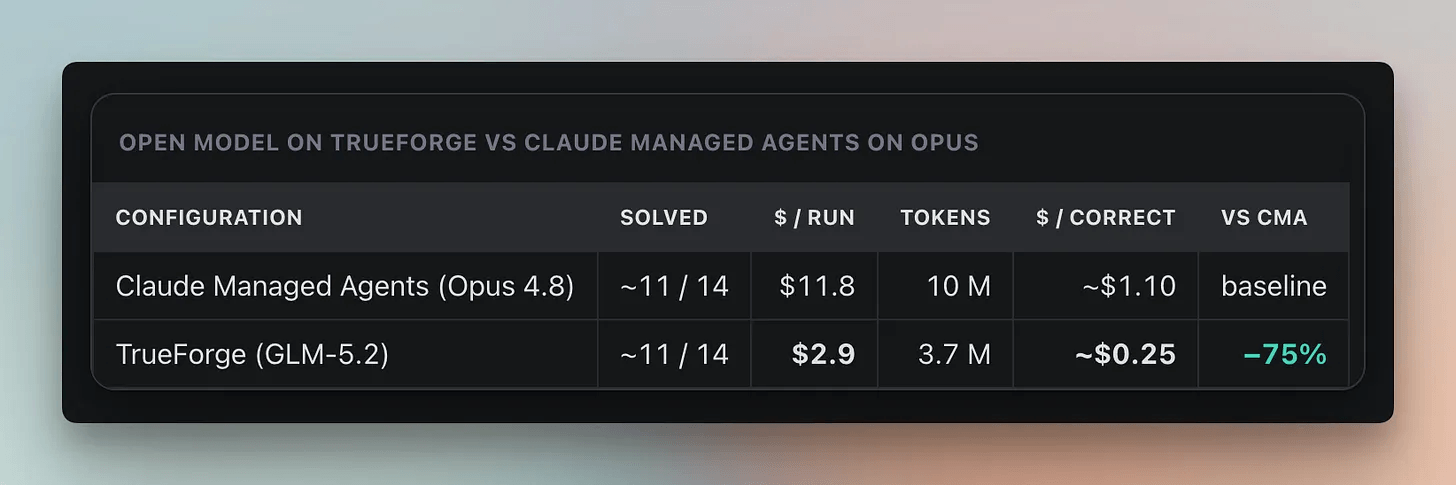
The benchmark harness, system prompt, and grader are all open-source, so you can run the same setup against your own models and datasets.
TrueFoundry’s full agent-harness benchmark →
What it already runs
TrueForge runs AskTFY, the copilot inside TrueFoundry’s AI Gateway, where it works across production traces to investigate failures and surface patterns.
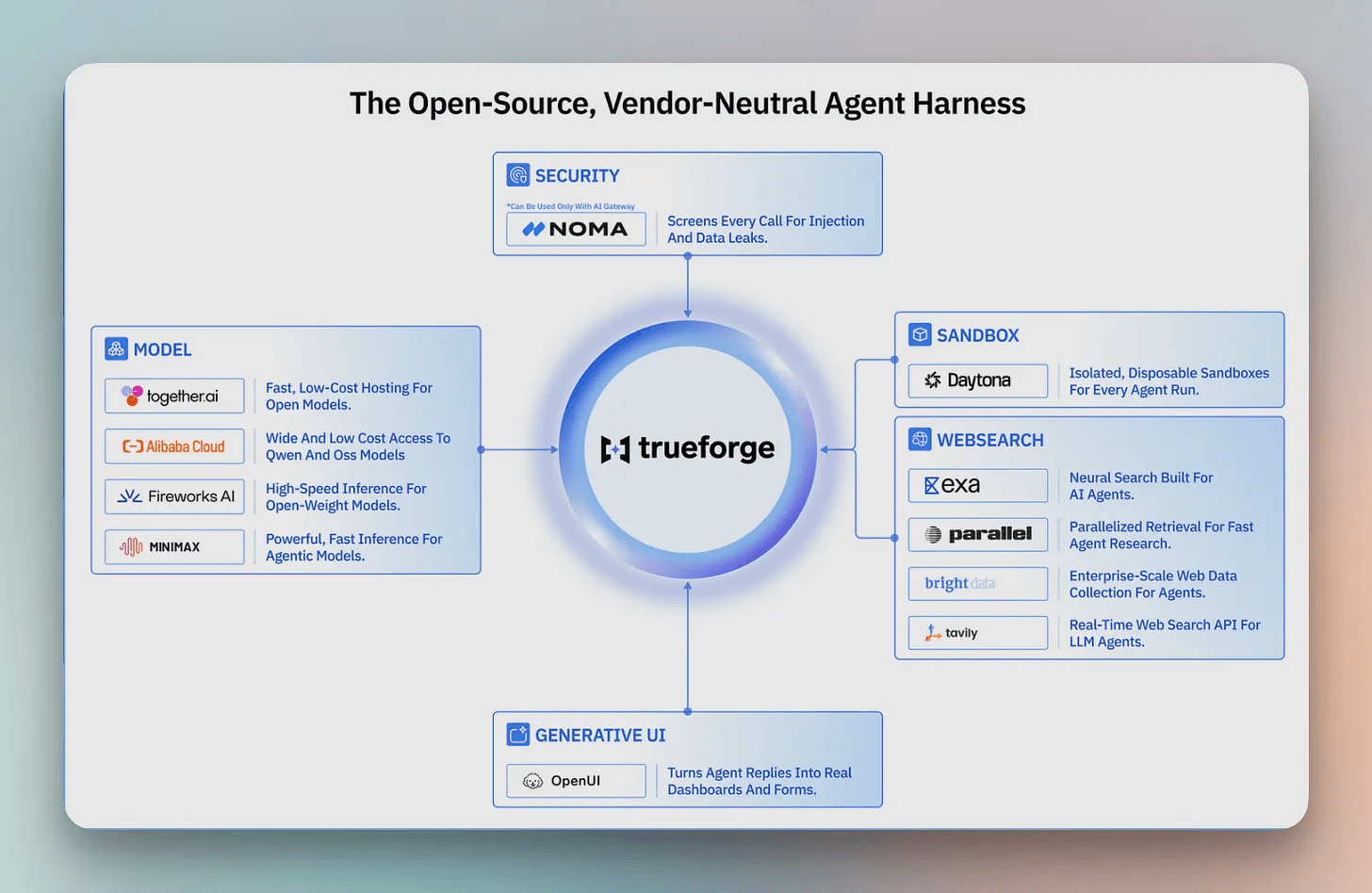
NetApp and Automatiq are building agents on it too, with Daytona supplying the sandbox and search, inference, and guardrail providers plugging in around it. The harness is the execution layer, and the systems around it change underneath.
Running it on your machine
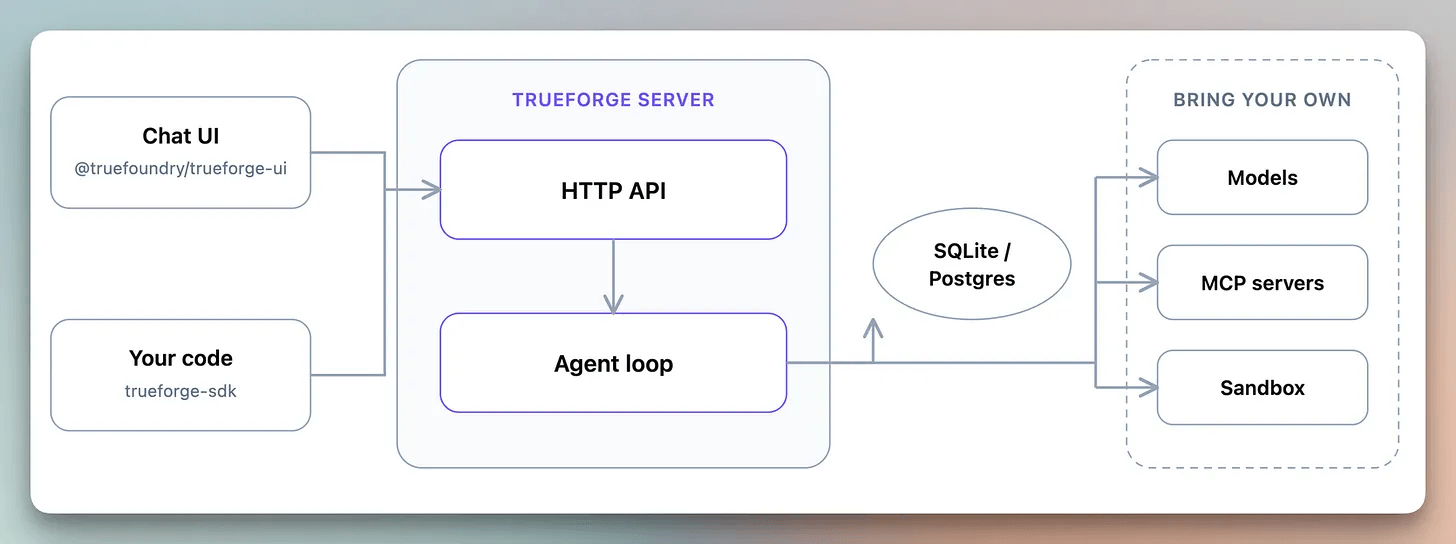
TrueForge runs locally as a single process on SQLite. The only requirement is Node 22.13 or newer.
npx @truefoundry/trueforgeOpen http://localhost:8790 and configure the runtime once in Settings, after which every agent reuses it.
Local mode has no login, so keep it on your own machine. To serve multiple users, run the same runtime in hosted mode, backed by Postgres and Redis and deployed through Docker Compose or Helm.
Add your model provider under Settings → Models, connect MCP servers under Connectors, and add a Daytona key under Sandbox providers for sandboxed code execution, file offloading, and skills.
Then create an agent. Choose the model, attach connectors and skills, add instructions, and save it to the library.
The chat UI is the fastest way in, but the deeper controls live in the agent spec, and everything runs through the API and SDK. You can build agents into your own product or theme the UI into a branded interface backed by your server.
Conclusion and final takeaway
Two harnesses ran the same model on the same 14 tasks and landed within a task of each other. One spent 2.7× the tokens.
That difference came from what each runtime put in front of the model on every run. You either make those decisions deliberately or inherit them by default.
Harness complexity shrinks as models improve. Manus was rebuilt five times, each pass deleting machinery the model no longer needed, and Anthropic has removed planning steps from Claude Code as newer models internalize them.
Some parts are harder to replace. A better reasoning model cannot stop the harness from sending a 50,000-token payload sixteen times.
That makes the harness worth engineering on purpose. The models will keep changing, and the runtime will still decide what each one sees, how often it runs, and what carries forward.
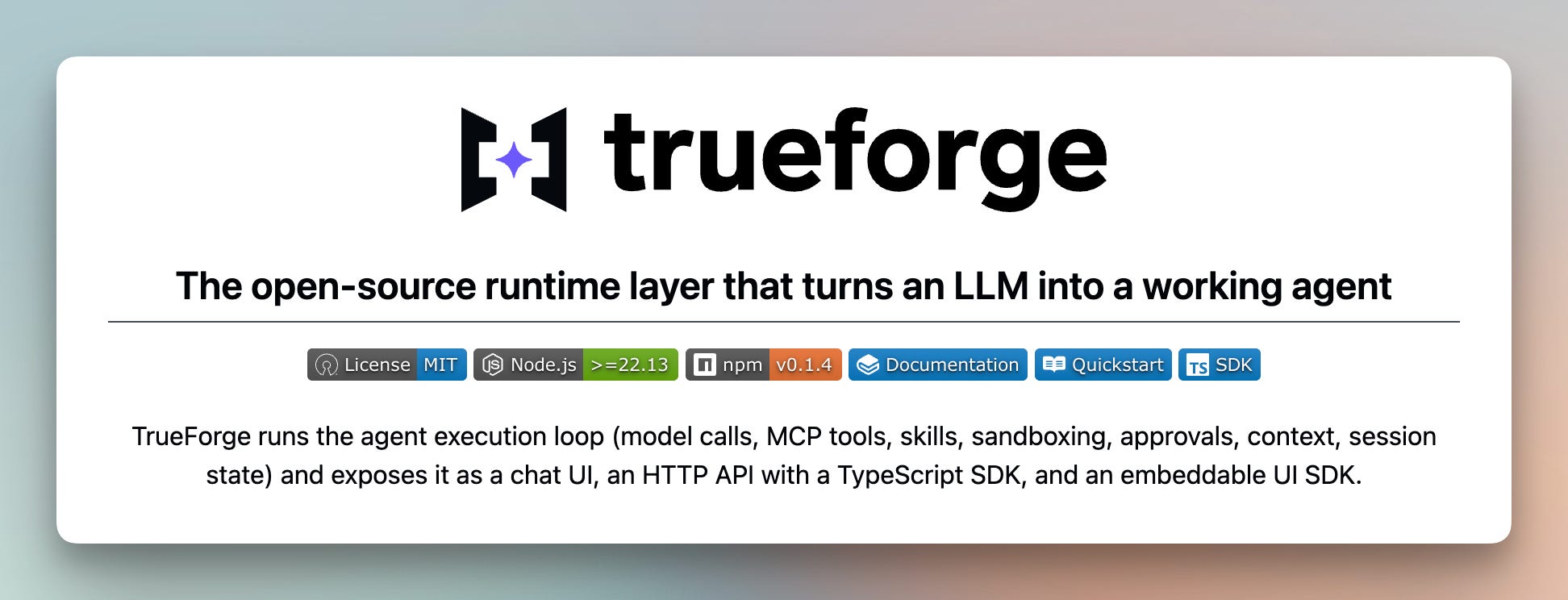
Check out TrueForge (MIT licensed) on GitHub →
Explore the documentation and quickstart →
👉 Over to you: when an agent run costs more than you expected, do you check the model first or the trace first?
Thanks to TrueFoundry for working with us on this issue!