

MaxClaw: One-Click OpenClaw Agents with zero infra headaches
OpenClaw involves a ton of setup, including Node.js setup, Docker configs, WebSocket debugging, and channel integrations that often break on updates.
MiniMax recently launched MaxClaw to eliminate all of that.

It’s a cloud-hosted version of OpenClaw powered by MiniMax M2.5.
Just click on “Deploy Now” and within ~10 seconds, it gives a live agent running 24/7 across Telegram, WhatsApp, Slack, or Discord with no server provisioning or API keys to manage.
The thing we have specifically liked about it is that it also ships with 10,000+ pre-configured Experts, which are like ready-to-use agent workflows for content, research, coding, and more.
Prompt caching in LLMs!
Every time an AI agent takes a step, it sends the entire conversation history back to the LLM.
That includes the system instructions, the tool definitions, and the project context it already processed three turns ago. All of it gets re-read, re-processed, and re-billed on every single turn.
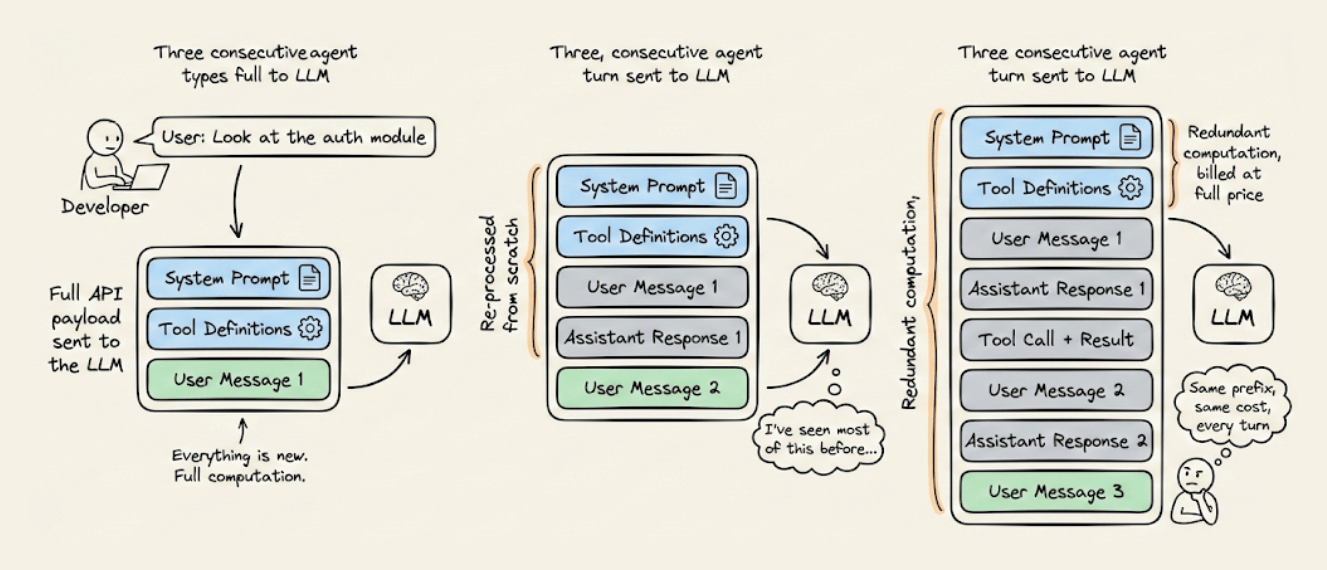
For long-running agentic workflows, this redundant computation is often the most expensive line item in your entire AI infrastructure.
A system prompt with 20,000 tokens running over 50 turns means 1 million tokens of redundant computation billed at full price, producing zero new value. And that cost compounds across every user and every session.
The fix is prompt caching. But to use it well, you need to understand what’s actually happening under the hood.
Static vs. Dynamic context
Before you can optimize a prompt, you need to understand what changes and what doesn’t.
Every agent request has two fundamentally different parts:
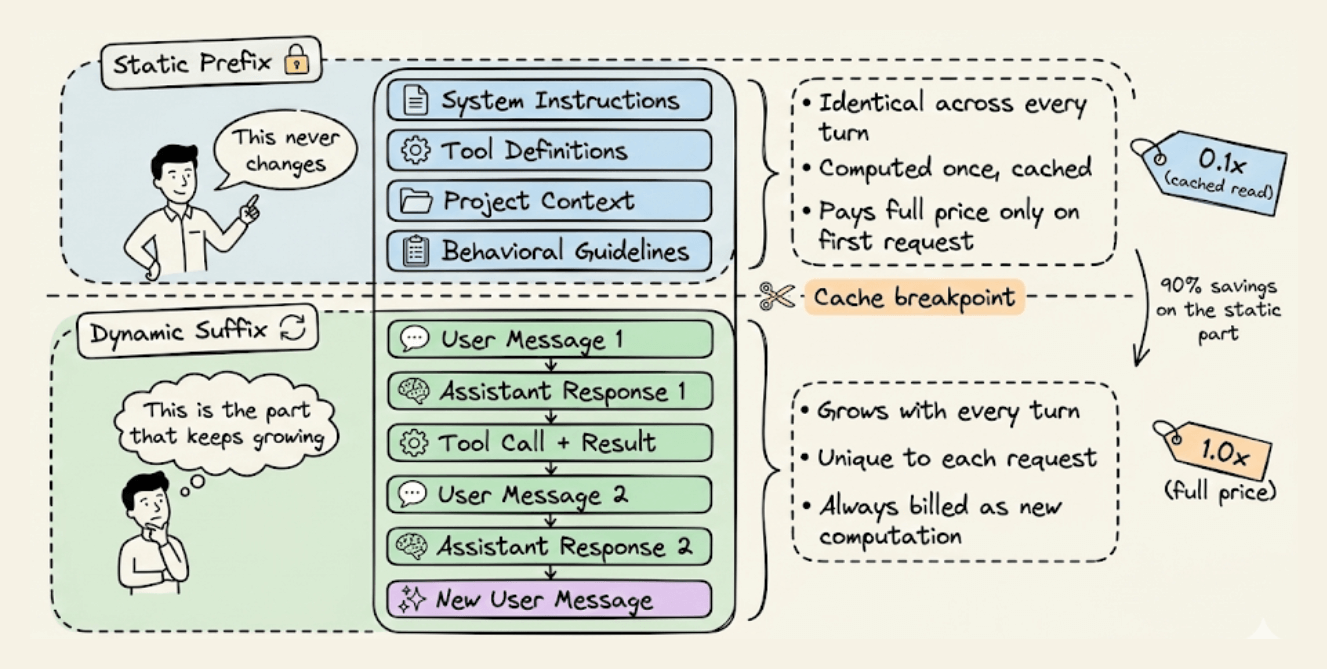
The static prefix that stays identical across turns: system instructions, tool definitions, project context, and behavioral guidelines.
The dynamic suffix that grows with every turn: user messages, assistant responses, tool outputs, and terminal observations.
This split is what makes prompt caching possible. The infrastructure stores the mathematical state of the static prefix so that subsequent requests sharing that exact prefix can skip the computation entirely and read from memory.
Once you internalize this, every architectural decision in this article becomes obvious.
How does the KV Cache work?
To understand why caching is so effective, you need to know what the transformer actually does when it processes your prompt.
Every LLM inference request has two phases:
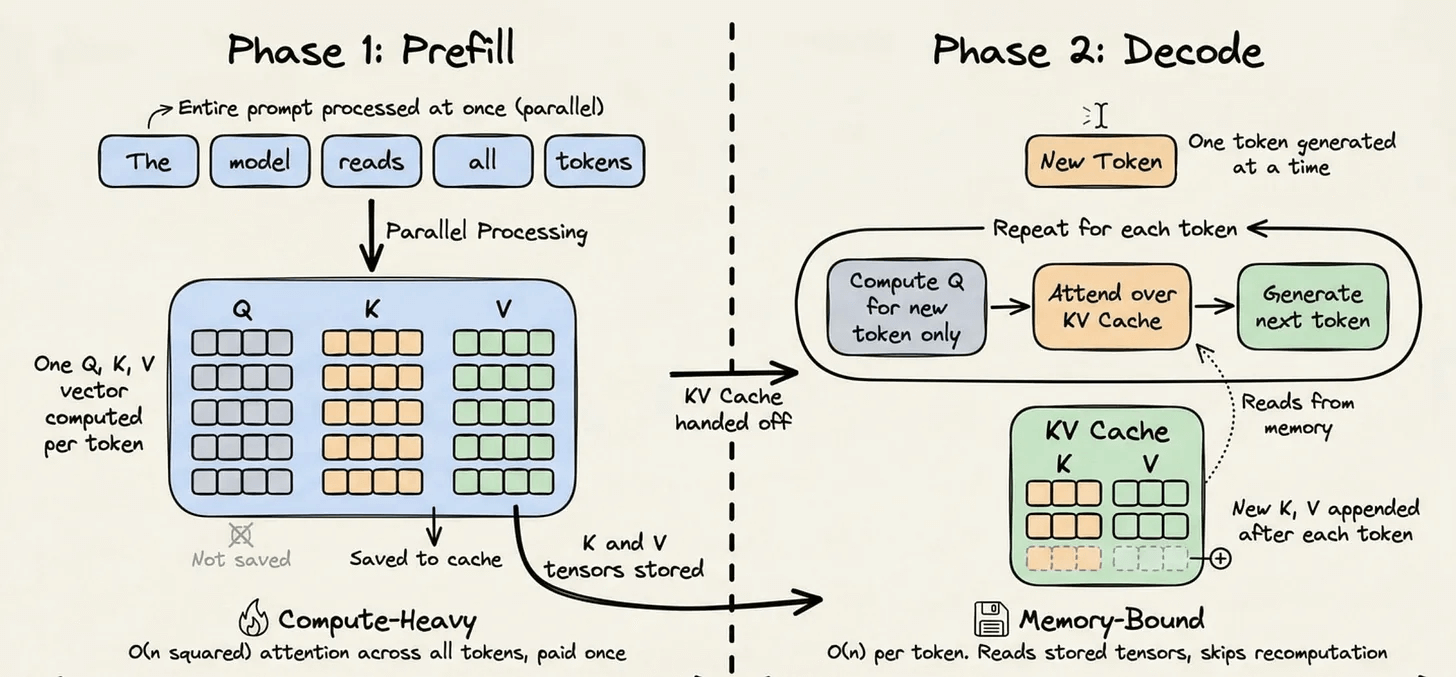
The prefill phase handles the entire input prompt. It runs dense matrix multiplications across all tokens in context to build the model’s internal representation. This is compute-bound and expensive.
The decode phase generates tokens one at a time. Each new token gets added to the sequence, and the model predicts the next one. This phase is memory-bound because it mostly reads the historical state rather than doing heavy computation.
During the prefill phase, the transformer computes three vectors for each token: a Query, a Key, and a Value. The attention mechanism uses these to determine how each token relates to every other token. The Key and Value vectors for any given token depend only on the tokens before it, and once computed, they never change.
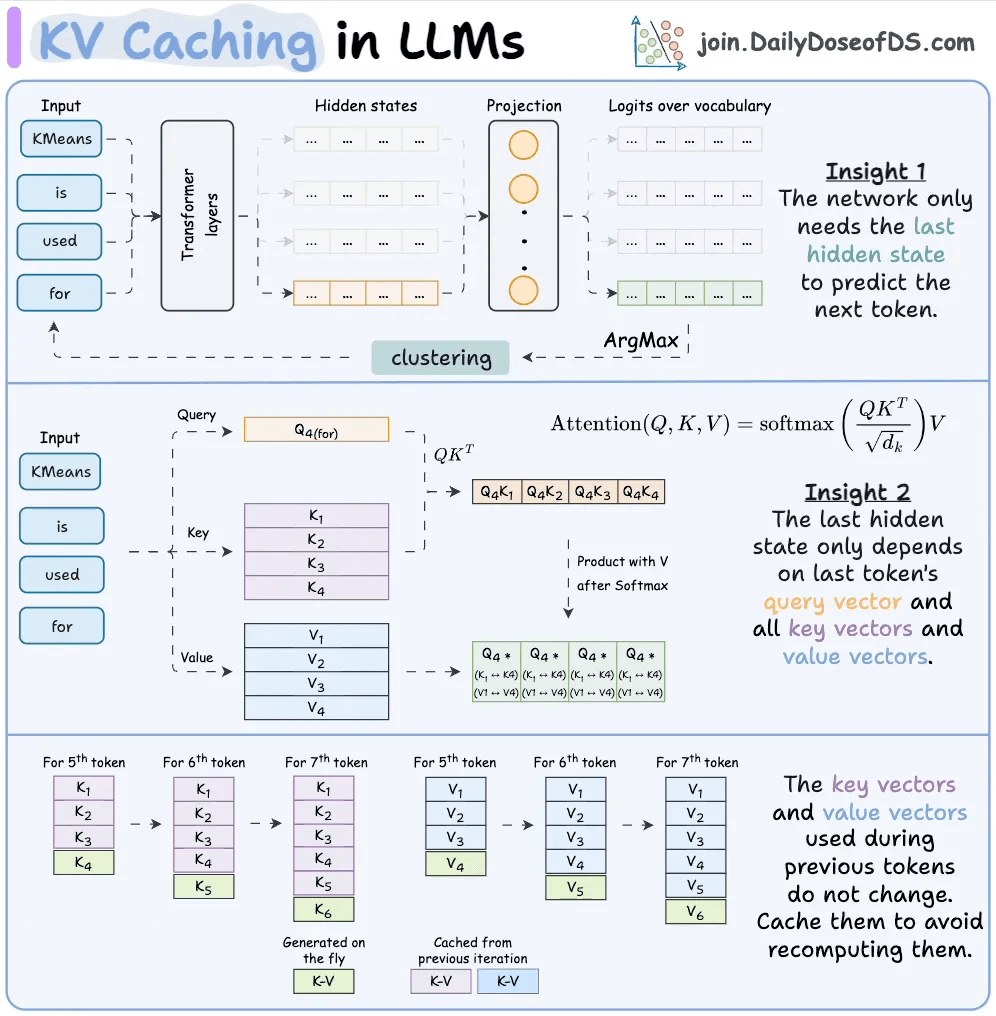
Without caching, these Key and Value tensors get thrown away after every request, and the next request recomputes them from scratch. For a 20,000-token prefix, that’s 20,000 tokens worth of attention computation that didn’t need to happen again.
The KV cache fixes this by persisting those tensors on the inference servers, indexed by a cryptographic hash of the token sequence. When a new request comes in with the same prefix, the hash matches, the tensors are loaded from memory, and the prefill computation for those tokens is skipped entirely.
This drops computational complexity from O(n²) per generated token to O(n). And for a 20,000-token prefix repeated across 50 turns, that's an enormous reduction.
The Economics
The pricing structure is what makes this architectural decision so consequential.
Cache reads cost 0.1x the base input price, which is a 90% discount on every cached token. Cache writes cost 1.25x, a 25% premium to store the KV tensors. Extended one-hour caching costs 2.0x.
Here’s what this looks like across Anthropic’s Claude models:
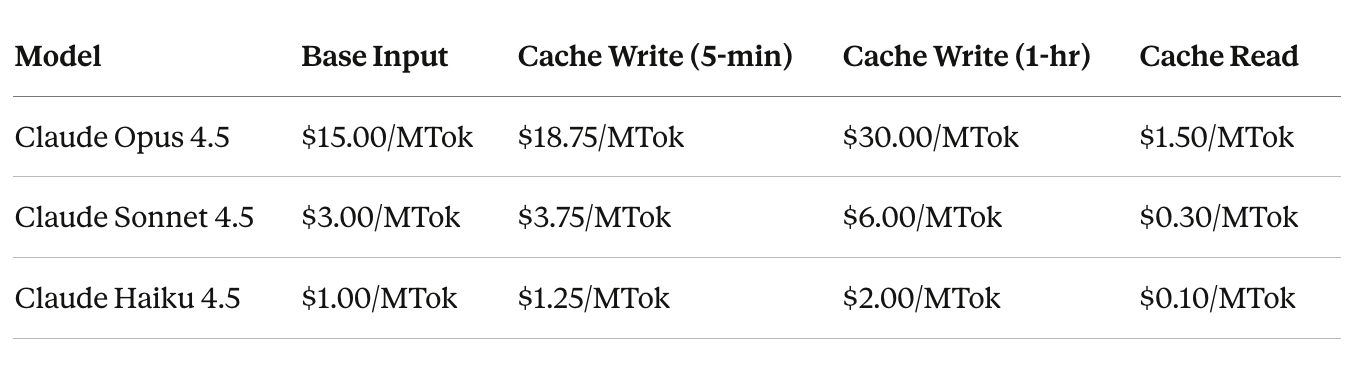
This math only works if the cache hit rate stays high. The best production example of what that looks like is Claude Code.
A 30-minute coding session with Claude Code
Claude Code is built entirely around one objective: keep the cache hot.
Here’s what a real 30-minute coding session looks like from a billing perspective.
Minute 0: Claude Code loads its system prompt, tool definitions, and the project’s CLAUDE.md file. This payload exceeds 20,000 tokens, and since every token is new, this is the most expensive moment of the entire session. But you only pay this cost once.
Minutes 1 to 5: You start giving instructions, and Claude Code dispatches its Explore Subagent to navigate the codebase, open files, and run grep commands. All of this gets appended to the dynamic suffix. But the 20,000-token static prefix is now reading from cache at $0.30/MTok instead of $3.00/MTok.
Minutes 6 to 15: The Plan Subagent receives a summarized brief rather than the raw results, because passing raw output would bloat the dynamic suffix unnecessarily. It produces an implementation plan, you approve it, and Claude Code starts making changes. Every turn reads the static prefix from cache, the hit rate climbs past 90%, and each access resets the TTL to keep the cache warm.
Minutes 16 to 25: You request changes, which means more tool calls, more terminal output, and more context accumulating in the dynamic suffix. By now the session has processed hundreds of thousands of tokens, but every single turn has read the 20,000-token foundation from cache.
Minute 28: You run /cost in the terminal. Without caching, 2 million tokens at the Sonnet 4.5 rate would cost $6.00. With the cache running at 92% efficiency, 1.84 million tokens were cache reads, bringing the total cost to $1.15. That’s an 81% reduction on a single task.
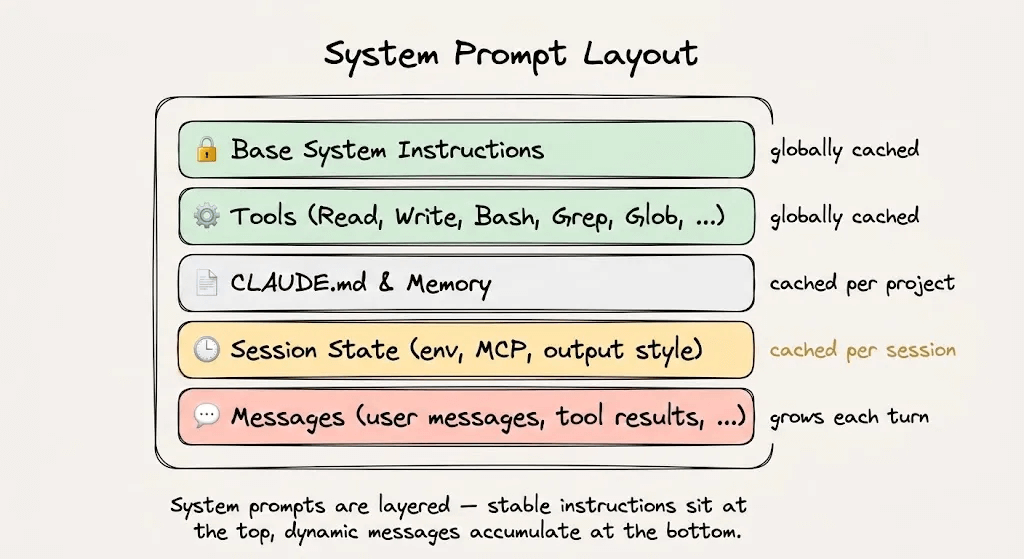
This is how a hot cache looks. You have to pay for the static foundation once, and then you can read it for free. The dynamic tail is the only thing that is ever charged.
The fragility of hash-based caching
Here’s the most counterintuitive thing about prompt caching:
“1 + 2 = 3” works but “2 + 1” is a cache miss.
The infrastructure hashes the full token sequence from the beginning. If anything in that sequence changes, even just the order of two elements, the hash changes and the entire prefix gets recomputed at full price.
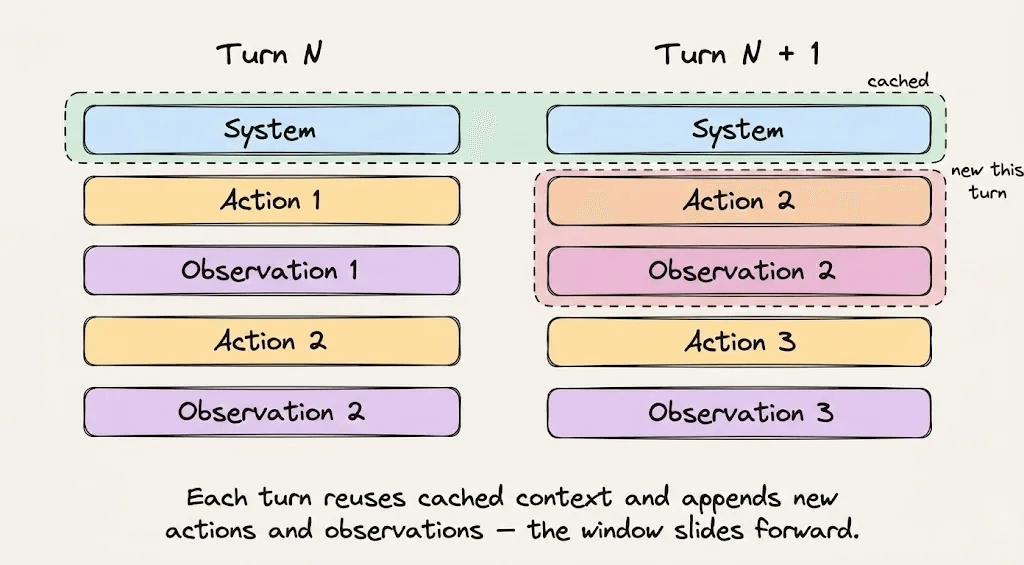
This isn’t a minor implementation detail. It’s the central constraint that every engineering decision in Claude Code is designed around.
Here are real examples of what has broken caches in production:
A timestamp injected into the system prompt created a unique hash on every request.
A JSON serializer that sorted tool schema keys differently between requests invalidated the prefix.
An AgentTool whose parameters were updated mid-session wiped the entire 20,000-token cache.
Three rules follow from this:
Don’t modify tools during a session. The tool definitions are part of the cached prefix, so adding or removing a tool invalidates everything downstream.
Never switch models mid-session. Caches are model-specific, which means switching to a cheaper model mid-conversation requires rebuilding the entire cache from scratch.
Never mutate the prefix to update state. Instead of editing the system prompt, Claude Code appends a reminder tag to the next user message so that the prefix stays untouched.
Applying this to your own Agents
The same rules apply whether you’re using Claude Code or building your own agent from scratch.
Structure your prompts in this order:
System instructions and behavioral rules at the top. Don’t change them mid-session.
Load all tool definitions upfront. Don’t add or remove them.
Retrieved context and reference documents next. Keep them stable for the session duration.
Conversation history and tool outputs at the bottom. This is your dynamic suffix.
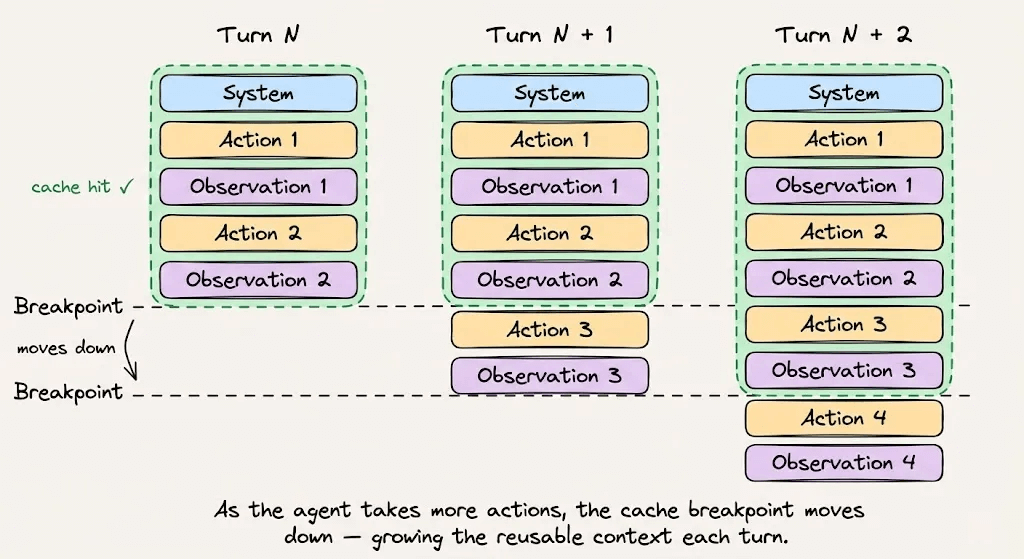
With auto-caching enabled on the Anthropic API, the cache breakpoint advances automatically as the conversation grows. Without it, you’d need to manually track token boundaries, and a wrong boundary means missing the cache entirely.
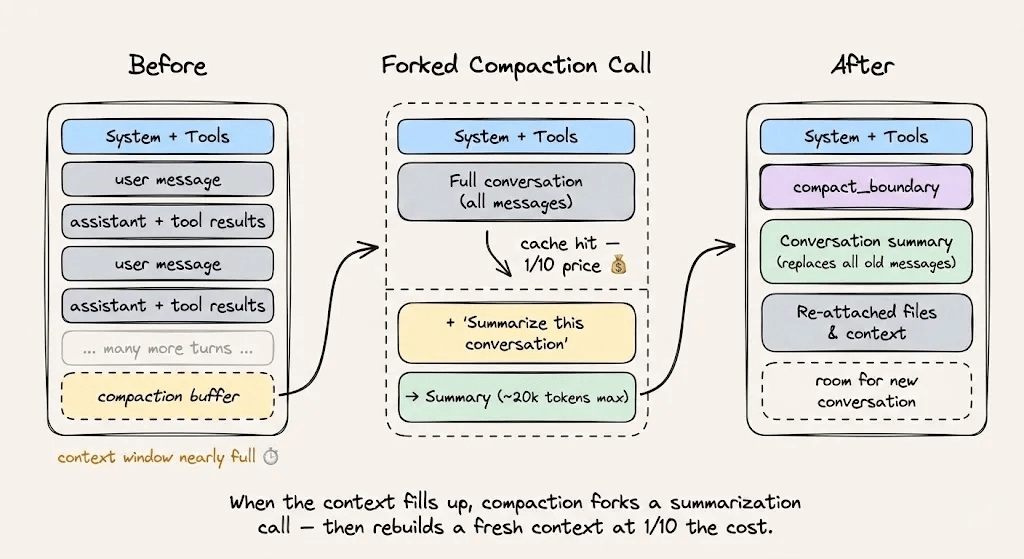
For context compaction when you’re approaching the context limit, use cache-safe forking. Keep the same system prompt, tools, and conversation history, then append the compaction instruction as a new message. The cached prefix gets reused, and the only new tokens billed are the compaction instruction itself.
To verify your caching is working, monitor these three fields in every API response:
cache_creation_input_tokensare the tokens written to cache.cache_read_input_tokensare the tokens served from cache.input_tokensare the tokens processed without caching.
Your cache efficiency is cache_read_input_tokens / (cache_read_input_tokens + cache_creation_input_tokens). Track it the same way you track uptime.
Key takeaways
Prompt caching isn’t a feature you toggle on. It’s an architectural discipline you design around.
The core idea is simple: structure your prompts so the static content sits at the top and the dynamic content grows at the bottom. The infrastructure hashes the prefix, stores the KV tensors, and gives you a 90% discount on every subsequent read.
But the discipline is in the details. Don’t inject timestamps into system prompts, don’t shuffle tool definitions, don’t switch models mid-session, and don’t mutate anything upstream of the cache breakpoint.
Claude Code demonstrates what this looks like at scale, with a 92% cache hit rate and an 81% cost reduction. If you’re building agents and not designing around prompt caching, you’re leaving most of your margin on the table.
To dive deeper into how LLM systems are deployed, start with the practical and hands-on LLMOps course here →
Thanks for reading!