

Agent hackers to test your AI apps!
Pentesting firms don’t want you to see this.
An open-source AI agent just replicated their $50k service.
Here’s why this matters right now.
Teams are shipping faster than ever. AI writes the code, CI catches build failures, tests catch regressions, and observability catches outages.
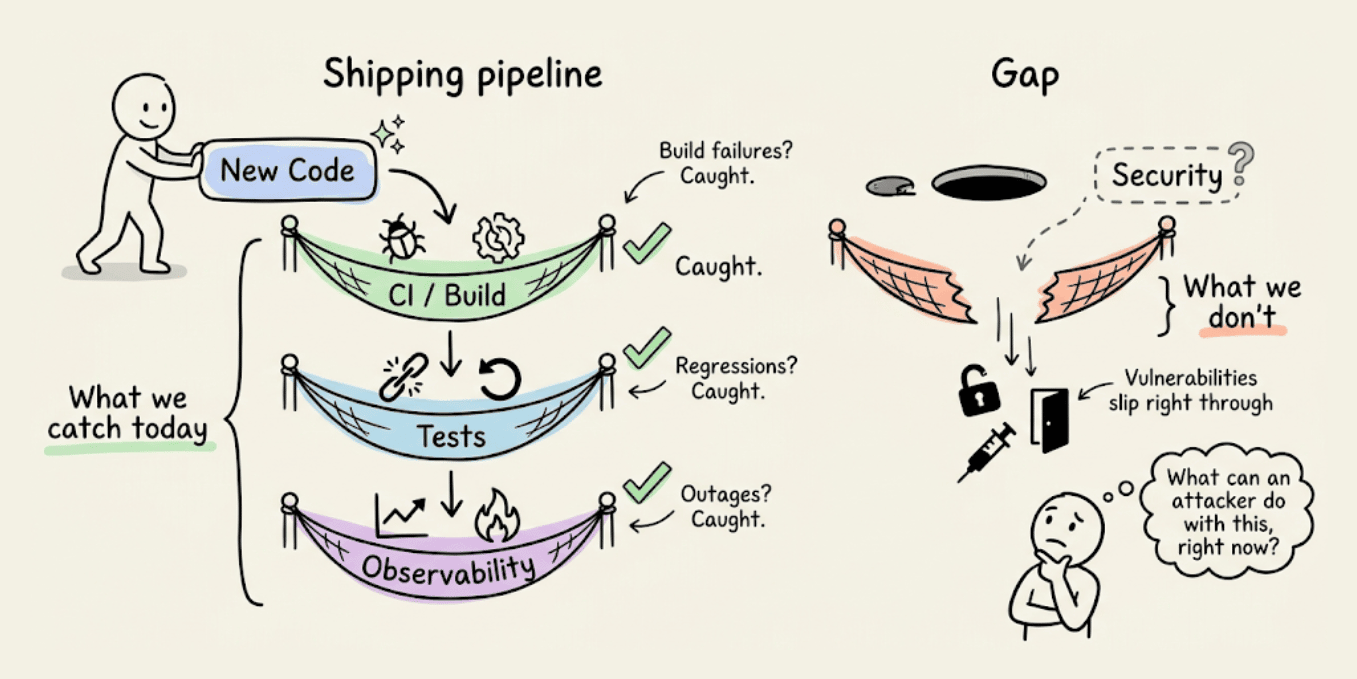
But one more key question to ask is: What can an attacker do with this, right now?
It’s important to answer this question because several real-world examples make this hard to ignore:
Moltbook exposed 1.5M auth tokens. The owner hadn’t written a single line of code.
Tea App leaked 72,000 government IDs. The database was just open, no sophisticated hack needed.
A researcher took control of a journalist’s computer through her own vibe-coded game, without a single click.
The code ran fine in all three cases, tests passed, and nothing raised a flag.
Because the bottleneck is no longer writing code, it’s understanding what that code actually exposes once it’s live. PR reviews miss auth edge cases, unit tests don’t probe broken access control, staging environments don’t simulate adversarial behavior, and business logic flaws look completely fine until someone decides to break them on purpose.
An automated approach is actually implemented in Strix, a recently trending open-source framework (26k+ stars) for AI pentesting agent.
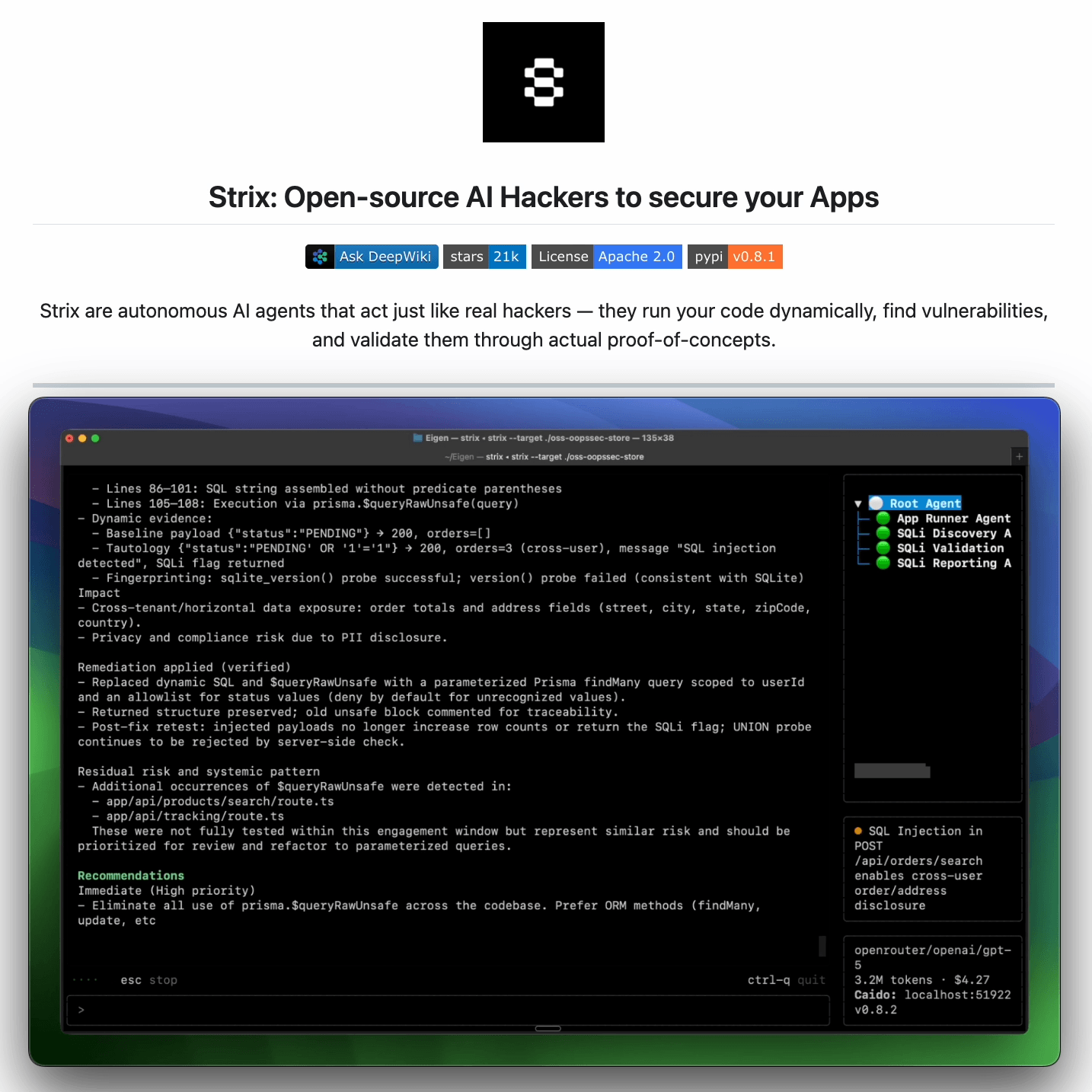
It reviews any running app the way an attacker would:
Crawls the app and maps every exposed route and flow
Probes abuse paths dynamically, not just at build time
Returns findings with proofs-of-concept and suggested fixes
It is benchmarked against 200 real companies and open-source repos, and it found 600+ verified vulnerabilities, including assigned CVEs.
It’s designed to fit into how modern teams already work: run it before a release, after major changes, or continuously as the app evolves.
You can find the GitHub repo here → (don’t forget to star it)
Prompt engineering & loop engineering, clearly explained!
At its core, an agent is a while loop:
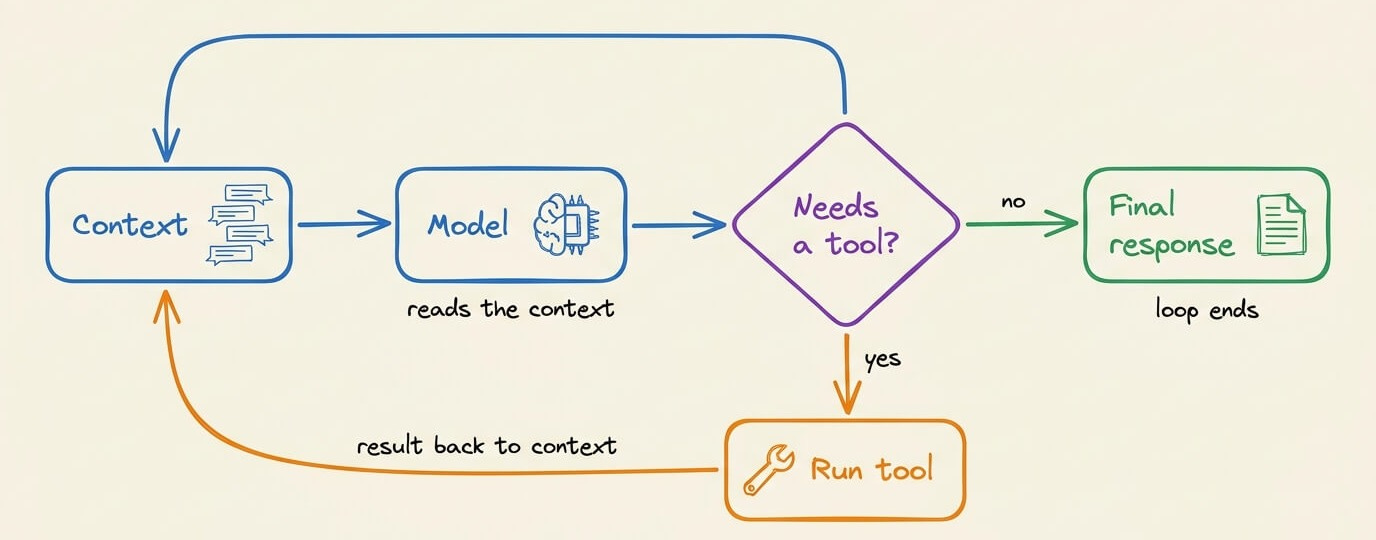
The model runs
It requests tool calls
The tool results return to the context
The model runs again until it stops requesting tools
This is not new. In fact, the ReAct pattern described this form of loop back in 2022-23, and almost every agent/framework runs a similar implementation of this (we implemented ReAct from scratch in pure Python here)
So loops aren’t a new thing at all, and the above implementation of loops was solved a long time ago.
What wasn’t solved is the loop around the above loop, and this is what Boris/Peter talked about recently.
In the most common setup, you are the loop around the loop.
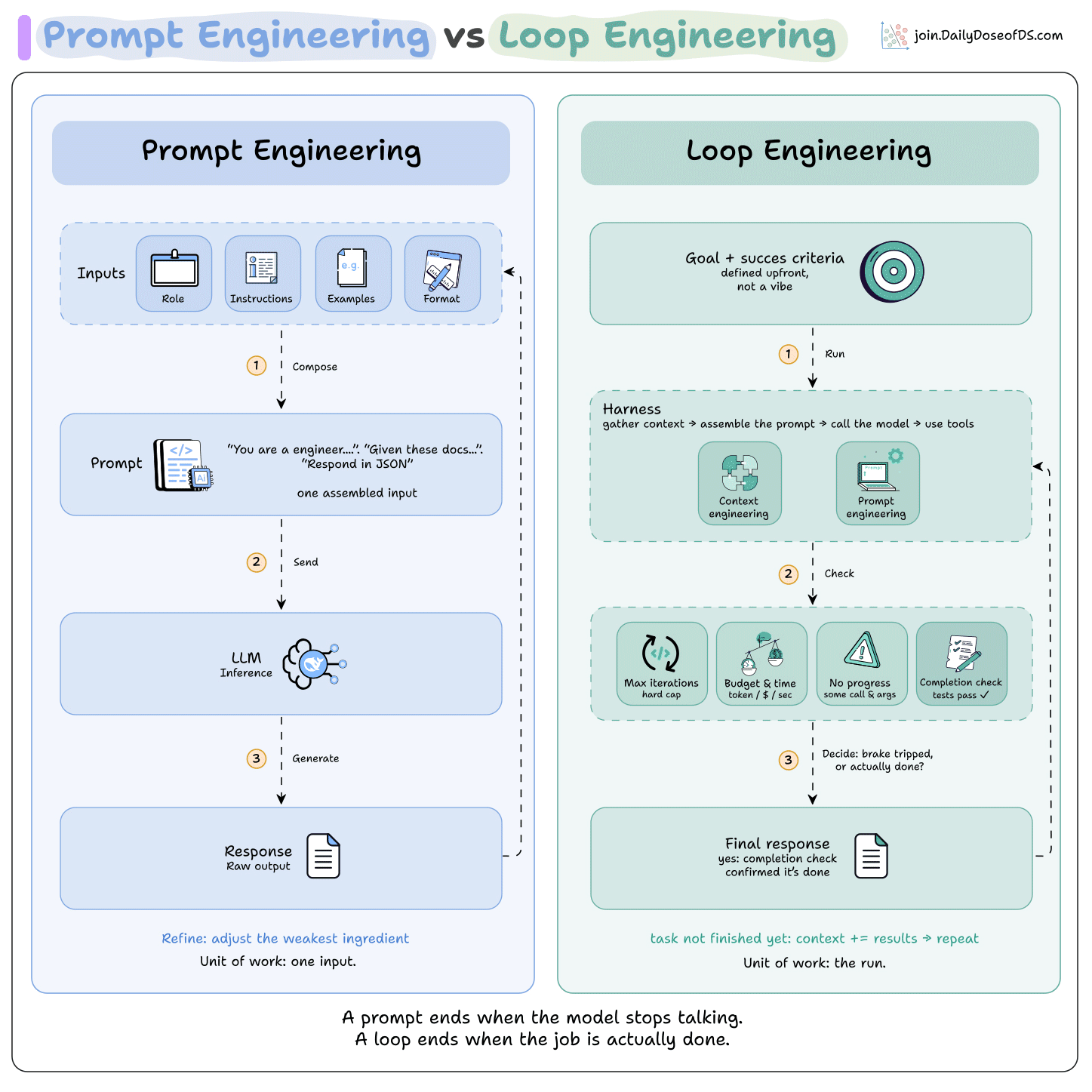
You write a prompt
Read the turns the agent runs
Write the next prompt
And repeat, catching failures as it runs
Now there are attempts to let the system run the outer loop too, so that you can eliminate yourself.
It starts on a schedule or an event
It runs for many turns with no prompt in between
It decides on its own when it’s done
It comes back only when something needs you
Consider a failing test in CI to understand this.
In the current way, you paste the error into the agent, read the fix, run the tests, and paste the next failure back in until they pass.
So every turn goes through you.
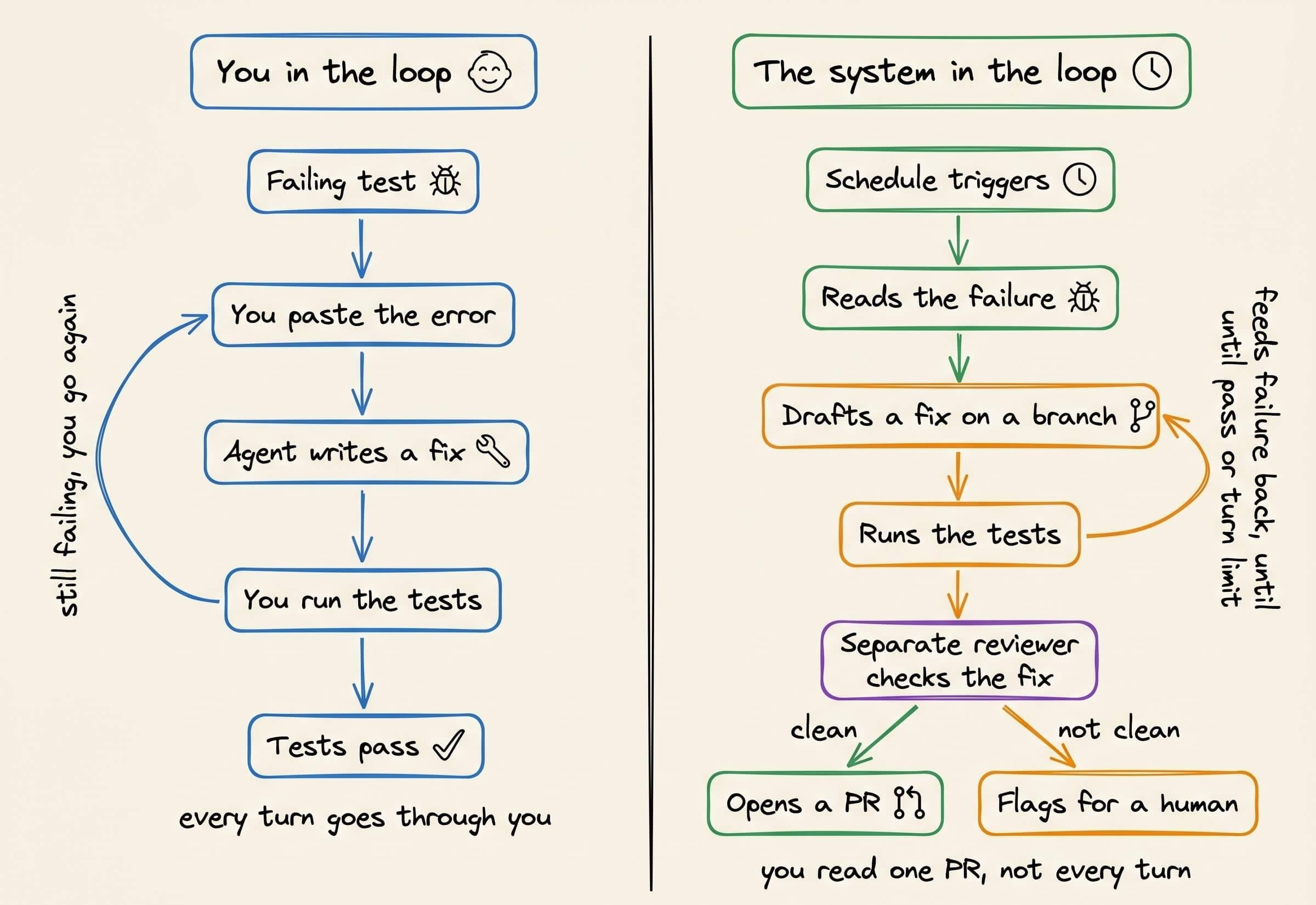
The loop runs those same turns on its own.
It triggers on a schedule, reads the failure, drafts a fix on a branch, runs the tests, and feeds a failure back in as the next turn, until they pass or it hits a turn limit.
A separate reviewer checks the fix, opens a PR if it’s clean, and flags it for a human if it isn’t.
So the inner loop was always automatic. The part being automated now is your involvement in that loop.
None of that comes for free though, as expected.
→ Sitting in the outer loop gave you the flexibility to stop, possess project memory, and be the reviewer. But each of those now has to exist in the system.
→ Also, while sitting in the loop was slow, you understood the system.
But one big downside of taking yourself out is that you keep the ownership, but would likely lose the understanding of what’s being shipped.
→ Inherently, a loop doesn’t know when to stop on its own either. It will take the agent’s word that the work is done and stop on a fix while the tests still fail, so the stop has to be a real check, plus a turn or token cap to avoid infinite loops.
→ The context grows every turn, and the model gets worse as its context fills up.
So the loop should trim it and keep summaries instead of full history, move large outputs to files, and split subtasks into separate runs.
→ Lastly, the agent can’t be the one to check its own work, since it will pass whatever it wrote.
A separate model or a binary/deterministic test should provide that signal.
And the cost for all this adds up fast since every turn sends the whole context again, so a long loop can spend many times what a single prompt would.
If you want to dive deeper, we wrote a full breakdown, from the loop above to a run that finishes on its own, with the code behind each part.
[Hands-on] Corrective RAG Agentic Workflow
Corrective RAG (CRAG) is a common technique to improve RAG systems. It introduces a self-assessment step of the retrieved documents, which helps in retaining the relevance of generated responses.
Here’s an overview of how it works:
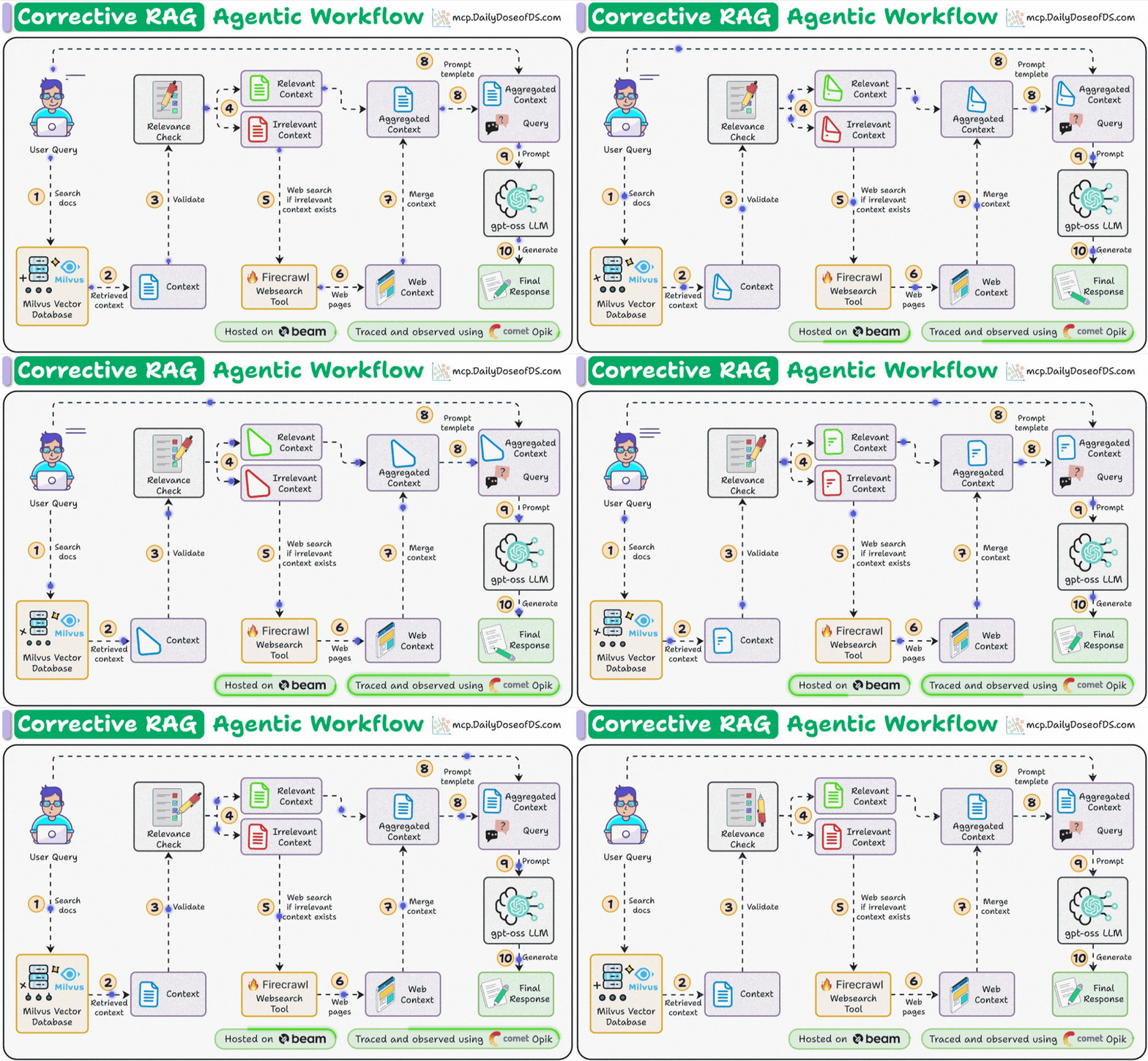
First, search the docs with user query.
Evaluate if the retrieved context is relevant using LLM.
Only keep the relevant context.
Do web search if needed.
Aggregate the context & generate response.
The video at the top shows how it works!
Here’s our tech stack for this demo:
Firecrawl for deep web search
Milvus to self-host vectorDB.
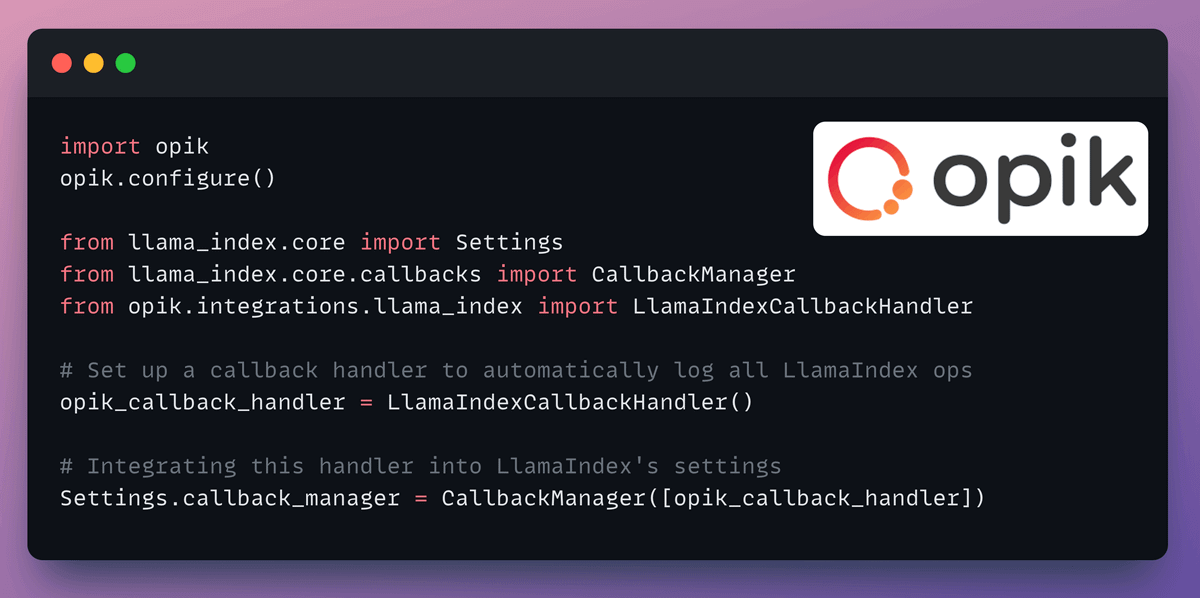
CometML’s Opik to trace and monitor
LlamaIndex workflows for orchestration
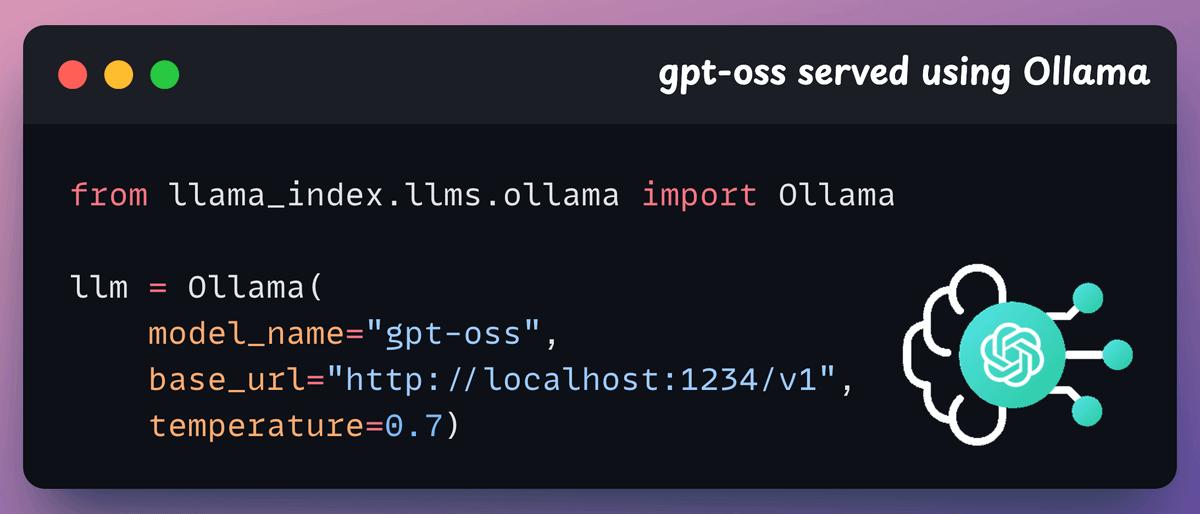
Setup LLM
We will use gpt-oss as the LLM, locally served using Ollama.
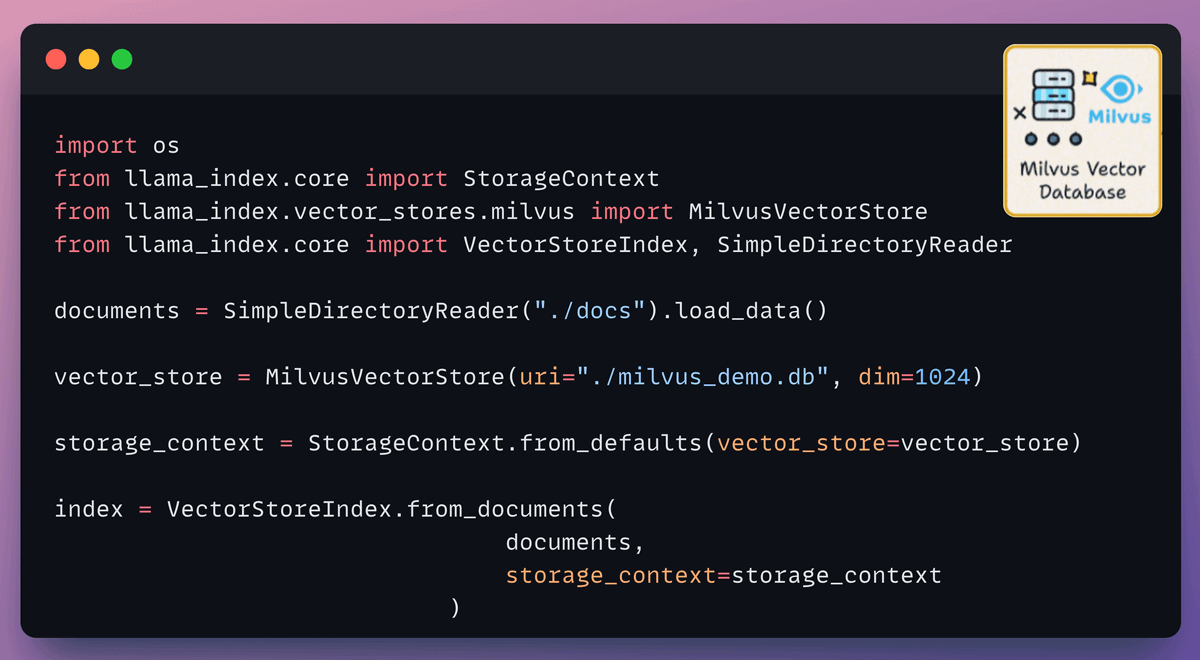
Setup vectorDB
Our primary source of knowledge is the user documents that we index and store in a Milvus vectorDB collection.
This will be the first source that will be invoked to fetch context when the user inputs a query.
Set up web search tool
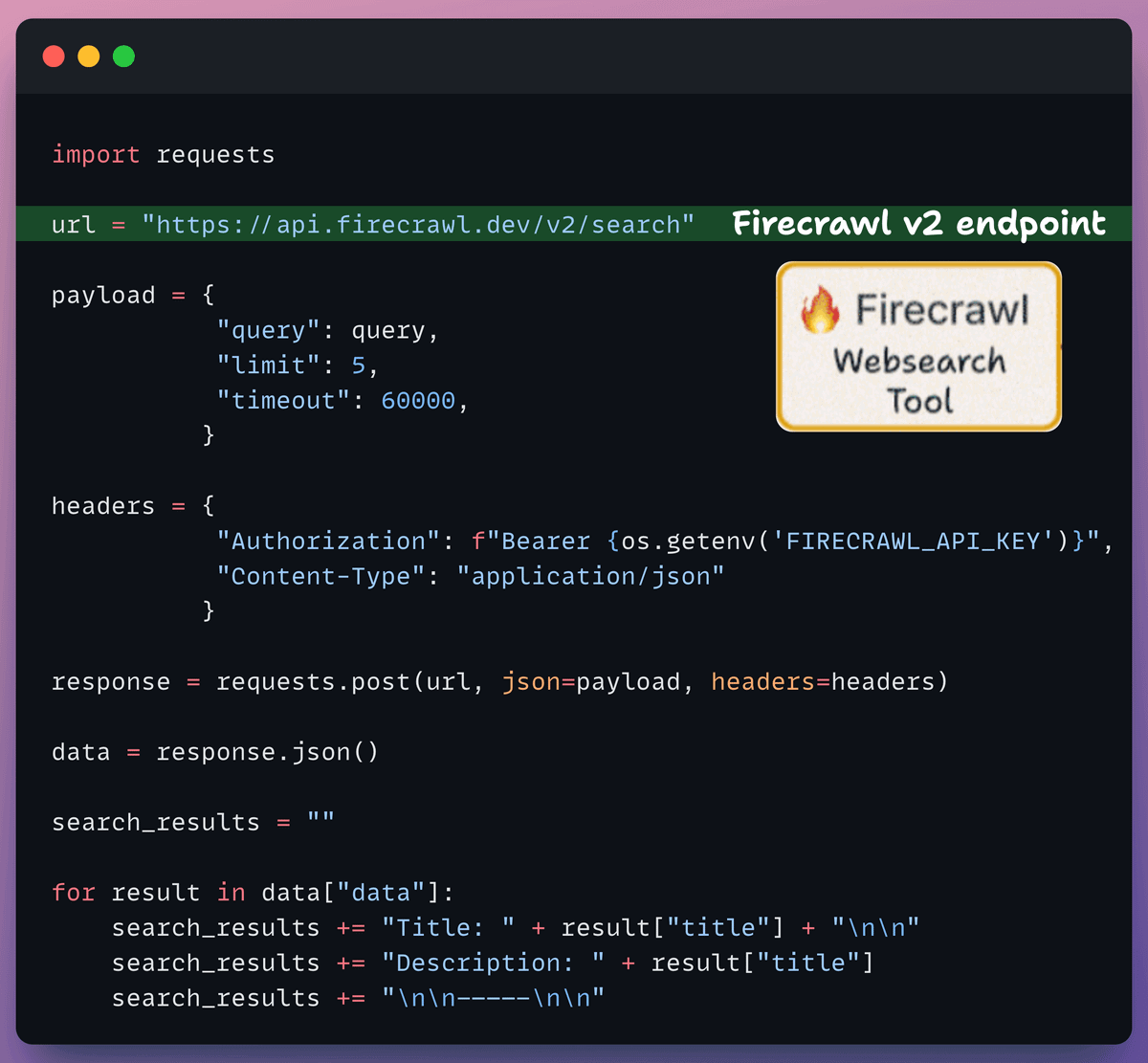
If the context obtained from the vector DB isn’t relevant, we resort to web search using Firecrawl.
More specifically, we use the latest v2 endpoint that provides 10x faster scraping, semantic crawling, News & image search, and more.
Tracing and Observability
LlamaIndex also offers a seamless integration with CometML’s Opik. You can use this to trace every LLM call, monitor, and evaluate your LLM application.
Create the workflow
Now that we have everything set up, it’s time to create the event-driven agentic workflow that orchestrates our application.
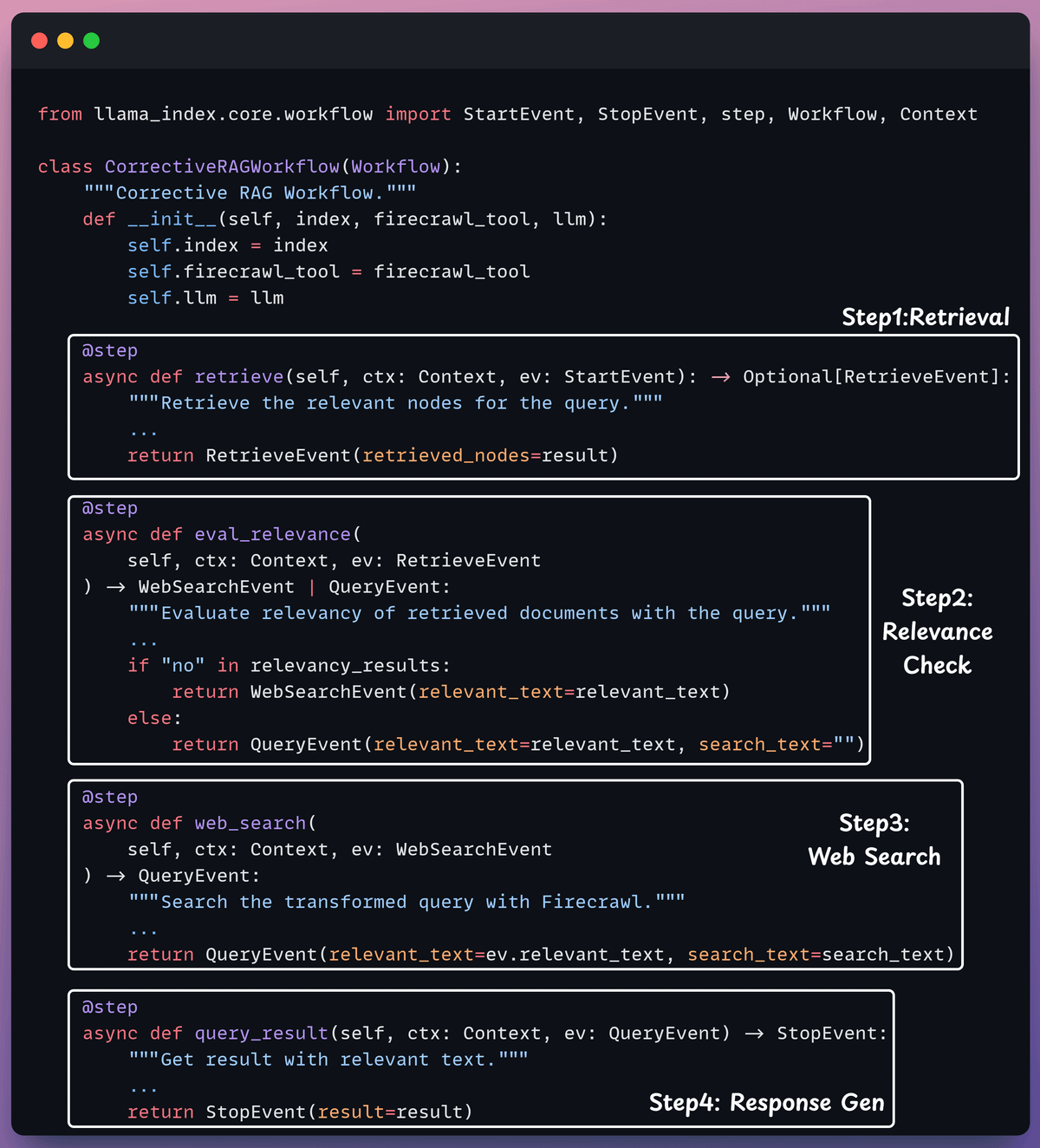
We pass in the LLM, vector index, and web search tool to initialise the workflow.
Kickoff the workflow
Finally, when we have everything ready, we kick off our workflow.
Check this out👇
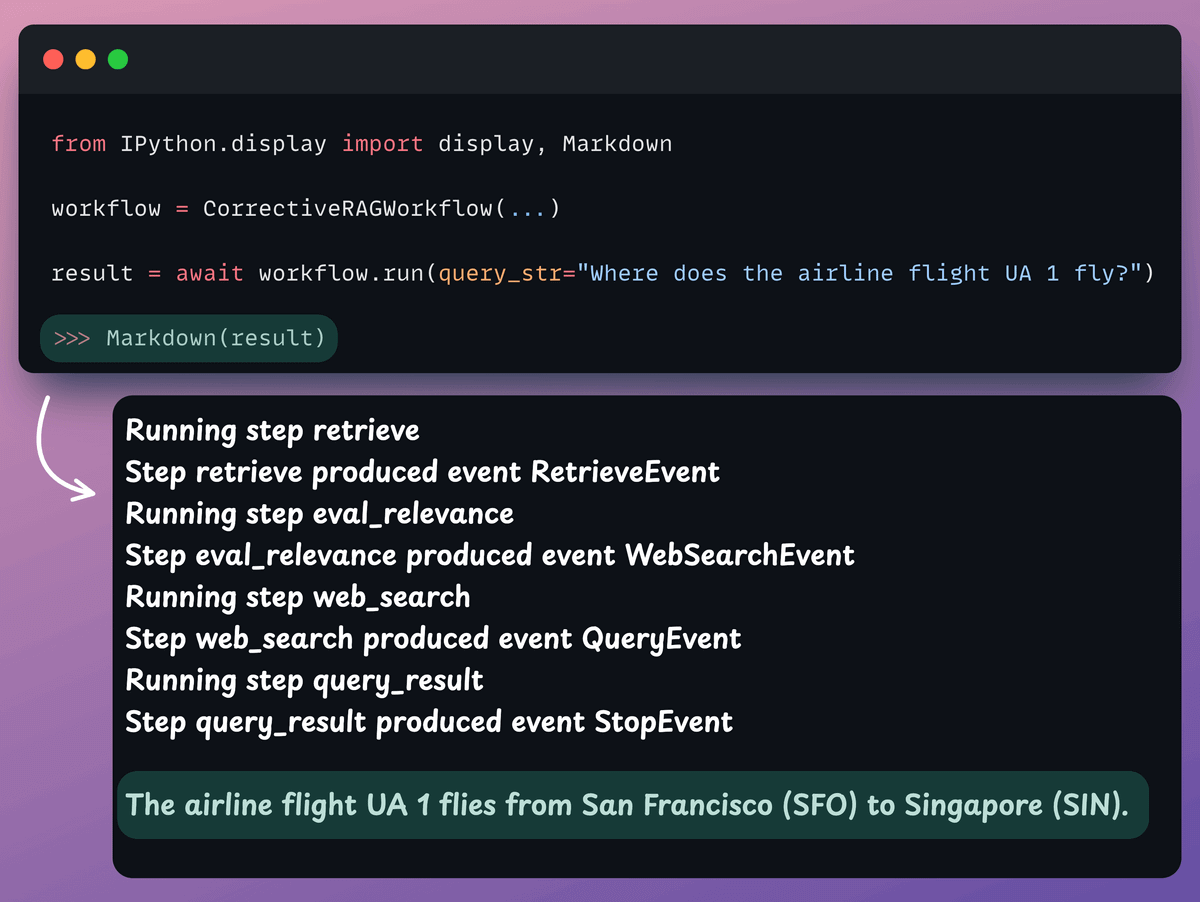
In the video below, our workflow is able to answer a query that’s unrelated to the document. The evaluation step makes this possible:
If you want to dive into building LLM apps, our full RAG crash course discusses RAG from basics to beyond:
The code for this issue is available here →
👉 Over to you: What other RAG demos would you like to see?
Thanks for reading!