

In today’s newsletter:
Speculative decoding, now 2.6x faster on a MacBook.
RAG vs. Vectorless RAG, clearly explained.
Speculative decoding, now 2.6x faster on a MacBook:
We ran Qwen3.5 9B on an M5 MacBook Pro with the same prompt, three ways:
No speculative decoding: 22.0 tokens/s, done in 42.2s
Regular speculative decoding: 34.7 tokens/s, done in 30.4s
DFlash + Weaver in Uzu: 92.1 tokens/s, done in 11.0s
That is about 4x faster than plain decoding and 2.6x faster than regular speculative decoding. The video shows all three runs side by side.
Speculative decoding lets a cheap drafter guess the next few tokens, and the main model checks them all in one pass.
The fastest drafters, like DFlash, guess every position in parallel. But each guess is made on its own, so position 5 never sees what was picked at position 4.
One early mismatch, and everything after it gets thrown away.
Weaver fixes this. It is a tiny adapter, a single Transformer layer with 56.7M parameters, that sits on top of DFlash and:
↳ picks among DFlash’s top candidates left to right, so each pick depends on the last one.
↳ grows a tree of likely continuations instead of a single chain.
↳ lets the main model verify the whole tree in one pass.
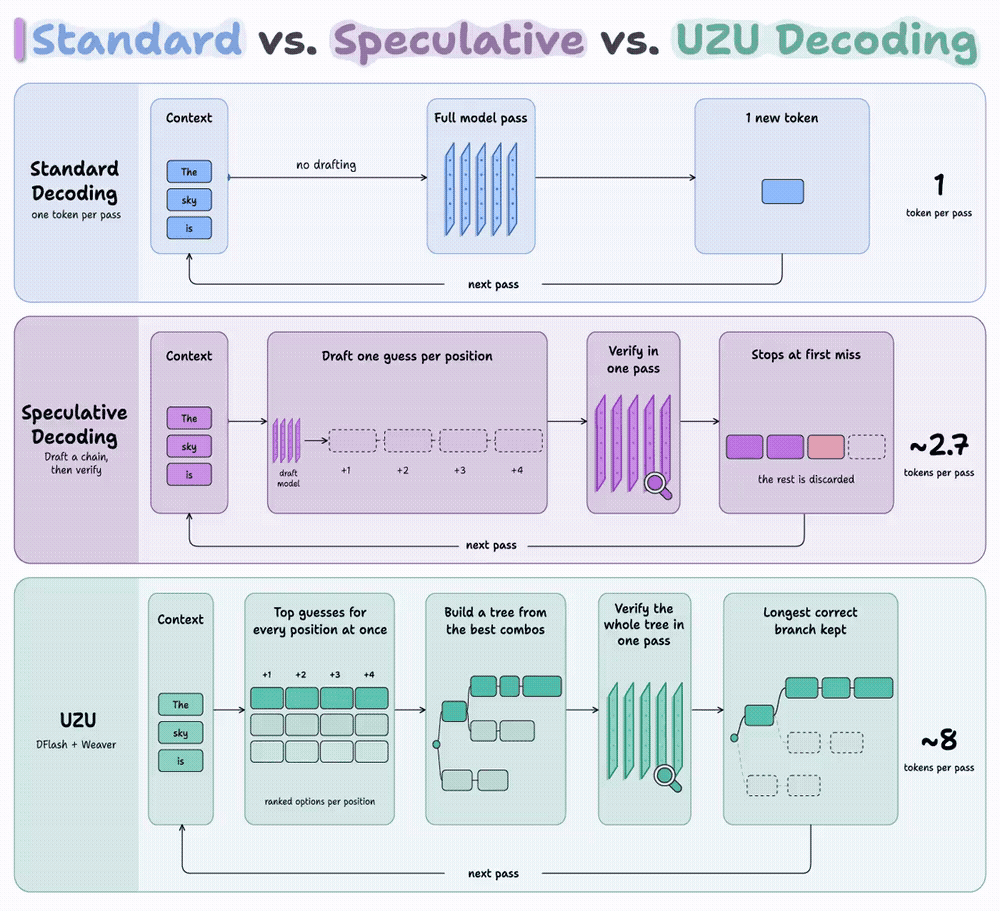
On the MacBook, every pass of the 9B model produced 7.5 tokens instead of 1.
On a B200 GPU, the Weaver paper reports a 4.08x speedup over standard decoding, measured across chat, math, and code benchmarks.
Mirai open-sourced the whole stack in Uzu, its inference engine built for Apple Silicon. Trying it takes two commands:
brew install mirai
mirai --model trymirai/Qwen3.5-9B-M -m \
 "Write a python function to merge two sorted lists"
GitHub repo: https://github.com/trymirai/uzu
(don’t forget to star 🌟)
RAG vs. Vectorless RAG, clearly explained!
The chunk closest to a question is often not the chunk that answers it.
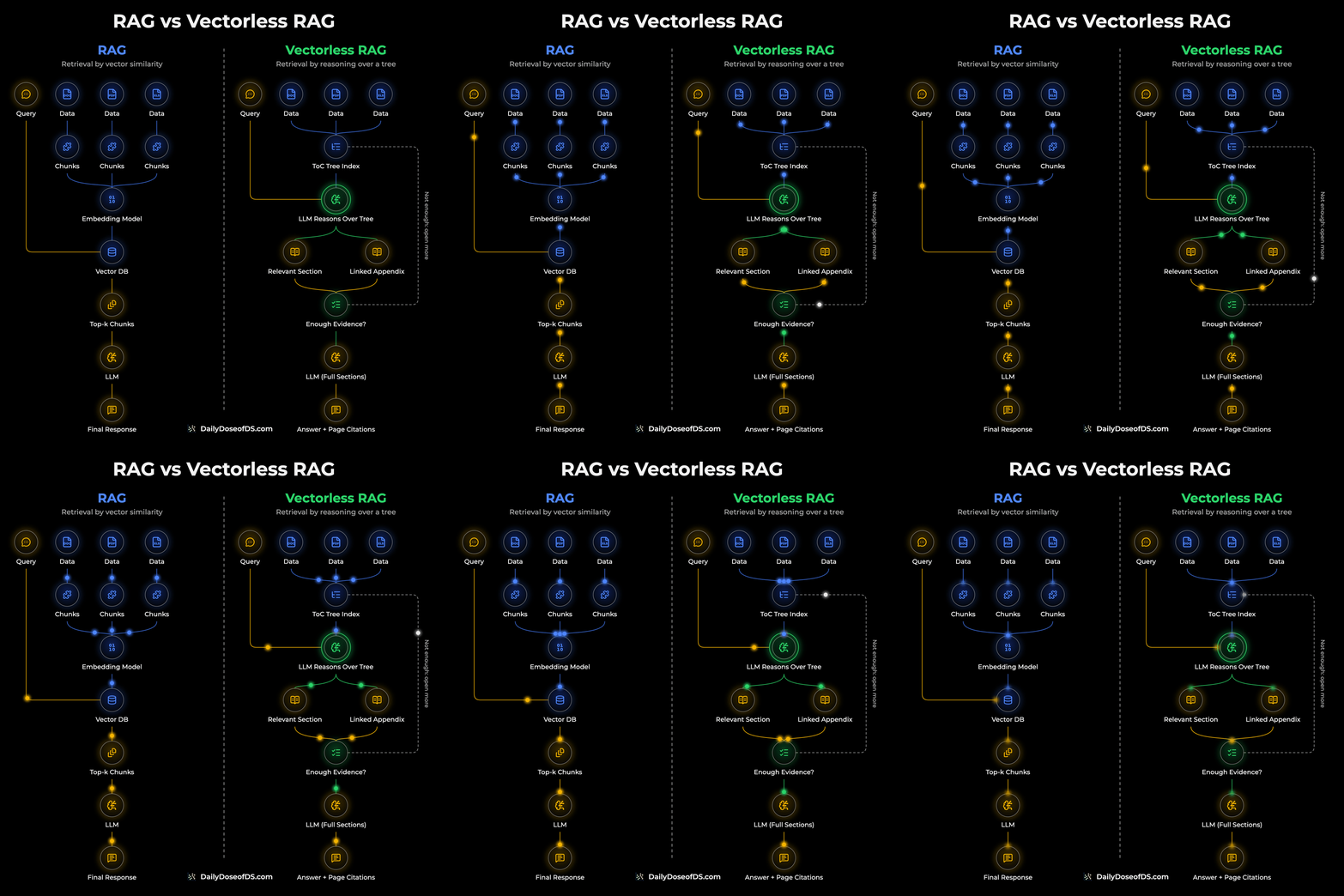
In a standard RAG setup, documents are split into chunks, embedded, and stored in a vector DB. The query gets embedded too, and the top-k closest chunks go to the LLM.
This works when the closest text also holds the answer. On long, structured documents, that assumption breaks in two ways.
Problems with similarity search
Five annual reports from one company usually follow the same template every year, and only the numbers change.
So a question about FY2022 can land just as close to an FY2025 chunk as to the FY2022 one. The embedding captures what a chunk is about, and both chunks are about the same thing.
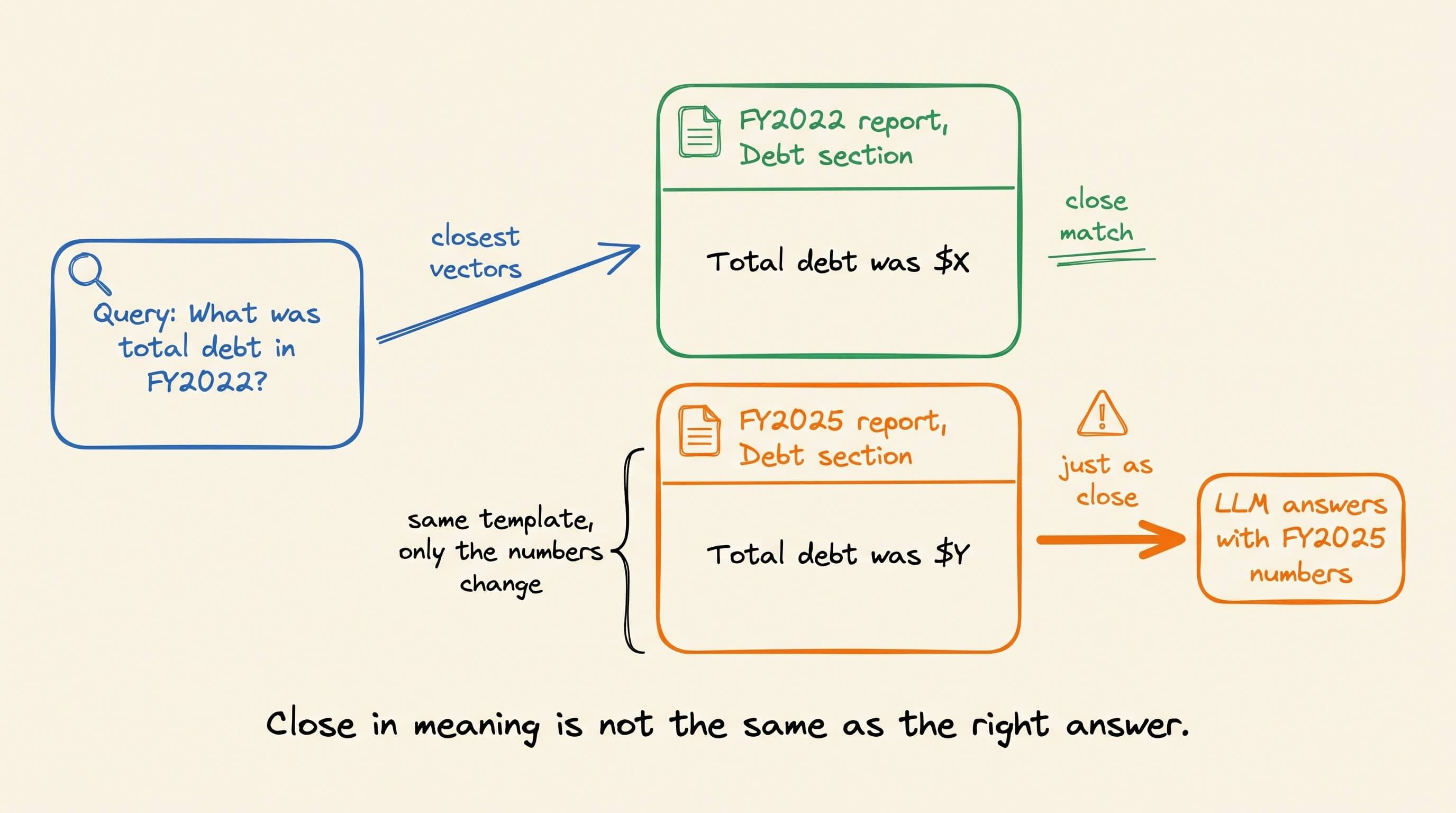
The LLM then answers from the wrong year. Nothing in the pipeline flags it, because the retrieved chunk really is on topic.
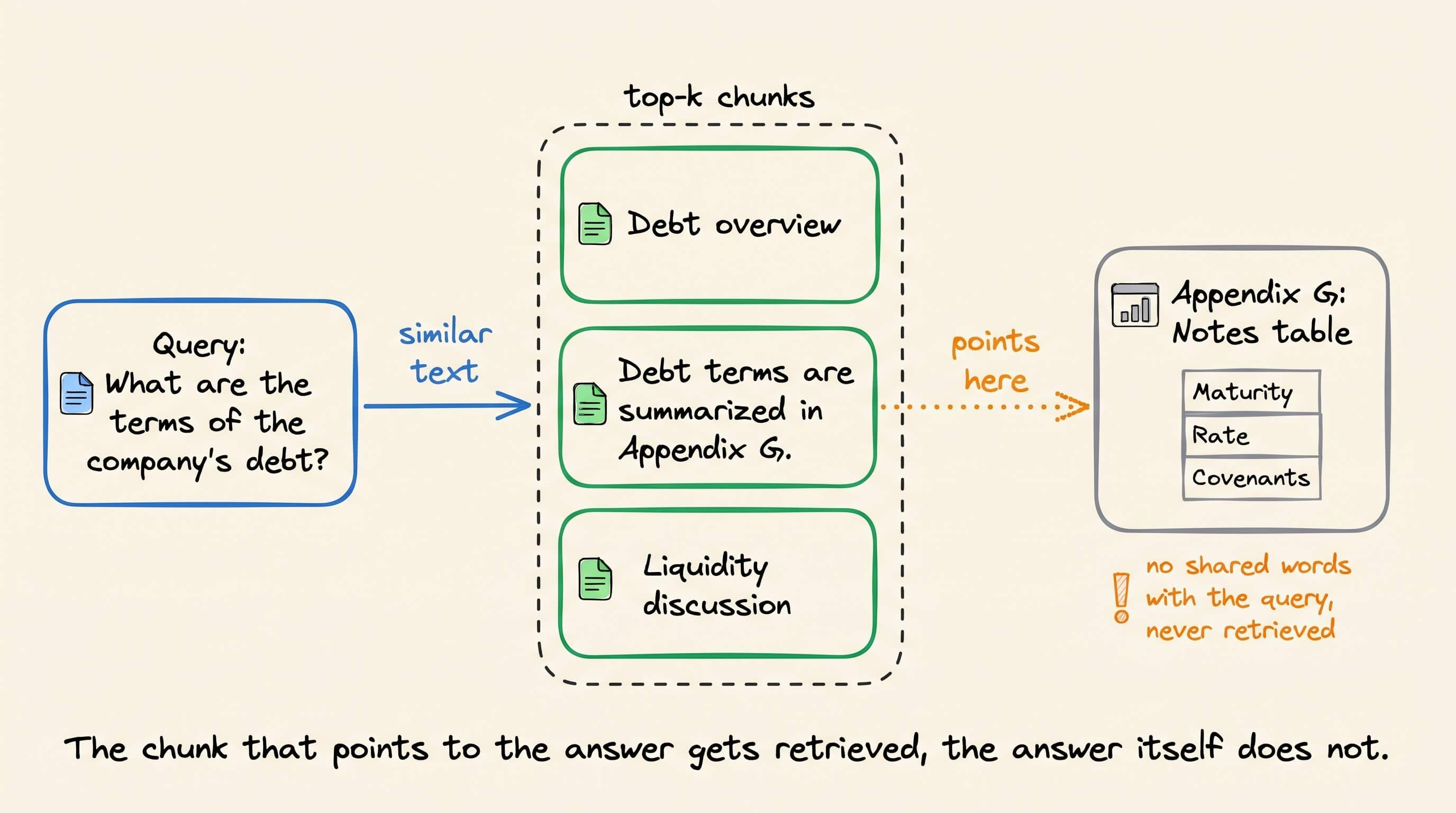
Cross-references cause the second failure. A chunk might say “see Appendix G”, while the table in Appendix G holds the actual numbers.
That table looks nothing like the query, so it never makes it to the top-k. The pointer gets retrieved, but the answer it points to does not.
Fixes on the vector side do help. Anthropic’s contextual retrieval adds document context to each chunk before embedding, and with a reranker it cut top-20 retrieval failures from 5.7% to 1.9%.
But these fixes still rank text by how similar it looks to the query.
How vectorless RAG works
Vectorless RAG drops the embedding model and the vector DB, and replaces similarity search with LLM reasoning.
There are three parts to the process.
First, a preprocessing step parses each document’s layout into a ToC tree index. Every node holds a section title, its page range, and a short summary.
Nothing gets chunked, so a table never gets split across two chunks. And the whole tree is small enough to fit in the LLM’s context. In PageIndex, the most popular open-source implementation, the structure comes from the layout itself, and a basic model only writes the summaries.
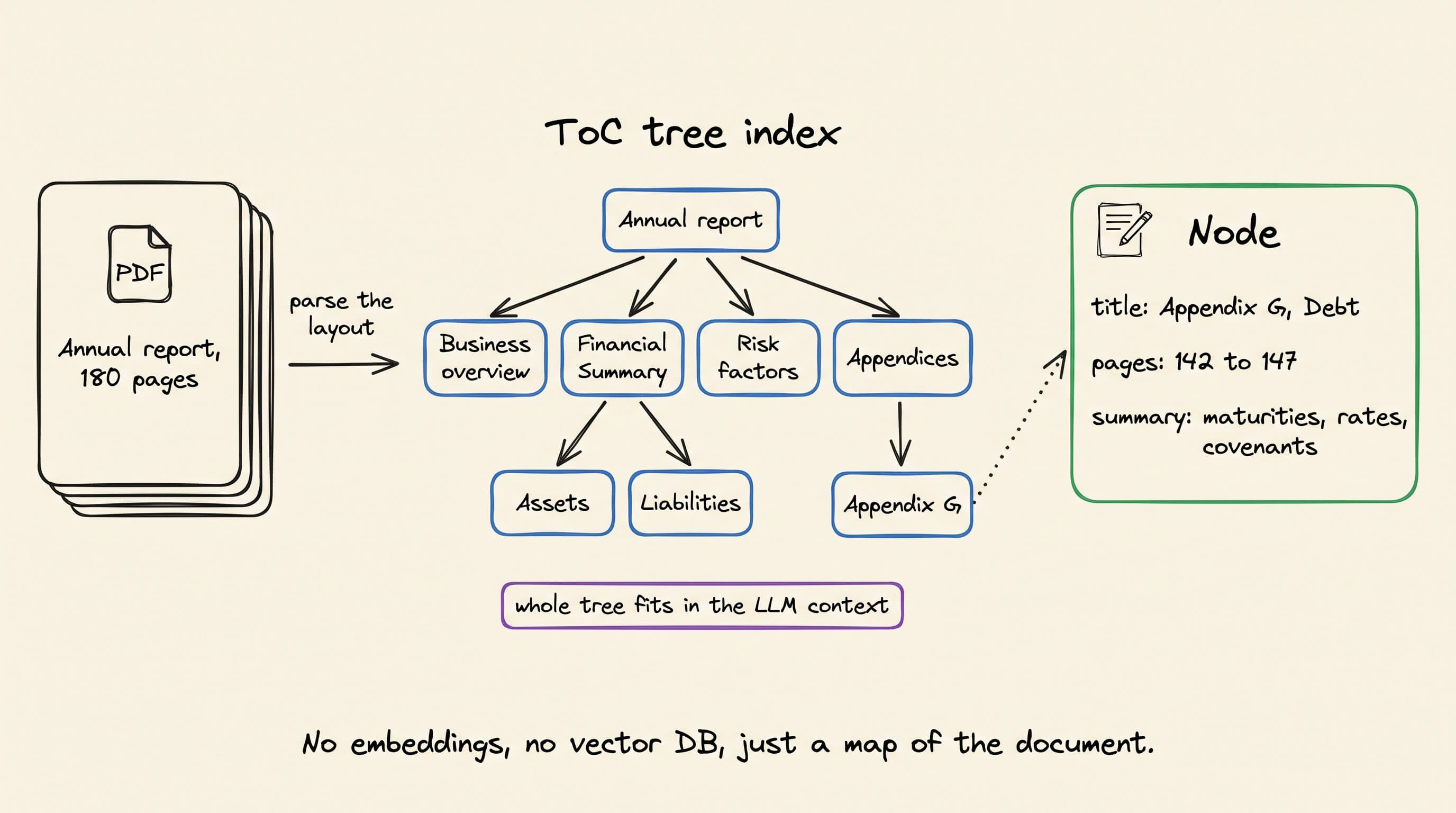
Next, at query time, the LLM gets the query along with the tree. It reads the section titles and summaries and picks the few sections most likely to hold the answer.
For example, for a question about debt, it might pick the “Financial Summary” section and also “Appendix G”, because its summary says the debt details are there.
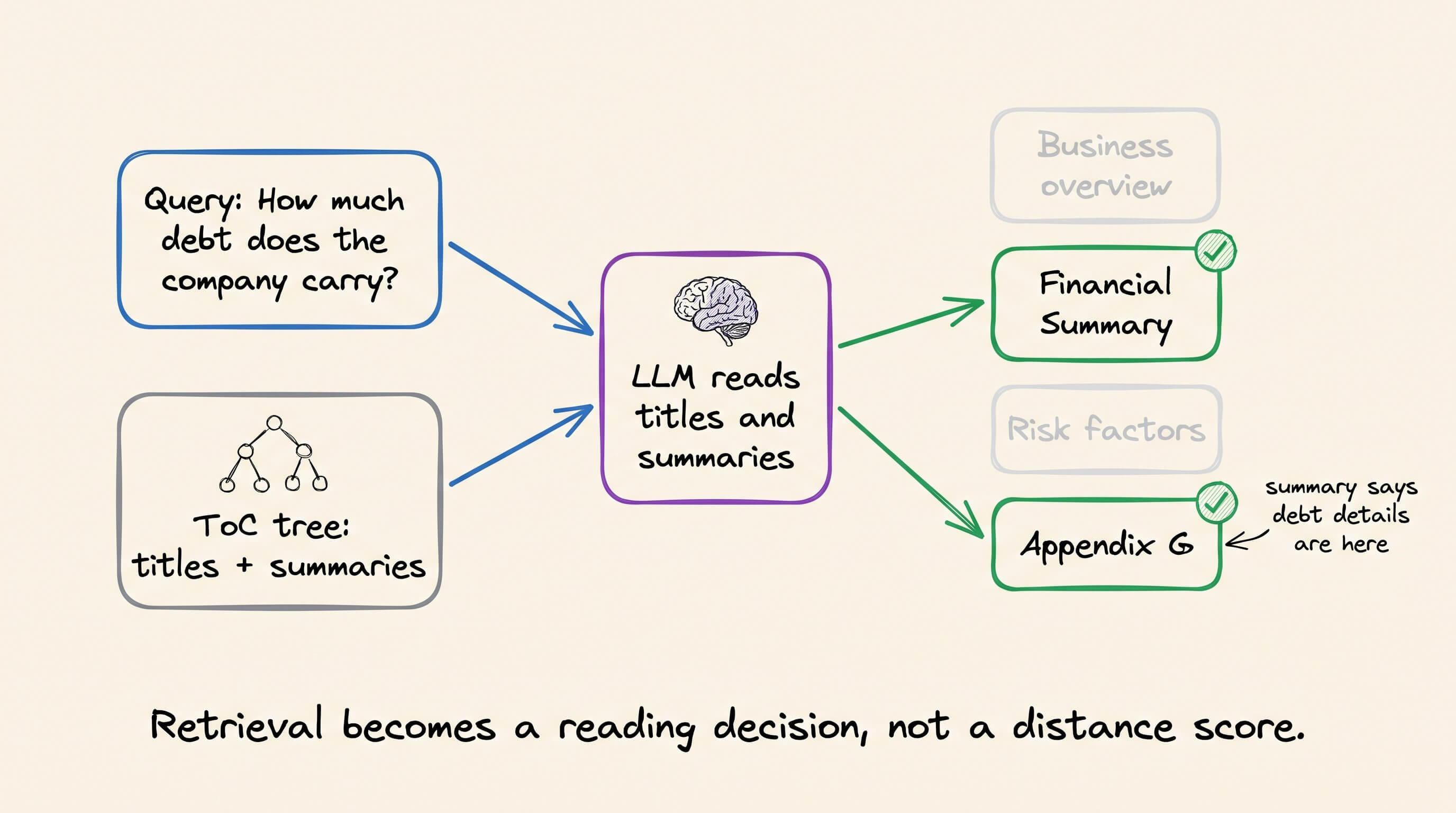
That is how an analyst reads a 10-K. They open the table of contents, go to the financial summary, and follow the note to the appendix.
Finally, the system pulls those full sections and checks whether the evidence is enough.
↳ If it is, the LLM answers from the full sections, with page citations.
↳ If not, it goes back to the tree and opens more nodes.
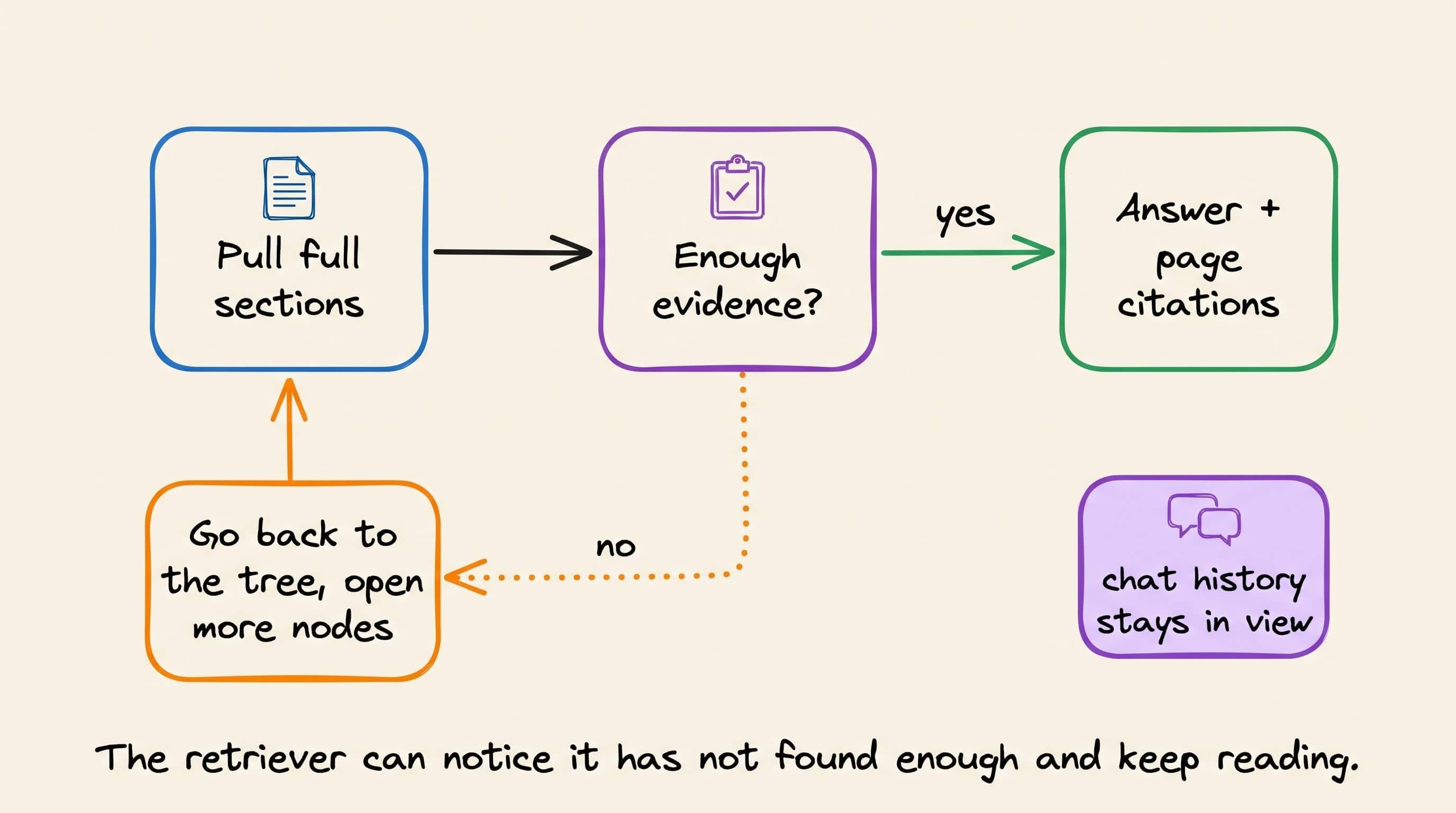
The LLM also sees the chat history. So if you ask about assets and then follow up with “what about liabilities?”, it goes back to the same report.
What it costs
The trade-off is that every query now runs LLM calls over the tree.
PageIndex tested this on 63 questions over NVIDIA’s FY2022 to FY2026 annual reports. Note that the benchmark comes from the PageIndex team itself.
Tree retrieval answered all 63 correctly, at about $110 per 1,000 queries.
The best vector setup reached 92.1%, and only by sending the top 100 chunks, at about $134.
At top-10, vector search cost about $15 per 1,000 queries, but no embedding model got past 76.2%.
So vector search is cheaper per query at a normal k, but it can be less accurate on documents like these.
Latency follows the same pattern. Every hop through the tree is another LLM call, and PageIndex has not published latency numbers.
The index costs more too. One independent benchmark across about 1,000 documents skipped the tree entirely, because building one took 2 to 5 minutes of LLM calls per document.
And the tree only helps when documents have real structure. A pile of support tickets has no table of contents to reason over.
So the two suit different data:
↳ Use a tree for long, structured documents like filings, contracts, and manuals.
↳ Stick with a vector DB for lots of short, unrelated text.
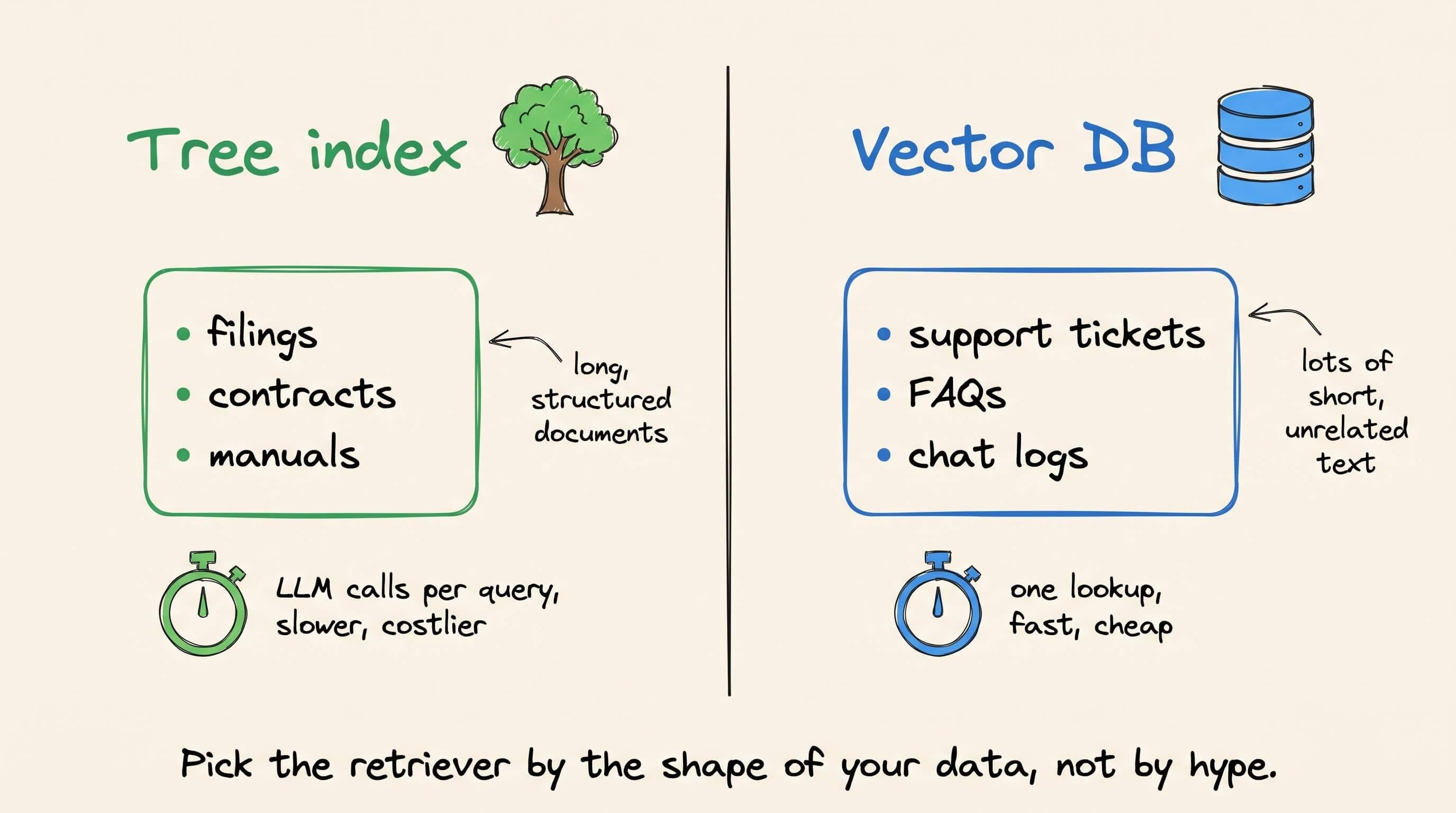
Vector search asks which text looks like the question. Vectorless RAG asks where in the document the answer should be.
If you want to dive deeper, our full RAG course covers RAG from basics to beyond:
Part 1: Build the complete RAG workflow, including chunking, embeddings, retrieval, and reranking →
Part 2: Evaluate retrieval and generation quality with RAG-specific metrics →
Part 3: Reduce RAG latency with faster retrieval and generation paths →
Part 5: Understand CLIP embeddings, multimodal prompting, and tool calling →
Part 6: Build a multimodal RAG system over real-world data →
Part 7: Use Graph RAG for relationships that ordinary chunk retrieval misses →
Part 10: Apply the first set of techniques for production RAG systems →
Part 11: Complete the production RAG techniques and implementation patterns →
Part 12: Reduce prefill latency by reusing KV caches without a shared prefix →
Part 13: Preload a corpus before queries arrive and examine the production constraints →
Part 14: Compress preloaded caches and measure where the approaches break →
Part 15: Implement Block-Attention, Cartridges, and production preloading →
👉 Over to you: Do your documents have enough structure for a tree index, or does a vector DB still fit better?
Good day!