

Technical LLM interview question!
You have 80,000 agent trajectories from production. You need to find top 100 worth reviewing to improve your agent.
No LLM allowed to evaluate trajectories. How will you do this?
Let’s look at some approaches.
The simplest solution one could start with is random sampling. Pick 100 random trajectories and review.
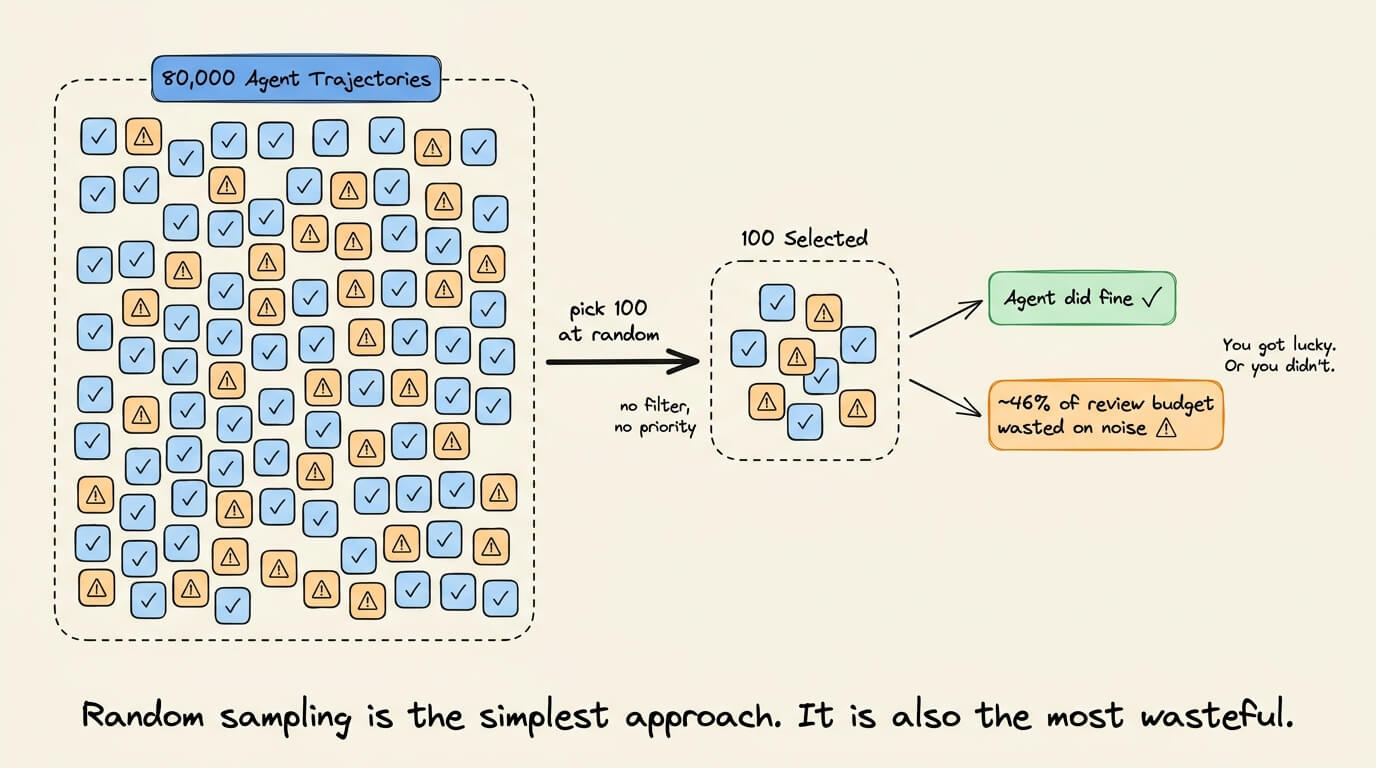
But most production agents handle routine requests just fine, so you end up wasting a big chunk of your annotation budget.
Another approach can filter for longer conversations since 10+ user messages means more complexity.
But longer conversations skew heavily toward outright failures. You’ll surface obvious breakdowns but miss subtle issues hiding in conversations where the agent technically succeeded.
A recent paper from DigitalOcean takes a new approach.

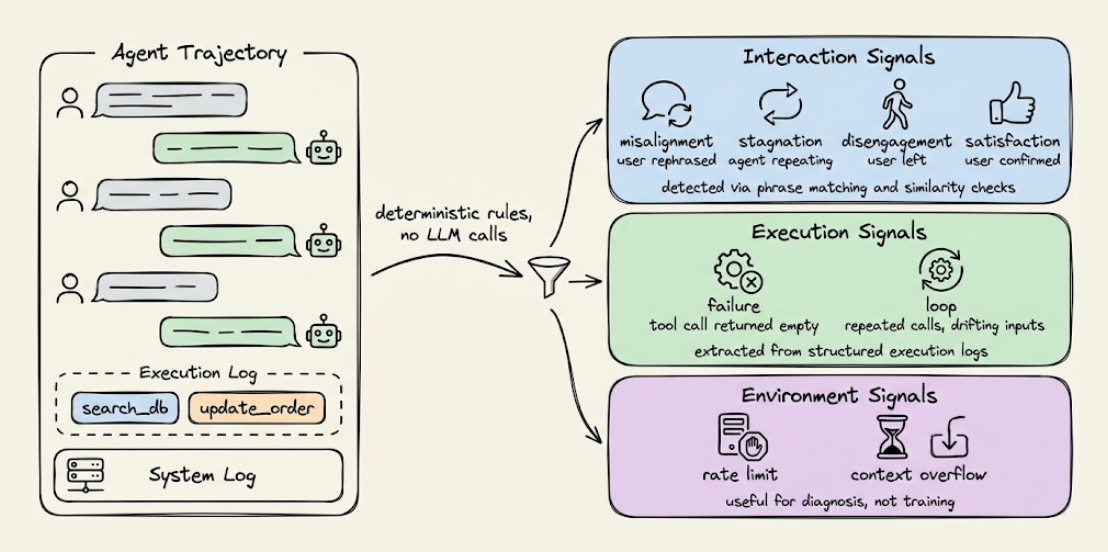
It computes lightweight behavioral signals directly from the trajectory data using deterministic rules.
The signals fall into three groups:
1) Interaction signals:
If a user rephrases the request or corrects the agent, that’s misalignment.
Agent repeating itself is stagnation.
User abandoning the agent is disengagement.
User confirming something worked is satisfaction.
All are detected through normalized phrase matching and similarity checks.
2) Execution signals:
A tool call that doesn’t advance the task is a failure signal.
Repeated calls with identical or drifting inputs indicate a loop.
These are straightforward to extract from execution logs.
3) Environment signals, like rate limits, context overflow, and API errors.
Useful to diagnose but not for training since they reflect system constraints, not agent decisions.
Each trajectory gets scored based on which signals fire, and you sample the highest-signal ones for review.
On τ-bench, they compared all three approaches on 100 trajectories:
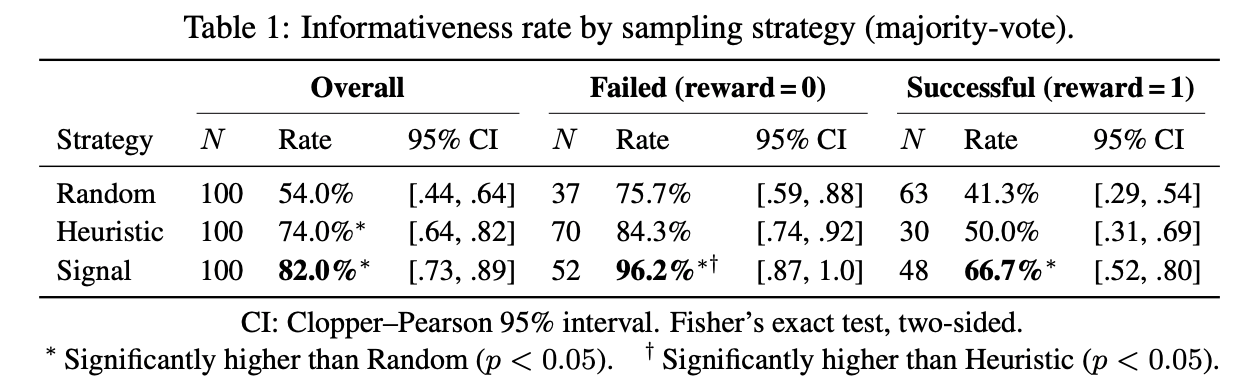
Random sampling hit a 54% informativeness rate.
The length-based heuristic reached 74%.
Signal-based sampling reached 82%.
This means roughly 4 out of every 5 trajectories are genuinely useful to improve the agent.
In fact, among conversations where the agent completed the task correctly, signal sampling still identified useful patterns in 66.7% of cases vs. 41.3% for random.
These are the subtle issues like policy violations, inefficient tool use, and unnecessary steps that don’t break the task but still matter for optimization.
The whole framework runs without any LLM overhead and can sit always-on in a production pipeline.
If you want to see this in practice, this signal-based approach is already integrated into Plano, an open-source AI-native proxy that handles routing, orchestration, guardrails, and observability in one place.
Here’s the Plano GitHub repo →
👉 Over to you: What is your approach to solve this?
Serverless vs on-prem vs edge deployment
Serverless, on-prem, and edge deployment are three different answers to the same question of where your model actually runs, and each one costs you something different.
The visual below depicts them:
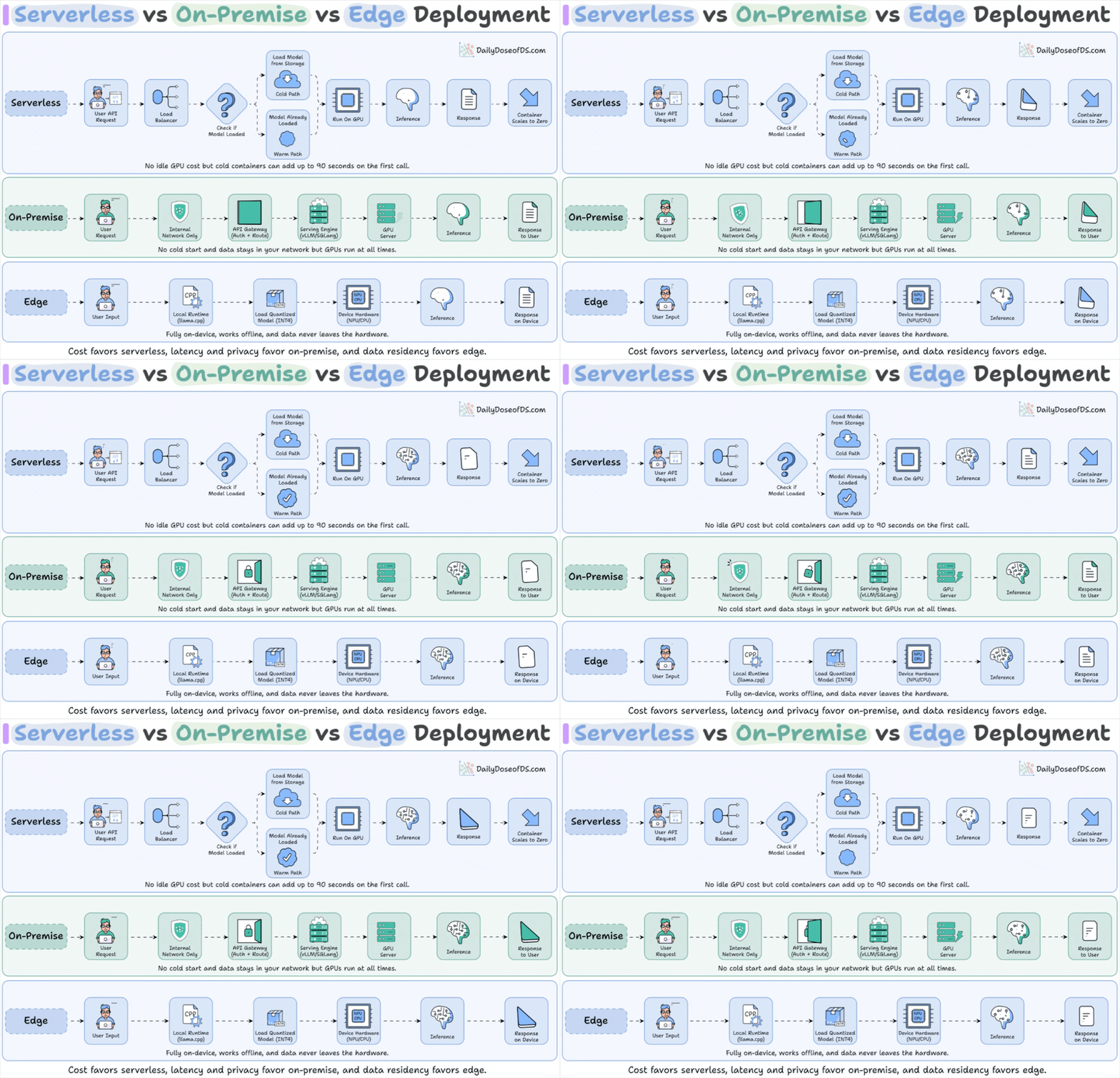
Serverless means you hand your model to a provider that only turns on a machine when a request arrives. Between requests the container shuts down, so you pay nothing while idle. The weights get unloaded along with it, so the next call has to pull gigabytes back into memory before it can answer, which adds up to 90 seconds. A reranker sitting in the middle of a search cannot spend that long waking up, so you keep instances warm, and you are back to paying for idle GPUs.
On-premise means you rent or own the GPU yourself and keep the server running inside your own network. Nothing leaves your walls, there is no cold start because the engine already holds the weights, and you pay a flat hourly rate instead of a per-token meter. The card runs whether traffic arrives or not.
Edge means the model runs on the user’s own device, on its NPU or CPU, through a small local runtime. The model has to be shrunk down to fit, so it works offline with nothing ever leaving the hardware, but it handles one narrow task rather than a full pipeline.
On-premise is where serious teams land, and it only pays off if several models share one card.
In reality, this rarely happens because vLLM pre-allocates 90% of the GPU at startup and ignores every other vLLM instance on it, while HuggingFace TEI (Text Embeddings Inference) takes one model-id per process. Neither one knows the other is there.
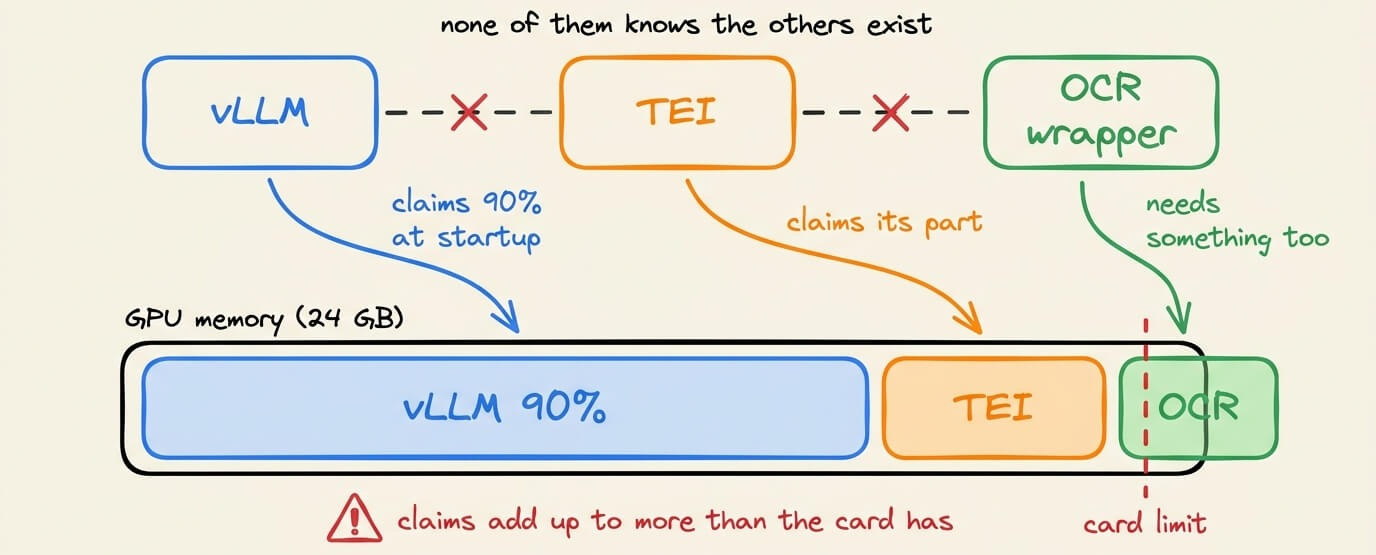
So four small models end up on four separate cards. You switched to small models to spend less, and you are now renting four GPUs to run what one could hold.
The serving engine box in on-prem decides whether on-prem is cheap or just differently expensive.
The card is not the constraint. Instead, the missing piece is one server that holds all the models and shifts memory between them as traffic moves, instead of four servers each convinced they own the whole GPU.
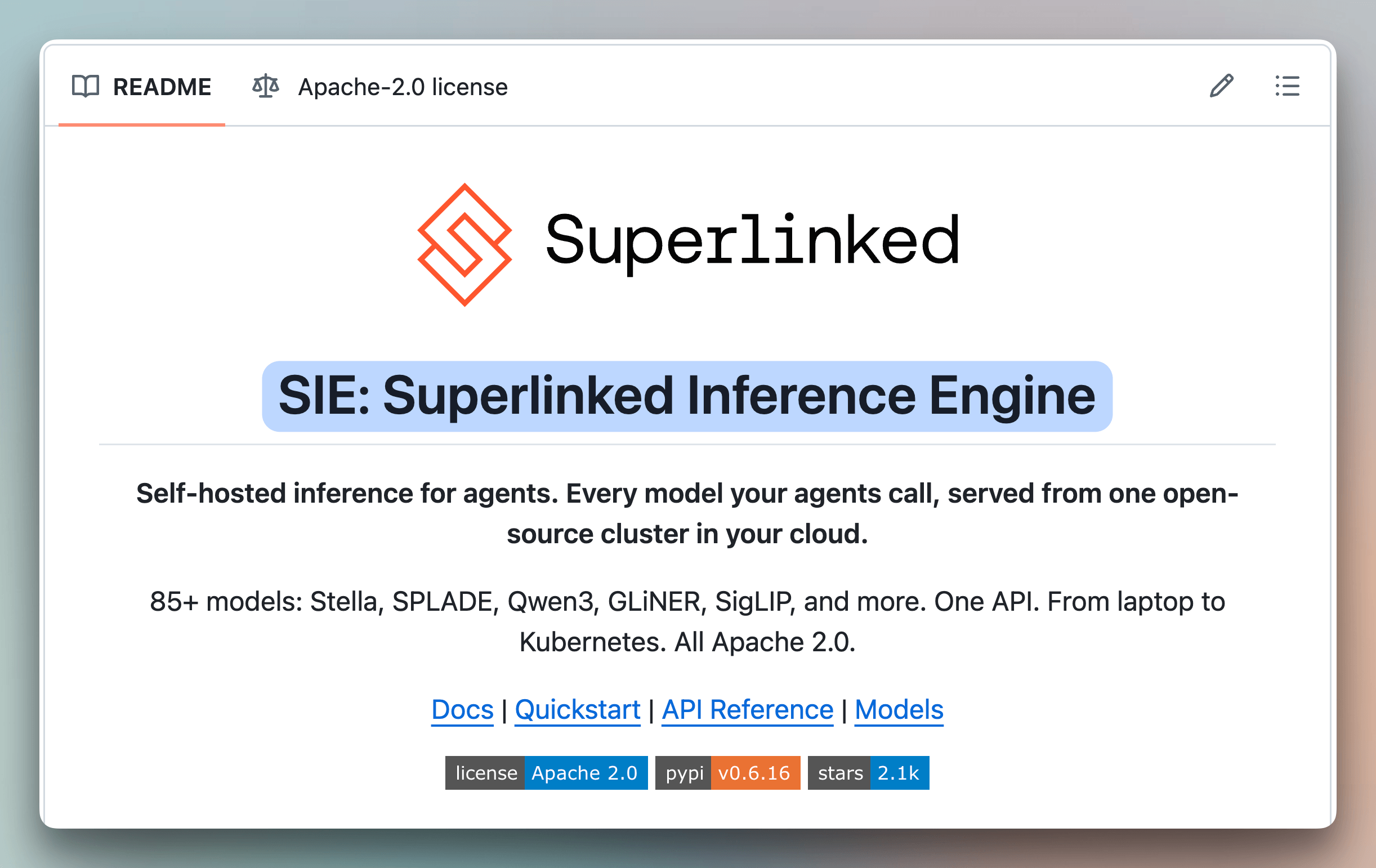
The Superlinked Inference Engine (SIE) is the open-source project built for that slot. One server handles embeddings, reranking, extraction, and generation, loads a model the first time a request needs it, and drops the least recently used one when memory runs short.
GitHub repo: https://github.com/superlinked/sie
(don’t forget to star 🌟)
We also wrote a detailed breakdown on what SIE is and how to get started with it.
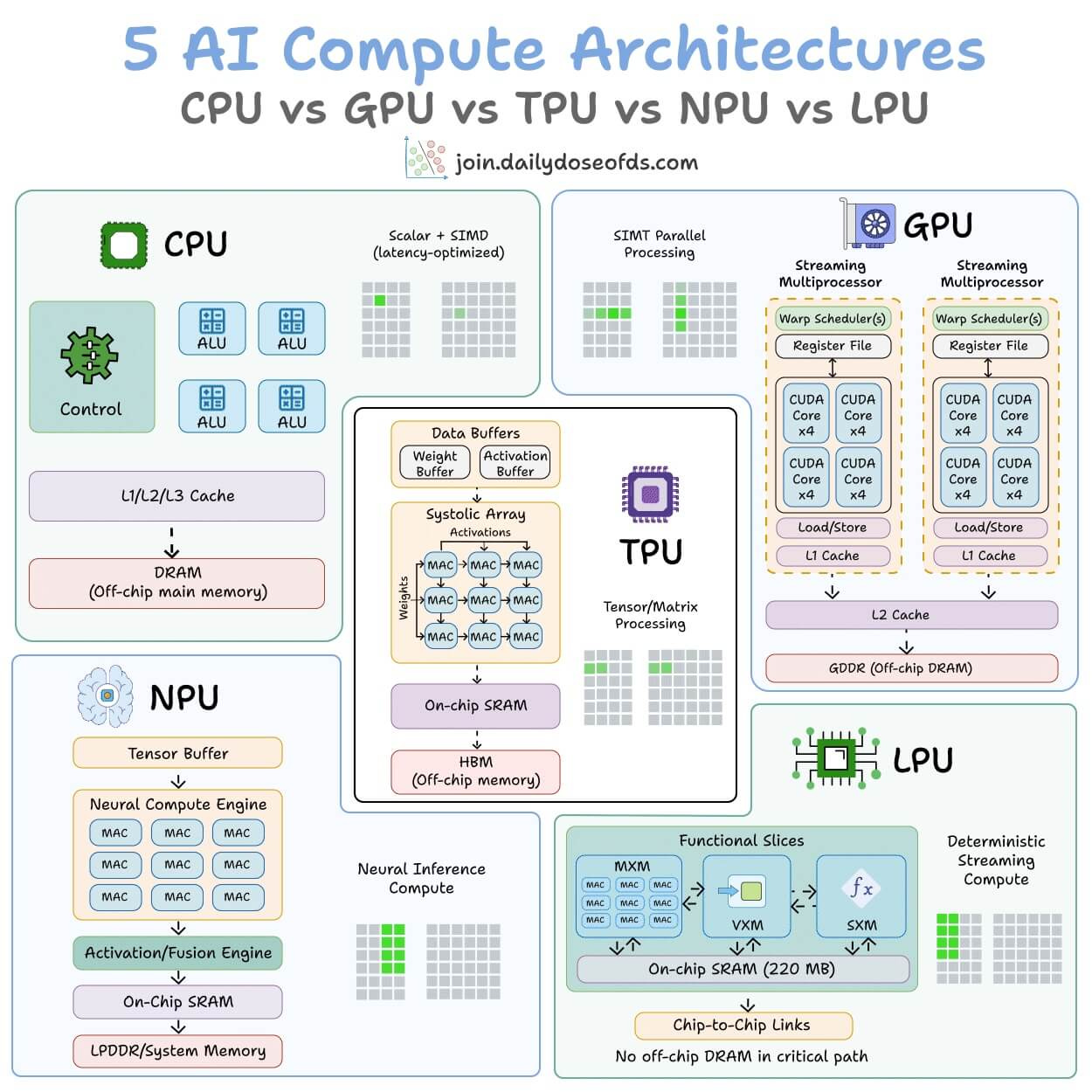
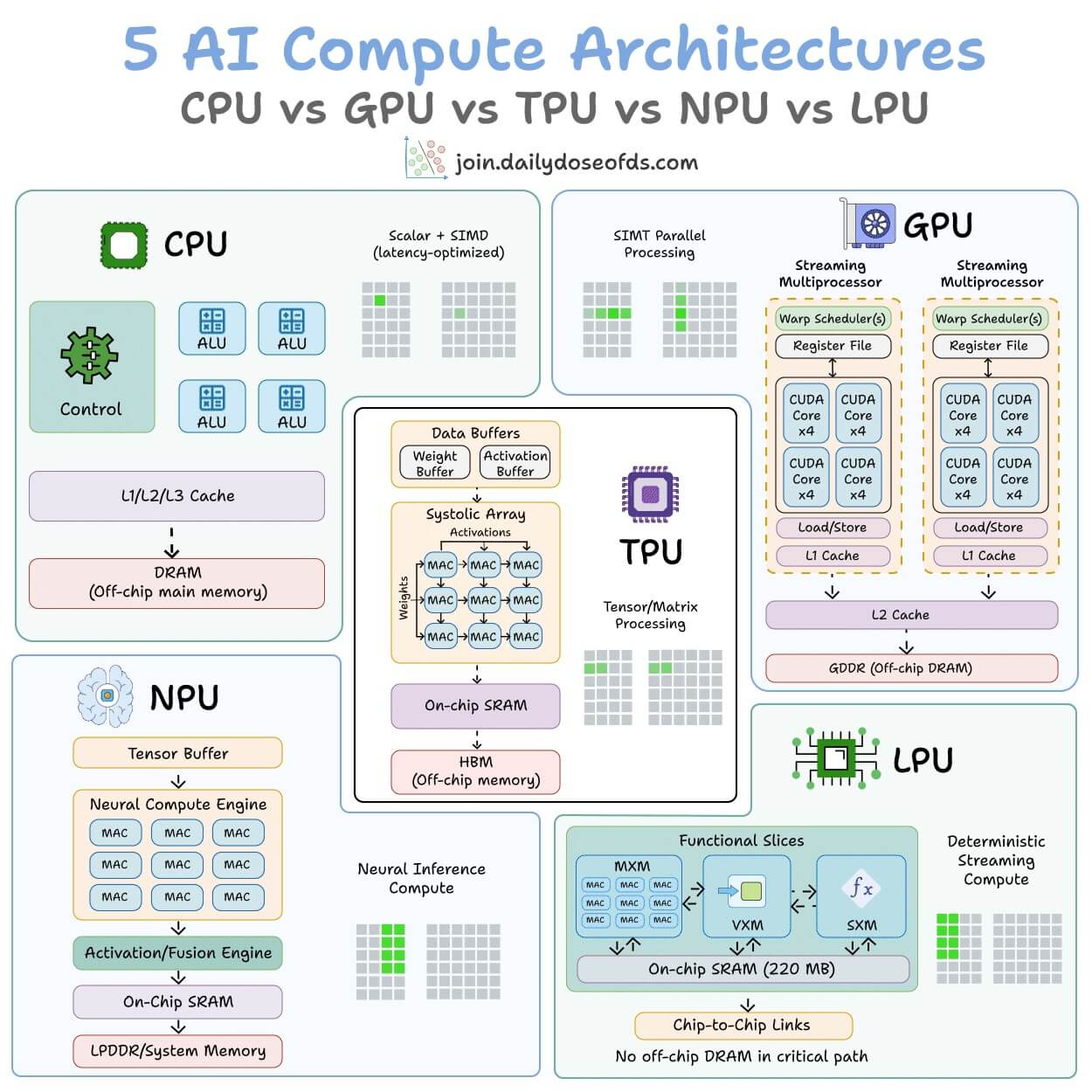
CPU vs. GPU vs. TPU vs. NPU vs. LPU
5 hardware architectures power AI today.
Each one makes a fundamentally different tradeoff between flexibility, parallelism, and memory access.
The visual below maps the internal architecture of all five side by side:
CPU
It is built for general-purpose computing. A few powerful cores handle complex logic, branching, and system-level tasks.
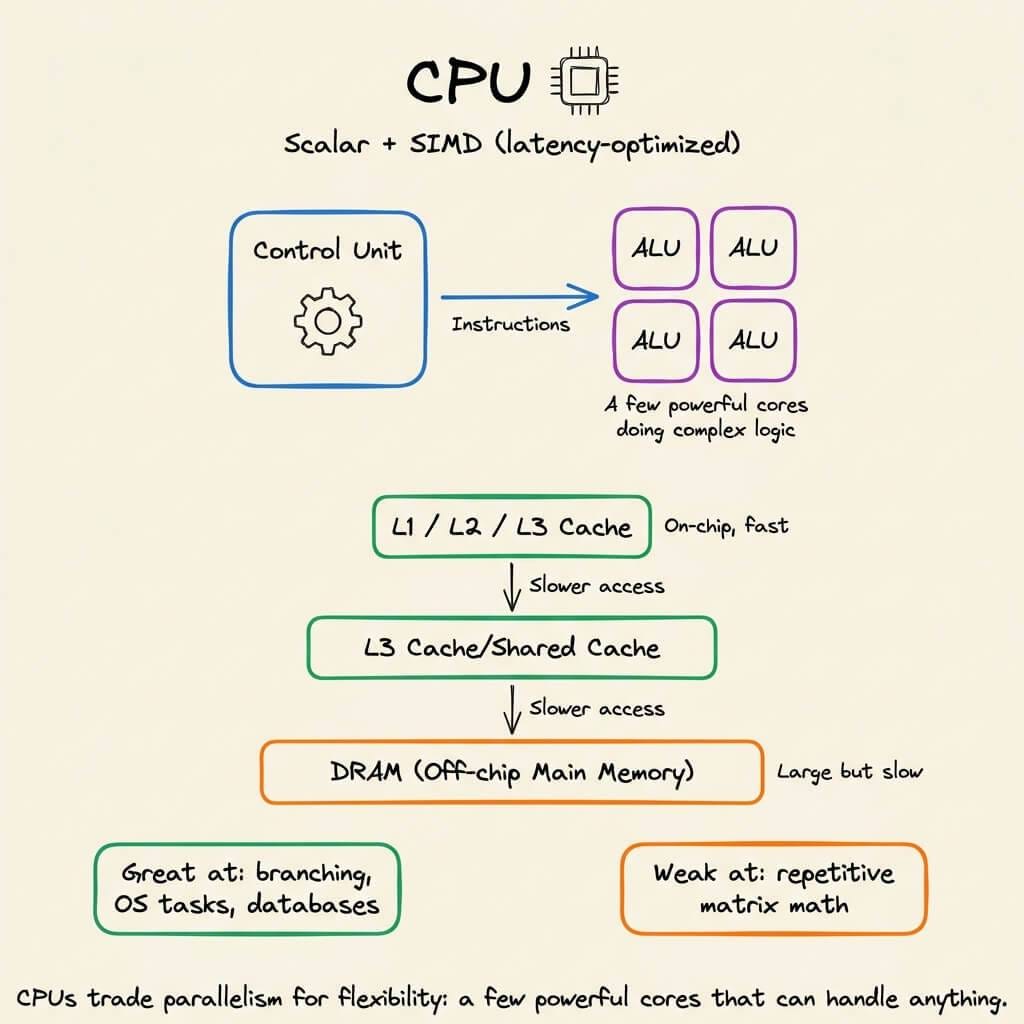
It has deep cache hierarchies and off-chip main memory (DRAM). It’s great for operating systems, databases, and decision-heavy code, but not that great for repetitive math like matrix multiplications.
GPU
Instead of a few powerful cores, GPUs spread work across thousands of smaller cores that all execute the same instruction on different data.
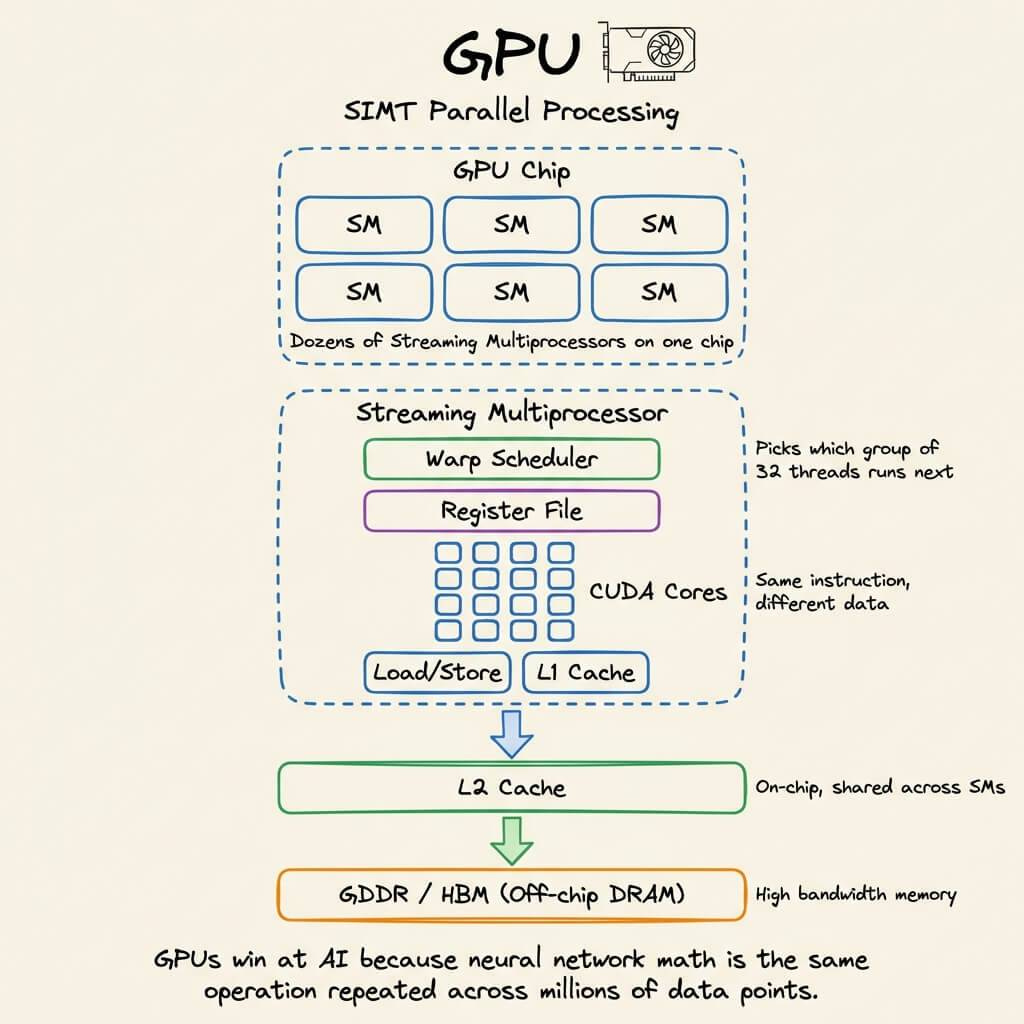
This is why GPUs dominate AI training. The parallelism maps directly to the kind of math neural networks need.
TPU
They go one step further with specialization.
The core compute unit is a grid of multiply-accumulate (MAC) units where data flows through in a wave pattern.
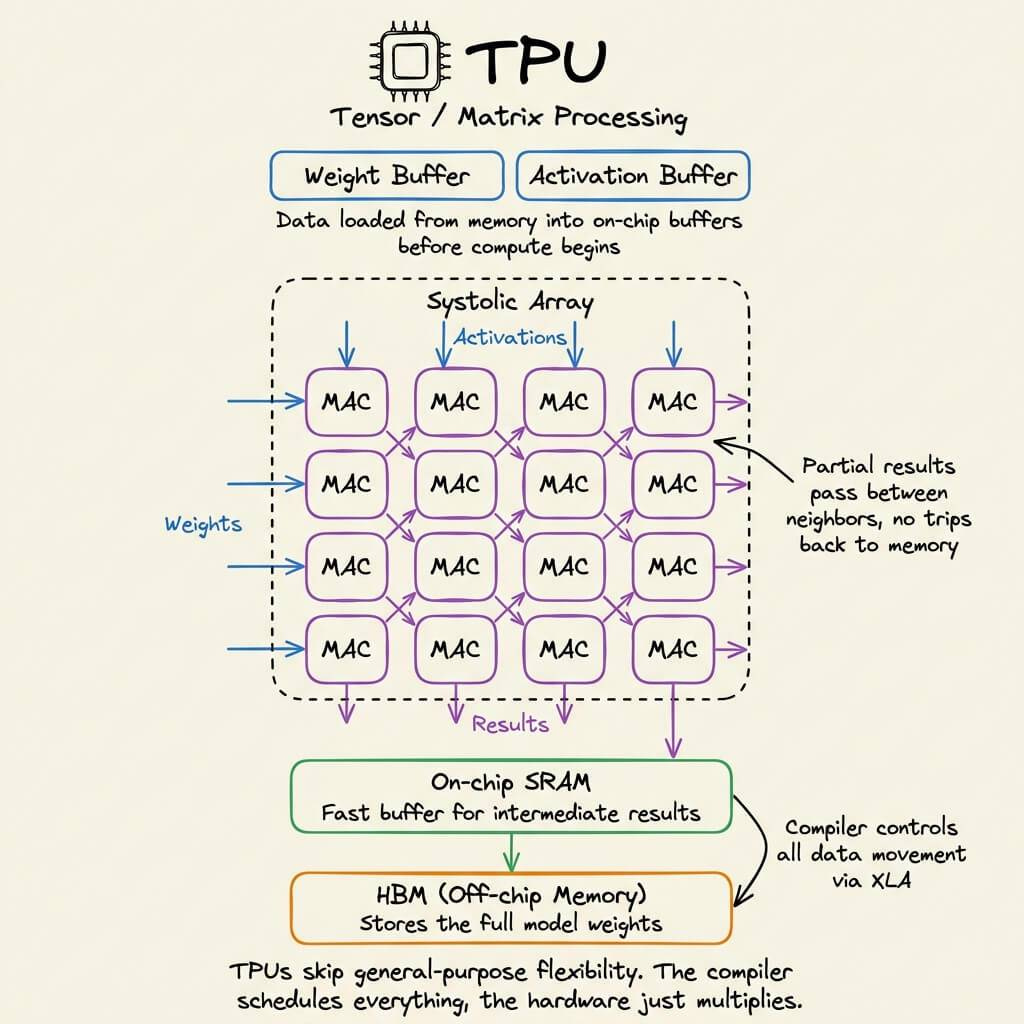
Weights enter from one side, activations from the other, and partial results propagate without going back to memory each time.
The entire execution is compiler-controlled, not hardware-scheduled. Google designed TPUs specifically for neural network workloads.
NPU
This is an edge-optimized variant.
The architecture is built around a Neural Compute Engine packed with MAC arrays and on-chip SRAM, but instead of high-bandwidth memory (HBM), NPUs use low-power system memory
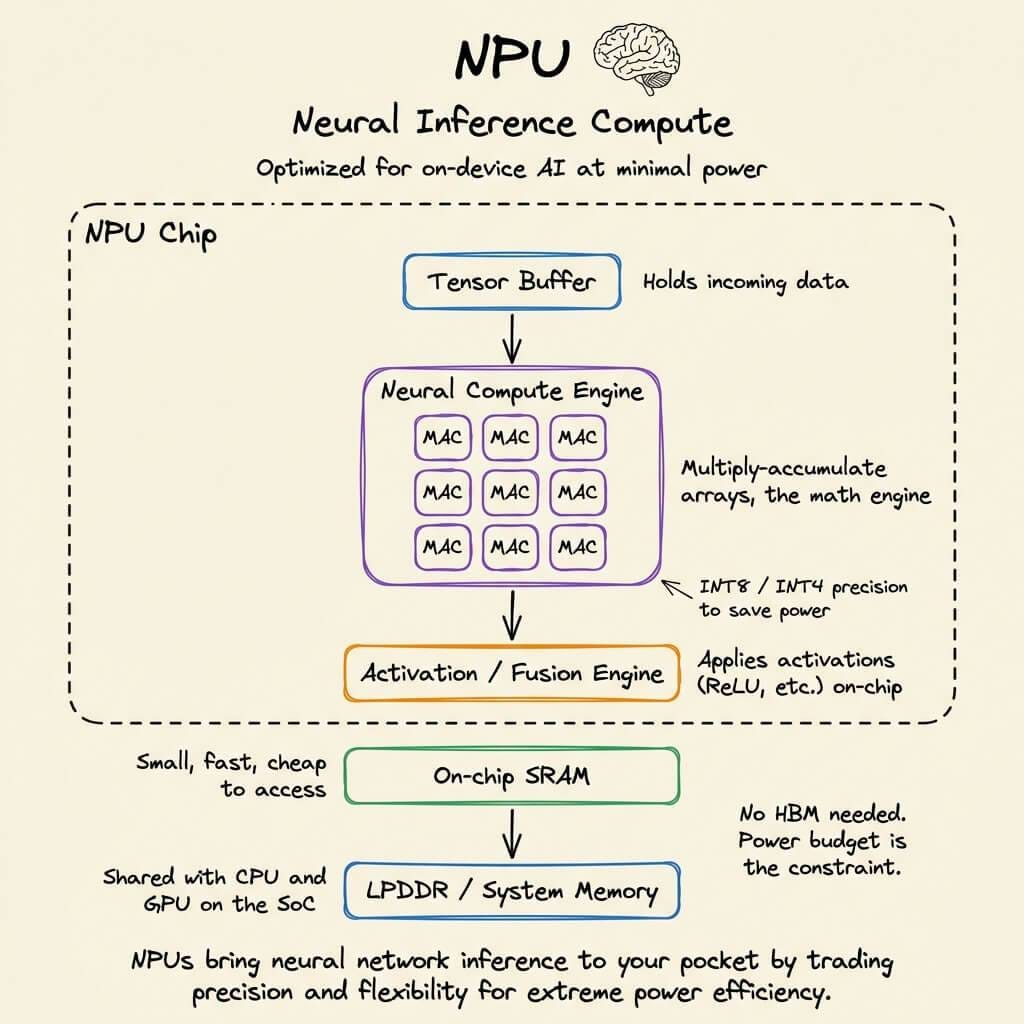
The design goal is to run inference at single-digit watt power budgets, like smartphones, wearables, and IoT devices.
Apple Neural Engine and Intel’s NPU follow this pattern.
LPU (Language Processing Unit)
This is the newest entrant, by Groq.
The architecture removes off-chip memory from the critical path entirely. All weight storage lives in on-chip SRAM.
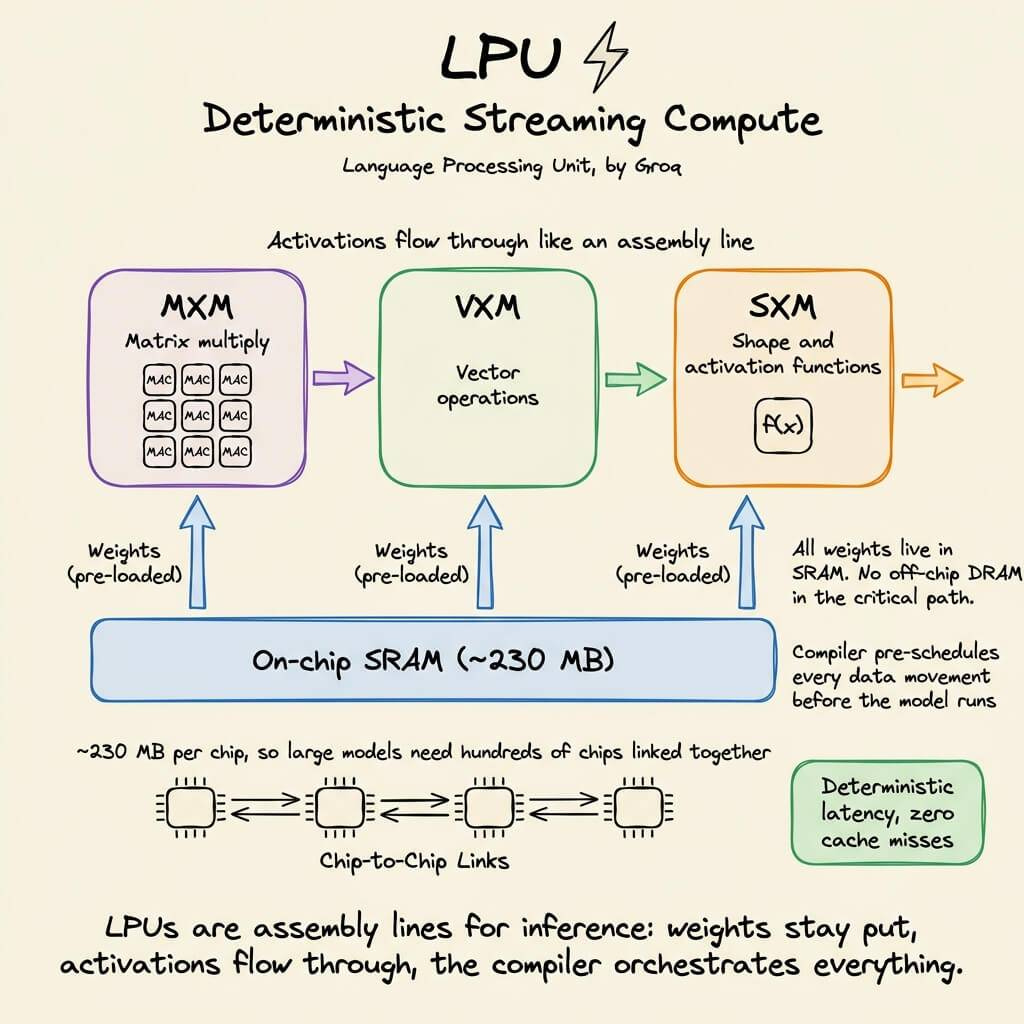
Execution is fully deterministic and compiler-scheduled, which means zero cache misses and zero runtime scheduling overhead.
The tradeoff is that it provides limited memory per chip, which means you need hundreds of chips linked together to serve a single large model. But the latency advantage is real.
AI compute has evolved from general-purpose flexibility (CPU) to extreme specialization (LPU). Each step trades some level of generality for efficiency.
The visual below maps the internal architecture of all five side by side, and it was inspired by ByteByteGo’s post on CPU vs GPU vs TPU. We expanded it to include two more architectures that are becoming central to AI inference today.
That said, if you want to get hands-on with actual GPU programming using CUDA, learn about how CUDA operates GPU’s threads, blocks, grids (with visuals), etc., we covered it here: Implementing (Massively) Parallelized CUDA Programs From Scratch Using CUDA Programming.
👉 Over to you: Which of these 5 have you actually worked with or deployed on?
Good day!