

InsForge: The first backend built for AI coding agents, not human dashboards
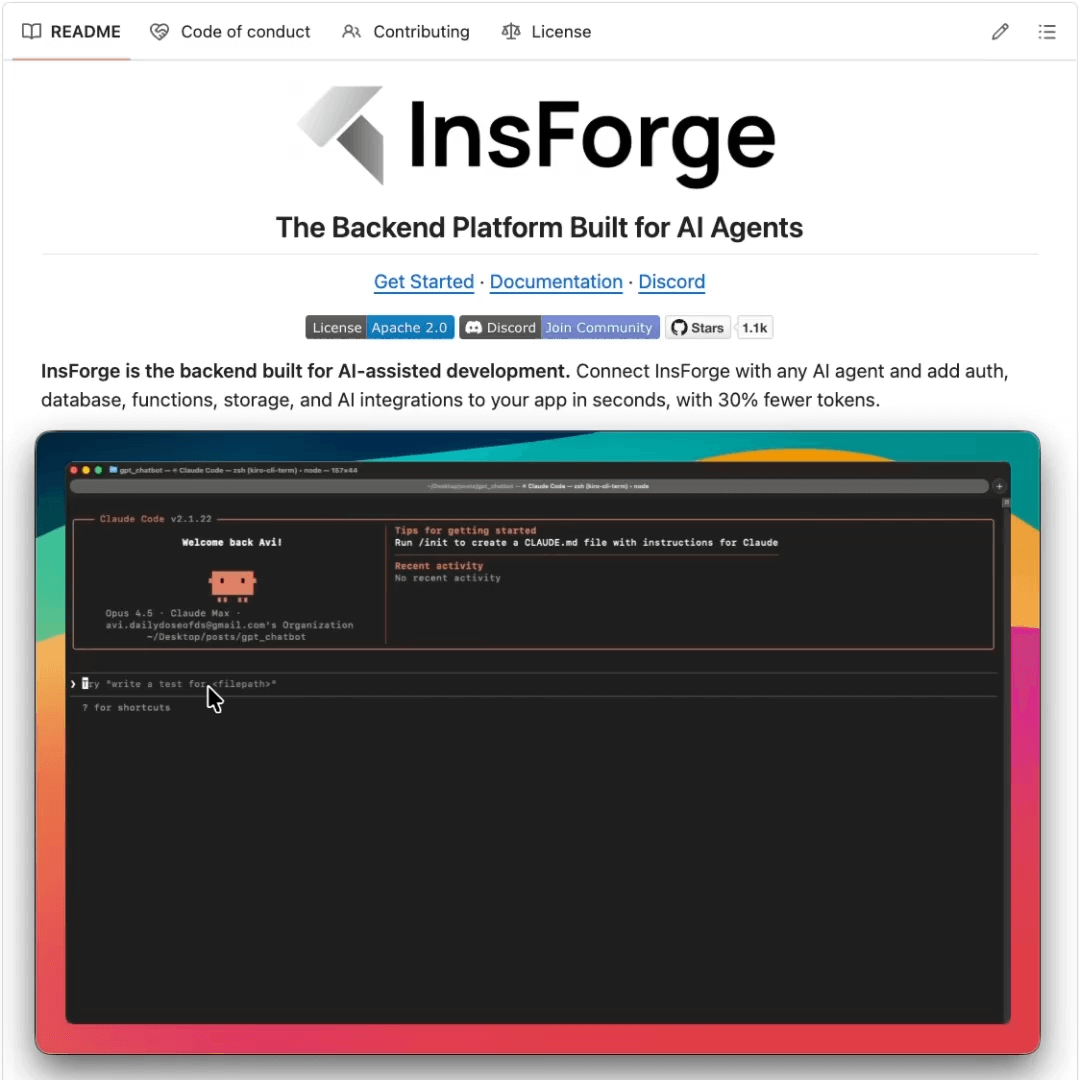
InsForge (open-source) solves the most frustrating bottleneck in AI-assisted development: backend configuration.
Agents can build a beautiful frontend in minutes, set up API routes, and lay out the component architecture. But the moment it needs to enable auth or configure a database, it completely falls apart.
The reason is that every backend platform today (Firebase, Supabase, AWS) was designed for humans clicking through dashboards. When agents try to interact with these platforms through MCP servers, they get fragmented context like table names without schema details or auth endpoints without security configs. So agents end up guessing, hallucinating, and generating broken code.
InsForge fixes this at the infrastructure level rather than the tooling level. It introduces a semantic layer where every backend primitive (auth, database, storage, AI features) is exposed as structured, machine-readable capabilities with metadata, constraints, and documentation baked in.
Primitives are also aware of each other, so auth knows about database permissions and storage understands access policies.
Because agents get a complete, structured context instead of inferring what’s missing, InsForge delivers:
Roughly 2x more accuracy than Supabase MCP
1.6x faster task completion
30% better token efficiency
To test this out, we built a full ChatGPT clone with auth, database, storage, and AI integration, built entirely with Claude Code using InsForge as the backend. No manual configuration was needed, not because of any magic, but because the agent could reason about the entire backend as one coherent system.
InsForge works with any AI coding agent, including Cursor, Claude Code, Windsurf, and Codex. You can use all the primitives together or just pick what you need, like database only or auth only.
It’s fully open-source under Apache 2.0.
Find GitHub repo here → (don’t forget to star it ⭐️)
Six Key Metrics for AI Agent Evaluation
An agent that completes a task in 3 tool calls and one that takes 9 calls (retrying, backtracking, calling the same API twice) can both score 1.0 on task completion.
However, end-to-end scoring won’t flag this difference, but your token bill and latency will.
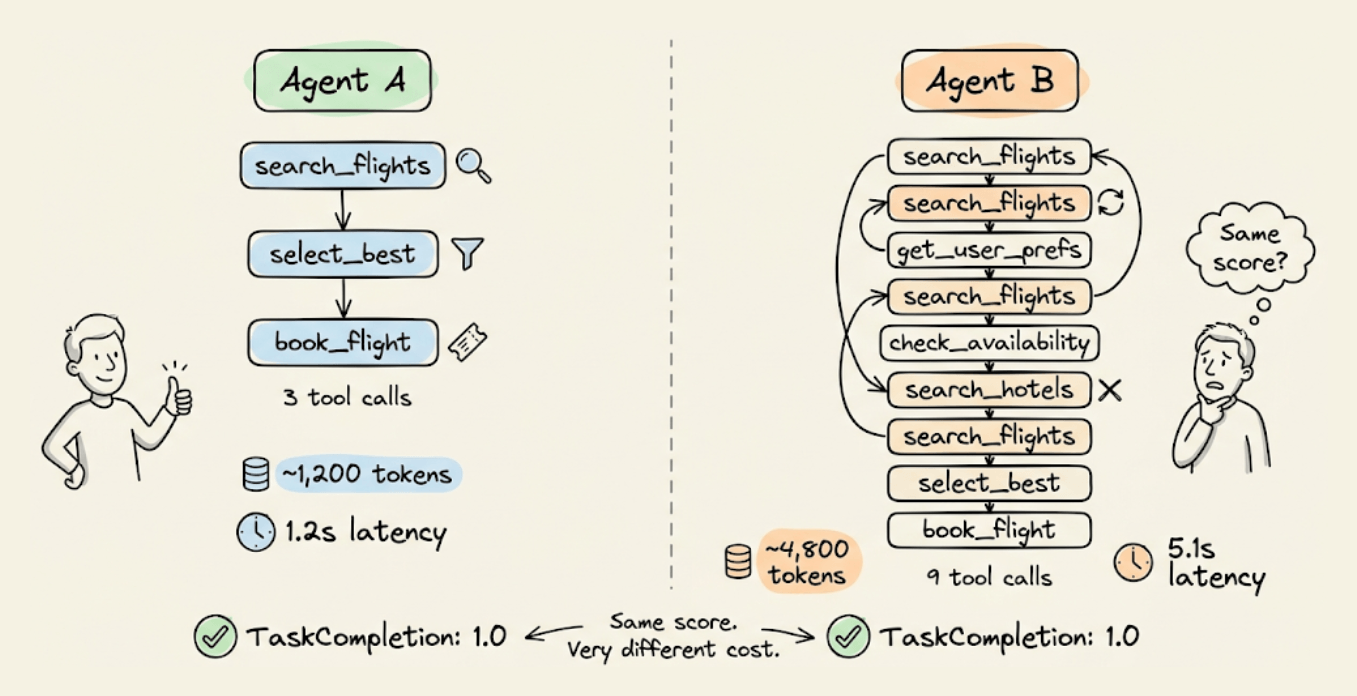
Evaluating agents properly means going deeper than the final output. You need to check if the agent planned well, followed its plan, called the right tools with the right arguments, and did it all without wasted steps.
Today, let’s look at how you can do end-to-end Agent evaluation in a few lines of code using the open-source DeepEval evaluation framework (14k+ stars).
It ships six agentic metrics that cover all of this, plus a conversation simulator that auto-generates multi-turn test cases from scenario definitions.
Two layers of agent evaluation
DeepEval’s six metrics operate at two levels, based on what part of the agent’s execution they inspect:
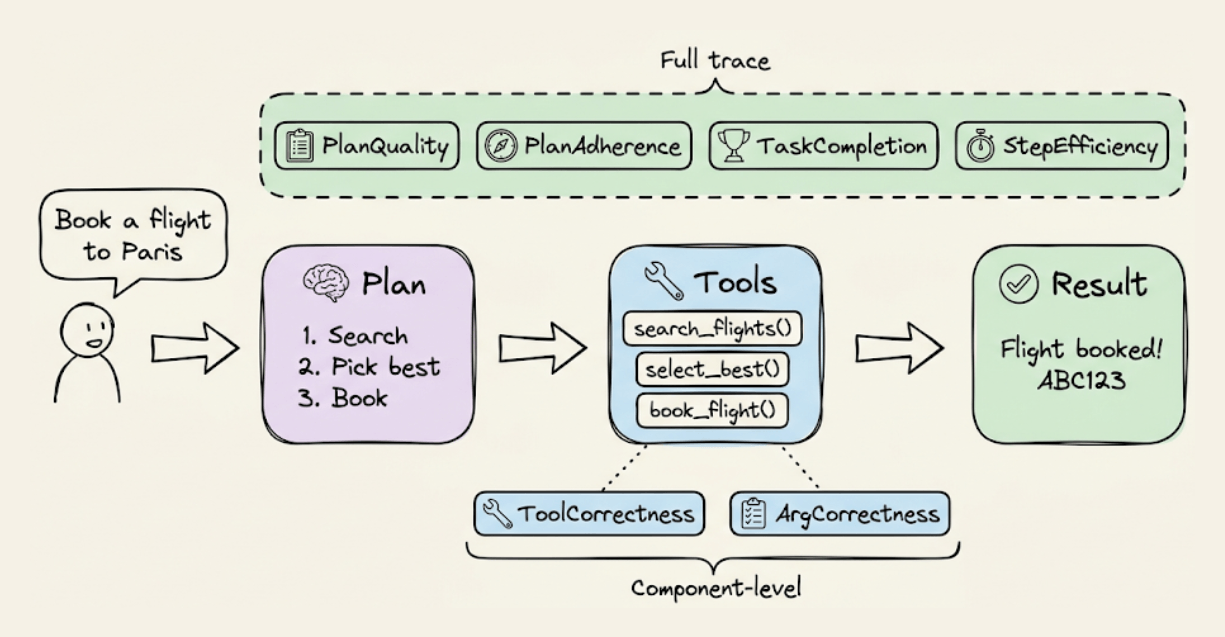
Full-trace metrics (read the entire agent execution via @observe tracing):
PlanQualityMetricevaluates whether the agent’s generated plan is logical, complete, and efficient for the task.PlanAdherenceMetriccompares the plan against actual execution to check if the agent followed its own strategy or deviated mid-run.TaskCompletionMetricscores whether the agent accomplished the user’s task based on the full trace.StepEfficiencyMetricpenalizes unnecessary or redundant steps even if the task was completed.
Component-level metrics (zoom into tool calls at a specific @observe span):
ToolCorrectnessMetriccomparestools_calledagainstexpected_toolsto verify the agent picked the right tools.ArgumentCorrectnessMetricvalidates that the input parameters passed to each tool call were correct for the task.
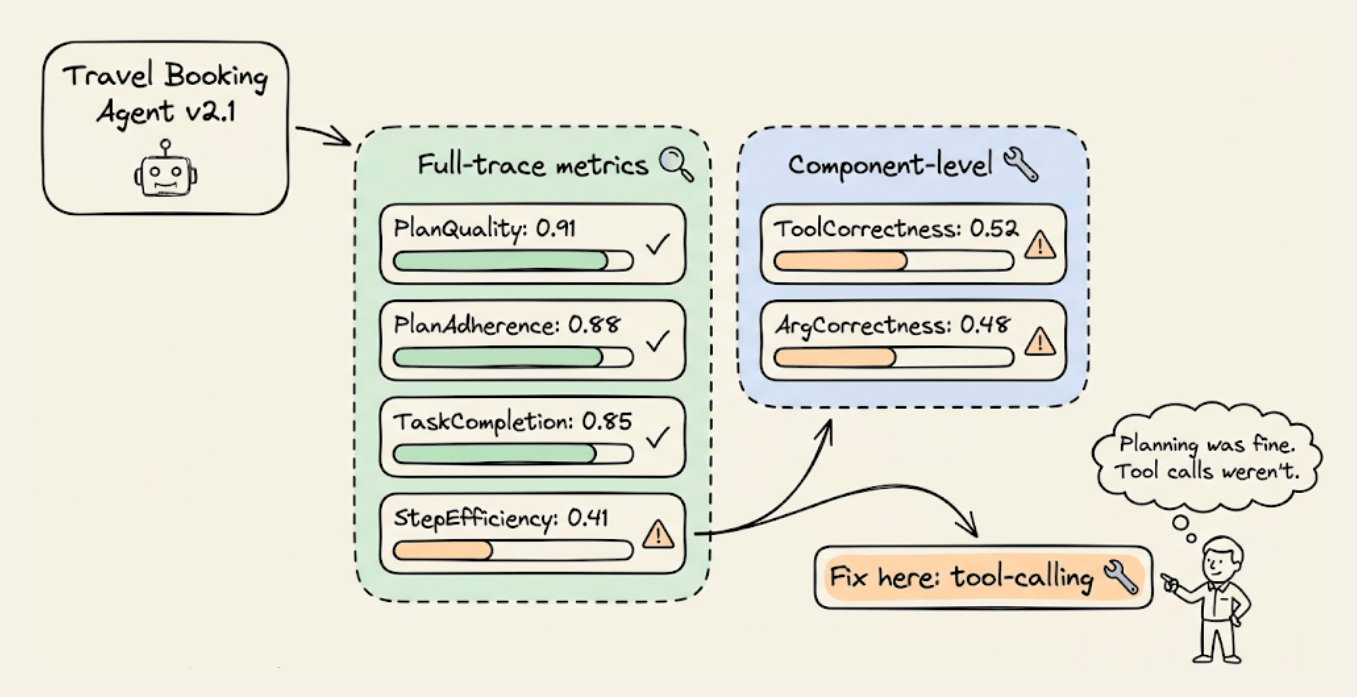
Using them together is important because an agent can score 1.0 on TaskCompletion but 0.4 on StepEfficiency. If it called the same API three times to get a result, it should have cached. You’d never catch that with a single pass/fail metric.
Evaluating planning and execution from traces
Before running any metrics, we need an application to evaluate. Here’s a minimal travel booking agent with three functions:
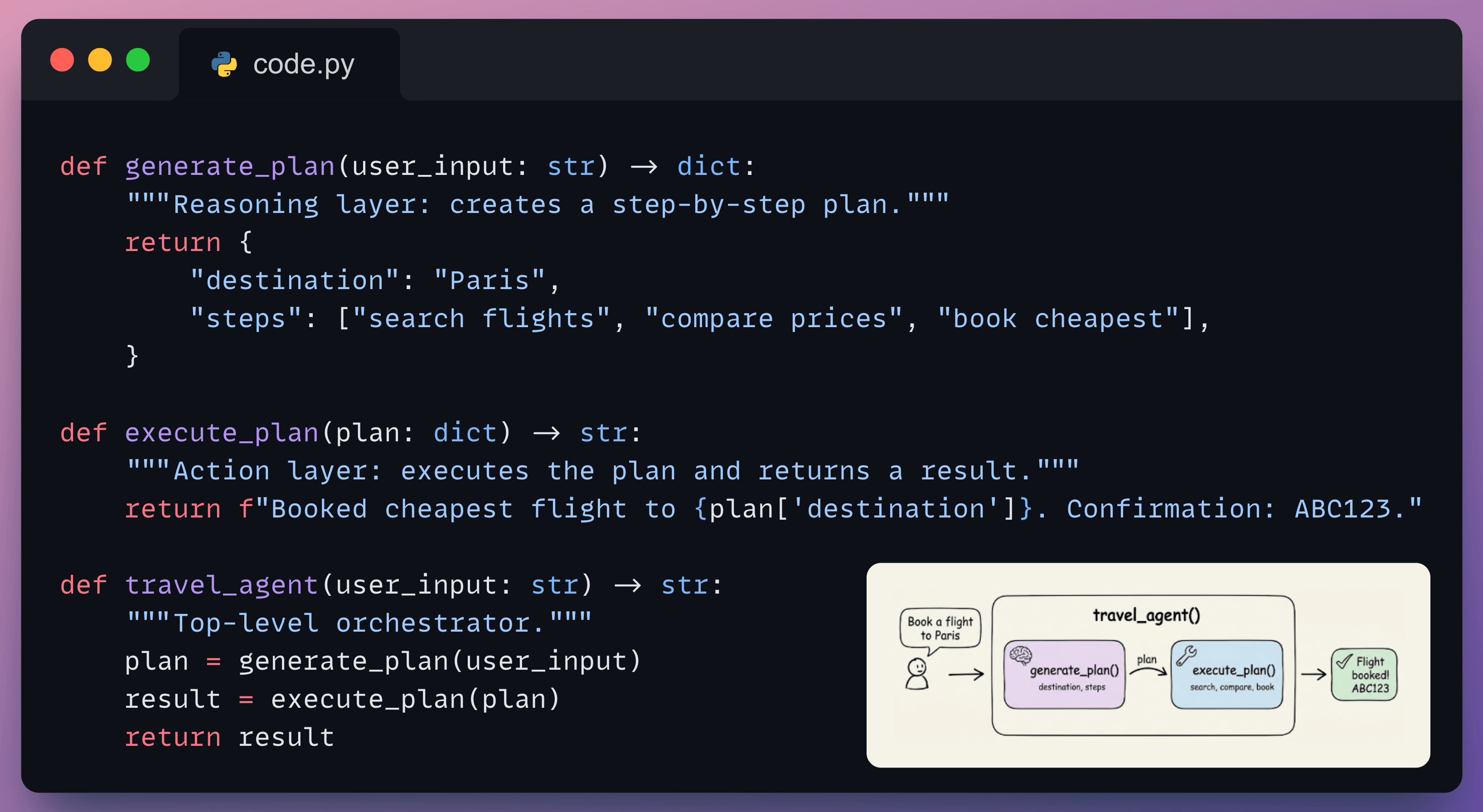
generate_plan handles reasoning (what steps to take), execute_plan handles action (calling tools to complete the task), and travel_agent orchestrates both. This is a stand-in for any agent you’d build with OpenAI, LangGraph, or CrewAI.
To evaluate this agent with DeepEval, we need to make its execution visible. The @observe decorator does this without changing any logic:
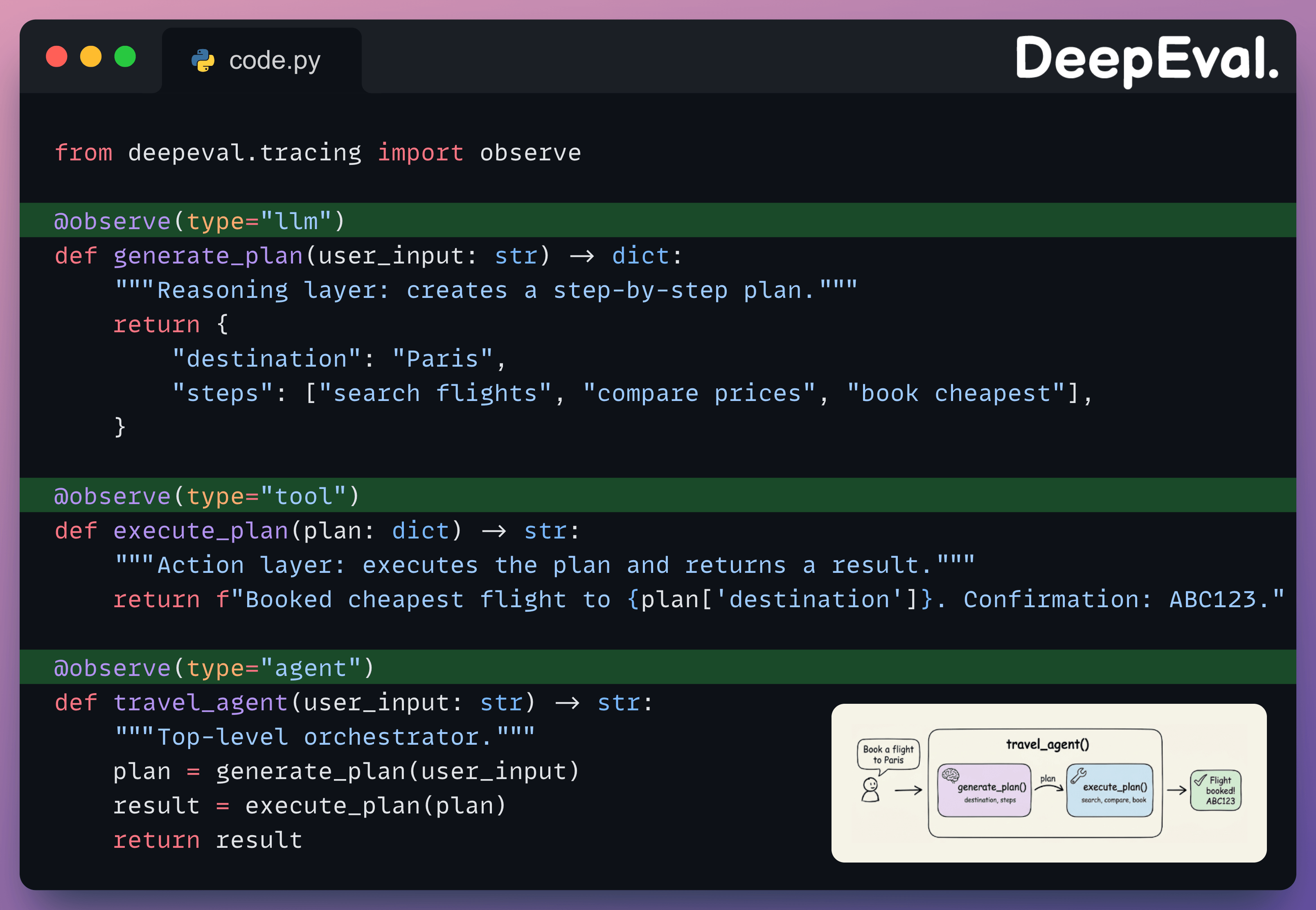
The type parameter tells DeepEval the role each function plays: "agent" for the orchestrator, "llm" for reasoning, "tool" for action. Full-trace metrics read the entire trace starting from the "agent" span. Component-level metrics zoom into a specific span like "tool" or "llm".
Next, define a dataset of goldens (test inputs) to evaluate against:
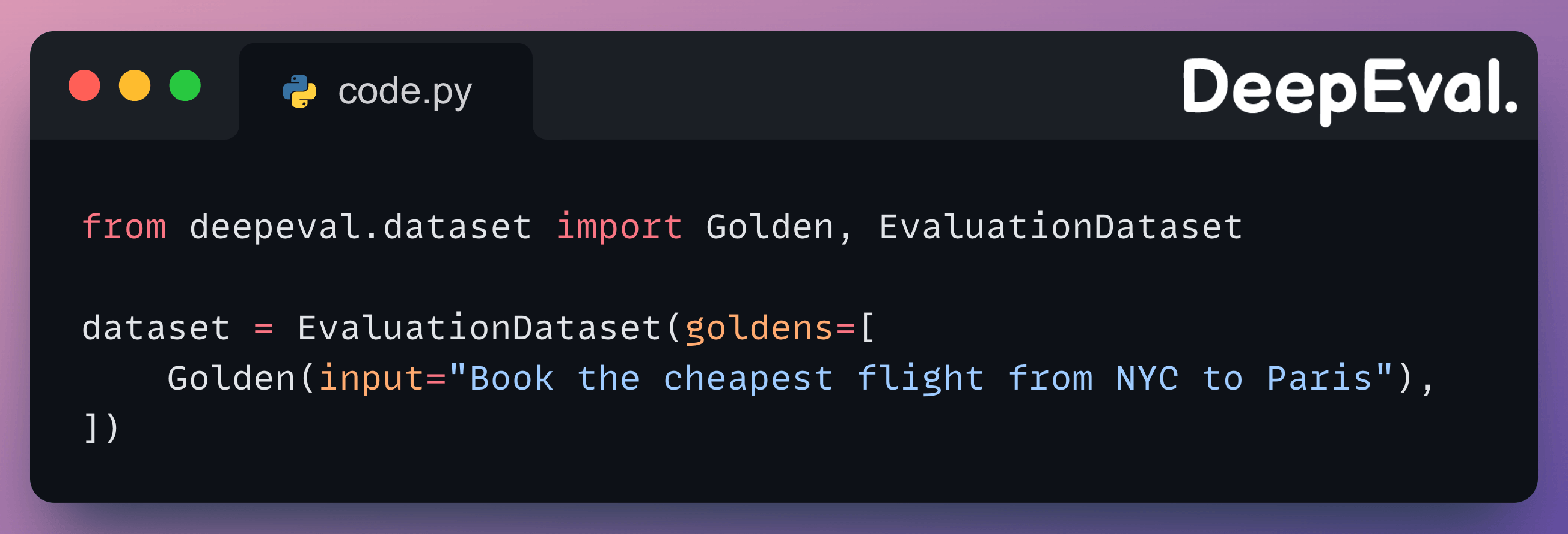
Each Golden is one test scenario. In practice, you’d have 20-50+ goldens covering edge cases (wrong dates, ambiguous destinations, cancellations).
Now pass the four full-trace metrics to evals_iterator(), run the agent inside the loop, and DeepEval reads the execution trace to score each one:
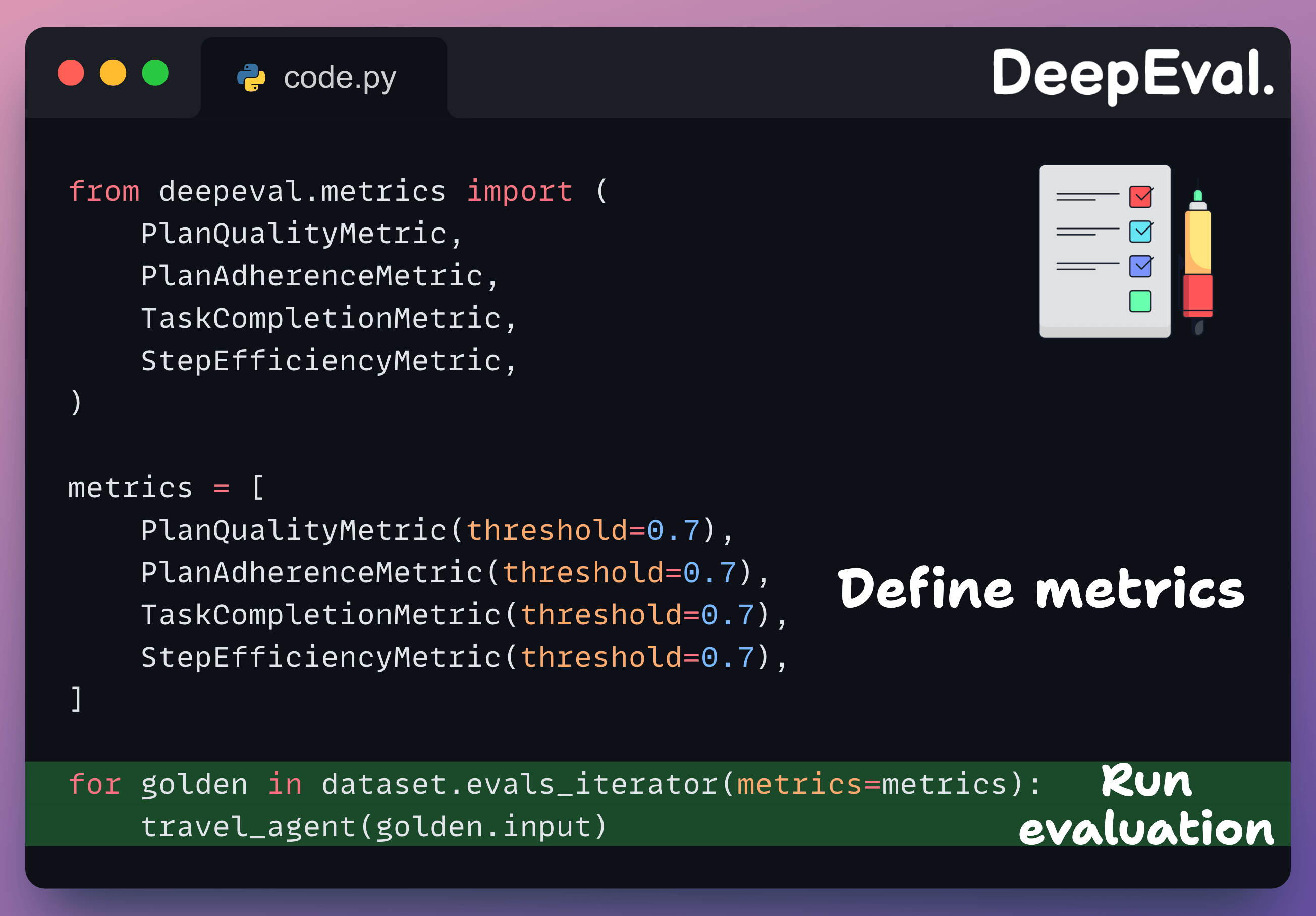
Here’s what we got on our dummy agent:

The scores tell a clear debugging story. PlanQuality flagged that the steps (”search”, “compare”, “book”) lacked operational detail. PlanAdherence confirmed the agent didn’t execute those steps in the trace. StepEfficiency caught that the separate planning phase was redundant. TaskCompletion still passed because the final output was correct, which is exactly why you can’t rely on it alone.
Evaluating tool calls at the component level
Full-trace metrics (used above) tell you whether the overall execution worked.
Component-level metrics zoom into a specific span (typically the LLM call that decides which tools to invoke) and evaluate tool selection and argument quality independently.
The two metrics here work differently under the hood.
ToolCorrectnessMetric is reference-based. It compares actual tools called to the expected tool calls.
ArgumentCorrectnessMetric is referenceless. It uses an LLM judge to evaluate whether the arguments make sense given the input, without needing expected values.
You can attach both metrics to a specific component inside a traced agent using @observe(metrics=[...]):
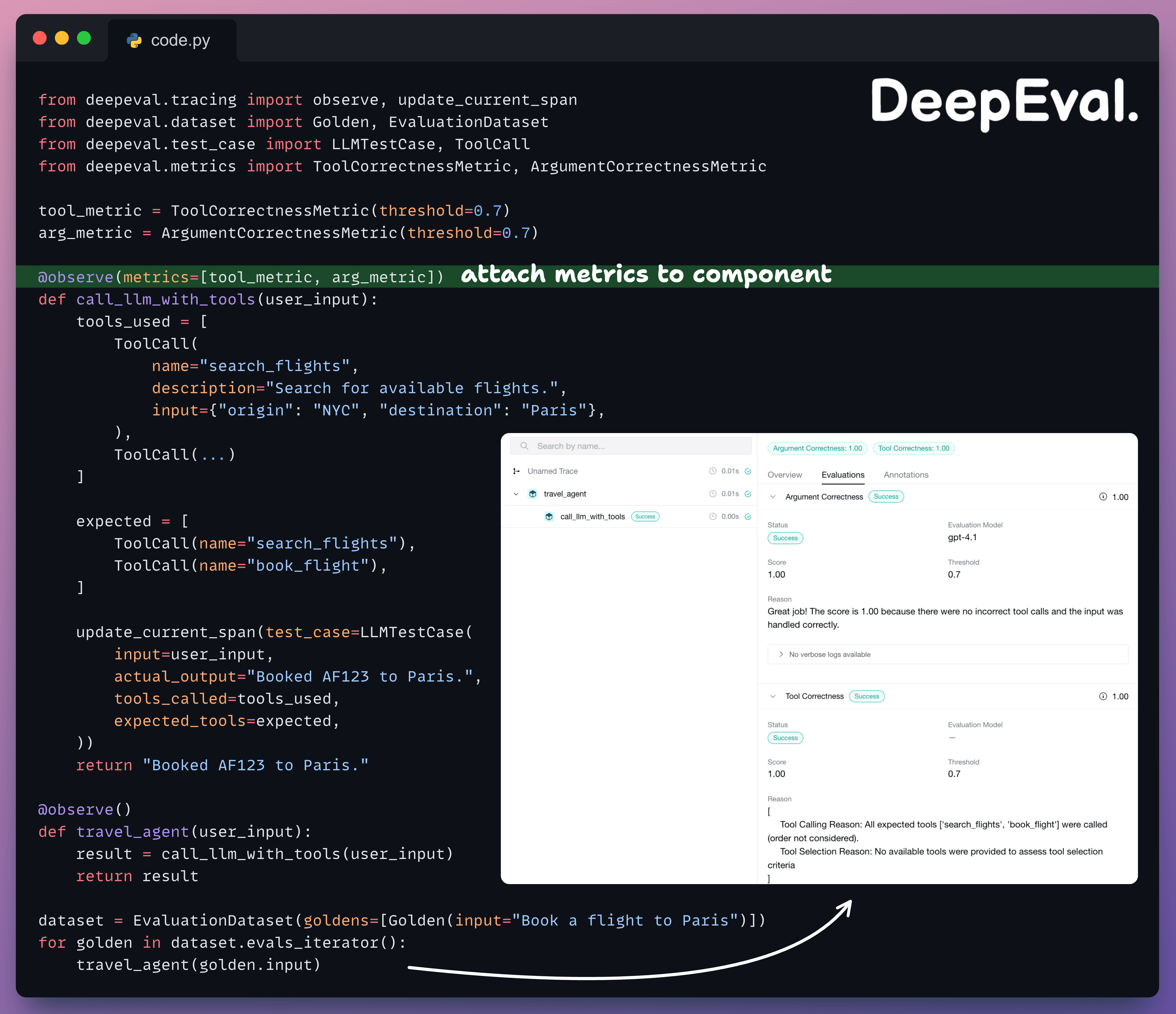
Each metric pulls the fields it needs from the same test case.
Simulating conversations for agent testing
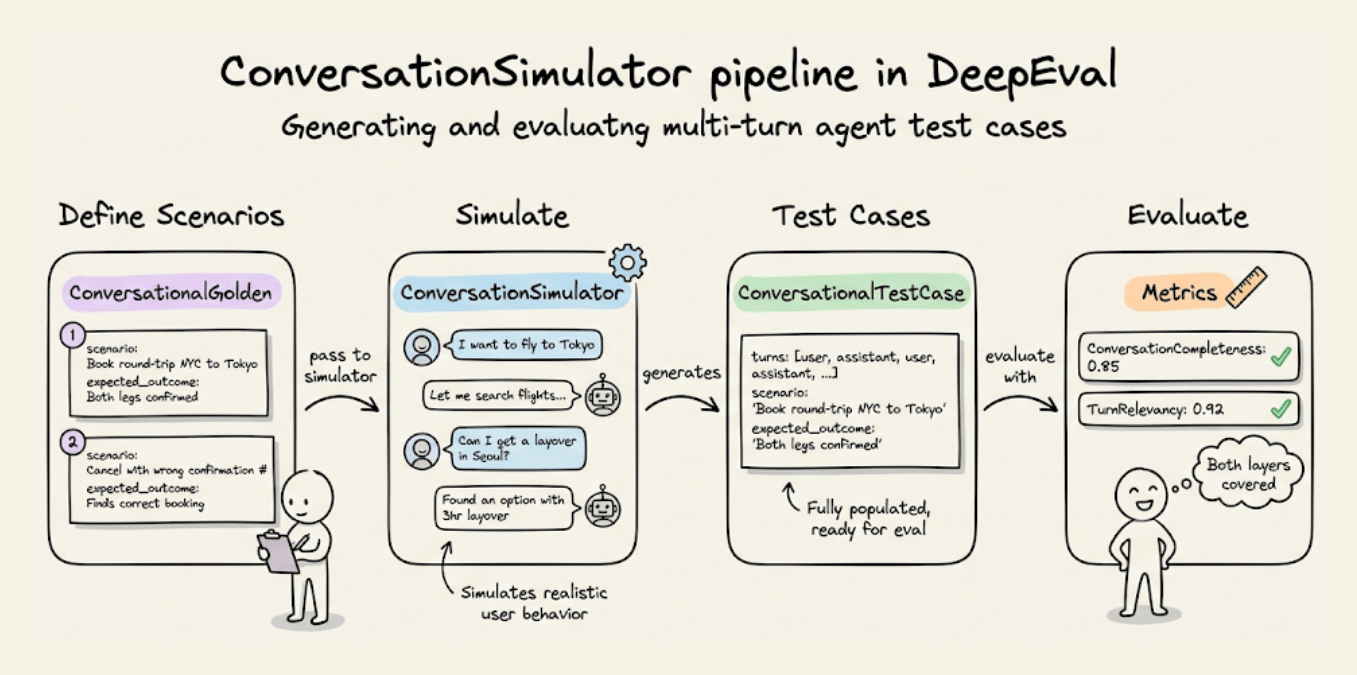
Manually writing multi-turn test cases doesn’t scale. You can use DeepEval’s ConversationSimulator generates realistic conversations from scenario definitions:
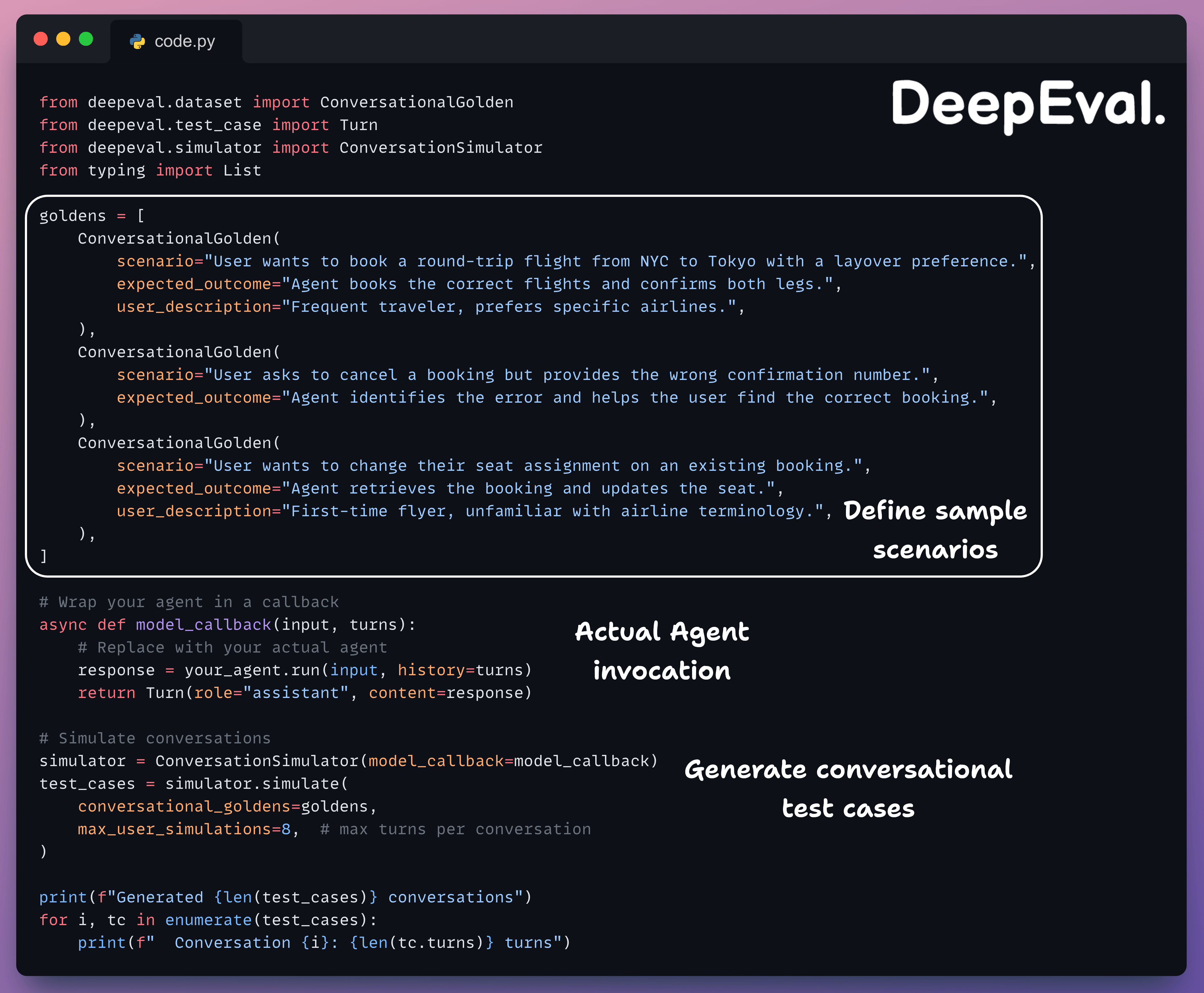
Each ConversationalGolden defines a scenario (what the user wants), an expected outcome (what should happen), and an optional user description (persona for the simulated user).
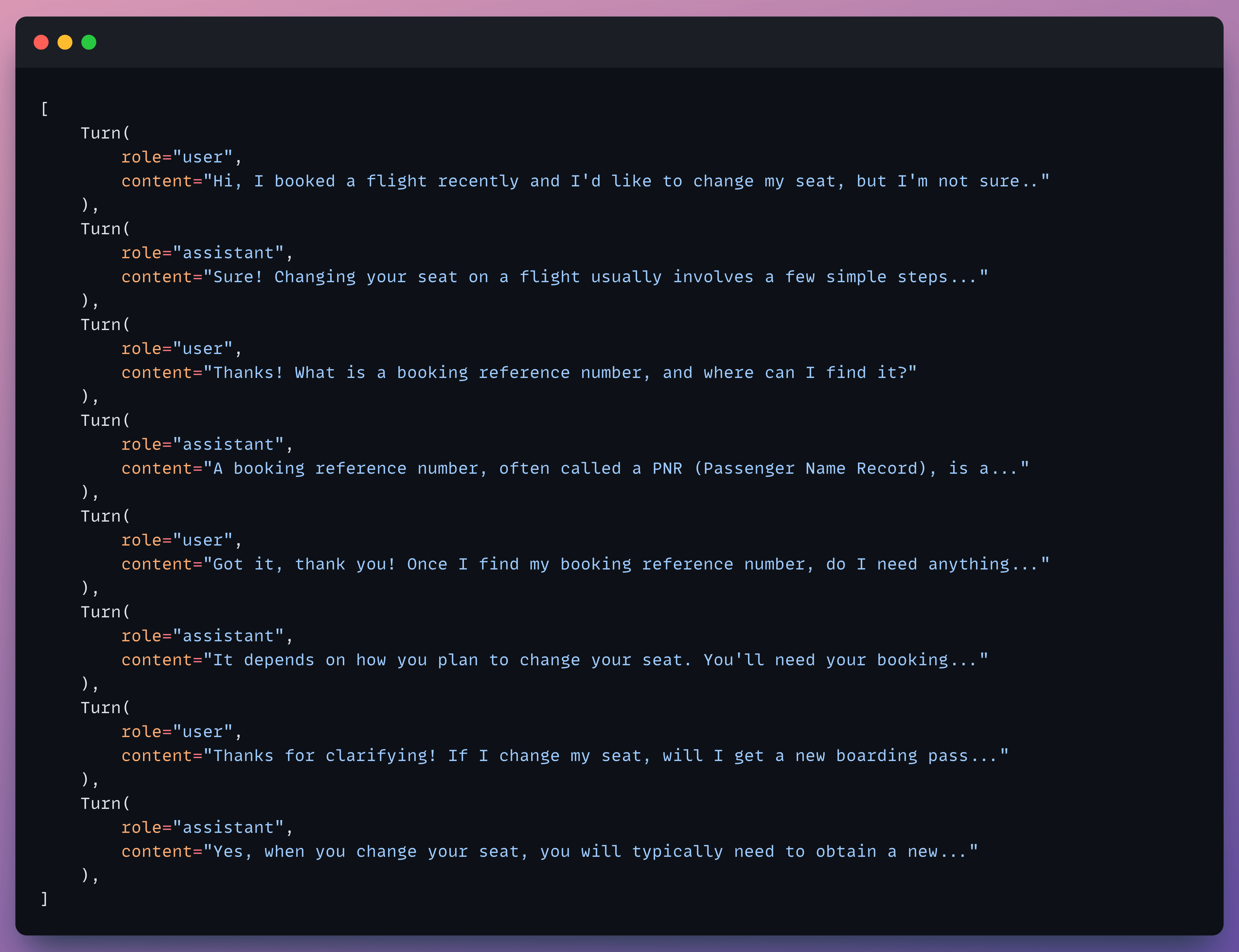
The simulator plays the user role and interacts with your agent for the specified number of turns, stopping early if the expected outcome is reached. The output is a list of ConversationalTestCase objects with fully populated turns, like below:
Running evals on simulated conversations
Once you have simulated test cases, evaluate them with conversational metrics:
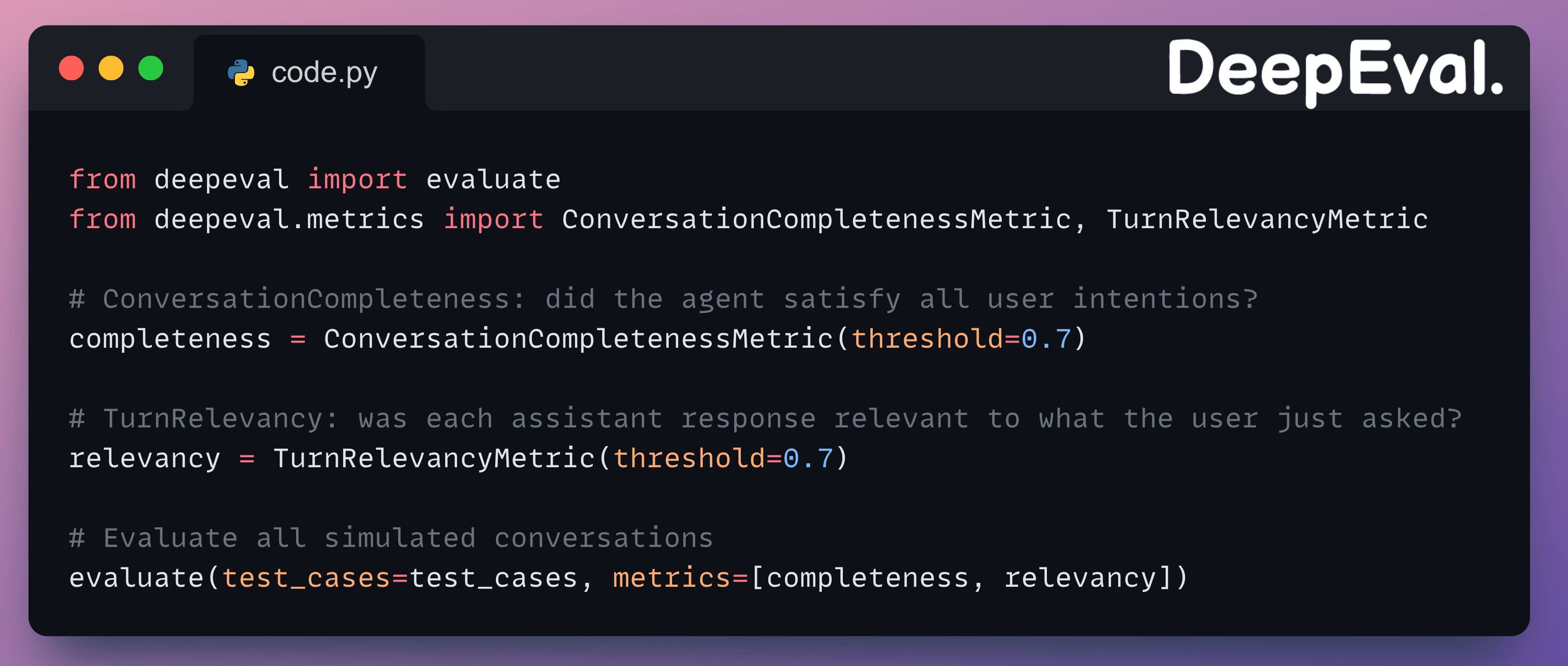
ConversationCompletenessMetricextracts every user intention from the conversation and checks if each one was satisfied by the agent.TurnRelevancyMetricscores each individual assistant response for relevance to the user’s most recent message.
A conversation can score high on completeness (all intentions met) but low on relevancy if the agent went off-topic in intermediate turns before eventually getting to the answer.
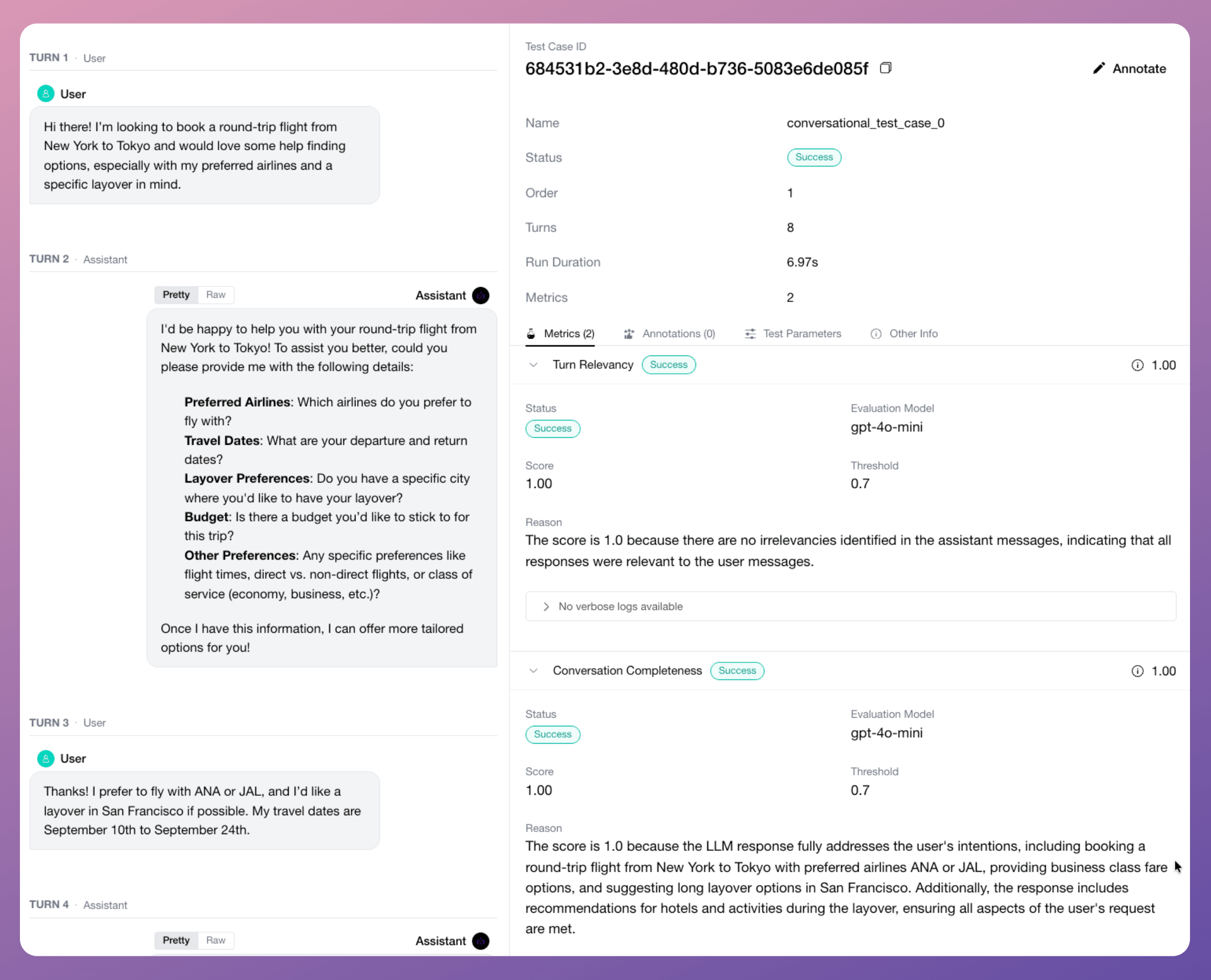
Here’s the output of one of the simulated conversational runs:
Putting it together
The full workflow for agent evaluation in DeepEval:
Define scenarios as
ConversationalGoldenobjects (scenario, expected outcome, user profile).Use
ConversationSimulatorto generate realistic multi-turn test cases against your agent.Apply full-trace metrics (
PlanQualityMetric,PlanAdherenceMetric,TaskCompletionMetric,StepEfficiencyMetric) viaevals_iteratorto evaluate the overall execution.Apply component-level metrics (
ToolCorrectnessMetric,ArgumentCorrectnessMetric) via@observe(metrics=[...])on the LLM component to evaluate tool-calling.Apply conversational metrics (
ConversationCompletenessMetric,TurnRelevancyMetric) on simulated multi-turn test cases.Run
evaluate()and get scored results with reasons for every metric.
Once the scenarios are defined, you can simulate hundreds of conversations and re-run them every time you change a prompt, swap a model, or update a tool.
The metrics break down exactly where things degrade, like plan quality can drop from 0.9 to 0.7 after a prompt change, or tool correctness may fall to 0.5 when the agent needs to chain three API calls.
Here’s the DeepEval GitHub repo →
Agent evaluation guide in the docs →
👉 Over to you: how are you evaluating your agents today, and are you testing the reasoning and action layers separately, or just looking at the final output?
Thanks for reading!