

You pointed a coding agent at a local model to do real work, and it got slower every turn until it started making mistakes.
So you decided your machine wasn’t good enough and went back to a hosted model.
That conclusion is usually wrong, and the reason sits in how agents actually run.
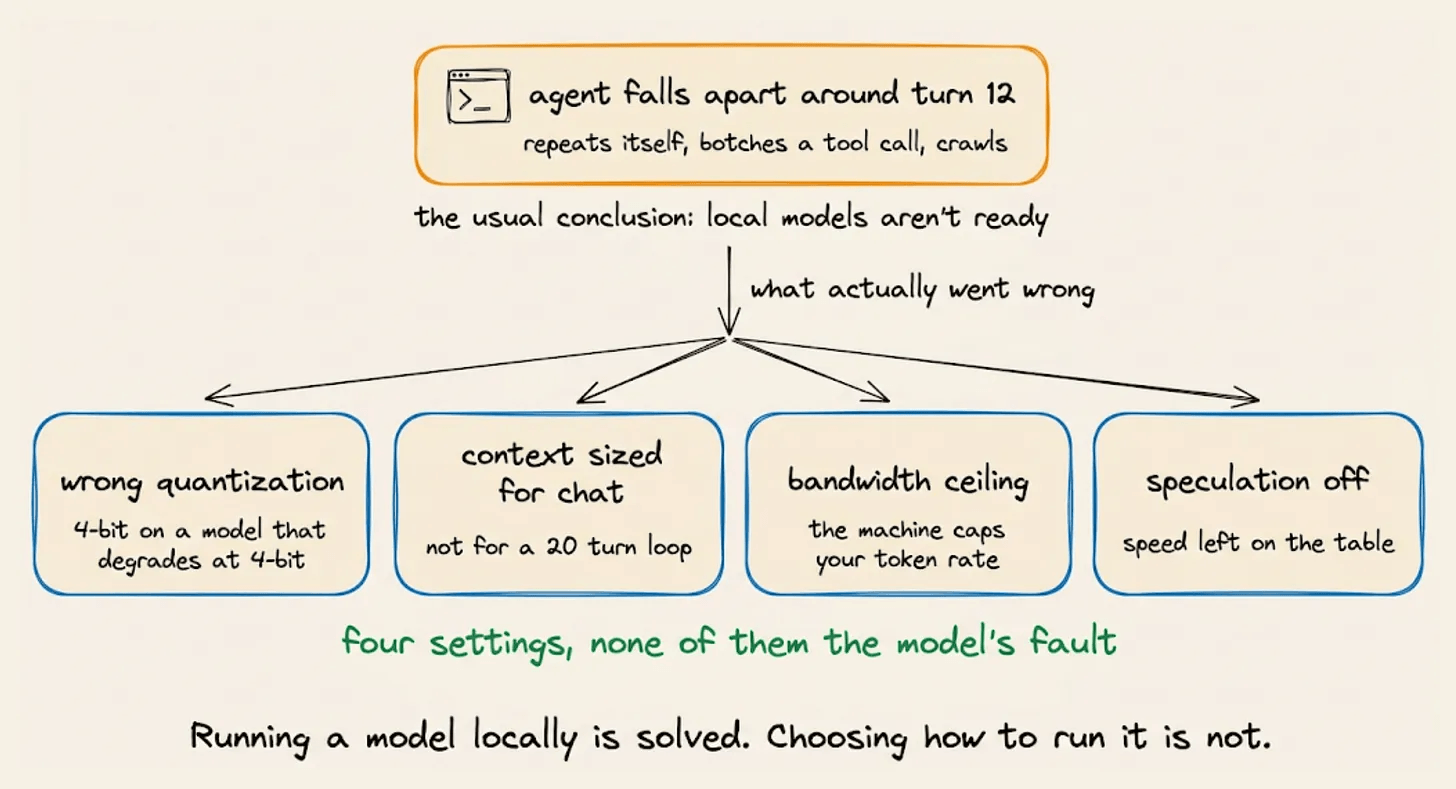
Agent work is nothing like the chat and conversational use that local model tools were built around. Every turn drags along the whole conversation history, every command the agent ran, every tool it called, and every result it got back, and all of it gets read again before the next line comes out.
This piece covers what agent work demands from local hardware, and what today’s tools leave you to work out on your own.
Then it covers Magnitude, a fully open-source inference server that profiles your machine and picks that configuration for you.

Setup is a single command, and it plugs into the coding agent you already use, so your existing harness runs entirely on your own hardware.
Let’s begin!
Hardware in Agent work vs Chat
Local model tools became easy to use back when chat was the main use case, and chat is forgiving in ways that agent work is not.
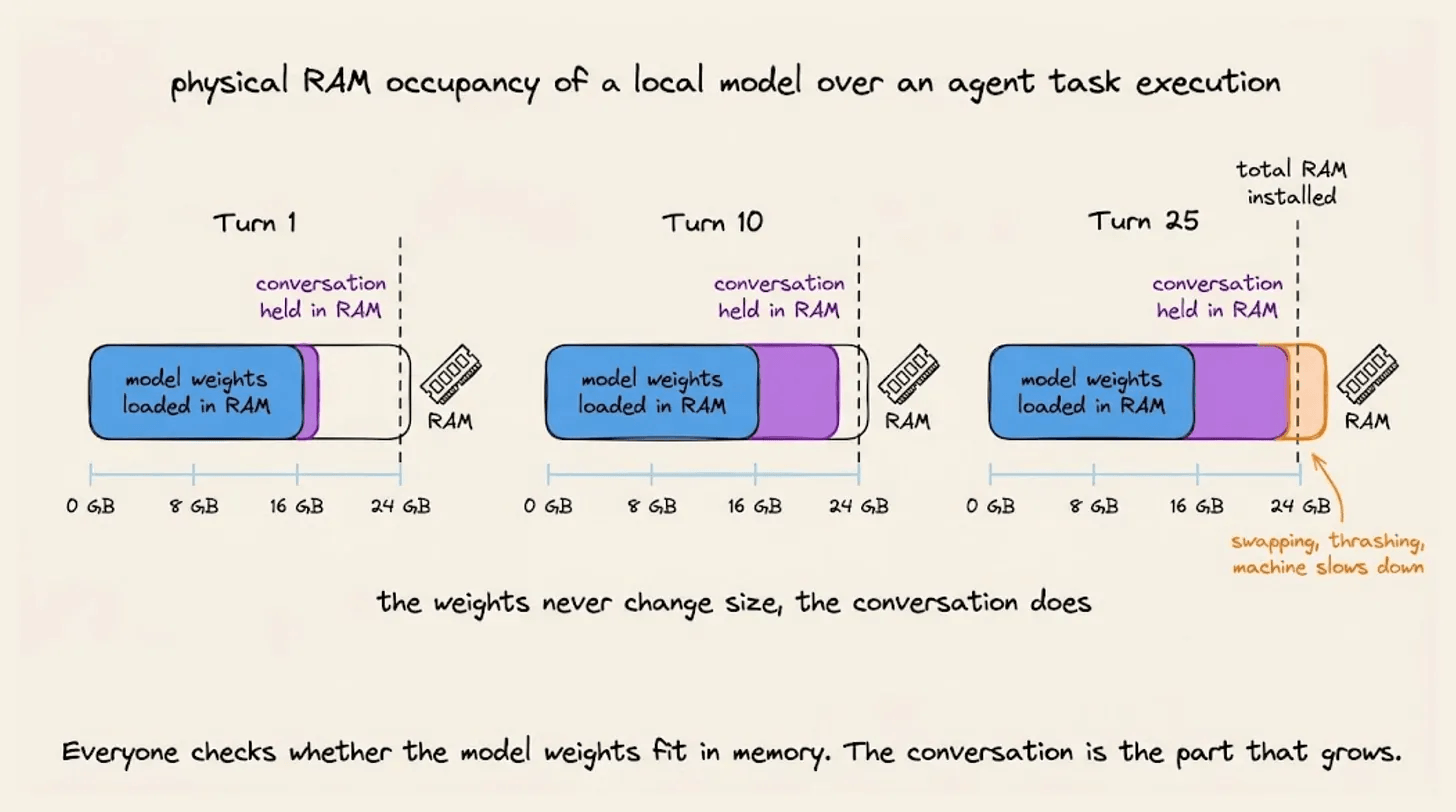
The conversation gets big and never resets.
A chat session is a few thousand tokens.
But an agent trajectory accumulates for twenty or thirty turns, and every turn adds tool output and file contents to what the model holds. That accumulated conversation occupies RAM alongside the weights, and in long agent runs it routinely grows larger than the weights themselves.
A tool call either works or it doesn’t.
Techniques like quantization shrink the weights to fewer bits so the model fits in less memory, but this comes with slightly degraded outputs which are still acceptable in a conversation; there is no partial credit on an agent calling a tool. Agent work needs very high precision.
Slow speeds compound instead of resetting. 20 tokens/s feels fine in a chat window because you read along as it types, and the same rate across a twenty-step loop isn’t acceptable.
The agent also runs flat out for minutes, which is when memory pressure and thermal limits start showing up.
Local AI isn’t optional for many teams
People talk about local inference like it's a matter of taste, but for a lot of teams, there’s no other option:
Client data under an agreement that names which processors are allowed to touch it.
Regulated work in health, legal, and finance, where the review cost of adding a vendor is higher than the tool is worth.
Air-gapped environments, where the question never comes up.
High-volume repetitive work, where per-token pricing dominates and the task is mechanical enough for a small model.
It’s usually partial rather than total. One repository that can’t leave the building, one class of document legal won’t sign off on, one batch job that runs often enough for pricing to matter.
Local LLM inference has a huge demand in the industry.
The problem with local AI
Getting a model to run on your machine is a solved problem. Several tools do it well, and they have done it well for years.
Choosing what to run is not solved, and that is the part that costs people time.
The search space has four axes, and they all interact:
which model
how heavily it is compressed
how the runtime underneath is tuned
how much conversation you configure it to hold
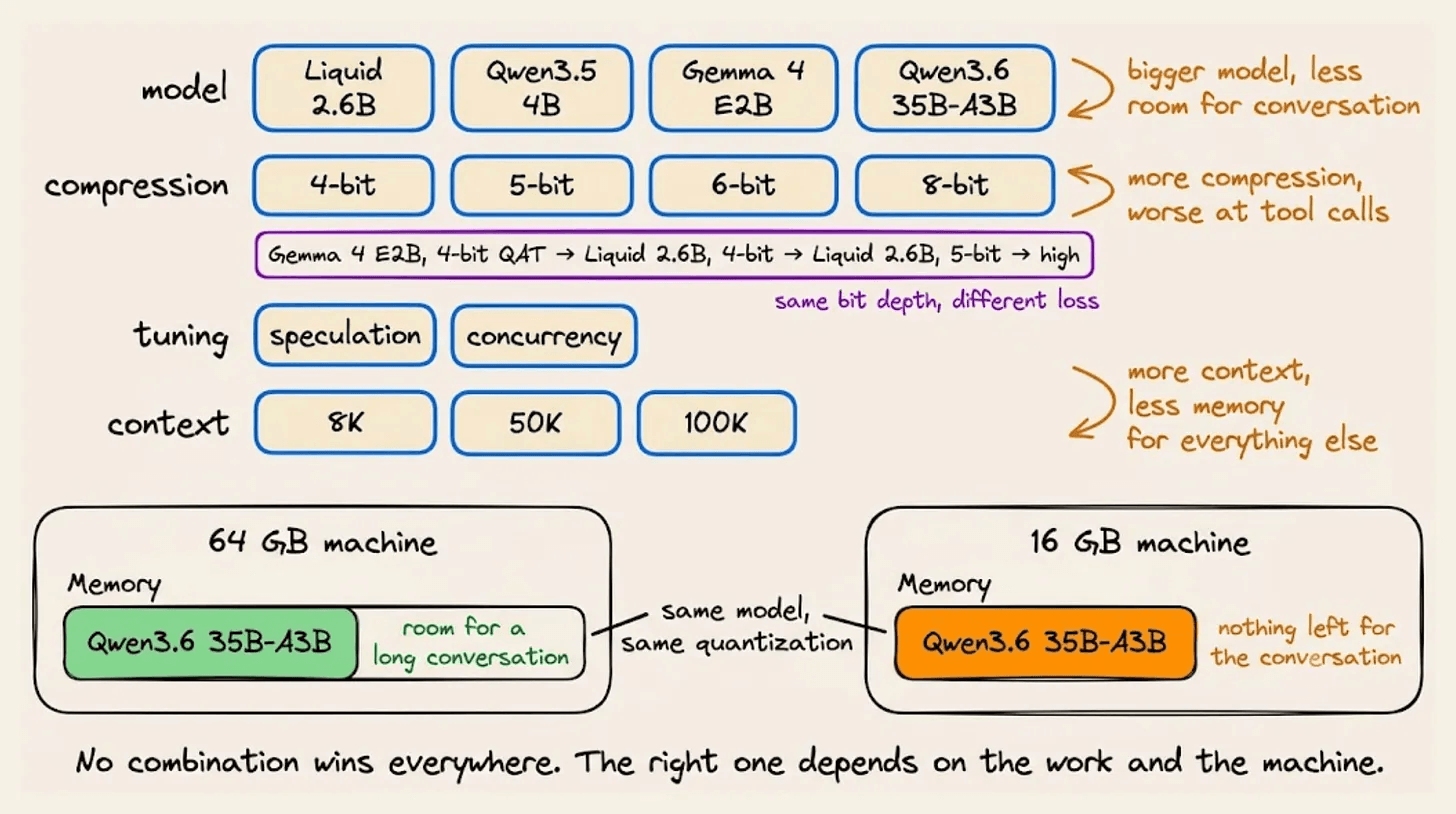
For example, Qwen3.6 35B-A3B is an MoE model with 35B total parameters and about 3B active per token.
Routing decides which experts run on a given token, but all of them have to be resident when that choice is made, so the full 35B sits in memory regardless of how few are active.
At 8-bit, the weights come to roughly 38GB. A 64GB machine holds that with plenty of room left for a long conversation, and cannot load the full BF16 weights at all, which run to around 70GB.
A 16GB machine never loads it at any setting. Compressed down to 4-bit, the weights alone still come to roughly 20GB, which is more than the machine physically has before you add a single token of conversation on top. No amount of shrinking the context fixes that.
Quantization carries a second problem. Two models at the same bit depth can lose very different amounts of quality.
Gemma 4 E2B ships as a quantization-aware training model, so it was trained with low precision built in rather than compressed after the fact, and at 4-bit it holds most of its accuracy.
Liquid LFM2.5 2.6B, at the same 4-bit width, was compressed the ordinary way once training was already done, and it gives up more to reach that size.
So the bit depth tells you the file size. It doesn’t tell you what you gave up, and for agent work, where tool calls have to be structurally exact, what you gave up matters more than the space you saved.
No combination wins everywhere. Which one is right depends on the work and on the machine, and the machine part is where most of the difficulty hides.
Memory bandwidth decides token rate
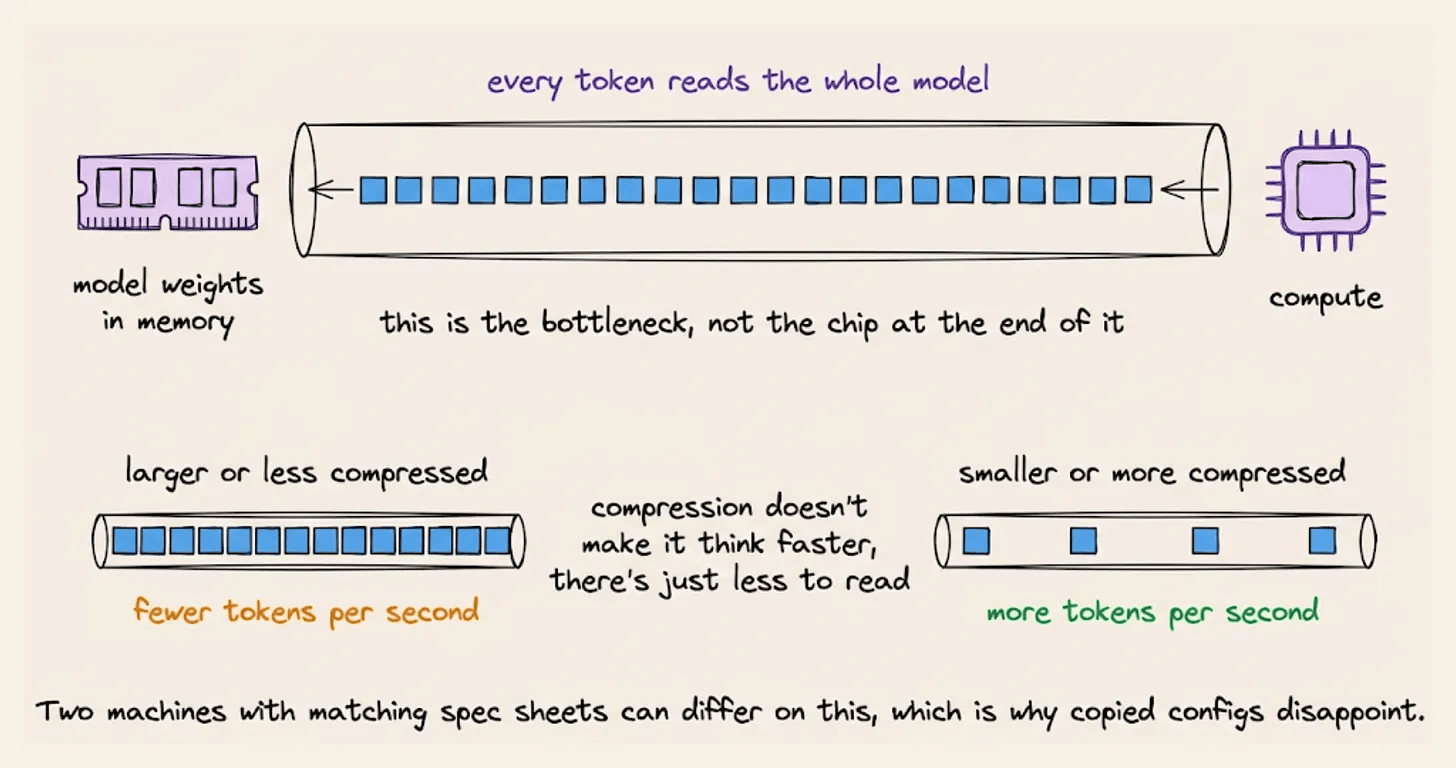
Producing one token requires reading the model’s weights out of memory.
So the ceiling on generation speed is roughly your memory bandwidth divided by the size of the weights being read.
Compute barely enters into it at this stage, so a high throughput rating won’t help a slow generation rate.
A high-bandwidth card still moves weights faster than most laptops. What it has less of is capacity, and that bandwidth only applies to weights lying in the card’s own memory.
Once the model is larger than that, the rest lives in system memory, and the rate falls to whatever the link to that memory allows.
A large unified pool holds the whole model at lower bandwidth and still generates faster than a card that had to split it.
You can’t work out your token rate from a spec sheet, because the bandwidth number you can actually compare across machines rarely appears on one, and achieved bandwidth differs from theoretical anyway once architecture, acceleration, thermal behaviour, and whatever else is running get involved.
The same model also performs very differently on two machines with similar-looking specifications. Which is why configurations copied from a forum post so often disappoint. They were tuned against someone else’s memory bus.
Existing tools run the model you tell them to run. Working out which model, which quant, whether it fits, and how fast it'll go is left to you. The honest industry practice today is to download twenty gigabytes and find out.
Magnitude profiles the machine
Magnitude is an open source inference server that measures your hardware, recommends models that suit it, then downloads, tunes, and runs them.
It runs headless and is controllable from the CLI. Models load on request and unload when idle or when memory gets tight, so a long agent session doesn’t hold weights it isn’t using.
Speculative decoding and concurrency are set for your machine rather than left as flags.
It doesn’t replace the agent you use. During setup, it asks which harness you want to connect, then writes that harness’s configuration itself.
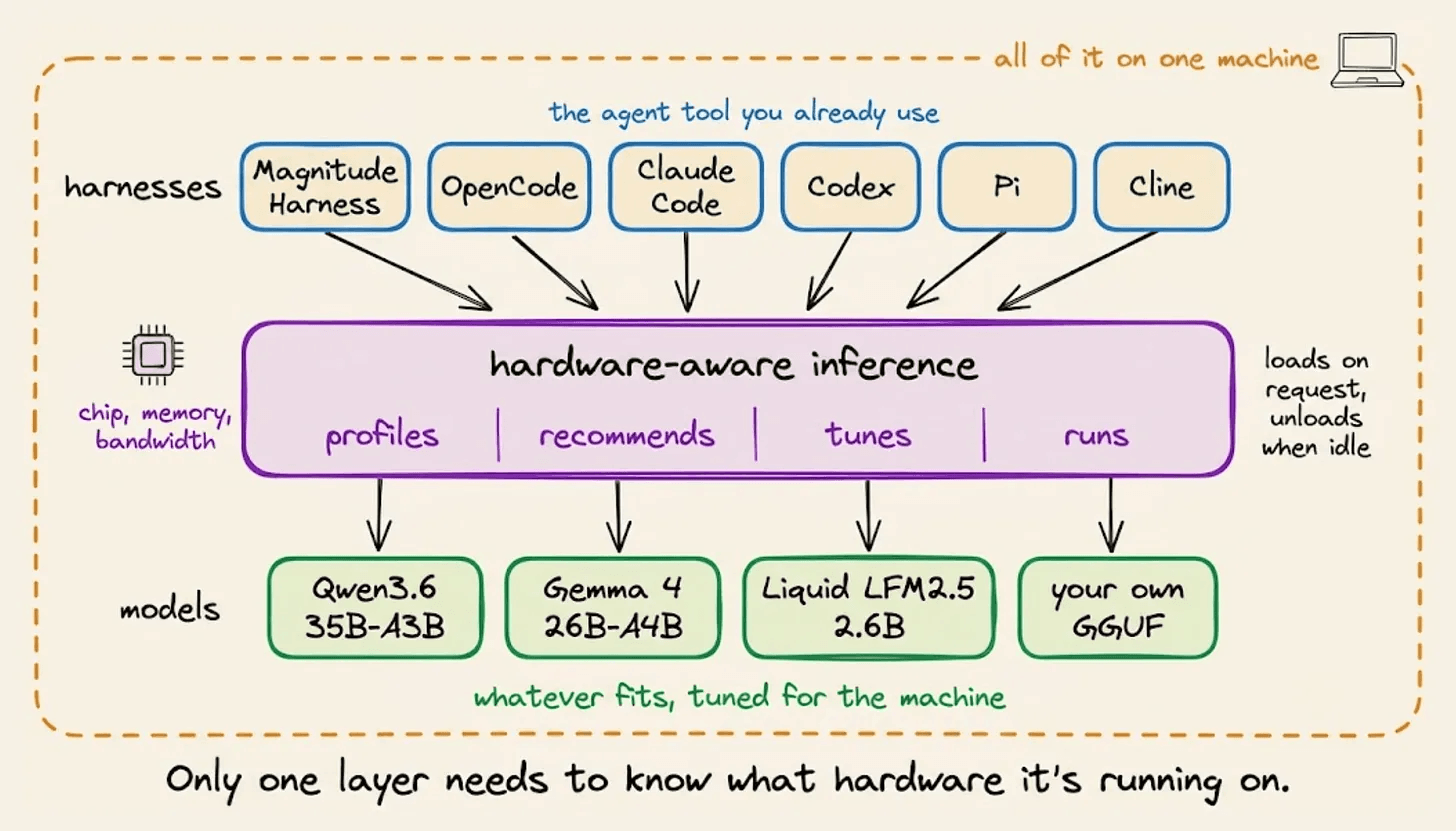
Pi, OpenCode, Hermes, OpenClaw, Codex, Claude Code, Oh My Pi, and Cline are all handled, and there’s a built-in harness optimized for local models if you don’t already have one.
npm install -g @magnitudedev/cli && magnitude setupProfiling
Magnitude profiles three things about your machine, and memory bandwidth decides the token rate.
It reads the chip and the memory, which decides which model can physically fit.
Then it measures bandwidth. This is the number that predicts generation speed, and the one nobody publishes in a form you can compare across machines.
Producing each token requires reading through the model’s weights, so the theoretical ceiling on tokens per second is roughly your bandwidth divided by the size of the weights being read.
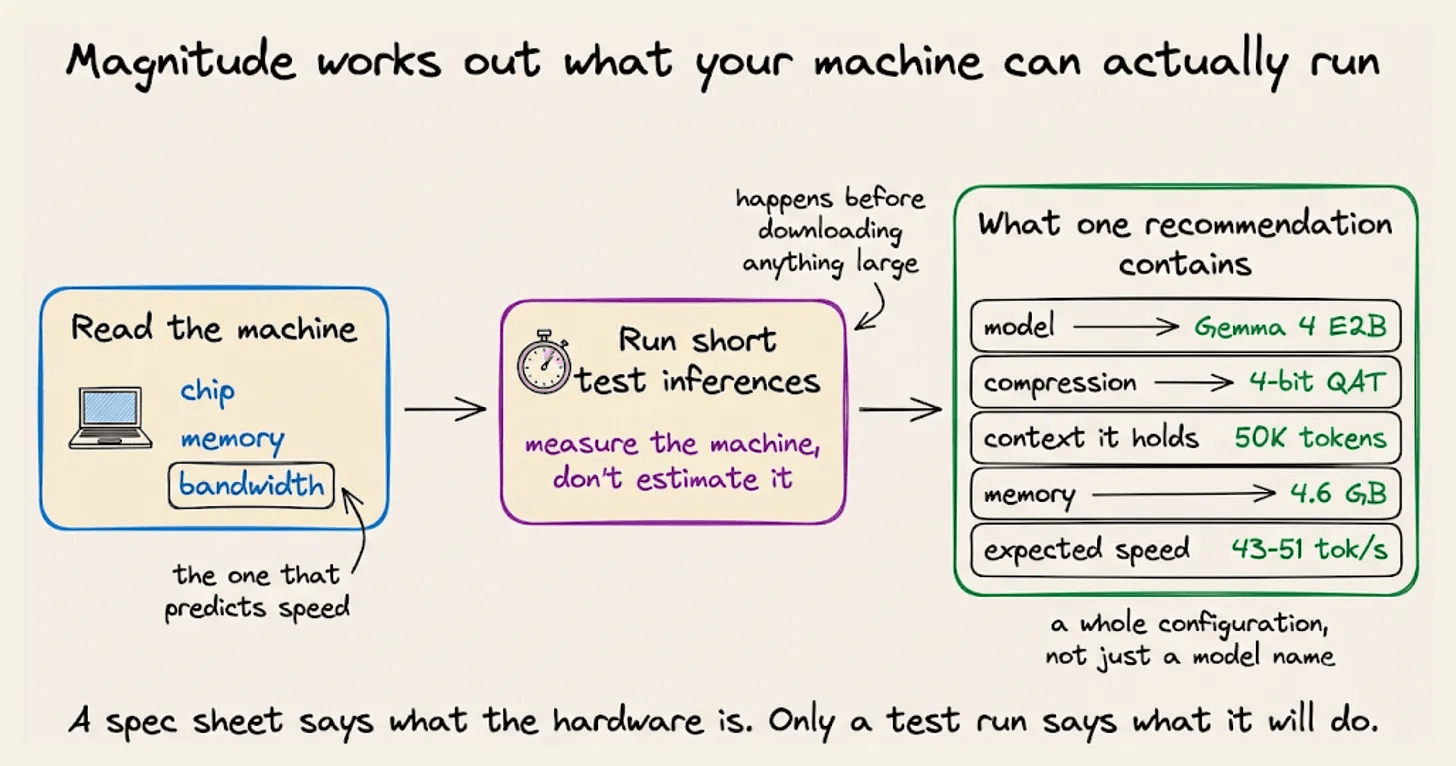
Then it runs short test inferences to see how the machine behaves in practice rather than in theory, before downloading anything large.
That last step is the one that separates measurement from arithmetic.
Two machines with identical specifications can differ on achieved throughput because of architecture, acceleration, thermal behaviour, and whatever else is competing for memory at the time.
What comes back is a set of complete configurations rather than a list of models. Each one names a model, a compression level, a context size, and an expected speed range, sorted into balanced, smartest, and fastest.
Setup runs three steps: choose a model, install it, then pick where to use it.
The choosing step is the interesting one. Across the top sits a slider running from fastest to smartest, and moving it re-runs the recommendation against your hardware rather than just re-sorting a list.
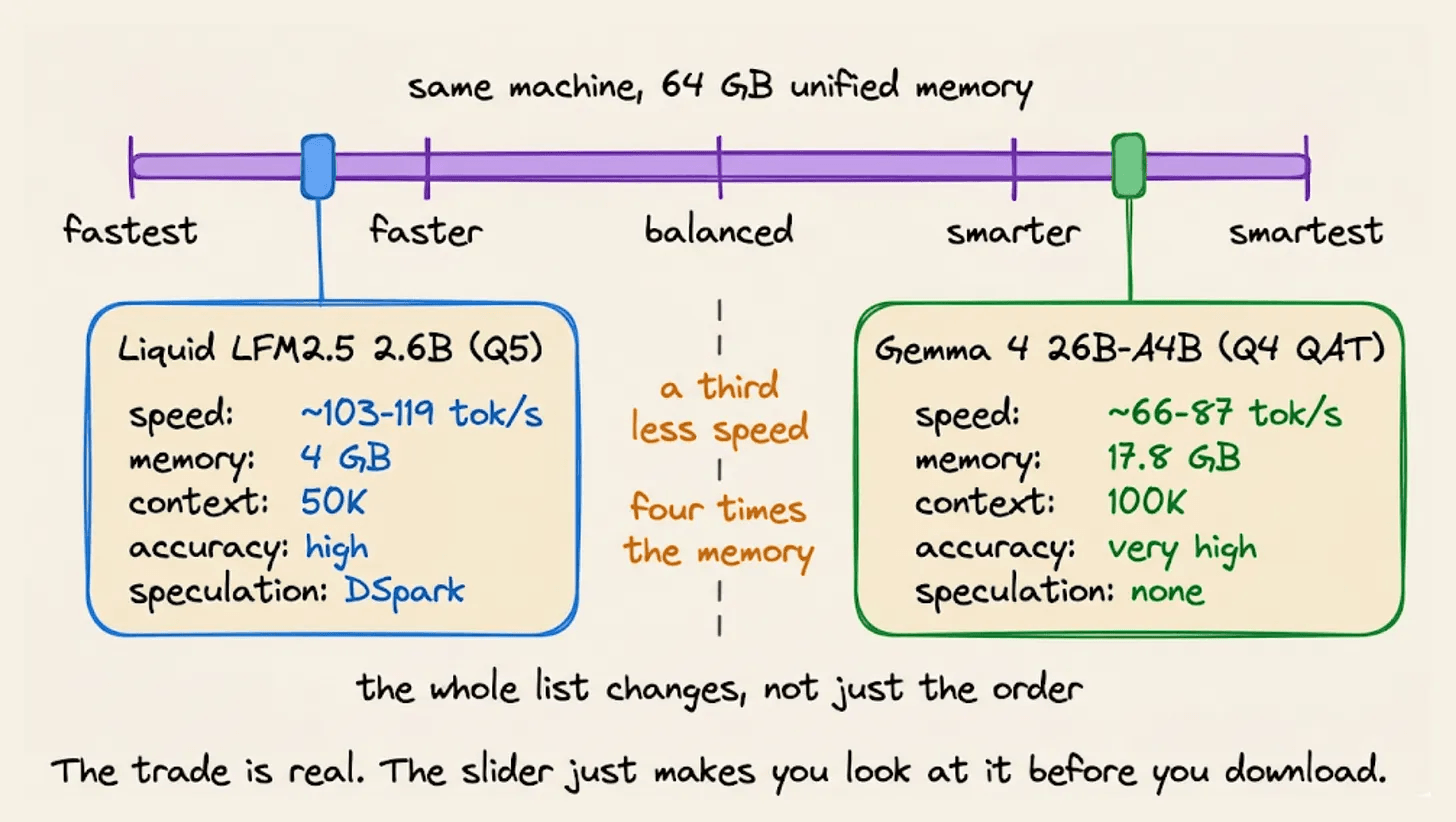
Smartest spends more on the model and gives up speed. Fastest picks something smaller or more compressed. Balanced is where most people should start.
Each recommendation shows what it costs and what it gives: context window, memory footprint, expected tokens per second as a range, quantization accuracy in words rather than bit depth, and whether speculative decoding is available.
We ran this on an Apple M5 with 10 cores and 16GB of unified memory. The profile finished in under a minute.
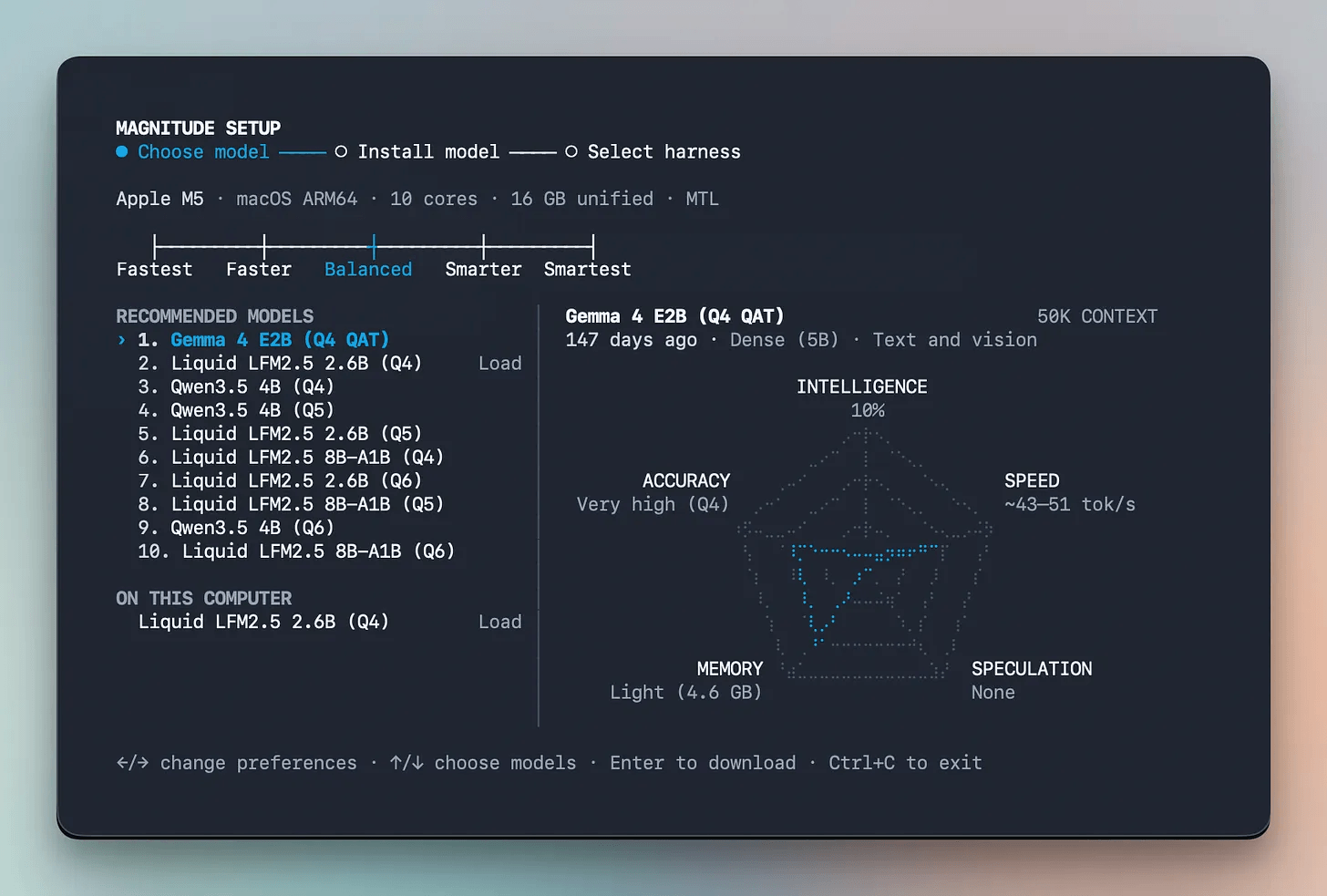
The balanced recommendation came back as a list of various quantized models that are suitable for the machine.
The top recommendation is Gemma 4 E2B at 4-bit QAT: a 5B dense model handling text and vision, holding 50K context in 4.6GB, predicted at 43 to 51 tokens per second, with accuracy rated very high.
Below it sit Liquid LFM2.5 2.6B and Qwen3.5 4B at several quantization levels.
Two details in that output are worth stopping on.
The predicted speed comes as a range rather than a single number, with the bottom of that range sitting close to the point where an agent loop stops feeling usable. The tool doesn’t round that up.
And the balanced pick has no speculative decoding available, while the model directly beneath it does. That’s a real trade rather than a bug because Gemma 4 E2B is faster and more accurate at the same bit depth, and it gives up the drafter to get there.
Automated tuning
Picking a configuration gets you a model that fits.
Running it well is a separate problem, and it’s where a hardware-aware server can do things that a general-purpose server won’t
Speculative decoding
Since reading all the weights is expensive, the trick is to get more out of each read. Speculative decoding does that by having a small fast model propose several tokens ahead, then having the real model check the whole proposal in a single pass.
Correct guesses give you several tokens for roughly the cost of one. Wrong ones get discarded, at a small loss.
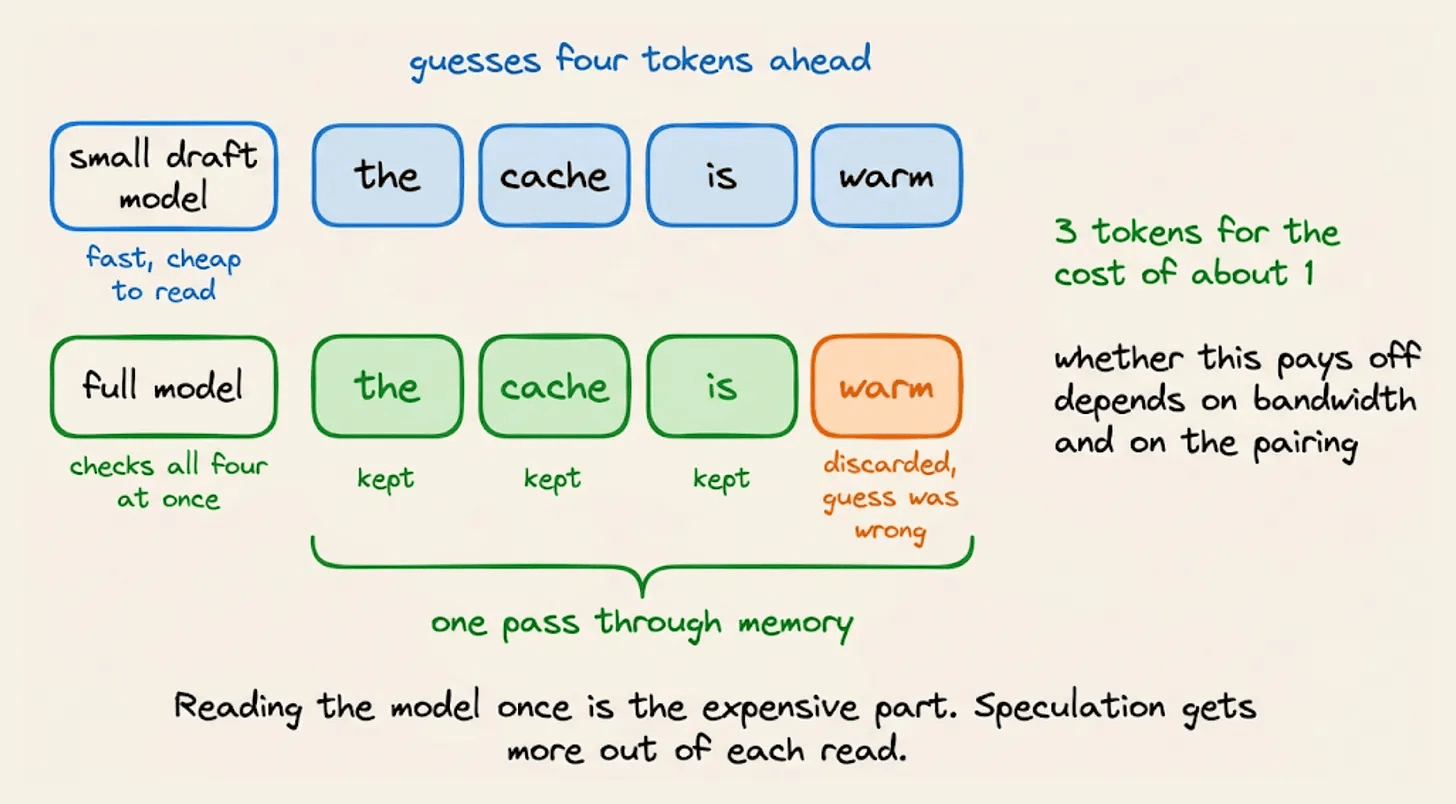
Whether it pays off depends on the pairing and on your bandwidth, which is exactly the sort of judgement that needs a hardware profile to make.
Concurrency
How many requests the server handles at once trades directly against how much context each one keeps.
If you set it too high on a constrained machine, this results in a shrinking working conversation, which surfaces as an agent that forgets what it did ten steps ago rather than as an error message.
Nothing crashes here and the logs look fine though. The agent just gets quietly worse at long tasks, and the natural conclusion is that the model isn’t smart enough.
Setup, end to end
We ran magnitude setup and it profiled the machine and returned ten ranked configurations. We took the balanced pick and went with Gemma 4 E2B.
From the list of harnesses, we selected Pi, and it configured and set up the local model with the harness.
To check it worked rather than just connected, we first turned the wifi off and then gave it the task.
We had a folder of internal client files, the kind you’d review before sending anything to an outside contractor. Account numbers, named contacts, a pricing clause, alongside templates and published material that only look sensitive.
We’re about to share this folder with an external contractor. Go through
every file and decide which ones contain client-identifying information
or account numbers. Write the results to review.md.
After reviewing the files, it correctly evaluates that none of the files contain any client-specific PII and writes the results to a file as instructed.
It did all of this without an internet connection, and nothing left the machine.
Every agent harness was designed assuming inference happens somewhere else.
That assumption is correct for hosted models, but local AI works differently since someone must decide what runs, how it’s quantized, how much context it keeps, and how it’s tuned.
Leaving that decision to whoever is installing the tool is how the category has worked so far.
It’s also why so many people who try a local model once and conclude their hardware isn’t good enough, when what actually happened is they picked a configuration nobody measured for them.
Getting a model to run was never the hard part. Getting it configured for the machine it’s running on is, and that’s a job for the layer that can see the hardware.
(don’t forget to star 🌟)
Good day!
I've watched a similar thing happen with retrieval pipelines: a model gets blamed for 'getting dumber' when really the input it's being fed has quietly grown past what the setup was designed to handle efficiently. Did you find a way to measure when an agent's context has crossed from 'fine' to 'now degrading performance,' or is it mostly trial and error until things visibly break?