

Skip the boilerplate. Go from prompt to deployed app fast.

You can build it yourself, that’s not the question. It’s whether you want to spend tonight wiring up auth, a frontend, and a deploy pipeline before you watch the thing run.
Describe the app in the prompt box and Bolt.new builds the full stack in your browser: working UI, backend, and a live URL to share.
Prototype a dashboard for your latest analysis, stand up an internal tool, or pressure-test an idea before you commit real engineering hours. Then own what you ship, i.e., export the code, extend it, and take it anywhere. No lock-in.
The first 20 DailyDoseofDS readers get a free Bolt.new Pro code.
Thanks to Bolt for partnering today!
The AI engineering master stack for 2026!
We prepared this AI engineering master stack that covers ten layers from the model itself to running it safely in production:
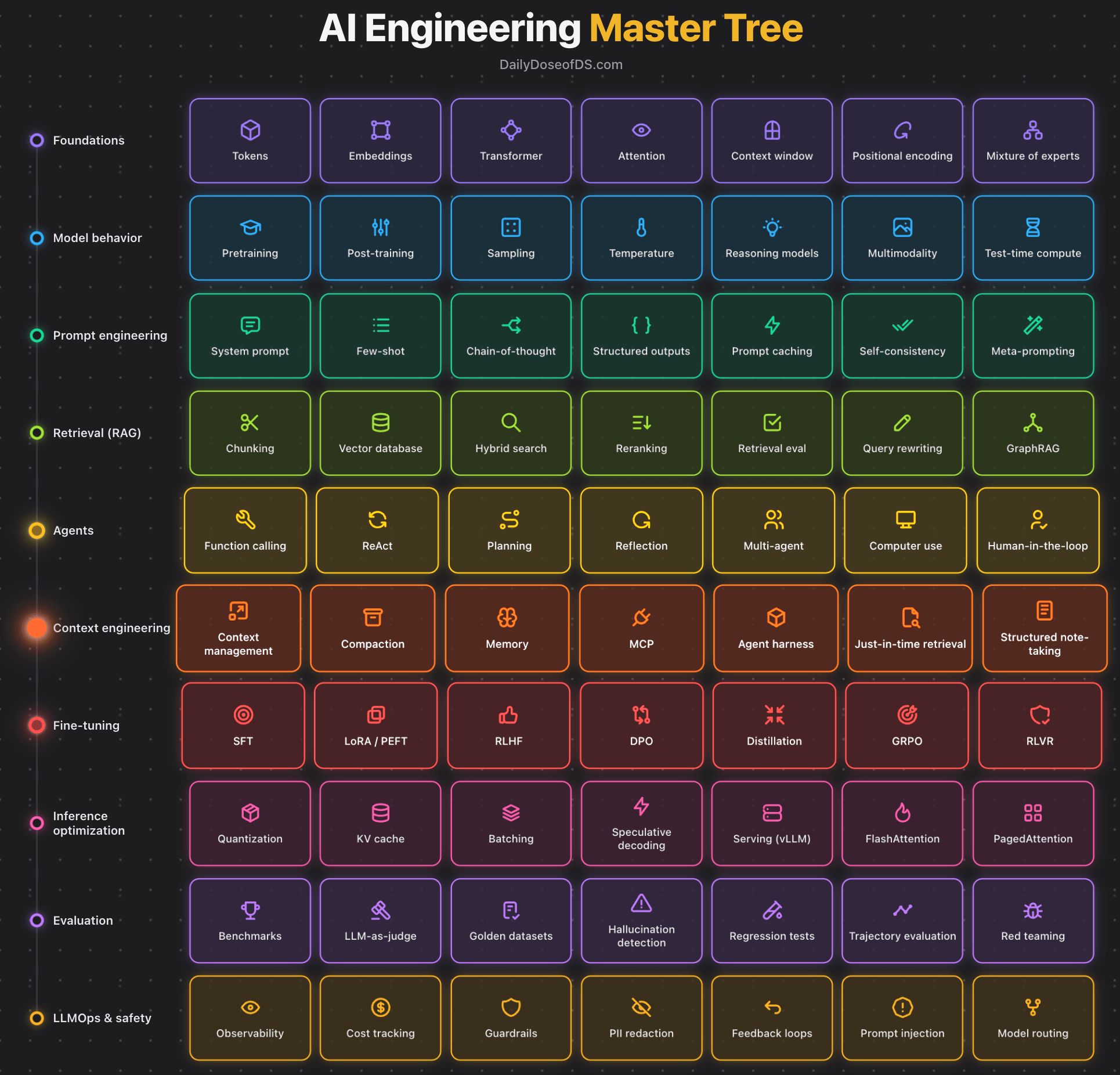
Here’s what each layer comprises:
1) Foundations set how the model represents input through tokens, embeddings, transformer, attention, context window, positional encoding, and mixture of experts.
2) Model behavior covers how a trained model responds through pretraining, post-training, sampling, temperature, reasoning models, multimodality, and test-time compute.
3) Prompt engineering shapes the output through the prompt alone using system prompts, few-shot, chain-of-thought, structured outputs, prompt caching, self-consistency, and meta-prompting.
4) Retrieval feeds the model data it was never trained on through chunking, vector databases, hybrid search, reranking, retrieval eval, query rewriting, and GraphRAG.
5) Agents let the model take actions instead of only answering through function calling, ReAct, planning, reflection, multi-agent, computer use, and human-in-the-loop.
6) Context engineering controls what fills the context window across steps through context management, compaction, memory, MCP, agent harness, just-in-time retrieval, and structured note-taking.
7) Fine-tuning changes the weights when prompting and context fall short through SFT, LoRA, RLHF, DPO, distillation, GRPO, and RLVR.
8) Inference optimization makes the model cheap and fast to serve through quantization, KV cache, batching, speculative decoding, vLLM serving, FlashAttention, and PagedAttention.
9) Evaluation measures whether the system is actually correct through benchmarks, LLM-as-judge, golden datasets, hallucination detection, regression tests, trajectory evaluation, and red teaming.
10) LLMOps and safety keep the system reliable and safe in production through observability, cost tracking, guardrails, PII redaction, feedback loops, prompt injection defense, and model routing.
This grid above is the overview, but each layer is deep enough to be its own field with dedicated tooling.
We have covered every bit of it in the LLMOps course, starting from fundamentals to productions:
Read Part 2 on understanding the core building blocks of LLMs →
Read Part 11 on evaluation of multi-turn systems, tool use evaluations, tracing, and red teaming →
👉 Over to you: What else would you add to the master tree?
6 components of context engineering
Here’s rough math on what determines your AI app’s output quality:
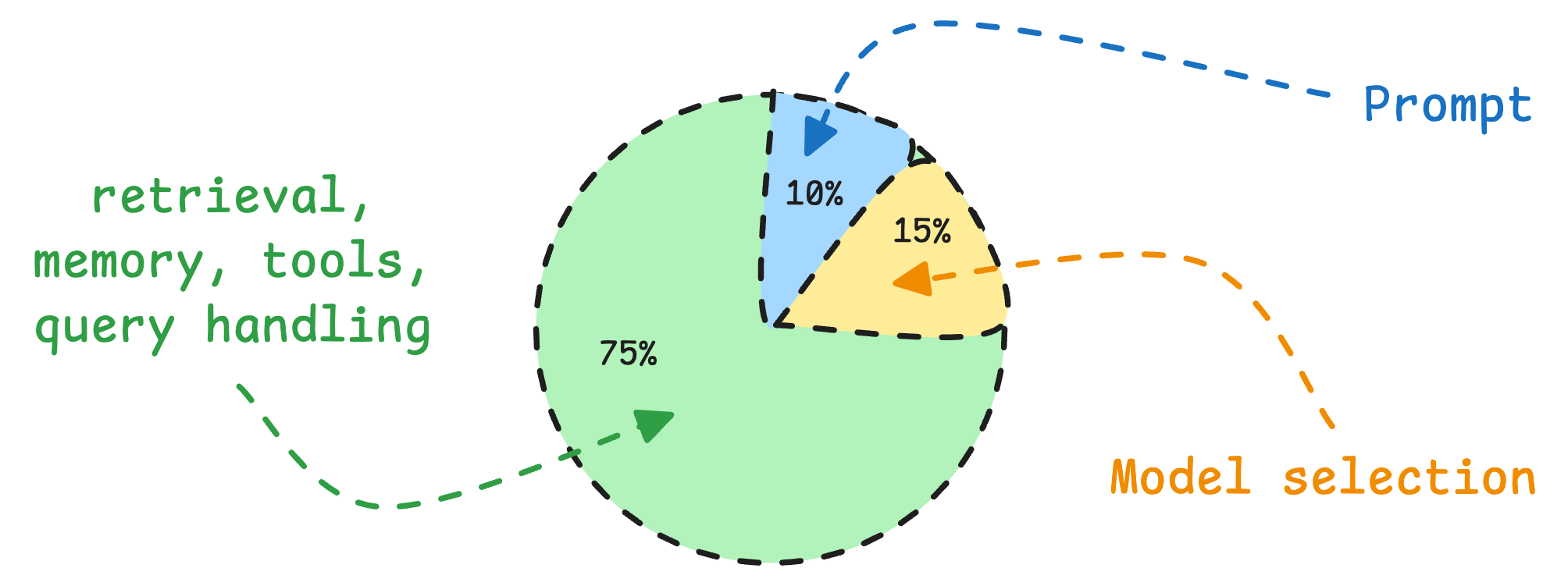
Model selection: 15%
Prompt: 10%
Everything else (retrieval, memory, tools, query handling): 75%
We’ve seen teams obsessing over the wrong 25% when the actual problem lies elsewhere.
And this is exactly why “context engineering” has quietly become the most important skill in AI engineering today.
It’s the art of getting the right information to the model at the right time in the right format.
And it has 6 core components, as depicted in the visual below:
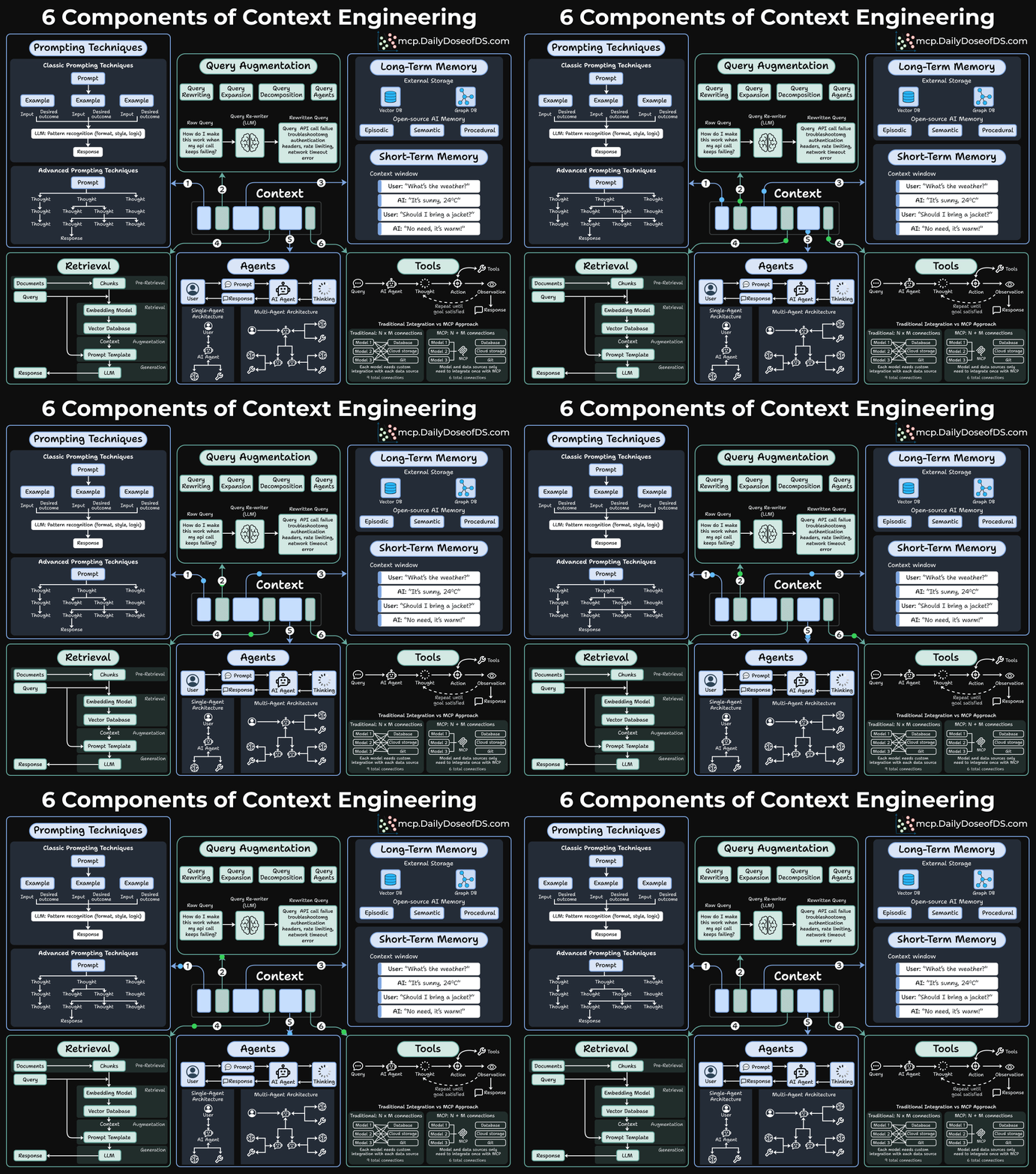
Prompting techniques
This is where most people stop. But even here, there’s more depth than people realize.
Classic prompting is about pattern recognition. You give the model examples, and it learns the format, style, and logic you want. Few-shot prompting still works remarkably well for structured tasks.
But advanced prompting is where things get interesting.

Techniques like Chain-of-thought prompting give the model thinking room. Instead of jumping straight to an answer, you ask it to reason step-by-step. This simple change can dramatically improve accuracy on complex problems.
Query augmentation
Users are lazy in writing queries.
When someone types “How do I make this work when my API call keeps failing?”, that’s almost useless to a retrieval system.
Query augmentation fixes this through several techniques:
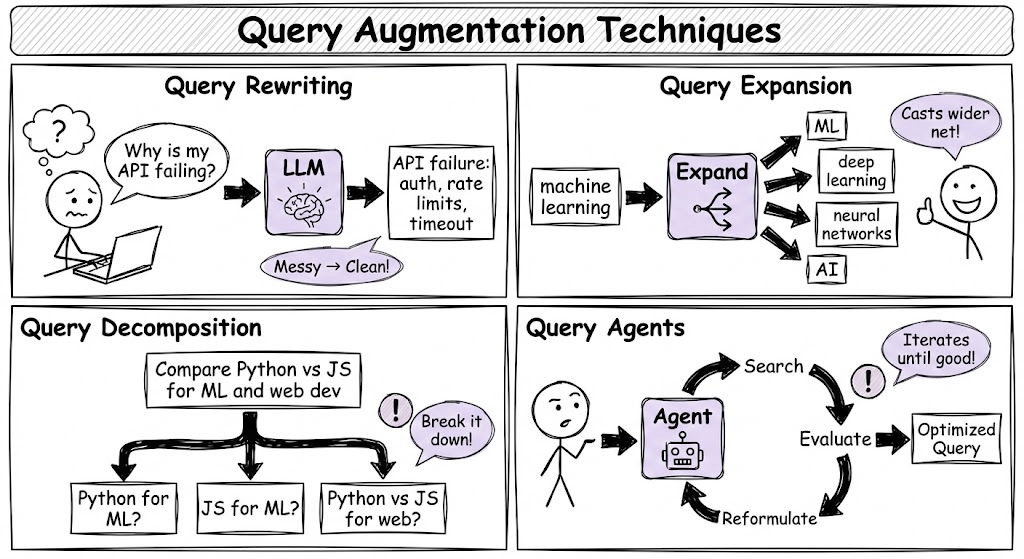
Query Rewriting: An LLM takes that vague question and transforms it.
Query Expansion: Adding related terms and synonyms to cast a wider net.
Query Decomposition: Breaking a complex question into sub-questions that can be answered independently.
Query Agents: Using an agent to dynamically decide how to reformulate the query based on initial results.
Long-term memory
Say an agent has a great conversation with a user. The user shared preferences, context, and history. But as the session ends, it’s all gone.
Long-term memory fixes this with external storage:
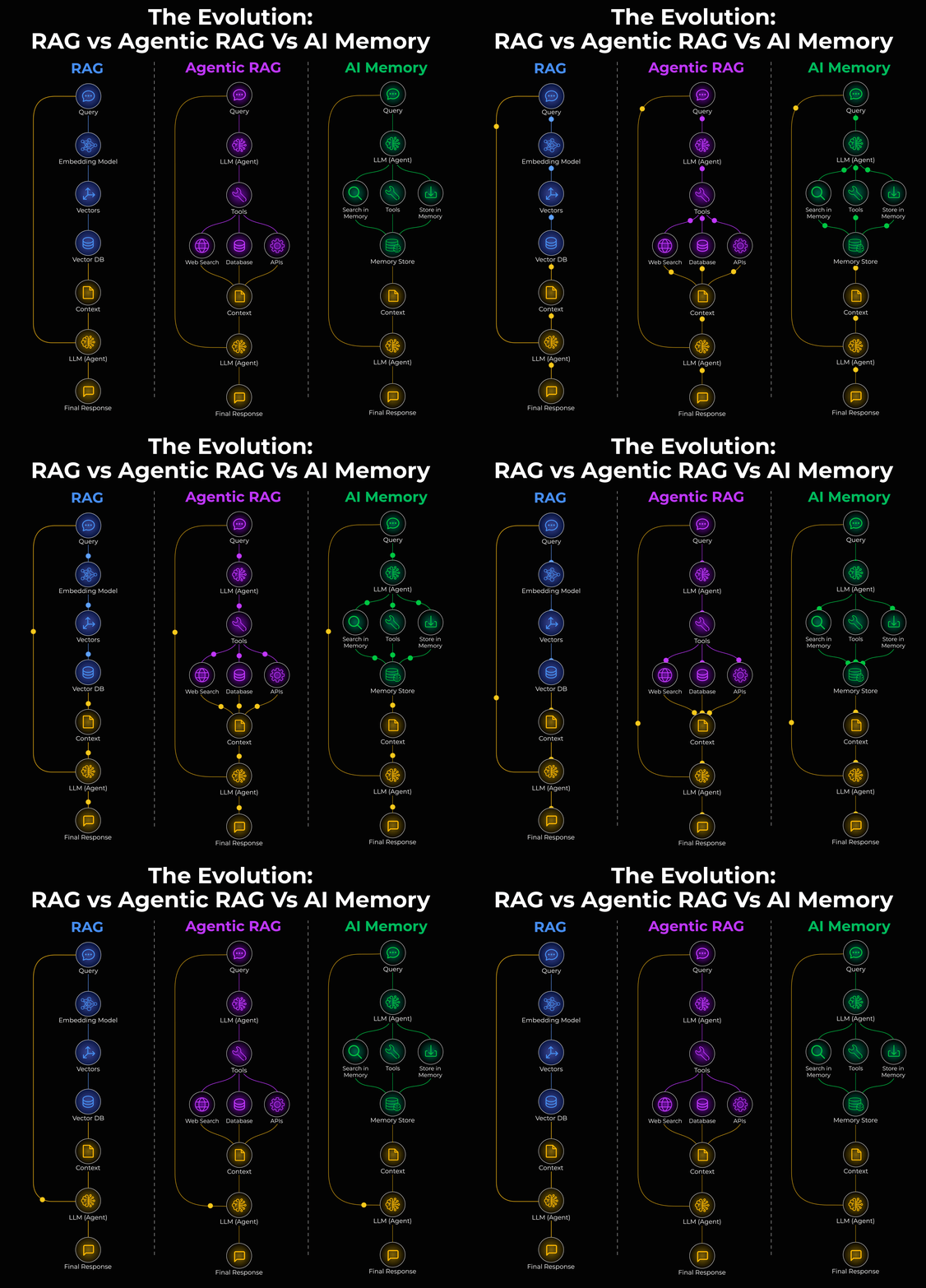
Vector Databases: Store embeddings of past interactions for semantic search.
Graph Databases: Store conversations as relationships and entities.
The type of memory matters too:
Episodic memory signifies specific events
Semantic memory maintains general facts about the user, and
Procedural memory handles how the user likes things done.
Open-source tools like Zep Graphiti make this accessible, and you don’t need to build from scratch.
Short-term memory
Short-term memory is simply the conversation history. This one seems obvious, but it’s often mismanaged.
And here’s where teams mess up:
Stuffing too much into the context window (noise drowns out signal)
Not including enough (model lacks critical information)
Poor ordering (important context buried at the end)
No summarization strategy for long conversations
Knowledge base retrieval
Most teams think about this as RAG, but that’s too narrow. RAG is one pattern, not the whole picture.
The real question is: How do you connect your AI to your organization’s data?
That knowledge lives everywhere, like: docs, wikis, databases, SaaS tools like Notion and Google Drive, APIs, and code repositories.
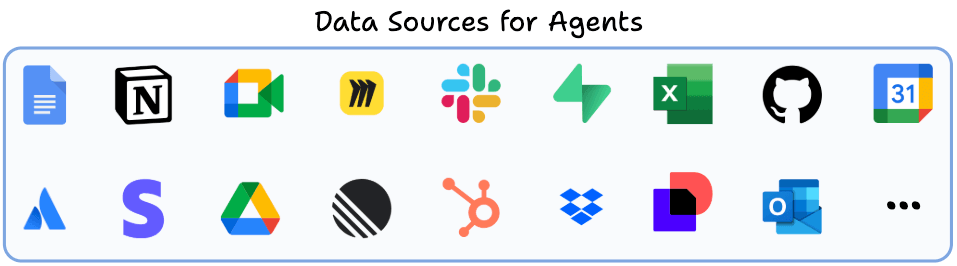
The retrieval pipeline has three layers:
Pre-Retrieval: How do you chunk docs? What metadata do you preserve? How do you handle tables and structured data? How do you keep everything in sync?
Retrieval: Which embedding model? Which retrieval strategy do you use: Vector search or hybrid with BM25? How do you re-rank?
Augmentation: How do you format retrieved context, include citations, handle contradictions, etc?
Open-source tooling like Airweave solves this end-to-end. Instead of building custom connectors for every data source, you can sync your knowledge bases and get unified access to Notion, Google Drive, databases, and more.
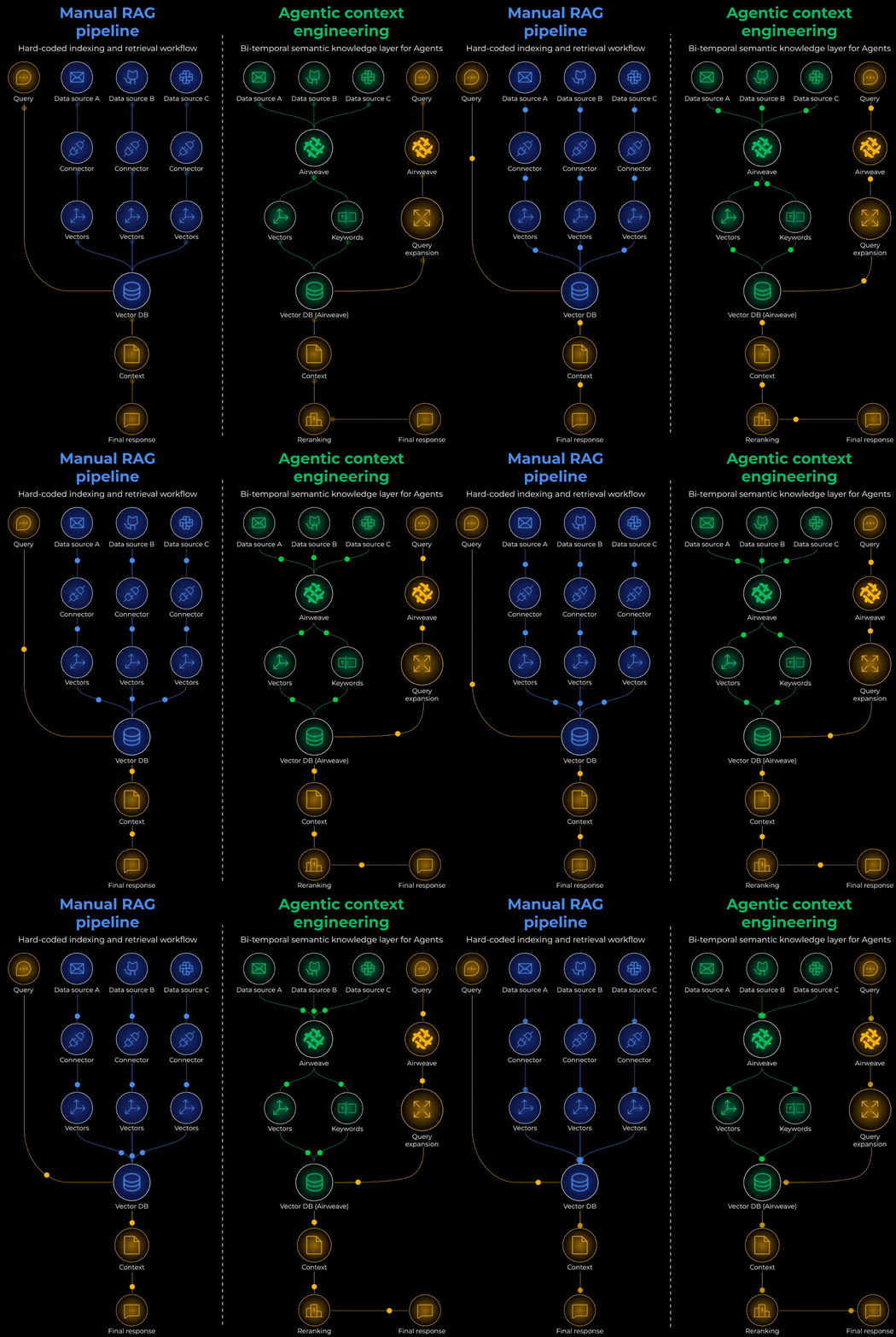
You can get 10x improvements in retrieval quality without changing the model, but by just fixing the chunking strategy or properly syncing knowledge sources.
Tools and agents
A tool extends what the model can do because, without it, the model is stuck with just what’s in its weights and context window.
Moreover, an agent decides when and how to use those tools.
The basic loop looks like this: Query → Thought → Action → Observation → (repeat until goal satisfied) → Response
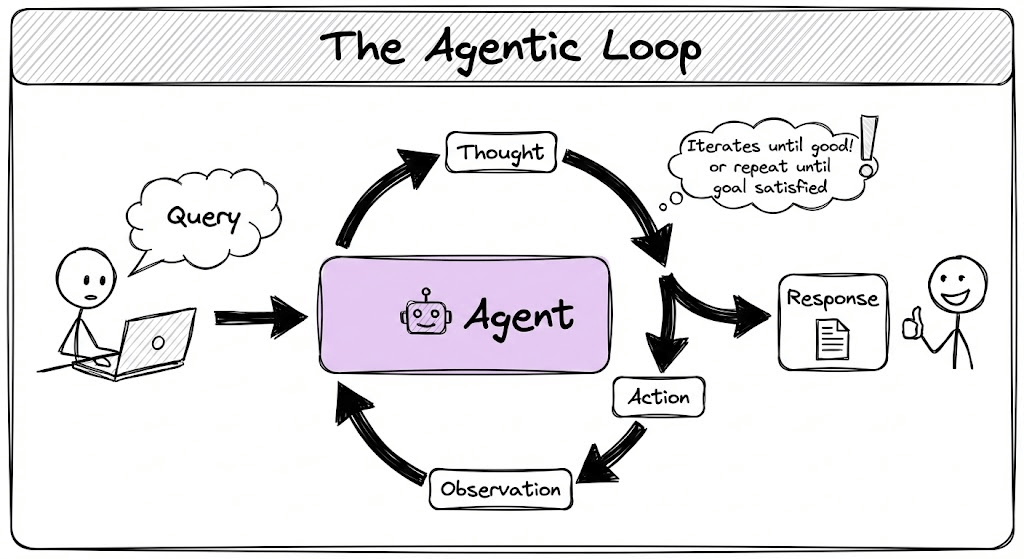
Single-agent architecture works for straightforward tasks. Most chatbots and copilots fall into this category.
A multi-agent architecture is better for complex workflows. You have specialized agents that collaborate. One does research, another writes, another critiques. They hand off work to each other.
MCPs take this to the next step!
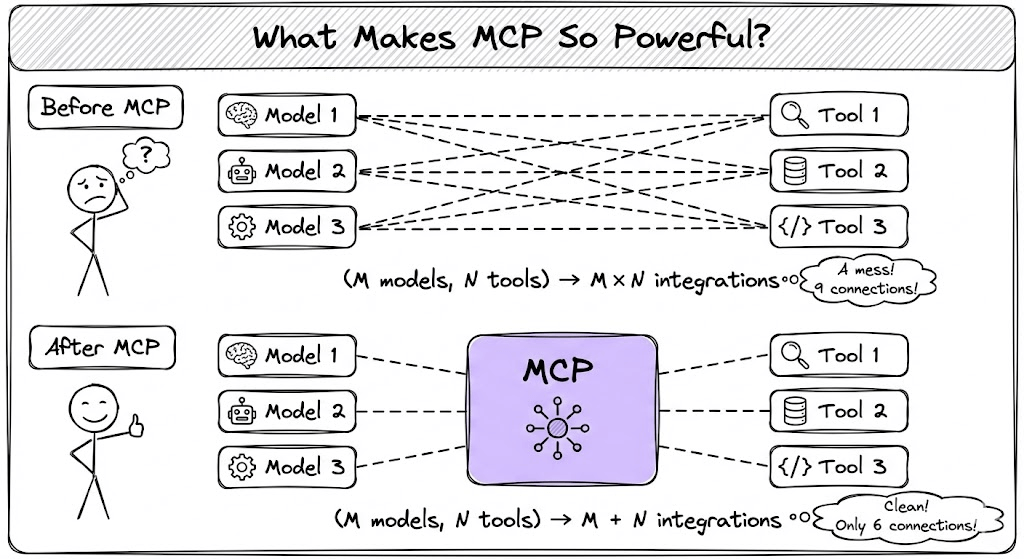
Traditional tool integration requires N×M connections. If you have 3 models and 4 tools, you need 12 integration points.
MCP changes this to N+M. Models and tools both connect to a standard protocol layer.
Some time back, prompt engineering made it sound like the magic was in crafting the perfect instruction.
Context engineering recognized that the real gains lie in the entire info pipeline instead:
What context do you provide?
Where does that context come from?
How is it retrieved, filtered, and formatted?
What can the model do with tools?
What does it remember across sessions?
Over to you: How are you building your Agentic systems?
Good day!
brilliant
.....absolutely love your diagrams