

Build a common memory layer for all your AI apps
Knowledge graphs are insanely good at giving agents human-like memory!
Recently, we built an MCP-powered memory layer that can be shared across all your AI apps, like Cursor, Claude Desktop, etc.
Here’s a complete walk-through:
It’s built using a real-time knowledge graph.
Tech stack:
Graphiti as a memory layer (open-source)
Neo4j to store the knowledge graph
Docker to self-host the MCP server
Everything is 100% open-source and self-hosted.
The anatomy of ~/.hermes folder
One folder controls everything your Hermes agent knows, remembers, and can do. Understanding its layout is the difference between treating Hermes as a black box and actually customizing it.
Here’s what lives inside and why each piece matters.
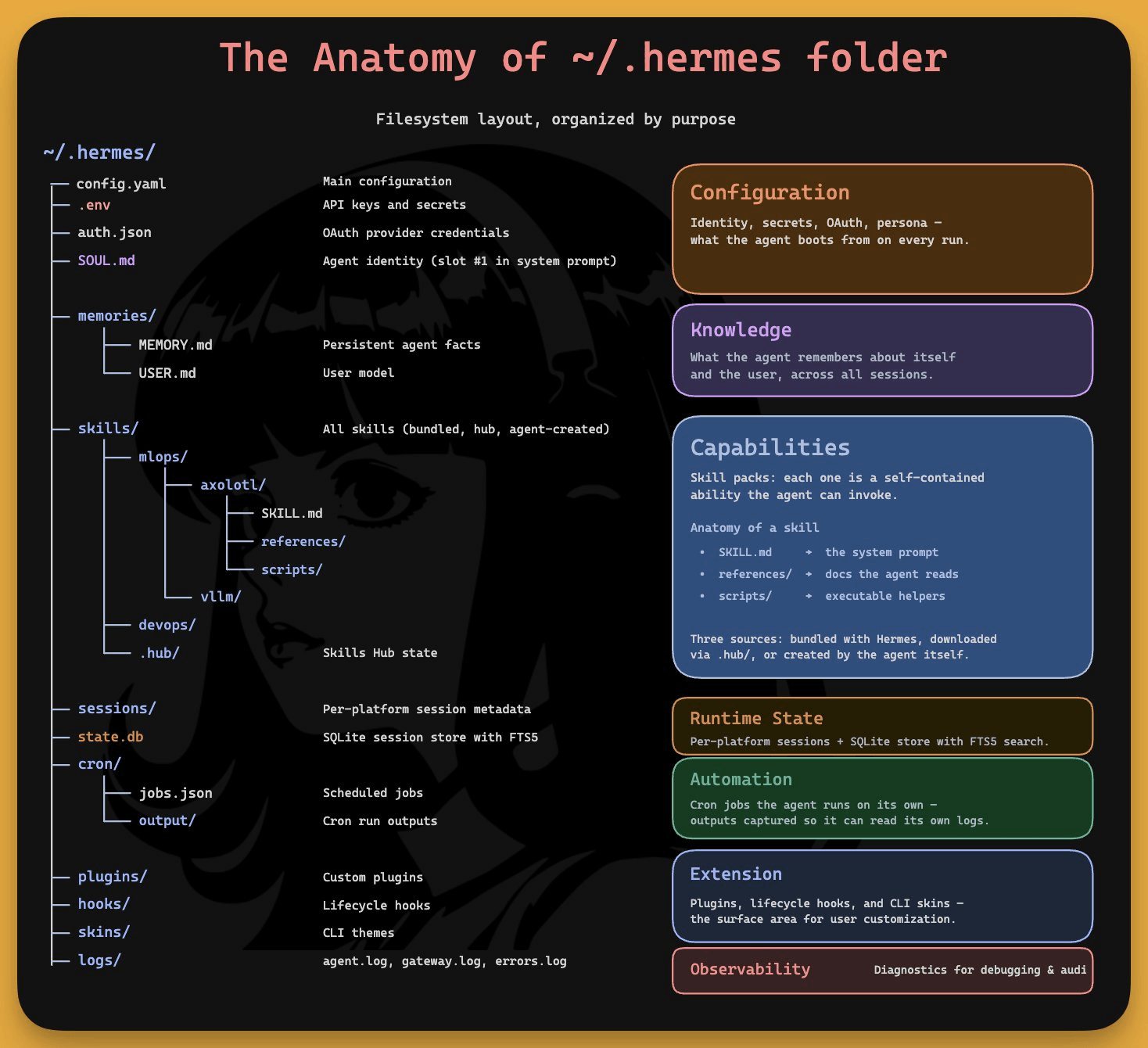
Configuration
config.yaml is the source of truth for everything non-secret, like model choice, terminal backend, tool enablement, and MCP servers.
The env holds your API keys and bot tokens and auth.json stores OAuth credentials.
Then there’s SOUL.md. It occupies slot #1 in the system prompt, before anything else loads.
It defines who the agent is, like its personality, tone, communication style, and hard limits. Everything the agent writes, creates, and remembers passes through this identity layer.
Knowledge
memories/ contains two tiny files. MEMORY.md (2,200 chars) holds project conventions, tool quirks, and lessons learned. USER.md (1,375 chars) holds your profile.
Both get injected into the system prompt as frozen snapshots at session start. When they fill up, the agent consolidates by merging entries, dropping redundancy, keeping only what’s dense and useful.
Capabilities
skills/ is where the learning loop lives. Each skill is a self-contained ability with a SKILL.md (the procedure), a references/ folder (docs the agent reads), and scripts/ (executable helpers).
Skills come from three sources. Either they are bundled with Hermes, downloaded from the hub via hub/, or created by the agent itself during your sessions.
Hermes ships with 687 skills across 18 categories, and you can add any GitHub repo as a custom tap.
Runtime state
sessions/ stores per-platform session metadata. state.db is the SQLite database with FTS5 indexing that backs tier 2 memory.
Automation
cron/ holds scheduled jobs in jobs.json and their outputs in output/. The gateway daemon ticks every 60 seconds and runs due jobs in isolated sessions. You describe schedules in plain English, Hermes converts them.
Extension + observability
plugins/, hooks/, and skins/ are the surface area for user customization. logs/ gives you agent.log, gateway.log, and errors.log for debugging.
You won’t manually edit most of these files. But knowing this layout means you understand exactly where identity, memory, skills, automation, and state live, and how they connect.
We wrote a full deep dive covering Hermes agent’s architecture, memory system, self-evolving skills, GEPA optimization, and setting up multiple specialized agents.
You can find the full deep dive here →
Thanks for reading!
P.S. For those wanting to develop “Industry ML” expertise:

At the end of the day, all businesses care about impact. That’s it!
Can you reduce costs?
Drive revenue?
Can you scale ML models?
Predict trends before they happen?
We have discussed several other topics (with implementations) that align with such topics.
Here are some of them:
Learn everything about MCPs in this crash course with 9 parts →
Learn how to build Agentic systems in a crash course with 14 parts.
Learn how to build real-world RAG apps and evaluate and scale them in this crash course.
Learn sophisticated graph architectures and how to train them on graph data.
So many real-world NLP systems rely on pairwise context scoring. Learn scalable approaches here.
Learn how to run large models on small devices using Quantization techniques.
Learn how to generate prediction intervals or sets with strong statistical guarantees for increasing trust using Conformal Predictions.
Learn how to identify causal relationships and answer business questions using causal inference in this crash course.
Learn how to scale and implement ML model training in this practical guide.
Learn techniques to reliably test new models in production.
Learn how to build privacy-first ML systems using Federated Learning.
Learn 6 techniques with implementation to compress ML models.
All these resources will help you cultivate key skills that businesses and companies care about the most.