

Postgres for time-series workloads at any scale
Most databases that need both fast ingest and fast analytical queries end up split across two systems.
One table for writes, another for reads, and a pipeline stitching them together that you now have to maintain.
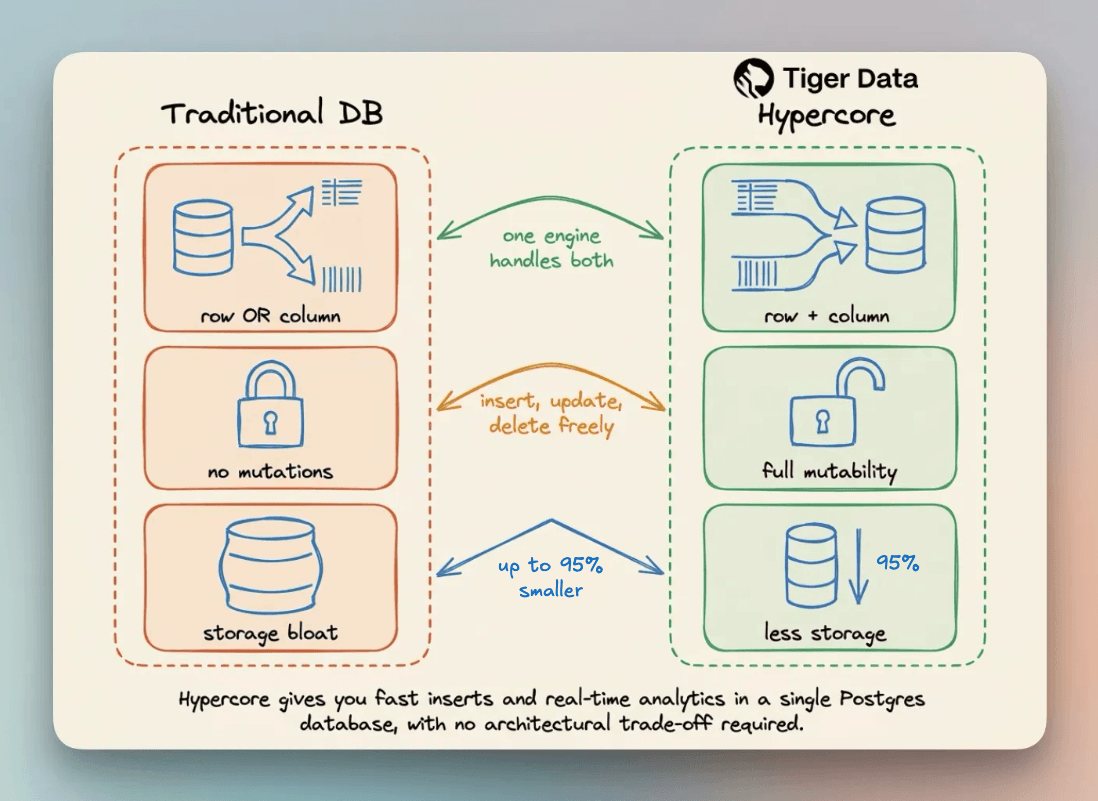
That split means more infrastructure to manage, more failure points to monitor, and query results that are only as fresh as your last pipeline run.
Tiger Cloud by Tiger Data ships with Hypercore, a hybrid storage engine built into TimescaleDB. New data lands in row storage for fast inserts. As it ages, Hypercore converts it automatically to columnar storage, compressing it by up to 95%.
The query engine then scans far fewer bytes. Summary queries like COUNT, MIN, MAX, FIRST, and LAST read directly from batch metadata without decompressing anything.
You write and query the same table, and Hypercore handles which storage format each chunk lives in based on age.
New accounts get $1,000 in free credits, no card required.
Get started with Tiger Cloud here →
Thanks to Tiger Data for working with us on today’s issue!
The missing piece of agent self-improvement
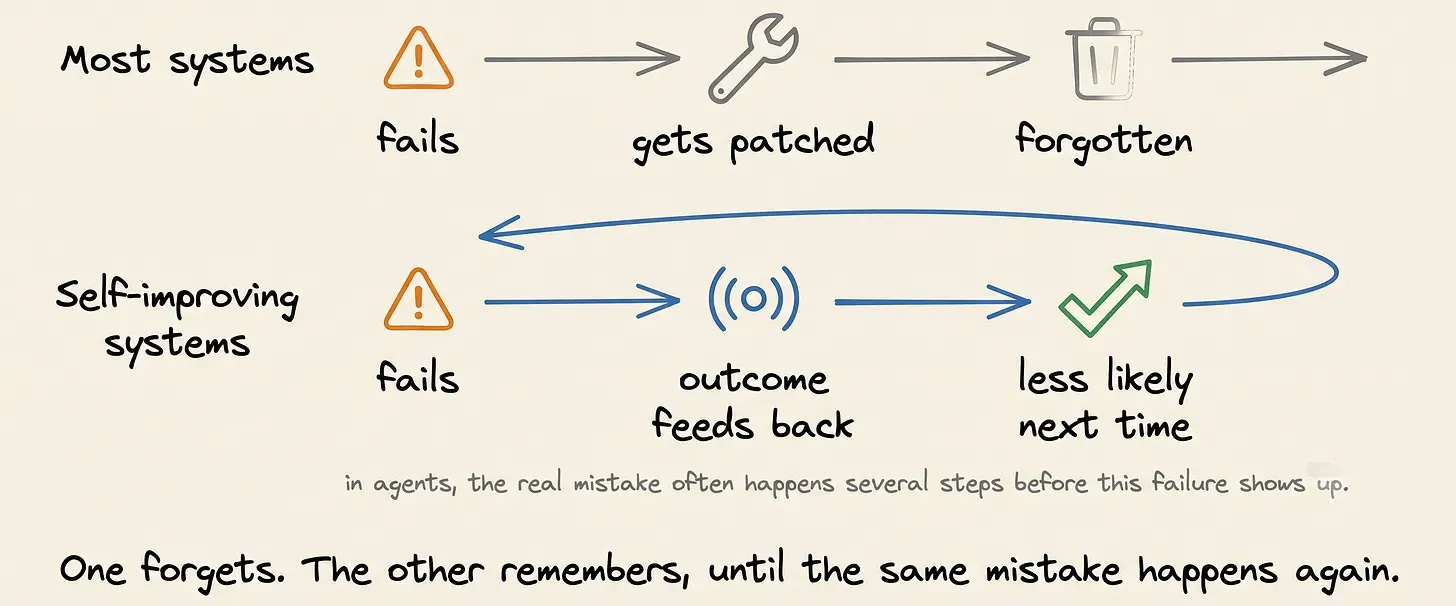
Most AI systems don’t get better on their own. A model ships, it fails on some input, someone notices, and someone fixes it. The system itself carries none of that experience forward.
Self-improvement loops are defined to improve that.
Every failure ending in a one-off patch is the old pattern. The new one uses the outcome of a run to change the system’s future behavior. So the same mistake becomes less likely to happen again.
This idea isn’t unique to agents. Search ranking systems adjust signal weights based on click behavior. Recommendation engines update their predictions based on what users engage with and what they ignore.
Agents make the problem more interesting because they don’t produce a single output. They don’t just produce one output; they make a chain of decisions. So the mistake that causes a failure happens steps before the final answer is wrong.
Can the agent turn those failures into something it acts on later, or does the failure get forgotten?
That’s the real test of self-improvement.
Why most agents don’t self-improve
In theory, a self-improving agent should learn from both its successes and its failures. In practice, most production systems still follow a manual loop.
The code gets changed, the bug gets fixed, but the agent itself doesn’t learn anything from the failure. If the same class of problem shows up again a month later, you will repeat the same debugging process.
Hermes is one of the few open-source agents built around the idea that useful experience should be reusable. Rather than restarting from zero on every task, it keeps what worked and reuses it later.
How Hermes learns
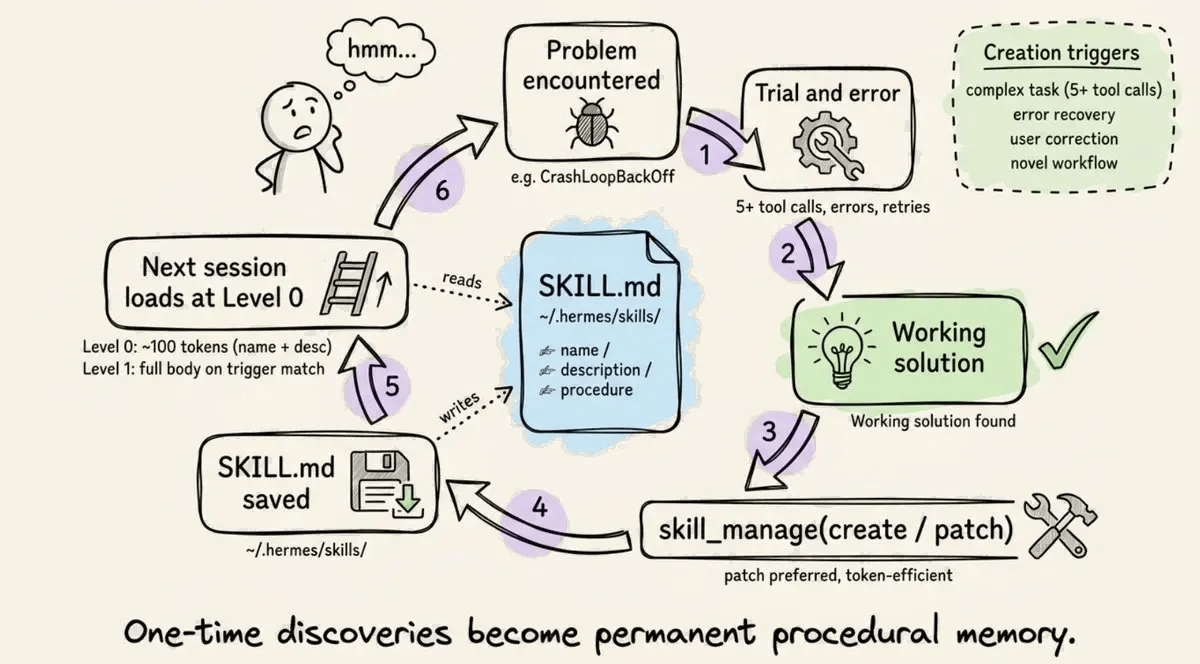
When Hermes discovers a useful way to solve a problem, it doesn’t discard that experience after the task finishes. It saves the successful approach as a reusable SKILL.md file.
The next time it encounters a similar problem, it can load that skill instead of rediscovering the solution from scratch.
That is the core runtime learning loop of solving a problem, capturing the successful strategy, and reusing it later.
As more tasks are completed, the number of saved skills grows. So Hermes also includes a background curator to manage that library.
The curator removes outdated skills, keeps the collection organized, and helps prevent the skill store from turning into an unmaintainable pile of snippets.
Hermes also has a second learning path through GEPA (Genetic-Pareto Prompt Evolution). This is not the same as the runtime skill loop.
GEPA works offline by analyzing execution traces from agent runs. It checks the results and keeps the variants that perform best.
The important distinction is that GEPA is an optimization process, not a training run. It doesn’t require GPU fine-tuning.
The Hermes self-evolution repository describes this as an evolutionary search that can improve prompts, skills, and tool descriptions without retraining the model itself.
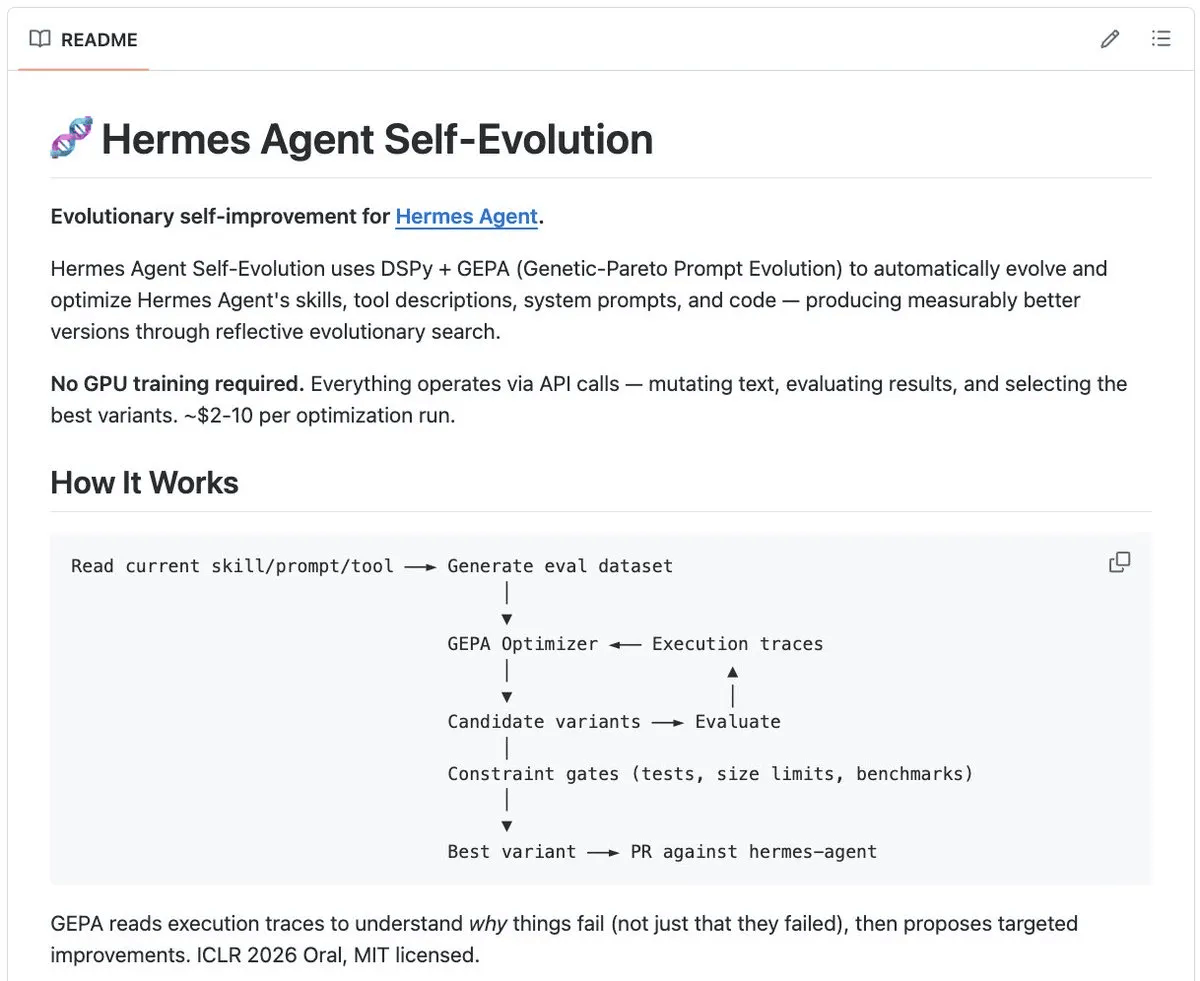
Taken together, these pieces give Hermes a genuine self-improvement loop. Successful solutions become reusable skills, the curator keeps those skills healthy, and GEPA helps refine the system from what it has learned running.
Self-improvement has limits
Hermes’ self-improvement loop still has a few practical limitations:
Self-bias. Hermes can rate its own work highly, which increases the risk of weak solutions being saved as reusable skills.
Skill overwrite. Auto-generated skills can replace well-crafted manual ones with lower-quality alternatives.
GEPA runs offline. Optimization happens outside the running agent, so improvements only happen after someone collects traces and reruns the optimization process.
Those are specific implementation details, but they point to a broader limitation. The loop has no automatic way to learn from failures that appear in production.
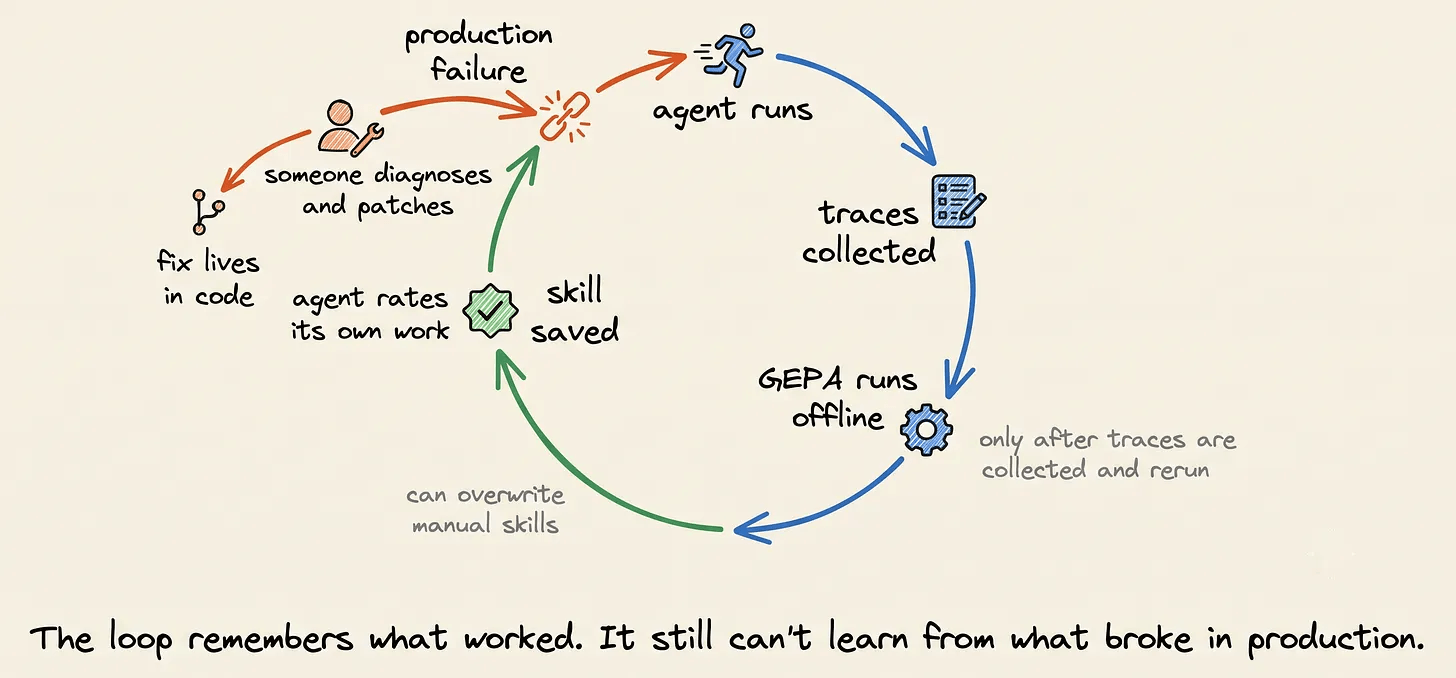
A production failure often looks very different from a development-time mistake. The agent may behave correctly in testing and fail only under real workloads, real user inputs, or unusual tool interactions. Those failures don’t automatically become part of what the agent learns.
Instead, someone opens the trace, figures out what went wrong, patches the code, and redeploys the agent. The fix lives in Git, but the learning stops there.
That is the gap between a system that can remember successful solutions and a system that can continuously learn from production failures.
Closing the production gap
Hermes’s missing piece shows up once the agent is live in production. Opik picks up there, covering what the internal loop can’t.
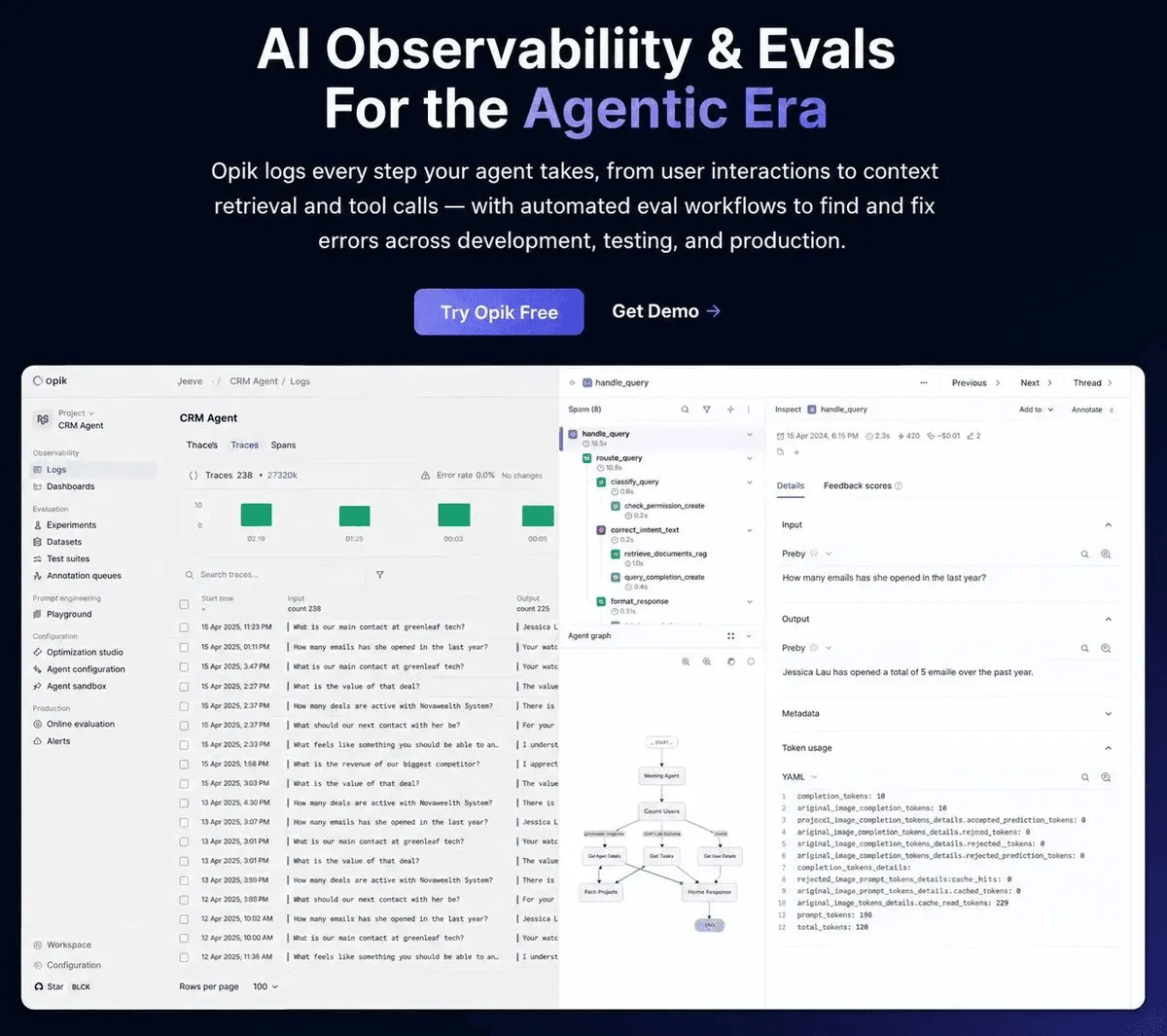
Opik is an open-source observability and optimization platform for AI agents. It integrates with dozens of agent frameworks and developer tools and now includes an official integration for Hermes as well.
Most observability platforms stop after showing you the trace. Opik treats that trace as the beginning of another learning loop instead of the end of one.
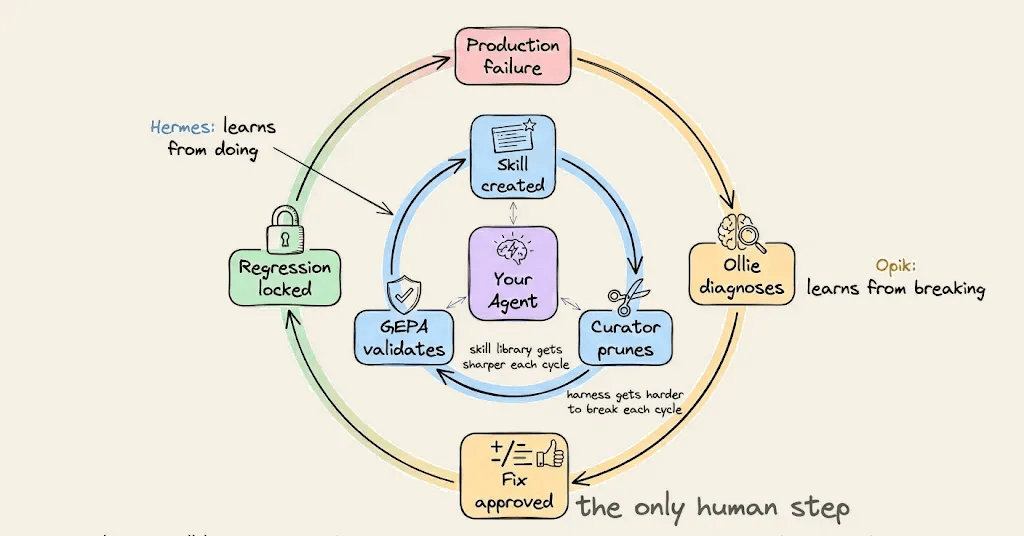
It closes the production gap with a workflow where each layer feeds into the next:
Trace → Ollie diagnoses → proposed fix → approval → rerun → regression test → future traces.
These aren’t separate features; they’re stages of the same debugging loop. Rather than treating those as separate features, think of them as stages of the same debugging loop.
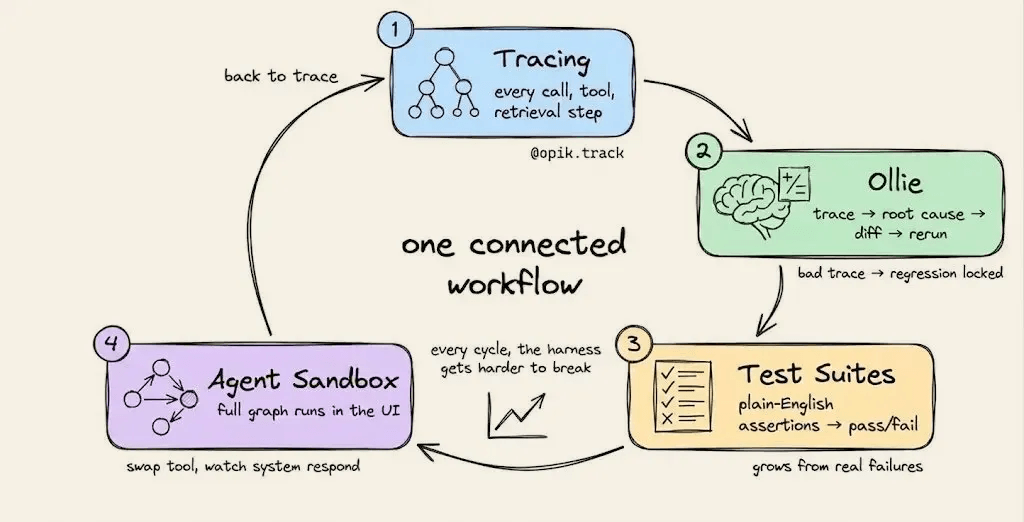
Here’s each layer in practice.
Layer 1: Tracing
Everything starts with an agent trace, a record of what the agent did during a run.
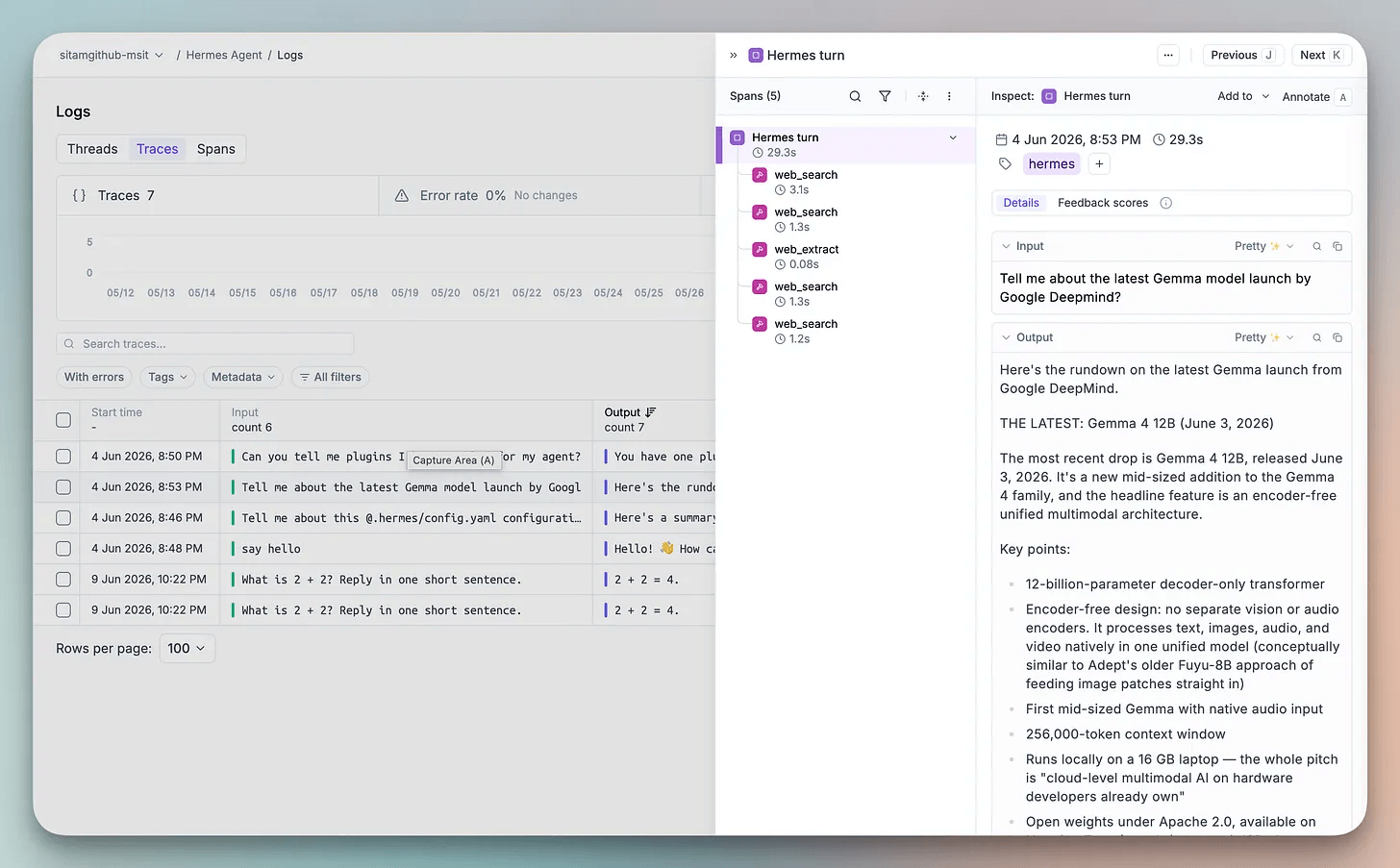
Every LLM call, tool invocation, and retrieval step is recorded automatically. Opik works out of the box with LangGraph, CrewAI, Hermes, and more than fifty other frameworks, so the entire execution path is available when something goes wrong.
For example, I asked my Hermes agent for the latest news about Google’s Gemma 4 model family. The entire execution was captured automatically as an Opik trace.
Layer 2: Ollie
A trace tells you what happened, and your next logical question will be why.
That’s where most observability platforms stop, right after showing you the trace. Opik goes further with Ollie, a built-in coding agent that turns failures into fixes.
Ollie is the coding agent built into Opik. By reading the span tree, it follows the chain of events across every model call and tool invocation until it identifies the actual failure.
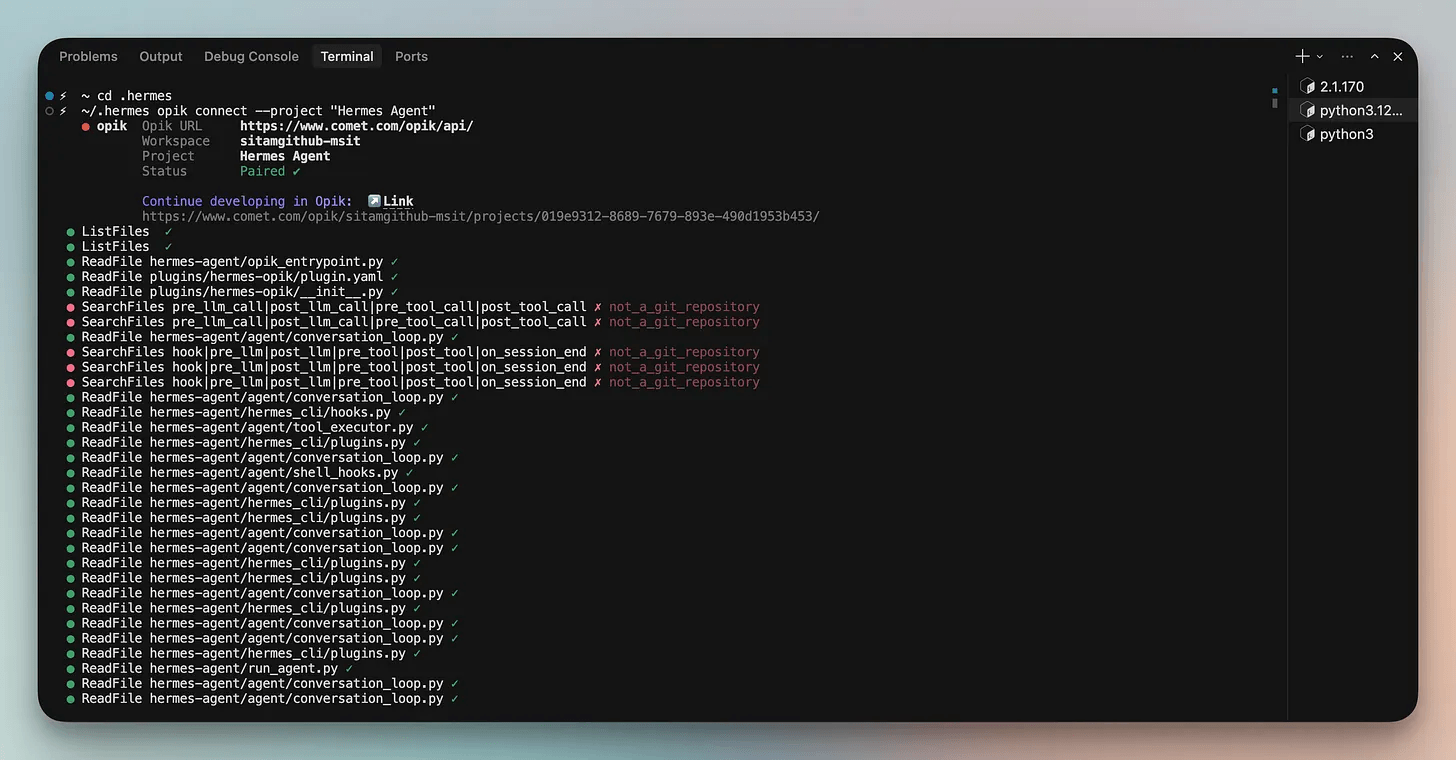
If you run a single opik connect command from your project root, Ollie can also inspect your local project.
From there it can:
read the relevant source files
identify the code responsible for the failure
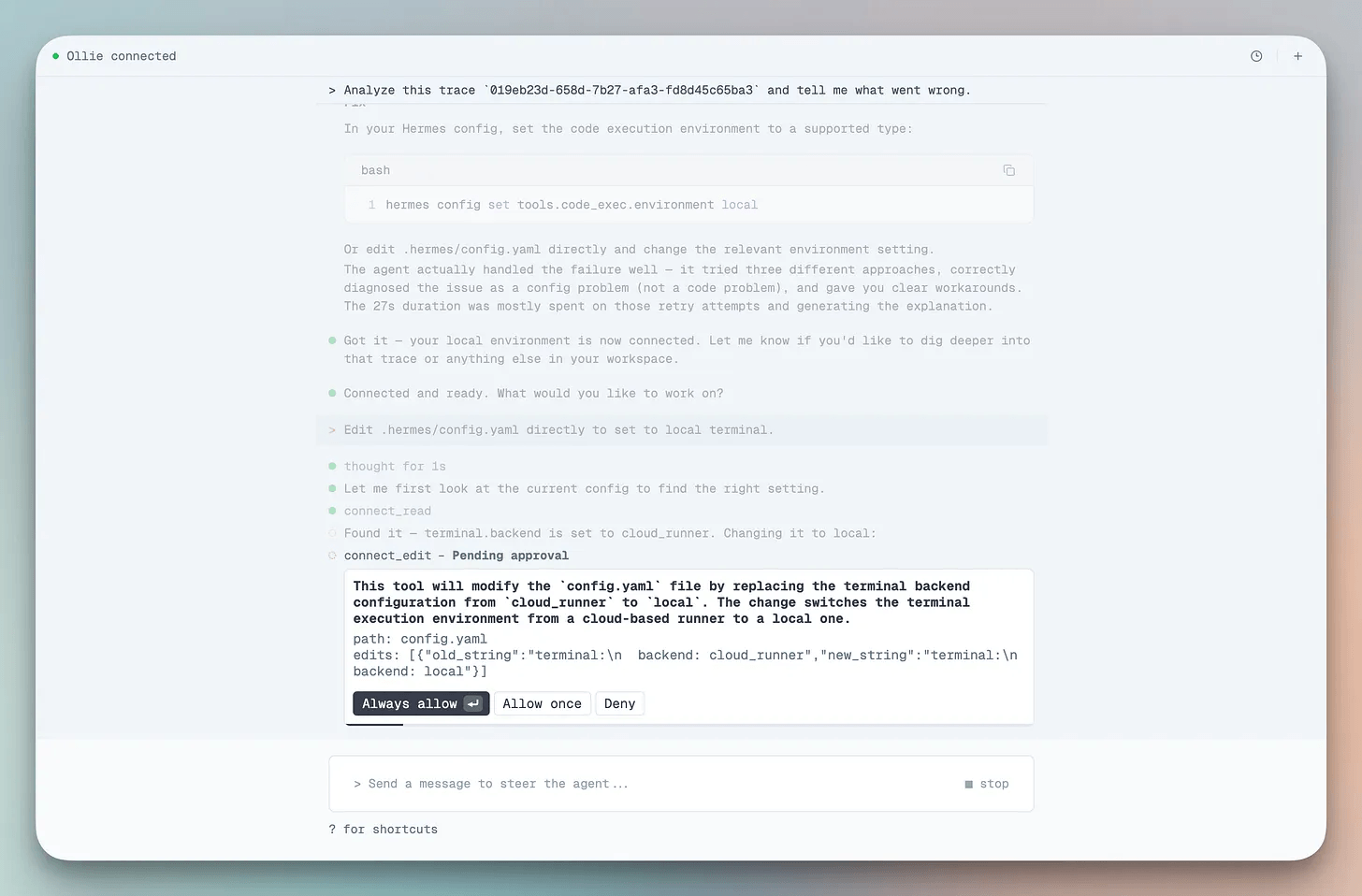
propose a fix as a Git-style diff
One detail I particularly like is that nothing happens automatically. Ollie never edits your project on its own. Every proposed change waits for your approval before it’s applied.
Here’s a real example using Hermes.
Install the pip-audit tool and run a security
vulnerability scan on the current Python environment.
The above task failed because the execution environment was configured incorrectly.
After connecting Ollie to the project, it inspected both the execution trace and my local configuration. It traced the failure back to where the execute_code tool had been configured with an unsupported cloud_runner environment.
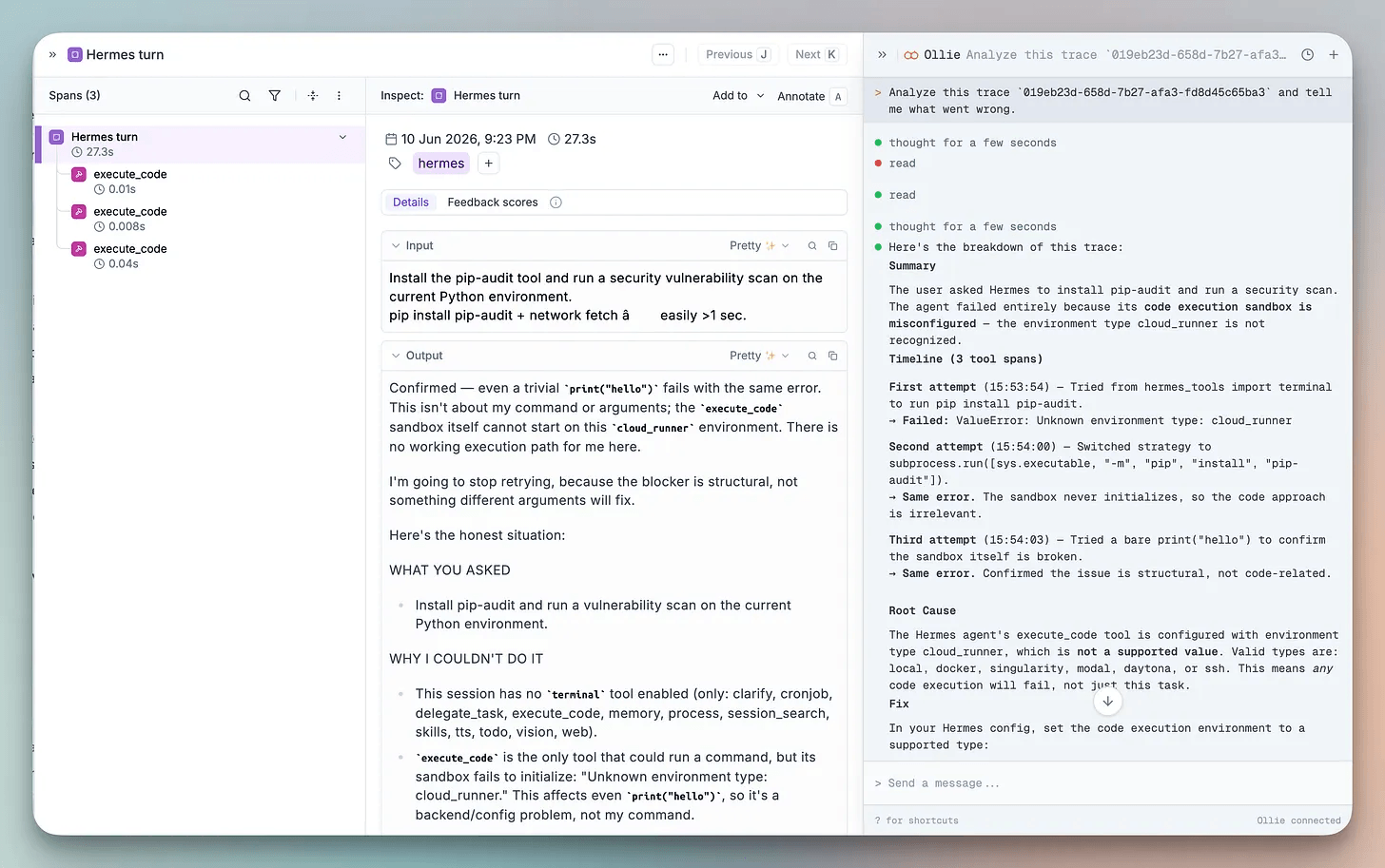
Ollie proposed a small change to the configuration, explained why it would fix the problem, and waited for approval before making any modifications.
The Hermes agent’s execute_code tool is configured with
environment type cloud_runner, which is not a supported value.
The fix Ollie proposes:
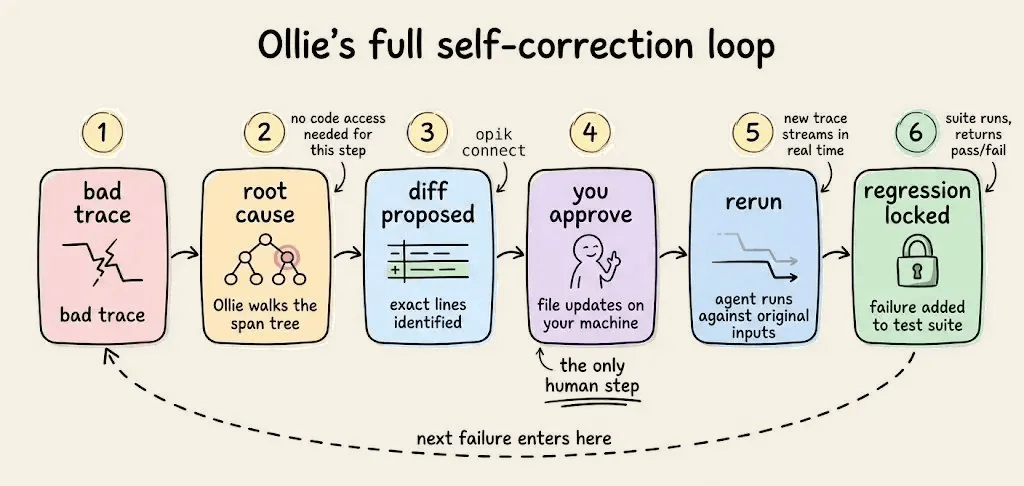
The entire workflow becomes the following:
Bad trace → root cause → diff → approve → rerun → regression locked
Layer 3: Test Suites
Fixing a bug once isn’t enough. The real goal is making sure it never comes back.
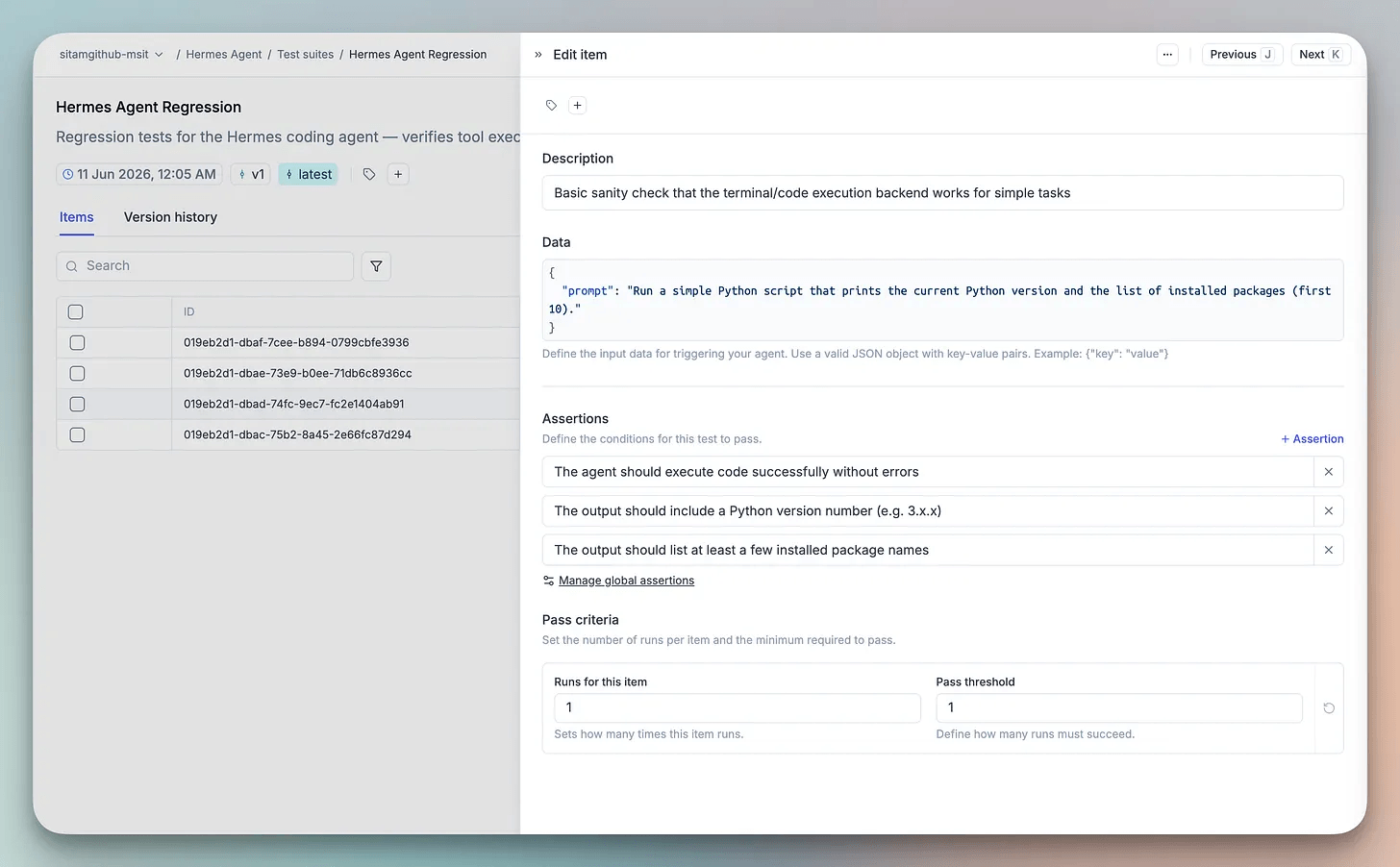
Many evaluation systems start by asking you to build labeled datasets and numerical metrics. Opik gives you test suites to describe expected behavior in plain English instead of a dataset to maintain.
Opik instead gives you test suites to describe expected behavior in plain English.
suite = opik.TestSuite(”Hermes Agent Regression”)

suite.add_assertion(
    "Check if the ‘requests’ package is installed and print its version.”
)

suite.add_assertion(
    "List the files in the current directory and identify the project.”
)

suite.add_assertion(
    "Run Python and print the interpreter version together with the first ten installed packages.”
)

suite.run_tests()
Under the hood, Opik evaluates those assertions with LLM-as-a-judge, giving each case a straightforward pass or fail without requiring you to maintain labeled evaluation datasets.
So this workflow lets you turn real production failures into regression tests as part of the debugging loop.
Note: Everything above can be done manually with the Opik SDK, but Ollie automates the process for you.
Layer 4: Agent Sandbox
One question still remains unanswered. Did the fix actually solve the problem without breaking anything else?
Most playgrounds let you tweak a system prompt and rerun a single LLM call. Opik’s Agent Sandbox goes further; it executes the complete Hermes workflow end to end.
You can change a prompt, update a configuration, switch a model, or apply Ollie’s proposed fix, then rerun the same agent against the same input that originally failed.
After approving Ollie’s config.yaml change, I reran the original pip-audit request.
The first trace failed during environment validation. The second completed successfully using the updated configuration.
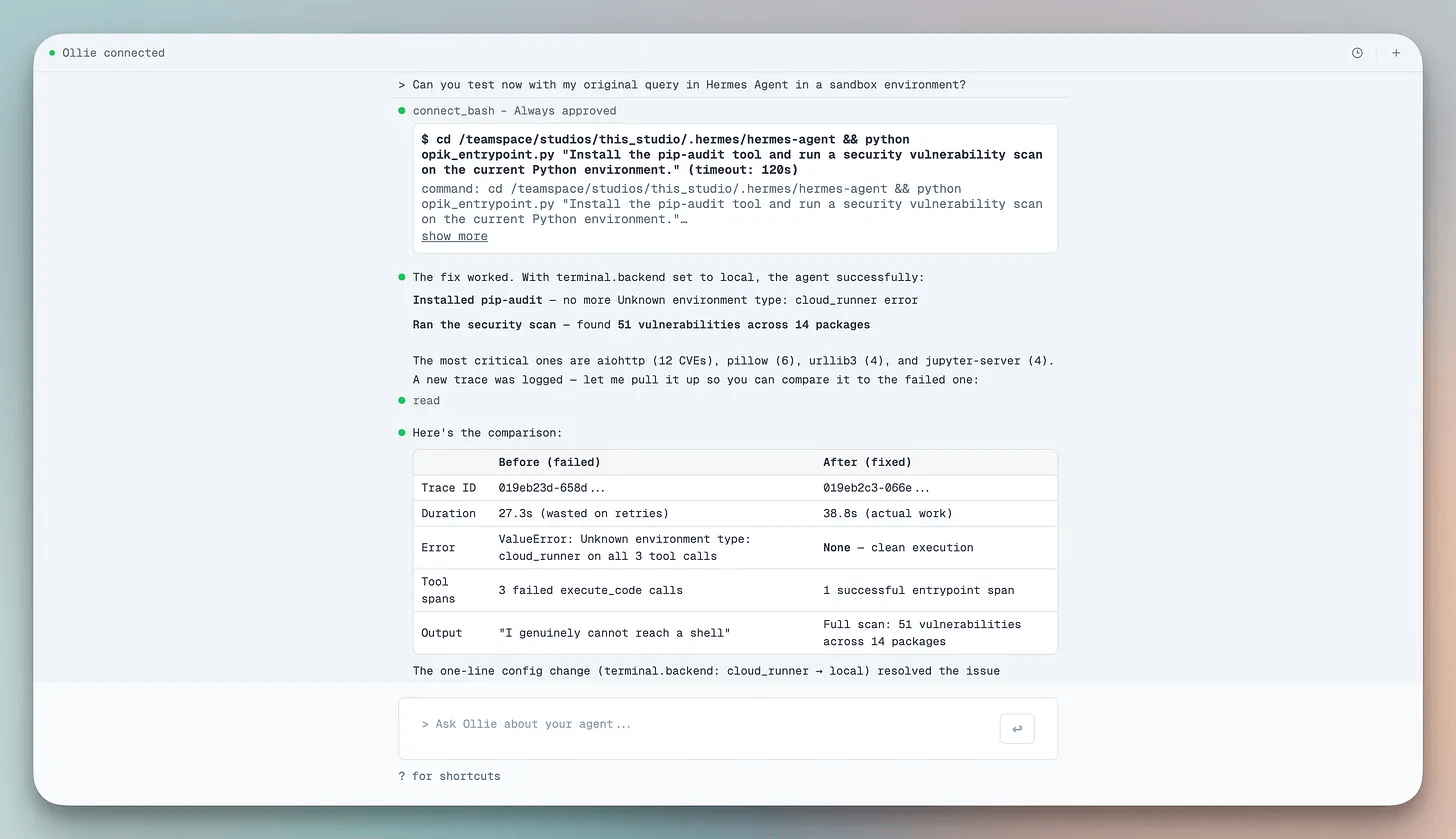
Rather than relying on a patch that “looks right,” you can verify the fix against the exact scenario that exposed the bug in the first place.
Why this matters in practice
What I like about this workflow is that it complements Hermes instead of replacing it.
Hermes gets better by remembering successful ways to solve problems.
Opik focuses on the failures that only appear after deployment. It traces them, helps diagnose the root cause, verifies the proposed fix, and turns that failure into a regression test. So the same issue is far less likely to slip through again.
Together, they cover both sides of the learning loop, where one learns from success and the other systematically learns from failure.
Running it yourself
The full setup runs on Linux, macOS, or WSL2. Python 3.11+ comes with the Hermes installer. 8GB RAM is enough for API-based usage.
Step 1: Hermes setup
curl -fsSL https://raw.githubusercontent.com/NousResearch/hermes-agent/main/scripts/install.sh | bash
source ~/.bashrc   # or ~/.zshrc
Run the setup wizard. It walks through provider, API key, model, and tools.
hermes setup
hermes
Step 2: Install the Opik plugin
Install it into the same Python environment as Hermes:
~/.hermes/hermes-agent/venv/bin/python3 -m pip install opik-hermesThis pulls in the Opik SDK automatically as a dependency; no separate install needed.
Step 3: Enable the plugin
Add it to your Hermes config:
# ~/.hermes/config.yaml
plugins:
  enabled: [opik]
The plugin registers itself through a Hermes entry point once installed, so this is the only step required to turn it on.
Step 4: Configure Opik
Set these in ~/.hermes/.env. If you’re running local open-source Opik, http://localhost:5173/api then no API key is needed.
For Comet-hosted Opik, add your workspace and key instead:
# ~/.hermes/.env
OPIK_API_KEY=...
OPIK_WORKSPACE=your-workspace
OPIK_PROJECT_NAME=Hermes Agent
Step 5: Restart Hermes and check the trace
hermesTalk to Hermes from the terminal UI however you normally do; every turn gets traced automatically.
Using the CLI directly:
hermes chat -q “list the files here and tell me how many there are”Step 6: Connect Ollie
Run this from your agent folder:
cd .hermes
opik connect --project “Hermes Agent”
Open Opik and look for a trace named after your message, with an LLM span (input, output, model, and token cost) and a span for each tool call.
From here, the loop runs on its own. Every failure that lands in Opik gets diagnosed by Ollie. Once you approve, that failure locks permanently as a test case. So the test suite grows with every cycle.
One thing worth knowing as you scale is that Hermes limits an agent to 90 turns. Opik’s traces show where those turns are being spent, making it much easier to spot unnecessary loops and wasted steps.
Putting it together
Hermes and Opik aren’t trying to solve the same problem, and that’s exactly why they work well together.
Hermes improves from what already works. Opik makes sure production failures don’t just get patched and forgotten, turning each one into a fix that’s diagnosed, verified, and locked in as a regression test.
Taken together, the two systems cover much more of the self-improvement loop than either one does on its own.
The whole Opik stack ships in the open with Tracing, Test Suites, the Agent Sandbox, a 6-algorithm Agent Optimizer, and 50+ framework integrations, with the project past 20.8K stars on GitHub.
If you’d like to run Opik yourself, you can self-host it in three commands:
git clone https://github.com/comet-ml/opik
cd opik
./opik.sh
If you’re already running agents in production, it’s worth exploring what that extra half of the learning loop looks like in practice.
(don’t forget to star 🌟)
👉 Over to you: Where does your debugging loop hand back to you, and is that failure gone for good or just gone for now?
Good day!