

In today’s newsletter:
Insane upgrade for coding agents!
Vibe coding has a blind spot.
Insane upgrade for coding agents!
Claude Code, Codex, Claude and ChatGPT can now work on the same data app, with the team using it against live data.
An agent-built dashboard often starts as something only its creator can run.
The charts use a snapshot embedded in an HTML file. Database access depends on credentials configured locally. Sharing the file doesn’t give colleagues a working app connected to the warehouse.
Deepnote rebuilt its data apps to handle that transition and keep all dashboards you vibecode in sync, regardless of where you built them.
Each app has a page for charts, filters and interactions, backed by a Deepnote notebook that executes SQL and Python. The database credentials stay behind the page.
That gives the app a backend the team can inspect and maintain.
Queries can rerun to refresh the data, including on a schedule.
Supported OAuth integrations let signed-in viewers query using their own database permissions.
Version history makes it possible to undo an agent’s changes.
Colleagues can access the app through a shared link.
The agents can build and modify it through the Deepnote plugin or MCP.
The video above shows Claude and ChatGPT editing the same live app using a San Francisco dataset, and we worked with the Deepnote team to put it together.
The notebook keeps execution sandboxed and the app connected to its data pipelines and permissions.
The logic stays reviewable too, so a data teammate can inspect and fix an incorrect join in the SQL cell behind the chart.
Thanks to Deepnote for partnering today!
Vibe coding has a blind spot
Everything you need to understand about what stands between AI-built apps and the data they read, and how to keep it the same no matter which agent wrote the code.
In early 2026, Wiz researchers found that Moltbook, a viral app its founder built entirely with AI, had left its production database open to anyone, exposing 1.5 million API keys and 35,000 email addresses.
This sounds counterintuitive, but the code wasn’t the weak link. Nothing sat between the app and the data to decide who could read what.
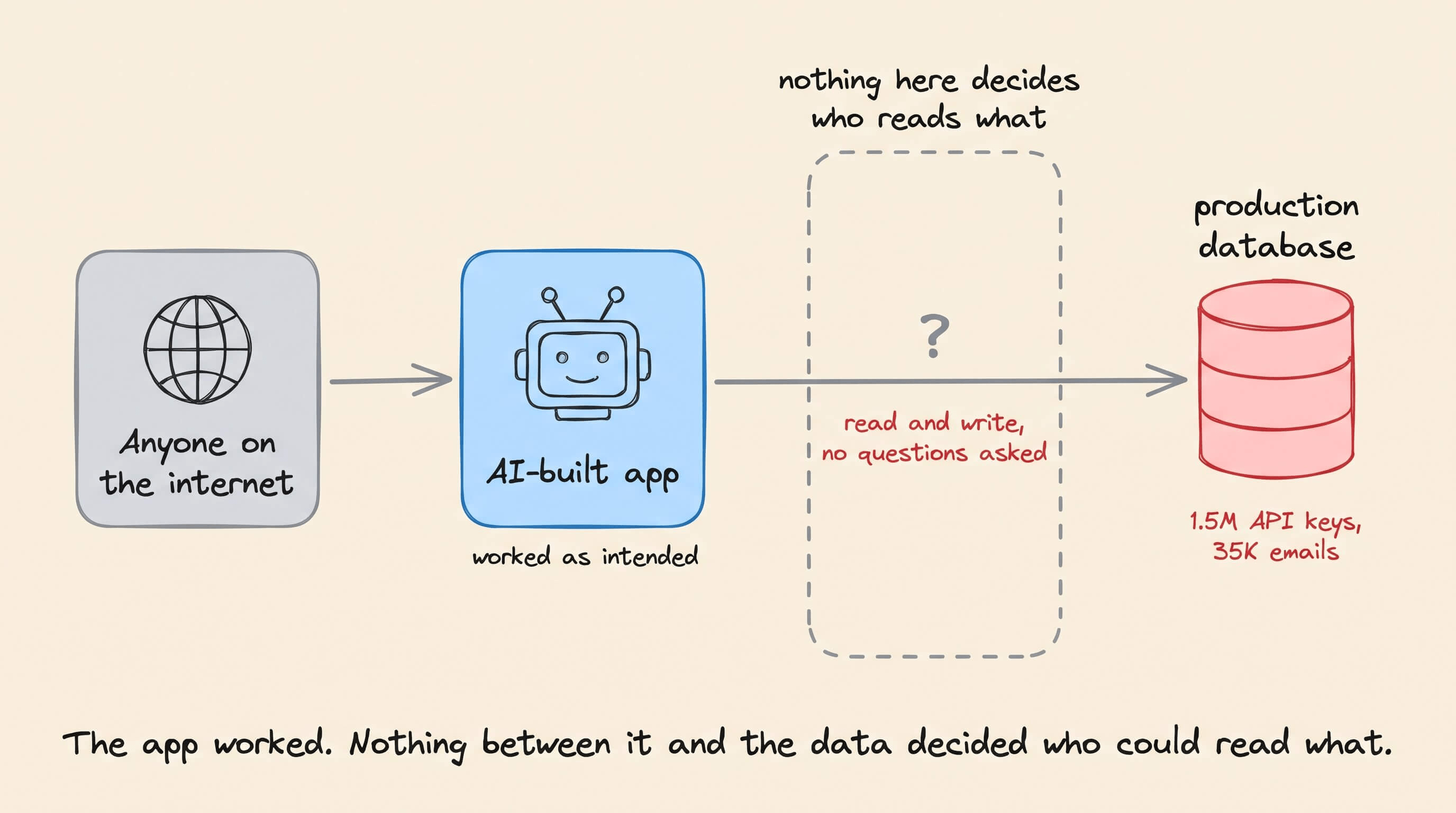
Inside a company, the same gap multiplies. A team rarely ships just one internal tool, and once it ships ten, every app carries its own access check.
One app uses a WHERE clause, another a role check in a component, each written a little differently by a different model.
Nobody can see all those checks at once, so nobody can tell whether they still agree.
Retool, a platform for running AI-built internal apps in production, moves that job out of the app.

You keep building in whichever agent you’re fastest in, and Retool decides who sees which data on the database connection itself, so one access policy covers every app that queries it.
Today, let’s put that to the test. We had Claude Code, Codex and Cursor build the same employee salary table from one prompt, then set up access in Retool once for all three.
But first, let’s look at why the access check ends up inside the app at all.
Every app writes its own access check
A coding agent optimizes for whether the app it’s building works.
But it has no signal for what sits around that app, i.e., which other tools read the same table and which access checks they all have to agree on. So it writes access logic the same way it writes everything else, as code inside the app.
The check then takes whatever shape that app’s code takes. One app might filter in SQL, another might fetch everything and filter in the UI, a third might check the role in a backend function.
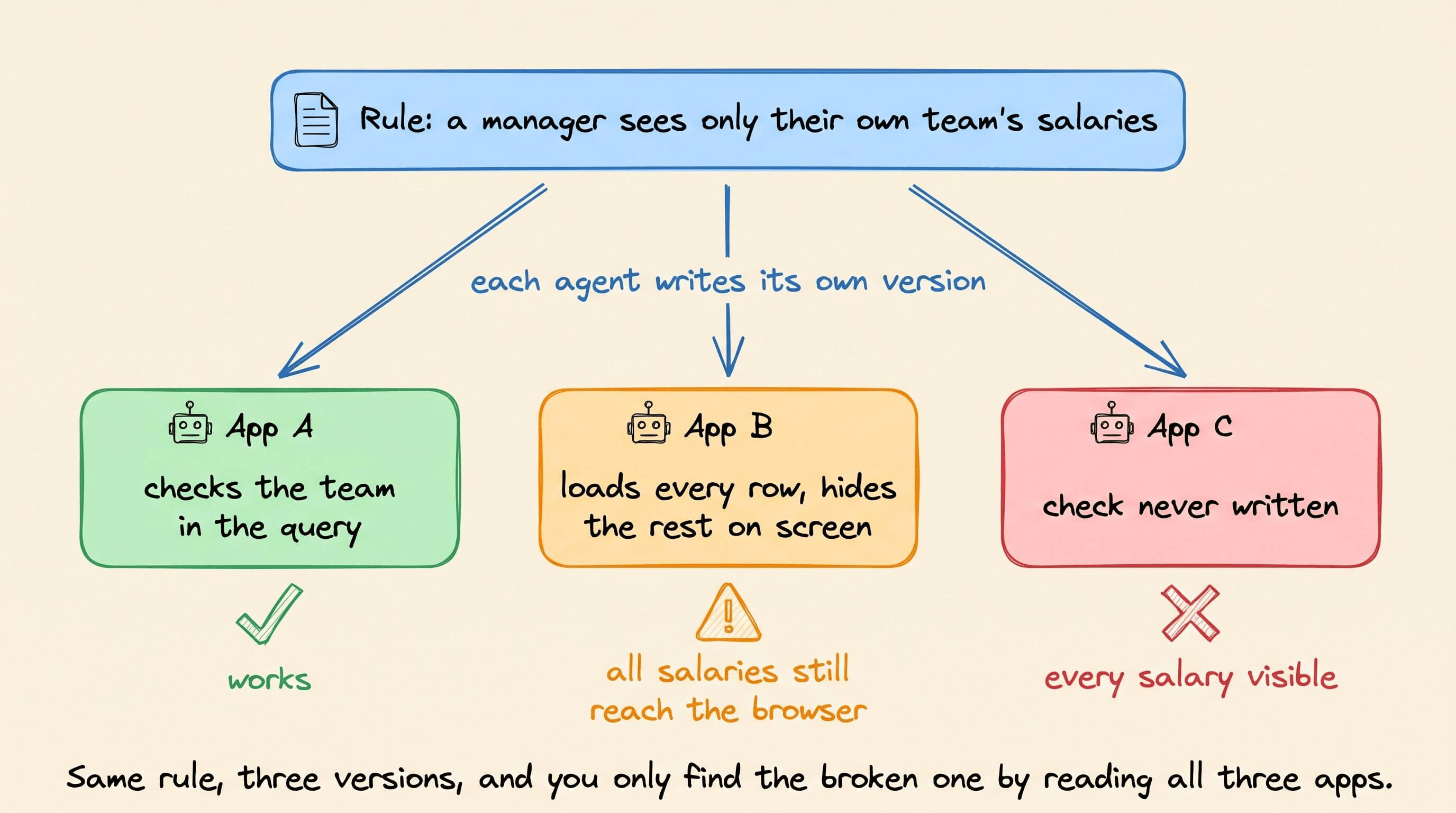
Even when every version is correct, it’s still a liability:
When the access requirement changes, someone has to find and update every app that touches the table.
When someone audits it, they have to read each codebase to confirm the check is still there.
When one app forgets it, every row is exposed, and nothing else in the system notices.
A better model or a better prompt won’t solve this problem. Both shape one app at a time, and the problem is the number of apps.
The data behind these tools is often the kind that can’t leak. A manager seeing their own team’s salaries is normal. A manager seeing the whole company’s is an incident.
Let’s actually look at this in action to understand better.
Building one app with three agents
The app itself was simple, one page showing a table of employee compensation.
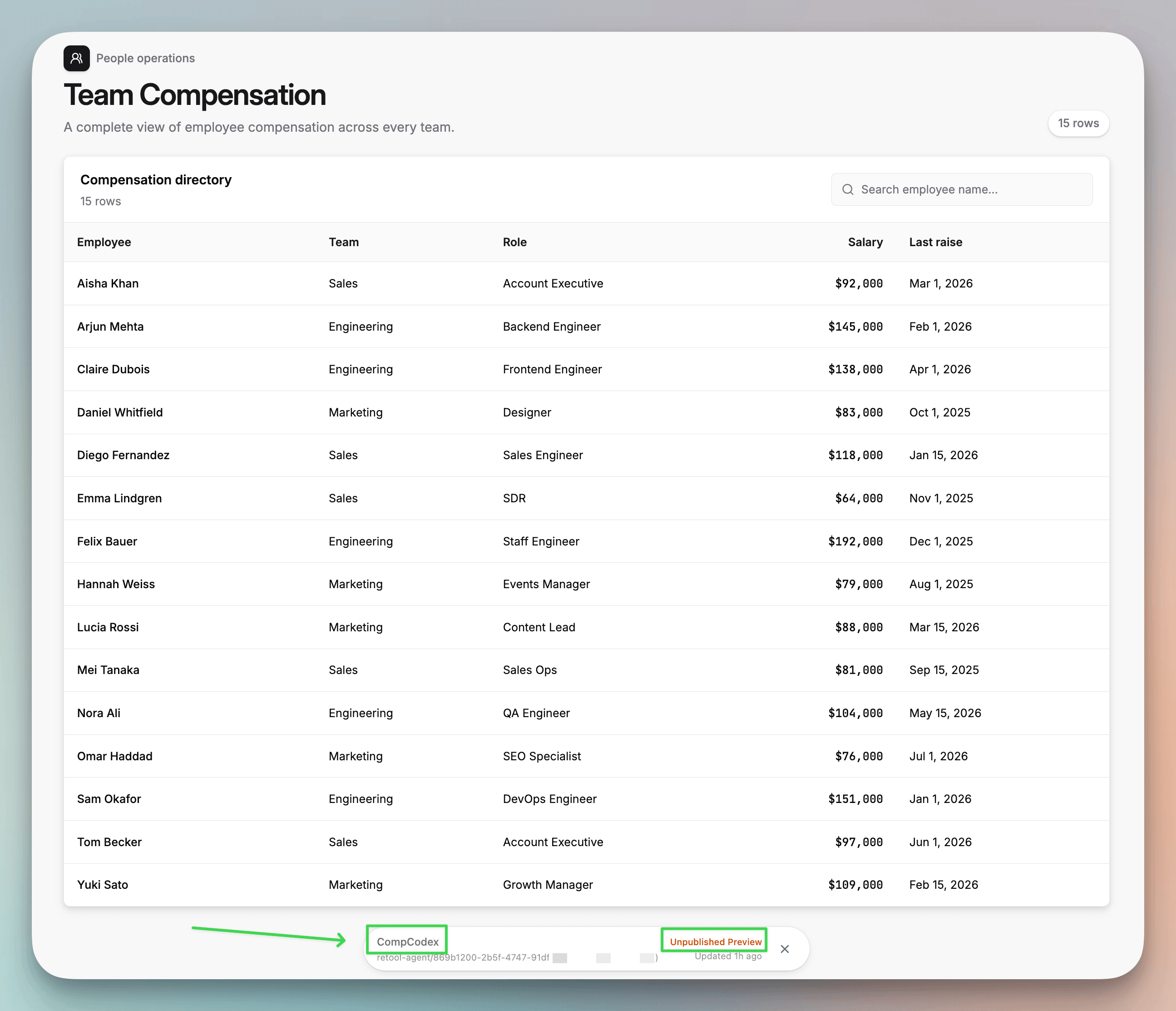
Each agent worked in its own project, created with the Retool CLI, against the same PostgreSQL table of 15 employees across Sales, Engineering and Marketing.
The CLI let every agent check its app and push it to Retool on its own. Retool also offers an MCP server for connecting agents, but the CLI was enough here.
Setting this up took a few commands:
# one-time setup
pnpm i -g @tryretool/cli
retool auth login --host <your-org>.retool.com
retool skill install

# one project per agent
retool init comp-claude
retool init comp-codex
retool init comp-cursor
Here’s the prompt we used:
This folder is an existing Retool app project created
with `retool init`. First run `retool skill show retool-ready` and follow that spec.

Build one page in this project:
- A table showing every row from the `compensation` table in
  the `compensation_db` PostgreSQL resource.

- Columns: employee_name, team, role, salary (formatted as currency),
  last_raise_date. Select these columns by name, not with SELECT *.
- A header titled "Team Compensation", with a row count and a search
  box that filters by employee name.

- Read-only: no writes, no custom login, no sample data, no hardcoded
  credentials. All data comes from the compensation_db resource.

- Do not filter rows by user or team in the query. Return all rows.

- Clean, modern styling.

When done, run `retool check` and fix any errors,
then run `retool push --wait` and give me the preview URL.
The prompt also never gives the agents a database password. Every query goes through the compensation_db resource in Retool, so no credentials end up in the generated code.
All three worked. Claude Code and Cursor came out practically identical, while Codex picked its own layout and components.
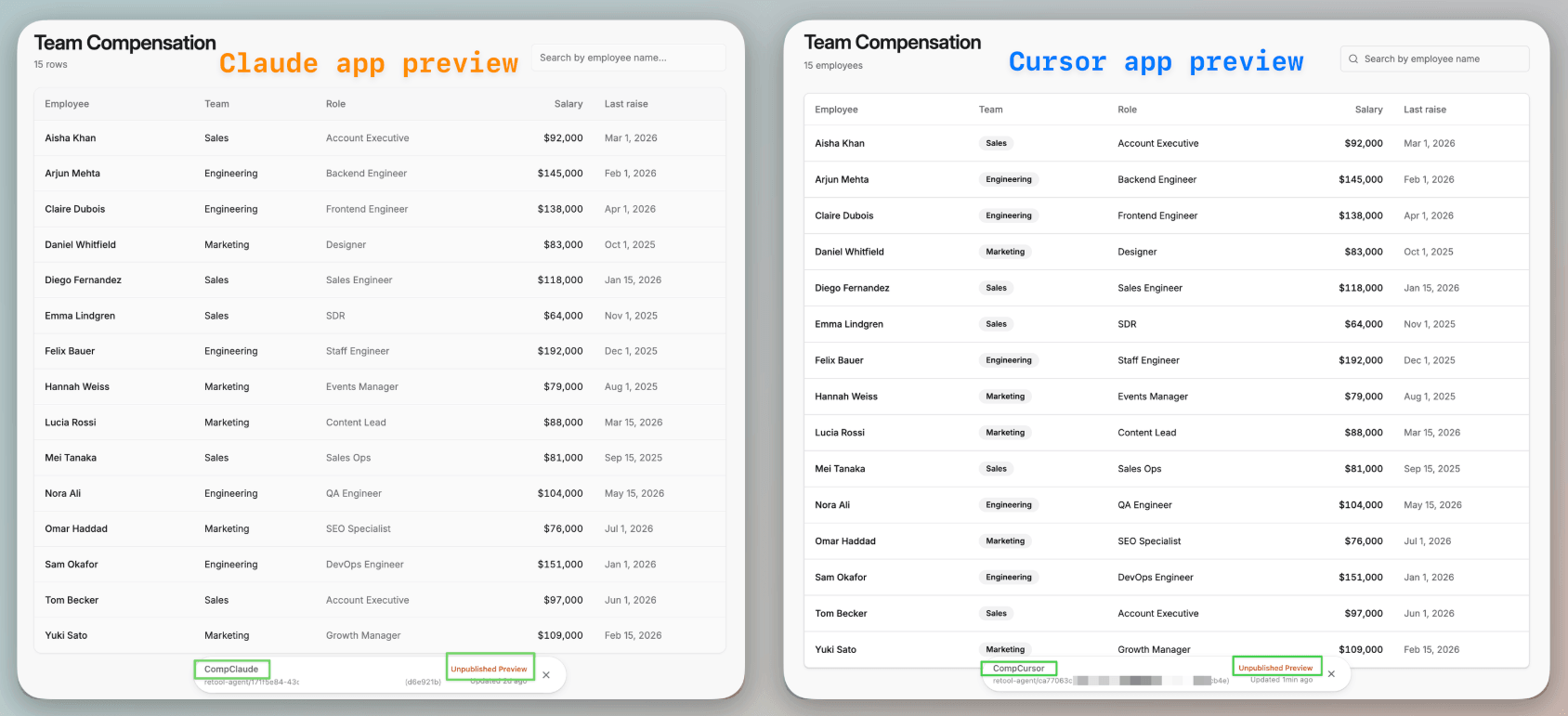
Now imagine we had asked for the access check in that prompt. We’d have three versions of it in three codebases, and the only way to trust them would be to read all three.
Why access checks don’t belong inside the app
In May 2026, Red Access showed what this looks like at company scale, reporting that about 5,000 publicly accessible apps built on popular vibe-coding platforms were exposing sensitive corporate data, from a hospital’s patient complaints and staff schedules to a bank’s internal financials.
The researchers traced it to employees publishing internal tools without company oversight or basic access controls. Each app was responsible for its own access checks, and many shipped without any.
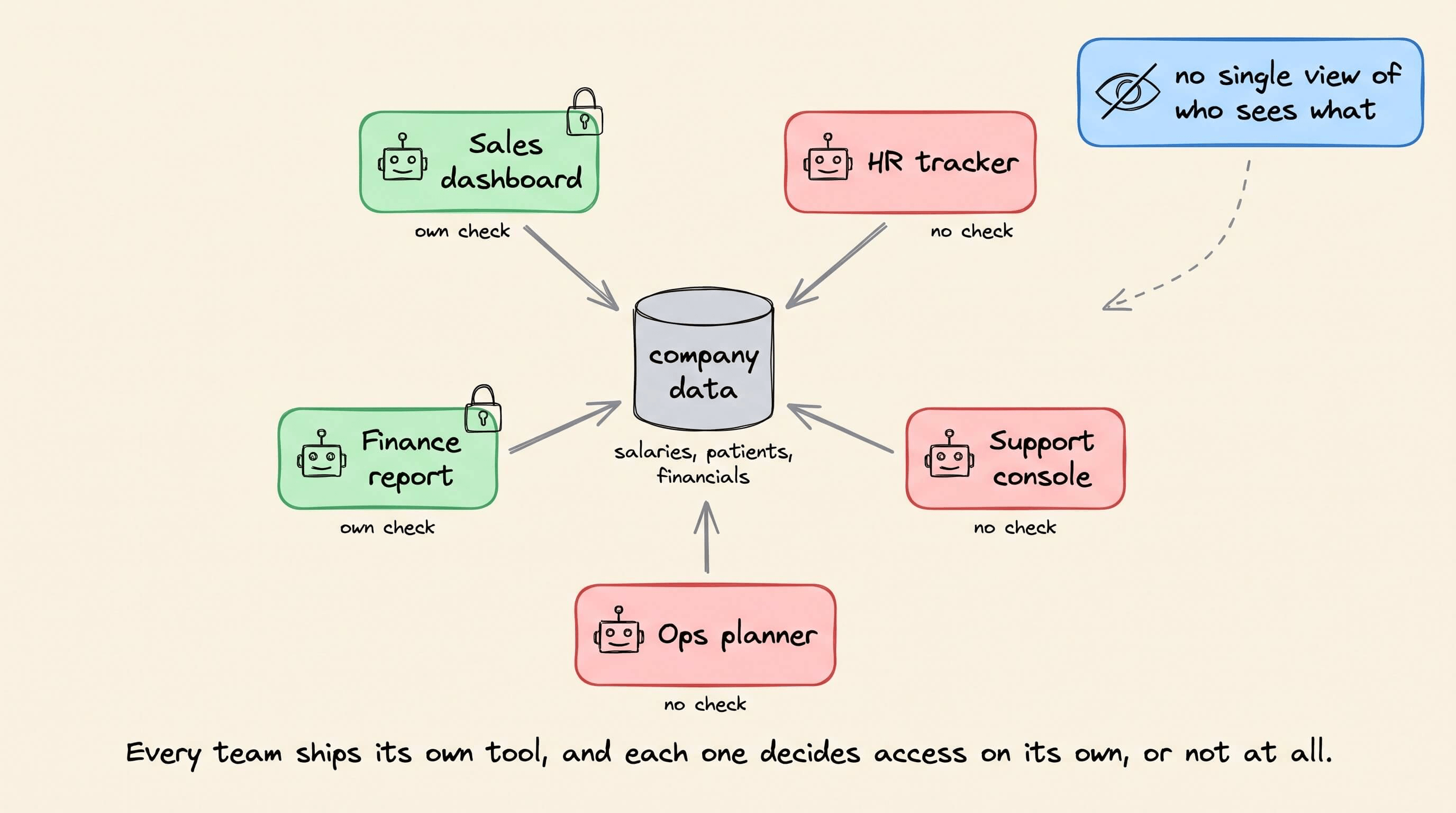
Ideally, who sees what should be decided by the platform the apps run on, not by any one app. Otherwise, every new app adds another access check that nobody manages centrally, and that’s how Shadow AI creeps in.
When the platform handles access instead of each app:
Access is defined once per table and applies to every query.
Identity comes from the platform’s login, not from each app.
Every narrowed or blocked query is recorded in one place.
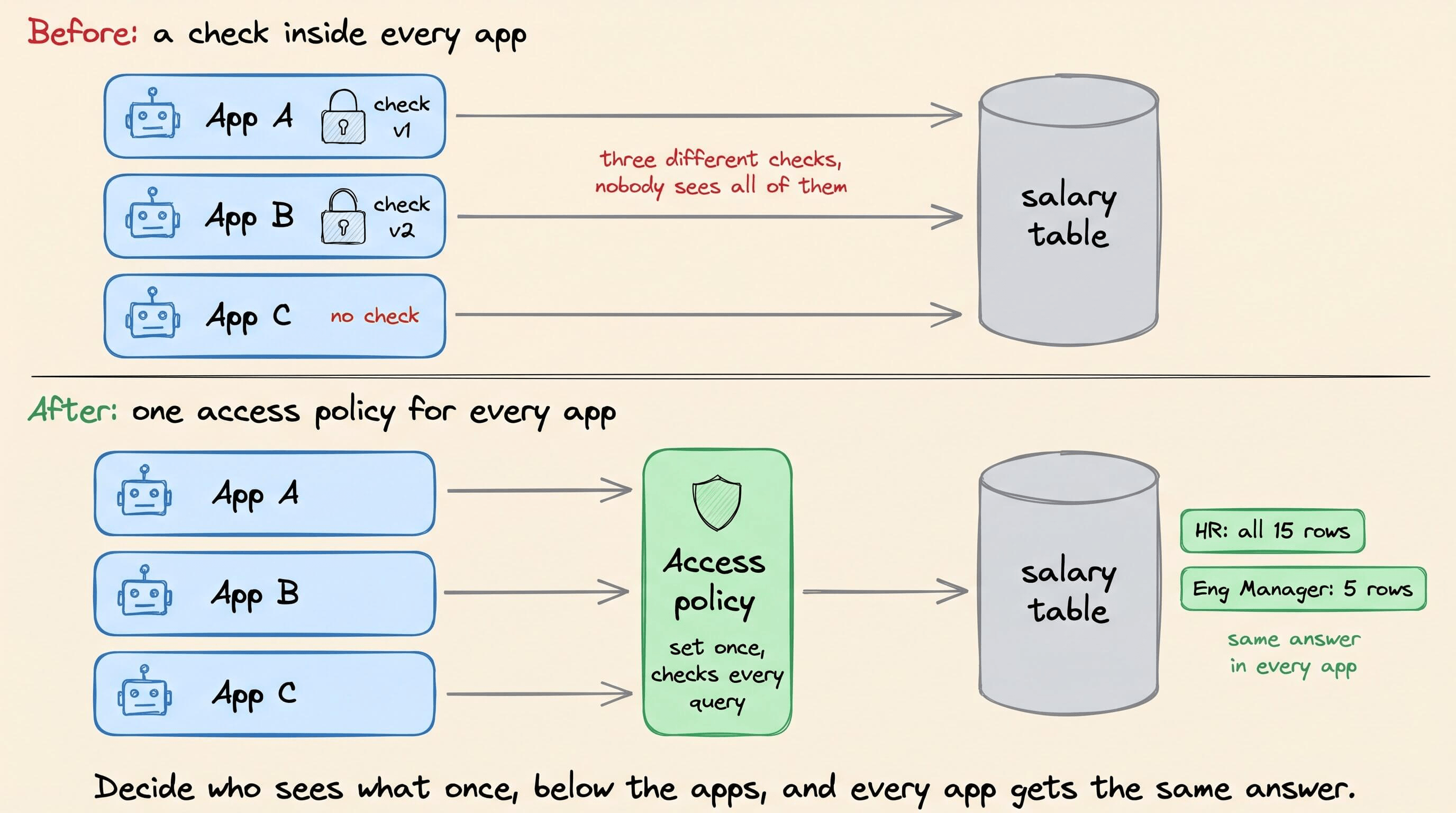
Solving this is important because anyone can now build an internal tool in an afternoon. However, few of those builders will think about which rows each user should see.
So the responsibility moves to engineers, who have to build infrastructure that enforces it underneath them automatically.
Setting access once for all three apps
Retool does this through Data Access Enforcement (DAE), which applies access policies to every query on a PostgreSQL resource.
Essentially, instead of asking each agent to write the access check, you set access policies once, on the database connection, and Retool checks every query against them, whether it comes from an app, the query library, raw SQL or an agent.
Once enforcement is on, the resource is closed. No query runs unless a policy allows it.
To demonstrate this, we took the same three apps from earlier. All three read from one Retool resource, compensation_db.
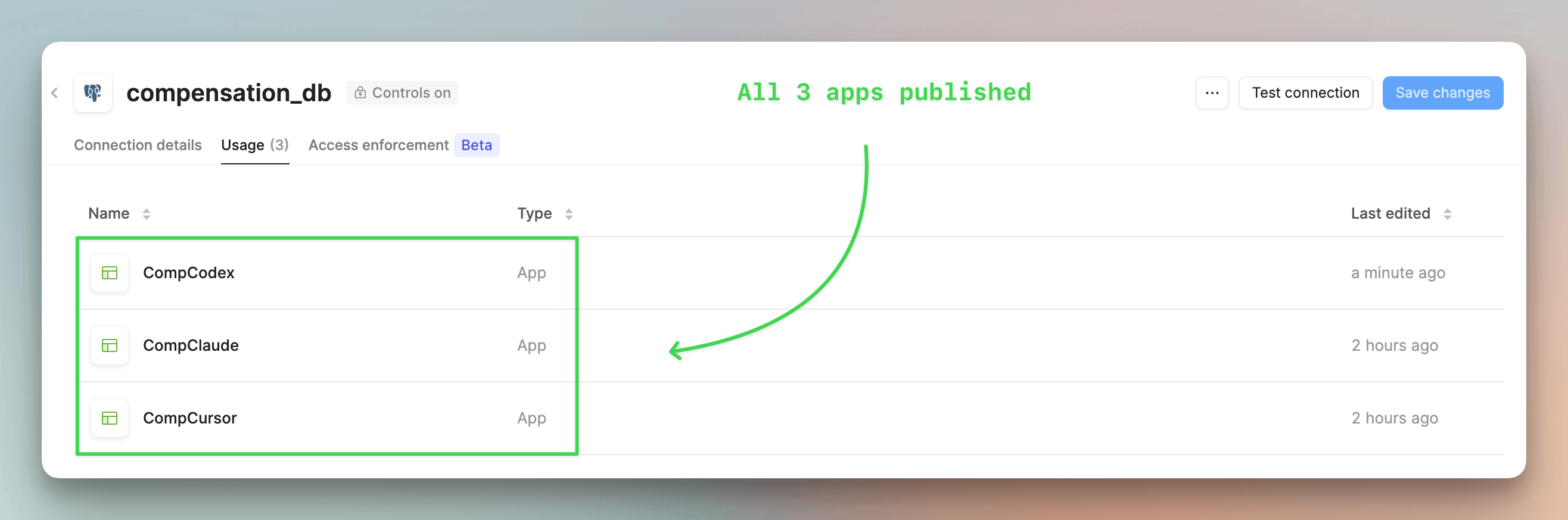
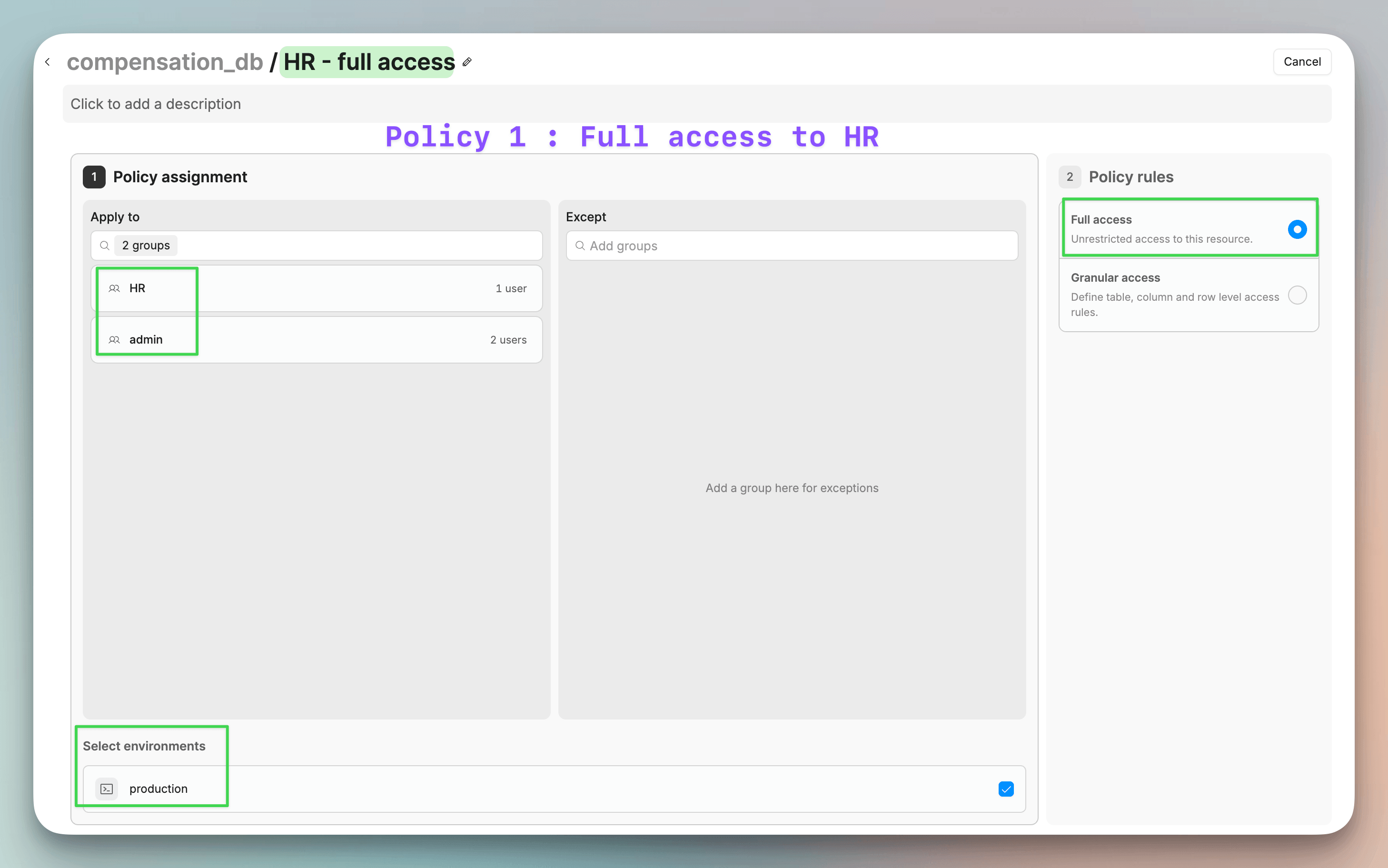
We turned enforcement on for that resource and wrote two policies.
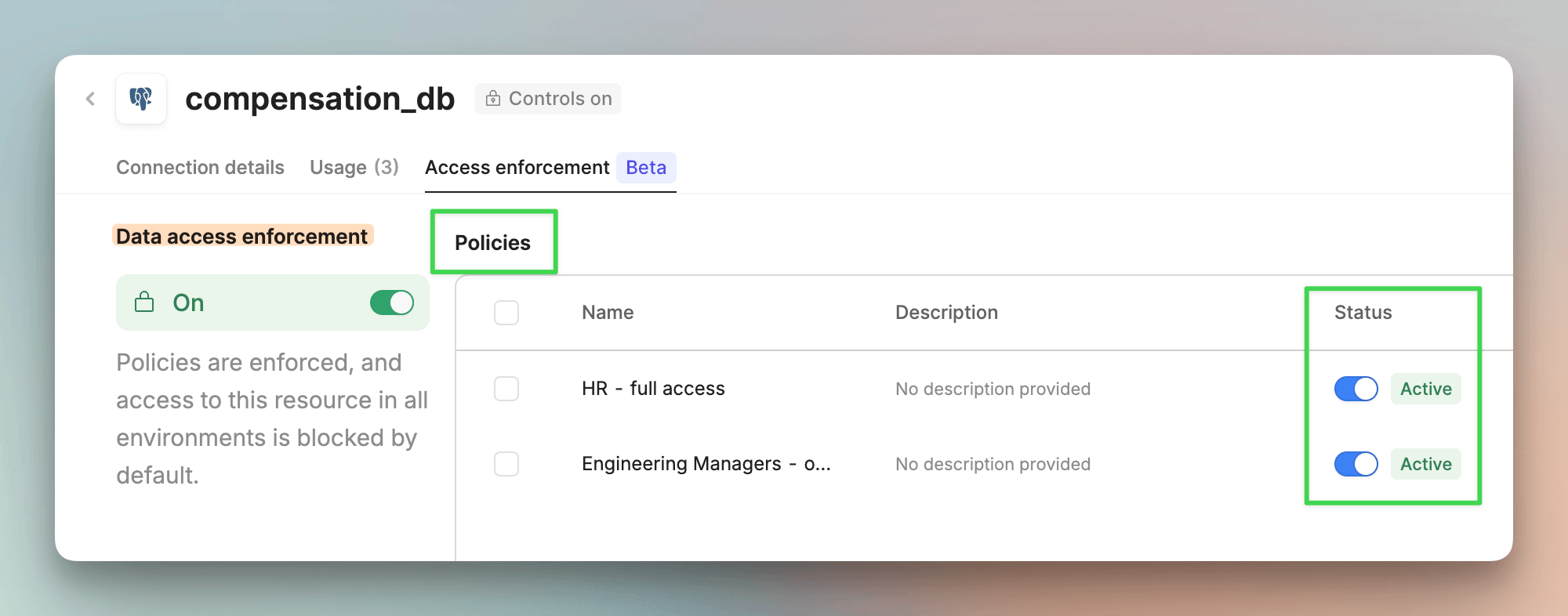
The first policy gives the HR and admin groups unrestricted access.
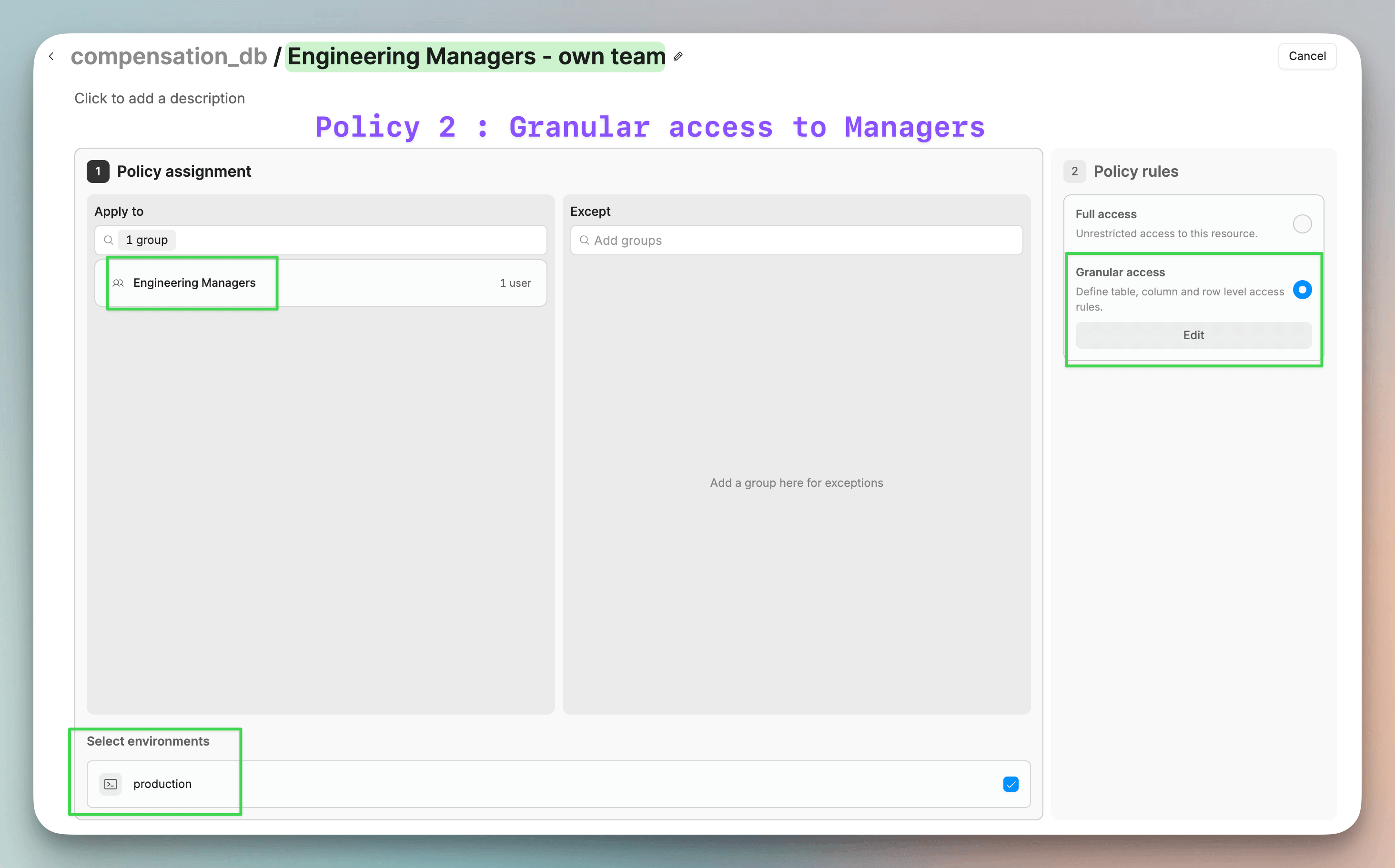
The second policy applies to the Engineering Managers group with granular access instead of full access.
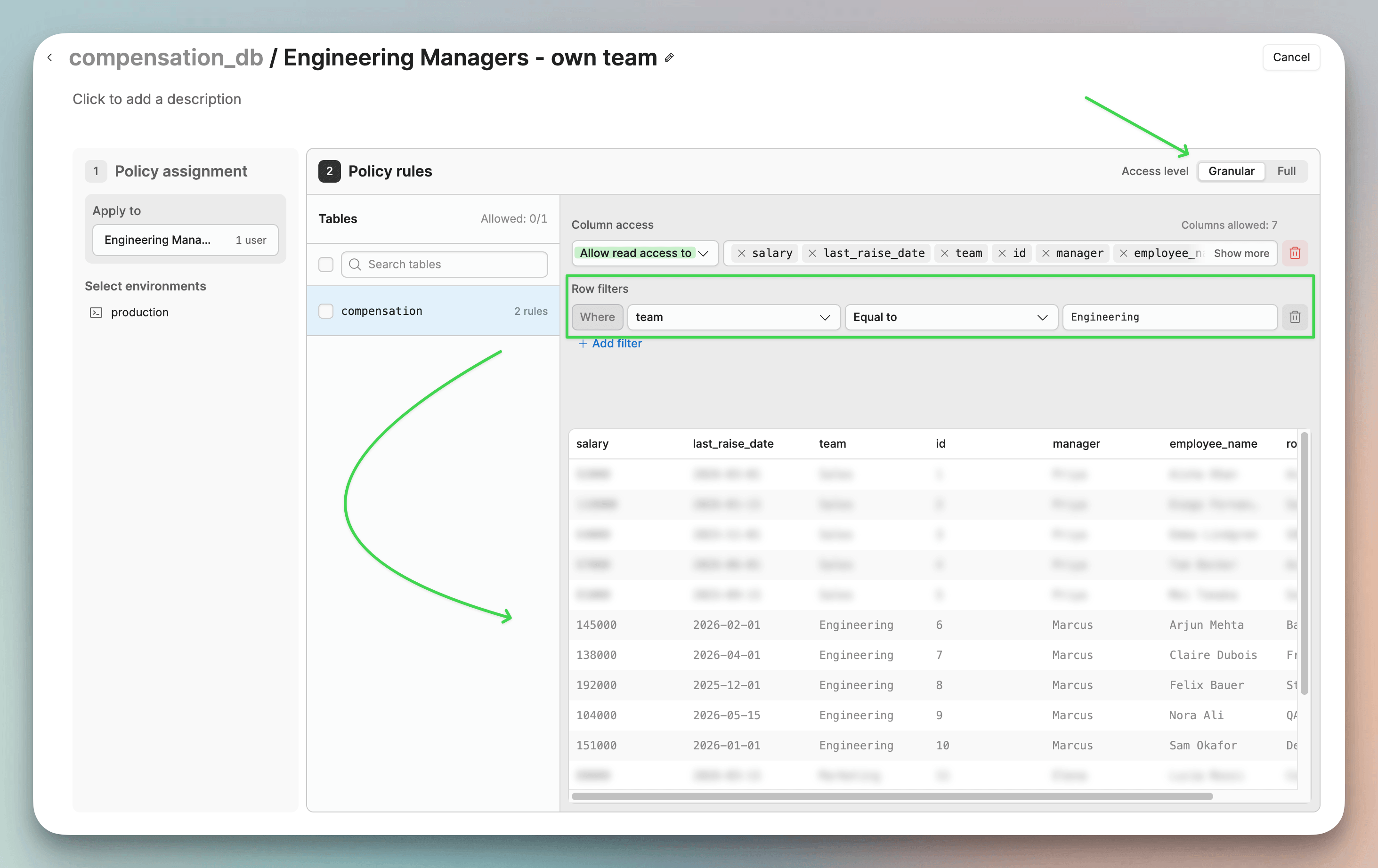
Inside that policy, a row filter lets the group read only the rows where team = ‘Engineering’ .
Then we opened the three published apps as two different users:
Nina from HR sees all 15 employees in every app. Tom, our Engineering Manager, sees only the 5 from his team.
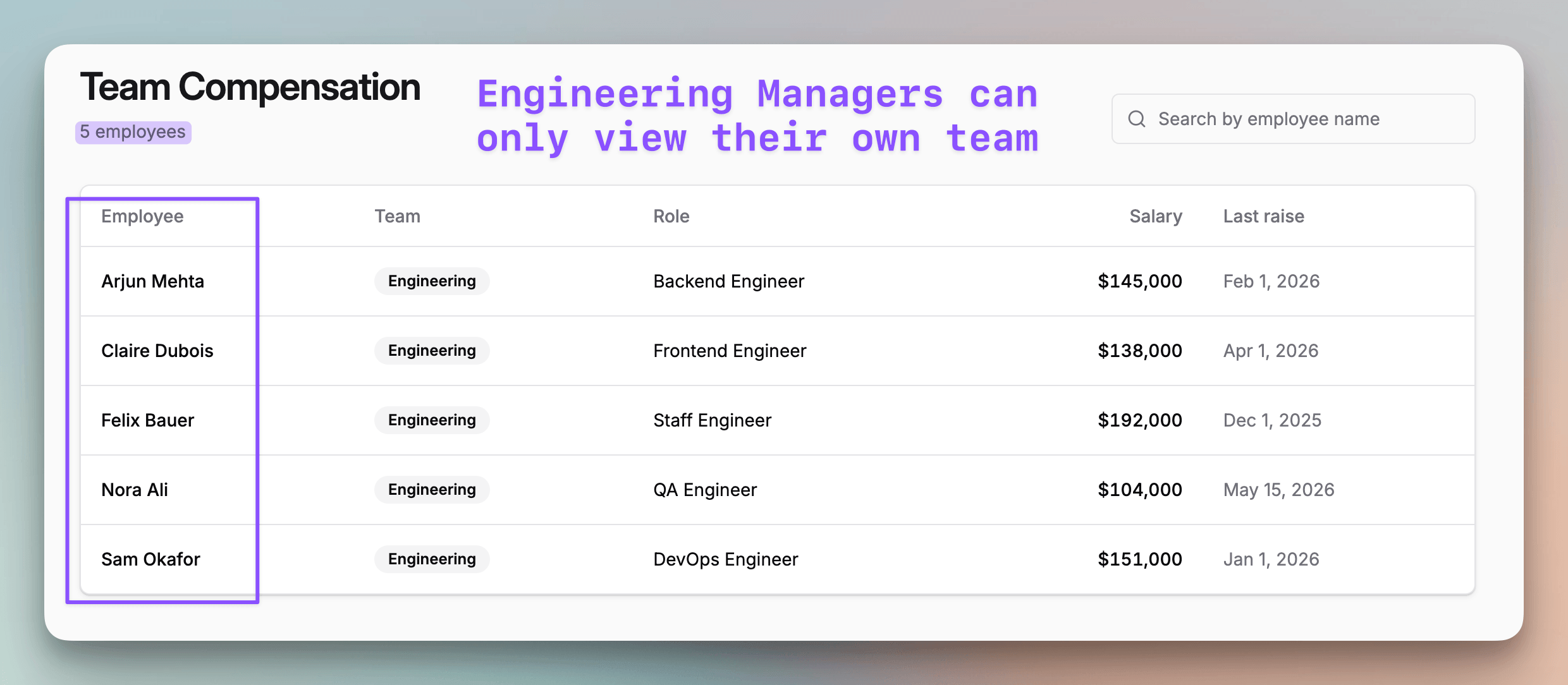
We didn’t change a line of code in any of the three apps. Each app still sends the same query with no WHERE clause, and Retool narrows the rows on the server before they reach the app.
An internal tool sitting on real data has to answer a few questions the agent never reasons about during development:
Which rows can this user query?
Which columns should come back?
Who is this user, really?
Is there a record of what they saw?
Retool handles all of that on the resource, in one place, no matter which agent wrote the app or how many apps there are.
Build in Claude Code, Codex, Cursor or whatever you’re fastest in. Who sees what stays the same anyway, because it never depended on the code.
You can try Retool yourself here →
👉 Over to you: Do the internal tools your team ships enforce access in the app, or on the data connection itself?
Good day, and thanks to Retool for partnering on today’s article.