

Agent hackers to test your AI apps!
Pentesting firms don’t want you to see this.
An open-source AI agent replicated their $50k service.
Here’s why this matters right now.
Teams are shipping faster than ever. AI writes the code, CI catches build failures, tests catch regressions, and observability catches outages.
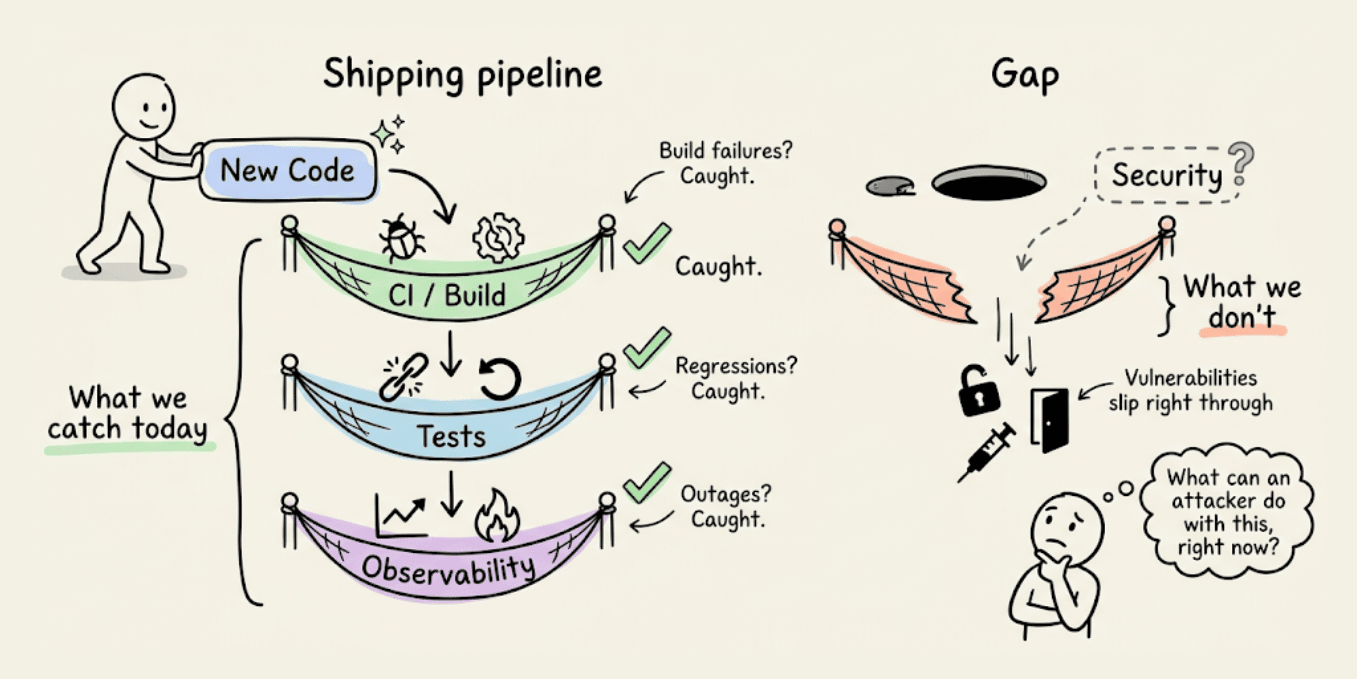
But one more key question to ask is: What can an attacker do with this, right now?
It’s important to answer this question because several real-world examples make this hard to ignore:
Moltbook exposed 1.5M auth tokens. The owner hadn’t written a single line of code.
Tea App leaked 72,000 government IDs. The database was just open, no sophisticated hack needed.
A researcher took control of a journalist’s computer through her own vibe-coded game, without a single click.
The code ran fine in all three cases, tests passed, and nothing raised a flag.
Because the bottleneck is no longer writing code, it’s understanding what that code actually exposes once it’s live. PR reviews miss auth edge cases, unit tests don’t probe broken access control, staging environments don’t simulate adversarial behavior, and business logic flaws look completely fine until someone decides to break them on purpose.
An automated approach is actually implemented in Strix, a recently trending open-source framework (23k+ stars) for an AI pentesting agent.
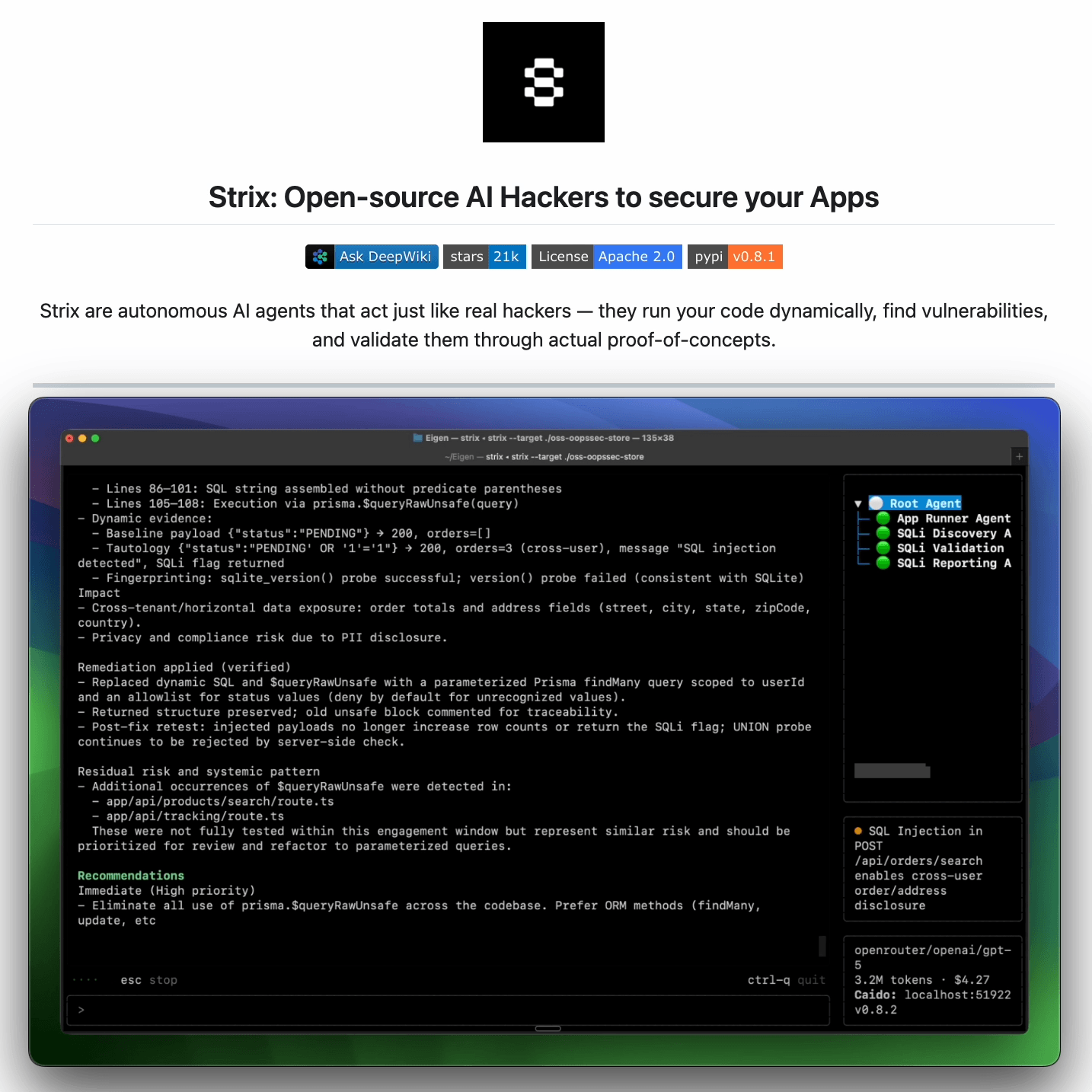
It reviews any running app the way an attacker would:
Crawls the app and maps every exposed route and flow
Probes abuse paths dynamically, not just at build time
Returns findings with proofs-of-concept and suggested fixes
It is benchmarked against 200 real companies and open-source repos, and it found 600+ verified vulnerabilities, including assigned CVEs.
It’s designed to fit into how modern teams already work: run it before a release, after major changes, or continuously as the app evolves.
You can find the GitHub repo here → (don’t forget to star it)
What are Agent Skills and How Agents Use Them?
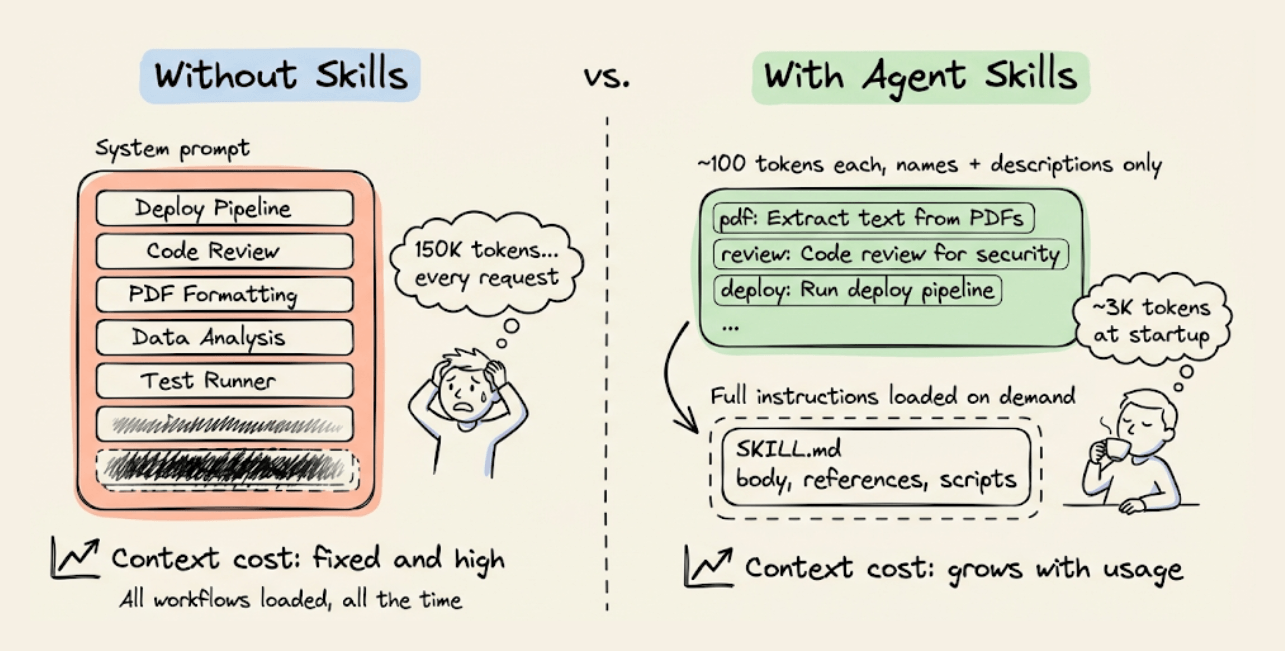
An agent with 30 specialized workflows installed (deployment pipelines, code review checklists, document formatting rules) would need roughly ~150,000 tokens in its system prompt if you loaded everything upfront.
With Agent Skills, that drops to around 3,000 tokens at startup. The agent knows what skills exist, but loads full instructions only when the current task needs them.
Anthropic released the SKILL.md spec as an open standard in December 2025. Within months, OpenAI Codex, Google Gemini CLI, GitHub Copilot, Cursor, VS Code, JetBrains Junie, and over 30 other agent products adopted it.
You can write a skill once, use it everywhere.
Today, let’s look at how the architecture actually works!
Progressive disclosure
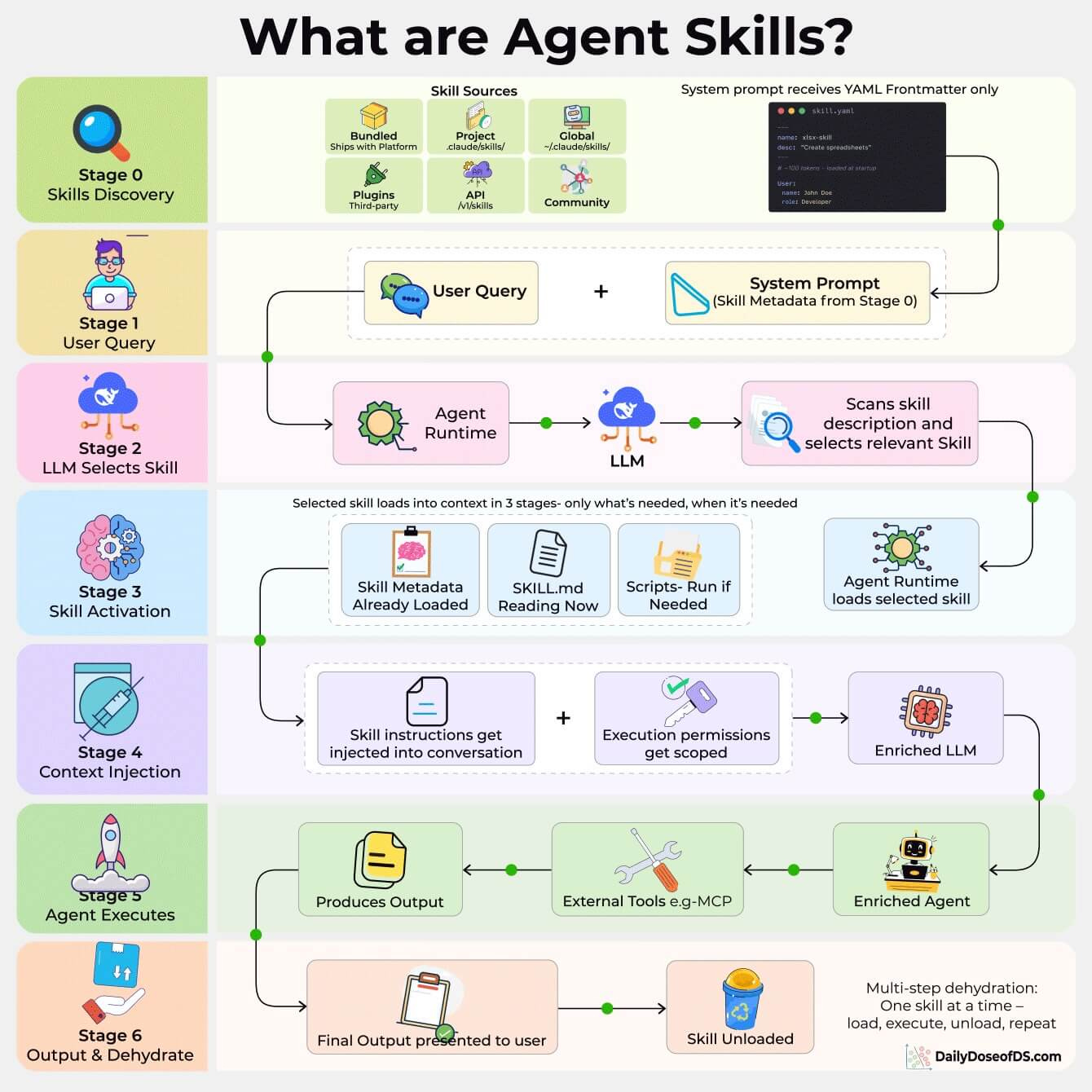
Skills use a three-tier loading system that keeps context costs proportional to what the agent uses, not what it has installed.
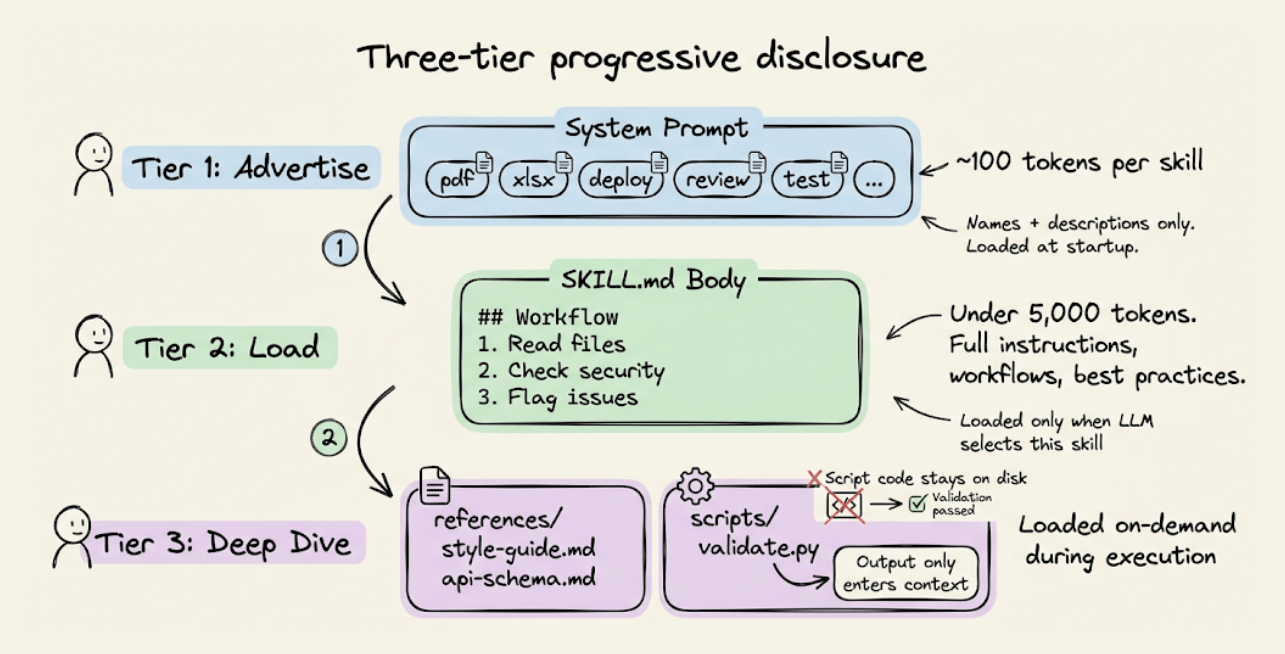
Tier 1: Advertise (~100 tokens per skill). At startup, only the YAML frontmatter (name + description) from each
SKILL.mdgets injected into the system prompt. This is how the agent knows what skills are available.Tier 2: Load (under 5,000 tokens). When the LLM matches a user request to a skill description, it reads the full
SKILL.mdbody: workflows, best practices, edge cases. The spec recommends keeping this under 500 lines.Tier 3: Deep dive (as needed). Reference files (
references/style-guide.md,references/api-schema.md) and scripts (scripts/validate.py) load on-demand during execution. Scripts are executed via bash, and only the output enters context, not the script code itself.
Routing and the Skills vs. Tools distinction
Skill selection happens entirely through LLM reasoning during the model’s forward pass. There are no embeddings, classifiers or algorithmic routing.
The LLM reads the skill descriptions in the system prompt and picks the best match. This makes the description field the single most important part of any skill.
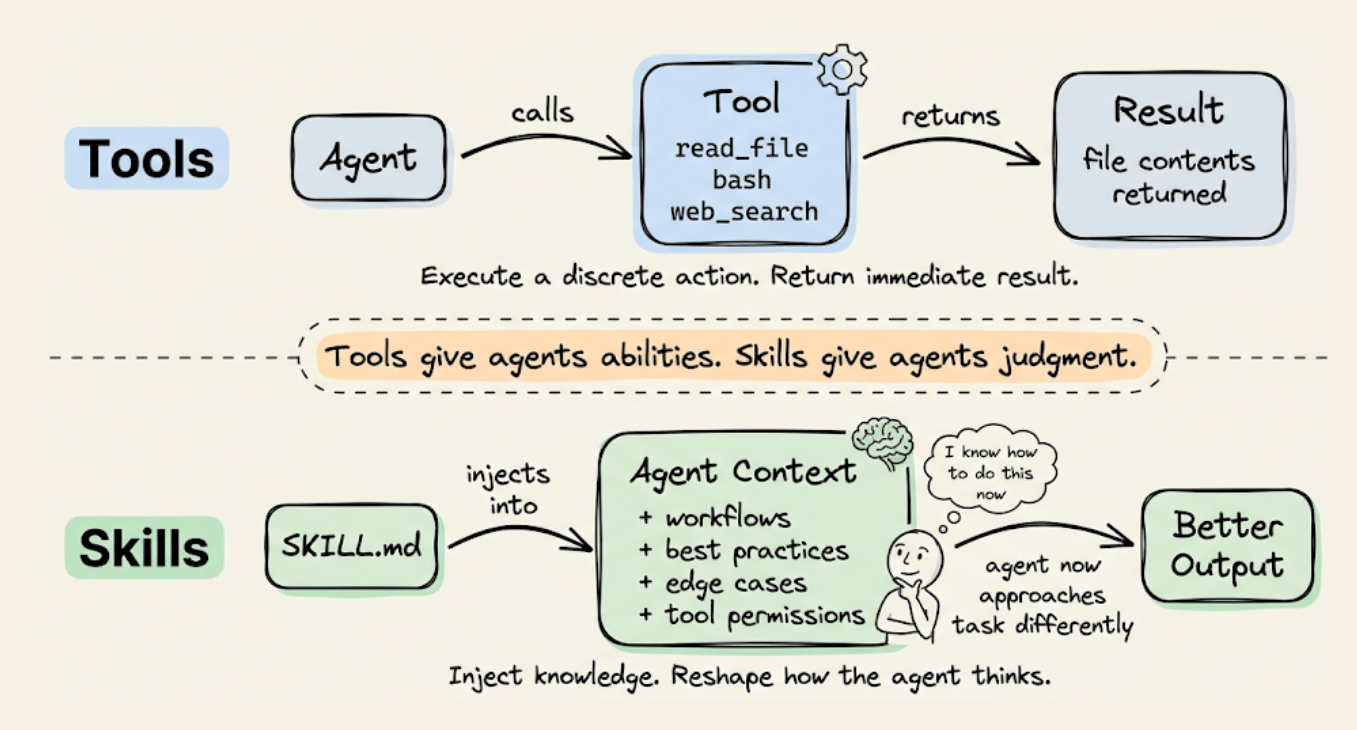
This is also why skills aren’t tools. Tools execute discrete actions and return results (read a file, call an API). Skills inject specialized instructions into the agent’s context and reshape how it approaches the task. A skill prepares the agent to solve a problem rather than solving it directly.
The format
A SKILL.md file starts with a YAML frontmatter (required name and description, optional license, compatibility, metadata, allowed-tools) followed by a Markdown body with instructions.
The skill lives in a folder that can also include scripts/, references/, and assets/ directories.
Skills are discovered from project-level directories (.claude/skills/ or .agents/skills/), personal directories (~/.claude/skills/), bundled platform skills, and plugin/marketplace sources. The .agents/skills/ path is the cross-platform convention: any compliant agent scans it.
Community adoption has been fast. There are repositories with over 1,300 contributed skills, and Google’s ADK ships with a SkillToolset class that implements the full three-tier disclosure with list_skills, load_skill, and load_skill_resource tools.
Skills + MCP
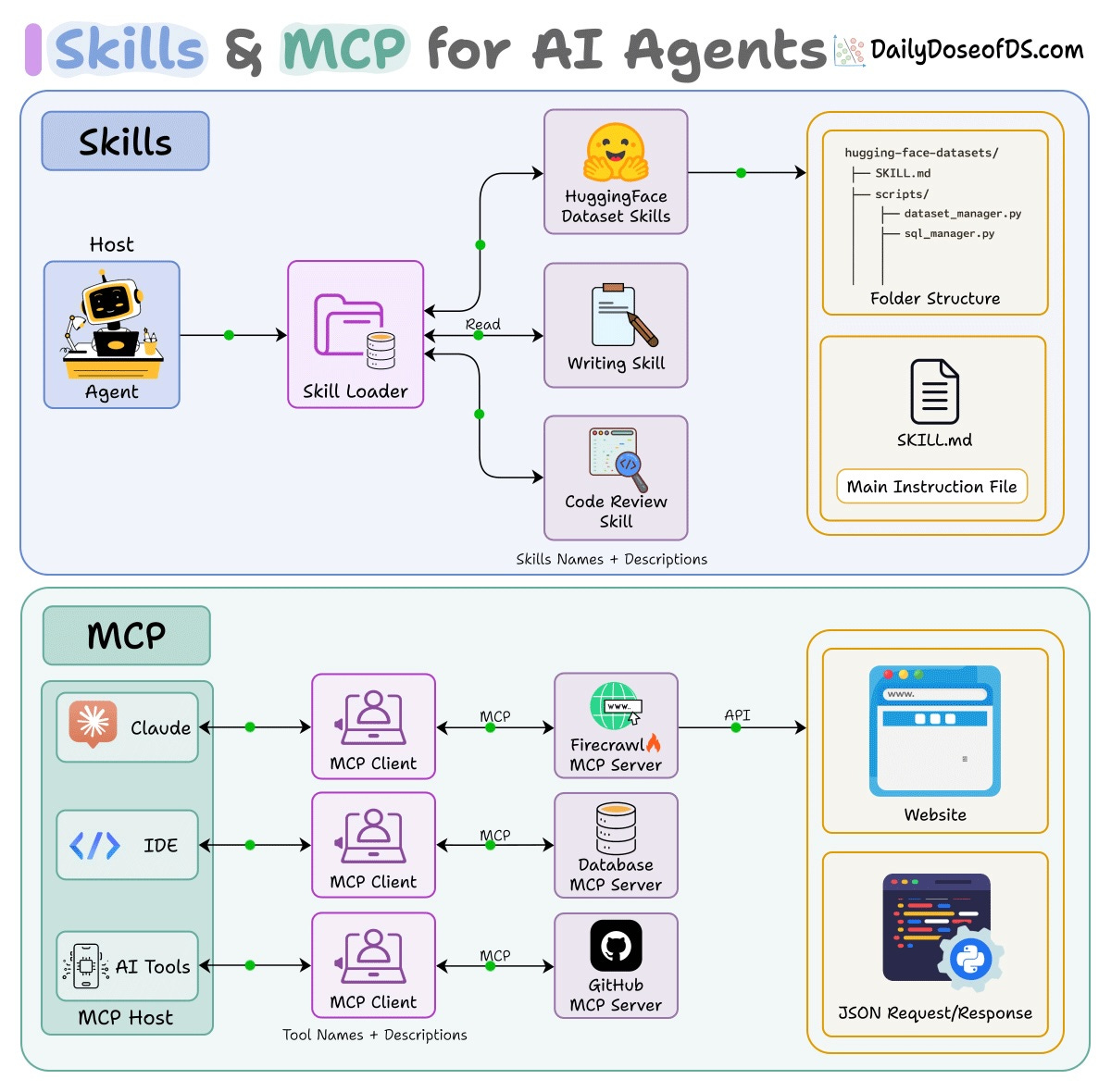
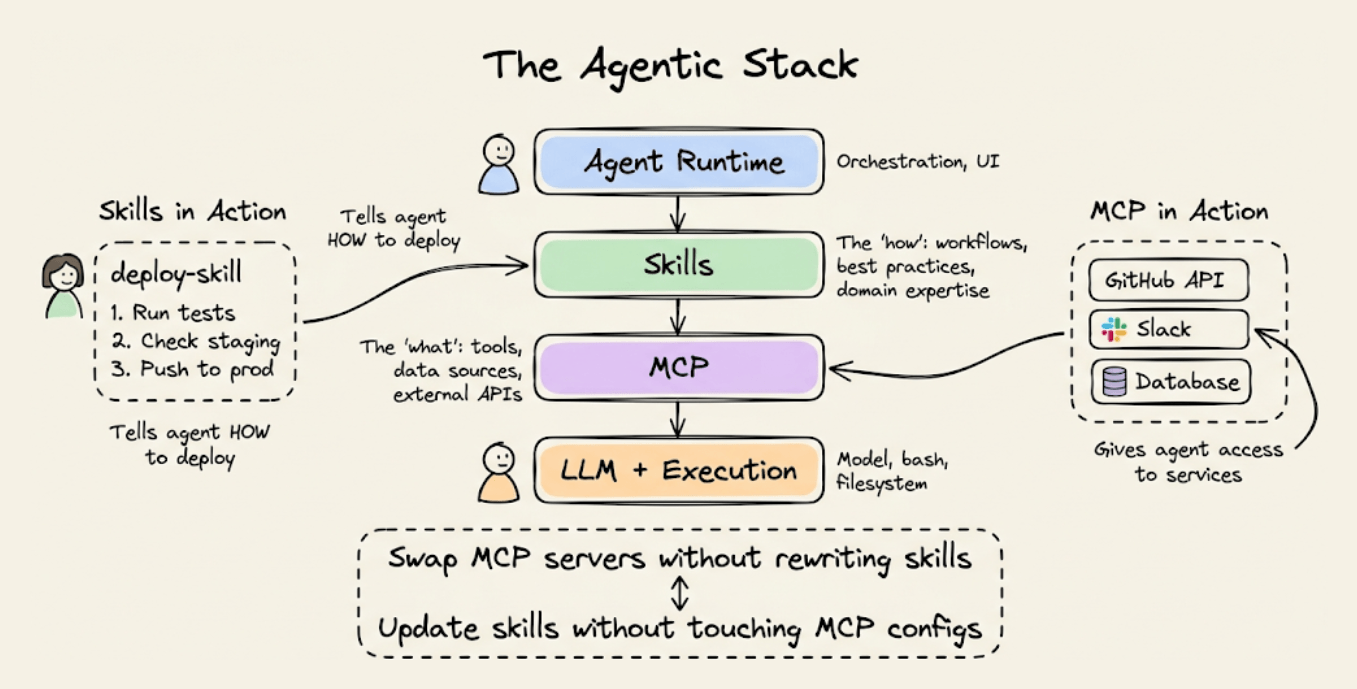
Skills and MCP are complementary, not competing. MCP provides connectivity (tools, data sources, external APIs). Skills provide procedural knowledge (workflows, best practices, domain expertise).
A skill might instruct the agent to use a specific MCP server, define how to interpret its outputs, and enforce safety checks before destructive operations. You can swap MCP servers without rewriting skills, and update skill instructions without touching MCP configs. The two layers are fully independent.
👉 Over to you: Are you using Agent Skills in your workflow yet? What’s one skill that’s made the biggest difference for you?
MCP vs Traditional API Architecture
Traditional APIs were built for apps to talk to servers.
You have a client (web or mobile app), that sends HTTP requests through an API gateway, and the gateway routes to different services.
This works great for applications. But AI agents aren’t apps.
Here’s the problem:
When you want an AI agent to use a tool, like querying a database, accessing files, or calling an API, you have to write custom integration code for each one. Every tool is different, and every integration is bespoke.
MCP solves this, and the visual below differentiates the architectural difference.
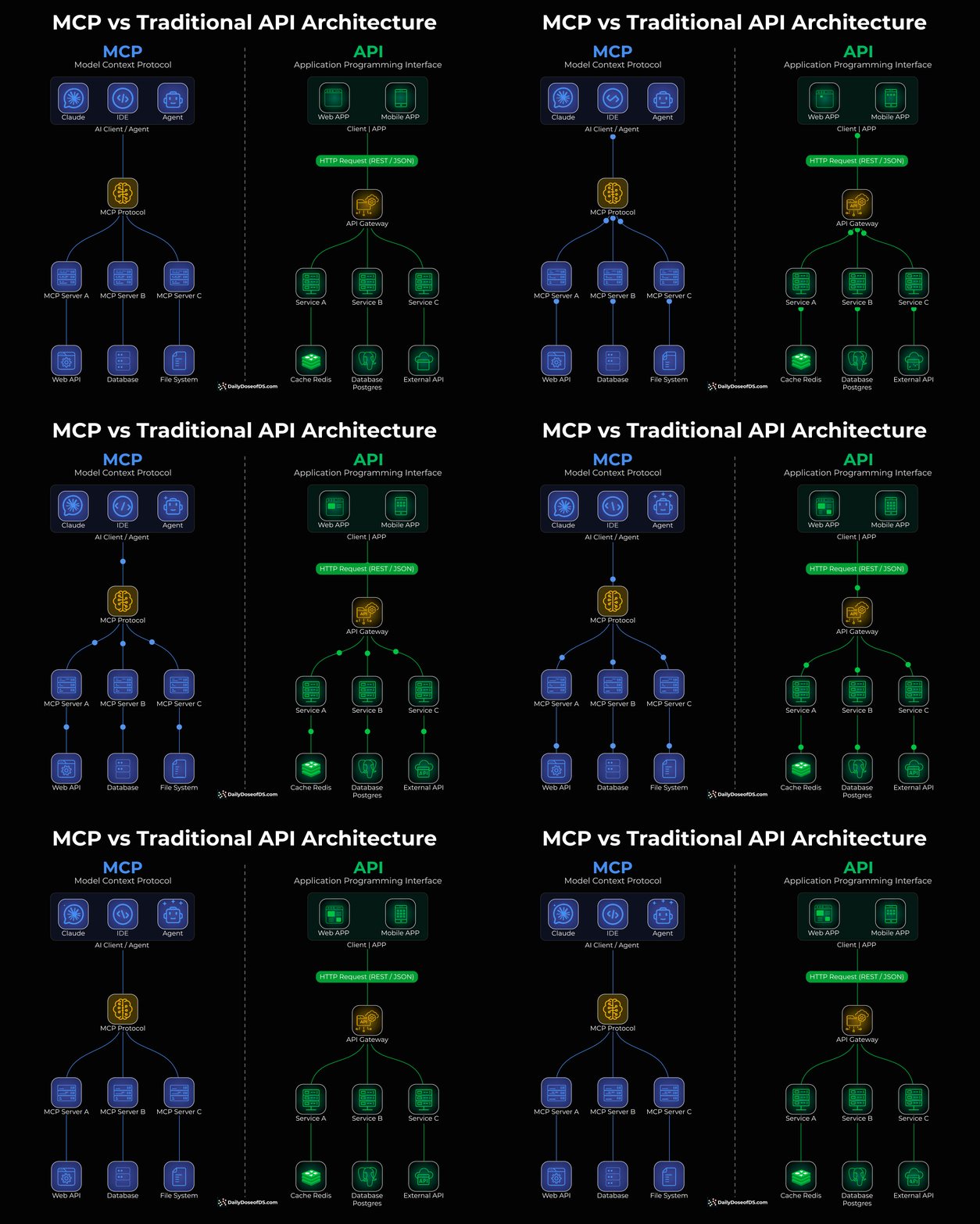
Instead of building custom integrations, MCP provides a universal protocol that sits between AI clients (Claude, IDEs, agents) and tools/APIs.
One protocol to connect to any tool
The AI doesn’t care what’s behind the server, like a database, file system, web API
Tool providers build one MCP server, and it works with any AI client.
The visual above shows this clearly: instead of an API gateway routing traffic to individual services, MCP creates a universal layer between AI agents and backend resources.
If you don’t know MCPs, read the guidebook shared above.
And if you want to dive into core MCP engineering, we covered all these details (with implementations) in the MCP course:
Part 1 covered MCP fundamentals, the architecture, context management, etc. →
Part 2 covered core capabilities, JSON-RPC communication, etc. →
Part 4 built a full-fledged MCP workflow using tools, resources, and prompts →
Part 5 taught how to integrate Sampling into MCP workflows →
Part 6 covered testing, security, and sandboxing in MCP Workflows →
Part 7 covered testing, security, and sandboxing in MCP Workflows →
Part 8 integrated MCPs with the most widely used agentic frameworks: LangGraph, LlamaIndex, CrewAI, and PydanticAI →
Part 9 covered using LangGraph MCP workflows to build a comprehensive real-world use case →
👉 Over to you: What is your perspective on MCP vs Traditional API?
Thanks for reading!